Writing Well-behaved 
Unix Utilities 
Rob Miller • robm.me.uk • @robmil
Who are you? 
• Head of Digital at Big Fish 
• We’re a design, branding and 
marketing consultancy 
• Which is to say:
Who are you? 
• I’ve been programming in Ruby for 
several years now 
• But I don’t do much web development 
any more 
• My world is reporting, sysadmin, ops, 
general tools and utilities 
• Ruby is my tool of choice
The command-line 
spectrum 
• One-liner 
• Script 
• Application
The command-line 
spectrum 
• One-liner 
• Script 
• Application
What makes something 
an “application”? 
• Intended for use by others, or for the 
foreseeable future 
• General-purpose 
• Robust 
• Reusable 
• Built to last
An aside: “Unix” 
• A grouping of computer operating 
systems that behave in a relatively 
standard way 
• In practical terms: 
• Linux (Ubuntu, Debian, Fedora, etc.) 
• Mac OS X 
• BSDs (FreeBSD, OpenBSD, etc.)
The Unix Philosophy 
“…no single program or idea makes 
[Unix] work well. Instead, what makes it 
effective is the approach to 
programming… at its heart is the idea 
that the power of a system comes more 
from the relationships among programs 
than from the programs themselves.
The Unix Philosophy 
“Many UNIX programs do 
quite trivial things in isolation, 
but, combined with other 
programs, become general and 
useful tools.” 
— Brian Kernighan, 1984
The Unix Philosophy 
“This is the Unix philosophy: write 
programs that do one thing and do 
it well. Write programs to work 
together. Write programs to handle 
text streams, because that is a 
universal interface.” 
— Doug McIlroy, c. 1978
The Unix Philosophy 
• To summarise: good Unix applications 
play well with others 
• They respect conventions 
• They’re reusable and general in nature 
• They interact with other processes and 
accept interaction in standard ways 
(files, pipes, sockets)
In Ruby 
• What does this mean in the concrete? 
• How do we write Ruby applications 
that fit this philosophy? 
• Why is Ruby a great choice for writing 
command-line applications?
A good application…
• works with standard input and output 
• works with files 
• communicates via its exit status 
• respects resource limits 
• handles signals 
• accepts command-line options
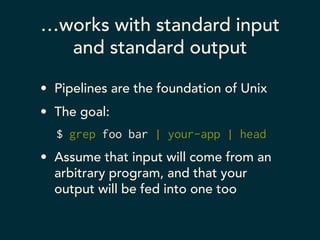
…works with standard input 
and standard output 
• Pipelines are the foundation of Unix 
• The goal: 
$ grep foo bar | your-app | head 
• Assume that input will come from an 
arbitrary program, and that your 
output will be fed into one too
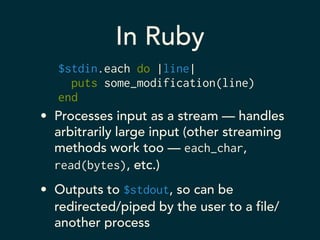
In Ruby 
$stdin.each do |line| 
puts some_modification(line) 
end 
• Processes input as a stream — handles 
arbitrarily large input (other streaming 
methods work too — each_char, 
read(bytes), etc.) 
• Outputs to $stdout, so can be 
redirected/piped by the user to a file/ 
another process
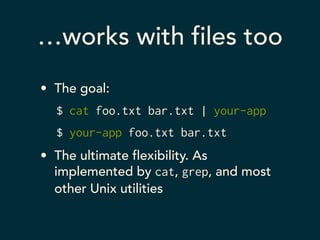
…works with files too 
• The goal: 
$ cat foo.txt bar.txt | your-app 
$ your-app foo.txt bar.txt 
• The ultimate flexibility. As 
implemented by cat, grep, and most 
other Unix utilities
In Ruby 
ARGF.each do |line| 
# process a line of input 
end 
• No more effort than reading from 
standard input 
• If ARGV is non-empty, its contents will 
be read as files 
• If it is empty, standard input will be 
used instead
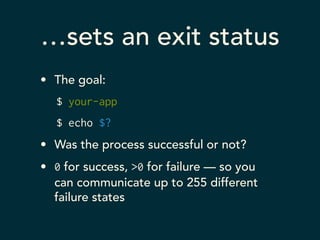
…sets an exit status 
• The goal: 
$ your-app 
$ echo $? 
• Was the process successful or not? 
• 0 for success, >0 for failure — so you 
can communicate up to 255 different 
failure states
In Ruby 
if successful? 
exit 
else 
exit 1 
end 
• Use exit to stop execution of your script 
and return a successful exit status 
• Pass it an argument to alter the exit status 
• Document them!
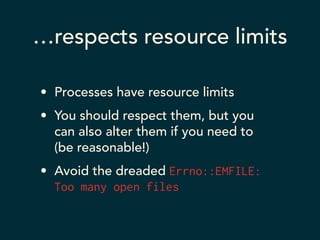
…respects resource limits 
• Processes have resource limits 
• You should respect them, but you 
can also alter them if you need to 
(be reasonable!) 
• Avoid the dreaded Errno::EMFILE: 
Too many open files
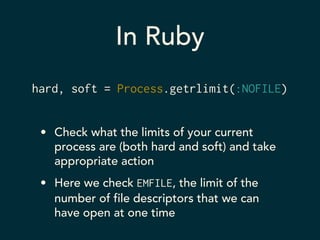
In Ruby 
hard, soft = Process.getrlimit(:NOFILE) 
• Check what the limits of your current 
process are (both hard and soft) and take 
appropriate action 
• Here we check EMFILE, the limit of the 
number of file descriptors that we can 
have open at one time
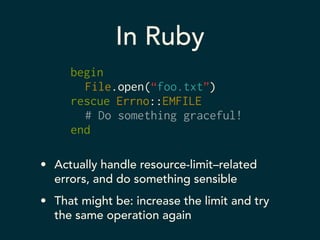
In Ruby 
begin 
File.open(“foo.txt”) 
rescue Errno::EMFILE 
# Do something graceful! 
end 
• Actually handle resource-limit–related 
errors, and do something sensible 
• That might be: increase the limit and try 
the same operation again
In Ruby 
Process.setrlimit(:NOFILE, 4096) 
• Change the soft limit if you need to; you’re 
generally allowed to! 
• Applies to the current process and its 
children, including subshells — so you can 
make sure third-party code behaves too
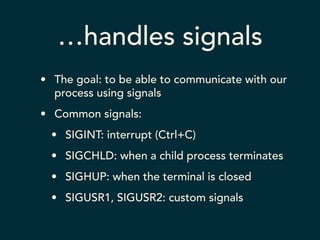
…handles signals 
• The goal: to be able to communicate with our 
process using signals 
• Common signals: 
• SIGINT: interrupt (Ctrl+C) 
• SIGCHLD: when a child process terminates 
• SIGHUP: when the terminal is closed 
• SIGUSR1, SIGUSR2: custom signals
In Ruby 
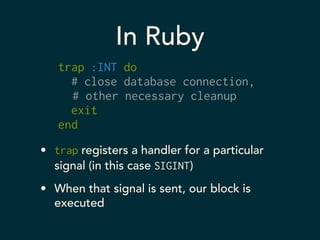
trap :INT do 
# close database connection, 
# other necessary cleanup 
exit 
end 
• trap registers a handler for a particular 
signal (in this case SIGINT) 
• When that signal is sent, our block is 
executed
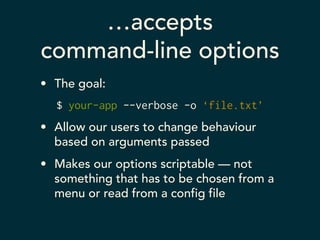
…accepts 
command-line options 
• The goal: 
$ your-app --verbose -o ‘file.txt’ 
• Allow our users to change behaviour 
based on arguments passed 
• Makes our options scriptable — not 
something that has to be chosen from a 
menu or read from a config file
In Ruby 
require “optparse” 
! 
options = { verbose: false } 
OptionParser.new do |opts| 
opts.banner = "Usage: app.rb [options]" 
! 
opts.on("-v", "--verbose") do |v| 
options[:verbose] = true 
end 
end.parse!
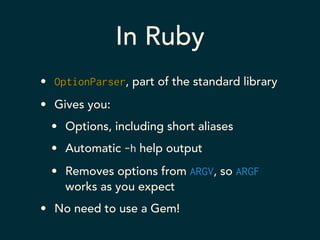
In Ruby 
• OptionParser, part of the standard library 
• Gives you: 
• Options, including short aliases 
• Automatic -h help output 
• Removes options from ARGV, so ARGF 
works as you expect 
• No need to use a Gem!
Wrapping Up

Writing Well-Behaved Unix Utilities

  • 1.
    Writing Well-behaved UnixUtilities Rob Miller • robm.me.uk • @robmil
  • 2.
    Who are you? • Head of Digital at Big Fish • We’re a design, branding and marketing consultancy • Which is to say:
  • 3.
    Who are you? • I’ve been programming in Ruby for several years now • But I don’t do much web development any more • My world is reporting, sysadmin, ops, general tools and utilities • Ruby is my tool of choice
  • 4.
    The command-line spectrum • One-liner • Script • Application
  • 5.
    The command-line spectrum • One-liner • Script • Application
  • 6.
    What makes something an “application”? • Intended for use by others, or for the foreseeable future • General-purpose • Robust • Reusable • Built to last
  • 7.
    An aside: “Unix” • A grouping of computer operating systems that behave in a relatively standard way • In practical terms: • Linux (Ubuntu, Debian, Fedora, etc.) • Mac OS X • BSDs (FreeBSD, OpenBSD, etc.)
  • 8.
    The Unix Philosophy “…no single program or idea makes [Unix] work well. Instead, what makes it effective is the approach to programming… at its heart is the idea that the power of a system comes more from the relationships among programs than from the programs themselves.
  • 9.
    The Unix Philosophy “Many UNIX programs do quite trivial things in isolation, but, combined with other programs, become general and useful tools.” — Brian Kernighan, 1984
  • 10.
    The Unix Philosophy “This is the Unix philosophy: write programs that do one thing and do it well. Write programs to work together. Write programs to handle text streams, because that is a universal interface.” — Doug McIlroy, c. 1978
  • 11.
    The Unix Philosophy • To summarise: good Unix applications play well with others • They respect conventions • They’re reusable and general in nature • They interact with other processes and accept interaction in standard ways (files, pipes, sockets)
  • 12.
    In Ruby •What does this mean in the concrete? • How do we write Ruby applications that fit this philosophy? • Why is Ruby a great choice for writing command-line applications?
  • 13.
  • 14.
    • works withstandard input and output • works with files • communicates via its exit status • respects resource limits • handles signals • accepts command-line options
  • 15.
    …works with standardinput and standard output • Pipelines are the foundation of Unix • The goal: $ grep foo bar | your-app | head • Assume that input will come from an arbitrary program, and that your output will be fed into one too
  • 16.
    In Ruby $stdin.eachdo |line| puts some_modification(line) end • Processes input as a stream — handles arbitrarily large input (other streaming methods work too — each_char, read(bytes), etc.) • Outputs to $stdout, so can be redirected/piped by the user to a file/ another process
  • 17.
    …works with filestoo • The goal: $ cat foo.txt bar.txt | your-app $ your-app foo.txt bar.txt • The ultimate flexibility. As implemented by cat, grep, and most other Unix utilities
  • 18.
    In Ruby ARGF.eachdo |line| # process a line of input end • No more effort than reading from standard input • If ARGV is non-empty, its contents will be read as files • If it is empty, standard input will be used instead
  • 19.
    …sets an exitstatus • The goal: $ your-app $ echo $? • Was the process successful or not? • 0 for success, >0 for failure — so you can communicate up to 255 different failure states
  • 20.
    In Ruby ifsuccessful? exit else exit 1 end • Use exit to stop execution of your script and return a successful exit status • Pass it an argument to alter the exit status • Document them!
  • 21.
    …respects resource limits • Processes have resource limits • You should respect them, but you can also alter them if you need to (be reasonable!) • Avoid the dreaded Errno::EMFILE: Too many open files
  • 22.
    In Ruby hard,soft = Process.getrlimit(:NOFILE) • Check what the limits of your current process are (both hard and soft) and take appropriate action • Here we check EMFILE, the limit of the number of file descriptors that we can have open at one time
  • 23.
    In Ruby begin File.open(“foo.txt”) rescue Errno::EMFILE # Do something graceful! end • Actually handle resource-limit–related errors, and do something sensible • That might be: increase the limit and try the same operation again
  • 24.
    In Ruby Process.setrlimit(:NOFILE,4096) • Change the soft limit if you need to; you’re generally allowed to! • Applies to the current process and its children, including subshells — so you can make sure third-party code behaves too
  • 25.
    …handles signals •The goal: to be able to communicate with our process using signals • Common signals: • SIGINT: interrupt (Ctrl+C) • SIGCHLD: when a child process terminates • SIGHUP: when the terminal is closed • SIGUSR1, SIGUSR2: custom signals
  • 26.
    In Ruby trap:INT do # close database connection, # other necessary cleanup exit end • trap registers a handler for a particular signal (in this case SIGINT) • When that signal is sent, our block is executed
  • 27.
    …accepts command-line options • The goal: $ your-app --verbose -o ‘file.txt’ • Allow our users to change behaviour based on arguments passed • Makes our options scriptable — not something that has to be chosen from a menu or read from a config file
  • 28.
    In Ruby require“optparse” ! options = { verbose: false } OptionParser.new do |opts| opts.banner = "Usage: app.rb [options]" ! opts.on("-v", "--verbose") do |v| options[:verbose] = true end end.parse!
  • 29.
    In Ruby •OptionParser, part of the standard library • Gives you: • Options, including short aliases • Automatic -h help output • Removes options from ARGV, so ARGF works as you expect • No need to use a Gem!
  • 30.