

Sharing information between your systems 
Michael Richardson @m_richo
Agenda 
1.Chef Search 
2.Puppet Exported Resources 
3.PuppetDB query 
4.Confd + etcd
Agenda 
1.Chef Search 
2.Puppet Exported Resources 
3.PuppetDB query 
4.Confd + etcd
Chef Server 
Stores many useful things including 
• Policies applied to nodes 
• Metadata that describes each node 
(ohai) 
• And more…
Chef Server 
This data is searchable!
Chef Server 
This data is searchable!
Chef Server 
This data is searchable! 
But how?
Chef Server 
1. ‘search’ method within recipe. 
2. Search subcommand of ‘knife’ 
3. /search or /search/INDEX endpoints of Chef 
Server API
Chef Server 
1. ‘search’ method within recipe. 
2. Search subcommand of ‘knife’ 
3. /search or /search/INDEX endpoints of Chef 
Server API
Chef Server 
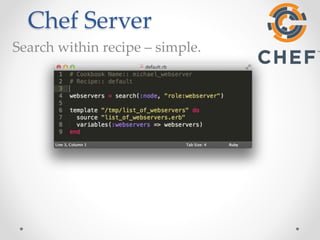
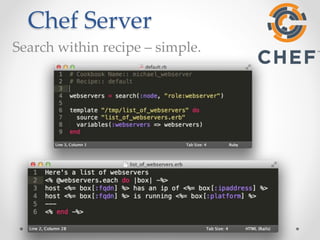
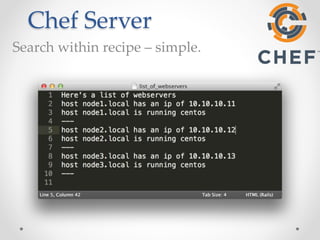
Search within recipe – simple.
Chef Server 
Search within recipe – simple.
Chef Server 
Search within recipe – simple.
Chef Server 
Search within recipe – simple. 
It’s that simple
Chef Server 
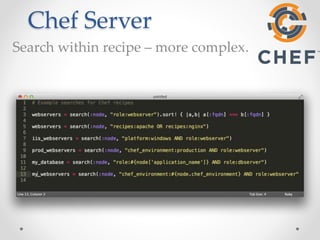
Search within recipe – more complex.
Chef Server 
Chef Search is fantastic for 
• Searching for nodes with particular 
attributes 
• Searching for nodes with particular profiles 
• Using search results to configure services on 
other nodes.
Chef Server 
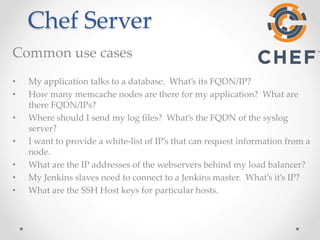
Common use cases 
• My application talks to a database. What’s its FQDN/IP? 
• How many memcache nodes are there for my application? What are 
there FQDN/IPs? 
• Where should I send my log files? What’s the FQDN of the syslog 
server? 
• I want to provide a white-list of IP’s that can request information from a 
node. 
• What are the IP addresses of the webservers behind my load balancer? 
• My Jenkins slaves need to connect to a Jenkins master. What’s it’s IP? 
• What are the SSH Host keys for particular hosts.
Agenda 
1.Chef Search 
2.Puppet Exported Resources 
3.PuppetDB query 
4.Confd + etcd
Exported Resources 
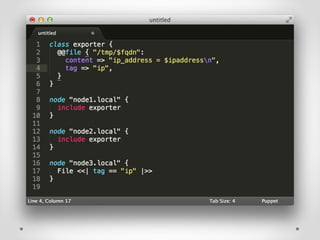
Definition: 
An exported resource declaration specifies a 
desired state for a resource, does not manage the 
resource on the target system, and publishes the 
resource for use by other nodes. Any node 
(including the node that exported it) can then 
collect the exported resource and manage its own 
copy of it. * 
* https://docs.puppetlabs.com/puppet/latest/reference/lang_exported.html
Exported Resources 
Think of it as 
• Node(s) “publish” resources to the Puppet Master 
• Other Node(s) consume those resources 
* https://docs.puppetlabs.com/puppet/latest/reference/lang_exported.html
Exported Resources 
Common Examples 
• Backend servers configured in a load balancer 
• Monitoring Servers updated with monitoring 
clients (nagios_host / nagios_service) 
• Distribute public keys (ssh and openssl)
Agenda 
1.Chef Search 
2.Puppet Exported Resources 
3.PuppetDB query 
4.Confd + etcd
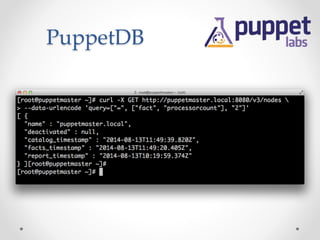
PuppetDB 
Definition: 
collects data generated by Puppet. It enables 
advanced Puppet features like the inventory service 
and exported resources, and can be the foundation 
for other applications that use Puppet’s data. *
PuppetDB 
PuppetDB stores: 
• The most recent facts from every node 
• The most recent catalog for every node 
• Optionally, 14 days of event reports for 
every node 
• Exported Resources
PuppetDB 
PuppetDB stores: 
• The most recent facts from every node 
• The most recent catalog for every node 
• Optionally, 14 days of event reports for 
every node 
• Exported Resources
PuppetDB 
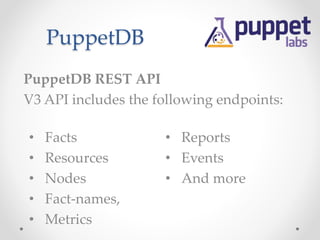
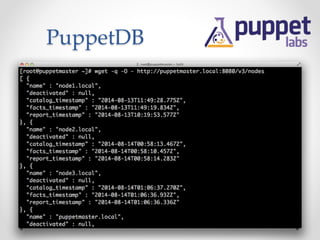
PuppetDB REST API 
V3 API includes the following endpoints: 
• Facts 
• Resources 
• Nodes 
• Fact-names, 
• Metrics 
• Reports 
• Events 
• And more
PuppetDB
PuppetDB
PuppetDB 
But this talk is about Node Collaboration. 
How can I make use of this data?
PuppetDB 
checkout 
Puppetdbquery module 
by Erik Dalén 
https://forge.puppetlabs.com/dalen/puppetdbquery 
https://github.com/dalen/puppet-puppetdbquery
PuppetDB 
Puppetdbquery module 
• Command line tools 
• Puppet functions to query PuppetDB 
• Hiera backend to return query results 
from PuppetDB
PuppetDB 
Puppetdbquery module 
• Command line tools 
• Puppet functions to query PuppetDB 
• Hiera backend to return query results 
from PuppetDB
PuppetDB 
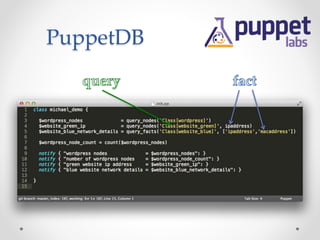
Puppetdbquery functions 
• query_nodes 
• query_facts
PuppetDB
PuppetDB 
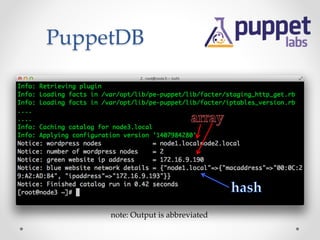
note: Output is abbreviated
PuppetDB 
PuppetDBquery 
• Works great and very similar to Chef 
Search (searching for specific hosts, and 
use their facts for configuring other 
hosts). 
• If you use Roles+Profiles pattern, this is 
a fantastic fit for profiles.
Chef Search and PuppetDB are great!
Chef Search and PuppetDB are great! 
but what if…
Chef Search and PuppetDB are great! 
but what if… 
• You want your infrastructure to react more quickly than 
your Puppet agent / Chef-client run intervals (are you 
even running the agents continuously).
Chef Search and PuppetDB are great! 
but what if… 
• You want your infrastructure to react more quickly than 
your Puppet agent / Chef-client run intervals (are you 
even running the agents continuously). 
• You appreciate “desired state” AND “running state” aren’t 
always the same thing.
Chef Search and PuppetDB are great! 
but what if… 
• You want your infrastructure to react more quickly than 
your Puppet agent / Chef-client run intervals (are you 
even running the agents continuously). 
• You appreciate “desired state” AND “running state” aren’t 
always the same thing. 
• You don’t want to run a Puppet Master or Chef Server 
(masterless Puppet / Chef-solo).
Chef Search and PuppetDB are great! 
but what if… 
• You want your infrastructure to react more quickly than 
your Puppet agent / Chef-client run intervals (are you 
even running the agents continuously). 
• You appreciate “desired state” AND “running state” aren’t 
always the same thing. 
• You don’t want to run a Puppet Master or Chef Server 
(masterless Puppet / Chef-solo). 
• You don’t use Puppet or Chef. 
Agenda 
1.Chef Search 
2.Puppet Exported Resources 
3.PuppetDB query 
4.Confd + etcd
Confd 
• “Lightweight configuration management tool” 
• https://github.com/kelseyhightower/confd 
• Written in go 
• Manage local application configuration files using 
templates and data from etcd or consul.
etcd 
• Highly-available key/value store for shared 
configuration and service discovery 
• https://github.com/coreos/etcd 
• Written in go 
• Typical cluster size or 3-9 peers. 
• CAP theorem
Confd + etcd 
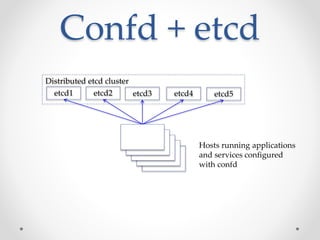
Distributed etcd cluster 
etcd1 
etcd2 etcd3 etcd4 etcd5 
Hosts running applications 
and services configured 
with confd
Confd + etcd 
• Hosts/Services that wish to share 
information post data to etcd. 
• Confd is configured on other hosts 
to use this data to manage local 
configuration files and services.
Confd + etcd 
Distributed etcd cluster 
etcd1 
etcd2 etcd3 etcd4 etcd5 
1 2 
App server DB server 
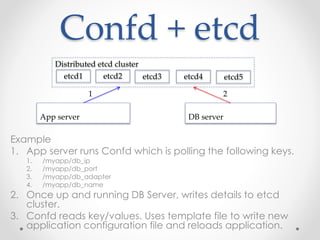
Example 
1. App server runs Confd which is polling the following keys. 
1. /myapp/db_ip 
2. /myapp/db_port 
3. /myapp/db_adapter 
4. /myapp/db_name 
2. Once up and running DB Server, writes details to etcd 
cluster. 
3. Confd reads key/values. Uses template file to write new 
application configuration file and reloads application.
Confd + etcd 
Demo 
A “working” demo is worth a thousand powerpoint slides…
Summary 
• Share information between your servers. 
• Let them discover each other. 
• Let your nodes collaborate with each 
other.
Thank you

Node collaboration - sharing information between your systems

  • 1.
    Sharing information betweenyour systems Michael Richardson @m_richo
  • 2.
    Agenda 1.Chef Search 2.Puppet Exported Resources 3.PuppetDB query 4.Confd + etcd
  • 3.
    Agenda 1.Chef Search 2.Puppet Exported Resources 3.PuppetDB query 4.Confd + etcd
  • 5.
    Chef Server Storesmany useful things including • Policies applied to nodes • Metadata that describes each node (ohai) • And more…
  • 6.
    Chef Server Thisdata is searchable!
  • 7.
    Chef Server Thisdata is searchable!
  • 8.
    Chef Server Thisdata is searchable! But how?
  • 9.
    Chef Server 1.‘search’ method within recipe. 2. Search subcommand of ‘knife’ 3. /search or /search/INDEX endpoints of Chef Server API
  • 10.
    Chef Server 1.‘search’ method within recipe. 2. Search subcommand of ‘knife’ 3. /search or /search/INDEX endpoints of Chef Server API
  • 11.
    Chef Server Searchwithin recipe – simple.
  • 12.
    Chef Server Searchwithin recipe – simple.
  • 13.
    Chef Server Searchwithin recipe – simple.
  • 14.
    Chef Server Searchwithin recipe – simple. It’s that simple
  • 15.
    Chef Server Searchwithin recipe – more complex.
  • 16.
    Chef Server ChefSearch is fantastic for • Searching for nodes with particular attributes • Searching for nodes with particular profiles • Using search results to configure services on other nodes.
  • 17.
    Chef Server Commonuse cases • My application talks to a database. What’s its FQDN/IP? • How many memcache nodes are there for my application? What are there FQDN/IPs? • Where should I send my log files? What’s the FQDN of the syslog server? • I want to provide a white-list of IP’s that can request information from a node. • What are the IP addresses of the webservers behind my load balancer? • My Jenkins slaves need to connect to a Jenkins master. What’s it’s IP? • What are the SSH Host keys for particular hosts.
  • 18.
    Agenda 1.Chef Search 2.Puppet Exported Resources 3.PuppetDB query 4.Confd + etcd
  • 19.
    Exported Resources Definition: An exported resource declaration specifies a desired state for a resource, does not manage the resource on the target system, and publishes the resource for use by other nodes. Any node (including the node that exported it) can then collect the exported resource and manage its own copy of it. * * https://docs.puppetlabs.com/puppet/latest/reference/lang_exported.html
  • 20.
    Exported Resources Thinkof it as • Node(s) “publish” resources to the Puppet Master • Other Node(s) consume those resources * https://docs.puppetlabs.com/puppet/latest/reference/lang_exported.html
  • 22.
    Exported Resources CommonExamples • Backend servers configured in a load balancer • Monitoring Servers updated with monitoring clients (nagios_host / nagios_service) • Distribute public keys (ssh and openssl)
  • 23.
    Agenda 1.Chef Search 2.Puppet Exported Resources 3.PuppetDB query 4.Confd + etcd
  • 24.
    PuppetDB Definition: collectsdata generated by Puppet. It enables advanced Puppet features like the inventory service and exported resources, and can be the foundation for other applications that use Puppet’s data. *
  • 25.
    PuppetDB PuppetDB stores: • The most recent facts from every node • The most recent catalog for every node • Optionally, 14 days of event reports for every node • Exported Resources
  • 26.
    PuppetDB PuppetDB stores: • The most recent facts from every node • The most recent catalog for every node • Optionally, 14 days of event reports for every node • Exported Resources
  • 27.
    PuppetDB PuppetDB RESTAPI V3 API includes the following endpoints: • Facts • Resources • Nodes • Fact-names, • Metrics • Reports • Events • And more
  • 28.
  • 29.
  • 30.
    PuppetDB But thistalk is about Node Collaboration. How can I make use of this data?
  • 31.
    PuppetDB checkout Puppetdbquerymodule by Erik Dalén https://forge.puppetlabs.com/dalen/puppetdbquery https://github.com/dalen/puppet-puppetdbquery
  • 32.
    PuppetDB Puppetdbquery module • Command line tools • Puppet functions to query PuppetDB • Hiera backend to return query results from PuppetDB
  • 33.
    PuppetDB Puppetdbquery module • Command line tools • Puppet functions to query PuppetDB • Hiera backend to return query results from PuppetDB
  • 34.
    PuppetDB Puppetdbquery functions • query_nodes • query_facts
  • 35.
  • 36.
    PuppetDB note: Outputis abbreviated
  • 37.
    PuppetDB PuppetDBquery •Works great and very similar to Chef Search (searching for specific hosts, and use their facts for configuring other hosts). • If you use Roles+Profiles pattern, this is a fantastic fit for profiles.
  • 38.
    Chef Search andPuppetDB are great!
  • 39.
    Chef Search andPuppetDB are great! but what if…
  • 40.
    Chef Search andPuppetDB are great! but what if… • You want your infrastructure to react more quickly than your Puppet agent / Chef-client run intervals (are you even running the agents continuously).
  • 41.
    Chef Search andPuppetDB are great! but what if… • You want your infrastructure to react more quickly than your Puppet agent / Chef-client run intervals (are you even running the agents continuously). • You appreciate “desired state” AND “running state” aren’t always the same thing.
  • 42.
    Chef Search andPuppetDB are great! but what if… • You want your infrastructure to react more quickly than your Puppet agent / Chef-client run intervals (are you even running the agents continuously). • You appreciate “desired state” AND “running state” aren’t always the same thing. • You don’t want to run a Puppet Master or Chef Server (masterless Puppet / Chef-solo).
  • 43.
    Chef Search andPuppetDB are great! but what if… • You want your infrastructure to react more quickly than your Puppet agent / Chef-client run intervals (are you even running the agents continuously). • You appreciate “desired state” AND “running state” aren’t always the same thing. • You don’t want to run a Puppet Master or Chef Server (masterless Puppet / Chef-solo). • You don’t use Puppet or Chef. 
  • 44.
    Agenda 1.Chef Search 2.Puppet Exported Resources 3.PuppetDB query 4.Confd + etcd
  • 45.
    Confd • “Lightweightconfiguration management tool” • https://github.com/kelseyhightower/confd • Written in go • Manage local application configuration files using templates and data from etcd or consul.
  • 46.
    etcd • Highly-availablekey/value store for shared configuration and service discovery • https://github.com/coreos/etcd • Written in go • Typical cluster size or 3-9 peers. • CAP theorem
  • 47.
    Confd + etcd Distributed etcd cluster etcd1 etcd2 etcd3 etcd4 etcd5 Hosts running applications and services configured with confd
  • 48.
    Confd + etcd • Hosts/Services that wish to share information post data to etcd. • Confd is configured on other hosts to use this data to manage local configuration files and services.
  • 49.
    Confd + etcd Distributed etcd cluster etcd1 etcd2 etcd3 etcd4 etcd5 1 2 App server DB server Example 1. App server runs Confd which is polling the following keys. 1. /myapp/db_ip 2. /myapp/db_port 3. /myapp/db_adapter 4. /myapp/db_name 2. Once up and running DB Server, writes details to etcd cluster. 3. Confd reads key/values. Uses template file to write new application configuration file and reloads application.
  • 50.
    Confd + etcd Demo A “working” demo is worth a thousand powerpoint slides…
  • 51.
    Summary • Shareinformation between your servers. • Let them discover each other. • Let your nodes collaborate with each other.
  • 52.

Editor's Notes

  • #36 Query_node - Accepts 2 arguments Query to discover nodes Fact that should be returned (optional) Returns array of certnames or fact values Query_facts – requires 2 arguments query list of facts to return in a nested hash
  • #46 Polls key/value databases for data (etcd or consul). Updates local configuration files with polled data via template files. Reloads applications to pick up config file changes.