“WEBMASTER TOOLS”actually do?
What can
By... Ariya Pongkularb 5680565
Kamolchat Chongviriyaphan 5680688
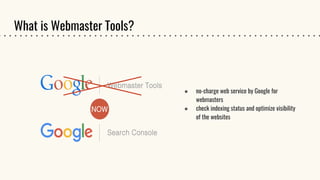
What is Webmaster Tools?
● no-charge web service by Google for
webmasters
● check indexing status and optimize visibility
of the websites
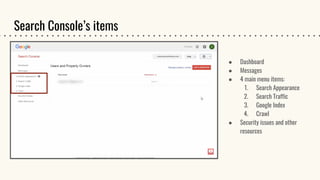
Search Console’s items
● Dashboard
● Messages
● 4 main menu items:
1. Search Appearance
2. Search Traffic
3. Google Index
4. Crawl
● Security issues and other
resources
Dashboard
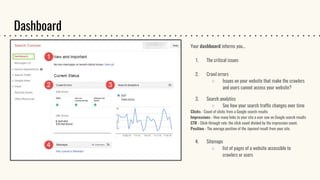
Your dashboard informs you…
1. The critical issues
2. Crawl errors
○ Issues on your website that make the crawlers
and users cannot access your website?
3. Search analytics
○ See how your search traffic changes over time
Clicks - Count of clicks from a Google search results
Impressions - How many links to your site a user saw on Google search results
CTR - Click-through rate: the click count divided by the impression count.
Position - The average position of the topmost result from your site.
4. Sitemaps
○ list of pages of a website accessible to
crawlers or users
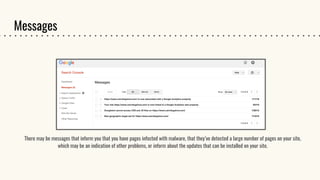
Messages
There may be messages that inform you that you have pages infected with malware, that they’ve detected a large number of pages on your site,
which may be an indication of other problems, or inform about the updates that can be installed on your site.
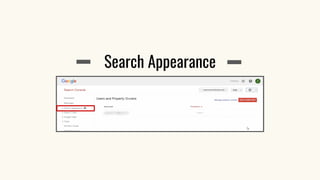
Search Appearance
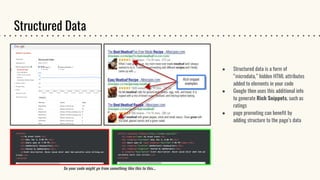
Structured Data
● Structured data is a form of
“microdata,” hidden HTML attributes
added to elements in your code
● Google then uses this additional info
to generate Rich Snippets, such as
ratings
● page promoting can benefit by
adding structure to the page’s data
So your code might go from something like this to this...
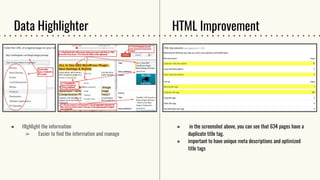
Data Highlighter
● HIghlight the information
➢ Easier to find the information and manage
● in the screenshot above, you can see that 634 pages have a
duplicate title tag.
● important to have unique meta descriptions and optimized
title tags
HTML Improvement
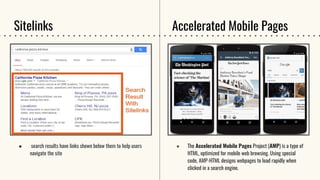
Sitelinks
● search results have links shown below them to help users
navigate the site
● The Accelerated Mobile Pages Project (AMP) is a type of
HTML, optimized for mobile web browsing. Using special
code, AMP-HTML designs webpages to load rapidly when
clicked in a search engine.
Accelerated Mobile Pages
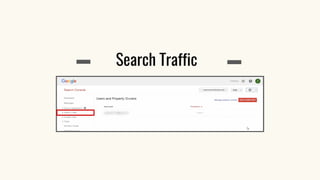
Search Traffic
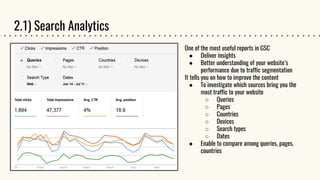
2.1) Search Analytics
One of the most useful reports in GSC
● Deliver insights
● Better understanding of your website’s
performance due to traffic segmentation
It tells you on how to improve the content
● To investigate which sources bring you the
most traffic to your website
○ Queries
○ Pages
○ Countries
○ Devices
○ Search types
○ Dates
● Enable to compare among queries, pages,
countries
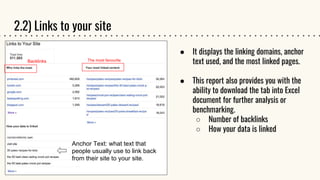
2.2) Links to your site
● It displays the linking domains, anchor
text used, and the most linked pages.
● This report also provides you with the
ability to download the tab into Excel
document for further analysis or
benchmarking.
○ Number of backlinks
○ How your data is linked
The most favouriteBacklinks
Anchor Text: what text that
people usually use to link back
from their site to your site.
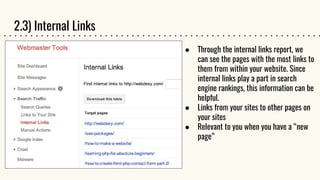
2.3) Internal Links
● Through the internal links report, we
can see the pages with the most links to
them from within your website. Since
internal links play a part in search
engine rankings, this information can be
helpful.
● Links from your sites to other pages on
your sites
● Relevant to you when you have a “new
page”
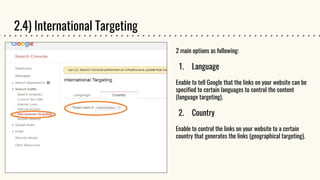
2.4) International Targeting
2 main options as following:
1. Language
Enable to tell Google that the links on your website can be
specified to certain languages to control the content
(language targeting).
2. Country
Enable to control the links on your website to a certain
country that generates the links (geographical targeting).
Google Index
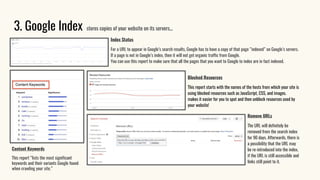
3. Google Index stores copies of your website on its servers...
Index Status
For a URL to appear in Google’s search results, Google has to have a copy of that page “indexed” on Google’s servers.
If a page is not in Google’s index, then it will not get organic traffic from Google.
You can use this report to make sure that all the pages that you want to Google to index are in fact indexed.
Content Keywords
This report “lists the most significant
keywords and their variants Google found
when crawling your site.”
Blocked Resources
This report starts with the names of the hosts from which your site is
using blocked resources such as JavaScript, CSS, and images.
makes it easier for you to spot and then unblock resources used by
your website!
Remove URLs
The URL will definitely be
removed from the search index
for 90 days. Afterwards, there is
a possibility that the URL may
be re-introduced into the index,
if the URL is still accessible and
links still point to it.
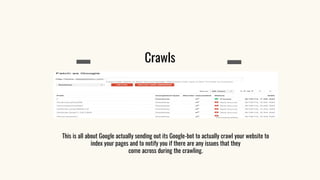
Crawls
This is all about Google actually sending out its Google-bot to actually crawl your website to
index your pages and to notify you if there are any issues that they
come across during the crawling.
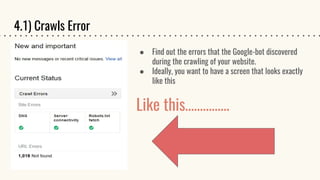
4.1) Crawls Error
● Find out the errors that the Google-bot discovered
during the crawling of your website.
● Ideally, you want to have a screen that looks exactly
like this
Like this……………
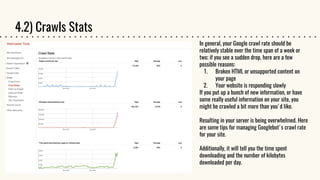
4.2) Crawls Stats
In general, your Google crawl rate should be
relatively stable over the time span of a week or
two; if you see a sudden drop, here are a few
possible reasons:
1. Broken HTML or unsupported content on
your page
2. Your website is responding slowly
If you put up a bunch of new information, or have
some really useful information on your site, you
might be crawled a bit more than you'd like.
Resulting in your server is being overwhelmed. Here
are some tips for managing Googlebot's crawl rate
for your site.
Additionally, it will tell you the time spent
downloading and the number of kilobytes
downloaded per day.
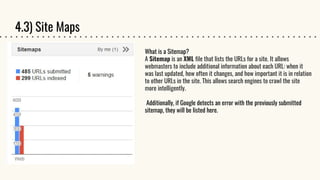
4.3) Site Maps
What is a Sitemap?
A Sitemap is an XML file that lists the URLs for a site. It allows
webmasters to include additional information about each URL: when it
was last updated, how often it changes, and how important it is in relation
to other URLs in the site. This allows search engines to crawl the site
more intelligently.
Additionally, if Google detects an error with the previously submitted
sitemap, they will be listed here.
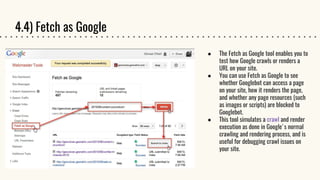
4.4) Fetch as Google
● The Fetch as Google tool enables you to
test how Google crawls or renders a
URL on your site.
● You can use Fetch as Google to see
whether Googlebot can access a page
on your site, how it renders the page,
and whether any page resources (such
as images or scripts) are blocked to
Googlebot.
● This tool simulates a crawl and render
execution as done in Google's normal
crawling and rendering process, and is
useful for debugging crawl issues on
your site.
So, why use GSC when you have access to a lot of the same information on Google
Analytics?
While GSC may seem similar to analytics, there are many distinct differences between the two.
Google Analytics is meant to give a picture of who is coming to a website, how many hits a site gets,
how people are finding the site and what content is popular.
Webmaster tools differ in that they are designed to provide a picture on how a website is seen by a
search engine. How does Google perceive your site?
Google Search Console -vs- Google Analytics
Webmaster tools (ICMK485)

Webmaster tools (ICMK485)

  • 1.
    “WEBMASTER TOOLS”actually do? Whatcan By... Ariya Pongkularb 5680565 Kamolchat Chongviriyaphan 5680688
  • 2.
    What is WebmasterTools? ● no-charge web service by Google for webmasters ● check indexing status and optimize visibility of the websites
  • 3.
    Search Console’s items ●Dashboard ● Messages ● 4 main menu items: 1. Search Appearance 2. Search Traffic 3. Google Index 4. Crawl ● Security issues and other resources
  • 4.
    Dashboard Your dashboard informsyou… 1. The critical issues 2. Crawl errors ○ Issues on your website that make the crawlers and users cannot access your website? 3. Search analytics ○ See how your search traffic changes over time Clicks - Count of clicks from a Google search results Impressions - How many links to your site a user saw on Google search results CTR - Click-through rate: the click count divided by the impression count. Position - The average position of the topmost result from your site. 4. Sitemaps ○ list of pages of a website accessible to crawlers or users
  • 5.
    Messages There may bemessages that inform you that you have pages infected with malware, that they’ve detected a large number of pages on your site, which may be an indication of other problems, or inform about the updates that can be installed on your site.
  • 6.
  • 7.
    Structured Data ● Structureddata is a form of “microdata,” hidden HTML attributes added to elements in your code ● Google then uses this additional info to generate Rich Snippets, such as ratings ● page promoting can benefit by adding structure to the page’s data So your code might go from something like this to this...
  • 8.
    Data Highlighter ● HIghlightthe information ➢ Easier to find the information and manage ● in the screenshot above, you can see that 634 pages have a duplicate title tag. ● important to have unique meta descriptions and optimized title tags HTML Improvement
  • 9.
    Sitelinks ● search resultshave links shown below them to help users navigate the site ● The Accelerated Mobile Pages Project (AMP) is a type of HTML, optimized for mobile web browsing. Using special code, AMP-HTML designs webpages to load rapidly when clicked in a search engine. Accelerated Mobile Pages
  • 10.
  • 11.
    2.1) Search Analytics Oneof the most useful reports in GSC ● Deliver insights ● Better understanding of your website’s performance due to traffic segmentation It tells you on how to improve the content ● To investigate which sources bring you the most traffic to your website ○ Queries ○ Pages ○ Countries ○ Devices ○ Search types ○ Dates ● Enable to compare among queries, pages, countries
  • 12.
    2.2) Links toyour site ● It displays the linking domains, anchor text used, and the most linked pages. ● This report also provides you with the ability to download the tab into Excel document for further analysis or benchmarking. ○ Number of backlinks ○ How your data is linked The most favouriteBacklinks Anchor Text: what text that people usually use to link back from their site to your site.
  • 13.
    2.3) Internal Links ●Through the internal links report, we can see the pages with the most links to them from within your website. Since internal links play a part in search engine rankings, this information can be helpful. ● Links from your sites to other pages on your sites ● Relevant to you when you have a “new page”
  • 14.
    2.4) International Targeting 2main options as following: 1. Language Enable to tell Google that the links on your website can be specified to certain languages to control the content (language targeting). 2. Country Enable to control the links on your website to a certain country that generates the links (geographical targeting).
  • 15.
  • 16.
    3. Google Indexstores copies of your website on its servers... Index Status For a URL to appear in Google’s search results, Google has to have a copy of that page “indexed” on Google’s servers. If a page is not in Google’s index, then it will not get organic traffic from Google. You can use this report to make sure that all the pages that you want to Google to index are in fact indexed. Content Keywords This report “lists the most significant keywords and their variants Google found when crawling your site.” Blocked Resources This report starts with the names of the hosts from which your site is using blocked resources such as JavaScript, CSS, and images. makes it easier for you to spot and then unblock resources used by your website! Remove URLs The URL will definitely be removed from the search index for 90 days. Afterwards, there is a possibility that the URL may be re-introduced into the index, if the URL is still accessible and links still point to it.
  • 17.
    Crawls This is allabout Google actually sending out its Google-bot to actually crawl your website to index your pages and to notify you if there are any issues that they come across during the crawling.
  • 18.
    4.1) Crawls Error ●Find out the errors that the Google-bot discovered during the crawling of your website. ● Ideally, you want to have a screen that looks exactly like this Like this……………
  • 19.
    4.2) Crawls Stats Ingeneral, your Google crawl rate should be relatively stable over the time span of a week or two; if you see a sudden drop, here are a few possible reasons: 1. Broken HTML or unsupported content on your page 2. Your website is responding slowly If you put up a bunch of new information, or have some really useful information on your site, you might be crawled a bit more than you'd like. Resulting in your server is being overwhelmed. Here are some tips for managing Googlebot's crawl rate for your site. Additionally, it will tell you the time spent downloading and the number of kilobytes downloaded per day.
  • 20.
    4.3) Site Maps Whatis a Sitemap? A Sitemap is an XML file that lists the URLs for a site. It allows webmasters to include additional information about each URL: when it was last updated, how often it changes, and how important it is in relation to other URLs in the site. This allows search engines to crawl the site more intelligently. Additionally, if Google detects an error with the previously submitted sitemap, they will be listed here.
  • 21.
    4.4) Fetch asGoogle ● The Fetch as Google tool enables you to test how Google crawls or renders a URL on your site. ● You can use Fetch as Google to see whether Googlebot can access a page on your site, how it renders the page, and whether any page resources (such as images or scripts) are blocked to Googlebot. ● This tool simulates a crawl and render execution as done in Google's normal crawling and rendering process, and is useful for debugging crawl issues on your site.
  • 22.
    So, why useGSC when you have access to a lot of the same information on Google Analytics? While GSC may seem similar to analytics, there are many distinct differences between the two. Google Analytics is meant to give a picture of who is coming to a website, how many hits a site gets, how people are finding the site and what content is popular. Webmaster tools differ in that they are designed to provide a picture on how a website is seen by a search engine. How does Google perceive your site? Google Search Console -vs- Google Analytics