GOOGLE SEARCH CONSOLE
WHAT IS
GOOGLE SEARCH CONSOLE
• Google Search Console is a free service offered
by Google that helps you monitor, maintain,
and troubleshoot your site's presence in Google
Search results.
• Search Console tools and reports help you
measure your site's Search traffic and
performance, fix issues, and make your site
shine in Google Search results.
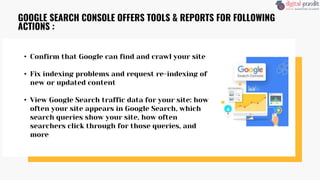
• Confirm that Google can find and crawl your site
• Fix indexing problems and request re-indexing of
new or updated content
• View Google Search traffic data for your site: how
often your site appears in Google Search, which
search queries show your site, how often
searchers click through for those queries, and
more
GOOGLE SEARCH CONSOLE OFFERS TOOLS & REPORTS FOR FOLLOWING
ACTIONS :
• Receive alerts when Google encounters indexing,
spam, or other issues on your site
• Show you which sites link to your website
GOOGLE SEARCH CONSOLE OFFERS TOOLS & REPORTS FOR FOLLOWING
ACTIONS : (CONTINUE FROM PAGE-3)
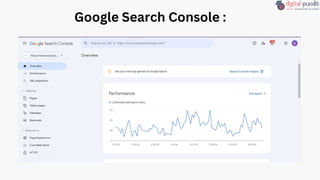
Google Search Console :
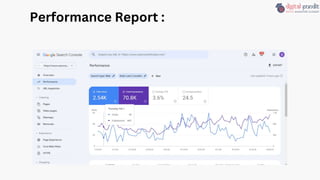
Performance Report :
The “Performance” report provides data about how
your website is performing on Google.
It shows four metrics :
1.Total clicks: The number of times people clicked on
your site from the search results
2.Total impressions: The number of times your site
appeared in search results
3.Average CTR (click-through rate): The percentage of
impressions that resulted in a click
4.Average position: The average position of your site
in search results
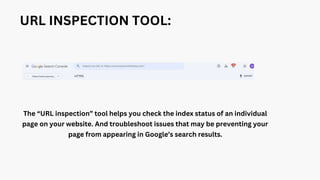
URL INSPECTION TOOL:
The “URL inspection” tool helps you check the index status of an individual
page on your website. And troubleshoot issues that may be preventing your
page from appearing in Google’s search results.
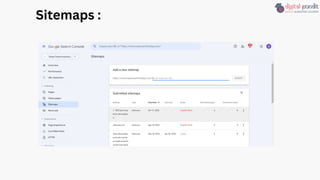
Sitemaps :
Sitemap file includes all the website URLs you
want Google to crawl and index.
This is important because Google needs to crawl
and index your pages in order to rank them.
Sitemaps :
• URL: The URL specified when you submitted your sitemap
• Type: The type of sitemap (e.g., XML, RSS, etc.)
• Submitted: The date you originally submitted the sitemap
• Last read: The last date Google crawled the sitemap
• Status: The crawl status (e.g., “Success,” “Has errors,” or “Couldn’t
fetch”)
• Discovered pages: The total number of pages Google found in the
sitemap
Following information can be found:
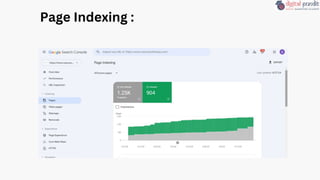
Page Indexing :
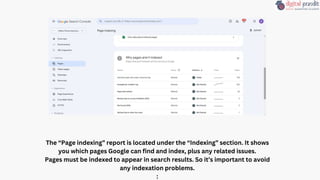
The “Page indexing” report is located under the “Indexing” section. It shows
you which pages Google can find and index, plus any related issues.
Pages must be indexed to appear in search results. So it’s important to avoid
any indexation problems.
:
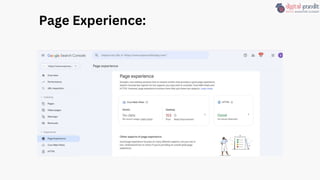
Page Experience:
Page Experience:
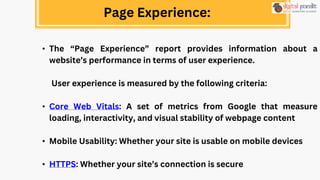
• The “Page Experience” report provides information about a
website’s performance in terms of user experience.
User experience is measured by the following criteria:
• Core Web Vitals: A set of metrics from Google that measure
loading, interactivity, and visual stability of webpage content
• Mobile Usability: Whether your site is usable on mobile devices
• HTTPS: Whether your site’s connection is secure
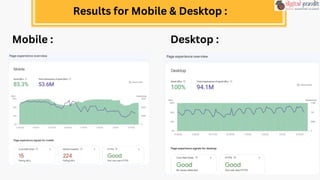
Results for Mobile & Desktop :
Mobile : Desktop :
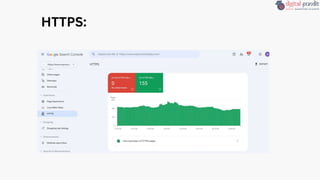
HTTPS:
• The HTTPS report shows how many indexed URLs on your
site are HTTP vs HTTPS.
• Google strongly recommends using HTTPS for your site to
protect your users' security and privacy.
• If your site has a page with both an HTTP and HTTPS
address, Google prefers to index the HTTPS version.
HTTPS:
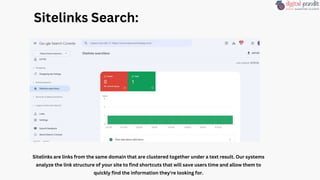
Sitelinks Search:
Sitelinks are links from the same domain that are clustered together under a text result. Our systems
analyze the link structure of your site to find shortcuts that will save users time and allow them to
quickly find the information they're looking for.
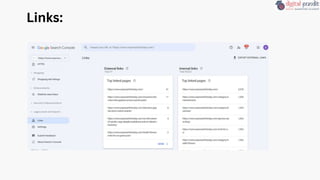
Links:
External Links :
• The “Links” report helps you track your external links, or
backlinks. Backlinks are links on other domains that point to your
domain.
And they’re an important Google ranking factor.
Internal Links:
• They help users and crawlers navigate your site more efficiently
They transfer authority to other pages on your site—which can help
them rank higher
Links Reports :
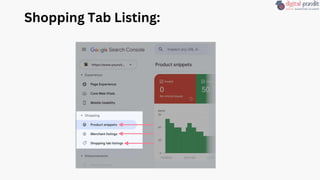
Shopping Tab Listing:
Shopping Reports :
The “Shopping” report is for online stores and product review sites that
have implemented product markup on their websites.
You’ll see a combination of the following reports (depending on what kind of
structured data Google finds on your site):
• Product snippets: Detects structured data issues for product snippets in
search results
• Merchant listings: Detects structured data issues for free listings across
Google
• Shopping tab listings: Detects structured data issues for items that
appear in the Shoppin tab in Google Search result
Business owners:
Even if you won't be using Search Console yourself, you should be aware of it, become
familiar with the basics of optimizing your site for search engines, and know what
features are available in Google Search.
SEO specialists or marketers:
As someone focused on online marketing, Search Console will help you monitor your
website traffic, optimize your ranking, and make informed decisions about the
appearance of your site's search results. You can use the information in Search Console
to influence technical decisions for the website and do sophisticated marketing analysis
in conjunction with other Google tools like Analytics, Google Trends, and Google Ads.
Who should use Google Search Cosole ?
Site administrators:
As a site admin, you care about the healthy operation of your site. Search
Console lets you easily monitor and in some cases resolve server errors,
site load issues, and security issues like hacking and malware. You can also
use it to ensure any site maintenance or adjustments you make happen
smoothly with respect to search performance.
Web developers:
If you are creating the actual markup and/or code for your site, Search
Console helps you monitor and resolve common issues with markup, such
as errors in structured data.
Who should use Google Search Cosole ?
THANK YOU!!!
Be Digital Marketing Expert with Us

Know Google Search Console By Trusha Suthar

  • 1.
  • 2.
    WHAT IS GOOGLE SEARCHCONSOLE • Google Search Console is a free service offered by Google that helps you monitor, maintain, and troubleshoot your site's presence in Google Search results. • Search Console tools and reports help you measure your site's Search traffic and performance, fix issues, and make your site shine in Google Search results.
  • 3.
    • Confirm thatGoogle can find and crawl your site • Fix indexing problems and request re-indexing of new or updated content • View Google Search traffic data for your site: how often your site appears in Google Search, which search queries show your site, how often searchers click through for those queries, and more GOOGLE SEARCH CONSOLE OFFERS TOOLS & REPORTS FOR FOLLOWING ACTIONS :
  • 4.
    • Receive alertswhen Google encounters indexing, spam, or other issues on your site • Show you which sites link to your website GOOGLE SEARCH CONSOLE OFFERS TOOLS & REPORTS FOR FOLLOWING ACTIONS : (CONTINUE FROM PAGE-3)
  • 5.
  • 6.
  • 7.
    Performance Report : The“Performance” report provides data about how your website is performing on Google. It shows four metrics : 1.Total clicks: The number of times people clicked on your site from the search results 2.Total impressions: The number of times your site appeared in search results 3.Average CTR (click-through rate): The percentage of impressions that resulted in a click 4.Average position: The average position of your site in search results
  • 8.
    URL INSPECTION TOOL: The“URL inspection” tool helps you check the index status of an individual page on your website. And troubleshoot issues that may be preventing your page from appearing in Google’s search results.
  • 9.
  • 10.
    Sitemap file includesall the website URLs you want Google to crawl and index. This is important because Google needs to crawl and index your pages in order to rank them. Sitemaps :
  • 11.
    • URL: TheURL specified when you submitted your sitemap • Type: The type of sitemap (e.g., XML, RSS, etc.) • Submitted: The date you originally submitted the sitemap • Last read: The last date Google crawled the sitemap • Status: The crawl status (e.g., “Success,” “Has errors,” or “Couldn’t fetch”) • Discovered pages: The total number of pages Google found in the sitemap Following information can be found:
  • 12.
  • 13.
    The “Page indexing”report is located under the “Indexing” section. It shows you which pages Google can find and index, plus any related issues. Pages must be indexed to appear in search results. So it’s important to avoid any indexation problems. :
  • 14.
  • 15.
    Page Experience: • The“Page Experience” report provides information about a website’s performance in terms of user experience. User experience is measured by the following criteria: • Core Web Vitals: A set of metrics from Google that measure loading, interactivity, and visual stability of webpage content • Mobile Usability: Whether your site is usable on mobile devices • HTTPS: Whether your site’s connection is secure
  • 16.
    Results for Mobile& Desktop : Mobile : Desktop :
  • 17.
  • 18.
    • The HTTPSreport shows how many indexed URLs on your site are HTTP vs HTTPS. • Google strongly recommends using HTTPS for your site to protect your users' security and privacy. • If your site has a page with both an HTTP and HTTPS address, Google prefers to index the HTTPS version. HTTPS:
  • 19.
    Sitelinks Search: Sitelinks arelinks from the same domain that are clustered together under a text result. Our systems analyze the link structure of your site to find shortcuts that will save users time and allow them to quickly find the information they're looking for.
  • 20.
  • 21.
    External Links : •The “Links” report helps you track your external links, or backlinks. Backlinks are links on other domains that point to your domain. And they’re an important Google ranking factor. Internal Links: • They help users and crawlers navigate your site more efficiently They transfer authority to other pages on your site—which can help them rank higher Links Reports :
  • 22.
  • 23.
    Shopping Reports : The“Shopping” report is for online stores and product review sites that have implemented product markup on their websites. You’ll see a combination of the following reports (depending on what kind of structured data Google finds on your site): • Product snippets: Detects structured data issues for product snippets in search results • Merchant listings: Detects structured data issues for free listings across Google • Shopping tab listings: Detects structured data issues for items that appear in the Shoppin tab in Google Search result
  • 24.
    Business owners: Even ifyou won't be using Search Console yourself, you should be aware of it, become familiar with the basics of optimizing your site for search engines, and know what features are available in Google Search. SEO specialists or marketers: As someone focused on online marketing, Search Console will help you monitor your website traffic, optimize your ranking, and make informed decisions about the appearance of your site's search results. You can use the information in Search Console to influence technical decisions for the website and do sophisticated marketing analysis in conjunction with other Google tools like Analytics, Google Trends, and Google Ads. Who should use Google Search Cosole ?
  • 25.
    Site administrators: As asite admin, you care about the healthy operation of your site. Search Console lets you easily monitor and in some cases resolve server errors, site load issues, and security issues like hacking and malware. You can also use it to ensure any site maintenance or adjustments you make happen smoothly with respect to search performance. Web developers: If you are creating the actual markup and/or code for your site, Search Console helps you monitor and resolve common issues with markup, such as errors in structured data. Who should use Google Search Cosole ?
  • 26.
    THANK YOU!!! Be DigitalMarketing Expert with Us