WEB
HOSTING
BY : VANSH, VRAJ, DARSHIL & KEVIN
PRESENTATION ON
Introduction
To make your Web site visible to the world, it has to be hosted
on a Web server.
If you want other people to view your web site, you must copy
your site to a public server.
Even if you can use your own PC as a web server, it is more
common to let an Internet Service Provider (ISP) host your site.
What is the World Wide Web?
The Web is a network of computers all over the world.
All the computers in the Web can communicate with each other.
All the computers use a communication protocol called HTTP.
How does the WWW work?
Web information is stored in documents called web pages.
Web pages are files stored on computers called web servers.
Computers reading the web pages are called web clients.
Web clients view the pages with a program called a web browser.
Popular browsers are Microsoft edge, Chrome, Internet Explorer.
Web Hosting Technologies
Windows Hosting
Windows hosting means hosting of web services that runs on the Windows
operating system.
You should choose Windows hosting if you plan to use ASP (Active Server
Pages) as server scripting, or if you plan to use a database like Microsoft
Access or Microsoft SQL Server. Windows hosting is also the best choice if
you plan to develop your web site using Microsoft Front Page.
Unix Hosting
Unix hosting means hosting of web services that runs on the Unix operating
system.
Unix was the first (original) web server operating system, and it is known for
being reliable and stable. Often less expensive than Windows.
Linux Hosting
Linux hosting means hosting of web services that runs on the Linux operating
system.
Web Hosting Types
Hosting can be FREE,
SHARED or DEDICATED.
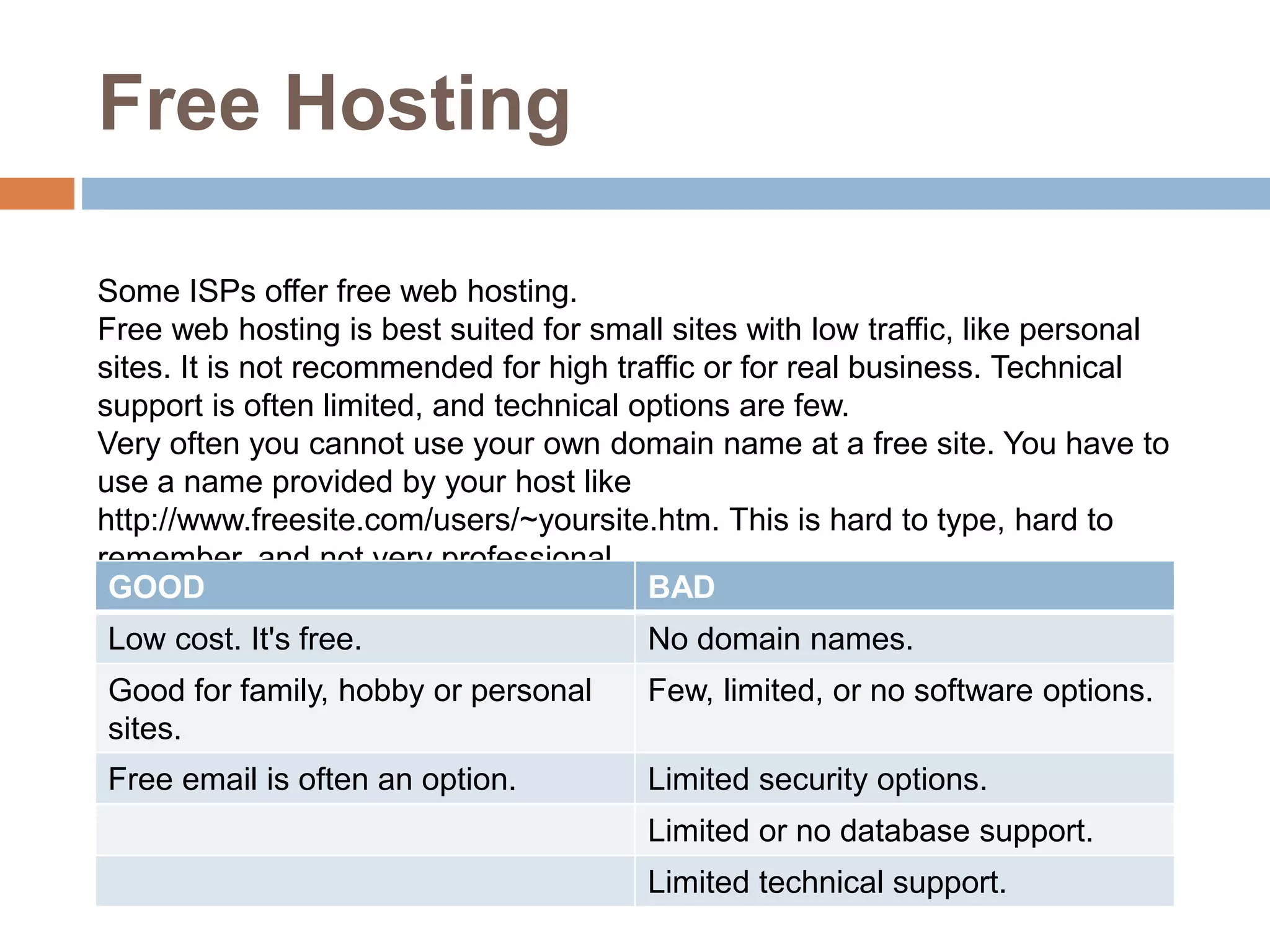
Free Hosting
Some ISPs offer free web hosting.
Free web hosting is best suited for small sites with low traffic, like personal
sites. It is not recommended for high traffic or for real business. Technical
support is often limited, and technical options are few.
Very often you cannot use your own domain name at a free site. You have to
use a name provided by your host like
http://www.freesite.com/users/~yoursite.htm. This is hard to type, hard to
remember, and not very professional.
GOOD BAD
Low cost. It's free. No domain names.
Good for family, hobby or personal
sites.
Few, limited, or no software options.
Free email is often an option. Limited security options.
Limited or no database support.
Limited technical support.
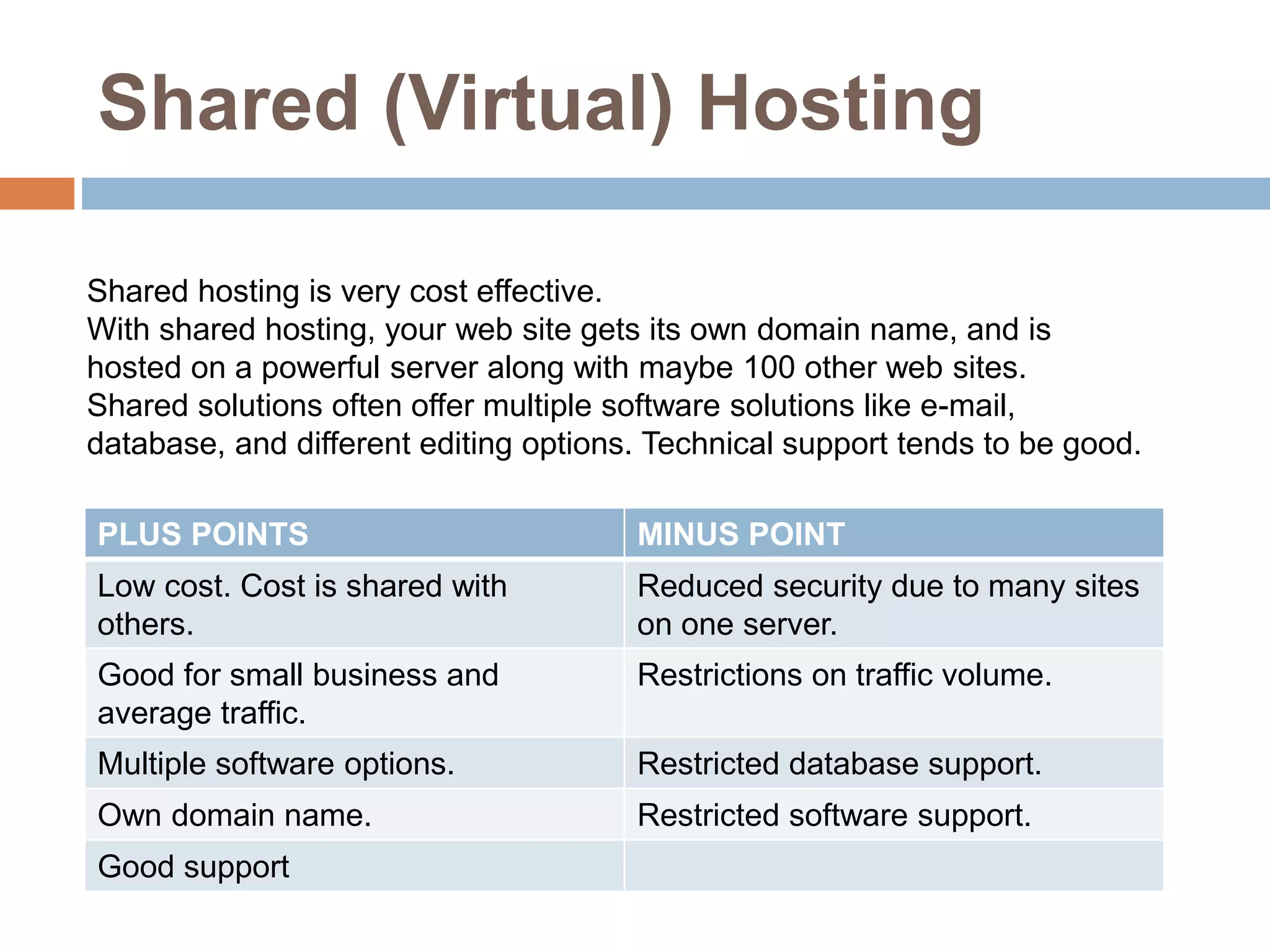
Shared (Virtual) Hosting
Shared hosting is very cost effective.
With shared hosting, your web site gets its own domain name, and is
hosted on a powerful server along with maybe 100 other web sites.
Shared solutions often offer multiple software solutions like e-mail,
database, and different editing options. Technical support tends to be good.
PLUS POINTS MINUS POINT
Low cost. Cost is shared with
others.
Reduced security due to many sites
on one server.
Good for small business and
average traffic.
Restrictions on traffic volume.
Multiple software options. Restricted database support.
Own domain name. Restricted software support.
Good support
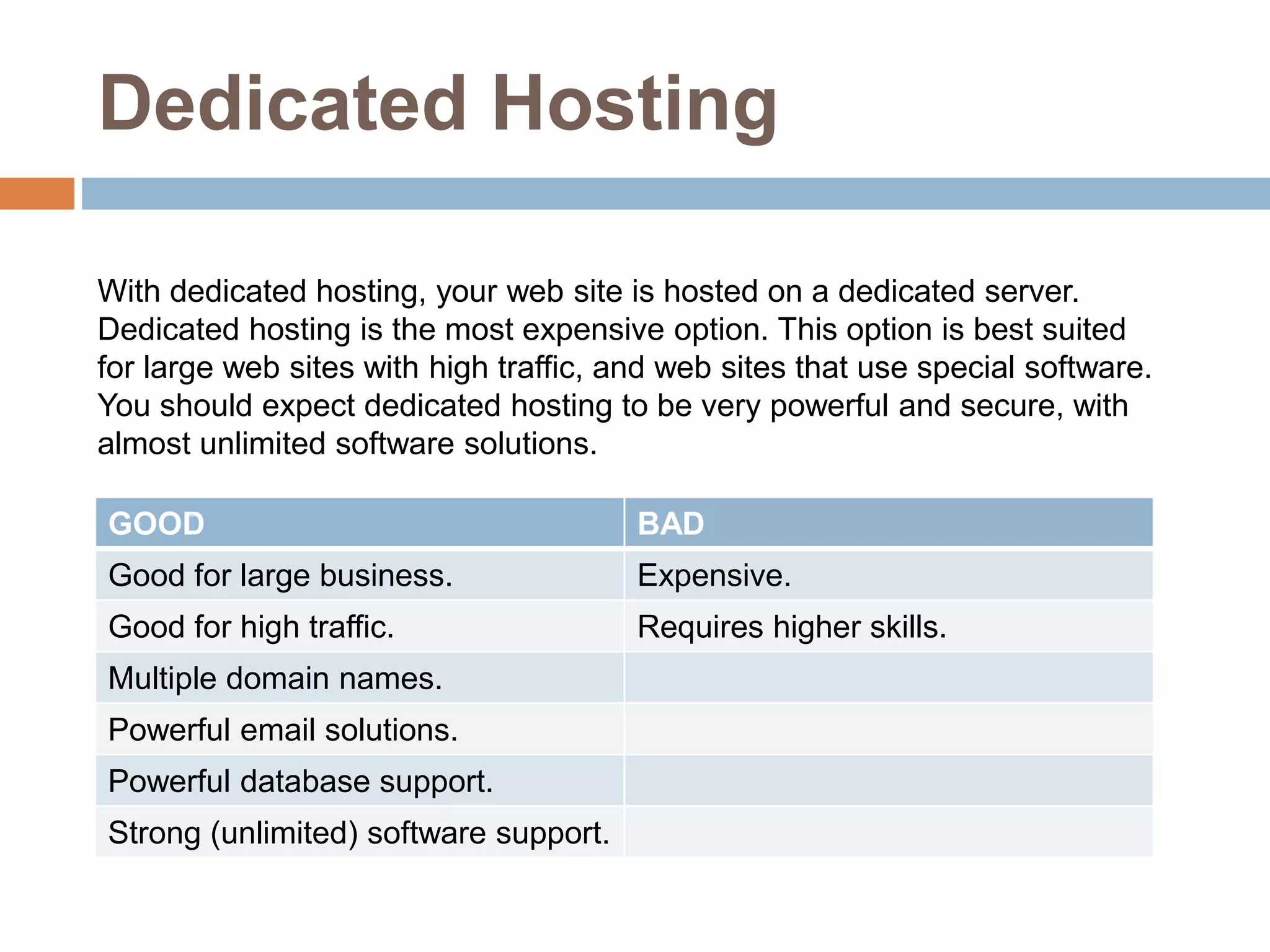
Dedicated Hosting
With dedicated hosting, your web site is hosted on a dedicated server.
Dedicated hosting is the most expensive option. This option is best suited
for large web sites with high traffic, and web sites that use special software.
You should expect dedicated hosting to be very powerful and secure, with
almost unlimited software solutions.
GOOD BAD
Good for large business. Expensive.
Good for high traffic. Requires higher skills.
Multiple domain names.
Powerful email solutions.
Powerful database support.
Strong (unlimited) software support.
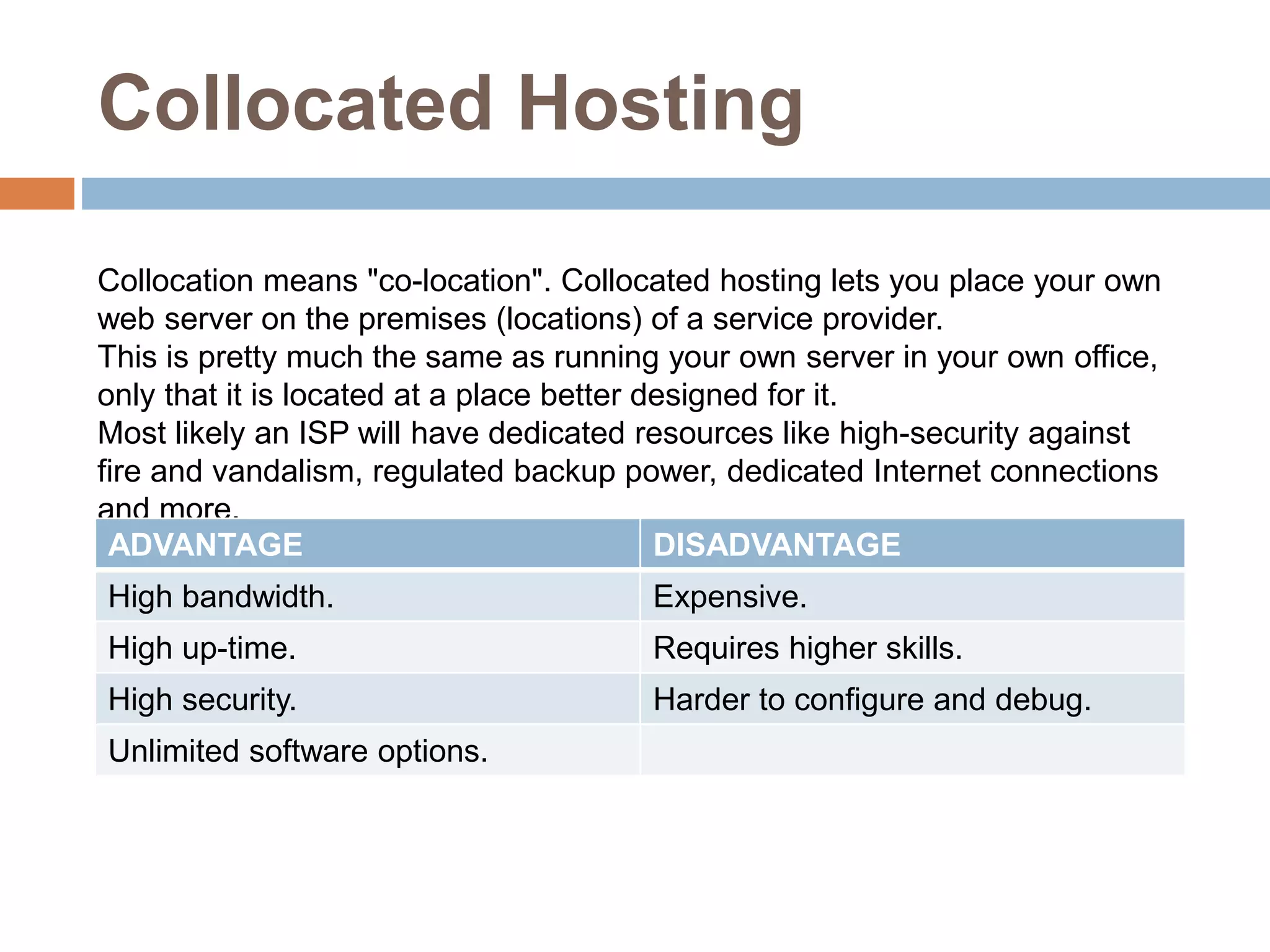
Collocated Hosting
Collocation means "co-location". Collocated hosting lets you place your own
web server on the premises (locations) of a service provider.
This is pretty much the same as running your own server in your own office,
only that it is located at a place better designed for it.
Most likely an ISP will have dedicated resources like high-security against
fire and vandalism, regulated backup power, dedicated Internet connections
and more.
ADVANTAGE DISADVANTAGE
High bandwidth. Expensive.
High up-time. Requires higher skills.
High security. Harder to configure and debug.
Unlimited software options.
THANK
YOU !

web hosting.pptx

  • 1.
    WEB HOSTING BY : VANSH,VRAJ, DARSHIL & KEVIN PRESENTATION ON
  • 2.
    Introduction To make yourWeb site visible to the world, it has to be hosted on a Web server. If you want other people to view your web site, you must copy your site to a public server. Even if you can use your own PC as a web server, it is more common to let an Internet Service Provider (ISP) host your site.
  • 3.
    What is theWorld Wide Web? The Web is a network of computers all over the world. All the computers in the Web can communicate with each other. All the computers use a communication protocol called HTTP. How does the WWW work? Web information is stored in documents called web pages. Web pages are files stored on computers called web servers. Computers reading the web pages are called web clients. Web clients view the pages with a program called a web browser. Popular browsers are Microsoft edge, Chrome, Internet Explorer.
  • 4.
    Web Hosting Technologies WindowsHosting Windows hosting means hosting of web services that runs on the Windows operating system. You should choose Windows hosting if you plan to use ASP (Active Server Pages) as server scripting, or if you plan to use a database like Microsoft Access or Microsoft SQL Server. Windows hosting is also the best choice if you plan to develop your web site using Microsoft Front Page. Unix Hosting Unix hosting means hosting of web services that runs on the Unix operating system. Unix was the first (original) web server operating system, and it is known for being reliable and stable. Often less expensive than Windows. Linux Hosting Linux hosting means hosting of web services that runs on the Linux operating system.
  • 5.
    Web Hosting Types Hostingcan be FREE, SHARED or DEDICATED.
  • 6.
    Free Hosting Some ISPsoffer free web hosting. Free web hosting is best suited for small sites with low traffic, like personal sites. It is not recommended for high traffic or for real business. Technical support is often limited, and technical options are few. Very often you cannot use your own domain name at a free site. You have to use a name provided by your host like http://www.freesite.com/users/~yoursite.htm. This is hard to type, hard to remember, and not very professional. GOOD BAD Low cost. It's free. No domain names. Good for family, hobby or personal sites. Few, limited, or no software options. Free email is often an option. Limited security options. Limited or no database support. Limited technical support.
  • 7.
    Shared (Virtual) Hosting Sharedhosting is very cost effective. With shared hosting, your web site gets its own domain name, and is hosted on a powerful server along with maybe 100 other web sites. Shared solutions often offer multiple software solutions like e-mail, database, and different editing options. Technical support tends to be good. PLUS POINTS MINUS POINT Low cost. Cost is shared with others. Reduced security due to many sites on one server. Good for small business and average traffic. Restrictions on traffic volume. Multiple software options. Restricted database support. Own domain name. Restricted software support. Good support
  • 8.
    Dedicated Hosting With dedicatedhosting, your web site is hosted on a dedicated server. Dedicated hosting is the most expensive option. This option is best suited for large web sites with high traffic, and web sites that use special software. You should expect dedicated hosting to be very powerful and secure, with almost unlimited software solutions. GOOD BAD Good for large business. Expensive. Good for high traffic. Requires higher skills. Multiple domain names. Powerful email solutions. Powerful database support. Strong (unlimited) software support.
  • 9.
    Collocated Hosting Collocation means"co-location". Collocated hosting lets you place your own web server on the premises (locations) of a service provider. This is pretty much the same as running your own server in your own office, only that it is located at a place better designed for it. Most likely an ISP will have dedicated resources like high-security against fire and vandalism, regulated backup power, dedicated Internet connections and more. ADVANTAGE DISADVANTAGE High bandwidth. Expensive. High up-time. Requires higher skills. High security. Harder to configure and debug. Unlimited software options.
  • 10.