Dot Com in a Day Getting your business online without developers, an IT department or a budgetSlides and links:www.wright.ru/dotcom1
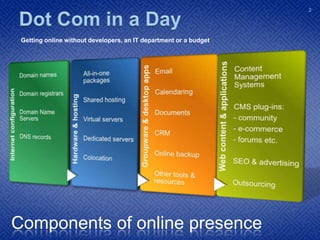
Dot Com in a Day Getting your business online without developers, an IT department or a budgetComponents of online presence2
Introduction Multiple uses:
 Start-ups
 Non-profits
 Clubs
 Vanity domains
 Negligible technical skills needed:
 Technical basics are minimal – fundamentals covered today
 Many easy-to-use tools available
 Just requires knowledge and time3
Introduction Low budget:
 Free and Open Source Software (FOSS) e.g. Mozilla, Apache, Linux
 Free proprietary resources e.g. Google, DNS services etc.
 Community support
 Professional:
 FOSS serves over two thirds of web sites globally
 Many prominent sites use free software
 Other examples: Firefox, Ubuntu, OpenOffice.org
 No reliance on ‘security through obscurity’
 Adoption of open source by governments and agencies4
Introduction Many ways to achieve the same end results
 Future-proof your online presence:don’t opt for ‘all-in-one’ basic solutions that tie you to one provider Today’s suggestions are relatively simple, yet powerful and scalable
 Using standard, popular FOSS packages also saves on hidden costs:
 Solutions are designed for non-technical users and havecomprehensive, clear documentation and extensive supportfrom community forums Open source means developers can get up to speed quickly	and extend software for your precise needs easily5
IntroductionYour interests:6
About Me Business analyst, project manager, enthusiast
 In e-Commerce before – and during – the dot-com bust
 IT and Development Manager for a banking consultancy
 Designed and implemented many web sites/apps for all purposes:
 Personal
 Non-profits
 Clubs
 E-commerce and fashion
 Small businesses
 International banks
 But I’m not a developer7
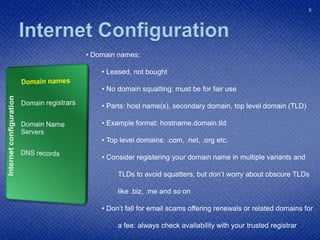
Internet ConfigurationDomain namesDomain registrarsDomain Name ServersDNS records Domain names:
 Leased, not bought
 No domain squatting: must be for fair use
 Parts: host name(s), secondary domain, top level domain (TLD)
 Example format: hostname.domain.tld
 Top level domains: .com, .net, .org etc.
 Consider registering your domain name in multiple variants and	TLDs to avoid squatters, but don’t worry about obscure TLDs	like .biz, .me and so on Don’t fall for email scams offering renewals or related domains for	a fee: always check availability with your trusted registrarInternet configuration8
Internet ConfigurationDomain namesDomain registrarsDomain Name ServersDNS records Domain registrars:
 Each TLD has a principal registrar (e.g. Verisign for. com)appointed by ICANN, who then appoints retail registrars Many, many registrars but they differ on ease of use, customerservice and price: choose a good one Good .com registrars: GoDaddy.com, 1and1.com,	namecheap.com, omnis.com Bad (overpriced) registrars: Register.com, Network Solutions
 Consider opting for a private registration (free with some	registrars) to hide your personal details from spammersInternet configuration9
Internet ConfigurationDomain namesDomain registrarsDomain Name ServersDNS records Registering a domain:
 Example: namecheap.com
 Cheap and includes anonymous WhoIs registration
 Search for domain(s) and add to your cart – consider other TLDs
 At checkout, define four contacts (ICANN requirement):
 Registrant
 Administrative
 Technical
 Billing
 Can all be the same; different contacts get different	communications, e.g. DMCA complaints, renewal notices etc.Internet configuration10
Internet ConfigurationDomain namesDomain registrarsDomain Name ServersDNS recordsRegistering a domain contd.: You can turn on WhoisGuard at this point to protect your identity	from spammers Now define name servers (next topic) e.g. ns1.everydns.net,ns2.everydns.net and so on Use external name servers for flexibility
 Do not choose any URL or email forwarding options
 Some registrars like GoDaddy will try to sell many additional	services; ignore these with possible exception of web hosting A good registrar may not be a good web host – check the web	for unbiased reviewsInternet configuration11
Internet ConfigurationDomain namesDomain registrarsDomain Name ServersDNS recordsDomain Name Servers: Domain Name Servers translate a request from a domain	name into the IP address of the relevant server A domain name is easier to remember than 217.162.3.28
 Each host name within your domain and your mail servers canbe pointed to the same or differing servers as necessary You can use a registrar/web host’s provided DNS servers	or use an external service Recommendation: a free, reliable service like everydns.netwhich is affiliated with OpenDNS to ensure rapid propagation	of DNS record changes through the internet (cached records)Internet configuration12

Dot Com In A Day

Editor's Notes

  • #10 ICANN: the Internet Corporation for Assigned Names and Numbers – allocates IP address blocks and grants rights to TLD-specific master registrars
  • #11 DMCA: Digital Millennium Copyright Act