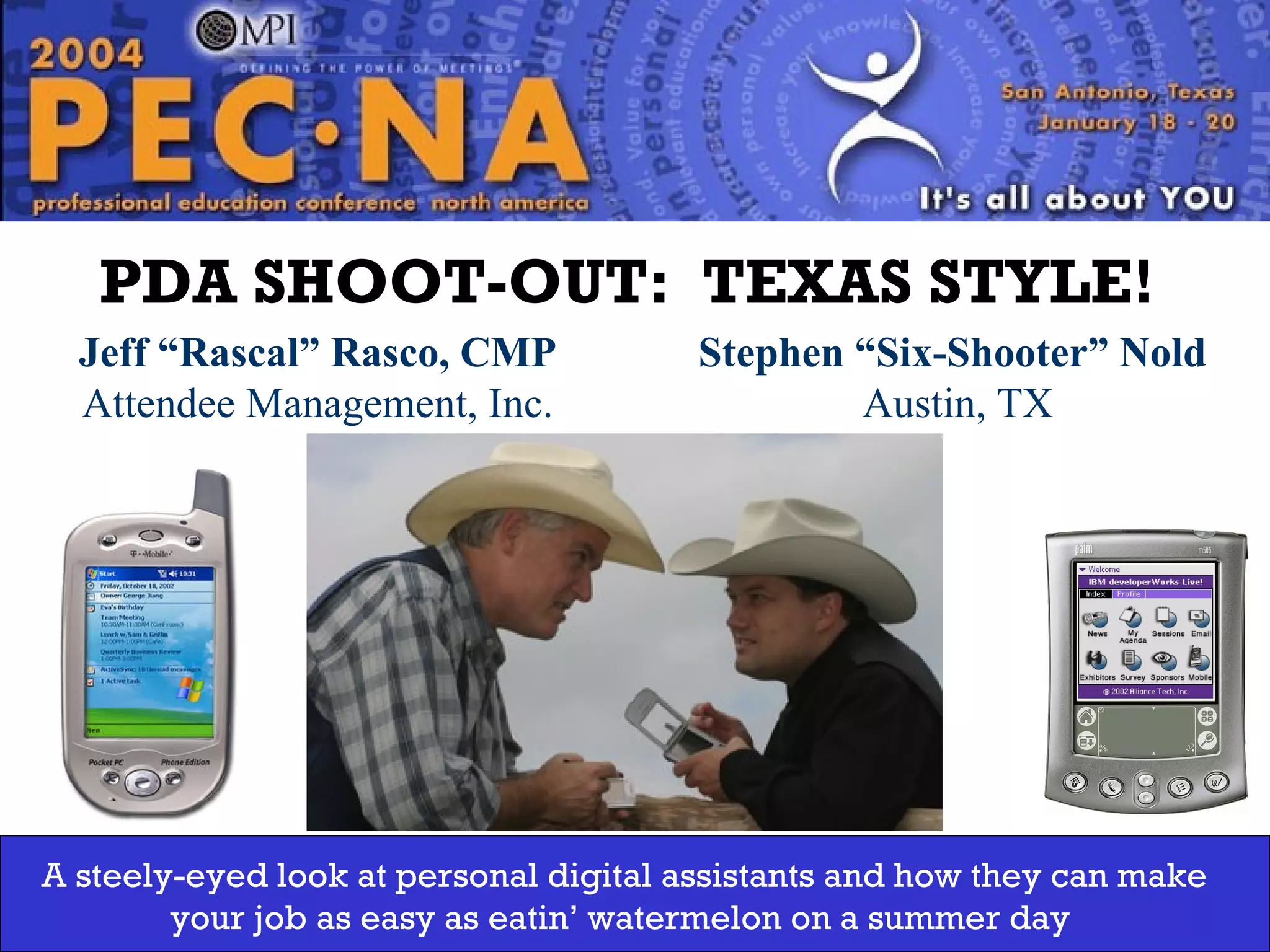
Jeff ā€œRascalā€ Rasco, CMP Attendee Management, Inc. Washington State Chapter PDA SHOOT-OUT:  TEXAS STYLE!   Stephen ā€œSix-Shooterā€ Nold  Austin, TX A steely-eyed look at personal digital assistants and how they can make your job as easy as eatin’ watermelon on a summer day
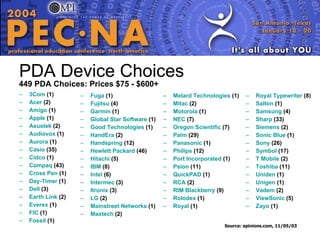
PDA Device Choices 449 PDA Choices: Prices $75 - $600+ 3Com Ā (1)  Acer Ā (2)  Amigo Ā (1)  Apple Ā (1)  Asustek Ā (2)  Audiovox Ā (1)  Aurora Ā (1)  Casio Ā (35)  Cidco Ā (1)  Compaq Ā (43)  Cross Pen Ā (1)  Day-Timer Ā (1)  Dell Ā (3)  Earth Link Ā (2)  Everex Ā (1)  FIC Ā (1) Fossil Ā (1)  Fuga Ā (1)  Fujitsu Ā (4)  Garmin Ā (1)  Global Star Software Ā (1)  Good Technologies Ā (1)  HandEra Ā (2)  Handspring Ā (12)  Hewlett Packard Ā (46)  Hitachi Ā (5)  IBM Ā (8)  Intel Ā (6)  Intermec Ā (3)  Itronix Ā (3)  LG Ā (2) Mainstreet  Networks Ā (1)  Maxtech Ā (2)  Royal Typewriter Ā (8)  Salton Ā (1)  Samsung Ā (4)  Sharp Ā (33)  Siemens Ā (2)  Sonic Blue Ā (1)  Sony Ā (26)  Symbol Ā (17)  T Mobile Ā (2)  Toshiba Ā (11)  Uniden Ā (1)  Unigen Ā (1)  Vadem Ā (2)  ViewSonic Ā (5)  Zayo Ā (1)  Melard  Technologies Ā (1)  Mitac Ā (2)  Motorola Ā (1)  NEC Ā (7)  Oregon Scientific Ā (7)  Palm Ā (29)  Panasonic Ā (1)  Philips Ā (12)  Port Incorporated Ā (1)  Psion Ā (11)  QuickPAD Ā (1)  RCA Ā (2)  RIM Blackberry Ā (9)  Rolodex Ā (1)  Royal Ā (1)  Source: epinions.com, 11/05/03
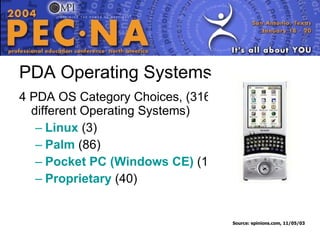
PDA Operating Systems 4 PDA OS Category Choices, (316 different Operating Systems)  Linux Ā  (3)  Palm Ā  (86)   Pocket PC (Windows CE) Ā  (187)   Proprietary Ā  (40)   Source: epinions.com, 11/05/03
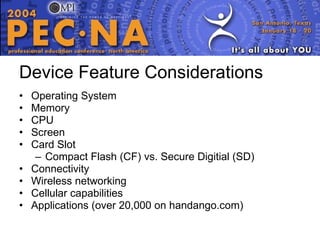
Device Feature Considerations Operating System Memory CPU Screen Card Slot Compact Flash (CF) vs. Secure Digitial (SD) Connectivity Wireless networking Cellular capabilities Applications (over 20,000 on handango.com)
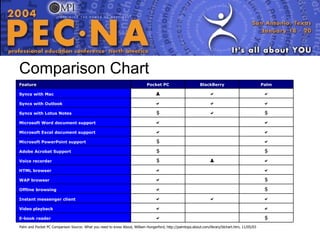
Comparison Chart Palm and Pocket PC Comparison Source: What you need to know About, William Hungerford, http://palmtops.about.com/library/blchart.htm, 11/05/03 $ Ā   E-book reader  Ā   Video playback    Instant messenger client $ Ā   Offline browsing $ Ā   WAP browser  Ā   HTML browser  ļ‚  $ Voice recorder $ Ā  $ Adobe Acrobat Support  Ā  $ Microsoft PowerPoint support  Ā   Microsoft Excel document support  Ā   Microsoft Word document support $  $ Syncs with Lotus Notes    Syncs with Outlook   ļ‚  Syncs with Mac Palm BlackBerry Pocket PC Feature
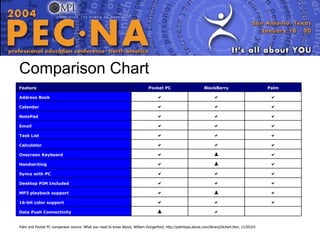
Comparison Chart Palm and Pocket PC comparison source: What you need to know About, William Hungerford, http://palmtops.about.com/library/blchart.htm, 11/05/03 Ā   ļ‚  Data Push Connectivity    16-bit color support  ļ‚   MP3 playback support    Desktop PIM Included    Syncs with PC  ļ‚   Handwriting  ļ‚   Onscreen Keyboard    Calculator    Task List    Email    NotePad    Calendar    Address Book Palm BlackBerry Pocket PC Feature
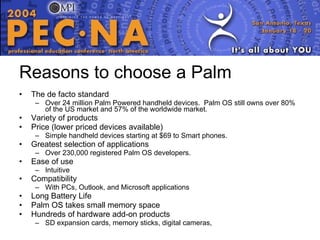
Reasons to choose a Palm The de facto standard Over 24 million Palm Powered handheld devices.  Palm OS still owns over 80% of the US market and 57% of the worldwide market. Variety of products  Price (lower priced devices available) Simple handheld devices starting at $69 to Smart phones. Greatest selection of applications Over 230,000 registered Palm OS developers. Ease of use Intuitive Compatibility With PCs, Outlook, and Microsoft applications Long Battery Life Palm OS takes small memory space Hundreds of hardware add-on products SD expansion cards, memory sticks, digital cameras,
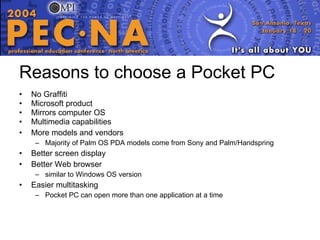
Reasons to choose a Pocket PC No Graffiti Microsoft product Mirrors computer OS Multimedia capabilities More models and vendors Majority of Palm OS PDA models come from Sony and Palm/Handspring  Better screen display Better Web browser similar to Windows OS version Easier multitasking Pocket PC can open more than one application at a time
Reasons to choose a BlackBerry QWERTY keyboard typing Always-on wireless network connectivity Desktop email synchronization over-the-air (Exchange, Domino) allowing data pushed instantly to the handheld  Allows the consolidation of phones and pagers into a single mobile device to carry  Wireless carrier agnostic for worldwide operation Centralized user and device management
The Winner is… If you are primarily need a compact, reasonably priced, easy-to-use PDA for calendaring, contacts, to-do lists, and possibly a few multimedia perks, shop for a Palm OS device. If the familiarity of the Windows OS interface appeals to you, if you want to carry around what is essentially a tiny version of your PC, and if you want multimedia to be the rule and not the exception, then go for a Pocket PC. If always-on instant data push capability is important, then the BlackBerry device is the right choice.  Mobile Computing: Palm vs. Pocket PC, The products are different, but also the same. How do choose? James A. Martin, Thursday, August 21, 2003, http://www.pcworld.com/howto/article/0,aid,111825,00.asp
Resources Avantgo   Handango   Handango  Glossary   Handspring   How  PDAs  Work   HP Handheld Devices   MemoWare   Palm Handhelds   Palm  Tipsheet   Security Brief: Implementing HIPAA-Compliant Palm Handheld Solutions   SonyStyle  USA   TealPoint  Software   Toshiba   Tucows  PDA software   ZDNet Palm Downloads   Source:   D. Samuel Gottesman Library,  http:// library.aecom.yu.edu/resources/pda/pdageneral.htm , 11.06.03 PalmGear   PalmSpot   PDA Central   Pdalive   PDAmart   PDAStreet   PocketPC
PDA/Wireless Developers Advontech/AMi – Jeff (512) 842-1613 www.attendeenet.com Stephen (512) 789-1603 www.advontech.com Alliance Tech – (512) 617-2000 www.alliancetech.com bCard – (301) 654-3779 www.bcard.com EventCentric – (703) 524-3309 www.eventcentric.com ExpoExchange – (301) 662-9401 www.expoexchange.com EventPoint – (425) 869-0567 www.eventpoint.com  Hemko Systems – (970) 667-0460 www.hemkosys.com Pistachio – (503) 292-6617 www.pistachioinc.com NearSpace – (707) 792-8004 www.nearspace.com Shockfish Communications – Lausanne, Switzerland –  +41 (0) 878 877 931 www.shockfish.com Registration Unlimited – (916) 626-5135 www.regunlim.com WideRay – (415) 263-2802 www.wideray.com
Websites www.cnet.com www.palm.com Offers thousands of commercial PalmOS products www.handspring.com Learn more about Handspring Visors www.palmgear.com Tips/Tricks section has shortcuts that will help new users get up to speed. www.nearlymobile.com New user tips and suggestions
Websites www.tucows.com Downloads and reviews of almost everything! www.handango.com Software and gear for multiple systems Excellent Support section for all platforms with tips/tricks www.microsoft.com/mobile/pocketpc/default.asp Features, buyer’s guide, downloads, and how to information www.rex.net www.blackberry.com www.hp.com/www.compaq.com www.casio.com www.toshiba.com
Further Questions? Jeffrey W. Rasco, CMP 164 Augusta Drive Wimberley, TX 78676 USA P: 512.842.1613 ext 4# F: 512.233.2870 E: jeff@attendeenet.com Stephen Nold 14917 Solera Drive Austin, TX 78717 USA P: 512.789.1603 F: 512.233.2267 E: snold@advontech.com

MPI PDA Shoot Out

  • 1.
    Jeff ā€œRascalā€ Rasco,CMP Attendee Management, Inc. Washington State Chapter PDA SHOOT-OUT: TEXAS STYLE! Stephen ā€œSix-Shooterā€ Nold Austin, TX A steely-eyed look at personal digital assistants and how they can make your job as easy as eatin’ watermelon on a summer day
  • 2.
    PDA Device Choices449 PDA Choices: Prices $75 - $600+ 3Com Ā (1) Acer Ā (2) Amigo Ā (1) Apple Ā (1) Asustek Ā (2) Audiovox Ā (1) Aurora Ā (1) Casio Ā (35) Cidco Ā (1) Compaq Ā (43) Cross Pen Ā (1) Day-Timer Ā (1) Dell Ā (3) Earth Link Ā (2) Everex Ā (1) FIC Ā (1) Fossil Ā (1) Fuga Ā (1) Fujitsu Ā (4) Garmin Ā (1) Global Star Software Ā (1) Good Technologies Ā (1) HandEra Ā (2) Handspring Ā (12) Hewlett Packard Ā (46) Hitachi Ā (5) IBM Ā (8) Intel Ā (6) Intermec Ā (3) Itronix Ā (3) LG Ā (2) Mainstreet Networks Ā (1) Maxtech Ā (2) Royal Typewriter Ā (8) Salton Ā (1) Samsung Ā (4) Sharp Ā (33) Siemens Ā (2) Sonic Blue Ā (1) Sony Ā (26) Symbol Ā (17) T Mobile Ā (2) Toshiba Ā (11) Uniden Ā (1) Unigen Ā (1) Vadem Ā (2) ViewSonic Ā (5) Zayo Ā (1) Melard Technologies Ā (1) Mitac Ā (2) Motorola Ā (1) NEC Ā (7) Oregon Scientific Ā (7) Palm Ā (29) Panasonic Ā (1) Philips Ā (12) Port Incorporated Ā (1) Psion Ā (11) QuickPAD Ā (1) RCA Ā (2) RIM Blackberry Ā (9) Rolodex Ā (1) Royal Ā (1) Source: epinions.com, 11/05/03
  • 3.
    PDA Operating Systems4 PDA OS Category Choices, (316 different Operating Systems) Linux Ā  (3) Palm Ā  (86) Pocket PC (Windows CE) Ā  (187) Proprietary Ā  (40) Source: epinions.com, 11/05/03
  • 4.
    Device Feature ConsiderationsOperating System Memory CPU Screen Card Slot Compact Flash (CF) vs. Secure Digitial (SD) Connectivity Wireless networking Cellular capabilities Applications (over 20,000 on handango.com)
  • 5.
    Comparison Chart Palmand Pocket PC Comparison Source: What you need to know About, William Hungerford, http://palmtops.about.com/library/blchart.htm, 11/05/03 $ Ā   E-book reader  Ā   Video playback    Instant messenger client $ Ā   Offline browsing $ Ā   WAP browser  Ā   HTML browser  ļ‚  $ Voice recorder $ Ā  $ Adobe Acrobat Support  Ā  $ Microsoft PowerPoint support  Ā   Microsoft Excel document support  Ā   Microsoft Word document support $  $ Syncs with Lotus Notes    Syncs with Outlook   ļ‚  Syncs with Mac Palm BlackBerry Pocket PC Feature
  • 6.
    Comparison Chart Palmand Pocket PC comparison source: What you need to know About, William Hungerford, http://palmtops.about.com/library/blchart.htm, 11/05/03 Ā   ļ‚  Data Push Connectivity    16-bit color support  ļ‚   MP3 playback support    Desktop PIM Included    Syncs with PC  ļ‚   Handwriting  ļ‚   Onscreen Keyboard    Calculator    Task List    Email    NotePad    Calendar    Address Book Palm BlackBerry Pocket PC Feature
  • 7.
    Reasons to choosea Palm The de facto standard Over 24 million Palm Powered handheld devices. Palm OS still owns over 80% of the US market and 57% of the worldwide market. Variety of products Price (lower priced devices available) Simple handheld devices starting at $69 to Smart phones. Greatest selection of applications Over 230,000 registered Palm OS developers. Ease of use Intuitive Compatibility With PCs, Outlook, and Microsoft applications Long Battery Life Palm OS takes small memory space Hundreds of hardware add-on products SD expansion cards, memory sticks, digital cameras,
  • 8.
    Reasons to choosea Pocket PC No Graffiti Microsoft product Mirrors computer OS Multimedia capabilities More models and vendors Majority of Palm OS PDA models come from Sony and Palm/Handspring Better screen display Better Web browser similar to Windows OS version Easier multitasking Pocket PC can open more than one application at a time
  • 9.
    Reasons to choosea BlackBerry QWERTY keyboard typing Always-on wireless network connectivity Desktop email synchronization over-the-air (Exchange, Domino) allowing data pushed instantly to the handheld Allows the consolidation of phones and pagers into a single mobile device to carry Wireless carrier agnostic for worldwide operation Centralized user and device management
  • 10.
    The Winner is…If you are primarily need a compact, reasonably priced, easy-to-use PDA for calendaring, contacts, to-do lists, and possibly a few multimedia perks, shop for a Palm OS device. If the familiarity of the Windows OS interface appeals to you, if you want to carry around what is essentially a tiny version of your PC, and if you want multimedia to be the rule and not the exception, then go for a Pocket PC. If always-on instant data push capability is important, then the BlackBerry device is the right choice. Mobile Computing: Palm vs. Pocket PC, The products are different, but also the same. How do choose? James A. Martin, Thursday, August 21, 2003, http://www.pcworld.com/howto/article/0,aid,111825,00.asp
  • 11.
    Resources Avantgo Handango Handango Glossary Handspring How PDAs Work HP Handheld Devices MemoWare Palm Handhelds Palm Tipsheet Security Brief: Implementing HIPAA-Compliant Palm Handheld Solutions SonyStyle USA TealPoint Software Toshiba Tucows PDA software ZDNet Palm Downloads Source: D. Samuel Gottesman Library, http:// library.aecom.yu.edu/resources/pda/pdageneral.htm , 11.06.03 PalmGear PalmSpot PDA Central Pdalive PDAmart PDAStreet PocketPC
  • 12.
    PDA/Wireless Developers Advontech/AMi– Jeff (512) 842-1613 www.attendeenet.com Stephen (512) 789-1603 www.advontech.com Alliance Tech – (512) 617-2000 www.alliancetech.com bCard – (301) 654-3779 www.bcard.com EventCentric – (703) 524-3309 www.eventcentric.com ExpoExchange – (301) 662-9401 www.expoexchange.com EventPoint – (425) 869-0567 www.eventpoint.com Hemko Systems – (970) 667-0460 www.hemkosys.com Pistachio – (503) 292-6617 www.pistachioinc.com NearSpace – (707) 792-8004 www.nearspace.com Shockfish Communications – Lausanne, Switzerland – +41 (0) 878 877 931 www.shockfish.com Registration Unlimited – (916) 626-5135 www.regunlim.com WideRay – (415) 263-2802 www.wideray.com
  • 13.
    Websites www.cnet.com www.palm.comOffers thousands of commercial PalmOS products www.handspring.com Learn more about Handspring Visors www.palmgear.com Tips/Tricks section has shortcuts that will help new users get up to speed. www.nearlymobile.com New user tips and suggestions
  • 14.
    Websites www.tucows.com Downloadsand reviews of almost everything! www.handango.com Software and gear for multiple systems Excellent Support section for all platforms with tips/tricks www.microsoft.com/mobile/pocketpc/default.asp Features, buyer’s guide, downloads, and how to information www.rex.net www.blackberry.com www.hp.com/www.compaq.com www.casio.com www.toshiba.com
  • 15.
    Further Questions? JeffreyW. Rasco, CMP 164 Augusta Drive Wimberley, TX 78676 USA P: 512.842.1613 ext 4# F: 512.233.2870 E: jeff@attendeenet.com Stephen Nold 14917 Solera Drive Austin, TX 78717 USA P: 512.789.1603 F: 512.233.2267 E: snold@advontech.com