SharePoint
Office 365
Microsoft Teams
Build your first MicrosoftTeams App using SPFx
Hi! I’m Seb!
@sebastienlevert | http://www.sebastienlevert.com | Product Lead at
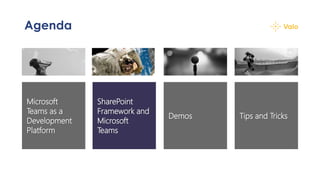
Agenda
Tips and Tricks
SharePoint
Framework and
Microsoft
Teams
Microsoft
Teams as a
Development
Platform
Demos
Agenda
Tips and Tricks
SharePoint
Framework and
Microsoft
Teams
Microsoft
Teams as a
Development
Platform
Demos
Microsoft Teams as a
Development Platform
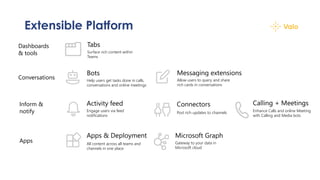
Extensible Platform
Bots
Help users get tasks done in calls,
conversations and online meetings
Connectors
Post rich updates to channels
Apps & Deployment
All content across all teams and
channels in one place
Tabs
Surface rich content within
Teams
Activity feed
Engage users via feed
notifications
Messaging extensions
Allow users to query and share
rich cards in conversations
Calling + Meetings
Enhance Calls and online Meeting
with Calling and Media bots
Microsoft Graph
Gateway to your data in
Microsoft cloud
Conversations
Inform &
notify
Apps
Dashboards
& tools
Tabs
+ Teams-aware webpages embedded in Microsoft
Teams.
+ Can be added as part of a channel inside a team,
a group chat or as a personal app.
+ Built as any other webpages and leverages the
Microsoft Teams Javascript SDKs
Bots
+ Enable the Conversation as a service scenarios
+ Reacting to conversations, acting as an assistant,
etc.
+ Using the Bot Framework and all bots magical
features (LUIS, Azure, etc.)
Messaging Extensions
+ Interactions with your services through buttons
and forms
+ Fully integrated and native on all platforms
+ Can search, or initiate actions, in any system
+ Based on the Adaptive Card standard
Agenda
Tips and Tricks
SharePoint
Framework and
Microsoft
Teams
Microsoft
Teams as a
Development
Platform
Demos
SharePoint Framework
and Microsoft Teams
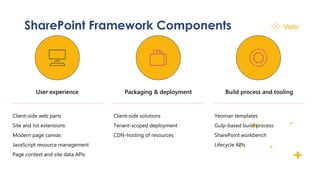
SharePoint Framework Components
SharePoint Framework
+ Since SPFx 1.8
+ Availability to create Teams Tabs using the same
tooling
+ SPFx 1.10 brought the availability of personal
tabs and native mobile support!
Make your Web Part available as a
Teams tab
{
// ...
"supportedHosts": ["SharePointWebPart", "TeamsTab"],
// ...
}
HelloWorldWebPart.json
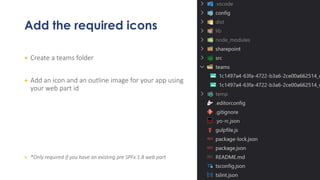
Add the required icons
+ Create a teams folder
+ Add an icon and an outline image for your app using
your web part id
+ *Only required if you have an existing pre SPFx 1.8 web part
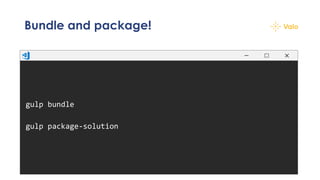
Bundle and package!
gulp bundle
gulp package-solution
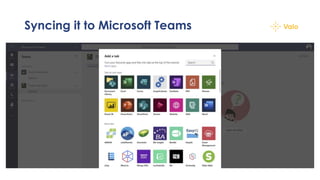
Syncing it to Microsoft Teams
Magic
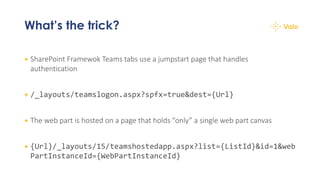
What’s the trick?
+ SharePoint Framewok Teams tabs use a jumpstart page that handles
authentication
+ /_layouts/teamslogon.aspx?spfx=true&dest={Url}
+ The web part is hosted on a page that holds “only” a single web part canvas
+ {Url}/_layouts/15/teamshostedapp.aspx?list={ListId}&id=1&web
PartInstanceId={WebPartInstanceId}
Agenda
Tips and Tricks
SharePoint
Framework and
Microsoft
Teams
Microsoft
Teams as a
Development
Platform
Demos
Demos
Agenda
Tips and Tricks
SharePoint
Framework and
Microsoft
Teams
Microsoft
Teams as a
Development
Platform
Demos
Tips and Tricks
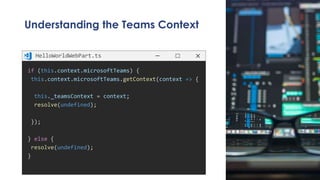
Understanding the Teams Context
if (this.context.microsoftTeams) {
this.context.microsoftTeams.getContext(context => {
this._teamsContext = context;
resolve(undefined);
});
} else {
resolve(undefined);
}
HelloWorldWebPart.ts
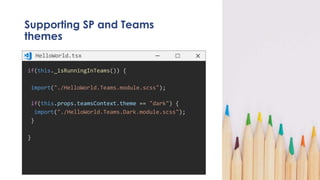
Supporting SP and Teams
themes
if(this._isRunningInTeams()) {
import("./HelloWorld.Teams.module.scss");
if(this.props.teamsContext.theme == "dark") {
import("./HelloWorld.Teams.Dark.module.scss");
}
}
HelloWorld.tsx
Making it event prettier
+ Use Office UI Fabric for anything that would be
consumed through SharePoint and Teams
+ Use Fluent UI (Codename Stardust, codename
Semantic UI) if your goal is to deliver a Teams-
only SPFx web part
Test with the real thing
+ Don’t just test in the Workbench, test in Teams
+ The web experience is nice, but sometimes
misleading
+ Test in your production environment (SSO,
Conditional Access, etc.)
+ Use the Developer preview option
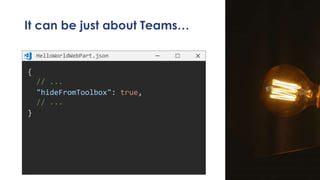
It can be just about Teams…
{
// ...
"hideFromToolbox": true,
// ...
}
HelloWorldWebPart.json
Resources
Resources
+ https://github.com/sebastienlevert/sp-dev-fx-webparts/tree/dev/samples/react-graph-calendar
+ https://docs.microsoft.com/en-us/sharepoint/dev/spfx/web-parts/get-started/using-web-part-as-ms-
teams-tab
+ https://github.com/SharePoint/sp-dev-training-spfx-teams-dev
+ https://developer.microsoft.com/en-us/fabric
+ https://microsoft.github.io/fluent-ui-react/
+ https://slevert.me/ESPC19-SPFx-Teams
Thank you!
@sebastienlevert | http://www.sebastienlevert.com | Product Lead at

Webinar - 2020-03-24 - Build your first Microsoft Teams app using SPFx