Agenda
What is a Teams application?
DEMO: HR
Application
Tabs (3 kinds)
Bot
Messaging
extension
DEMO: Field Visit
Application
SharePoint
Framework
integration
https://bit.ly/Apps4Teams
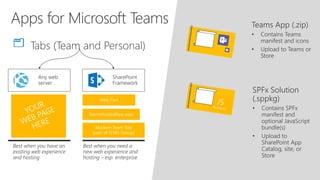
Web Part
TeamsHostedApp.aspx
Modern Team Site
(part of O365 Group)
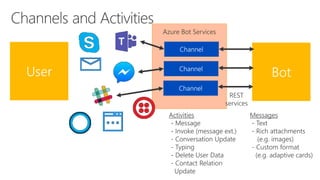
Azure Bot Services
Azure Bot Services
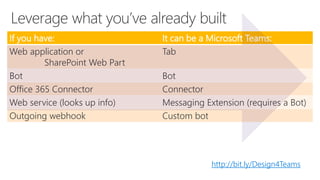
If you have: It can be a Microsoft Teams:
Web application or
SharePoint Web Part
Tab
Bot Bot
Office 365 Connector Connector
Web service (looks up info) Messaging Extension (requires a Bot)
Outgoing webhook Custom bot
http://bit.ly/Design4Teams
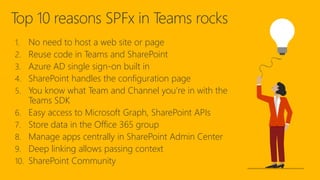
Top 10 reasons SPFx in Teams rocks
1. No need to host a web site or page
2. Reuse code in Teams and SharePoint
3. Azure AD single sign-on built in
4. SharePoint handles the configuration page
5. You know what Team and Channel you’re in with the
Teams SDK
6. Easy access to Microsoft Graph, SharePoint APIs
7. Store data in the Office 365 group
8. Manage apps centrally in SharePoint Admin Center
9. Deep linking allows passing context
10. SharePoint Community
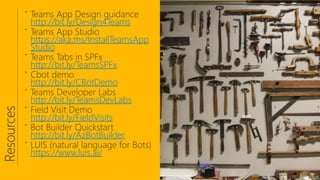
http://bit.ly/Design4Teams
https://aka.ms/InstallTeamsApp
Studio
http://bit.ly/TeamsSPFx
http://bit.ly/CBotDemo
http://bit.ly/TeamsDevLabs
http://bit.ly/FieldVisits
http://bit.ly/AzBotBuilder
https://www.luis.ai/

Introduction to Teams Development - North American Collaboration Summit

Editor's Notes

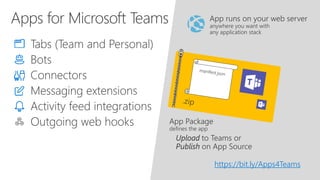
  • #3 EXPLAIN: Here are the parts of a Teams application: Tabs – Display information or present a Single-Page App (implemented as a web page or SharePoint web part) Connectors – Send notifications and information feeds into a Channel (implemented as incoming web service calls / web hooks) Bots – Interact with users via chat messages and cards (implemented as a REST web service) Messaging Extensions – Insert information from the app in the conversation. Requires a Bot. Activity feed – Notify individual users Outgoing web hooks – Receive commands – sort of a 1-way Bot IMPORTANT: None of these features run in Teams, they just appear to! Your application runs outside of Teams, generally in Azure web sites/services or SharePoint web parts. You don’t have to use Azure but it’s easier if you do. You create a manifest (JSON file) that tells Teams where to find the various parts of the app. You create an App Package by zipping the manifest along with application icons; this can be uploaded into Teams
  • #4 Tabs – Display information or present a Single-Page App Connectors – Notifications and information feeds Bots – Natural language interaction Messaging Extensions – Insert information from the app in the conversation. Requires a Bot. Activity feed – Notify individual users Outgoing web hooks – Receive commands
  • #5 VIDEO DEMO This is a solution that helps a team of recruiters in an HR department. It includes tabs, bots, and messaging extensions. YOU can build this demo in the lab for our upcoming Teams Developer Workshop – SIGN UP TODAY!
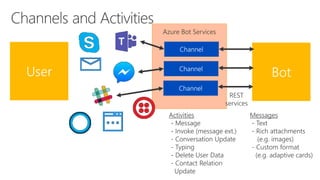
  • #6 EXPLAIN This shows how Azure Bot Services connects your bots to many online chat services. Your bot just uses a standard set of REST services to speak with any Channel (not to be confused with a Teams channel!). The Channel translates to each chat service. Activities flow across channels, and include messages, and indications about what’s going on in the conversation. Messages can be in various formats; Text is the only universal format. Teams can handle advanced formats such as images and adaptive cards, and it allows file uploads and downloads as well.
  • #8 EXPLAIN This shows how Azure Bot Services connects your bots to many online chat services. Your bot just uses a standard set of REST services to speak with any Channel (not to be confused with a Teams channel!). The Channel translates to each chat service. Activities flow across channels, and include messages, and indications about what’s going on in the conversation. Messages can be in various formats; Text is the only universal format. Teams can handle advanced formats such as images and adaptive cards, and it allows file uploads and downloads as well.
  • #9 LIVE DEMO Click the link. Open the Kronos sample; try the Approve and Refuse buttons. EXPLAIN: The interactivity is possible because this is an adaptive card. View the JSON on the left. Message cards can be used in Outlook messages and email as well; these are called Actionable Messages. Clicking a button can call a web service or open a web browser pointing a URL specified in the card.
  • #10 EXPLAIN A big advantage of the Teams architecture is you can reuse things you’ve already developed. This is especially helpful for ISV’s, and greatly accelerated the list of apps in the Teams store. DISCUSSION: What existing assets could you reuse in Teams? Open Teams and go into the Store and look at some of the apps. How might some of these vendors reused their cloud based applications?
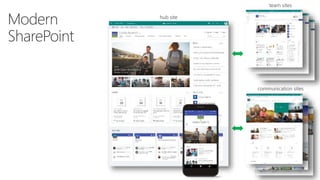
  • #11 DISCUSS: How many SharePoint partners? What kind of work do they do? Have you started using Modern SharePoint? What is Modern SharePoint? Over the last 2 years, Microsoft has completely reimagined the SharePoint UX Beautiful Communication and Team Sites Hub sites provide a flexible structure Site Designs for easy and consistent provisioning By default, Team sites are part of an O365 Group, just like Teams