












Firefox OS
  Web APIs & Apps

                    Jan Jongboom
@janjongboom
One of the main problems that we're facing when developing mobile applications with web
technologies, is that phone specific features aren't available yet in the browser APIs. And why
would we; vibrating your desktop computer was not really an issue when the web standards
were decided upon.
To accomodate for the changing landscape parties like PhoneGap have already tried to bridge
the gap between 'native' and the web on platforms like iOS and Android;
but Mozilla is taking this one step (maybe two or three) further by proposing standardized
solutions to access phone specific APIs.
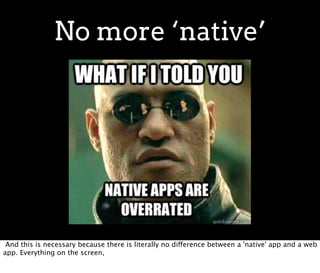
No more ‘native’


 And this is necessary because there is literally no difference between a 'native' app and a web
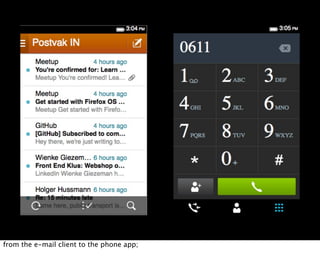
app. Everything on the screen,
from the e-mail client to the phone app;
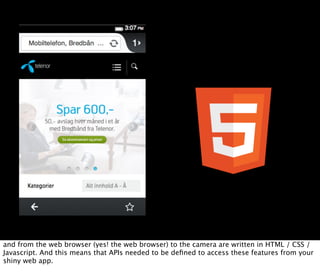
and from the web browser (yes! the web browser) to the camera are written in HTML / CSS /
Javascript. And this means that APIs needed to be defined to access these features from your
shiny web app.
Decouple web and online


Another problem that we need to solve in this space is the fact that 'web' basically means
'online'. But with a mobile application you can't fully rely on a user having a data connection
at all time.
How can we adjust a current application to also be available when the user is on a plane?
Overview
           1. Oeh shiny, an overview of Web APIs
           2. Offline support
           3. First app in 5 minutes
           4. Adding 'native' capabilities
           5. And off to the market place


So here's the list of subjects that we're going to tackle in this talk:
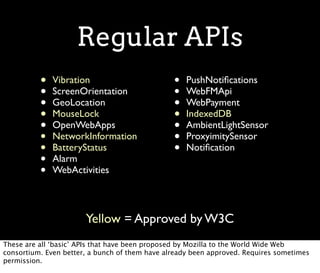
Regular APIs
          •   Vibration                         •   PushNotifications
          •   ScreenOrientation                 •   WebFMApi
          •   GeoLocation                       •   WebPayment
          •   MouseLock                         •   IndexedDB
          •   OpenWebApps                       •   AmbientLightSensor
          •   NetworkInformation                •   ProxyimitySensor
          •   BatteryStatus                     •   Notification
          •   Alarm
          •   WebActivities


                       Yellow = Approved by W3C
These are all ‘basic’ APIs that have been proposed by Mozilla to the World Wide Web
consortium. Even better, a bunch of them have already been approved. Requires sometimes
permission.
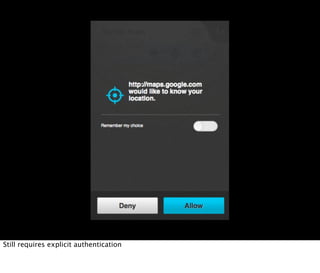
Still requires explicit authentication
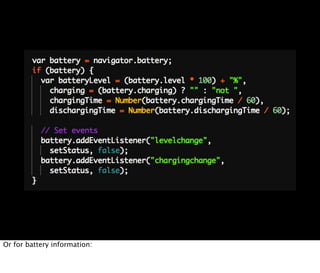
*Who has used IndexedDB?* It's very similar. The APIs are accessible via the `navigator`
object. For example, to vibrate your phone:
Or for battery information:
The list I showed you before is the list of all APIs that you can use from any web application.
However, some websites are more equal than others and thus require additional APIs
Think the phone application. Not every simple website should be able to make phone calls or
send text messages.
Jeg bruker bare
   sertifiserte
      API’er!


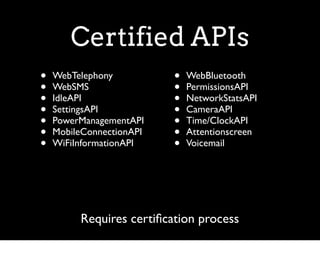
These are the 'certified' APIs. They go through the same W3C process as the other APIs but
require your app to be certified.
Certified APIs
•   WebTelephony          •   WebBluetooth
•   WebSMS                •   PermissionsAPI
•   IdleAPI               •   NetworkStatsAPI
•   SettingsAPI           •   CameraAPI
•   PowerManagementAPI    •   Time/ClockAPI
•   MobileConnectionAPI   •   Attentionscreen
•   WiFiInformationAPI    •   Voicemail


         Requires certification process
Webactivities
                               Connecting apps

Webactivities are a way to loosely couple applications to eachother. They work in a pub/sub
way where every application can register itself as a listener for certain activities.
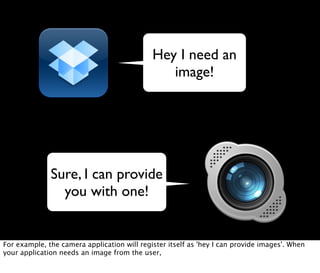
Hey I need an
                                                image!


              Sure, I can provide
                you with one!


For example, the camera application will register itself as 'hey I can provide images'. When
your application needs an image from the user,
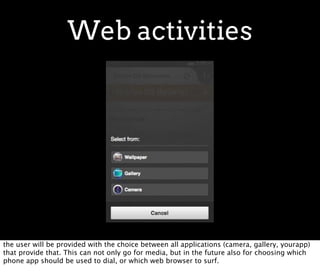
Web activities


the user will be provided with the choice between all applications (camera, gallery, yourapp)
that provide that. This can not only go for media, but in the future also for choosing which
phone app should be used to dial, or which web browser to surf.
I NEED AN ADULT!
Because when you start devving this you might need some help ('i need an adult' image)
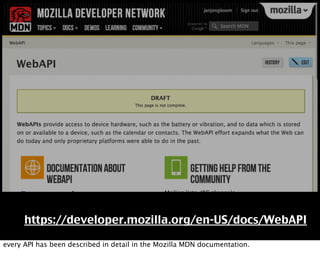
https://developer.mozilla.org/en-US/docs/WebAPI

every API has been described in detail in the Mozilla MDN documentation.
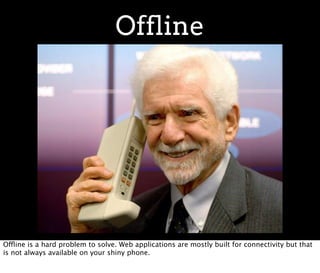
Offline


Offline is a hard problem to solve. Web applications are mostly built for connectivity but that
is not always available on your shiny phone.
Dealing with offline

           • Have the necessary application files
               available
           • Cache server side data
           • Store app state on device


Data can be expensive, people are roaming, etc. The ways that you have to deal with offline
usage is:
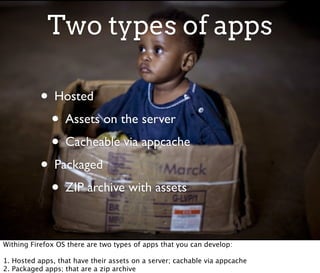
Two types of apps

           • Hosted
            • Assets on the server
            • Cacheable via appcache
           • Packaged
            • ZIP archive with assets

Withing Firefox OS there are two types of apps that you can develop:

1. Hosted apps, that have their assets on a server; cachable via appcache
2. Packaged apps; that are a zip archive
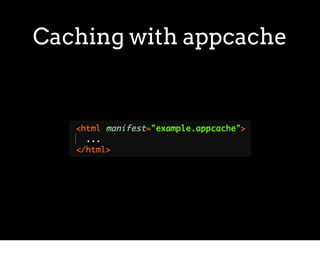
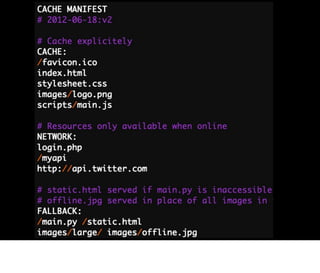
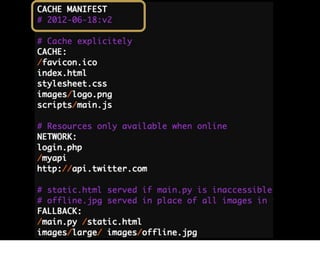
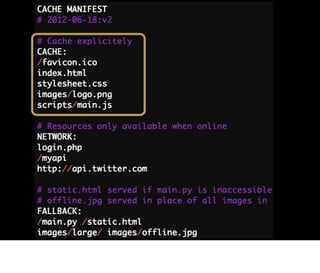
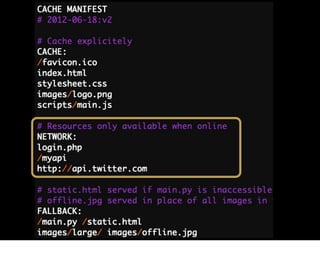
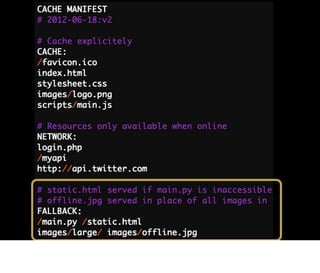
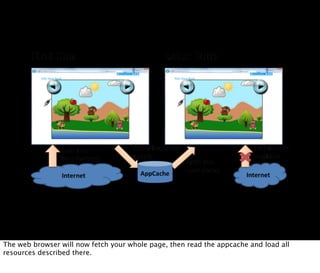
Caching with appcache
The web browser will now fetch your whole page, then read the appcache and load all
resources described there.
ZIP

           • One big zip file
           • Resources loaded from zip file
           • Still requires manifest file


The zip approach doesn't require this but has all dependencies in the zip archive.
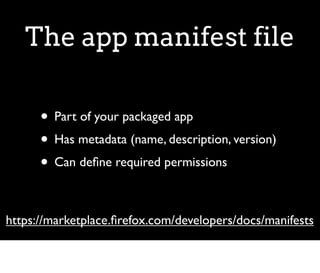
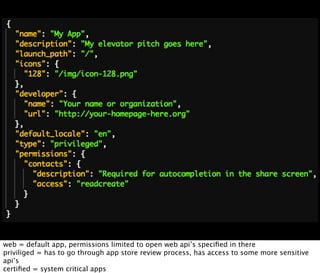
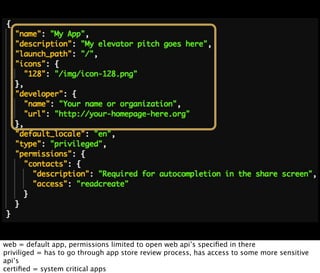
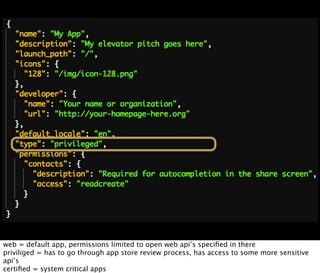
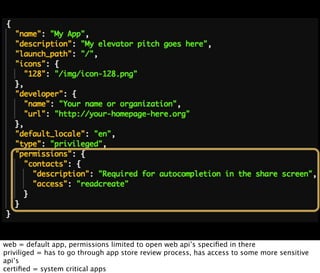
The app manifest file

      • Part of your packaged app
      • Has metadata (name, description, version)
      • Can define required permissions

https://marketplace.firefox.com/developers/docs/manifests
web = default app, permissions limited to open web api’s specified in there
priviliged = has to go through app store review process, has access to some more sensitive
api’s
certified = system critical apps
web = default app, permissions limited to open web api’s specified in there
priviliged = has to go through app store review process, has access to some more sensitive
api’s
certified = system critical apps
web = default app, permissions limited to open web api’s specified in there
priviliged = has to go through app store review process, has access to some more sensitive
api’s
certified = system critical apps
web = default app, permissions limited to open web api’s specified in there
priviliged = has to go through app store review process, has access to some more sensitive
api’s
certified = system critical apps
Storing data

           • Local Storage
           • IndexedDB
           • Limited storage!
            • Manifest file can increase

For storing data rely on local storage or IndexedDB, which has limited storage but these limits
can be improved by specifying this in the manifest file.
Writing first app


Let's get this thing rolling. [Mortar](https://github.com/mozilla/mortar) is a set of projects
that can bootstrap you in creating Web Apps.
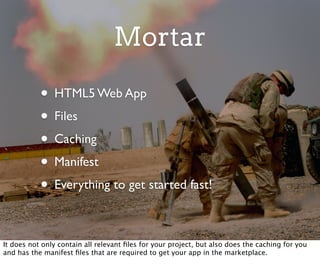
Mortar

           • HTML5 Web App
           • Files
           • Caching
           • Manifest
           • Everything to get started fast!

It does not only contain all relevant files for your project, but also does the caching for you
and has the manifest files that are required to get your app in the marketplace.
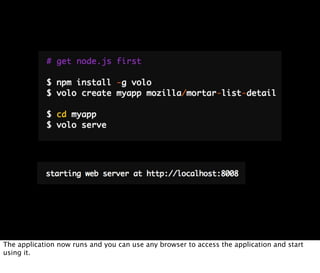
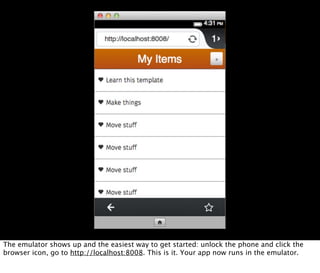
The application now runs and you can use any browser to access the application and start
using it.
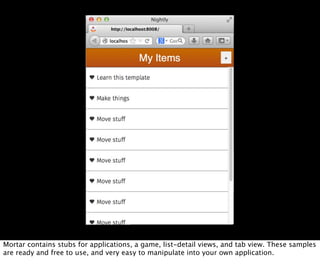
Mortar contains stubs for applications, a game, list-detail views, and tab view. These samples
are ready and free to use, and very easy to manipulate into your own application.
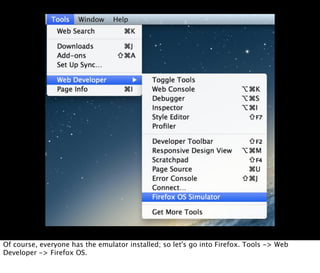
Of course, everyone has the emulator installed; so let's go into Firefox. Tools -> Web
Developer -> Firefox OS.
The emulator shows up and the easiest way to get started: unlock the phone and click the
browser icon, go to http://localhost:8008. This is it. Your app now runs in the emulator.
Debugging time

           • Install Firefox Nightly and go to the app
               page, debug with default tools
           • Remote connection via emulator
            • This breaks often!
           • Weinre

Because your app is 'just another' web application, we can use the default firefox developer
tools to debug the application. You can do this from two sources.
Connect to emulator
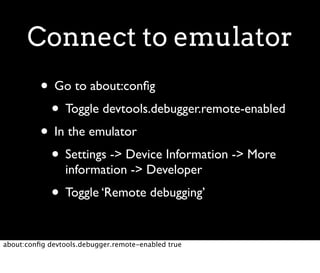
          • Go to about:config
           • Toggle devtools.debugger.remote-enabled
          • In the emulator
           • Settings -> Device Information -> More
                 information -> Developer
             • Toggle ‘Remote debugging’

about:config devtools.debugger.remote-enabled true
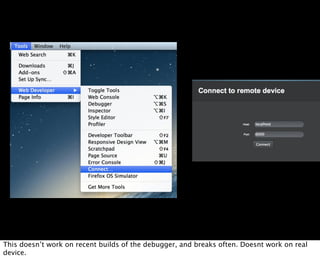
This doesn’t work on recent builds of the debugger, and breaks often. Doesnt work on real
device.
https://github.com/robnyman/
               Firefox-OS-Boilerplate-App


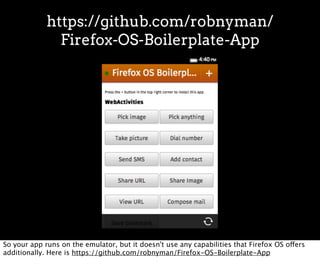
So your app runs on the emulator, but it doesn't use any capabilities that Firefox OS offers
additionally. Here is https://github.com/robnyman/Firefox-OS-Boilerplate-App
Get hacking!
Questions?


github.com/janjongboom

Webapi

  • 1.
    Firefox OS Web APIs & Apps Jan Jongboom
  • 2.
  • 3.
    One of themain problems that we're facing when developing mobile applications with web technologies, is that phone specific features aren't available yet in the browser APIs. And why would we; vibrating your desktop computer was not really an issue when the web standards were decided upon.
  • 4.
    To accomodate forthe changing landscape parties like PhoneGap have already tried to bridge the gap between 'native' and the web on platforms like iOS and Android;
  • 5.
    but Mozilla istaking this one step (maybe two or three) further by proposing standardized solutions to access phone specific APIs.
  • 6.
    No more ‘native’ And this is necessary because there is literally no difference between a 'native' app and a web app. Everything on the screen,
  • 7.
    from the e-mailclient to the phone app;
  • 8.
    and from theweb browser (yes! the web browser) to the camera are written in HTML / CSS / Javascript. And this means that APIs needed to be defined to access these features from your shiny web app.
  • 9.
    Decouple web andonline Another problem that we need to solve in this space is the fact that 'web' basically means 'online'. But with a mobile application you can't fully rely on a user having a data connection at all time.
  • 10.
    How can weadjust a current application to also be available when the user is on a plane?
  • 11.
    Overview 1. Oeh shiny, an overview of Web APIs 2. Offline support 3. First app in 5 minutes 4. Adding 'native' capabilities 5. And off to the market place So here's the list of subjects that we're going to tackle in this talk:
  • 12.
    Regular APIs • Vibration • PushNotifications • ScreenOrientation • WebFMApi • GeoLocation • WebPayment • MouseLock • IndexedDB • OpenWebApps • AmbientLightSensor • NetworkInformation • ProxyimitySensor • BatteryStatus • Notification • Alarm • WebActivities Yellow = Approved by W3C These are all ‘basic’ APIs that have been proposed by Mozilla to the World Wide Web consortium. Even better, a bunch of them have already been approved. Requires sometimes permission.
  • 13.
  • 14.
    *Who has usedIndexedDB?* It's very similar. The APIs are accessible via the `navigator` object. For example, to vibrate your phone:
  • 15.
    Or for batteryinformation:
  • 16.
    The list Ishowed you before is the list of all APIs that you can use from any web application. However, some websites are more equal than others and thus require additional APIs
  • 17.
    Think the phoneapplication. Not every simple website should be able to make phone calls or send text messages.
  • 18.
    Jeg bruker bare sertifiserte API’er! These are the 'certified' APIs. They go through the same W3C process as the other APIs but require your app to be certified.
  • 19.
    Certified APIs • WebTelephony • WebBluetooth • WebSMS • PermissionsAPI • IdleAPI • NetworkStatsAPI • SettingsAPI • CameraAPI • PowerManagementAPI • Time/ClockAPI • MobileConnectionAPI • Attentionscreen • WiFiInformationAPI • Voicemail Requires certification process
  • 20.
    Webactivities Connecting apps Webactivities are a way to loosely couple applications to eachother. They work in a pub/sub way where every application can register itself as a listener for certain activities.
  • 21.
    Hey I needan image! Sure, I can provide you with one! For example, the camera application will register itself as 'hey I can provide images'. When your application needs an image from the user,
  • 22.
    Web activities the userwill be provided with the choice between all applications (camera, gallery, yourapp) that provide that. This can not only go for media, but in the future also for choosing which phone app should be used to dial, or which web browser to surf.
  • 23.
    I NEED ANADULT! Because when you start devving this you might need some help ('i need an adult' image)
  • 24.
    https://developer.mozilla.org/en-US/docs/WebAPI every API hasbeen described in detail in the Mozilla MDN documentation.
  • 25.
    Offline Offline is ahard problem to solve. Web applications are mostly built for connectivity but that is not always available on your shiny phone.
  • 26.
    Dealing with offline • Have the necessary application files available • Cache server side data • Store app state on device Data can be expensive, people are roaming, etc. The ways that you have to deal with offline usage is:
  • 27.
    Two types ofapps • Hosted • Assets on the server • Cacheable via appcache • Packaged • ZIP archive with assets Withing Firefox OS there are two types of apps that you can develop: 1. Hosted apps, that have their assets on a server; cachable via appcache 2. Packaged apps; that are a zip archive
  • 28.
  • 34.
    The web browserwill now fetch your whole page, then read the appcache and load all resources described there.
  • 35.
    ZIP • One big zip file • Resources loaded from zip file • Still requires manifest file The zip approach doesn't require this but has all dependencies in the zip archive.
  • 36.
    The app manifestfile • Part of your packaged app • Has metadata (name, description, version) • Can define required permissions https://marketplace.firefox.com/developers/docs/manifests
  • 37.
    web = defaultapp, permissions limited to open web api’s specified in there priviliged = has to go through app store review process, has access to some more sensitive api’s certified = system critical apps
  • 38.
    web = defaultapp, permissions limited to open web api’s specified in there priviliged = has to go through app store review process, has access to some more sensitive api’s certified = system critical apps
  • 39.
    web = defaultapp, permissions limited to open web api’s specified in there priviliged = has to go through app store review process, has access to some more sensitive api’s certified = system critical apps
  • 40.
    web = defaultapp, permissions limited to open web api’s specified in there priviliged = has to go through app store review process, has access to some more sensitive api’s certified = system critical apps
  • 41.
    Storing data • Local Storage • IndexedDB • Limited storage! • Manifest file can increase For storing data rely on local storage or IndexedDB, which has limited storage but these limits can be improved by specifying this in the manifest file.
  • 42.
    Writing first app Let'sget this thing rolling. [Mortar](https://github.com/mozilla/mortar) is a set of projects that can bootstrap you in creating Web Apps.
  • 43.
    Mortar • HTML5 Web App • Files • Caching • Manifest • Everything to get started fast! It does not only contain all relevant files for your project, but also does the caching for you and has the manifest files that are required to get your app in the marketplace.
  • 44.
    The application nowruns and you can use any browser to access the application and start using it.
  • 45.
    Mortar contains stubsfor applications, a game, list-detail views, and tab view. These samples are ready and free to use, and very easy to manipulate into your own application.
  • 46.
    Of course, everyonehas the emulator installed; so let's go into Firefox. Tools -> Web Developer -> Firefox OS.
  • 47.
    The emulator showsup and the easiest way to get started: unlock the phone and click the browser icon, go to http://localhost:8008. This is it. Your app now runs in the emulator.
  • 48.
    Debugging time • Install Firefox Nightly and go to the app page, debug with default tools • Remote connection via emulator • This breaks often! • Weinre Because your app is 'just another' web application, we can use the default firefox developer tools to debug the application. You can do this from two sources.
  • 49.
    Connect to emulator • Go to about:config • Toggle devtools.debugger.remote-enabled • In the emulator • Settings -> Device Information -> More information -> Developer • Toggle ‘Remote debugging’ about:config devtools.debugger.remote-enabled true
  • 50.
    This doesn’t workon recent builds of the debugger, and breaks often. Doesnt work on real device.
  • 51.
    https://github.com/robnyman/ Firefox-OS-Boilerplate-App So your app runs on the emulator, but it doesn't use any capabilities that Firefox OS offers additionally. Here is https://github.com/robnyman/Firefox-OS-Boilerplate-App
  • 52.
  • 53.