Building Native Mobile
Applications using PhoneGap
  Speaker: Essam A. El-Zinaty
Agenda
•   Mobile Application Overview
•   PhoneGap Overview
•   PhoneGap Architecture
•   PhoneGap Using


Google Technology User Group (GTUG)
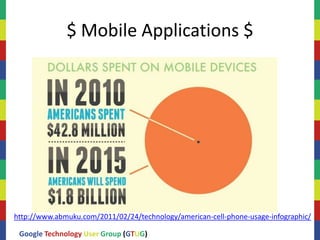
$ Mobile Applications $


http://www.abmuku.com/2011/02/24/technology/american-cell-phone-usage-infographic/

 Google Technology User Group (GTUG)
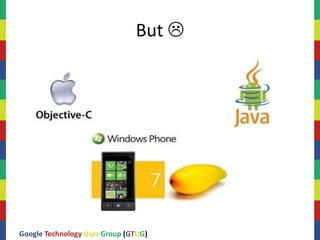
But 


Google Technology User Group (GTUG)
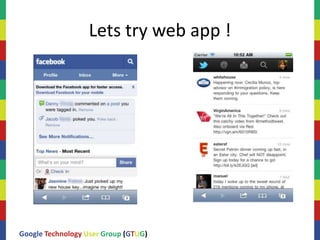
Lets try web app !


Google Technology User Group (GTUG)
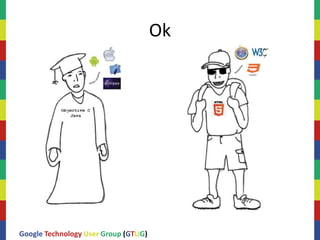
Ok


Google Technology User Group (GTUG)
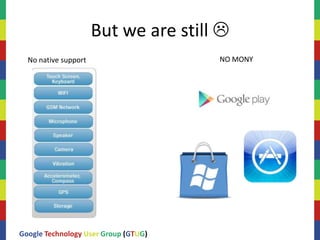
But we are still 
  No native support                   NO MONY


Google Technology User Group (GTUG)
PhoneGap


Google Technology User Group (GTUG)
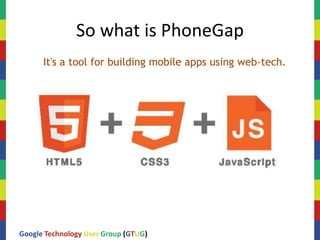
So what is PhoneGap
      It's a tool for building mobile apps using web-tech.


Google Technology User Group (GTUG)
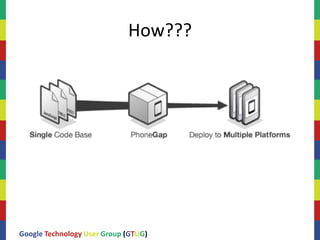
How???


Google Technology User Group (GTUG)
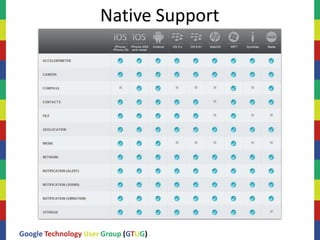
Native Support


Google Technology User Group (GTUG)
Application Structure

     HTML/JS/CSS + graphic assets are on the device, packaged as part
     of the build process.
     JavaScript can store retrieved data in a SQLite database or from
     localStorage (key/value pair) for offline access.
     Often a server component involved.
     JavaScript communicates with the server via XHR to get retrieve
     data.


Google Technology User Group (GTUG)
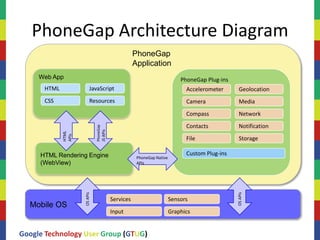
PhoneGap Architecture Diagram
                                                              PhoneGap
                                                              Application
     Web App                                                                         PhoneGap Plug-ins
      HTML               JavaScript                                                    Accelerometer      Geolocation
      CSS                Resources                                                     Camera             Media
                                                                                       Compass            Network
                                                                                       Contacts           Notification
                              PhoneGap
                                         JS APIs
             HTML
             APIs


                                                                                       File               Storage

     HTML Rendering Engine                                                             Custom Plug-ins
                                                               PhoneGap Native
     (WebView)                                                 APIs
                    OS APIs


                                                                                                         OS APIs
                                                   Services                      Sensors
  Mobile OS
                                                   Input                         Graphics


Google Technology User Group (GTUG)
Best Practices

     • Where possible use single HTML page
        Use JavaScript to show/hide page elements based on user interaction
        instead of linking to a separate page.
        Those JavaScript toolkits come in handy here!


     • Consider offline usage
        navigator.network.connection.type
        online /offline events
        Note: Apple checks for offline support


Google Technology User Group (GTUG)
Best Practices

     • Utilize persistent storage
        File APIs
        Storage APIs

     • SQL Lite / LawnchairWhere possible use single HTML page
        Use JavaScript to show/hide page elements based on user interaction
        instead of linking to a separate page.
        Those JavaScript toolkits come in handy here!

     • Obfuscate / crunch your JavaScript before release


Google Technology User Group (GTUG)
Using PhoneGap

     • Create resources in www directory
     • Include cordova.*.js in your start page (usually
       index.html)
     • Create onload handler
     • In onload handler register for deviceReady event from
       PhoneGap
     • When deviceready fires PhoneGap is ready.
     • Build, install and test for each platform
     • Use console.log for debuging


Google Technology User Group (GTUG)
Links
  • http://docs.phonegap.com/en/1.9.0/guide_getting-
    started_android_index.md.html#Getting%20Started%20with
    %20Android
  • http://docs.phonegap.com/en/1.9.0/index.html
  • http://brian.io/lawnchair/
  • http://zeptojs.com/


Google Technology User Group (GTUG)
The End
                               Thanks


Google Technology User Group (GTUG)

Phonegap

  • 1.
    Building Native Mobile Applicationsusing PhoneGap Speaker: Essam A. El-Zinaty
  • 2.
    Agenda • Mobile Application Overview • PhoneGap Overview • PhoneGap Architecture • PhoneGap Using Google Technology User Group (GTUG)
  • 3.
    $ Mobile Applications$ http://www.abmuku.com/2011/02/24/technology/american-cell-phone-usage-infographic/ Google Technology User Group (GTUG)
  • 4.
    But  Google TechnologyUser Group (GTUG)
  • 5.
    Lets try webapp ! Google Technology User Group (GTUG)
  • 6.
  • 7.
    But we arestill  No native support NO MONY Google Technology User Group (GTUG)
  • 8.
  • 9.
    So what isPhoneGap It's a tool for building mobile apps using web-tech. Google Technology User Group (GTUG)
  • 10.
  • 11.
  • 12.
    Application Structure HTML/JS/CSS + graphic assets are on the device, packaged as part of the build process. JavaScript can store retrieved data in a SQLite database or from localStorage (key/value pair) for offline access. Often a server component involved. JavaScript communicates with the server via XHR to get retrieve data. Google Technology User Group (GTUG)
  • 13.
    PhoneGap Architecture Diagram PhoneGap Application Web App PhoneGap Plug-ins HTML JavaScript Accelerometer Geolocation CSS Resources Camera Media Compass Network Contacts Notification PhoneGap JS APIs HTML APIs File Storage HTML Rendering Engine Custom Plug-ins PhoneGap Native (WebView) APIs OS APIs OS APIs Services Sensors Mobile OS Input Graphics Google Technology User Group (GTUG)
  • 14.
    Best Practices • Where possible use single HTML page Use JavaScript to show/hide page elements based on user interaction instead of linking to a separate page. Those JavaScript toolkits come in handy here! • Consider offline usage navigator.network.connection.type online /offline events Note: Apple checks for offline support Google Technology User Group (GTUG)
  • 15.
    Best Practices • Utilize persistent storage File APIs Storage APIs • SQL Lite / LawnchairWhere possible use single HTML page Use JavaScript to show/hide page elements based on user interaction instead of linking to a separate page. Those JavaScript toolkits come in handy here! • Obfuscate / crunch your JavaScript before release Google Technology User Group (GTUG)
  • 16.
    Using PhoneGap • Create resources in www directory • Include cordova.*.js in your start page (usually index.html) • Create onload handler • In onload handler register for deviceReady event from PhoneGap • When deviceready fires PhoneGap is ready. • Build, install and test for each platform • Use console.log for debuging Google Technology User Group (GTUG)
  • 17.
    Links •http://docs.phonegap.com/en/1.9.0/guide_getting- started_android_index.md.html#Getting%20Started%20with %20Android • http://docs.phonegap.com/en/1.9.0/index.html • http://brian.io/lawnchair/ • http://zeptojs.com/ Google Technology User Group (GTUG)
  • 18.
    The End Thanks Google Technology User Group (GTUG)