Building Mobile
Cross-Platform Apps
with HTML5, jQuery
Mobile & PhoneGap
Nick Landry
Microsoft Senior Technical Evangelist
Nokia Developer Ambassador
nick.landry@microsoft.com
www.AgeofMobility.com
@ActiveNick
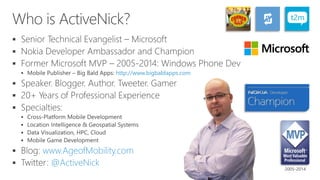



 http://www.bigbaldapps.com







 www.AgeofMobility.com
 @ActiveNick
2005-2014
Agenda
• Web Development Primer: HTML5, CSS & JavaScript
• Getting Started with jQuery Mobile (JQM)
– Common IDEs for JQM Mobile Development
– Testing & Debugging via Mobile Emulators
• Mobile Hybrid Apps with PhoneGap
– Setting-up Your PhoneGap Environment
– Getting Started with PhoneGap
– Calling Native Platform APIs
– Other Considerations: Design, Deployment, etc.
• Samples / Demos
• Discussion: Join in!
Mobile Platform Options
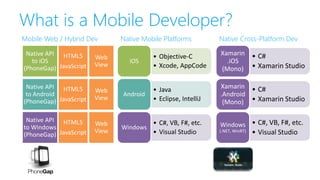
What is a Mobile Developer?
Mobile Web / Hybrid Dev
Web
View
Web
View
Web
View
• Objective-C
• Xcode, AppCode
iOS
• Java
• Eclipse, IntelliJ
Android
• C#, VB, F#, etc.
• Visual Studio
Windows
• C#
• Xamarin Studio
Xamarin
.iOS
(Mono)
• C#
• Xamarin Studio
Xamarin
.Android
(Mono)
• C#, VB, F#, etc.
• Visual Studio
Windows
(.NET, WinRT)
Native Mobile Platforms Native Cross-Platform Dev
HTML5
JavaScript
HTML5
JavaScript
HTML5
JavaScript
Native API
to iOS
(PhoneGap)
Native API
to Android
(PhoneGap)
Native API
to Windows
(PhoneGap)
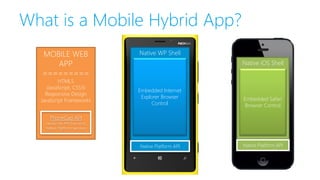
What is a Mobile Hybrid App?
Native WP Shell
Embedded Internet
Explorer Browser
Control
Native iOS Shell
Embedded Safari
Browser Control
Native Platform API Native Platform API
MOBILE WEB
APP
=========
HTML5
(JavaScript, CSS3)
Responsive Design
JavaScript
Frameworks
PhoneGap API
JavaScript API Exposing
Native Platform Services
MOBILE WEB
APP
=========
HTML5
(JavaScript, CSS3)
Responsive Design
JavaScript Frameworks
PhoneGap API
JavaScript API Exposing
Native Platform Services
Web Development Primer
HTML5 & CSS3
• HTML5 opens the door for new
advanced (i.e. modern) web techniques
• HTML5 paves the way for JavaScript to
go beyond standard HTML
– HTML5 is a LOT about JavaScript
APIs
• Most mobile browsers support HTML5
• HTML5 still allows some degree of
backward compatibility with older
browsers via progressive enhancement
• jQuery Mobile creates web apps from
standard and semantic HTML5
• Advanced knowledge of HTML5 & CSS3
is NOT required for JQM development
Modern Techniques Enabled
• Offline access and storage
• Web sockets
• Geolocation access
• Accelerometer and gyroscope support
• Animations, 2D and 3D transformations
• Gradients and visual effects
• Viewport management (for zooming
support inside the browser)
• Webapp installation metadata
• Integration with native applications
• Multimedia support
• Graphic drawing (vector and bitmap)
• Custom font support
Pick a Mobile Web Dev Framework
• Pure HTML5 & JavaScript
• jQuery Mobile
• Kendo UI Mobile
• Sencha Touch
• jQTouch
• Others
– The M-Project, Wink Toolkit, Zepto, Jo, EmbedJS, DHTMLX Touch,
Mobilise.js, Xui.js, Enjo.js, PhoneJS, iUI, Spine Mobile, WebApp.net, Dojo
Mobile, etc.
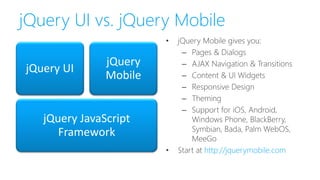
jQuery UI vs. jQuery Mobile
jQuery JavaScript
Framework
jQuery UI
jQuery
Mobile
• jQuery Mobile gives you:
– Pages & Dialogs
– AJAX Navigation & Transitions
– Content & UI Widgets
– Responsive Design
– Theming
– Support for iOS, Android,
Windows Phone, BlackBerry,
Symbian, Bada, Palm WebOS,
MeeGo
• Start at http://jquerymobile.com
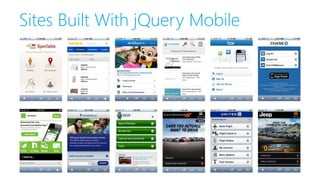
Sites Built With jQuery Mobile
Demo
Building our First Mobile Web App with JQM
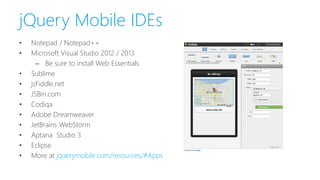
jQuery Mobile IDEs
• Notepad / Notepad++
• Microsoft Visual Studio 2012 / 2013
– Be sure to install Web Essentials
• Sublime
• jsFiddle.net
• JSBin.com
• Codiqa
• Adobe Dreamweaver
• JetBrains WebStorm
• Aptana Studio 3
• Eclipse
• More at jquerymobile.com/resources/#Apps
Emulators for JQM Debugging/Testing
• Chrome Desktop Browser with Dimensions Extension
• Android Emulator Options
– Install the Android SDK from http://developer.android.com/sdk
– Better & faster emulator from Genymotion: http://www.genymotion.com
• iOS Simulator (Mac)
– On Windows: Electric Mobile Studio (via Visual Studio Gallery)
• Windows Phone Emulator
– Requires VS2012/2013 & Windows Phone SDK: http://dev.windowsphone.com
• Opera Mobile Emulator for desktop
– http://www.opera.com/developer/mobile-emulator
• Always a good idea to test on physical devices
• Xamarin Test Cloud
– http://xamarin.com/test-cloud
Demo
Digging Deeper into JQM
Mobile Hybrid Apps
PhoneGap and its Derivatives
Cross-Platform Mobile Apps
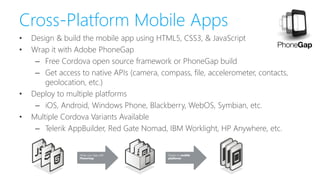
• Design & build the mobile app using HTML5, CSS3, & JavaScript
• Wrap it with Adobe PhoneGap
– Free Cordova open source framework or PhoneGap build
– Get access to native APIs (camera, compass, file, accelerometer, contacts,
geolocation, etc.)
• Deploy to multiple platforms
– iOS, Android, Windows Phone, Blackberry, WebOS, Symbian, etc.
• Multiple Cordova Variants Available
– Telerik AppBuilder, Red Gate Nomad, IBM Worklight, HP Anywhere, etc.
PhoneGap, by any other name…
• PhoneGap was originally developed by Nitobi
• In 2011, Adobe acquired Nitobi
• PhoneGap was donated to the Apache Software Foundation (ASF)
under the name Apache Cordova
• Through the ASF, PhoneGap remains free and open source under the
Apache License, Version 2.0
• PhoneGap is an open source distribution of Cordova
• Other commercial distributions of Cordova available
– Telerik AppBuilder, Red Gate VS Nomad, IBM Worklight, HP Anywhere, etc.
Pick a Mobile Web Dev Framework
• Pure HTML5 & JavaScript
• jQuery Mobile (covered in this talk)
• Sencha Touch
• Kendo UI Mobile
• jQTouch
• Others
– The M-Project, Wink Toolkit, Zepto, Jo, EmbedJS,
DHTMLX Touch, Mobilise.js, Xui.js, Enjo.js, PhoneJS, iUI,
Spine Mobile, WebApp.net, Dojo Mobile, etc.
Installing PhoneGap
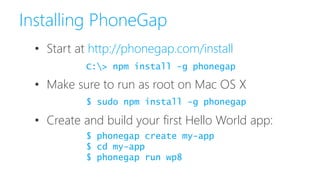
• Start at http://phonegap.com/install
• Make sure to run as root on Mac OS X
• Create and build your first Hello World app:
C:> npm install -g phonegap
$ phonegap create my-app
$ cd my-app
$ phonegap run wp8
$ sudo npm install -g phonegap
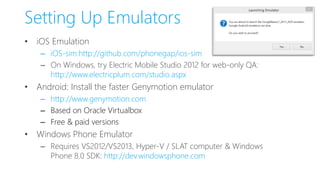
Setting Up Emulators
• iOS Emulation
– iOS-sim:http://github.com/phonegap/ios-sim
– On Windows, try Electric Mobile Studio 2012 for web-only QA:
http://www.electricplum.com/studio.aspx
• Android: Install the faster Genymotion emulator
– http://www.genymotion.com
– Based on Oracle Virtualbox
– Free & paid versions
• Windows Phone Emulator
– Requires VS2012/VS2013, Hyper-V / SLAT computer & Windows
Phone 8.0 SDK: http://dev.windowsphone.com
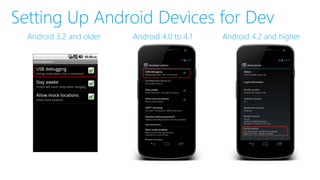
Setting Up Android Devices for Dev
Android 3.2 and older Android 4.0 to 4.1 Android 4.2 and higher
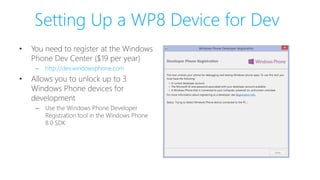
Setting Up a WP8 Device for Dev
• You need to register at the Windows
Phone Dev Center ($19 per year)
– http://dev.windowsphone.com
• Allows you to unlock up to 3
Windows Phone devices for
development
– Use the Windows Phone Developer
Registration tool in the Windows Phone
8.0 SDK
Demo
PhoneGap Development Environment
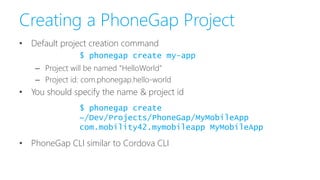
Creating a PhoneGap Project
• Default project creation command
– Project will be named “HelloWorld”
– Project id: com.phonegap.hello-world
• You should specify the name & project id
• PhoneGap CLI similar to Cordova CLI
$ phonegap create my-app
$ phonegap create
~/Dev/Projects/PhoneGap/MyMobileApp
com.mobility42.mymobileapp MyMobileApp
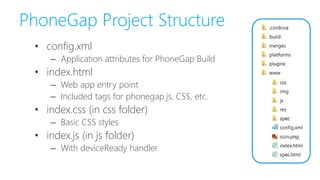
PhoneGap Project Structure
• config.xml
– Application attributes for PhoneGap Build
• index.html
– Web app entry point
– Included tags for phonegap.js, CSS, etc.
• index.css (in css folder)
– Basic CSS styles
• index.js (in js folder)
– With deviceReady handler
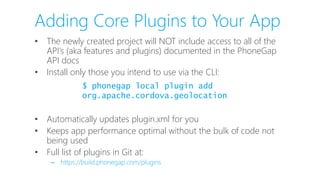
Adding Core Plugins to Your App
• The newly created project will NOT include access to all of the
API’s (aka features and plugins) documented in the PhoneGap
API docs
• Install only those you intend to use via the CLI:
• Automatically updates plugin.xml for you
• Keeps app performance optimal without the bulk of code not
being used
• Full list of plugins in Git at:
– https://build.phonegap.com/plugins
$ phonegap local plugin add
org.apache.cordova.geolocation
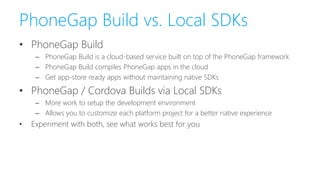
PhoneGap Build vs. Local SDKs
• PhoneGap Build
– PhoneGap Build is a cloud-based service built on top of the PhoneGap framework
– PhoneGap Build compiles PhoneGap apps in the cloud
– Get app-store ready apps without maintaining native SDKs
• PhoneGap / Cordova Builds via Local SDKs
– More work to setup the development environment
– Allows you to customize each platform project for a better native experience
• Experiment with both, see what works best for you
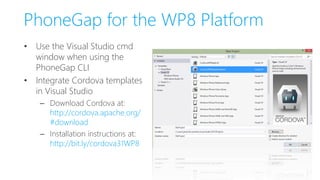
PhoneGap for the WP8 Platform
• Use the Visual Studio cmd
window when using the
PhoneGap CLI
• Integrate Cordova templates
in Visual Studio
– Download Cordova at:
http://cordova.apache.org/
#download
– Installation instructions at:
http://bit.ly/cordova31WP8
Demo
Building your First PhoneGap App
PhoneGap App Deployment
• Windows Phone, webOS & Symbian
– PhoneGap Build produces a binary that is ready for store submission and
distribution
• Android, iOS & BlackBerry
– You'll need to provide the correct certificates and/or signing keys to allow
distribution
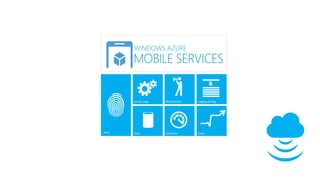
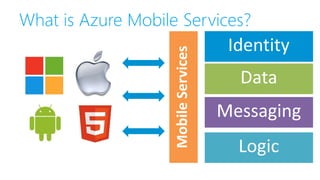
What is Azure Mobile Services?
Demo
Calling Cloud Services from Hybrid Apps
Which Mobile Approach is the Right
One?
Is There a Silver Bullet?
Go Native or Go Home
If you want to chase that “Angry Birds” money…
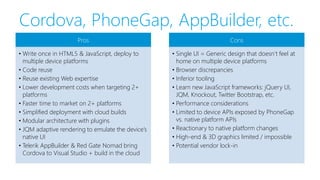
Cordova, PhoneGap, AppBuilder, etc.
Pros
• Write once in HTML5 & JavaScript, deploy to
multiple device platforms
• Code reuse
• Reuse existing Web expertise
• Lower development costs when targeting 2+
platforms
• Faster time to market on 2+ platforms
• Simplified deployment with cloud builds
• Modular architecture with plugins
• JQM adaptive rendering to emulate the device’s
native UI
• Telerik AppBuilder & Red Gate Nomad bring
Cordova to Visual Studio + build in the cloud
Cons
• Single UI = Generic design that doesn’t feel at
home on multiple device platforms
• Browser discrepancies
• Inferior tooling
• Learn new JavaScript frameworks: jQuery UI,
JQM, Knockout, Twitter Bootstrap, etc.
• Performance considerations
• Limited to device APIs exposed by PhoneGap
vs. native platform APIs
• Reactionary to native platform changes
• High-end & 3D graphics limited / impossible
• Potential vendor lock-in
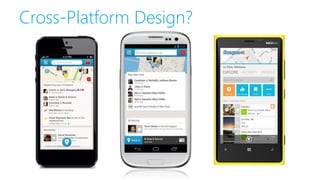
Cross-Platform Design?
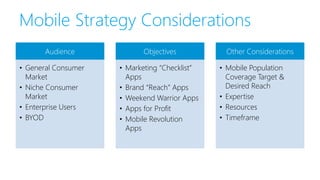
Mobile Strategy Considerations
Audience
• General Consumer
Market
• Niche Consumer
Market
• Enterprise Users
• BYOD
Objectives
• Marketing “Checklist”
Apps
• Brand “Reach” Apps
• Weekend Warrior Apps
• Apps for Profit
• Mobile Revolution
Apps
Other Considerations
• Mobile Population
Coverage Target &
Desired Reach
• Expertise
• Resources
• Timeframe
Summary • PhoneGap easily lets you target the top three
mobile platform:
– Android, iOS, Windows Phone (and others)
• There is no silver bullet, no “one size fits all”, when
choosing a cross-platform mobile strategy
• Native Apps and Hybrid Apps both have their place
• Each mobile project should be evaluated separately
• Audience, Goals, Reach, Expertise, Resources
• PhoneGap lets you leverage web skills to build
cross-platform mobile apps fast
• Remember to always strive to create a unique UI
specific to the platform
Technical Resources
• Official PhoneGap Site
– http://phonegap.com
– You will also need NodeJS: http://nodejs.org
• Official jQuery Mobile Resources
– http://jquerymobile.com/resources
• Pluralsight Online Training
– www.pluralsight.com/training/Courses/Find?searchTerm=phonegap
• Mobile Web Development IDEs
– Sublime: www.sublimetext.com
– JSFIDDLE: http://jsFiddle.net
– JSBin: http://JSBin.com
– Codiqa: http://codiqa.com
– JetBrains WebStorm: www.jetbrains.com/webstorm
• Age of Mobility Blog
– www.AgeofMobility.com
PhoneGap Articles and Posts
• PhoneGap 3.0 – Stuff You Should Know
– http://devgirl.org/2013/09/05/phonegap-3-0-stuff-you-should-know
• PhoneGap 3 for Dummies, Part 1: Setup & a first example
– http://neophob.com/2013/08/phonegap-3-for-dummies-part-1-
setup-and-a-first-example
• PhoneGap and Cordova with iOS 7
– http://coenraets.org/blog/2013/09/phonegap-and-cordova-with-ios-7
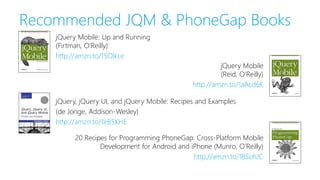
Recommended JQM & PhoneGap Books
jQuery, jQuery UI, and jQuery Mobile: Recipes and Examples
(de Jonge, Addison-Wesley)
http://amzn.to/1eB5KHE
20 Recipes for Programming PhoneGap: Cross-Platform Mobile
Development for Android and iPhone (Munro, O’Reilly)
http://amzn.to/18SohJC
jQuery Mobile: Up and Running
(Firtman, O’Reilly)
http://amzn.to/15Olkce
jQuery Mobile
(Reid, O’Reilly)
http://amzn.to/1aAcd6K
Thank You!
Slides will be posted on my Slideshare account.
Please share your comments. Your feedback is important and appreciated.
Slideshare: www.slideshare.net/ActiveNick
Blog: www.AgeofMobility.com
Twitter: @ActiveNick
Mobile Apps: www.bigbaldapps.com
LinkedIn: www.linkedin.com/in/activenick
Website: www.AgeofMobility.com
Email: nick.landry@microsoft.com

Building Mobile Cross-Platform Apps with HTML5, jQuery Mobile & PhoneGap

  • 1.
    Building Mobile Cross-Platform Apps withHTML5, jQuery Mobile & PhoneGap Nick Landry Microsoft Senior Technical Evangelist Nokia Developer Ambassador nick.landry@microsoft.com www.AgeofMobility.com @ActiveNick
  • 2.
  • 3.
    Agenda • Web DevelopmentPrimer: HTML5, CSS & JavaScript • Getting Started with jQuery Mobile (JQM) – Common IDEs for JQM Mobile Development – Testing & Debugging via Mobile Emulators • Mobile Hybrid Apps with PhoneGap – Setting-up Your PhoneGap Environment – Getting Started with PhoneGap – Calling Native Platform APIs – Other Considerations: Design, Deployment, etc. • Samples / Demos • Discussion: Join in!
  • 4.
  • 5.
    What is aMobile Developer? Mobile Web / Hybrid Dev Web View Web View Web View • Objective-C • Xcode, AppCode iOS • Java • Eclipse, IntelliJ Android • C#, VB, F#, etc. • Visual Studio Windows • C# • Xamarin Studio Xamarin .iOS (Mono) • C# • Xamarin Studio Xamarin .Android (Mono) • C#, VB, F#, etc. • Visual Studio Windows (.NET, WinRT) Native Mobile Platforms Native Cross-Platform Dev HTML5 JavaScript HTML5 JavaScript HTML5 JavaScript Native API to iOS (PhoneGap) Native API to Android (PhoneGap) Native API to Windows (PhoneGap)
  • 6.
    What is aMobile Hybrid App? Native WP Shell Embedded Internet Explorer Browser Control Native iOS Shell Embedded Safari Browser Control Native Platform API Native Platform API MOBILE WEB APP ========= HTML5 (JavaScript, CSS3) Responsive Design JavaScript Frameworks PhoneGap API JavaScript API Exposing Native Platform Services MOBILE WEB APP ========= HTML5 (JavaScript, CSS3) Responsive Design JavaScript Frameworks PhoneGap API JavaScript API Exposing Native Platform Services
  • 7.
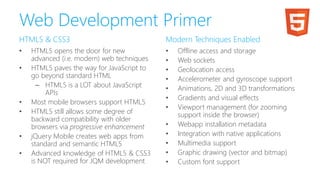
    Web Development Primer HTML5& CSS3 • HTML5 opens the door for new advanced (i.e. modern) web techniques • HTML5 paves the way for JavaScript to go beyond standard HTML – HTML5 is a LOT about JavaScript APIs • Most mobile browsers support HTML5 • HTML5 still allows some degree of backward compatibility with older browsers via progressive enhancement • jQuery Mobile creates web apps from standard and semantic HTML5 • Advanced knowledge of HTML5 & CSS3 is NOT required for JQM development Modern Techniques Enabled • Offline access and storage • Web sockets • Geolocation access • Accelerometer and gyroscope support • Animations, 2D and 3D transformations • Gradients and visual effects • Viewport management (for zooming support inside the browser) • Webapp installation metadata • Integration with native applications • Multimedia support • Graphic drawing (vector and bitmap) • Custom font support
  • 8.
    Pick a MobileWeb Dev Framework • Pure HTML5 & JavaScript • jQuery Mobile • Kendo UI Mobile • Sencha Touch • jQTouch • Others – The M-Project, Wink Toolkit, Zepto, Jo, EmbedJS, DHTMLX Touch, Mobilise.js, Xui.js, Enjo.js, PhoneJS, iUI, Spine Mobile, WebApp.net, Dojo Mobile, etc.
  • 9.
    jQuery UI vs.jQuery Mobile jQuery JavaScript Framework jQuery UI jQuery Mobile • jQuery Mobile gives you: – Pages & Dialogs – AJAX Navigation & Transitions – Content & UI Widgets – Responsive Design – Theming – Support for iOS, Android, Windows Phone, BlackBerry, Symbian, Bada, Palm WebOS, MeeGo • Start at http://jquerymobile.com
  • 10.
    Sites Built WithjQuery Mobile
  • 11.
    Demo Building our FirstMobile Web App with JQM
  • 12.
    jQuery Mobile IDEs •Notepad / Notepad++ • Microsoft Visual Studio 2012 / 2013 – Be sure to install Web Essentials • Sublime • jsFiddle.net • JSBin.com • Codiqa • Adobe Dreamweaver • JetBrains WebStorm • Aptana Studio 3 • Eclipse • More at jquerymobile.com/resources/#Apps
  • 13.
    Emulators for JQMDebugging/Testing • Chrome Desktop Browser with Dimensions Extension • Android Emulator Options – Install the Android SDK from http://developer.android.com/sdk – Better & faster emulator from Genymotion: http://www.genymotion.com • iOS Simulator (Mac) – On Windows: Electric Mobile Studio (via Visual Studio Gallery) • Windows Phone Emulator – Requires VS2012/2013 & Windows Phone SDK: http://dev.windowsphone.com • Opera Mobile Emulator for desktop – http://www.opera.com/developer/mobile-emulator • Always a good idea to test on physical devices • Xamarin Test Cloud – http://xamarin.com/test-cloud
  • 14.
  • 15.
    Mobile Hybrid Apps PhoneGapand its Derivatives
  • 16.
    Cross-Platform Mobile Apps •Design & build the mobile app using HTML5, CSS3, & JavaScript • Wrap it with Adobe PhoneGap – Free Cordova open source framework or PhoneGap build – Get access to native APIs (camera, compass, file, accelerometer, contacts, geolocation, etc.) • Deploy to multiple platforms – iOS, Android, Windows Phone, Blackberry, WebOS, Symbian, etc. • Multiple Cordova Variants Available – Telerik AppBuilder, Red Gate Nomad, IBM Worklight, HP Anywhere, etc.
  • 17.
    PhoneGap, by anyother name… • PhoneGap was originally developed by Nitobi • In 2011, Adobe acquired Nitobi • PhoneGap was donated to the Apache Software Foundation (ASF) under the name Apache Cordova • Through the ASF, PhoneGap remains free and open source under the Apache License, Version 2.0 • PhoneGap is an open source distribution of Cordova • Other commercial distributions of Cordova available – Telerik AppBuilder, Red Gate VS Nomad, IBM Worklight, HP Anywhere, etc.
  • 18.
    Pick a MobileWeb Dev Framework • Pure HTML5 & JavaScript • jQuery Mobile (covered in this talk) • Sencha Touch • Kendo UI Mobile • jQTouch • Others – The M-Project, Wink Toolkit, Zepto, Jo, EmbedJS, DHTMLX Touch, Mobilise.js, Xui.js, Enjo.js, PhoneJS, iUI, Spine Mobile, WebApp.net, Dojo Mobile, etc.
  • 19.
    Installing PhoneGap • Startat http://phonegap.com/install • Make sure to run as root on Mac OS X • Create and build your first Hello World app: C:> npm install -g phonegap $ phonegap create my-app $ cd my-app $ phonegap run wp8 $ sudo npm install -g phonegap
  • 20.
    Setting Up Emulators •iOS Emulation – iOS-sim:http://github.com/phonegap/ios-sim – On Windows, try Electric Mobile Studio 2012 for web-only QA: http://www.electricplum.com/studio.aspx • Android: Install the faster Genymotion emulator – http://www.genymotion.com – Based on Oracle Virtualbox – Free & paid versions • Windows Phone Emulator – Requires VS2012/VS2013, Hyper-V / SLAT computer & Windows Phone 8.0 SDK: http://dev.windowsphone.com
  • 21.
    Setting Up AndroidDevices for Dev Android 3.2 and older Android 4.0 to 4.1 Android 4.2 and higher
  • 22.
    Setting Up aWP8 Device for Dev • You need to register at the Windows Phone Dev Center ($19 per year) – http://dev.windowsphone.com • Allows you to unlock up to 3 Windows Phone devices for development – Use the Windows Phone Developer Registration tool in the Windows Phone 8.0 SDK
  • 23.
  • 24.
    Creating a PhoneGapProject • Default project creation command – Project will be named “HelloWorld” – Project id: com.phonegap.hello-world • You should specify the name & project id • PhoneGap CLI similar to Cordova CLI $ phonegap create my-app $ phonegap create ~/Dev/Projects/PhoneGap/MyMobileApp com.mobility42.mymobileapp MyMobileApp
  • 25.
    PhoneGap Project Structure •config.xml – Application attributes for PhoneGap Build • index.html – Web app entry point – Included tags for phonegap.js, CSS, etc. • index.css (in css folder) – Basic CSS styles • index.js (in js folder) – With deviceReady handler
  • 26.
    Adding Core Pluginsto Your App • The newly created project will NOT include access to all of the API’s (aka features and plugins) documented in the PhoneGap API docs • Install only those you intend to use via the CLI: • Automatically updates plugin.xml for you • Keeps app performance optimal without the bulk of code not being used • Full list of plugins in Git at: – https://build.phonegap.com/plugins $ phonegap local plugin add org.apache.cordova.geolocation
  • 27.
    PhoneGap Build vs.Local SDKs • PhoneGap Build – PhoneGap Build is a cloud-based service built on top of the PhoneGap framework – PhoneGap Build compiles PhoneGap apps in the cloud – Get app-store ready apps without maintaining native SDKs • PhoneGap / Cordova Builds via Local SDKs – More work to setup the development environment – Allows you to customize each platform project for a better native experience • Experiment with both, see what works best for you
  • 28.
    PhoneGap for theWP8 Platform • Use the Visual Studio cmd window when using the PhoneGap CLI • Integrate Cordova templates in Visual Studio – Download Cordova at: http://cordova.apache.org/ #download – Installation instructions at: http://bit.ly/cordova31WP8
  • 29.
  • 30.
    PhoneGap App Deployment •Windows Phone, webOS & Symbian – PhoneGap Build produces a binary that is ready for store submission and distribution • Android, iOS & BlackBerry – You'll need to provide the correct certificates and/or signing keys to allow distribution
  • 32.
    What is AzureMobile Services?
  • 33.
  • 34.
    Which Mobile Approachis the Right One? Is There a Silver Bullet?
  • 35.
    Go Native orGo Home If you want to chase that “Angry Birds” money…
  • 36.
    Cordova, PhoneGap, AppBuilder,etc. Pros • Write once in HTML5 & JavaScript, deploy to multiple device platforms • Code reuse • Reuse existing Web expertise • Lower development costs when targeting 2+ platforms • Faster time to market on 2+ platforms • Simplified deployment with cloud builds • Modular architecture with plugins • JQM adaptive rendering to emulate the device’s native UI • Telerik AppBuilder & Red Gate Nomad bring Cordova to Visual Studio + build in the cloud Cons • Single UI = Generic design that doesn’t feel at home on multiple device platforms • Browser discrepancies • Inferior tooling • Learn new JavaScript frameworks: jQuery UI, JQM, Knockout, Twitter Bootstrap, etc. • Performance considerations • Limited to device APIs exposed by PhoneGap vs. native platform APIs • Reactionary to native platform changes • High-end & 3D graphics limited / impossible • Potential vendor lock-in
  • 37.
  • 38.
    Mobile Strategy Considerations Audience •General Consumer Market • Niche Consumer Market • Enterprise Users • BYOD Objectives • Marketing “Checklist” Apps • Brand “Reach” Apps • Weekend Warrior Apps • Apps for Profit • Mobile Revolution Apps Other Considerations • Mobile Population Coverage Target & Desired Reach • Expertise • Resources • Timeframe
  • 39.
    Summary • PhoneGapeasily lets you target the top three mobile platform: – Android, iOS, Windows Phone (and others) • There is no silver bullet, no “one size fits all”, when choosing a cross-platform mobile strategy • Native Apps and Hybrid Apps both have their place • Each mobile project should be evaluated separately • Audience, Goals, Reach, Expertise, Resources • PhoneGap lets you leverage web skills to build cross-platform mobile apps fast • Remember to always strive to create a unique UI specific to the platform
  • 40.
    Technical Resources • OfficialPhoneGap Site – http://phonegap.com – You will also need NodeJS: http://nodejs.org • Official jQuery Mobile Resources – http://jquerymobile.com/resources • Pluralsight Online Training – www.pluralsight.com/training/Courses/Find?searchTerm=phonegap • Mobile Web Development IDEs – Sublime: www.sublimetext.com – JSFIDDLE: http://jsFiddle.net – JSBin: http://JSBin.com – Codiqa: http://codiqa.com – JetBrains WebStorm: www.jetbrains.com/webstorm • Age of Mobility Blog – www.AgeofMobility.com
  • 41.
    PhoneGap Articles andPosts • PhoneGap 3.0 – Stuff You Should Know – http://devgirl.org/2013/09/05/phonegap-3-0-stuff-you-should-know • PhoneGap 3 for Dummies, Part 1: Setup & a first example – http://neophob.com/2013/08/phonegap-3-for-dummies-part-1- setup-and-a-first-example • PhoneGap and Cordova with iOS 7 – http://coenraets.org/blog/2013/09/phonegap-and-cordova-with-ios-7
  • 42.
    Recommended JQM &PhoneGap Books jQuery, jQuery UI, and jQuery Mobile: Recipes and Examples (de Jonge, Addison-Wesley) http://amzn.to/1eB5KHE 20 Recipes for Programming PhoneGap: Cross-Platform Mobile Development for Android and iPhone (Munro, O’Reilly) http://amzn.to/18SohJC jQuery Mobile: Up and Running (Firtman, O’Reilly) http://amzn.to/15Olkce jQuery Mobile (Reid, O’Reilly) http://amzn.to/1aAcd6K
  • 43.
    Thank You! Slides willbe posted on my Slideshare account. Please share your comments. Your feedback is important and appreciated. Slideshare: www.slideshare.net/ActiveNick Blog: www.AgeofMobility.com Twitter: @ActiveNick Mobile Apps: www.bigbaldapps.com LinkedIn: www.linkedin.com/in/activenick Website: www.AgeofMobility.com Email: nick.landry@microsoft.com