Web 2.0 Tools &
 Applications in
   Libraries
Nicole C. Engard                   @nengard
Vice President of Education, ByWater Solutions
Author: The Accidental Systems Librarian 2d
Outline
● Live demos/hands on with
  four Web 2.0 tools:

  ○   Delicious
  ○   Flickr
  ○   Wordpress
  ○   Zotero
Delicious
Me: http://delicious.com/nengard
Delicious
               www.delicious.com

● Online bookmarking
  ○   Save all of your bookmarks in the cloud
  ○   Access them from any computer
  ○   Tag them for easy searching and recovery
  ○   Create stacks (like folders) to organize them

● Link Sharing
  ○ Find your friends and create a network
  ○ Save links publicly and share them
  ○ RSS feeds for your links
Bookmarking
● Sign up for free

● Add a bookmarklet or plugin to your browser
  ○ Find a page you like and bookmark it

● Import your local bookmarks or bookmarks
  from another service
Navigating
● Click on tags to see all links

● Search for tags, keywords & people

● Browse stacks
Learn more
● Social Bookmarking & Del.icio.us: A
  Personal and Professional
  Productivity Tool
  ○ http://slidesha.re/delciouslib

● Delicious Help
  ○ http://delicious.com/help
Flickr
Me: http://flickr.com/photos/nengard
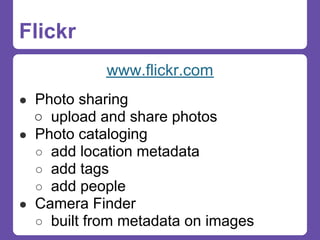
Flickr
            www.flickr.com
● Photo sharing
  ○ upload and share photos
● Photo cataloging
  ○ add location metadata
  ○ add tags
  ○ add people
● Camera Finder
  ○ built from metadata on images
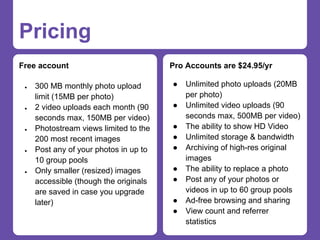
Pricing
Free account                            Pro Accounts are $24.95/yr

 ●   300 MB monthly photo upload        ●   Unlimited photo uploads (20MB
     limit (15MB per photo)                 per photo)
 ●   2 video uploads each month (90     ●   Unlimited video uploads (90
     seconds max, 150MB per video)          seconds max, 500MB per video)
 ●   Photostream views limited to the   ●   The ability to show HD Video
     200 most recent images             ●   Unlimited storage & bandwidth
 ●   Post any of your photos in up to   ●   Archiving of high-res original
     10 group pools                         images
 ●   Only smaller (resized) images      ●   The ability to replace a photo
     accessible (though the originals   ●   Post any of your photos or
     are saved in case you upgrade          videos in up to 60 group pools
     later)                             ●   Ad-free browsing and sharing
                                        ●   View count and referrer
                                            statistics
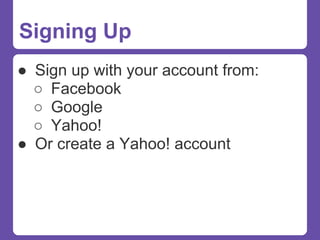
Signing Up
● Sign up with your account from:
  ○ Facebook
  ○ Google
  ○ Yahoo!
● Or create a Yahoo! account
Navigating
● On the homepage you see options for:
  ○ Your Photostream
    ■ Your recent photos
  ○ Recent Photos
    ■ Photos from/of your friends
  ○ Your Groups
    ■ Photos added to your groups
  ○ Explore
    ■ Random interesting photos
● Search box in the top right
Uploading Images
Images can be uploaded with various
tools:
● Flickr website (link on right of home)
● Flickr Uploadr (download to desktop)
  ○ flickr.com/tools/uploadr/
● Upload via email
  ○ flickr.com/account/uploadbyemail
● MobileApps
Librarian Groups
● 365 Days Library Project
  ○ flickr.com/groups/365libs/


● Libraries & Librarians
  ○ flickr.com/groups/librariesandlibrarians/


● ReadPosters
  ○ flickr.com/groups/readposters/


● Search for more:
  ○ flickr.com/search/groups/
Ordering Prints
You can order prints through Flickr
partners:
● Snapfish (www.snapfish.com)
  ○   Can be done through Flickr itself

● QOOP(www.qoop.
  com/direct_upload/directUpload.php)
Learn more
● Flickr for Libraries:
  ○   www.slideshare.net/nengard/flickr-
      for-libaries

● Flickr FAQ:
  ○   flickr.com/help/faq/

● Flickr Forums:
  ○   flickr.com/help/forum/
Wordpress
Me: http://web2learning.net
                and many many many more!
Wordpress
● Open Source Content Management
  System
  ○ wordpress.org

● Freely hosted blog/website
  ○ wordpress.com

● Not strictly Web 2.0 but provides
  many Web 2.0 tools for your website
Why Wordpress?
● No programming knowledge
  necessary
● Easy to navigate
● Built in search engine
● Thousands of plugins/extensions
● Thousands of pre-made themes
● Tons of online documentation & help
● Lots of Web 2.0 integration!
Wordpress as a CMS
●   It’s for more than just blogging
●   Allows for multiple users/
    permissions
●   No need for system admin -
    anyone can upgrade/edit files
●   Easy, Easy, Easy!
Wordpress for Libraries
● WP4Lib (Community for Libraries
  using Wordpress)
  ○ http://wp4lib.bluwiki.com

● Wordpress in Libraries
  ○ http://www.wpinlibraries.org
Wordpress Presentations
People to follow on SlideShare:

● Stephanie Leary www.slideshare.
  net/stephanieleary
● Syed Balkhi www.slideshare.
  net/wpbeginner
● Andrea Rennick www.slideshare.
  net/AndreaRennick
Wordpress Books
● Leary, Stephanie. Beginning WordPress 3. 1st ed.
    Apress, 2010.
●   Jones, Kyle, and Polly-Alida Farrington. Using
    WordPress as a library content management system.
    Vol. 47. Library Technology Reports 3. Chicago IL: ALA
    TechSource, 2011.
●   Hedengren,Thord Daniel. Smashing WordPress:
    Beyond the Blog. Wiley, 2010.
●   Tomasi, Chuck, and Kreg Steppe. Sams Teach Yourself
    WordPress 3 in 10 Minutes. 1st ed. Sams, 2010.
●   Beck, Jessica Neuman, and Matt Beck. 2009.
    WordPress:Visual QuickStart Guide. [S.l.]: Peachpit
    Press.
Zotero
Me: http://www.zotero.org/nengard
Zotero
               www.zotero.org

● Collect, organize, cite, and share your
  research sources
● Open Source online bibliography tool
● Firefox plugin and Standalone edition
● Share resources publicly or keep them
  private
● Join and create groups for sharing
Signing Up
● Sign up for free

● Install the plugin or application

● Find resources and save them!

● Attach PDFs for storage (more storage costs
  $$)
Groups
● Web 2.0 in Education: zotero.
  org/groups/web_2.0_in_education/items

● Adventures in Library Instruction: zotero.
  org/groups/adventures_in_library_instruction/ite
  ms

● Free/Libre and Open Source Software and
  Libraries Bibliography: zotero.
  org/groups/freelibre_and_open_source_softwar
  e_and_libraries_bibliography/items
Learn More
● Puckett, Jason. Zotero : a Guide for
  Librarians, Researchers, and Educators.
  Chicago: Association of College and
  Research Libraries, 2011.

● Puckett, Jason. “Zotero Research Guide.”
  Library Research Guides at Georgia State
  University, n.d. http://research.library.gsu.
  edu/zotero.
Policies
Social Media Policies
● Many libraries want to write up policies once
  they start using these tools - check out these
  links for more info:

  ○ www.web2learning.net/archives/1250
  ○ www.web2learning.net/archives/2967
  ○ www.schoollibraryjournal.
    com/article/CA6699104.html

● Policy Generator: socialmedia.policytool.net
Thank You!
Slides:


          web2learning.net > Publications &

Presentations


Nicole C. Engard                       @nengard
nengard@gmail.com

Web 2.0 Tools & Applications in Libraries

  • 1.
    Web 2.0 Tools& Applications in Libraries Nicole C. Engard @nengard Vice President of Education, ByWater Solutions Author: The Accidental Systems Librarian 2d
  • 2.
    Outline ● Live demos/handson with four Web 2.0 tools: ○ Delicious ○ Flickr ○ Wordpress ○ Zotero
  • 3.
  • 4.
    Delicious www.delicious.com ● Online bookmarking ○ Save all of your bookmarks in the cloud ○ Access them from any computer ○ Tag them for easy searching and recovery ○ Create stacks (like folders) to organize them ● Link Sharing ○ Find your friends and create a network ○ Save links publicly and share them ○ RSS feeds for your links
  • 5.
    Bookmarking ● Sign upfor free ● Add a bookmarklet or plugin to your browser ○ Find a page you like and bookmark it ● Import your local bookmarks or bookmarks from another service
  • 6.
    Navigating ● Click ontags to see all links ● Search for tags, keywords & people ● Browse stacks
  • 7.
    Learn more ● SocialBookmarking & Del.icio.us: A Personal and Professional Productivity Tool ○ http://slidesha.re/delciouslib ● Delicious Help ○ http://delicious.com/help
  • 8.
  • 9.
    Flickr www.flickr.com ● Photo sharing ○ upload and share photos ● Photo cataloging ○ add location metadata ○ add tags ○ add people ● Camera Finder ○ built from metadata on images
  • 10.
    Pricing Free account Pro Accounts are $24.95/yr ● 300 MB monthly photo upload ● Unlimited photo uploads (20MB limit (15MB per photo) per photo) ● 2 video uploads each month (90 ● Unlimited video uploads (90 seconds max, 150MB per video) seconds max, 500MB per video) ● Photostream views limited to the ● The ability to show HD Video 200 most recent images ● Unlimited storage & bandwidth ● Post any of your photos in up to ● Archiving of high-res original 10 group pools images ● Only smaller (resized) images ● The ability to replace a photo accessible (though the originals ● Post any of your photos or are saved in case you upgrade videos in up to 60 group pools later) ● Ad-free browsing and sharing ● View count and referrer statistics
  • 11.
    Signing Up ● Signup with your account from: ○ Facebook ○ Google ○ Yahoo! ● Or create a Yahoo! account
  • 12.
    Navigating ● On thehomepage you see options for: ○ Your Photostream ■ Your recent photos ○ Recent Photos ■ Photos from/of your friends ○ Your Groups ■ Photos added to your groups ○ Explore ■ Random interesting photos ● Search box in the top right
  • 13.
    Uploading Images Images canbe uploaded with various tools: ● Flickr website (link on right of home) ● Flickr Uploadr (download to desktop) ○ flickr.com/tools/uploadr/ ● Upload via email ○ flickr.com/account/uploadbyemail ● MobileApps
  • 14.
    Librarian Groups ● 365Days Library Project ○ flickr.com/groups/365libs/ ● Libraries & Librarians ○ flickr.com/groups/librariesandlibrarians/ ● ReadPosters ○ flickr.com/groups/readposters/ ● Search for more: ○ flickr.com/search/groups/
  • 15.
    Ordering Prints You canorder prints through Flickr partners: ● Snapfish (www.snapfish.com) ○ Can be done through Flickr itself ● QOOP(www.qoop. com/direct_upload/directUpload.php)
  • 16.
    Learn more ● Flickrfor Libraries: ○ www.slideshare.net/nengard/flickr- for-libaries ● Flickr FAQ: ○ flickr.com/help/faq/ ● Flickr Forums: ○ flickr.com/help/forum/
  • 17.
  • 18.
    Wordpress ● Open SourceContent Management System ○ wordpress.org ● Freely hosted blog/website ○ wordpress.com ● Not strictly Web 2.0 but provides many Web 2.0 tools for your website
  • 19.
    Why Wordpress? ● Noprogramming knowledge necessary ● Easy to navigate ● Built in search engine ● Thousands of plugins/extensions ● Thousands of pre-made themes ● Tons of online documentation & help ● Lots of Web 2.0 integration!
  • 20.
    Wordpress as aCMS ● It’s for more than just blogging ● Allows for multiple users/ permissions ● No need for system admin - anyone can upgrade/edit files ● Easy, Easy, Easy!
  • 21.
    Wordpress for Libraries ●WP4Lib (Community for Libraries using Wordpress) ○ http://wp4lib.bluwiki.com ● Wordpress in Libraries ○ http://www.wpinlibraries.org
  • 22.
    Wordpress Presentations People tofollow on SlideShare: ● Stephanie Leary www.slideshare. net/stephanieleary ● Syed Balkhi www.slideshare. net/wpbeginner ● Andrea Rennick www.slideshare. net/AndreaRennick
  • 23.
    Wordpress Books ● Leary,Stephanie. Beginning WordPress 3. 1st ed. Apress, 2010. ● Jones, Kyle, and Polly-Alida Farrington. Using WordPress as a library content management system. Vol. 47. Library Technology Reports 3. Chicago IL: ALA TechSource, 2011. ● Hedengren,Thord Daniel. Smashing WordPress: Beyond the Blog. Wiley, 2010. ● Tomasi, Chuck, and Kreg Steppe. Sams Teach Yourself WordPress 3 in 10 Minutes. 1st ed. Sams, 2010. ● Beck, Jessica Neuman, and Matt Beck. 2009. WordPress:Visual QuickStart Guide. [S.l.]: Peachpit Press.
  • 24.
  • 25.
    Zotero www.zotero.org ● Collect, organize, cite, and share your research sources ● Open Source online bibliography tool ● Firefox plugin and Standalone edition ● Share resources publicly or keep them private ● Join and create groups for sharing
  • 26.
    Signing Up ● Signup for free ● Install the plugin or application ● Find resources and save them! ● Attach PDFs for storage (more storage costs $$)
  • 27.
    Groups ● Web 2.0in Education: zotero. org/groups/web_2.0_in_education/items ● Adventures in Library Instruction: zotero. org/groups/adventures_in_library_instruction/ite ms ● Free/Libre and Open Source Software and Libraries Bibliography: zotero. org/groups/freelibre_and_open_source_softwar e_and_libraries_bibliography/items
  • 28.
    Learn More ● Puckett,Jason. Zotero : a Guide for Librarians, Researchers, and Educators. Chicago: Association of College and Research Libraries, 2011. ● Puckett, Jason. “Zotero Research Guide.” Library Research Guides at Georgia State University, n.d. http://research.library.gsu. edu/zotero.
  • 29.
  • 30.
    Social Media Policies ●Many libraries want to write up policies once they start using these tools - check out these links for more info: ○ www.web2learning.net/archives/1250 ○ www.web2learning.net/archives/2967 ○ www.schoollibraryjournal. com/article/CA6699104.html ● Policy Generator: socialmedia.policytool.net
  • 31.
    Thank You! Slides: web2learning.net > Publications & Presentations Nicole C. Engard @nengard nengard@gmail.com