Apps and
 Tools
DropBox
• Free service bringing
  your docs, photos and
  videos to one place

• Can access files from
  computers, phones or
  ipad
                          www.dropbox.com
DROPitTOme / SendtoDropbox

                        • Receive files into
                          your Dropbox
                          account
 www.dropittome.com
                        • Access through your
                          Dropbox account
                        • Great way for students to
                          submit assessment tasks that
www.sendtodropbox.com     are > 30MB
Prizmo
                        • Uses Optical
                          Character
                          Recognition

                        • Scans an item
http://goo.gl/EF8Sn
                        • Then edit the item
                        • seamless
                          intergration with
                          Dropbox
Evernote
• Save ideas, photos,
  documents into
  Evernote

• Works on computers
  and mobile devices
                        www.evernote.com
Wikispaces

• Collaborative tool
• Variety of uses such as
  subject guides, group     www.wikispaces.com
  projects
Google Apps
                                               • Includes docs and
                                                 Forms
                                               • Use for surveying,
                                                 quizzes
            http://goo.gl/cNPYy
                                               • Google sites for
NB: This link is for Saint Ignatius College,     making & hosting
     Geelong Google Apps account
                                                 basic webpages
Wallwisher

                     • Online notice board
                     • add images, music,
                       videos
www.wallwisher.com
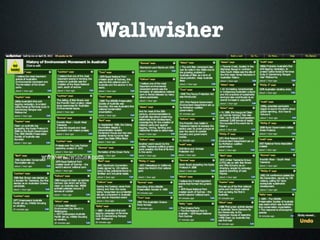
Wallwisher

                     • Online notice board
                     • add images, music,
                       videos
www.wallwisher.com
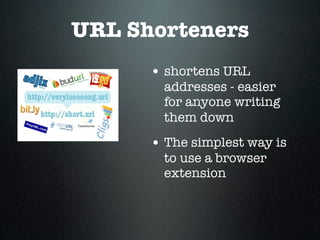
URL Shorteners
      • shortens URL
        addresses - easier
        for anyone writing
        them down
      • The simplest way is
        to use a browser
        extension
Keepvid.com


                  • Download and store
                   videos from
                   YouTube, Vimeo
www.keepvid.com
Clickview

• School Bag
• Clickview Exchange

                       www.clickview.com.au
Poll Everywhere
• Gives instant
  audience feedback
• Poll your class on
  any topic at
  anytime
                       www.polleverywhere.com
EasyBib
• Bibliography / citation
  maker
• Create bibliographies
• Access through Google
  Apps or using a Smart
  Phone App                 www.easybib.com


• Expectation of
  students to use for
  assessments

Apps and tools

  • 1.
  • 2.
    DropBox • Free servicebringing your docs, photos and videos to one place • Can access files from computers, phones or ipad www.dropbox.com
  • 3.
    DROPitTOme / SendtoDropbox • Receive files into your Dropbox account www.dropittome.com • Access through your Dropbox account • Great way for students to submit assessment tasks that www.sendtodropbox.com are > 30MB
  • 4.
    Prizmo • Uses Optical Character Recognition • Scans an item http://goo.gl/EF8Sn • Then edit the item • seamless intergration with Dropbox
  • 5.
    Evernote • Save ideas,photos, documents into Evernote • Works on computers and mobile devices www.evernote.com
  • 6.
    Wikispaces • Collaborative tool •Variety of uses such as subject guides, group www.wikispaces.com projects
  • 7.
    Google Apps • Includes docs and Forms • Use for surveying, quizzes http://goo.gl/cNPYy • Google sites for NB: This link is for Saint Ignatius College, making & hosting Geelong Google Apps account basic webpages
  • 8.
    Wallwisher • Online notice board • add images, music, videos www.wallwisher.com
  • 9.
    Wallwisher • Online notice board • add images, music, videos www.wallwisher.com
  • 10.
    URL Shorteners • shortens URL addresses - easier for anyone writing them down • The simplest way is to use a browser extension
  • 11.
    Keepvid.com • Download and store videos from YouTube, Vimeo www.keepvid.com
  • 12.
    Clickview • School Bag •Clickview Exchange www.clickview.com.au
  • 13.
    Poll Everywhere • Givesinstant audience feedback • Poll your class on any topic at anytime www.polleverywhere.com
  • 14.
    EasyBib • Bibliography /citation maker • Create bibliographies • Access through Google Apps or using a Smart Phone App www.easybib.com • Expectation of students to use for assessments

Editor's Notes