Chapter 5 Dynamical Calculations
Overview In this chapter you will: Dynamically populate a drop-down menu. Create a recordset using a filter from the form data on the previous asp page. Insert dynamic text. Write the code to handle errors when data has not validated.
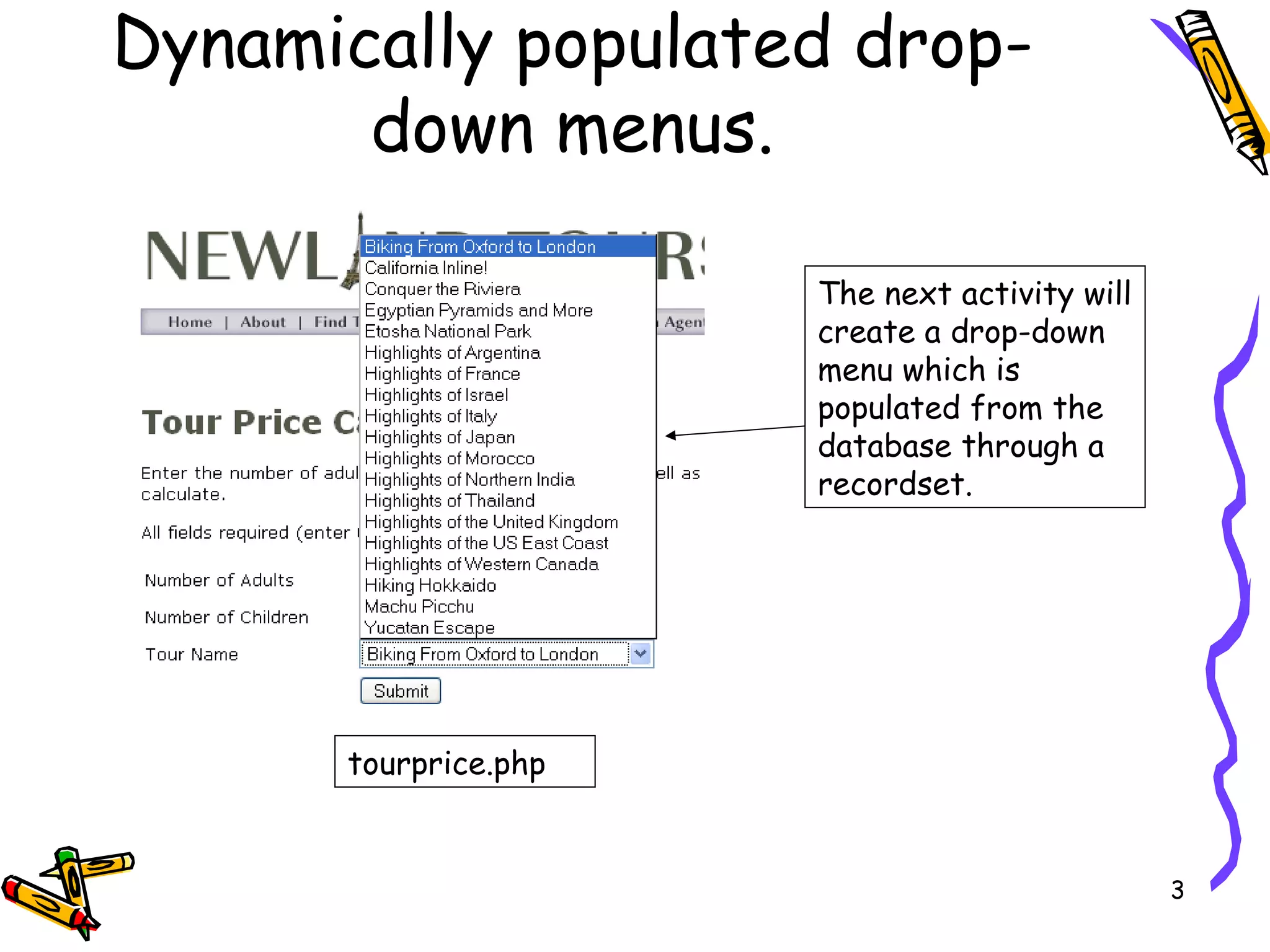
Dynamically populated drop-down menus. The next activity will create a drop-down menu which is populated from the database through a recordset. tourprice.php
Dynamic calculation  Remember the Tour Calculator. We are going to change it to dynamically put the tour locations in the list/menu, (with the ID being the value) on the tourprice.php page. On the tourprice_processor.php, we will then use the id to select the adult and child rate to calculate the cost or the tour.
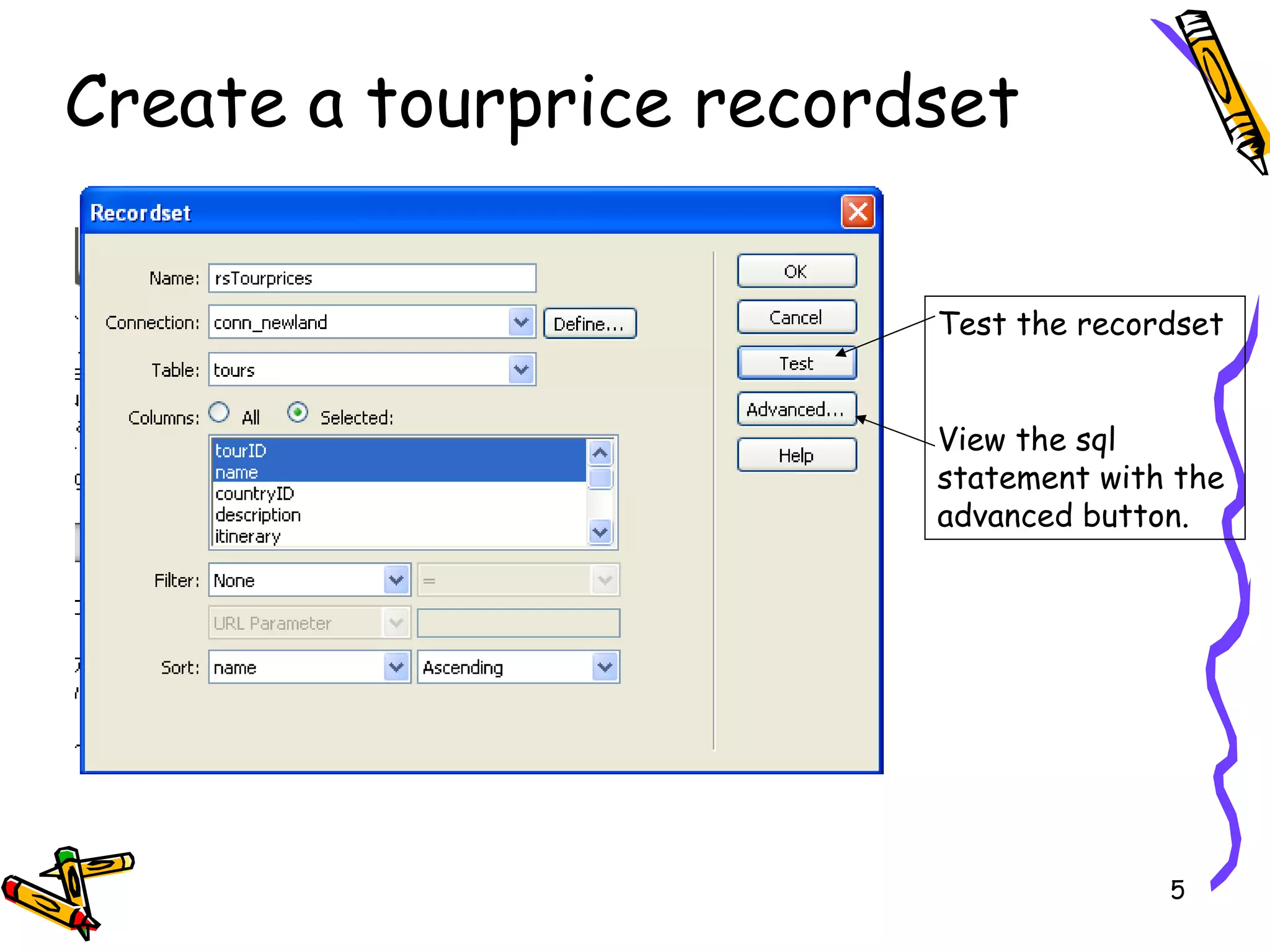
Create a tourprice recordset Test the recordset View the sql statement with the advanced button.
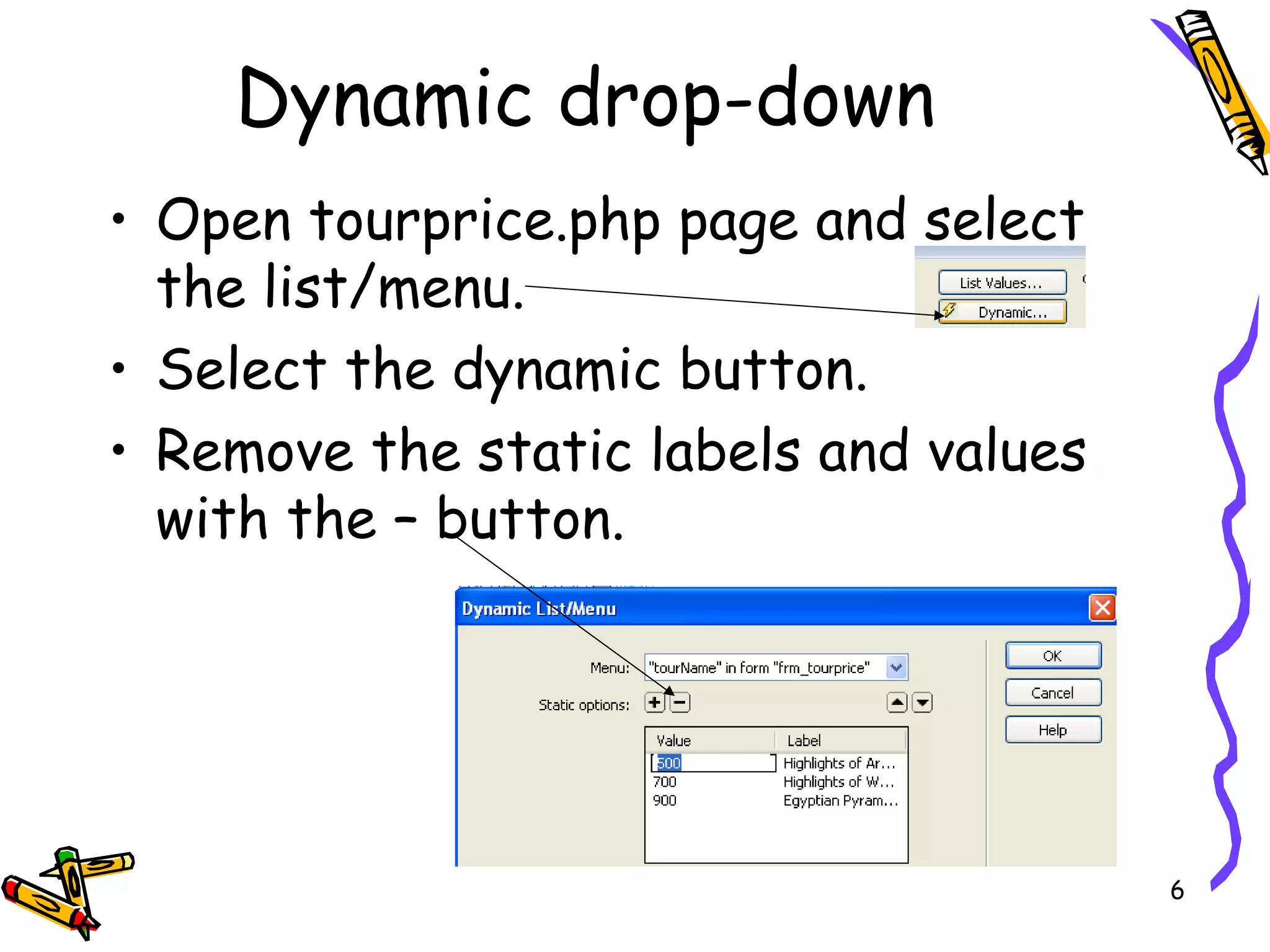
Dynamic drop-down Open tourprice.php page and select the list/menu. Select the dynamic button. Remove the static labels and values with the – button.
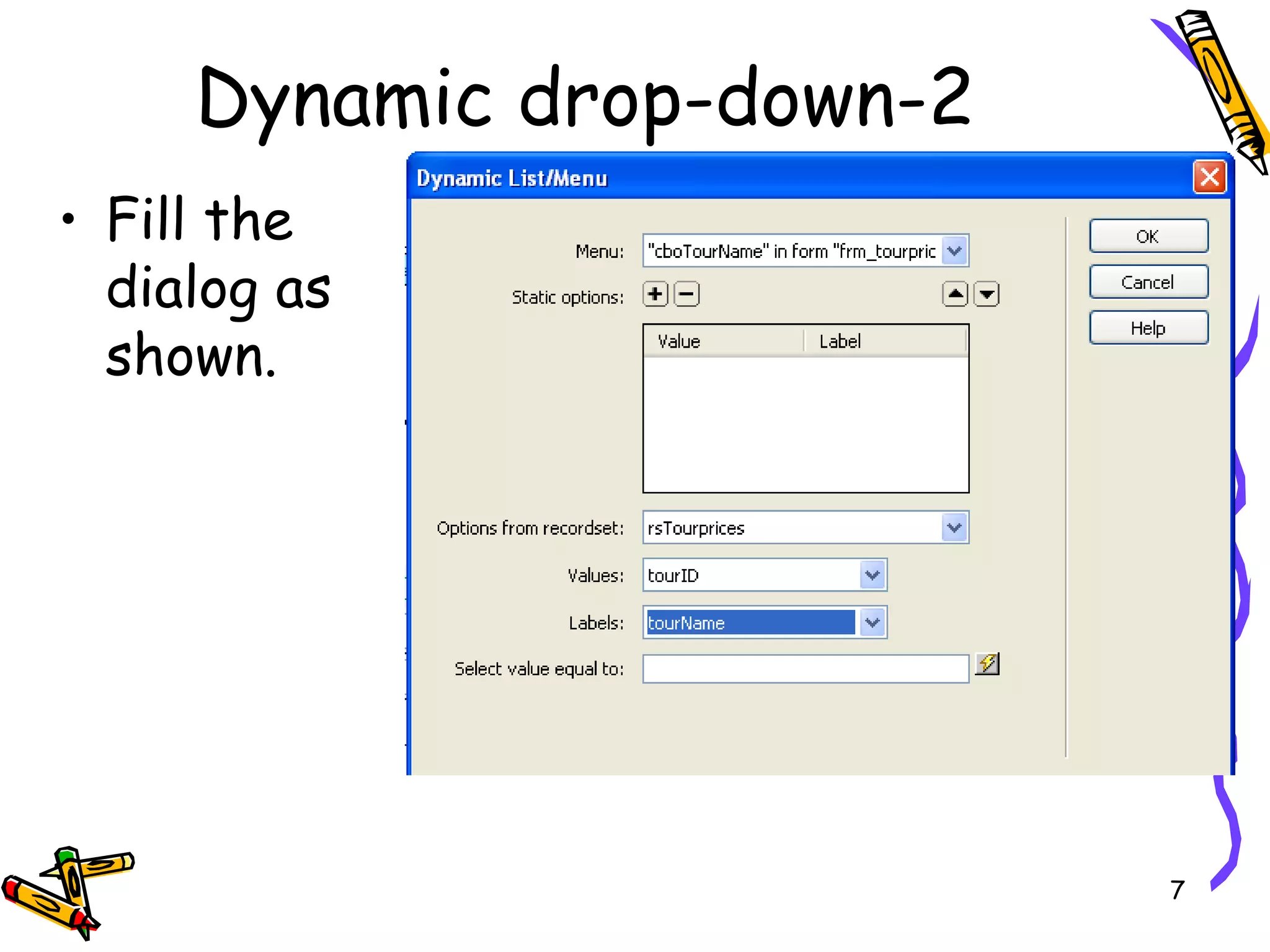
Fill the dialog as shown. Dynamic drop-down-2
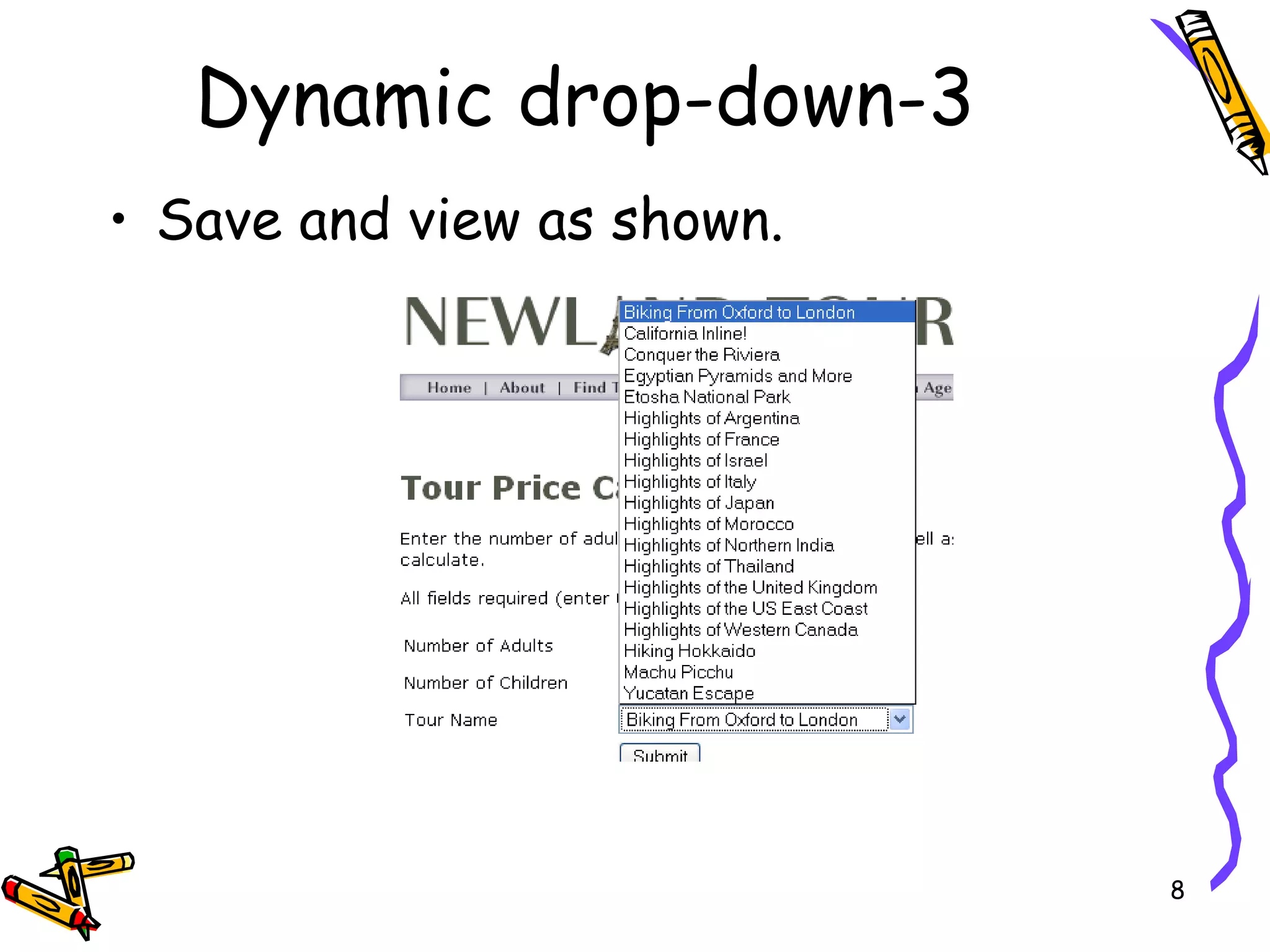
Save and view as shown. Dynamic drop-down-3
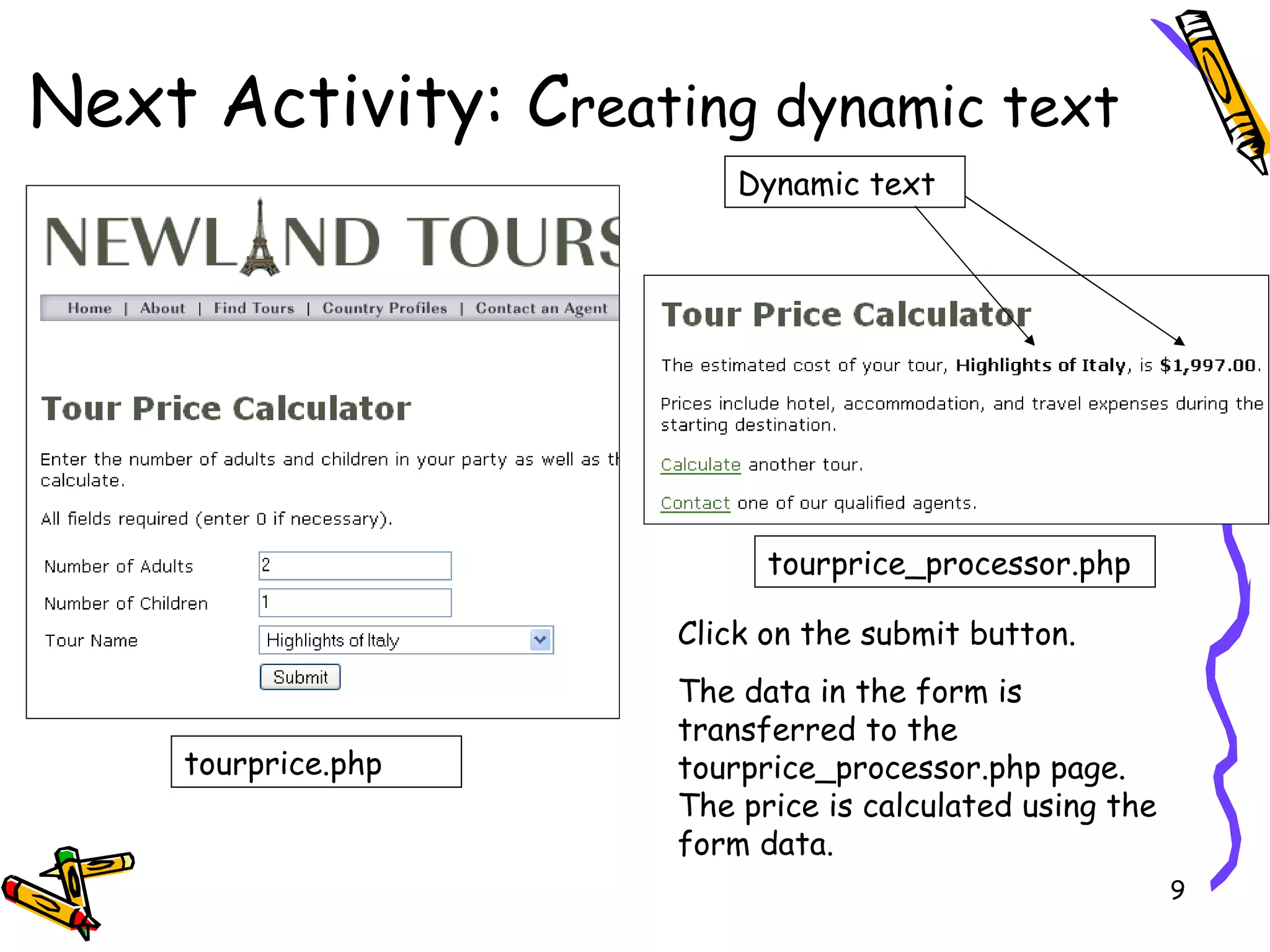
Next Activity: C reating dynamic text tourprice.php tourprice_processor.php Click on the submit button. The data in the form is transferred to the tourprice_processor.php page. The price is calculated using the form data. Dynamic text
Open tourprice_processor.php page. Create a new recordset (shown on next slide), with the following attributes:  Name = rsTourpricesFiltered  Connection = conn_newland Table = tours  Columns = selected tourID, tourName, basePriceAdult, basePriceChild  Dynamic calculation
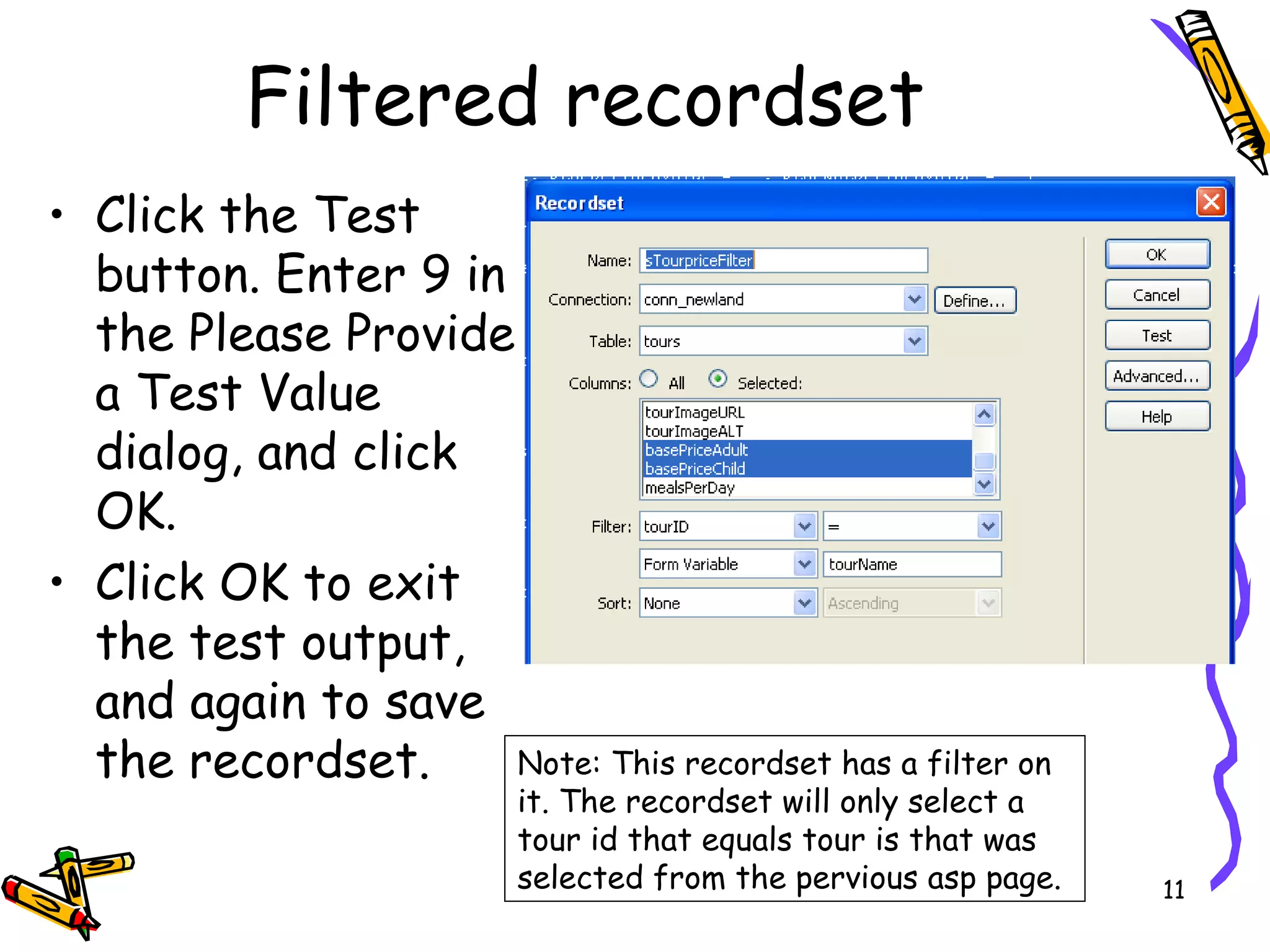
Click the Test button. Enter 9 in the Please Provide a Test Value dialog, and click OK.  Click OK to exit the test output, and again to save the recordset.  Filtered recordset Note: This recordset has a filter on it. The recordset will only select a tour id that equals tour is that was selected from the pervious asp page.
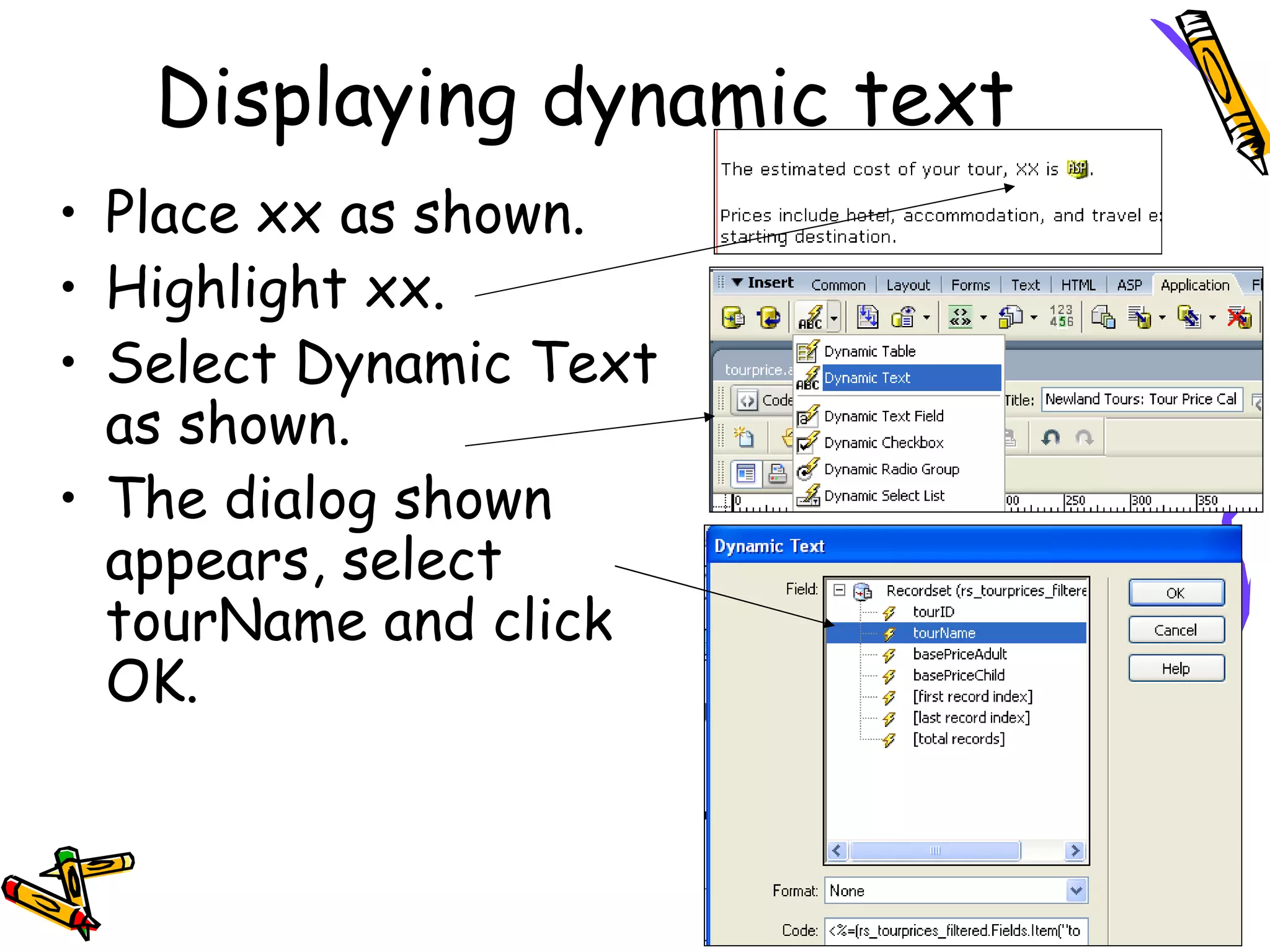
Place xx as shown. Highlight xx. Select Dynamic Text as shown. The dialog shown appears, select tourName and click OK. Displaying dynamic text
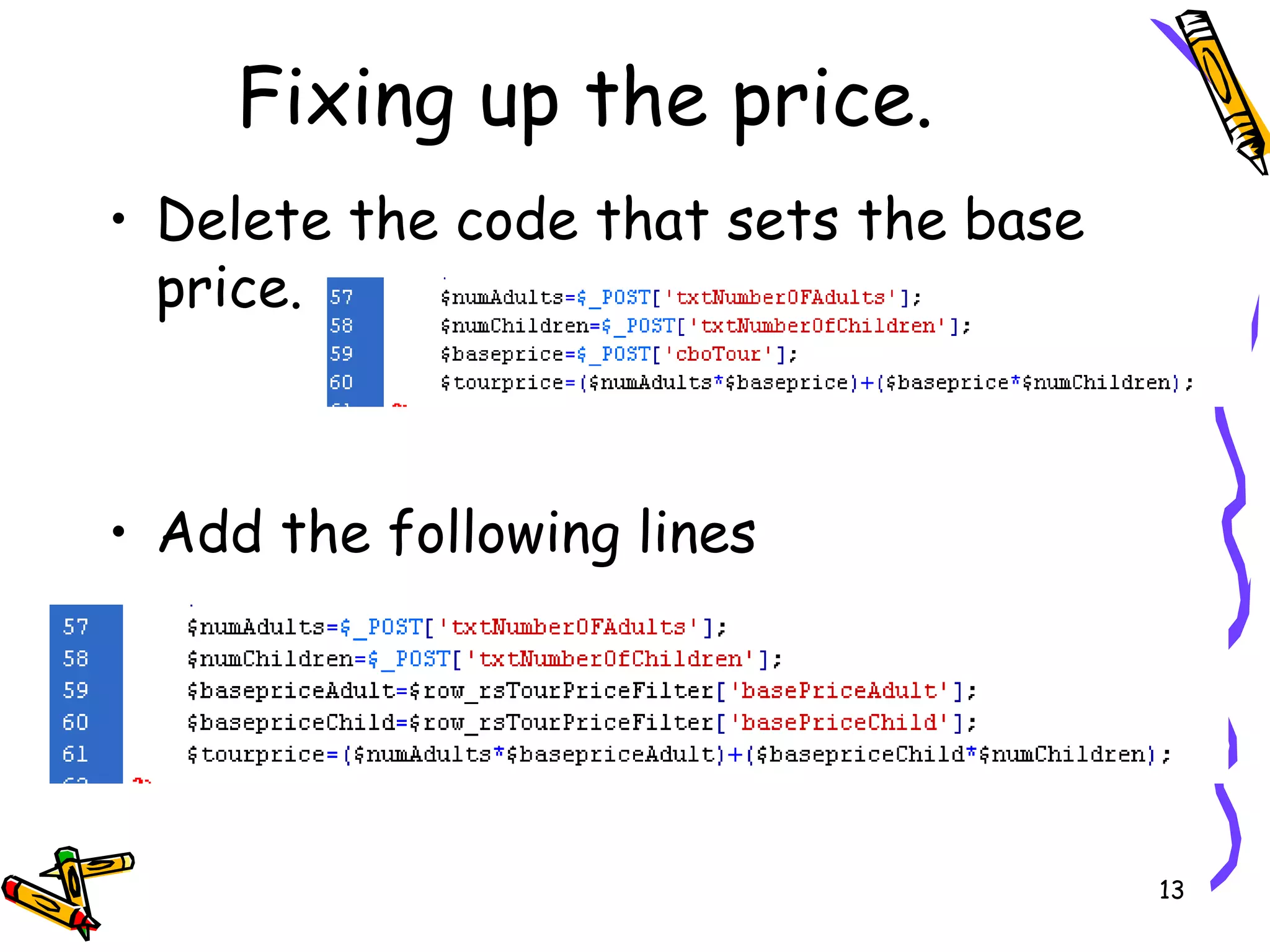
Delete the code that sets the base price. Add the following lines Fixing up the price.
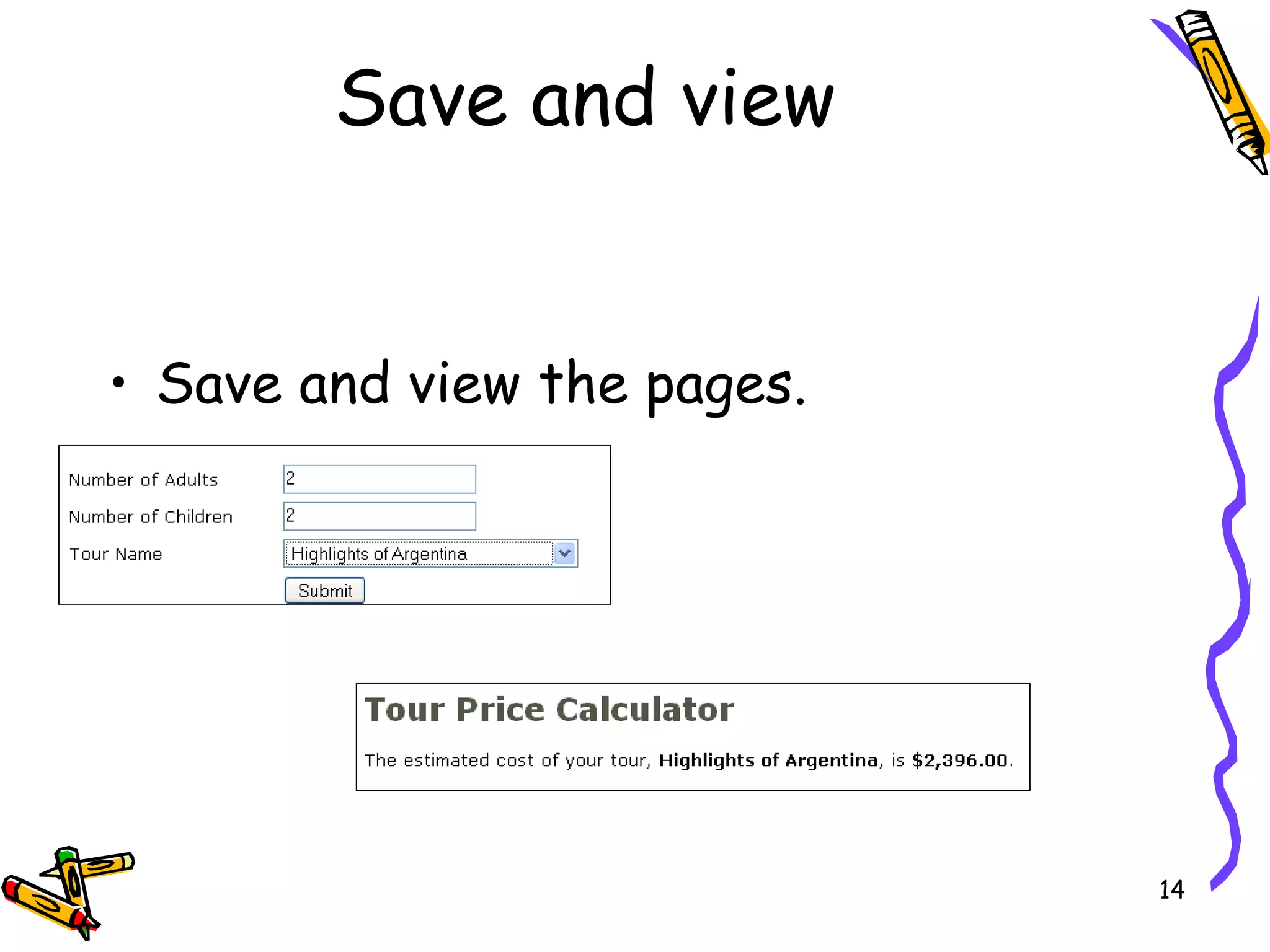
Save and view the pages. Save and view
Lab 5 - 1 In this lab you will; Create a dynamic list/menu for the reservation.php page, shown on the next slide. Add a dynamic feature tour list, as shown on the following slides.  To do this you need to detach this page from the template.
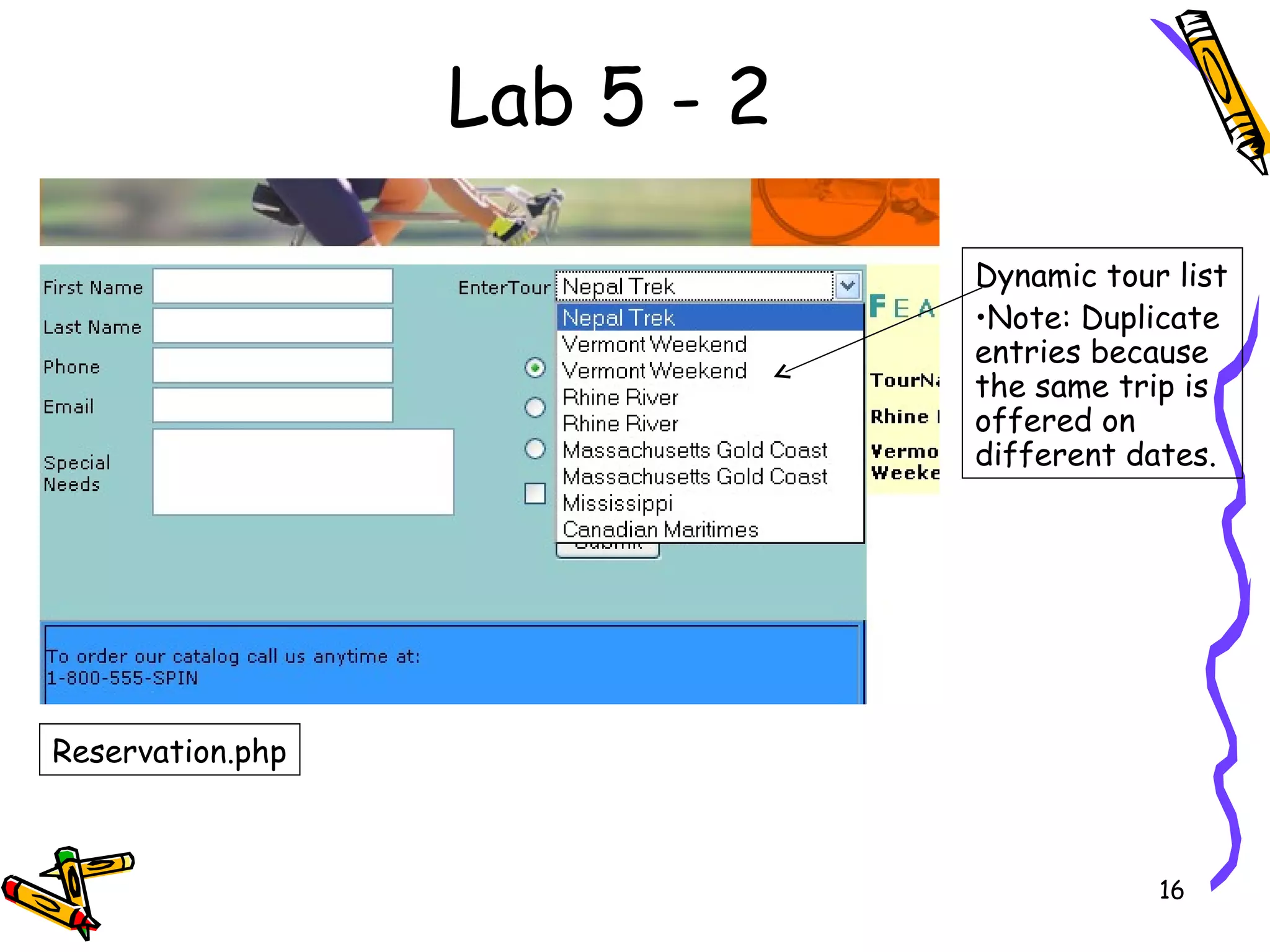
Lab 5 - 2 Reservation.php Dynamic tour list Note: Duplicate entries because the same trip is offered on different dates.
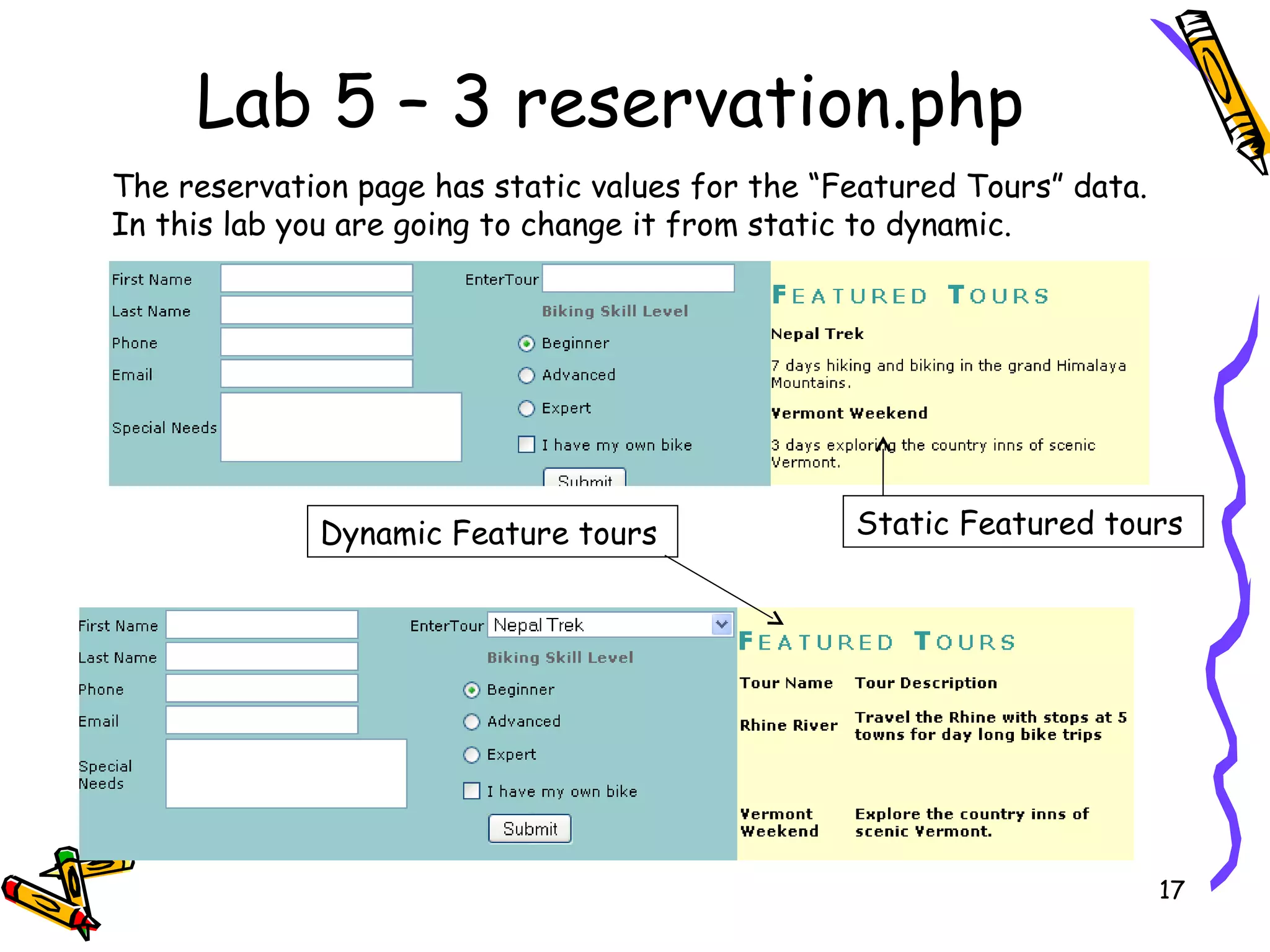
Lab 5 – 3 reservation.php Static Featured tours Dynamic Feature tours The reservation page has static values for the “Featured Tours” data. In this lab you are going to change it from static to dynamic.
Lab 5 - 4 reservations.php page.  create a recordset  named rs_tours from the tours table.  Select only TourID, TourName, and TourDate  sort by TourName.  Click the Dynamic button in the Property inspector.  Dynamically fill the values from the recordset that you just created. The values are the TourID  Labels are the TourName  Click OK to close the dynamic dialog.  Save the page and preview it. Drop down the list to see the dynamic values.
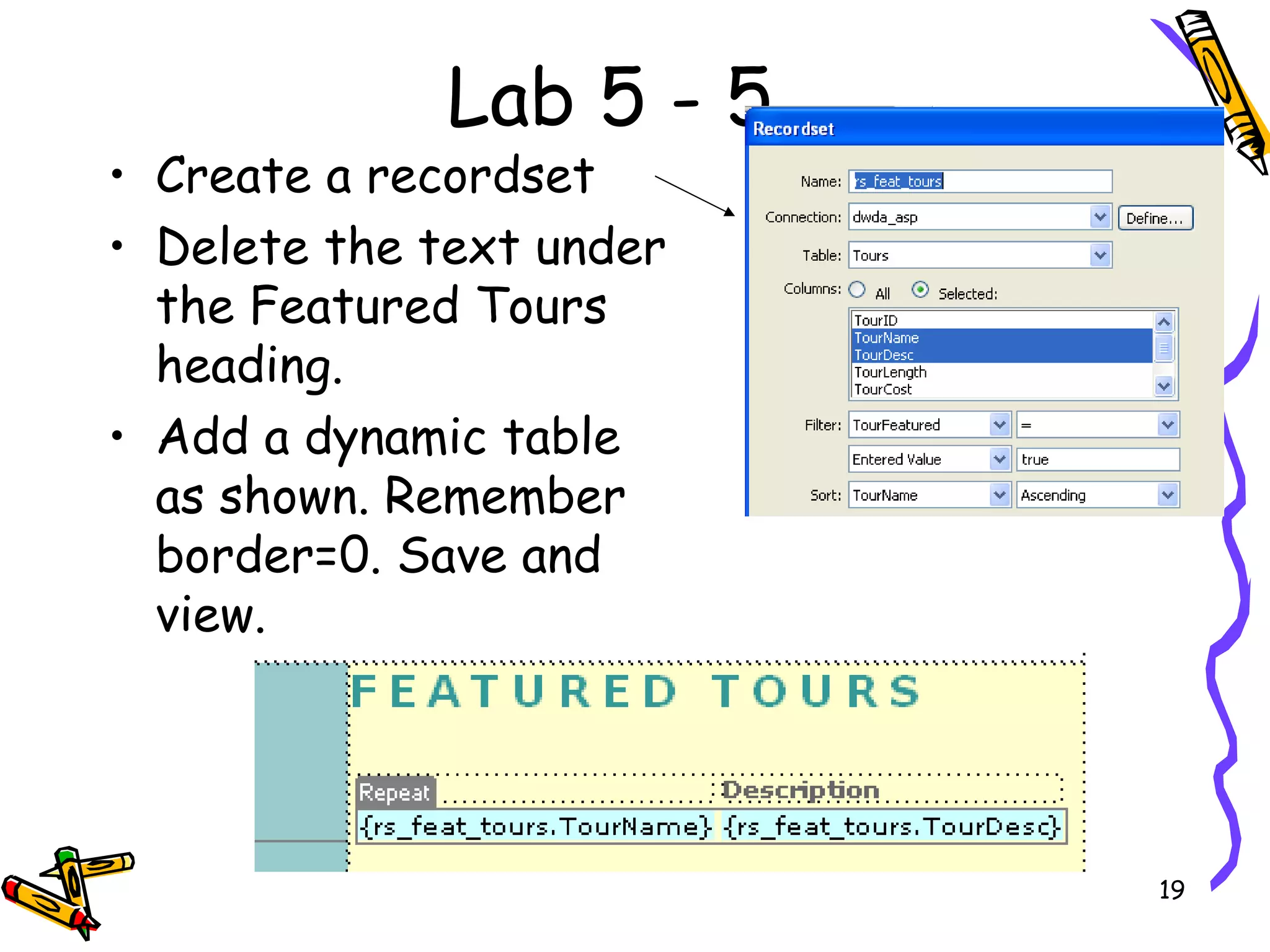
Lab 5 - 5 Create a recordset Delete the text under the Featured Tours heading. Add a dynamic table as shown. Remember border=0. Save and view.

Dynamic Web Pages Ch 5 V1.0

  • 1.
    Chapter 5 DynamicalCalculations
  • 2.
    Overview In thischapter you will: Dynamically populate a drop-down menu. Create a recordset using a filter from the form data on the previous asp page. Insert dynamic text. Write the code to handle errors when data has not validated.
  • 3.
    Dynamically populated drop-downmenus. The next activity will create a drop-down menu which is populated from the database through a recordset. tourprice.php
  • 4.
    Dynamic calculation Remember the Tour Calculator. We are going to change it to dynamically put the tour locations in the list/menu, (with the ID being the value) on the tourprice.php page. On the tourprice_processor.php, we will then use the id to select the adult and child rate to calculate the cost or the tour.
  • 5.
    Create a tourpricerecordset Test the recordset View the sql statement with the advanced button.
  • 6.
    Dynamic drop-down Opentourprice.php page and select the list/menu. Select the dynamic button. Remove the static labels and values with the – button.
  • 7.
    Fill the dialogas shown. Dynamic drop-down-2
  • 8.
    Save and viewas shown. Dynamic drop-down-3
  • 9.
    Next Activity: Creating dynamic text tourprice.php tourprice_processor.php Click on the submit button. The data in the form is transferred to the tourprice_processor.php page. The price is calculated using the form data. Dynamic text
  • 10.
    Open tourprice_processor.php page.Create a new recordset (shown on next slide), with the following attributes: Name = rsTourpricesFiltered Connection = conn_newland Table = tours Columns = selected tourID, tourName, basePriceAdult, basePriceChild Dynamic calculation
  • 11.
    Click the Testbutton. Enter 9 in the Please Provide a Test Value dialog, and click OK. Click OK to exit the test output, and again to save the recordset. Filtered recordset Note: This recordset has a filter on it. The recordset will only select a tour id that equals tour is that was selected from the pervious asp page.
  • 12.
    Place xx asshown. Highlight xx. Select Dynamic Text as shown. The dialog shown appears, select tourName and click OK. Displaying dynamic text
  • 13.
    Delete the codethat sets the base price. Add the following lines Fixing up the price.
  • 14.
    Save and viewthe pages. Save and view
  • 15.
    Lab 5 -1 In this lab you will; Create a dynamic list/menu for the reservation.php page, shown on the next slide. Add a dynamic feature tour list, as shown on the following slides. To do this you need to detach this page from the template.
  • 16.
    Lab 5 -2 Reservation.php Dynamic tour list Note: Duplicate entries because the same trip is offered on different dates.
  • 17.
    Lab 5 –3 reservation.php Static Featured tours Dynamic Feature tours The reservation page has static values for the “Featured Tours” data. In this lab you are going to change it from static to dynamic.
  • 18.
    Lab 5 -4 reservations.php page. create a recordset named rs_tours from the tours table. Select only TourID, TourName, and TourDate sort by TourName. Click the Dynamic button in the Property inspector. Dynamically fill the values from the recordset that you just created. The values are the TourID Labels are the TourName Click OK to close the dynamic dialog. Save the page and preview it. Drop down the list to see the dynamic values.
  • 19.
    Lab 5 -5 Create a recordset Delete the text under the Featured Tours heading. Add a dynamic table as shown. Remember border=0. Save and view.