BY,
B.SOUNDARYA,
II – M.SC (CS),
DEPARTMENT OF CS & IT,
WEB PROGRAMMING
NADAR SARASWATHI COLLEGE OF ARTS &
SCIENCE
WEB SERVICES
&
WCF SERVICES
WEB SERVICES INTRODUCTION
 A Web services makes software application
resources available over networks using standard
technologies.
 Because web services are based on standard
interfaces, they can communicate even if they are
running on different operation systems and are
written in different language.
 For this reason they are an excellent approach for
building distributed application that must
incorporate diverse systems over a network.
The following topic outlines the standard technologies
that you use to built web services and the advanced
functionality available through asynchronous web
services:
 Standard Technologies
 WSDL Files
 XML and SOAP
 Network Protocols
 Web Service Architecture
STANDARD TECHNOLOGIES
 Web Services are able to expose their
resources in this generally accessible way
because they adhere to recognized standards.
 A web service:
1. Publicly describes its own functionality
through a WSDL File.
2. Communicates with other application via
XML messages, often formatted with SOAP.
3. Employs a standard network protocol such as
HTTP.
WSDLFILES
 The Web services description language is a
standard XML format for describing web
services.
 A WSDL files describes a particular web
service so that others software applications
can interface with it.
 WSDL are generally publicly accessible and
provide enough detail so that potential clients
can interface with it.
 WSDL are generally publicly accessible and
provide enough detail so that potential clients
can figure out how to operate the service
solely from reading the WSDL file.
 If a web service translates English sentence
into French, the WDSL file will explain how
service, and how the French translation will be
returned to the requesting client.
XML AND SOAP
 Extensible markup language (XML) message
provides a common language by which
different applications can talk to one another
over a network.
 Most web services communicate via XML .
 A client sends an XML message contains the
results of the operation.
 In most cases these XML messages are
formatted according to SOAP SYNTAX.
CONTUD,…..
 Simple Object Access Protocol (SOAP),
specifies a standard format for application to
call each other methods and pass data to one
author.
 This type of messages supported by a
particular web service are delineated in the
services WDSL file.
NETWORK PROTOCOLS
 Web services receive requests and send
responses using widely used protocols and
java message service.
 A web service may support more than one
protocol.
 The protocols that a web services supports are
published in the WSDL file.
WEB SERVICEARCHITECTURE
 The following illustration shows the relationship
between a web service its client software
applications and the resources it users including,
databases other web services, and so on.
 A web service communication with client and
resources over standard protocol in such as HTTP
by exchanging XML messages.
 The web logic server on which the web service is
deployed as responsible for routing incoming
XML messages to the web services code that you
write.
Here are some well known web services
that use markup languages:
1. Web template
2. JSON-RPC
3. JSON-WSP
4. WSDL
5. WSCL
6. WSFL
7. WSME
8. XINS
BASIC OFWCF SERVICE
 WCF Stands for Windows Communication
Foundation.
 It is a programming platform to build,
configure and deploy network distributed
services.
 It is a combined feature of the web services,
Remoting, MSMQ .
WHYWCF ?
 WCF service is flexible , as it can be hosted in
IIS, windows activation services, managed
windows services and supports self hosting.
 It supposed HTTP,WT_HTTP,TCP, Custom,
Named pipes, P2P,MSMQ, ect.
 It can sent/ receive messages through any
Transport protocol message format.
 By default, it uses SOPE for communication.
 It is more secure than ASP.NET web service.
 It doesn’t return unhandled exceptions to the
clients as SOAP faults.
ADVANTAGES
 WCF provides better security than ASMX
Web service.
 Small changes in the configuration are
required to change implementation of security
model and change the binding.
 Integrated logging mechanism.
 Interoperability with the other services.
CREATING THE WCF
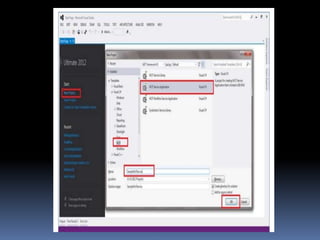
STEP 1:
Open the visual studio and create a “New
project” and select the WCF option where
various WCF applications can be created, here
I want a service application and select that
choice and name the application and click ok.
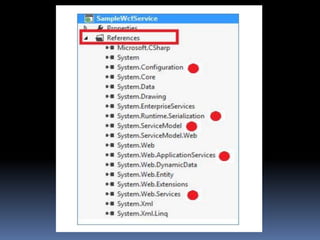
STEP 2:
1. On successful project creation now visual
studio gives us the option for automatic code
sample.
2. All the reference are added and some of the
references are highlighted with red point for
your visual.
STEP 3:
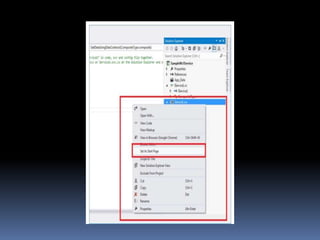
1. Set the services.SVC files as the “ Start up
page” and execute the application, so
automatically the WCF Test client window
will be displayed.
STEP 4:
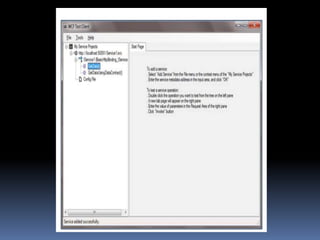
1. WCF test client execution
2. Here all the methods will be displayed and
also the appropriate method details will be
displayed on the right side pane when you
select the methods , which are readily
testable.
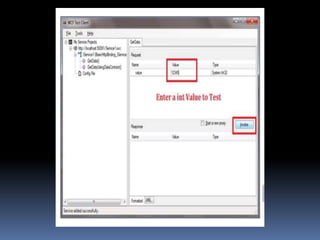
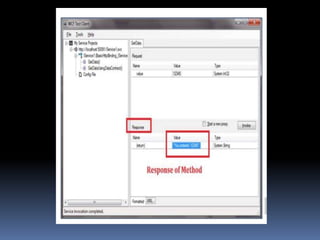
STEP 5:
1. “invoke” method will execute the method
with the input value and gives us the
response form the service and you can view
the response in the application output section
of WCF test client.
STEP 6:
1. Now you have successfully created the WCF
application and also tested using a “WCF
TEST CLIENT” to make it real on the other
part just think how many lines of code you
have typed for this applications execution.
THANK YOU!!!

Web programming

  • 1.
    BY, B.SOUNDARYA, II – M.SC(CS), DEPARTMENT OF CS & IT, WEB PROGRAMMING NADAR SARASWATHI COLLEGE OF ARTS & SCIENCE WEB SERVICES & WCF SERVICES
  • 2.
    WEB SERVICES INTRODUCTION A Web services makes software application resources available over networks using standard technologies.  Because web services are based on standard interfaces, they can communicate even if they are running on different operation systems and are written in different language.  For this reason they are an excellent approach for building distributed application that must incorporate diverse systems over a network.
  • 3.
    The following topicoutlines the standard technologies that you use to built web services and the advanced functionality available through asynchronous web services:  Standard Technologies  WSDL Files  XML and SOAP  Network Protocols  Web Service Architecture
  • 4.
    STANDARD TECHNOLOGIES  WebServices are able to expose their resources in this generally accessible way because they adhere to recognized standards.  A web service: 1. Publicly describes its own functionality through a WSDL File. 2. Communicates with other application via XML messages, often formatted with SOAP. 3. Employs a standard network protocol such as HTTP.
  • 5.
    WSDLFILES  The Webservices description language is a standard XML format for describing web services.  A WSDL files describes a particular web service so that others software applications can interface with it.  WSDL are generally publicly accessible and provide enough detail so that potential clients can interface with it.
  • 6.
     WSDL aregenerally publicly accessible and provide enough detail so that potential clients can figure out how to operate the service solely from reading the WSDL file.  If a web service translates English sentence into French, the WDSL file will explain how service, and how the French translation will be returned to the requesting client.
  • 7.
    XML AND SOAP Extensible markup language (XML) message provides a common language by which different applications can talk to one another over a network.  Most web services communicate via XML .  A client sends an XML message contains the results of the operation.  In most cases these XML messages are formatted according to SOAP SYNTAX.
  • 8.
    CONTUD,…..  Simple ObjectAccess Protocol (SOAP), specifies a standard format for application to call each other methods and pass data to one author.  This type of messages supported by a particular web service are delineated in the services WDSL file.
  • 9.
    NETWORK PROTOCOLS  Webservices receive requests and send responses using widely used protocols and java message service.  A web service may support more than one protocol.  The protocols that a web services supports are published in the WSDL file.
  • 10.
    WEB SERVICEARCHITECTURE  Thefollowing illustration shows the relationship between a web service its client software applications and the resources it users including, databases other web services, and so on.  A web service communication with client and resources over standard protocol in such as HTTP by exchanging XML messages.  The web logic server on which the web service is deployed as responsible for routing incoming XML messages to the web services code that you write.
  • 11.
    Here are somewell known web services that use markup languages: 1. Web template 2. JSON-RPC 3. JSON-WSP 4. WSDL 5. WSCL 6. WSFL 7. WSME 8. XINS
  • 12.
    BASIC OFWCF SERVICE WCF Stands for Windows Communication Foundation.  It is a programming platform to build, configure and deploy network distributed services.  It is a combined feature of the web services, Remoting, MSMQ .
  • 13.
    WHYWCF ?  WCFservice is flexible , as it can be hosted in IIS, windows activation services, managed windows services and supports self hosting.  It supposed HTTP,WT_HTTP,TCP, Custom, Named pipes, P2P,MSMQ, ect.  It can sent/ receive messages through any Transport protocol message format.
  • 14.
     By default,it uses SOPE for communication.  It is more secure than ASP.NET web service.  It doesn’t return unhandled exceptions to the clients as SOAP faults.
  • 15.
    ADVANTAGES  WCF providesbetter security than ASMX Web service.  Small changes in the configuration are required to change implementation of security model and change the binding.  Integrated logging mechanism.  Interoperability with the other services.
  • 16.
    CREATING THE WCF STEP1: Open the visual studio and create a “New project” and select the WCF option where various WCF applications can be created, here I want a service application and select that choice and name the application and click ok.
  • 18.
    STEP 2: 1. Onsuccessful project creation now visual studio gives us the option for automatic code sample. 2. All the reference are added and some of the references are highlighted with red point for your visual.
  • 20.
    STEP 3: 1. Setthe services.SVC files as the “ Start up page” and execute the application, so automatically the WCF Test client window will be displayed.
  • 22.
    STEP 4: 1. WCFtest client execution 2. Here all the methods will be displayed and also the appropriate method details will be displayed on the right side pane when you select the methods , which are readily testable.
  • 24.
    STEP 5: 1. “invoke”method will execute the method with the input value and gives us the response form the service and you can view the response in the application output section of WCF test client.
  • 26.
    STEP 6: 1. Nowyou have successfully created the WCF application and also tested using a “WCF TEST CLIENT” to make it real on the other part just think how many lines of code you have typed for this applications execution.
  • 28.