WebServices:
Definiation: A Web service is a service offered by an electronic device to another electronic device,
communicating with each other via the World wide web. In a web service, web technology such as the HTTP,
originally designed for human-to-machine communication, is utilized for machine-to-machine communication, more
specifically for transferring machine readable file formats such as XML and JSON. In practice, the web service
typically provides an object-oriented web based interface to a database server, utilized for example by another
web server, or by a mobile application, that provides a user interface to the end user. Another common application
offered to the end user may be a mashup, where a web server consumes several web services at different
machines, and compiles the content into one user interface.
What are the web services?
 Web Service is nothing but interface between one program and the another program
 It uses xml or SOAP(simple object access protocol) or WSDL(web services Description Language) or UDDI(
Universal Description Discovery and Integration)
 XML is the Back bone of the web services
Roles and Operations:
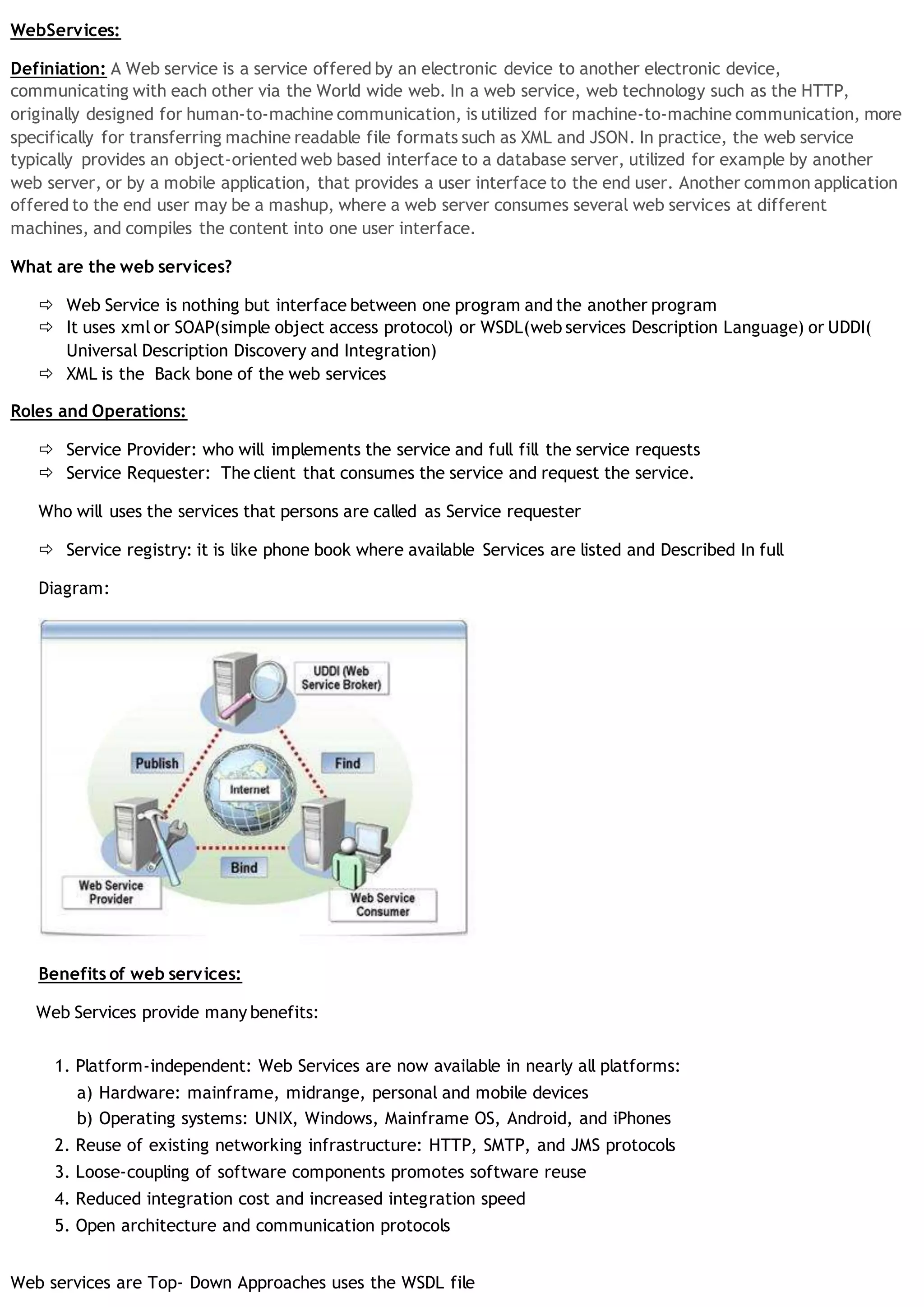
 Service Provider: who will implements the service and full fill the service requests
 Service Requester: The client that consumes the service and request the service.
Who will uses the services that persons are called as Service requester
 Service registry: it is like phone book where available Services are listed and Described In full
Diagram:
Benefits of web services:
Web Services provide many benefits:
1. Platform-independent: Web Services are now available in nearly all platforms:
a) Hardware: mainframe, midrange, personal and mobile devices
b) Operating systems: UNIX, Windows, Mainframe OS, Android, and iPhones
2. Reuse of existing networking infrastructure: HTTP, SMTP, and JMS protocols
3. Loose-coupling of software components promotes software reuse
4. Reduced integration cost and increased integration speed
5. Open architecture and communication protocols
Web services are Top- Down Approaches uses the WSDL file
Web services are Bottom –Up approaches use the EJB[Enterprise Java Bean]
How to working structure of the Web Services:
1. Create project
2. Create Web service
3. Create Http Server the Above Web Services
4. Host a Web Service
In Eclipse IDE, perform the following actions:
1. To run, open Server.java class. Choose Run → Run As → Java Application.
5. Verify a Web Service
View the Service Program WSDL:
6. Test a Web Service with SOAPUI
SOAPUI is a software that enables software developers and integrators to test Web Services. Similar to Eclipse IDE,
SOAPUI is a project-based application.
1. Run SOAPUI program.
2. Select File → New SOAPUI project.
3. Fill in the Project Name and the Initial WSDL/WADL.
To execute a SOAP operation, take the following steps:
1. On the left panel, double-click on Request 1.
2. Fill in the blank between <arg0> and </arg0>.
3. Click on the green triangle on the top left panel of the request.
4. View the SOAP response on the right panel.
7. SOAP Request:
The SOAP processor generates this request and sends it across the network to a WS invoking an operation say with a
simple String argument.
8. SOAP response:
A SOAP response shows a simple return of a message string.
9. Create a Web Service Client
A WS client code is simple to write; however, the amount of code required behind the scenes in order to ease the
amount of coding on the client side can be substantial. Generated code enables a client application to call WS
operations.
The process of creating a Java Web Service client to call the HelloWorld Web Service involves the following steps:
1. Create a java-ws-client project in Eclipse.
2. Generate WS client stub from a service endpoint (http://localhost:9999/java-ws/hello?WSDL).
3. Write a Java client class.
1.8.1 Create a Project
1.8.2 Generate Web Service Stub
First, a generated WS client code is generated using a readily available tool, wsimport, from the Java JDK package.
Second, a client code is written using the generated code.
1. Open a command prompt or a Unix terminal.
2. Go to the java-ws-client project directory.
3. Create a ‘generated’ directory.
4. Create a ‘lib’ directory.
5. Go to the ‘generated’ directory.
6. Run the following command:
wsimport -d . http://localhost:9999/java-ws/hello?wsdl
7. Package the generated client code:
jar cvf ../java-ws-generated.jar *
8. Move the java-ws-generated.jar file to the ‘lib’ directory.
1.8.3 Create Web Service Client
9. Return to Eclipse and refresh the Java project:
a) Choose java-ws project.
b) Choose File → Refresh.
c) From project properties, choose Java Build Path/Libraries.
d) Click on Add JARs and add the java-ws-generated.jar file.
e) Click OK.
10.Create a new Java package: com.bemach.ws.hello.client.
11.Create a new Java class: HelloWorldClient.java.
SOAP:
Definition: SOAP [simple object access protocol) is messaging protocol that allows programs run on any
platforms and any other Devices to communicate using HTTP . It is Fully XML Based Technology.
SOAP was an improvement of XML-RPC (Remote Procedure Call) that made it possible to use XML to represent
data between two systems. Initially, SOAP message structure was relatively simple. Since SOAP used HTTP
protocol,
SOAP was implemented as a plug-in to many middleware platforms and enabled data exchange over the
Internet in addition to intranet. The initial emphasis on RPC thus allowed SOAP to become widely implemented
as a wire-protocol over the Internet.
“…a lightweight protocol intended for exchanging structured information in a decentralized,
distributed environment. It uses XML technologies to define an extensible messaging framework
providing a message construct that can be exchanged over a variety of underlying protocols. The
framework has been designed to be independent of any particular programming model and other
implementation specific semantics.
”
SOAP XML Payload:
A SOAP message is enclosed in a SOAP envelope that contains a SOAP header and a SOAP body. The SOAP body
is mandatory, whereas the SOAP header is optional. The SOAP message is the basic unit of communication
between SOAP nodes. A SOAP node can transmit, receive or relay a SOAP message.
The two major message exchange patterns that SOAP supports are 1) request-response (in-out) and 2) request (in-
only).
=>The first pattern is often used where a SOAP request is processed and a SOAP response is returned to the SOAP
sender node.
=>The second pattern is used when the SOAP sender has no interest in receiving a response (e.g., notification).
=>A SOAP response may be returned in an asynchronous mode. For example, a server may take a long time to
process a SOAP request. Instead of waiting for this request to be completed, a SOAP client may receive a callback
when the server completes the processing.
Examples of SOAP Messages:
SOAP Message Exchange
Steps:
1.SOAP Request Message:
A request is marshalled (serialized) into an XML document prior to transport across the network to a remote SOAP
server. When the message arrives at the server, it is ‘un-marshalled’ by a SOAP engine and the targeted method is
invoked.
• A SOAP header is not used in this case.
• The SOAP body consists of a single element, emp:getEmployee.
• getEmployee: To get an employee record, an employee number (emplNo) is required.
2. SOAP response message
When the SOAP server successfully processes a request, a response is then marshaled into an XML document and
returned as a part of HTTP response to the client. The client SOAP engine then un-marshals the message to further
process the result of the call.
• A SOAP header is not used.
• The SOAP body has a single element, ns2:getEmployeeResponse. Note that namespace, ns2, is used and
referenced.
• Within the SOAP body, an employee record is returned.
3. SOAP fault message
If a request contains an invalid employee number, then a SOAP fault message can be optionally returned. A SOAP
fault may contain messages that help the client to resolve an error or unexpected condition. It must include a fault
code, fault string, and a detailed error message.
 Mapping SOAP to HTTP
3.WSDL(Web Services Description Language)
Definition:
The Web Services Description Language is an XML-based interface definition language that is used for describing
the functionality offered by a web service. The acronym is also used for any specific WSDL description of a web
service, which provides a machine-readable description of how the service can be called, what parameters it
expects, and what data structures it returns. Therefore its purpose is roughly similar to that of a method
signature in a programming language.
WSDL structure :
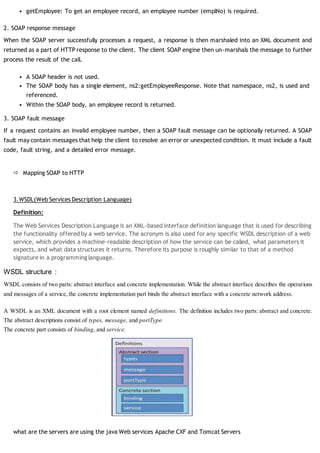
WSDL consists of two parts: abstract interface and concrete implementation. While the abstract interface describes the operations
and messages of a service, the concrete implementation part binds the abstract interface with a concrete network address.
A WSDL is an XML document with a root element named definitions. The definition includes two parts: abstract and concrete.
The abstract descriptions consist of types, message, and portType.
The concrete part consists of binding, and service.
what are the servers are using the java Web services Apache CXF and Tomcat Servers
WEB Services testing with SOAP UI:

Web services Concepts

  • 1.
    WebServices: Definiation: A Webservice is a service offered by an electronic device to another electronic device, communicating with each other via the World wide web. In a web service, web technology such as the HTTP, originally designed for human-to-machine communication, is utilized for machine-to-machine communication, more specifically for transferring machine readable file formats such as XML and JSON. In practice, the web service typically provides an object-oriented web based interface to a database server, utilized for example by another web server, or by a mobile application, that provides a user interface to the end user. Another common application offered to the end user may be a mashup, where a web server consumes several web services at different machines, and compiles the content into one user interface. What are the web services?  Web Service is nothing but interface between one program and the another program  It uses xml or SOAP(simple object access protocol) or WSDL(web services Description Language) or UDDI( Universal Description Discovery and Integration)  XML is the Back bone of the web services Roles and Operations:  Service Provider: who will implements the service and full fill the service requests  Service Requester: The client that consumes the service and request the service. Who will uses the services that persons are called as Service requester  Service registry: it is like phone book where available Services are listed and Described In full Diagram: Benefits of web services: Web Services provide many benefits: 1. Platform-independent: Web Services are now available in nearly all platforms: a) Hardware: mainframe, midrange, personal and mobile devices b) Operating systems: UNIX, Windows, Mainframe OS, Android, and iPhones 2. Reuse of existing networking infrastructure: HTTP, SMTP, and JMS protocols 3. Loose-coupling of software components promotes software reuse 4. Reduced integration cost and increased integration speed 5. Open architecture and communication protocols Web services are Top- Down Approaches uses the WSDL file
  • 2.
    Web services areBottom –Up approaches use the EJB[Enterprise Java Bean] How to working structure of the Web Services: 1. Create project 2. Create Web service 3. Create Http Server the Above Web Services 4. Host a Web Service In Eclipse IDE, perform the following actions: 1. To run, open Server.java class. Choose Run → Run As → Java Application. 5. Verify a Web Service View the Service Program WSDL: 6. Test a Web Service with SOAPUI SOAPUI is a software that enables software developers and integrators to test Web Services. Similar to Eclipse IDE, SOAPUI is a project-based application. 1. Run SOAPUI program. 2. Select File → New SOAPUI project. 3. Fill in the Project Name and the Initial WSDL/WADL. To execute a SOAP operation, take the following steps: 1. On the left panel, double-click on Request 1. 2. Fill in the blank between <arg0> and </arg0>. 3. Click on the green triangle on the top left panel of the request. 4. View the SOAP response on the right panel. 7. SOAP Request: The SOAP processor generates this request and sends it across the network to a WS invoking an operation say with a simple String argument. 8. SOAP response: A SOAP response shows a simple return of a message string. 9. Create a Web Service Client A WS client code is simple to write; however, the amount of code required behind the scenes in order to ease the amount of coding on the client side can be substantial. Generated code enables a client application to call WS operations. The process of creating a Java Web Service client to call the HelloWorld Web Service involves the following steps: 1. Create a java-ws-client project in Eclipse. 2. Generate WS client stub from a service endpoint (http://localhost:9999/java-ws/hello?WSDL).
  • 3.
    3. Write aJava client class. 1.8.1 Create a Project 1.8.2 Generate Web Service Stub First, a generated WS client code is generated using a readily available tool, wsimport, from the Java JDK package. Second, a client code is written using the generated code. 1. Open a command prompt or a Unix terminal. 2. Go to the java-ws-client project directory. 3. Create a ‘generated’ directory. 4. Create a ‘lib’ directory. 5. Go to the ‘generated’ directory. 6. Run the following command: wsimport -d . http://localhost:9999/java-ws/hello?wsdl 7. Package the generated client code: jar cvf ../java-ws-generated.jar * 8. Move the java-ws-generated.jar file to the ‘lib’ directory. 1.8.3 Create Web Service Client 9. Return to Eclipse and refresh the Java project: a) Choose java-ws project. b) Choose File → Refresh. c) From project properties, choose Java Build Path/Libraries. d) Click on Add JARs and add the java-ws-generated.jar file. e) Click OK. 10.Create a new Java package: com.bemach.ws.hello.client. 11.Create a new Java class: HelloWorldClient.java. SOAP: Definition: SOAP [simple object access protocol) is messaging protocol that allows programs run on any platforms and any other Devices to communicate using HTTP . It is Fully XML Based Technology. SOAP was an improvement of XML-RPC (Remote Procedure Call) that made it possible to use XML to represent data between two systems. Initially, SOAP message structure was relatively simple. Since SOAP used HTTP protocol, SOAP was implemented as a plug-in to many middleware platforms and enabled data exchange over the Internet in addition to intranet. The initial emphasis on RPC thus allowed SOAP to become widely implemented as a wire-protocol over the Internet. “…a lightweight protocol intended for exchanging structured information in a decentralized, distributed environment. It uses XML technologies to define an extensible messaging framework
  • 4.
    providing a messageconstruct that can be exchanged over a variety of underlying protocols. The framework has been designed to be independent of any particular programming model and other implementation specific semantics. ” SOAP XML Payload: A SOAP message is enclosed in a SOAP envelope that contains a SOAP header and a SOAP body. The SOAP body is mandatory, whereas the SOAP header is optional. The SOAP message is the basic unit of communication between SOAP nodes. A SOAP node can transmit, receive or relay a SOAP message. The two major message exchange patterns that SOAP supports are 1) request-response (in-out) and 2) request (in- only). =>The first pattern is often used where a SOAP request is processed and a SOAP response is returned to the SOAP sender node. =>The second pattern is used when the SOAP sender has no interest in receiving a response (e.g., notification). =>A SOAP response may be returned in an asynchronous mode. For example, a server may take a long time to process a SOAP request. Instead of waiting for this request to be completed, a SOAP client may receive a callback when the server completes the processing. Examples of SOAP Messages: SOAP Message Exchange Steps: 1.SOAP Request Message: A request is marshalled (serialized) into an XML document prior to transport across the network to a remote SOAP server. When the message arrives at the server, it is ‘un-marshalled’ by a SOAP engine and the targeted method is invoked. • A SOAP header is not used in this case. • The SOAP body consists of a single element, emp:getEmployee.
  • 5.
    • getEmployee: Toget an employee record, an employee number (emplNo) is required. 2. SOAP response message When the SOAP server successfully processes a request, a response is then marshaled into an XML document and returned as a part of HTTP response to the client. The client SOAP engine then un-marshals the message to further process the result of the call. • A SOAP header is not used. • The SOAP body has a single element, ns2:getEmployeeResponse. Note that namespace, ns2, is used and referenced. • Within the SOAP body, an employee record is returned. 3. SOAP fault message If a request contains an invalid employee number, then a SOAP fault message can be optionally returned. A SOAP fault may contain messages that help the client to resolve an error or unexpected condition. It must include a fault code, fault string, and a detailed error message.  Mapping SOAP to HTTP 3.WSDL(Web Services Description Language) Definition: The Web Services Description Language is an XML-based interface definition language that is used for describing the functionality offered by a web service. The acronym is also used for any specific WSDL description of a web service, which provides a machine-readable description of how the service can be called, what parameters it expects, and what data structures it returns. Therefore its purpose is roughly similar to that of a method signature in a programming language. WSDL structure : WSDL consists of two parts: abstract interface and concrete implementation. While the abstract interface describes the operations and messages of a service, the concrete implementation part binds the abstract interface with a concrete network address. A WSDL is an XML document with a root element named definitions. The definition includes two parts: abstract and concrete. The abstract descriptions consist of types, message, and portType. The concrete part consists of binding, and service. what are the servers are using the java Web services Apache CXF and Tomcat Servers
  • 6.
    WEB Services testingwith SOAP UI: