
Web fundamentals part 1
Bozhidar Boshnakov
Ivaiylo Kadiyski
FFW
This presentation and its contents are property of FFW.
Today’s Agenda
01
02
03
04
Evolution and components of web
Web communication
Site / server relation
Q&A
Evolution of web
1989, CERN, Tim Berners-Lee
Three fundamental technologies:
HTML
URI (Uniform Resource Identifier)
URL (Unified Resource Location)
HTTP / HTTPS
Тhe story starts…
Web 1.0
>Old media model
>It all started with a simple idea
>Just put content in the web
>Low content variety
>Limited content
>Limited creativity
>Limited business
>10 000 editors serve 500 000 000 internet users
Web 2.0
>User generated content
>New platforms allow users to generate content
themselves (YouTube, Wiki, Facebook, Blogs)
>Everyone can publish!
>Web 2.0 can be described in 3 parts:
- Rich Internet application (RIA)
>Web-oriented architecture (WOA)
- Feeds, RSS, Web Services, etc.
>Social web
Web 3.0
>Web 3.0 is where the computer is generating new
information, rather than humans
>All the new web 3.0 concepts can be divided into 4 parts:
- Semantic web
- Artificial intelligence
- Personalization
- Mobility
Components of web
What is website?
Collection of related web pages containing web resources.
Common navigation between web pages.
A website is hosted on at least one web server.
Accessible via a network.
All publicly accessible websites collectively constitute the
World Wide Web.
What is webpage?
Document of information resource that is suitable for the
World Wide Web
Can be accessed through a web browser and displayed on
different devices
HTML/XHTML format
Web pages frequently refer to other resources such as
CSS, JS
What is web application?
A web application or web app is any software that runs in a
web browser. It is created in a browser-supported
programming language (such as the combination of
JavaScript, HTML and CSS) and relies on a web browser
to render the application.
What is web application?
Next level web sites
High interactivity
High accessibility (Cloud)
AJAX, Silverlight, Flash, Flex
Applications are usually broken into logical chunks called
“tiers”, where every tier is assigned a role
Desktop-like apps in the web browser
How everything works?
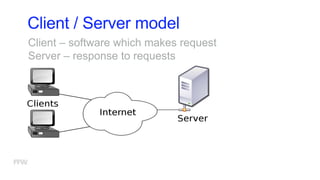
Client / Server model
Client – software which makes request
Server – response to requests
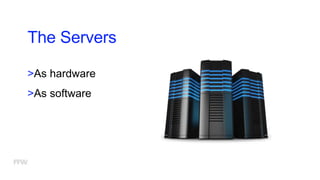
The Servers
>As hardware
>As software
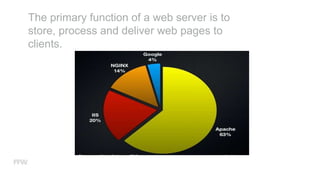
The primary function of a web server is to
store, process and deliver web pages to
clients.
Who are the clients?
Web browsers
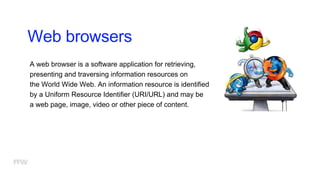
A web browser is a software application for retrieving,
presenting and traversing information resources on
the World Wide Web. An information resource is identified
by a Uniform Resource Identifier (URI/URL) and may be
a web page, image, video or other piece of content.
Layout engines
Displays the formatted content on the screen
HTML + CSS
>Trident-based - IE, Netscape, Maxthon, etc.
>Gecko-based - Firefox, Netscape, SeaMonkey, etc.
>WebKit-based - Chrome, Safari, Maxthon, etc.
>Presto-based - Opera
Web communication
Web communication
A user agent, commonly a web browser or web crawler,
initiates communication by making a request for a specific
resource using HTTP and the server responds with the
content of that resource or an error message if unable to do
so.
Web service protocols
In order for computers to communicate with one another,
standard methods of information transfer and processing
have been devised. These are referred to as "protocols" and
some of the more common ones such as TCP, IP, POP,
HTTP / HTTPS, and FTP.
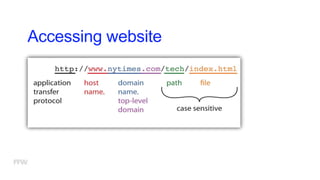
Accessing website
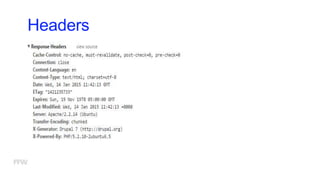
Headers
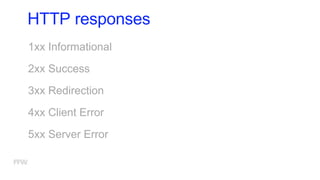
HTTP responses
1xx Informational
2xx Success
3xx Redirection
4xx Client Error
5xx Server Error
Proxy servers
A proxy server is a dedicated computer or a software system
running on a computer that acts as an intermediary between
an endpoint device, such as a computer, and another server
from which a user or client is requesting a service.
An advantage of a proxy server is that its cache can serve all
users.
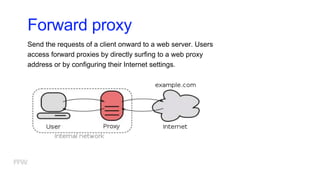
Forward proxy
Send the requests of a client onward to a web server. Users
access forward proxies by directly surfing to a web proxy
address or by configuring their Internet settings.
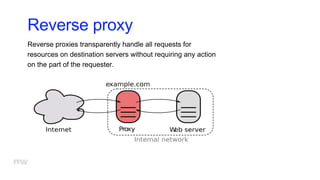
Reverse proxy
Reverse proxies transparently handle all requests for
resources on destination servers without requiring any action
on the part of the requester.
Cache
A web cache is a mechanism for the temporary storage
(caching) of web documents, such as HTML pages and
images, to reduce bandwidth usage,
server load, and perceived lag. A web cache stores copies of
documents passing through it. When this information is
requested again, it is not being loaded from the server again,
but from the already stored cache.
The cache is especially useful when you have a slow or
limited Internet connection.
Cookies
Is a small piece of data sent from a website and stored in a
user's web browser while the user is browsing that website.
Every time the user loads the website, the browser sends the
cookie back to the server to notify the website of the user's
previous activity. Cookies are designed to be a reliable
mechanism for websites to remember stateful information
(such as items in a shopping cart) or to record the user's
browsing activity (including clicking particular
buttons, logging in, or recording which pages were visited by
the user as far back as months or years ago).
Cookies
>Several Web sites also use cookies for personalization
based on users' preferences. For example, the Wikipedia
Web site allows authenticated users to decide the skin of
pages; the Google search engine allows users (even non-
registered ones) to decide how many hits per page they
want to see.
Any questions?
Thank you!

Web fundamentals - part 1

  • 1.
    Web fundamentals part1 Bozhidar Boshnakov Ivaiylo Kadiyski FFW This presentation and its contents are property of FFW.
  • 2.
    Today’s Agenda 01 02 03 04 Evolution andcomponents of web Web communication Site / server relation Q&A
  • 3.
  • 4.
    1989, CERN, TimBerners-Lee Three fundamental technologies: HTML URI (Uniform Resource Identifier) URL (Unified Resource Location) HTTP / HTTPS Тhe story starts…
  • 5.
    Web 1.0 >Old mediamodel >It all started with a simple idea >Just put content in the web >Low content variety >Limited content >Limited creativity >Limited business >10 000 editors serve 500 000 000 internet users
  • 6.
    Web 2.0 >User generatedcontent >New platforms allow users to generate content themselves (YouTube, Wiki, Facebook, Blogs) >Everyone can publish! >Web 2.0 can be described in 3 parts: - Rich Internet application (RIA) >Web-oriented architecture (WOA) - Feeds, RSS, Web Services, etc. >Social web
  • 7.
    Web 3.0 >Web 3.0is where the computer is generating new information, rather than humans >All the new web 3.0 concepts can be divided into 4 parts: - Semantic web - Artificial intelligence - Personalization - Mobility
  • 8.
  • 9.
    What is website? Collectionof related web pages containing web resources. Common navigation between web pages. A website is hosted on at least one web server. Accessible via a network. All publicly accessible websites collectively constitute the World Wide Web.
  • 10.
    What is webpage? Documentof information resource that is suitable for the World Wide Web Can be accessed through a web browser and displayed on different devices HTML/XHTML format Web pages frequently refer to other resources such as CSS, JS
  • 11.
    What is webapplication? A web application or web app is any software that runs in a web browser. It is created in a browser-supported programming language (such as the combination of JavaScript, HTML and CSS) and relies on a web browser to render the application.
  • 12.
    What is webapplication? Next level web sites High interactivity High accessibility (Cloud) AJAX, Silverlight, Flash, Flex Applications are usually broken into logical chunks called “tiers”, where every tier is assigned a role Desktop-like apps in the web browser
  • 13.
  • 14.
    Client / Servermodel Client – software which makes request Server – response to requests
  • 15.
  • 16.
    The primary functionof a web server is to store, process and deliver web pages to clients.
  • 17.
    Who are theclients?
  • 18.
    Web browsers A webbrowser is a software application for retrieving, presenting and traversing information resources on the World Wide Web. An information resource is identified by a Uniform Resource Identifier (URI/URL) and may be a web page, image, video or other piece of content.
  • 19.
    Layout engines Displays theformatted content on the screen HTML + CSS >Trident-based - IE, Netscape, Maxthon, etc. >Gecko-based - Firefox, Netscape, SeaMonkey, etc. >WebKit-based - Chrome, Safari, Maxthon, etc. >Presto-based - Opera
  • 20.
  • 21.
    Web communication A useragent, commonly a web browser or web crawler, initiates communication by making a request for a specific resource using HTTP and the server responds with the content of that resource or an error message if unable to do so.
  • 23.
    Web service protocols Inorder for computers to communicate with one another, standard methods of information transfer and processing have been devised. These are referred to as "protocols" and some of the more common ones such as TCP, IP, POP, HTTP / HTTPS, and FTP.
  • 24.
  • 26.
  • 27.
    HTTP responses 1xx Informational 2xxSuccess 3xx Redirection 4xx Client Error 5xx Server Error
  • 28.
    Proxy servers A proxyserver is a dedicated computer or a software system running on a computer that acts as an intermediary between an endpoint device, such as a computer, and another server from which a user or client is requesting a service. An advantage of a proxy server is that its cache can serve all users.
  • 29.
    Forward proxy Send therequests of a client onward to a web server. Users access forward proxies by directly surfing to a web proxy address or by configuring their Internet settings.
  • 30.
    Reverse proxy Reverse proxiestransparently handle all requests for resources on destination servers without requiring any action on the part of the requester.
  • 31.
    Cache A web cacheis a mechanism for the temporary storage (caching) of web documents, such as HTML pages and images, to reduce bandwidth usage, server load, and perceived lag. A web cache stores copies of documents passing through it. When this information is requested again, it is not being loaded from the server again, but from the already stored cache. The cache is especially useful when you have a slow or limited Internet connection.
  • 32.
    Cookies Is a smallpiece of data sent from a website and stored in a user's web browser while the user is browsing that website. Every time the user loads the website, the browser sends the cookie back to the server to notify the website of the user's previous activity. Cookies are designed to be a reliable mechanism for websites to remember stateful information (such as items in a shopping cart) or to record the user's browsing activity (including clicking particular buttons, logging in, or recording which pages were visited by the user as far back as months or years ago).
  • 33.
    Cookies >Several Web sitesalso use cookies for personalization based on users' preferences. For example, the Wikipedia Web site allows authenticated users to decide the skin of pages; the Google search engine allows users (even non- registered ones) to decide how many hits per page they want to see.
  • 34.
  • 35.

Editor's Notes

  • #5 http://webfoundation.org/about/vision/history-of-the-web/ http://www.evolutionoftheweb.com/
  • #16 HARDWARE: Physical computer dedicated to running one or more such services Servers are placed in collocation centers The server may be: Database server File server Mail server Print server VPS server
  • #17 Apache, IIS, nginx, lighttpd, etc. All physical servers have hardware The hardware is controlled by the operating system Web servers are software products that use the operating system to handle web requests These requests are redirected to other software products (ASP.NET, PHP), depending on the web server settings
  • #20 Software component that displays the formatted content on the screen combining: Marked up content (such as HTML, XML, image files, etc.) Formatting information (such as CSS, XSL, etc.) It “paints” on the content area of a window, which is displayed on a monitor or a printer Typically embedded in web browsers, e-mail clients, on-line help systems or other applications that require the displaying of web content Trident-based - IE, Netscape, Maxthon, etc. Gecko-based - Firefox, Netscape, SeaMonkey, etc. WebKit-based - Chrome, Safari, Maxthon, etc. Presto-based - Opera
  • #22 TCP is the means for creating the packets, putting them back together in the correct order at the end, and checking to make sure that no packets got lost in transmission. Internet Protocol (IP) is the method used to route information to the proper address. FTP is old protocol for file management. If FTP is involved, the URL will have ftp: at the front.
  • #23 TCP is the means for creating the packets, putting them back together in the correct order at the end, and checking to make sure that no packets got lost in transmission. Internet Protocol (IP) is the method used to route information to the proper address. FTP is old protocol for file management. If FTP is involved, the URL will have ftp: at the front.
  • #24 TCP is the means for creating the packets, putting them back together in the correct order at the end, and checking to make sure that no packets got lost in transmission. Internet Protocol (IP) is the method used to route information to the proper address. FTP is old protocol for file management. If FTP is involved, the URL will have ftp: at the front.
  • #25 A uniform resource locator, abbreviated URL (also known as web address, particularly when used with HTTP), is a specific character string that constitutes a reference to a resource. The URL displayed really says, “Use the Web (http://) to find a host server named ‘www’ in the ‘nytimes.com’ network, look in the ‘tech’ directory, and access the ‘index.html’ file.”
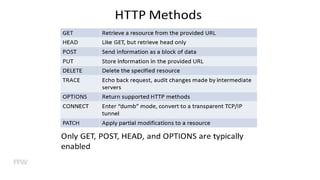
  • #26 1.Requests a representation of the specified resource. Requests using GET should only retrieve data and should have no other effect. (This is also true of some other HTTP methods.)[1] The W3C has published guidance principles on this distinction, saying, "Web application design should be informed by the above principles, but also by the relevant limitations."[13] See safe methods below. 2.Requests that the server accept the entity enclosed in the request as a new subordinate of the web resource identified by the URI. The data POSTed might be, for example, an annotation for existing resources; a message for a bulletin board, newsgroup, mailing list, or comment thread; a block of data that is the result of submitting a web form to a data-handling process; or an item to add to a database.[14] 3.Asks for the response identical to the one that would correspond to a GET request, but without the response body. This is useful for retrieving meta-information written in response headers, without having to transport the entire content.
  • #27 When you type a url in your address bar, your browser sends an HTTP request and it may look like this:
  • #28 http://en.wikipedia.org/wiki/List_of_HTTP_status_codes