
Web Development 101:
Getting Your Site Right From the
          Beginning
             KDMC Boot Camp for
     Knight Information Challenge Winners
                  March 21 2
                         - 5


                                        Lisa Williams
                              lisa@placeblogger.com

                                     placeblogger
What this is
• These are slides from a course developed to help winners of the
  Knight News & Information Challenge develop, launch, and grow
  online community, news, and information projects.
• The original presentation was given as part of a seminar presented
  at the Knight Digital Media Center at USC/Annenberg.
• Session handouts, assignments, and resource material are
  available FREE on the web at http://bit.ly/KDMC. The sessions were
  streamed live the week of March 21, 2010, and video of the
  sessions will be archived at the link above.
• If this is of interest to you, you should look into the Knight News
  Challenge and the Knight Community Information Challenge, which
  fund innovative news and community information projects. You
  can find out more at http://knightfoundation.org.
Who this is for
• Non-programmers who want to build a new website or
  add features to/extend an existing website
• Project leaders who will be working with others on their
  team to set up and run a website and web strategy for a
  project
• Particularly for people who know they will be hiring or
  working with a technical person to help them set up the
  site
• If you are a solo practicioner and want to see what you
  can do without hiring, see http://bit.ly/webdevbasics for
  a list of skills that will help you become more self-
  sufficient.
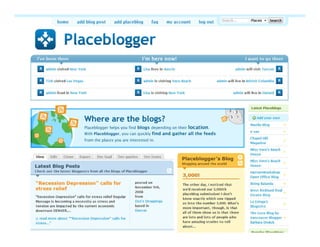
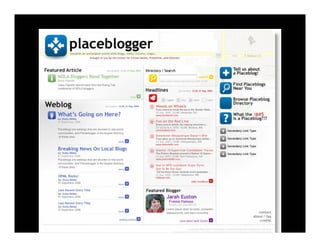
Screenshot of Placeblogger
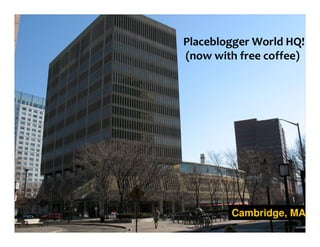
Placeblogger World HQ!
(now with free coffee)


        Cambridge, MA
Lisa on LinkedIn:
linkedin.com/in/lisawilliams
      Lisa on Twitter:
       @lisawilliams


                      placeblogger
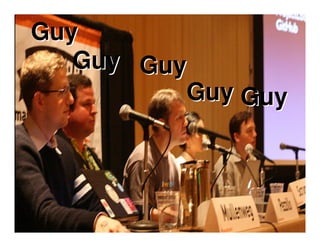
Guy
   Guy Guy
          Guy Guy


            placeblogger
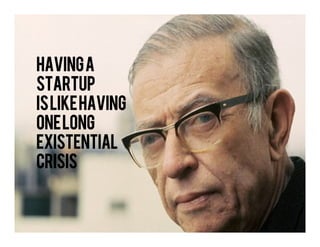
Having a
startup
islike
is like having
one long
existential
crisis
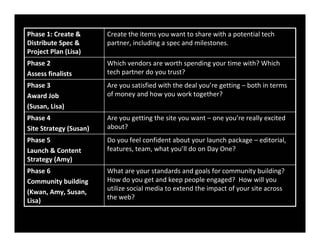
Phase 1: Create &       Create the items you want to share with a potential tech
Distribute Spec &       partner, including a spec and milestones.
Project Plan (Lisa)
Phase 2                 Which vendors are worth spending your time with? Which
Assess finalists        tech partner do you trust?
Phase 3                 Are you satisfied with the deal you’re getting – both in terms
Award Job               of money and how you work together?
(Susan, Lisa)
Phase 4                 Are you getting the site you want – one you’re really excited
Site Strategy (Susan)   about?
Phase 5                 Do you feel confident about your launch package – editorial,
Launch & Content        features, team, what you’ll do on Day One?
Strategy (Amy)
Phase 6                 What are your standards and goals for community building?
Community building      How do you get and keep people engaged? How will you
(Kwan, Amy, Susan,      utilize social media to extend the impact of your site across
Lisa)                   the web?
Finding, Landing & Working With
Technical Talent for Your Project


                        placeblogger
Where do I find them?


                 placeblogger
You’re not buying,
  you’re selling.


                 placeblogger
Don’t underestimate the cool
           factor


                     placeblogger
What type of relationship?


                    placeblogger
How much should I pay?


                 placeblogger
Do I have enough money?


                  placeblogger
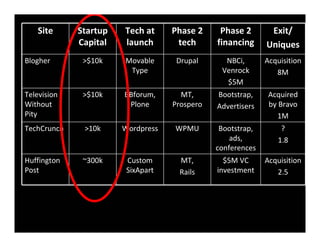
Site      Startup   Tech at     Phase 2     Phase 2       Exit/
             Capital   launch       tech      financing     Uniques
Blogher       >$10k    Movable      Drupal      NBCi,       Acquisition
                        Type                   Venrock         8M
                                                $5M
Television    >$10k    BBforum,      MT,      Bootstrap,     Acquired
Without                 Plone      Prospero   Advertisers    by Bravo
Pity                                                            1M
TechCrunch    >10k     Wordpress   WPMU        Bootstrap,       ?
                                                  ads,         1.8
                                              conferences
Huffington    ~300k     Custom      MT,         $5M VC      Acquisition
Post                    SixApart    Rails     investment       2.5
Exercise 1 of 3

Exercises are located at
http://bit.ly/webdev101


                      placeblogger
Understanding the responses
   you get from coders


                     placeblogger
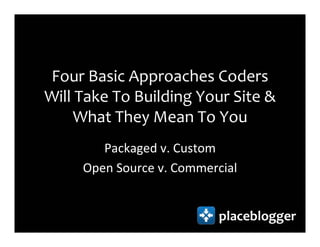
Four Basic Approaches Coders
Will Take To Building Your Site &
     What They Mean To You
        Packaged v. Custom
     Open Source v. Commercial


                           placeblogger
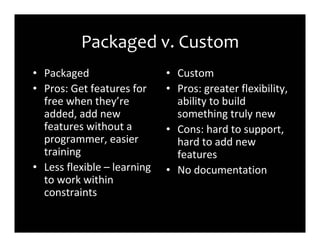
Packaged v. Custom
• Packaged                   • Custom
• Pros: Get features for     • Pros: greater flexibility,
  free when they’re            ability to build
  added, add new               something truly new
  features without a         • Cons: hard to support,
  programmer, easier           hard to add new
  training                     features
• Less flexible – learning   • No documentation
  to work within
  constraints
Reasons to go custom
• If you have a small site, a good developer may be
  able to get a site up and running very quickly.
• You have greater flexibility – you can build pretty
  much anything.
• It’s generally costlier and harder to maintain and
  train new people on.
• If you’re developing something that truly does
  not exist elsewhere, custom is the way to go.
• You might be working with the next big thing.
Open Source v. Commercial
• Open Source              • Commercial
• Pros: No license fees,   • Pros: Customer
  large developer            service, possibly
  community adds             streamlined.
  features for free        • Cons: if they go out of
• Cons: Less                 business, you may be
  streamlined, volunteer     stranded. Recurring
  labor                      license fees.
Ensuring self-sufficiency
      First feature after launch
        Documented or not?
         Where’s the code?
 What happens when the site crashes?


                               placeblogger
Write a spec

No, really. Write a spec.


                       placeblogger
Five Things You Should Share With A
Coder (Even if Your Project Isn’t New)
•   Wireframes
•   One page description of user roles
•   One page of “user stories”
•   One page list of content types
•   List of features
Writing a spec = thinking it
         through


                      placeblogger
Exercise 2 of 3: User Roles

   Exercises can be found at:
    http://bit.ly/webdev101


                          placeblogger
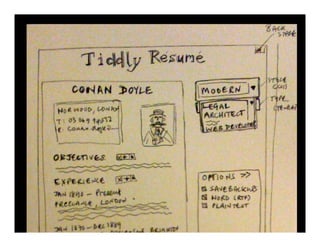
Create simple wireframes


                   placeblogger
Exercise 3 of 3: Simple
     Wireframes
Exercises can be found at:
 http://bit.ly/webdev101


                       placeblogger
Get more dangerous
 Commit to developing your own skills
so that you can add simple features and
           fix basic problems
       http://bit.ly/webdevbasics

                               placeblogger
The Society of Makers
• Show your work to other people who make
  things (& bring your coder, it makes them feel
  good)
• Pecha Kucha (http://www.pecha-kucha.org/ )
• University entrepreneur groups
• Show your work to students
• Get to know other people in your area who Make
  Stuff
Thanks!

                     Lisa Williams
           lisa@placeblogger.com
          twitter.com/lisawilliams


            placeblogger
Get Excited & Make Things


                   placeblogger

Web Dev101 For Journalists

  • 1.
    Web Development 101: GettingYour Site Right From the Beginning KDMC Boot Camp for Knight Information Challenge Winners March 21 2 - 5 Lisa Williams lisa@placeblogger.com placeblogger
  • 2.
    What this is •These are slides from a course developed to help winners of the Knight News & Information Challenge develop, launch, and grow online community, news, and information projects. • The original presentation was given as part of a seminar presented at the Knight Digital Media Center at USC/Annenberg. • Session handouts, assignments, and resource material are available FREE on the web at http://bit.ly/KDMC. The sessions were streamed live the week of March 21, 2010, and video of the sessions will be archived at the link above. • If this is of interest to you, you should look into the Knight News Challenge and the Knight Community Information Challenge, which fund innovative news and community information projects. You can find out more at http://knightfoundation.org.
  • 3.
    Who this isfor • Non-programmers who want to build a new website or add features to/extend an existing website • Project leaders who will be working with others on their team to set up and run a website and web strategy for a project • Particularly for people who know they will be hiring or working with a technical person to help them set up the site • If you are a solo practicioner and want to see what you can do without hiring, see http://bit.ly/webdevbasics for a list of skills that will help you become more self- sufficient.
  • 4.
  • 6.
    Placeblogger World HQ! (nowwith free coffee) Cambridge, MA
  • 8.
    Lisa on LinkedIn: linkedin.com/in/lisawilliams Lisa on Twitter: @lisawilliams placeblogger
  • 9.
    Guy Guy Guy Guy Guy placeblogger
  • 10.
    Having a startup islike is likehaving one long existential crisis
  • 12.
    Phase 1: Create& Create the items you want to share with a potential tech Distribute Spec & partner, including a spec and milestones. Project Plan (Lisa) Phase 2 Which vendors are worth spending your time with? Which Assess finalists tech partner do you trust? Phase 3 Are you satisfied with the deal you’re getting – both in terms Award Job of money and how you work together? (Susan, Lisa) Phase 4 Are you getting the site you want – one you’re really excited Site Strategy (Susan) about? Phase 5 Do you feel confident about your launch package – editorial, Launch & Content features, team, what you’ll do on Day One? Strategy (Amy) Phase 6 What are your standards and goals for community building? Community building How do you get and keep people engaged? How will you (Kwan, Amy, Susan, utilize social media to extend the impact of your site across Lisa) the web?
  • 13.
    Finding, Landing &Working With Technical Talent for Your Project placeblogger
  • 14.
    Where do Ifind them? placeblogger
  • 15.
    You’re not buying, you’re selling. placeblogger
  • 16.
    Don’t underestimate thecool factor placeblogger
  • 17.
    What type ofrelationship? placeblogger
  • 18.
    How much shouldI pay? placeblogger
  • 19.
    Do I haveenough money? placeblogger
  • 20.
    Site Startup Tech at Phase 2 Phase 2 Exit/ Capital launch tech financing Uniques Blogher >$10k Movable Drupal NBCi, Acquisition Type Venrock 8M $5M Television >$10k BBforum, MT, Bootstrap, Acquired Without Plone Prospero Advertisers by Bravo Pity 1M TechCrunch >10k Wordpress WPMU Bootstrap, ? ads, 1.8 conferences Huffington ~300k Custom MT, $5M VC Acquisition Post SixApart Rails investment 2.5
  • 21.
    Exercise 1 of3 Exercises are located at http://bit.ly/webdev101 placeblogger
  • 22.
    Understanding the responses you get from coders placeblogger
  • 23.
    Four Basic ApproachesCoders Will Take To Building Your Site & What They Mean To You Packaged v. Custom Open Source v. Commercial placeblogger
  • 24.
    Packaged v. Custom •Packaged • Custom • Pros: Get features for • Pros: greater flexibility, free when they’re ability to build added, add new something truly new features without a • Cons: hard to support, programmer, easier hard to add new training features • Less flexible – learning • No documentation to work within constraints
  • 25.
    Reasons to gocustom • If you have a small site, a good developer may be able to get a site up and running very quickly. • You have greater flexibility – you can build pretty much anything. • It’s generally costlier and harder to maintain and train new people on. • If you’re developing something that truly does not exist elsewhere, custom is the way to go. • You might be working with the next big thing.
  • 26.
    Open Source v.Commercial • Open Source • Commercial • Pros: No license fees, • Pros: Customer large developer service, possibly community adds streamlined. features for free • Cons: if they go out of • Cons: Less business, you may be streamlined, volunteer stranded. Recurring labor license fees.
  • 27.
    Ensuring self-sufficiency First feature after launch Documented or not? Where’s the code? What happens when the site crashes? placeblogger
  • 28.
    Write a spec No,really. Write a spec. placeblogger
  • 29.
    Five Things YouShould Share With A Coder (Even if Your Project Isn’t New) • Wireframes • One page description of user roles • One page of “user stories” • One page list of content types • List of features
  • 30.
    Writing a spec= thinking it through placeblogger
  • 31.
    Exercise 2 of3: User Roles Exercises can be found at: http://bit.ly/webdev101 placeblogger
  • 32.
  • 35.
    Exercise 3 of3: Simple Wireframes Exercises can be found at: http://bit.ly/webdev101 placeblogger
  • 36.
    Get more dangerous Commit to developing your own skills so that you can add simple features and fix basic problems http://bit.ly/webdevbasics placeblogger
  • 37.
    The Society ofMakers • Show your work to other people who make things (& bring your coder, it makes them feel good) • Pecha Kucha (http://www.pecha-kucha.org/ ) • University entrepreneur groups • Show your work to students • Get to know other people in your area who Make Stuff
  • 38.
    Thanks! Lisa Williams lisa@placeblogger.com twitter.com/lisawilliams placeblogger
  • 39.
    Get Excited &Make Things placeblogger