WEB  DESIGNBerni Durham-JonesBy xIslandDesign
Introduction 	In this unit you will:Learn basic WYSIWYG web designLearn some basic HTML programmingLearn how to use functions such as hyperlinks and flash text.
WYSIWYGWhat is a WYSIWYG editor?A WhatYouSeeIsWhatYouGet Editor is a program that requires no programming knowledge to build a webpage. These programs are often simple and the effects are very basic however they are good for fast page creation.
What is HTML?HTML stands for Hyper Text Mark-up Language. It consists of several tags which tell the web browser what to display.HTML is a simple language which can be easily wrote in a text editor such as notepad.
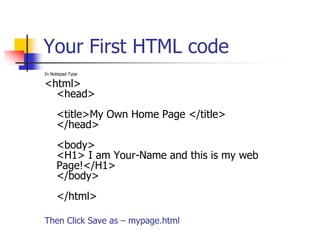
Your First HTML codeIn Notepad Type<html><head><title>My Own Home Page </title> </head><body><H1> I am Your-Name and this is my web Page!</H1> </body></html>Then Click Save as – mypage.html
What you have just done.You have just created your first webpage – though simple the techniques can be applied to much more complicated designs.The page consists of these tags.
THE <HTML> TAGThe tag <html> tells the browser that the html code is the beginning, this tag goes at the start of every webpage you make and its sibling </html> goes at the end.
THE <HEAD> TAGThe <head> tag is used to hold information about the site. The information between <head> and </head> will store info such as keywords for search engines and the title bar message.
THE <BODY> TAGThis tag is were all the important content is held such as the text on your page etc. This tag is important to remember because without it the webpage will not display properly.
DreamweaverDreamweaver is essentially a WYSIWYG editor with some key differences- it also supports coding. This makes it one of the best software packages on the market today.
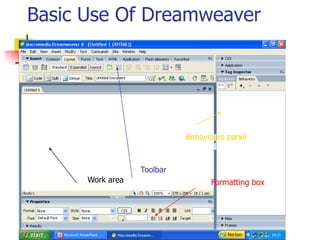
Basic Use Of DreamweaverBehaviours panelToolbarWork areaFormatting box
Task You will now create a webpage based on the skills you have just learned. A key point to remember is :Layers are useful for ordering text

Web designp pt

  • 1.
    WEB DESIGNBerniDurham-JonesBy xIslandDesign
  • 2.
    Introduction In thisunit you will:Learn basic WYSIWYG web designLearn some basic HTML programmingLearn how to use functions such as hyperlinks and flash text.
  • 3.
    WYSIWYGWhat is aWYSIWYG editor?A WhatYouSeeIsWhatYouGet Editor is a program that requires no programming knowledge to build a webpage. These programs are often simple and the effects are very basic however they are good for fast page creation.
  • 4.
    What is HTML?HTMLstands for Hyper Text Mark-up Language. It consists of several tags which tell the web browser what to display.HTML is a simple language which can be easily wrote in a text editor such as notepad.
  • 5.
    Your First HTMLcodeIn Notepad Type<html><head><title>My Own Home Page </title> </head><body><H1> I am Your-Name and this is my web Page!</H1> </body></html>Then Click Save as – mypage.html
  • 6.
    What you havejust done.You have just created your first webpage – though simple the techniques can be applied to much more complicated designs.The page consists of these tags.
  • 7.
    THE <HTML> TAGThetag <html> tells the browser that the html code is the beginning, this tag goes at the start of every webpage you make and its sibling </html> goes at the end.
  • 8.
    THE <HEAD> TAGThe<head> tag is used to hold information about the site. The information between <head> and </head> will store info such as keywords for search engines and the title bar message.
  • 9.
    THE <BODY> TAGThistag is were all the important content is held such as the text on your page etc. This tag is important to remember because without it the webpage will not display properly.
  • 10.
    DreamweaverDreamweaver is essentiallya WYSIWYG editor with some key differences- it also supports coding. This makes it one of the best software packages on the market today.
  • 11.
    Basic Use OfDreamweaverBehaviours panelToolbarWork areaFormatting box
  • 12.
    Task You willnow create a webpage based on the skills you have just learned. A key point to remember is :Layers are useful for ordering text