
Web Design
and
Development
By: Shahrzad Peyman
Session 7
December-2017
shahrzad.peymaan@gmail.com
1
2
Today’s Presentation
• Request/Response
• Using PHP
• Web Server
• IDE
• Introduction to PHP
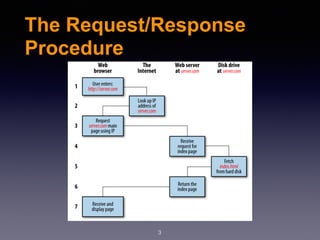
The Request/Response
Procedure
3
The Request/Response
Procedure
4
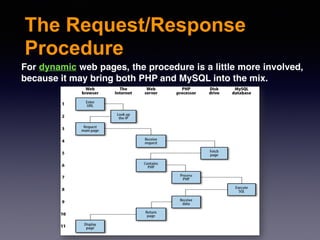
For dynamic web pages, the procedure is a little more involved,
because it may bring both PHP and MySQL into the mix.
Using PHP
5
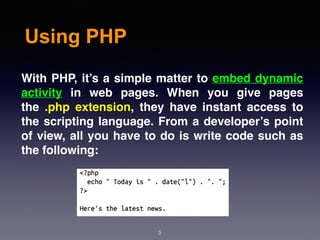
With PHP, it’s a simple matter to embed dynamic
activity in web pages. When you give pages
the .php extension, they have instant access to
the scripting language. From a developer’s point
of view, all you have to do is write code such as
the following:
Using PHP
6
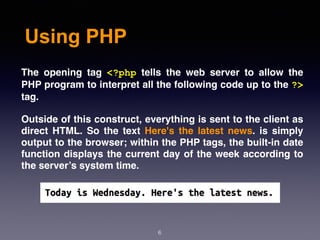
The opening tag <?php tells the web server to allow the
PHP program to interpret all the following code up to the ?>
tag.
Outside of this construct, everything is sent to the client as
direct HTML. So the text Here's the latest news. is simply
output to the browser; within the PHP tags, the built-in date
function displays the current day of the week according to
the server’s system time.
Using PHP
7
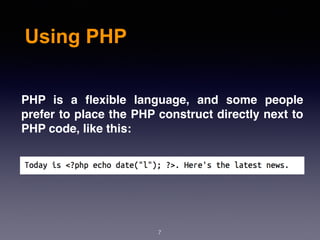
PHP is a flexible language, and some people
prefer to place the PHP construct directly next to
PHP code, like this:
The Web Server
8
In addition to PHP, MySQL, JavaScript, CSS, and HTML5, there’s a
sixth hero in the dynamic Web: the web server.
We’ve discussed a little of what a web server does during the HTTP
server/ client exchange, but it does much more behind the scenes.
For example, Web Server doesn’t serve up just HTML files—it
handles a wide range of files from images and Flash files to MP3
audio files, and so on. To do this, each element a web client
encounters in an HTML page is also requested from the server,
which then serves it up.
But these objects don’t have to be static files such as GIF images.
They can all be generated by programs such as PHP scripts.
Bringing It All Together
9
The real beauty of PHP, MySQL, JavaScript (sometimes aided by jQuery
or other frameworks), CSS, and HTML5 is the wonderful way in which
they all work together to produce dynamic web content:
PHP handles all the main work on the web server.
MySQL manages all the data.
The combination of CSS and JavaScript looks after web page
presentation.
JavaScript can also talk with your PHP code on the web server whenever
it needs to update something (either on the server or on the web page).
And with the powerful new features in HTML5, you can make your web
pages highly dynamic, interactive, and multimedia-packed.
Using an IDE
10
As good as dedicated program editors can be for your
programming productivity, their utility pales into
insignificance when compared to integrated
development environments (IDEs), which offer many
additional features such as in-editor debugging and
program testing, as well as function descriptions and
much more.
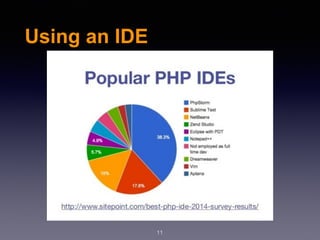
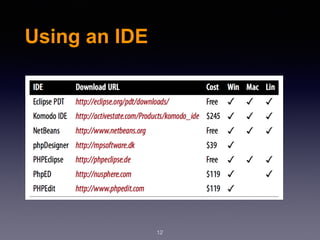
Choosing an IDE can be a very personal thing, so if you
intend to use one, I advise you to download a couple or
more to try them out first; they all either have trial
versions or are free to use, so it won’t cost you anything.
Using an IDE
11
Using an IDE
12
Introduction to PHP
13
In this session, I explained that PHP is the language
that you use to make the server generate dynamic
output—output that is potentially different each time a
browser requests a page. In this chapter, you’ll start
learning this simple but powerful language.
I encourage you to develop your PHP code in one of
the IDEs listed before. It will help you catch typos and
speed up learning tremendously in comparison to less
feature-rich editors.
Incorporating PHP Within
HTML
14
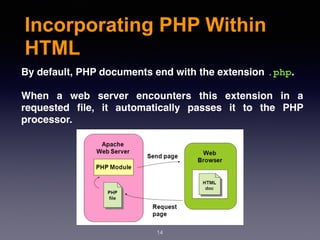
By default, PHP documents end with the extension .php.
When a web server encounters this extension in a
requested file, it automatically passes it to the PHP
processor.
Incorporating PHP Within
HTML
15
Your PHP program is responsible for passing
back a clean file suitable for display in a web
browser.
At its very simplest, a PHP document will output
only HTML. To prove this, you can take any
normal HTML document such as an index.html
file and save it as index.php, and it will display
identically to the original.
Incorporating PHP Within
HTML
16
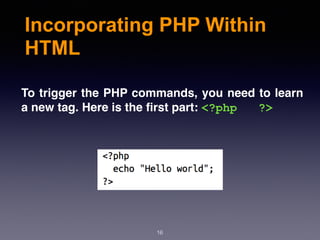
To trigger the PHP commands, you need to learn
a new tag. Here is the first part: <?php ?>
PHP Syntax
17
- PHP has quality easy syntax. If you are familiar
with any c-type language.
- It has all the same structures that you are
familiar with other programming languages.
- PHP is designed to output to browser, but it is
possible to do also CLI apps.
The $ symbol
18
The $ symbol has come to be used in many
different ways by different programming
languages.
In PHP, however, you must place a $ in front of all
variables. This is required to make the PHP
parser faster, as it instantly knows whenever it
comes across a variable.
The $ symbol
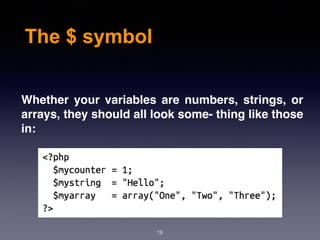
19
Whether your variables are numbers, strings, or
arrays, they should all look some‐ thing like those
in:
Variables
20
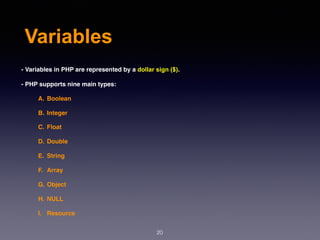
- Variables in PHP are represented by a dollar sign ($).
- PHP supports nine main types:
A. Boolean
B. Integer
C. Float
D. Double
E. String
F. Array
G. Object
H. NULL
I. Resource
Variables
21
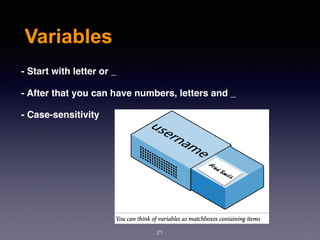
- Start with letter or _
- After that you can have numbers, letters and _
- Case-sensitivity
String
22
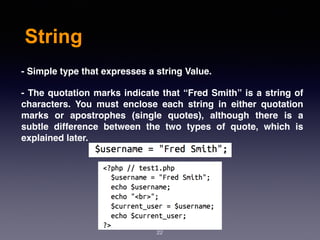
- Simple type that expresses a string Value.
- The quotation marks indicate that “Fred Smith” is a string of
characters. You must enclose each string in either quotation
marks or apostrophes (single quotes), although there is a
subtle difference between the two types of quote, which is
explained later.
Boolean
23
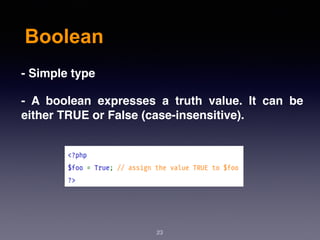
- Simple type
- A boolean expresses a truth value. It can be
either TRUE or False (case-insensitive).
Integer
24
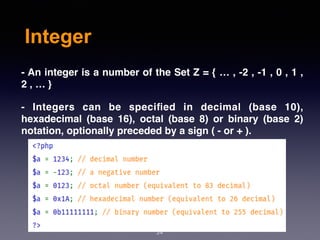
- An integer is a number of the Set Z = { … , -2 , -1 , 0 , 1 ,
2 , … }
- Integers can be specified in decimal (base 10),
hexadecimal (base 16), octal (base 8) or binary (base 2)
notation, optionally preceded by a sign ( - or + ).
Array
25
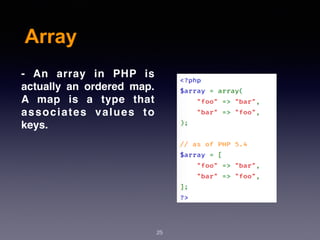
- An array in PHP is
actually an ordered map.
A map is a type that
associates values to
keys.
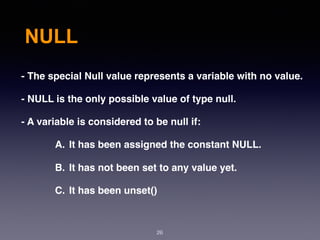
NULL
26
- The special Null value represents a variable with no value.
- NULL is the only possible value of type null.
- A variable is considered to be null if:
A. It has been assigned the constant NULL.
B. It has not been set to any value yet.
C. It has been unset()
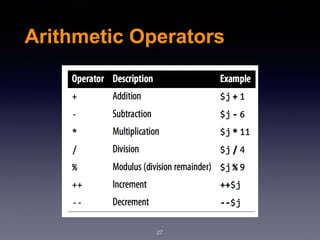
Arithmetic Operators
27
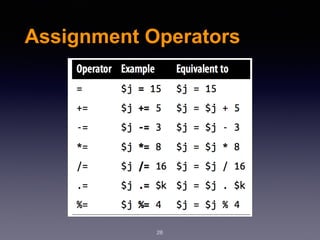
Assignment Operators
28
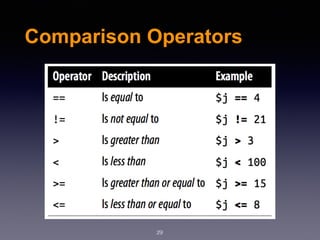
Comparison Operators
29
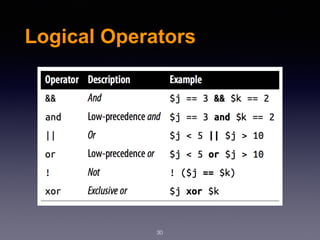
Logical Operators
30
String Concatenation
31
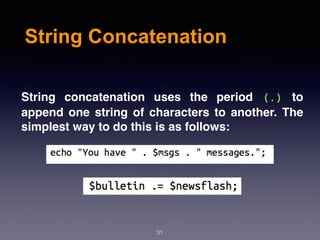
String concatenation uses the period (.) to
append one string of characters to another. The
simplest way to do this is as follows:
String Types
32
PHP supports two types of strings that are
denoted by the type of quotation mark that you
use. If you wish to assign a literal string,
preserving the exact contents, you should use
the single quotation mark (apostrophe).
On the other hand, when you want to include the
value of a variable inside a string, you do so by
using double-quoted strings.
Variable Typing
33
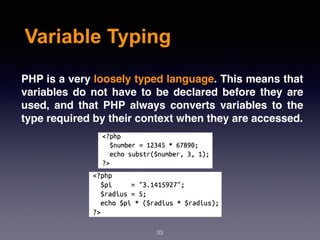
PHP is a very loosely typed language. This means that
variables do not have to be declared before they are
used, and that PHP always converts variables to the
type required by their context when they are accessed.
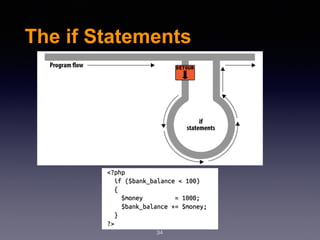
The if Statements
34
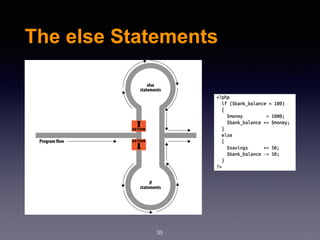
The else Statements
35
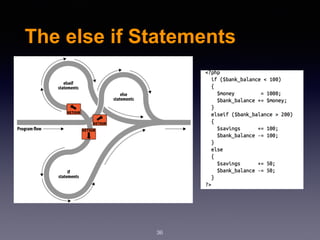
The else if Statements
36
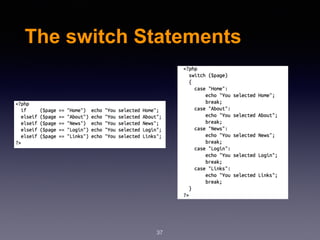
The switch Statements
37
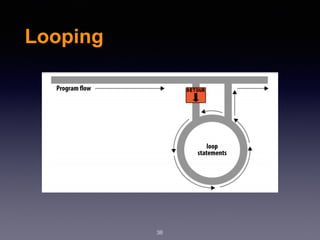
Looping
38
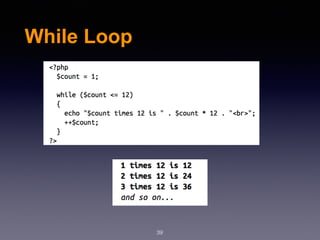
While Loop
39
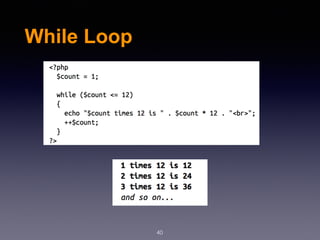
While Loop
40
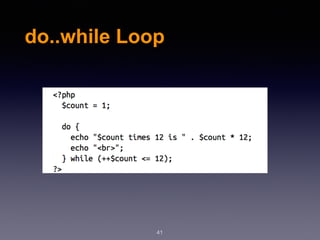
do..while Loop
41
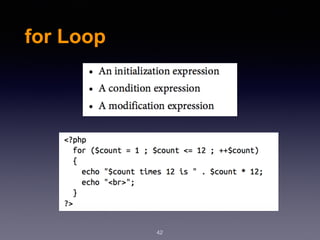
for Loop
42
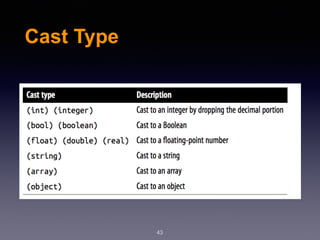
Cast Type
43
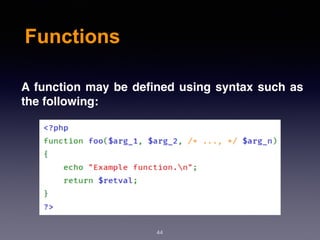
Functions
44
A function may be defined using syntax such as
the following:

Web Design & Development - Session 7

  • 1.
    Web Design and Development By: ShahrzadPeyman Session 7 December-2017 shahrzad.peymaan@gmail.com 1
  • 2.
    2 Today’s Presentation • Request/Response •Using PHP • Web Server • IDE • Introduction to PHP
  • 3.
  • 4.
    The Request/Response Procedure 4 For dynamicweb pages, the procedure is a little more involved, because it may bring both PHP and MySQL into the mix.
  • 5.
    Using PHP 5 With PHP,it’s a simple matter to embed dynamic activity in web pages. When you give pages the .php extension, they have instant access to the scripting language. From a developer’s point of view, all you have to do is write code such as the following:
  • 6.
    Using PHP 6 The openingtag <?php tells the web server to allow the PHP program to interpret all the following code up to the ?> tag. Outside of this construct, everything is sent to the client as direct HTML. So the text Here's the latest news. is simply output to the browser; within the PHP tags, the built-in date function displays the current day of the week according to the server’s system time.
  • 7.
    Using PHP 7 PHP isa flexible language, and some people prefer to place the PHP construct directly next to PHP code, like this:
  • 8.
    The Web Server 8 Inaddition to PHP, MySQL, JavaScript, CSS, and HTML5, there’s a sixth hero in the dynamic Web: the web server. We’ve discussed a little of what a web server does during the HTTP server/ client exchange, but it does much more behind the scenes. For example, Web Server doesn’t serve up just HTML files—it handles a wide range of files from images and Flash files to MP3 audio files, and so on. To do this, each element a web client encounters in an HTML page is also requested from the server, which then serves it up. But these objects don’t have to be static files such as GIF images. They can all be generated by programs such as PHP scripts.
  • 9.
    Bringing It AllTogether 9 The real beauty of PHP, MySQL, JavaScript (sometimes aided by jQuery or other frameworks), CSS, and HTML5 is the wonderful way in which they all work together to produce dynamic web content: PHP handles all the main work on the web server. MySQL manages all the data. The combination of CSS and JavaScript looks after web page presentation. JavaScript can also talk with your PHP code on the web server whenever it needs to update something (either on the server or on the web page). And with the powerful new features in HTML5, you can make your web pages highly dynamic, interactive, and multimedia-packed.
  • 10.
    Using an IDE 10 Asgood as dedicated program editors can be for your programming productivity, their utility pales into insignificance when compared to integrated development environments (IDEs), which offer many additional features such as in-editor debugging and program testing, as well as function descriptions and much more. Choosing an IDE can be a very personal thing, so if you intend to use one, I advise you to download a couple or more to try them out first; they all either have trial versions or are free to use, so it won’t cost you anything.
  • 11.
  • 12.
  • 13.
    Introduction to PHP 13 Inthis session, I explained that PHP is the language that you use to make the server generate dynamic output—output that is potentially different each time a browser requests a page. In this chapter, you’ll start learning this simple but powerful language. I encourage you to develop your PHP code in one of the IDEs listed before. It will help you catch typos and speed up learning tremendously in comparison to less feature-rich editors.
  • 14.
    Incorporating PHP Within HTML 14 Bydefault, PHP documents end with the extension .php. When a web server encounters this extension in a requested file, it automatically passes it to the PHP processor.
  • 15.
    Incorporating PHP Within HTML 15 YourPHP program is responsible for passing back a clean file suitable for display in a web browser. At its very simplest, a PHP document will output only HTML. To prove this, you can take any normal HTML document such as an index.html file and save it as index.php, and it will display identically to the original.
  • 16.
    Incorporating PHP Within HTML 16 Totrigger the PHP commands, you need to learn a new tag. Here is the first part: <?php ?>
  • 17.
    PHP Syntax 17 - PHPhas quality easy syntax. If you are familiar with any c-type language. - It has all the same structures that you are familiar with other programming languages. - PHP is designed to output to browser, but it is possible to do also CLI apps.
  • 18.
    The $ symbol 18 The$ symbol has come to be used in many different ways by different programming languages. In PHP, however, you must place a $ in front of all variables. This is required to make the PHP parser faster, as it instantly knows whenever it comes across a variable.
  • 19.
    The $ symbol 19 Whetheryour variables are numbers, strings, or arrays, they should all look some‐ thing like those in:
  • 20.
    Variables 20 - Variables inPHP are represented by a dollar sign ($). - PHP supports nine main types: A. Boolean B. Integer C. Float D. Double E. String F. Array G. Object H. NULL I. Resource
  • 21.
    Variables 21 - Start withletter or _ - After that you can have numbers, letters and _ - Case-sensitivity
  • 22.
    String 22 - Simple typethat expresses a string Value. - The quotation marks indicate that “Fred Smith” is a string of characters. You must enclose each string in either quotation marks or apostrophes (single quotes), although there is a subtle difference between the two types of quote, which is explained later.
  • 23.
    Boolean 23 - Simple type -A boolean expresses a truth value. It can be either TRUE or False (case-insensitive).
  • 24.
    Integer 24 - An integeris a number of the Set Z = { … , -2 , -1 , 0 , 1 , 2 , … } - Integers can be specified in decimal (base 10), hexadecimal (base 16), octal (base 8) or binary (base 2) notation, optionally preceded by a sign ( - or + ).
  • 25.
    Array 25 - An arrayin PHP is actually an ordered map. A map is a type that associates values to keys.
  • 26.
    NULL 26 - The specialNull value represents a variable with no value. - NULL is the only possible value of type null. - A variable is considered to be null if: A. It has been assigned the constant NULL. B. It has not been set to any value yet. C. It has been unset()
  • 27.
  • 28.
  • 29.
  • 30.
  • 31.
    String Concatenation 31 String concatenationuses the period (.) to append one string of characters to another. The simplest way to do this is as follows:
  • 32.
    String Types 32 PHP supportstwo types of strings that are denoted by the type of quotation mark that you use. If you wish to assign a literal string, preserving the exact contents, you should use the single quotation mark (apostrophe). On the other hand, when you want to include the value of a variable inside a string, you do so by using double-quoted strings.
  • 33.
    Variable Typing 33 PHP isa very loosely typed language. This means that variables do not have to be declared before they are used, and that PHP always converts variables to the type required by their context when they are accessed.
  • 34.
  • 35.
  • 36.
    The else ifStatements 36
  • 37.
  • 38.
  • 39.
  • 40.
  • 41.
  • 42.
  • 43.
  • 44.
    Functions 44 A function maybe defined using syntax such as the following: