Presentation
PHP Execution Environment
Presented
By
Musarat Amin
21/03/2017 NCBA$E MCS Final semester
3
Agenda
• What is PHP?
• How does PHP work?
• Servers
• Your first PHP page
• Execution
What is PHP?
21/03/2017 NCBA$E MCS Final semester
4
• PHP was originally an acronym for Personal Home Pages, but is
now a recursive acronym for PHP: Hypertext Pre-processor.
• PHP was originally developed by the Danish Greenlander
Rasmus Lerdorf, and was subsequently developed as open
source. PHP is not a proper web standard - but an open-source
technology.
• PHP is neither real programming language - but PHP lets you use
so-called scripting in your documents.
• To describe what a PHP page is, you could say that it is a file with
the extension .php that contains a combination of HTML tags and
scripts that run on a web server.
How does PHP work?
21/03/2017 NCBA$E MCS Final semester
5
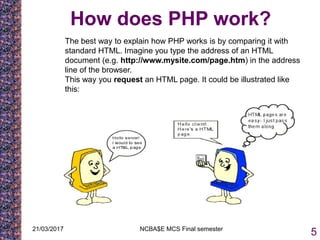
The best way to explain how PHP works is by comparing it with
standard HTML. Imagine you type the address of an HTML
document (e.g. http://www.mysite.com/page.htm) in the address
line of the browser.
This way you request an HTML page. It could be illustrated like
this:
21/03/2017 NCBA$E MCS Final semester
6
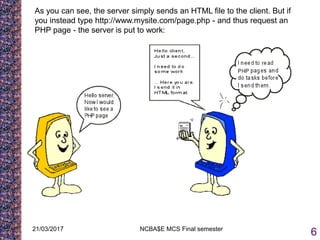
As you can see, the server simply sends an HTML file to the client. But if
you instead type http://www.mysite.com/page.php - and thus request an
PHP page - the server is put to work:
21/03/2017 NCBA$E MCS Final semester
7
The server first reads the PHP file carefully to see if there are any tasks
that need to be executed. Only when the server has done what it is
supposed to do, the result is then sent to the client. It is important to
understand that the client only sees the result of the server's work, not
the actual instructions.
This means that if you click "view source" on a PHP page, you do not
see the PHP codes - only basic HTML tags. Therefore, you cannot see
how a PHP page is made by using "view source". You have to learn
PHP in other ways
Servers
21/03/2017 NCBA$E MCS Final semester
8
• PHP is a server-side technology. Therefore, you need to have a server to
run PHP. But it doesn't need to cost you anything to make this upgrade
and there are several options for doing so.
• Since you ultimately only need to choose one option, this is divided into
three parts. First comes a little introduction on the different options (just
choose the one that suits you best). When your server is up and running,
Option 1: Website on a hosted server
You can choose to have a website on a host that supports PHP.
Option 2: Install PHP on your computer
It's no walk in the park to install PHP on your computer. This option is only
recommend for experienced computer users, but it can obviously be done.
Here are links to downloads and installation
• Windows Installation
• Mac Installation
• Linux Installation
21/03/2017 NCBA$E MCS Final semester
9
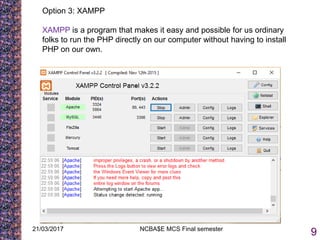
Option 3: XAMPP
XAMPP is a program that makes it easy and possible for us ordinary
folks to run the PHP directly on our computer without having to install
PHP on our own.
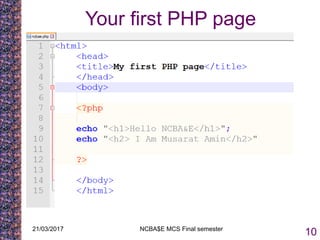
Your first PHP page
21/03/2017 NCBA$E MCS Final semester
10
Execution
21/03/2017 NCBA$E MCS Final semester
11
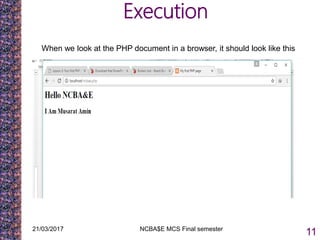
When we look at the PHP document in a browser, it should look like this

Presentation php

  • 1.
  • 2.
  • 3.
    21/03/2017 NCBA$E MCSFinal semester 3 Agenda • What is PHP? • How does PHP work? • Servers • Your first PHP page • Execution
  • 4.
    What is PHP? 21/03/2017NCBA$E MCS Final semester 4 • PHP was originally an acronym for Personal Home Pages, but is now a recursive acronym for PHP: Hypertext Pre-processor. • PHP was originally developed by the Danish Greenlander Rasmus Lerdorf, and was subsequently developed as open source. PHP is not a proper web standard - but an open-source technology. • PHP is neither real programming language - but PHP lets you use so-called scripting in your documents. • To describe what a PHP page is, you could say that it is a file with the extension .php that contains a combination of HTML tags and scripts that run on a web server.
  • 5.
    How does PHPwork? 21/03/2017 NCBA$E MCS Final semester 5 The best way to explain how PHP works is by comparing it with standard HTML. Imagine you type the address of an HTML document (e.g. http://www.mysite.com/page.htm) in the address line of the browser. This way you request an HTML page. It could be illustrated like this:
  • 6.
    21/03/2017 NCBA$E MCSFinal semester 6 As you can see, the server simply sends an HTML file to the client. But if you instead type http://www.mysite.com/page.php - and thus request an PHP page - the server is put to work:
  • 7.
    21/03/2017 NCBA$E MCSFinal semester 7 The server first reads the PHP file carefully to see if there are any tasks that need to be executed. Only when the server has done what it is supposed to do, the result is then sent to the client. It is important to understand that the client only sees the result of the server's work, not the actual instructions. This means that if you click "view source" on a PHP page, you do not see the PHP codes - only basic HTML tags. Therefore, you cannot see how a PHP page is made by using "view source". You have to learn PHP in other ways
  • 8.
    Servers 21/03/2017 NCBA$E MCSFinal semester 8 • PHP is a server-side technology. Therefore, you need to have a server to run PHP. But it doesn't need to cost you anything to make this upgrade and there are several options for doing so. • Since you ultimately only need to choose one option, this is divided into three parts. First comes a little introduction on the different options (just choose the one that suits you best). When your server is up and running, Option 1: Website on a hosted server You can choose to have a website on a host that supports PHP. Option 2: Install PHP on your computer It's no walk in the park to install PHP on your computer. This option is only recommend for experienced computer users, but it can obviously be done. Here are links to downloads and installation • Windows Installation • Mac Installation • Linux Installation
  • 9.
    21/03/2017 NCBA$E MCSFinal semester 9 Option 3: XAMPP XAMPP is a program that makes it easy and possible for us ordinary folks to run the PHP directly on our computer without having to install PHP on our own.
  • 10.
    Your first PHPpage 21/03/2017 NCBA$E MCS Final semester 10
  • 11.
    Execution 21/03/2017 NCBA$E MCSFinal semester 11 When we look at the PHP document in a browser, it should look like this