Posting in the Discussion Forum
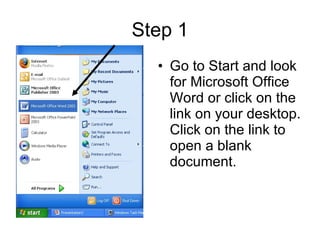
Step 1 Go to Start and look for Microsoft Office Word or click on the link on your desktop. Click on the link to open a blank document.
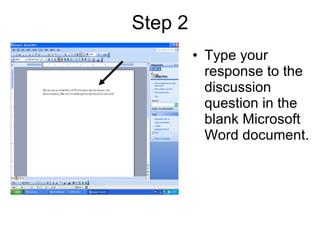
Type your response to the discussion question in the blank Microsoft Word document. Step 2
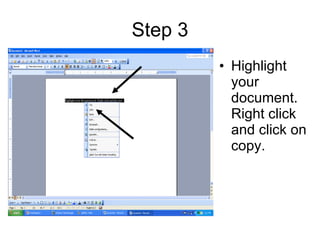
Step 3 Highlight your document. Right click and click on copy.
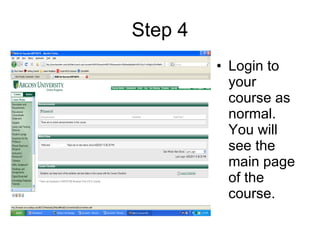
Step 4 Login to your course as normal. You will see the main page of the course.
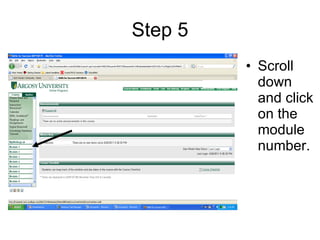
Step 5 Scroll down and click on the module number.
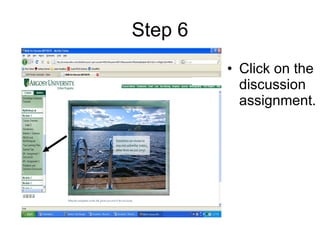
Step 6 Click on the discussion assignment.
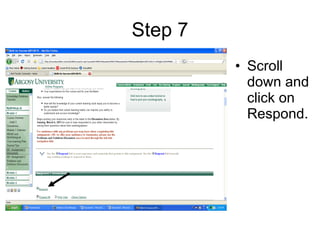
Step 7 Scroll down and click on Respond.
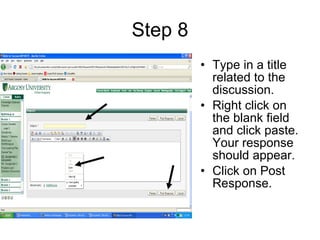
Step 8 Type in a title related to the discussion. Right click on the blank field and click paste. Your response should appear. Click on Post Response.
Any Questions? Please let me know if you have any problems posting a discussion response. In the next webcast, you will learn how to upload documents to the dropbox.

Web cast

  • 1.
    Posting in theDiscussion Forum
  • 2.
    Step 1 Goto Start and look for Microsoft Office Word or click on the link on your desktop. Click on the link to open a blank document.
  • 3.
    Type your responseto the discussion question in the blank Microsoft Word document. Step 2
  • 4.
    Step 3 Highlightyour document. Right click and click on copy.
  • 5.
    Step 4 Loginto your course as normal. You will see the main page of the course.
  • 6.
    Step 5 Scrolldown and click on the module number.
  • 7.
    Step 6 Clickon the discussion assignment.
  • 8.
    Step 7 Scrolldown and click on Respond.
  • 9.
    Step 8 Typein a title related to the discussion. Right click on the blank field and click paste. Your response should appear. Click on Post Response.
  • 10.
    Any Questions? Pleaselet me know if you have any problems posting a discussion response. In the next webcast, you will learn how to upload documents to the dropbox.