Technology in the
Classroom
21st Century Learning
Today’s Students
 94% of online teens use the Internet for school-
related research
 90% of children between ages 5 and 17 use
computers
 Teens spend more time online than watching
television
 Largest group of new users of the Internet are
2-5 year olds
Source: National Education Technology Plan 2004
Pennsylvania Department
of Education
 This video is an example of the way PDE views
the Classroom for the Future project.
http://www.youtube.com/watch?v=-5clgWxfwRw
21st Century Technology Resources
 Discovery Education Unitedstreaming
 Blogs
 WebQuests
 PodCasts
 Virtual E-Field Trips
 NetTrekker d.i.
 Teacher Webs
 Wiki’s
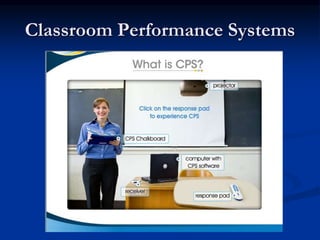
 Classroom Performance Systems - CPS
Unitedstreaming
 Discovery Education unitedstreaming is a digital
video-on-demand and online teaching service to
help improve students' retention and test scores;
it is aligned to U.S. state and provincial
standards. Find out what more than 30,000,000
teachers and students already know - Discovery
Education unitedstreaming works.
 http://www.unitedstreaming.com/
Blogging
 A blog is a website for which an individual or a group frequently
generates text, photographs, video or audio files, and/or links,
typically (but not always) on a daily basis. The term is a
shortened form of weblog. Authoring a blog, maintaining a blog
or adding an article to an existing blog is called "blogging".
Individual articles on a blog are called "blog posts," "posts," or
"entries". The person who posts these entries is called a
"blogger".
-Taken from http://en.wikipedia.org/wiki/Blog on
12/17/2005
 http://www3.essdack.org/socialstudies/blogs.htm
 http://blogging101.wikispaces.com/
 http://teacher.npsd.org/tchesko/default.aspx
WebQuests
 WebQuests are among the most fascinating applications on the Web
for K-12 educators. Student-centered and inquiry-based, a WebQuest
challenges students to explore the web for information. Most
WebQuests include the links that are appropriate for students to
research as well as suggestions for further research. WebQuests are
generally constructed around a scenario of interest to students.
Traditionally WebQuests have an introduction, a process, a task, a list
of resources, a conclusion, and an evaluation. We have developed an
diagram that is an introductory overview of a WebQuest. As teachers
begin to brainstorm a topic, a WebQuest development guide,
assists teachers. View a sample diagram on brainstorming ideas on
the concept, Survival, with the topic, earthquakes, as an introductory
activity.
Click here to download or view an example concept map WebQuest
Word document.
 http://www.teachersfirst.com/summer/webquest/quest-a.shtml
 http://web54.sd54.k12.il.us/district54/lts/dmoore/webquest/questing
.htm
WebQuest Examples
 http://bestwebquests.com/
 http://www.techtrekers.com/webquests/#Social%20Studies
 http://www.kn.pacbell.com/wired/fil/pages/webworldwamr.ht
ml
 http://www.lifestreamcenter.net/DrB/Lessons/WW2/index.ht
m
 http://www.web-and-
flow.com/members/shursey/separatepeace/webquest.htm
 http://www.kn.pacbell.com/wired/China/ChinaQuest.html
PodCasts
 A podcast is a media file that is distributed by subscription (paid or unpaid)
over the Internet using syndication feeds, for playback on mobile devices and
personal computers. Like 'radio', it can mean both the content and the
method of syndication. The latter may also be termed podcasting. The host
or author of a podcast is often called a podcaster. The term "podcast" is
derived from Apple's portable music player, the iPod. However, known
synonyms for the word pod are capsule, case, container, hull, husk, shell, and
vessel. A pod is obviously a container of some sort and the idea of
broadcasting to a container or pod correctly the describes the process of
podcasting. More about the name itself can be found in the History of
podcasting article. Though podcasters' web sites may also offer direct
download or streaming of their content, a podcast is distinguished from other
digital audio formats by its ability to be downloaded automatically, using
software capable of reading feed formats such as RSS or Atom.
 http://chatt.hdsb.ca/~magps/boylit/Podcasting%20in%20Education
 http://www.learninginhand.com/podcasting/
 http://www.npsd.net/podcasts.htm
Virtual E-Field Trips
 Ball State University Virtual E-Field Trips – No cost thru Best
Buy Grant
 http://www.bsu.edu/eft/home/00front.htm -
 http://www.efieldtrips.org/support/whatIs.cfm
 http://www.thinkport.org/Classroom/trips.tp
 http://www.field-trips.org/vft/PermissionSlip.pdf
NetTrekker d.i.
 NetTrekker d.i., the latest version of netTrekker, the
award-winning search engine for schools, supports
differentiated instruction with standards-based online
resources, organized by readability level to help every
child achieve.
 http://school.nettrekker.com/frontdoor/
Teacher Web Sites
 A set of interconnected webpages, usually including a
homepage, generally located on the same server, and
prepared and maintained as a collection of information
by a person, group, or organization.
 http://teacher.npsd.org/pcalderone/default.aspx
 http://www.gilbert.k12.az.us/tweb/view.srv?mode=vie
werViewSite&site=128
 http://teacher.npsd.org/tchesko/default.aspx
Wikis
 wiki communications
Any collaborative website that users can easily modify via the web, typically
without restriction. A wiki allows anyone, using a web browser, to edit, delete
or modify content that has been placed on the site, including the work of
other authors. This has been found to work surprisingly well since
contributors tend to be more numerous and persistent than vandals and old
versions of pages are always available.
Text is entered using a simple mark-up language which is then rendered as
HTML. A feature common to many of the different implementations is that
any word in mixed case LikeThis is automatically turned into a link to a page
of that name, which may or may not exist (similar to the linking in this
dictionary).
In contrast, a web log, typically authored by an individual, does not allow
visitors to change the original posted material, only add comments.
Wiki wiki means "quick" in Hawaiian. The first wiki was created by Ward
Cunningham in 1995.
wiki.org.
(2005-07-21)
Wikis
 Welcome to Technology for Differentiated Instruction
http://tech4di.wikispaces.com/
 E-Field Trip Wiki
http://nitschenotes.wikispaces.com/PETE%26C
 Digital Tool for Digital Natives
http://jdorman.wikispaces.com/Digital+Tools+for+Digital
+Natives
Teacher Wikis
 http://www2.teachersfirst.com/content/wiki/ - A Wiki walk-
through for teachers
 http://www.cbsd.org/holicong/jendorman/ - A PA Keystones
Wiki with examples of blogs, podcasts, wikis and all kinds of
teacher tools.
 http://www.education-world.com/a_tech/sites/sites079.shtml -
Wiki sites and examples for use of wikis in the classroom.
 http://theconnectedclassroom.wikispaces.com/World - More
examples and resources.
 Wiki’s created by the professional learning community for the
North Pocono School District
 http://wiki.npsd.org/index.php?title=Main_Page
 http://www.nptechzone.wikispaces.com
More Wikis
 http://flatclassroomproject.wikispaces.com/ - Flat
Classroom project has won the 2006 Edublog Award for
Best Wiki
 http://www.scienceofspectroscopy.info/edit/index.php?title
=Using_wiki_in_education#Ways_to_use_Wiki_in_Educati
on – Lists ways to use wikis in education.
 More useful multimedia tools to enhance websites and blogs
 http://www.splashcastmedia.com/
 http://www.slide.com/
Classroom Performance Systems
Internet Resources for Teachers
 http://www.yourchildlearns.com/geography.htm
 http://school.discovery.com/lessonplans/
 http://www.eduref.org/Virtual/Lessons/
 http://www.assortedstuff.com/top101/
 http://www.sitesforteachers.com/index.html
 http://www.teacherfreebies.com/index4members.htm
 http://teacherplanet.org/
 http://www.teacherplanet.com/calendar/calendar.php?op=cal&mon
th=2&year=2007
 Google Earth
 http://stu.dicio.us/
 http://wavelit.com/index.asp?ch=Wildlife&sh=africam
 http://magma.nationalgeographic.com/ngm/sealcam/index.html
Other Resources
 Classroom Performance Systems - CPS http://www.einstruction.com/
 Jumpcut and Eyespot – Free web based video editing and storage .
http://www.jumpcut.com/
http://eyespot.com/
 Audacity – Free audio editor and recorder
http://audacity.sourceforge.net/
 Box.net – Free 1G data storage online. http://www.box.net/
 http://www.splashcastmedia.com/
 http://www.slide.com/
Digital Copyright
 Technology & Learning Copyright Guidelines
 A Free Copyright Website Created by Berks County
Intermediate
 Use BCIU PD as the username and password
to log-in (upper case and use a space between BCIU and PD)
Network Safety Website
 Websites designed for students to develop an
understanding of how to safely use the internet
 http://www.cybersmartcurriculum.org/home/
 http://www.netsmartzkids.org/indexFL.htm
Professional Development
 2 days training by FutureKids
 30 hour on-line training course (March-April)
 Embedded Learning Courses
 Wilkes University - Masters in 21st Century
Learning (approx. $1025 per course)
 Tech Classes to develop instructional
coursework
 Promethean Interactive Whiteboard Tutorials
CFF Information
 CFF Equipment Order – March 15 Order Date with
Arrival Date – End of March
 Teaching Performance Record – TPR
http://tpr.casenex.com/content/index.php
 PDE Selected Teachers for CFF Data Collection
 Joe Bartoletti
 Paul Calderone
 Brian Croom
 Jennifer Hauber

Technology

  • 1.
  • 2.
    Today’s Students  94%of online teens use the Internet for school- related research  90% of children between ages 5 and 17 use computers  Teens spend more time online than watching television  Largest group of new users of the Internet are 2-5 year olds Source: National Education Technology Plan 2004
  • 3.
    Pennsylvania Department of Education This video is an example of the way PDE views the Classroom for the Future project. http://www.youtube.com/watch?v=-5clgWxfwRw
  • 4.
    21st Century TechnologyResources  Discovery Education Unitedstreaming  Blogs  WebQuests  PodCasts  Virtual E-Field Trips  NetTrekker d.i.  Teacher Webs  Wiki’s  Classroom Performance Systems - CPS
  • 5.
    Unitedstreaming  Discovery Educationunitedstreaming is a digital video-on-demand and online teaching service to help improve students' retention and test scores; it is aligned to U.S. state and provincial standards. Find out what more than 30,000,000 teachers and students already know - Discovery Education unitedstreaming works.  http://www.unitedstreaming.com/
  • 6.
    Blogging  A blogis a website for which an individual or a group frequently generates text, photographs, video or audio files, and/or links, typically (but not always) on a daily basis. The term is a shortened form of weblog. Authoring a blog, maintaining a blog or adding an article to an existing blog is called "blogging". Individual articles on a blog are called "blog posts," "posts," or "entries". The person who posts these entries is called a "blogger". -Taken from http://en.wikipedia.org/wiki/Blog on 12/17/2005  http://www3.essdack.org/socialstudies/blogs.htm  http://blogging101.wikispaces.com/  http://teacher.npsd.org/tchesko/default.aspx
  • 7.
    WebQuests  WebQuests areamong the most fascinating applications on the Web for K-12 educators. Student-centered and inquiry-based, a WebQuest challenges students to explore the web for information. Most WebQuests include the links that are appropriate for students to research as well as suggestions for further research. WebQuests are generally constructed around a scenario of interest to students. Traditionally WebQuests have an introduction, a process, a task, a list of resources, a conclusion, and an evaluation. We have developed an diagram that is an introductory overview of a WebQuest. As teachers begin to brainstorm a topic, a WebQuest development guide, assists teachers. View a sample diagram on brainstorming ideas on the concept, Survival, with the topic, earthquakes, as an introductory activity. Click here to download or view an example concept map WebQuest Word document.  http://www.teachersfirst.com/summer/webquest/quest-a.shtml  http://web54.sd54.k12.il.us/district54/lts/dmoore/webquest/questing .htm
  • 8.
    WebQuest Examples  http://bestwebquests.com/ http://www.techtrekers.com/webquests/#Social%20Studies  http://www.kn.pacbell.com/wired/fil/pages/webworldwamr.ht ml  http://www.lifestreamcenter.net/DrB/Lessons/WW2/index.ht m  http://www.web-and- flow.com/members/shursey/separatepeace/webquest.htm  http://www.kn.pacbell.com/wired/China/ChinaQuest.html
  • 9.
    PodCasts  A podcastis a media file that is distributed by subscription (paid or unpaid) over the Internet using syndication feeds, for playback on mobile devices and personal computers. Like 'radio', it can mean both the content and the method of syndication. The latter may also be termed podcasting. The host or author of a podcast is often called a podcaster. The term "podcast" is derived from Apple's portable music player, the iPod. However, known synonyms for the word pod are capsule, case, container, hull, husk, shell, and vessel. A pod is obviously a container of some sort and the idea of broadcasting to a container or pod correctly the describes the process of podcasting. More about the name itself can be found in the History of podcasting article. Though podcasters' web sites may also offer direct download or streaming of their content, a podcast is distinguished from other digital audio formats by its ability to be downloaded automatically, using software capable of reading feed formats such as RSS or Atom.  http://chatt.hdsb.ca/~magps/boylit/Podcasting%20in%20Education  http://www.learninginhand.com/podcasting/  http://www.npsd.net/podcasts.htm
  • 10.
    Virtual E-Field Trips Ball State University Virtual E-Field Trips – No cost thru Best Buy Grant  http://www.bsu.edu/eft/home/00front.htm -  http://www.efieldtrips.org/support/whatIs.cfm  http://www.thinkport.org/Classroom/trips.tp  http://www.field-trips.org/vft/PermissionSlip.pdf
  • 11.
    NetTrekker d.i.  NetTrekkerd.i., the latest version of netTrekker, the award-winning search engine for schools, supports differentiated instruction with standards-based online resources, organized by readability level to help every child achieve.  http://school.nettrekker.com/frontdoor/
  • 12.
    Teacher Web Sites A set of interconnected webpages, usually including a homepage, generally located on the same server, and prepared and maintained as a collection of information by a person, group, or organization.  http://teacher.npsd.org/pcalderone/default.aspx  http://www.gilbert.k12.az.us/tweb/view.srv?mode=vie werViewSite&site=128  http://teacher.npsd.org/tchesko/default.aspx
  • 13.
    Wikis  wiki communications Anycollaborative website that users can easily modify via the web, typically without restriction. A wiki allows anyone, using a web browser, to edit, delete or modify content that has been placed on the site, including the work of other authors. This has been found to work surprisingly well since contributors tend to be more numerous and persistent than vandals and old versions of pages are always available. Text is entered using a simple mark-up language which is then rendered as HTML. A feature common to many of the different implementations is that any word in mixed case LikeThis is automatically turned into a link to a page of that name, which may or may not exist (similar to the linking in this dictionary). In contrast, a web log, typically authored by an individual, does not allow visitors to change the original posted material, only add comments. Wiki wiki means "quick" in Hawaiian. The first wiki was created by Ward Cunningham in 1995. wiki.org. (2005-07-21)
  • 14.
    Wikis  Welcome toTechnology for Differentiated Instruction http://tech4di.wikispaces.com/  E-Field Trip Wiki http://nitschenotes.wikispaces.com/PETE%26C  Digital Tool for Digital Natives http://jdorman.wikispaces.com/Digital+Tools+for+Digital +Natives
  • 15.
    Teacher Wikis  http://www2.teachersfirst.com/content/wiki/- A Wiki walk- through for teachers  http://www.cbsd.org/holicong/jendorman/ - A PA Keystones Wiki with examples of blogs, podcasts, wikis and all kinds of teacher tools.  http://www.education-world.com/a_tech/sites/sites079.shtml - Wiki sites and examples for use of wikis in the classroom.  http://theconnectedclassroom.wikispaces.com/World - More examples and resources.  Wiki’s created by the professional learning community for the North Pocono School District  http://wiki.npsd.org/index.php?title=Main_Page  http://www.nptechzone.wikispaces.com
  • 16.
    More Wikis  http://flatclassroomproject.wikispaces.com/- Flat Classroom project has won the 2006 Edublog Award for Best Wiki  http://www.scienceofspectroscopy.info/edit/index.php?title =Using_wiki_in_education#Ways_to_use_Wiki_in_Educati on – Lists ways to use wikis in education.  More useful multimedia tools to enhance websites and blogs  http://www.splashcastmedia.com/  http://www.slide.com/
  • 17.
  • 18.
    Internet Resources forTeachers  http://www.yourchildlearns.com/geography.htm  http://school.discovery.com/lessonplans/  http://www.eduref.org/Virtual/Lessons/  http://www.assortedstuff.com/top101/  http://www.sitesforteachers.com/index.html  http://www.teacherfreebies.com/index4members.htm  http://teacherplanet.org/  http://www.teacherplanet.com/calendar/calendar.php?op=cal&mon th=2&year=2007  Google Earth  http://stu.dicio.us/  http://wavelit.com/index.asp?ch=Wildlife&sh=africam  http://magma.nationalgeographic.com/ngm/sealcam/index.html
  • 19.
    Other Resources  ClassroomPerformance Systems - CPS http://www.einstruction.com/  Jumpcut and Eyespot – Free web based video editing and storage . http://www.jumpcut.com/ http://eyespot.com/  Audacity – Free audio editor and recorder http://audacity.sourceforge.net/  Box.net – Free 1G data storage online. http://www.box.net/  http://www.splashcastmedia.com/  http://www.slide.com/
  • 20.
    Digital Copyright  Technology& Learning Copyright Guidelines  A Free Copyright Website Created by Berks County Intermediate  Use BCIU PD as the username and password to log-in (upper case and use a space between BCIU and PD)
  • 21.
    Network Safety Website Websites designed for students to develop an understanding of how to safely use the internet  http://www.cybersmartcurriculum.org/home/  http://www.netsmartzkids.org/indexFL.htm
  • 22.
    Professional Development  2days training by FutureKids  30 hour on-line training course (March-April)  Embedded Learning Courses  Wilkes University - Masters in 21st Century Learning (approx. $1025 per course)  Tech Classes to develop instructional coursework  Promethean Interactive Whiteboard Tutorials
  • 23.
    CFF Information  CFFEquipment Order – March 15 Order Date with Arrival Date – End of March  Teaching Performance Record – TPR http://tpr.casenex.com/content/index.php  PDE Selected Teachers for CFF Data Collection  Joe Bartoletti  Paul Calderone  Brian Croom  Jennifer Hauber