Next Generation Branch Office Designs
Tommy Walker, VMware
EUC5442
#EUC5442
2
Agenda
 Remote Office Overview
• Challenges
 Remote Office Solutions
• Horizon View
• Horizon Mirage
• Horizon Distributed View
3
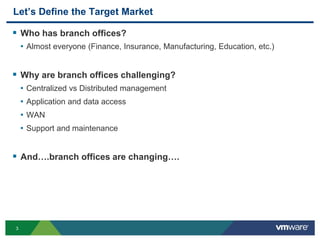
Let’s Define the Target Market
 Who has branch offices?
• Almost everyone (Finance, Insurance, Manufacturing, Education, etc.)
 Why are branch offices challenging?
• Centralized vs Distributed management
• Application and data access
• WAN
• Support and maintenance
 And….branch offices are changing….
4
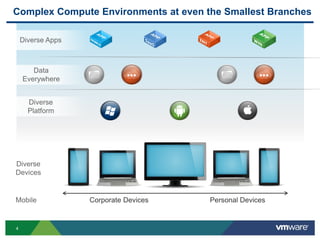
Complex Compute Environments at even the Smallest Branches
Personal DevicesCorporate Devices
Diverse Apps
Diverse
Platform
Data
Everywhere
Diverse
Devices
Mobile
5
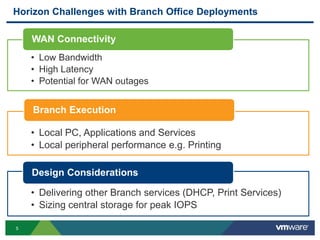
Horizon Challenges with Branch Office Deployments
• Low Bandwidth
• High Latency
• Potential for WAN outages
WAN Connectivity
• Local PC, Applications and Services
• Local peripheral performance e.g. Printing
Branch Execution
• Delivering other Branch services (DHCP, Print Services)
• Sizing central storage for peak IOPS
Design Considerations
6
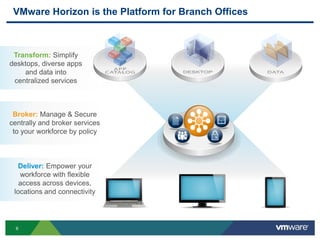
Transform: Simplify
desktops, diverse apps
and data into
centralized services
Deliver: Empower your
workforce with flexible
access across devices,
locations and connectivity
VMware Horizon is the Platform for Branch Offices
Broker: Manage & Secure
centrally and broker services
to your workforce by policy
7
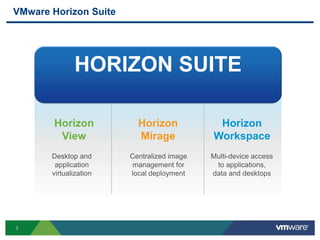
Centralized image
management for
local deployment
Multi-device access
to applications,
data and desktops
VMware Horizon Suite
HORIZON SUITE
Horizon
View
Horizon
Mirage
Horizon
Workspace
Desktop and
application
virtualization
8
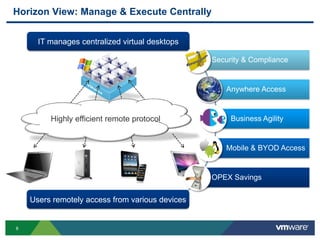
Horizon View: Manage & Execute Centrally
Security & Compliance
Anywhere Access
Business Agility
Mobile & BYOD Access
OPEX Savings
IT manages centralized virtual desktops
Users remotely access from various devices
Highly efficient remote protocol
9
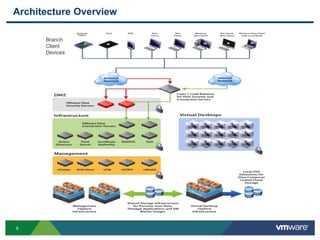
Architecture Overview
Branch
Client
Devices
10
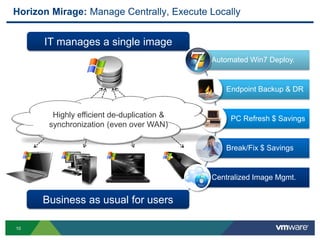
IT manages a single image
Business as usual for users
Horizon Mirage: Manage Centrally, Execute Locally
Automated Win7 Deploy.
Endpoint Backup & DR
PC Refresh $ Savings
Break/Fix $ Savings
Centralized Image Mgmt.
Highly efficient de-duplication &
synchronization (even over WAN)
11
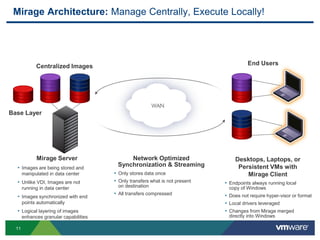
Mirage Server
• Images are being stored and
manipulated in data center
• Unlike VDI, Images are not
running in data center
• Images synchronized with end
points automatically
• Logical layering of images
enhances granular capabilities
Centralized Images
Network Optimized
Synchronization & Streaming
• Only stores data once
• Only transfers what is not present
on destination
• All transfers compressed
Base Layer
Desktops, Laptops, or
Persistent VMs with
Mirage Client
• Endpoints always running local
copy of Windows
• Does not require hyper-visor or format
• Local drivers leveraged
• Changes from Mirage merged
directly into Windows
End Users
Mirage Architecture: Manage Centrally, Execute Locally!
12
BRANCHHQ
Mirage for Physical Endpoint Image Management
SYNC
MIRAGE
BRANCH
REFLECTOR
MIRAGE
CVD DB
BRANCH
REFLECTOR
CACHE
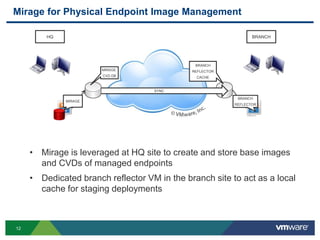
• Mirage is leveraged at HQ site to create and store base images
and CVDs of managed endpoints
• Dedicated branch reflector VM in the branch site to act as a local
cache for staging deployments
13
Horizon Mirage Deployment
14
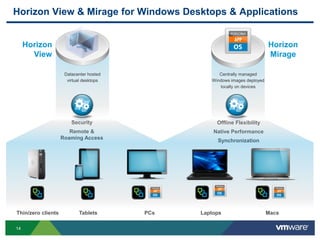
Centrally managed
Windows images deployed
locally on devices
Datacenter hosted
virtual desktops
Horizon
View
Horizon
Mirage
Security
Remote &
Roaming Access
Offline Flexibility
Native Performance
Synchronization
Horizon View & Mirage for Windows Desktops & Applications
Thin/zero clients Tablets PCs Laptops Macs
15
Horizon Distributed View (New in View 5.2)
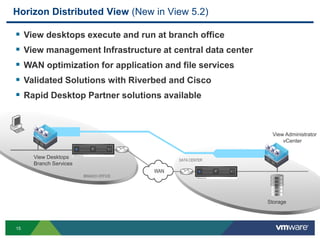
 View desktops execute and run at branch office
 View management Infrastructure at central data center
 WAN optimization for application and file services
 Validated Solutions with Riverbed and Cisco
 Rapid Desktop Partner solutions available
WAN
DATA CENTER
BRANCH OFFICE
View Administrator
vCenter
View Desktops
Branch Services
Storage
16
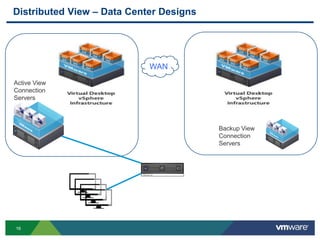
Distributed View – Data Center Designs
WAN
Active View
Connection
Servers
Backup View
Connection
Servers
17
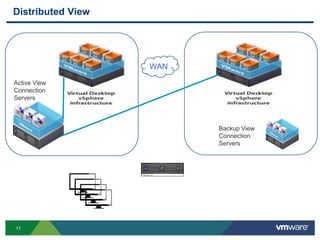
Distributed View
WAN
Active View
Connection
Servers
Backup View
Connection
Servers
18
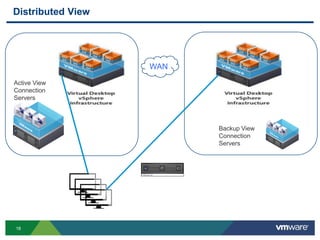
Distributed View
WAN
Active View
Connection
Servers
Backup View
Connection
Servers
19
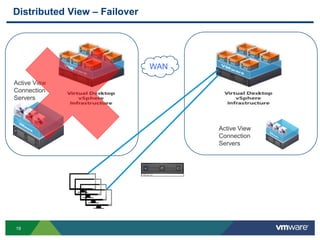
Distributed View – Failover
WAN
Active View
Connection
Servers
Active View
Connection
Servers
20
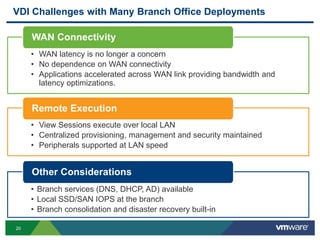
• Low Bandwidth
• High Latency
• Potential for WAN outages
• WAN latency is no longer a concern
• No dependence on WAN connectivity
• Applications accelerated across WAN link providing bandwidth and
latency optimizations.
• Delivering other Branch services (DNS, DHCP, AD)
• Sizing central storage for peak IOPS
• Branch services (DNS, DHCP, AD) available
• Local SSD/SAN IOPS at the branch
• Branch consolidation and disaster recovery built-in
• Local Applications and Services
• Local peripheral performance e.g. Printing
• View Sessions execute over local LAN
• Centralized provisioning, management and security maintained
• Peripherals supported at LAN speed
VDI Challenges with Many Branch Office Deployments
WAN Connectivity
Remote Execution
Other Considerations
WAN Connectivity
Remote Execution
Other Considerations
21
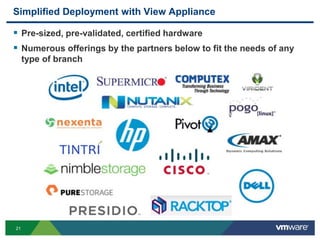
Simplified Deployment with View Appliance
 Pre-sized, pre-validated, certified hardware
 Numerous offerings by the partners below to fit the needs of any
type of branch
© 2013 VMware Inc. All rights reserved
The Branch of the Future is Now
23
Other VMware Activities Related to This Session
 HOL:
HOL-MBL-1301
Horizon View from A to Z
THANK YOU
Next Generation Branch Office Designs
Tommy Walker, VMware
EUC5442
#EUC5442

VMworld 2013: Next Generation Branch Office Designs

  • 1.
    Next Generation BranchOffice Designs Tommy Walker, VMware EUC5442 #EUC5442
  • 2.
    2 Agenda  Remote OfficeOverview • Challenges  Remote Office Solutions • Horizon View • Horizon Mirage • Horizon Distributed View
  • 3.
    3 Let’s Define theTarget Market  Who has branch offices? • Almost everyone (Finance, Insurance, Manufacturing, Education, etc.)  Why are branch offices challenging? • Centralized vs Distributed management • Application and data access • WAN • Support and maintenance  And….branch offices are changing….
  • 4.
    4 Complex Compute Environmentsat even the Smallest Branches Personal DevicesCorporate Devices Diverse Apps Diverse Platform Data Everywhere Diverse Devices Mobile
  • 5.
    5 Horizon Challenges withBranch Office Deployments • Low Bandwidth • High Latency • Potential for WAN outages WAN Connectivity • Local PC, Applications and Services • Local peripheral performance e.g. Printing Branch Execution • Delivering other Branch services (DHCP, Print Services) • Sizing central storage for peak IOPS Design Considerations
  • 6.
    6 Transform: Simplify desktops, diverseapps and data into centralized services Deliver: Empower your workforce with flexible access across devices, locations and connectivity VMware Horizon is the Platform for Branch Offices Broker: Manage & Secure centrally and broker services to your workforce by policy
  • 7.
    7 Centralized image management for localdeployment Multi-device access to applications, data and desktops VMware Horizon Suite HORIZON SUITE Horizon View Horizon Mirage Horizon Workspace Desktop and application virtualization
  • 8.
    8 Horizon View: Manage& Execute Centrally Security & Compliance Anywhere Access Business Agility Mobile & BYOD Access OPEX Savings IT manages centralized virtual desktops Users remotely access from various devices Highly efficient remote protocol
  • 9.
  • 10.
    10 IT manages asingle image Business as usual for users Horizon Mirage: Manage Centrally, Execute Locally Automated Win7 Deploy. Endpoint Backup & DR PC Refresh $ Savings Break/Fix $ Savings Centralized Image Mgmt. Highly efficient de-duplication & synchronization (even over WAN)
  • 11.
    11 Mirage Server • Imagesare being stored and manipulated in data center • Unlike VDI, Images are not running in data center • Images synchronized with end points automatically • Logical layering of images enhances granular capabilities Centralized Images Network Optimized Synchronization & Streaming • Only stores data once • Only transfers what is not present on destination • All transfers compressed Base Layer Desktops, Laptops, or Persistent VMs with Mirage Client • Endpoints always running local copy of Windows • Does not require hyper-visor or format • Local drivers leveraged • Changes from Mirage merged directly into Windows End Users Mirage Architecture: Manage Centrally, Execute Locally!
  • 12.
    12 BRANCHHQ Mirage for PhysicalEndpoint Image Management SYNC MIRAGE BRANCH REFLECTOR MIRAGE CVD DB BRANCH REFLECTOR CACHE • Mirage is leveraged at HQ site to create and store base images and CVDs of managed endpoints • Dedicated branch reflector VM in the branch site to act as a local cache for staging deployments
  • 13.
  • 14.
    14 Centrally managed Windows imagesdeployed locally on devices Datacenter hosted virtual desktops Horizon View Horizon Mirage Security Remote & Roaming Access Offline Flexibility Native Performance Synchronization Horizon View & Mirage for Windows Desktops & Applications Thin/zero clients Tablets PCs Laptops Macs
  • 15.
    15 Horizon Distributed View(New in View 5.2)  View desktops execute and run at branch office  View management Infrastructure at central data center  WAN optimization for application and file services  Validated Solutions with Riverbed and Cisco  Rapid Desktop Partner solutions available WAN DATA CENTER BRANCH OFFICE View Administrator vCenter View Desktops Branch Services Storage
  • 16.
    16 Distributed View –Data Center Designs WAN Active View Connection Servers Backup View Connection Servers
  • 17.
  • 18.
  • 19.
    19 Distributed View –Failover WAN Active View Connection Servers Active View Connection Servers
  • 20.
    20 • Low Bandwidth •High Latency • Potential for WAN outages • WAN latency is no longer a concern • No dependence on WAN connectivity • Applications accelerated across WAN link providing bandwidth and latency optimizations. • Delivering other Branch services (DNS, DHCP, AD) • Sizing central storage for peak IOPS • Branch services (DNS, DHCP, AD) available • Local SSD/SAN IOPS at the branch • Branch consolidation and disaster recovery built-in • Local Applications and Services • Local peripheral performance e.g. Printing • View Sessions execute over local LAN • Centralized provisioning, management and security maintained • Peripherals supported at LAN speed VDI Challenges with Many Branch Office Deployments WAN Connectivity Remote Execution Other Considerations WAN Connectivity Remote Execution Other Considerations
  • 21.
    21 Simplified Deployment withView Appliance  Pre-sized, pre-validated, certified hardware  Numerous offerings by the partners below to fit the needs of any type of branch
  • 22.
    © 2013 VMwareInc. All rights reserved The Branch of the Future is Now
  • 23.
    23 Other VMware ActivitiesRelated to This Session  HOL: HOL-MBL-1301 Horizon View from A to Z
  • 24.
  • 26.
    Next Generation BranchOffice Designs Tommy Walker, VMware EUC5442 #EUC5442