Migrating Thousands of
Workloads?
No Problem!
CXS1373BCN
Principal Architect, VCDX #240
Andrea Siviero
#vmwareexplore #CXS1373BCN
Emad Younis
Director, VMware Cloud Solutions
© 2023 VMware, Inc. 2
• This presentation may contain product features or functionality that are currently under development.
• This overview of new technology represents no commitment from VMware to deliver these features in any
generally available product.
• Features are subject to change, and must not be included in contracts, purchase orders, or sales
agreements of any kind.
• Technical feasibility and market demand will affect final delivery.
• Pricing and packaging for any new features/functionality/technology discussed or presented, have not
been determined.

Required Disclaimer
© 2023 VMware, Inc. 3
Agenda Why: Migrations as a multi-cloud feature
What: A framework for successful migrations
How: Guidance and detailed steps
© 2023 VMware, Inc. 4
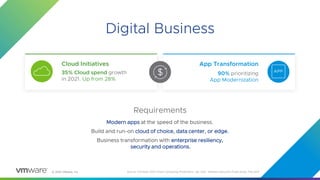
Digital Business
4
Requirements
Modern apps at the speed of the business.
Build and run-on cloud of choice, data center, or edge.
Business transformation with enterprise resiliency,
security and operations.
35% Cloud spend growth
in 2021. Up from 28%
Cloud Initiatives
90% prioritizing
App Modernization
App Transformation
Source: Forrester 2021 Cloud Computing Predictions, Jan 2021, VMware Executive Pulse Study, Feb 2021
© 2023 VMware, Inc. 5
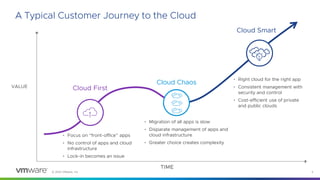
A Typical Customer Journey to the Cloud
Cloud First
Cloud Chaos
TIME
VALUE
Cloud Smart
• Right cloud for the right app
• Consistent management with
security and control
• Cost-efficient use of private
and public clouds
• Migration of all apps is slow
• Disparate management of apps and
cloud infrastructure
• Greater choice creates complexity
• Focus on “front-office” apps
• No control of apps and cloud
infrastructure
• Lock-in becomes an issue
PRIVATE
CLOUD
© 2023 VMware, Inc. 6
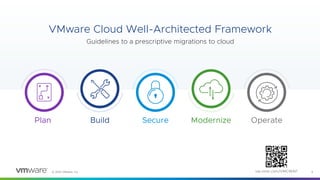
VMware Cloud Well-Architected Framework
Guidelines to a prescriptive migrations to cloud
Plan Build Secure Modernize Operate
via.vmw.com/VMCWAF
© 2023 VMware, Inc. 7
Migration Guidance – Plan
© 2023 VMware, Inc. 8
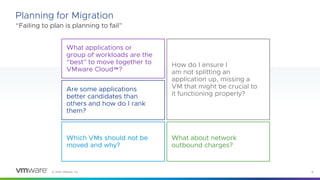
“Failing to plan is planning to fail”
Planning for Migration
What applications or
group of workloads are the
“best” to move together to
VMware Cloud™?
Are some applications
better candidates than
others and how do I rank
them?
Which VMs should not be
moved and why?
How do I ensure I
am not splitting an
application up, missing a
VM that might be crucial to
it functioning properly?
What about network
outbound charges?
© 2023 VMware, Inc. 9
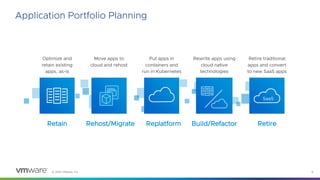
Application Portfolio Planning
Build/Refactor
Rewrite apps using
cloud native
technologies
Retain
Optimize and
retain existing
apps, as-is
Rehost/Migrate
Move apps to
cloud and rehost
Replatform
Put apps in
containers and
run in Kubernetes
Retire
SaaS
Retire traditional
apps and convert
to new SaaS apps
© 2023 VMware, Inc. 10
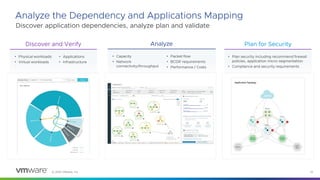
Analyze the Dependency and Applications Mapping
Discover application dependencies, analyze plan and validate
Discover and Verify
• Physical workloads
• Virtual workloads
• Applications
• Infrastructure
Analyze
• Capacity
• Network
connectivity/throughput
• Packet flow
• BCDR requirements
• Performance / Costs
Plan for Security
• Plan security including recommend firewall
policies, application micro-segmentation
• Compliance and security requirements
© 2023 VMware, Inc. 11
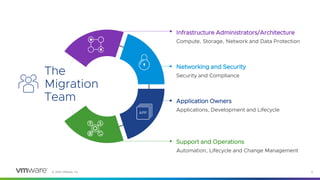
The
Migration
Team
Infrastructure Administrators/Architecture
Compute, Storage, Network and Data Protection
Networking and Security
Security and Compliance
Application Owners
Applications, Development and Lifecycle
Support and Operations
Automation, Lifecycle and Change Management
© 2023 VMware, Inc. 12
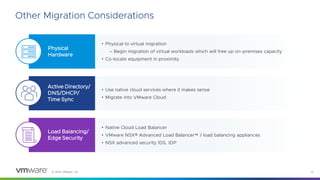
Other Migration Considerations
• Physical to virtual migration
– Begin migration of virtual workloads which will free up on-premises capacity
• Co-locate equipment in proximity
Physical
Hardware
Active Directory/
DNS/DHCP/
Time Sync
Load Balancing/
Edge Security
• Use native cloud services where it makes sense
• Migrate into VMware Cloud
• Native Cloud Load Balancer
• VMware NSX® Advanced Load Balancer™ / load balancing appliances
• NSX advanced security IDS, IDP
© 2023 VMware, Inc. 13
Migration Guidance – Build
© 2023 VMware, Inc. 14
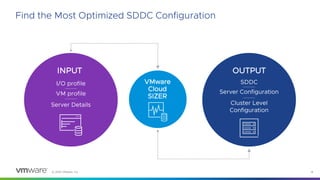
Find the Most Optimized SDDC Configuration
OUTPUT
SDDC
Server Configuration
Cluster Level
Configuration
INPUT
I/O profile
VM profile
Server Details
VMware
Cloud
SIZER
© 2023 VMware, Inc. 15
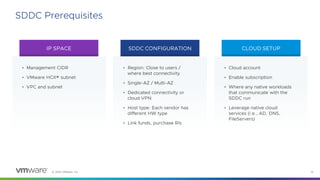
SDDC Prerequisites
IP SPACE SDDC CONFIGURATION CLOUD SETUP
• Management CIDR
• VMware HCX® subnet
• VPC and subnet
• Region: Close to users /
where best connectivity
• Single-AZ / Multi-AZ
• Dedicated connectivity or
cloud VPN
• Host type: Each vendor has
different HW type
• Link funds, purchase RIs
• Cloud account
• Enable subscription
• Where any native workloads
that communicate with the
SDDC run
• Leverage native cloud
services (i.e., AD, DNS,
FileServers)
© 2023 VMware, Inc. 16
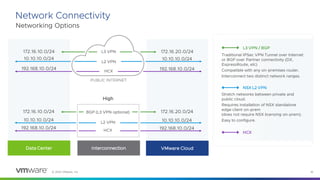
Network Connectivity
Networking Options
High
L3 VPN / BGP
172.16.10.0/24 172.16.20.0/24
L3 VPN
10.10.10.0/24 10.10.10.0/24
L2 VPN
192.168.10.0/24 192.168.10.0/24
HCX
Traditional IPSec VPN Tunnel over Internet
or BGP over Partner connectivity (DX,
ExpressRoute, etc)
Compatible with any on-premises router.
Interconnect two distinct network ranges.
NSX L2 VPN
Stretch networks between private and
public cloud.
Requires installation of NSX standalone
edge client on-prem
(does not require NSX licensing on-prem).
Easy to configure.
HCX
172.16.10.0/24 172.16.20.0/24
BGP (L3 VPN optional)
10.10.10.0/24 10.10.10.0/24
L2 VPN
192.168.10.0/24 192.168.10.0/24
HCX
PUBLIC INTERNET
VMware Cloud
Data Center Interconnection
© 2023 VMware, Inc. 17
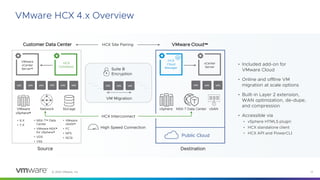
VMware HCX 4.x Overview
• Included add-on for
VMware Cloud
• Online and offline VM
migration at scale options
• Built-in Layer 2 extension,
WAN optimization, de-dupe,
and compression
• Accessible via
• vSphere HTML5 plugin
• HCX standalone client
• HCX API and PowerCLI
VMware
vCenter
Server®
HCX
Connector
VMware
vSphere®
Network Storage
Customer Data Center
• 6.X
• 7.X
• NSX-T™ Data
Center
• VMware NSX®
for vSphere®
• VDS
• VSS
• VMware
vSAN™
• FC
• NFS
• iSCSI
vm
vm vm
vm
vm
vm
Source
HCX
Cloud
Manager
vCenter
Server
vSphere NSX-T Data Center vSAN
VMware Cloud™
vm
vm vm
Destination
HCX Site Pairing
VM Migration
vm
vm vm
Suite B
Encryption
HCX Interconnect
High Speed Connection
Public Cloud
© 2023 VMware, Inc. 18
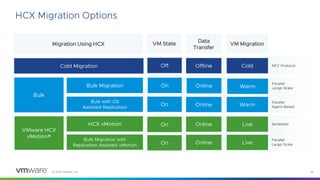
HCX Migration Options
HCX vMotion
Bulk Migration
Offline
Online
Online
Data
Transfer
VM Migration
Cold
Live
Warm
Migration Using HCX
Cold Migration
VMware HCX
vMotion®
Bulk
Bulk with OS
Assisted Replication Online Warm
Bulk Migration with
Replication Assisted vMotion Online
VM State
Off
On
On
On
On Live
NFC Protocol
Serialized
Parallel
Agent Based
Parallel
Large-Scale
Parallel
Large-Scale
© 2023 VMware, Inc. 19
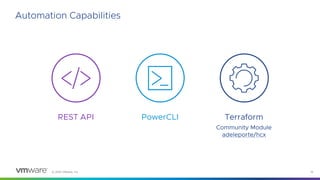
Automation Capabilities
REST API PowerCLI Terraform
Community Module
adeleporte/hcx
© 2023 VMware, Inc. 20
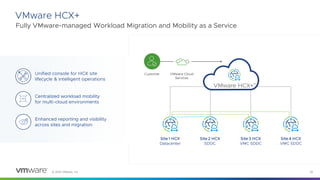
VMware HCX+
Fully VMware-managed Workload Migration and Mobility as a Service
Unified console for HCX site
lifecycle & intelligent operations
Centralized workload mobility
for multi-cloud environments
Enhanced reporting and visibility
across sites and migration
Site 1 HCX
Datacenter
Site 2 HCX
SDDC
Site 3 HCX
VMC SDDC
Site 4 HCX
VMC SDDC
Customer VMware Cloud
Services
© 2023 VMware, Inc. 21
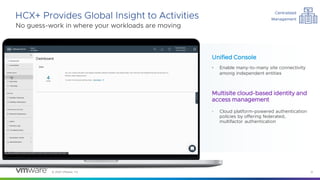
HCX+ Provides Global Insight to Activities
No guess-work in where your workloads are moving
Unified Console
• Enable many-to-many site connectivity
among independent entities
Multisite cloud-based identity and
access management
• Cloud platform-powered authentication
policies by offering federated,
multifactor authentication
Centralized
Management
© 2023 VMware, Inc. 22
Migration Guidance – Secure
© 2023 VMware, Inc. 23
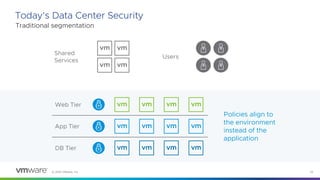
Today’s Data Center Security
Traditional segmentation
Shared
Services
Web Tier
App Tier
DB Tier
Users
Policies align to
the environment
instead of the
application
© 2023 VMware, Inc. 24
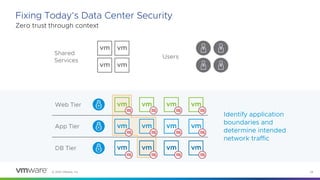
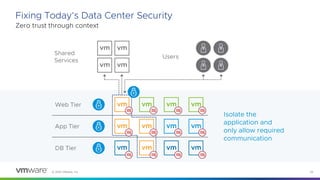
Fixing Today’s Data Center Security
Zero trust through context
Shared
Services
Web Tier
App Tier
DB Tier
Users
Identify application
boundaries and
determine intended
network traffic
© 2023 VMware, Inc. 25
Fixing Today’s Data Center Security
Zero trust through context
Shared
Services
Web Tier
App Tier
DB Tier
Users
Isolate the
application and
only allow required
communication
© 2023 VMware, Inc. 26
Migration Guidance – Modernize
© 2023 VMware, Inc. 27
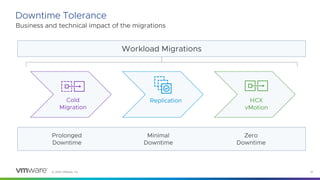
Downtime Tolerance
Business and technical impact of the migrations
Workload Migrations
Cold
Migration
Replication HCX
vMotion
Prolonged
Downtime
Minimal
Downtime
Zero
Downtime
© 2023 VMware, Inc. 28
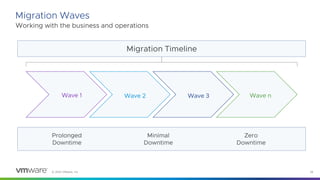
Migration Waves
Working with the business and operations
Migration Timeline
Wave 1 Wave 2 Wave 3 Wave n
Prolonged
Downtime
Minimal
Downtime
Zero
Downtime
© 2023 VMware, Inc. 29
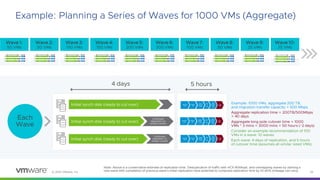
Example: Planning a Series of Waves for 1000 VMs (Aggregate)
Note: Above is a conservative estimate of replication time. Deduplication of traffic with HCX WANopt, and overlapping waves by starting a
new wave with completion of previous wave’s initial replication have potential to compress replication time by 10-60% (mileage can vary).
Each
Wave
Wave 2:
50 VMs
Wave 1:
50 VMs
Wave 3:
150 VMs
Wave 4:
150 VMs
Wave 5:
200 VMs
Wave 7:
100 VMs
Wave 6:
200 VMs
Wave 8:
50 VMs
Wave 9:
25 VMs
Wave 10:
25 VMs
Initial synch disk (ready
to cut over)
Initial synch disk
(ready to cut over)
Continu
ed
replicati
on to
remain
current
Initial synch disk
(ready to cut over)
Contin
ued
replica
tion to
remai
n
curren
t
4 days 5 hrs
Initial synch disk (ready
to cut over)
Initial synch disk
(ready to cut over)
Continu
ed
replicati
on to
remain
current
Initial synch disk
(ready to cut over)
Contin
ued
replica
tion to
remai
n
curren
t
4 days 5 hrs
Initial synch disk (ready
to cut over)
Initial synch disk
(ready to cut over)
Continu
ed
replicati
on to
remain
current
Initial synch disk
(ready to cut over)
Contin
ued
replica
tion to
remai
n
curren
t
4 days 5 hrs
Initial synch disk (ready
to cut over)
Initial synch disk
(ready to cut over)
Continu
ed
replicati
on to
remain
current
Initial synch disk
(ready to cut over)
Contin
ued
replica
tion to
remai
n
curren
t
4 days 5 hrs
Initial synch disk (ready
to cut over)
Initial synch disk
(ready to cut over)
Continu
ed
replicati
on to
remain
current
Initial synch disk
(ready to cut over)
Contin
ued
replica
tion to
remai
n
curren
t
4 days 5 hrs
Initial synch disk (ready
to cut over)
Initial synch disk
(ready to cut over)
Continu
ed
replicati
on to
remain
current
Initial synch disk
(ready to cut over)
Contin
ued
replica
tion to
remai
n
curren
t
4 days 5 hrs
Initial synch disk (ready
to cut over)
Initial synch disk
(ready to cut over)
Continu
ed
replicati
on to
remain
current
Initial synch disk
(ready to cut over)
Contin
ued
replica
tion to
remai
n
curren
t
4 days 5 hrs
Initial synch disk (ready
to cut over)
Initial synch disk
(ready to cut over)
Continu
ed
replicati
on to
remain
current
Initial synch disk
(ready to cut over)
Contin
ued
replica
tion to
remai
n
curren
t
4 days 5 hrs
Initial synch disk (ready
to cut over)
Initial synch disk
(ready to cut over)
Continu
ed
replicati
on to
remain
current
Initial synch disk
(ready to cut over)
Contin
ued
replica
tion to
remai
n
curren
t
4 days 5 hrs
Initial synch disk (ready
to cut over)
Initial synch disk
(ready to cut over)
Continu
ed
replicati
on to
remain
current
Initial synch disk
(ready to cut over)
Contin
ued
replica
tion to
remai
n
curren
t
4 days 5 hrs
4 days 5 hours
Example: 1000 VMs, aggregate 200 TB,
and migration transfer capacity = 500 Mbps
Aggregate replication time = 200TB/500Mbps
= 40 days
Aggregate long pole cutover time = 1000
VMs * 3 mins = 3000 mins = 50 hours (~2 days)
Consider an example recommendation of 100
VMs in a wave: 10 waves
Each wave: 4 days of replication, and 5 hours
of cutover time (assumes all similar sized VMs)
Initial synch disk (ready to cut over)
Continued
replication to
remain current
Initial synch disk (ready to cut over)
Continued
replication to
remain current
© 2023 VMware, Inc. 30
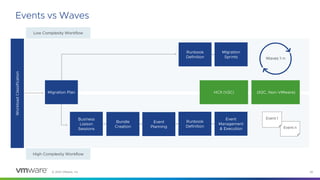
Events vs Waves
HCX (V2C) (X2C, Non-VMware)
Workload
Classification
High Complexity Workflow
Runbook
Definition
Migration
Sprints
Event n
Waves 1-n
Event 1
Business
Liaison
Sessions
Runbook
Definition
Bundle
Creation
Event
Planning
Event
Management
& Execution
Migration Plan
Low Complexity Workflow
© 2023 VMware, Inc. 31
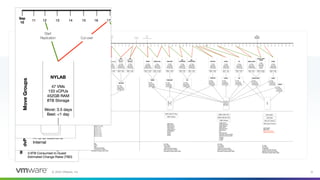
Example
© 2023 VMware, Inc. 32
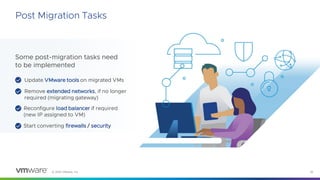
Post Migration Tasks
Some post-migration tasks need
to be implemented
Reconfigure load balancer if required
(new IP assigned to VM)
Update VMware tools on migrated VMs
Remove extended networks, if no longer
required (migrating gateway)
Start converting firewalls / security
© 2023 VMware, Inc. 33
Migration Guidance – Operate
© 2023 VMware, Inc. 34
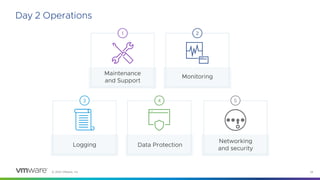
Day 2 Operations
Data Protection
4
Logging
3
Networking
and security
5
Maintenance
and Support
1
Monitoring
2
© 2023 VMware, Inc. 35
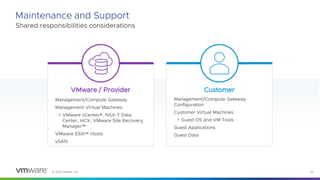
Maintenance and Support
Shared responsibilities considerations
VMware / Provider Customer
Management/Compute Gateway
Management Virtual Machines
• VMware vCenter®, NSX-T Data
Center, HCX, VMware Site Recovery
Manager™
VMware ESXi™ Hosts
vSAN
Management/Compute Gateway
Configuration
Customer Virtual Machines
• Guest OS and VM Tools
Guest Applications
Guest Data
© 2023 VMware, Inc. 36
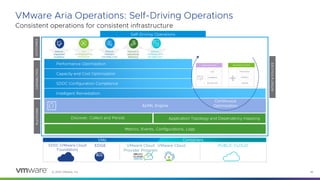
Consistent operations for consistent infrastructure
VMware Aria Operations: Self-Driving Operations
Self-Driving Operations
CONTINUOUS
OPTIMIZATION
AI/ML Engine
Metrics, Events, Configurations, Logs
Application Topology and Dependency mapping
Intelligent Remediation
Capacity and Cost Optimization
Performance Optimization
SDDC Configuration Compliance
CAPABILITIES
PLATFORM
INTENT
&
POLICIES
Continuous
Optimization
Business Intent Operational Intent
Cost
Compliance
Service Level
Performance
Utilization
Capacity
OUTCOMES
PUBLIC CLOUD
SDDC (VMware Cloud
Foundation)
EDGE VMware Cloud
VMware Cloud
Provider Program
Discover, Collect and Persist
VMs Containers
© 2023 VMware, Inc. 37
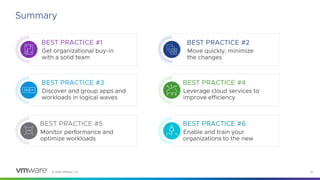
Summary
BEST PRACTICE #1
Get organizational buy-in
with a solid team
BEST PRACTICE #2
Move quickly, minimize
the changes
BEST PRACTICE #3
Discover and group apps and
workloads in logical waves
BEST PRACTICE #4
Leverage cloud services to
improve efficiency
BEST PRACTICE #5
Monitor performance and
optimize workloads
BEST PRACTICE #6
Enable and train your
organizations to the new
38
Please take
your survey.
39
Thank You

vmware-need-to-migrate-thousands-of-workloads-no-problem.pdf

  • 1.
    Migrating Thousands of Workloads? NoProblem! CXS1373BCN Principal Architect, VCDX #240 Andrea Siviero #vmwareexplore #CXS1373BCN Emad Younis Director, VMware Cloud Solutions
  • 2.
    © 2023 VMware,Inc. 2 • This presentation may contain product features or functionality that are currently under development. • This overview of new technology represents no commitment from VMware to deliver these features in any generally available product. • Features are subject to change, and must not be included in contracts, purchase orders, or sales agreements of any kind. • Technical feasibility and market demand will affect final delivery. • Pricing and packaging for any new features/functionality/technology discussed or presented, have not been determined. Required Disclaimer
  • 3.
    © 2023 VMware,Inc. 3 Agenda Why: Migrations as a multi-cloud feature What: A framework for successful migrations How: Guidance and detailed steps
  • 4.
    © 2023 VMware,Inc. 4 Digital Business 4 Requirements Modern apps at the speed of the business. Build and run-on cloud of choice, data center, or edge. Business transformation with enterprise resiliency, security and operations. 35% Cloud spend growth in 2021. Up from 28% Cloud Initiatives 90% prioritizing App Modernization App Transformation Source: Forrester 2021 Cloud Computing Predictions, Jan 2021, VMware Executive Pulse Study, Feb 2021
  • 5.
    © 2023 VMware,Inc. 5 A Typical Customer Journey to the Cloud Cloud First Cloud Chaos TIME VALUE Cloud Smart • Right cloud for the right app • Consistent management with security and control • Cost-efficient use of private and public clouds • Migration of all apps is slow • Disparate management of apps and cloud infrastructure • Greater choice creates complexity • Focus on “front-office” apps • No control of apps and cloud infrastructure • Lock-in becomes an issue PRIVATE CLOUD
  • 6.
    © 2023 VMware,Inc. 6 VMware Cloud Well-Architected Framework Guidelines to a prescriptive migrations to cloud Plan Build Secure Modernize Operate via.vmw.com/VMCWAF
  • 7.
    © 2023 VMware,Inc. 7 Migration Guidance – Plan
  • 8.
    © 2023 VMware,Inc. 8 “Failing to plan is planning to fail” Planning for Migration What applications or group of workloads are the “best” to move together to VMware Cloud™? Are some applications better candidates than others and how do I rank them? Which VMs should not be moved and why? How do I ensure I am not splitting an application up, missing a VM that might be crucial to it functioning properly? What about network outbound charges?
  • 9.
    © 2023 VMware,Inc. 9 Application Portfolio Planning Build/Refactor Rewrite apps using cloud native technologies Retain Optimize and retain existing apps, as-is Rehost/Migrate Move apps to cloud and rehost Replatform Put apps in containers and run in Kubernetes Retire SaaS Retire traditional apps and convert to new SaaS apps
  • 10.
    © 2023 VMware,Inc. 10 Analyze the Dependency and Applications Mapping Discover application dependencies, analyze plan and validate Discover and Verify • Physical workloads • Virtual workloads • Applications • Infrastructure Analyze • Capacity • Network connectivity/throughput • Packet flow • BCDR requirements • Performance / Costs Plan for Security • Plan security including recommend firewall policies, application micro-segmentation • Compliance and security requirements
  • 11.
    © 2023 VMware,Inc. 11 The Migration Team Infrastructure Administrators/Architecture Compute, Storage, Network and Data Protection Networking and Security Security and Compliance Application Owners Applications, Development and Lifecycle Support and Operations Automation, Lifecycle and Change Management
  • 12.
    © 2023 VMware,Inc. 12 Other Migration Considerations • Physical to virtual migration – Begin migration of virtual workloads which will free up on-premises capacity • Co-locate equipment in proximity Physical Hardware Active Directory/ DNS/DHCP/ Time Sync Load Balancing/ Edge Security • Use native cloud services where it makes sense • Migrate into VMware Cloud • Native Cloud Load Balancer • VMware NSX® Advanced Load Balancer™ / load balancing appliances • NSX advanced security IDS, IDP
  • 13.
    © 2023 VMware,Inc. 13 Migration Guidance – Build
  • 14.
    © 2023 VMware,Inc. 14 Find the Most Optimized SDDC Configuration OUTPUT SDDC Server Configuration Cluster Level Configuration INPUT I/O profile VM profile Server Details VMware Cloud SIZER
  • 15.
    © 2023 VMware,Inc. 15 SDDC Prerequisites IP SPACE SDDC CONFIGURATION CLOUD SETUP • Management CIDR • VMware HCX® subnet • VPC and subnet • Region: Close to users / where best connectivity • Single-AZ / Multi-AZ • Dedicated connectivity or cloud VPN • Host type: Each vendor has different HW type • Link funds, purchase RIs • Cloud account • Enable subscription • Where any native workloads that communicate with the SDDC run • Leverage native cloud services (i.e., AD, DNS, FileServers)
  • 16.
    © 2023 VMware,Inc. 16 Network Connectivity Networking Options High L3 VPN / BGP 172.16.10.0/24 172.16.20.0/24 L3 VPN 10.10.10.0/24 10.10.10.0/24 L2 VPN 192.168.10.0/24 192.168.10.0/24 HCX Traditional IPSec VPN Tunnel over Internet or BGP over Partner connectivity (DX, ExpressRoute, etc) Compatible with any on-premises router. Interconnect two distinct network ranges. NSX L2 VPN Stretch networks between private and public cloud. Requires installation of NSX standalone edge client on-prem (does not require NSX licensing on-prem). Easy to configure. HCX 172.16.10.0/24 172.16.20.0/24 BGP (L3 VPN optional) 10.10.10.0/24 10.10.10.0/24 L2 VPN 192.168.10.0/24 192.168.10.0/24 HCX PUBLIC INTERNET VMware Cloud Data Center Interconnection
  • 17.
    © 2023 VMware,Inc. 17 VMware HCX 4.x Overview • Included add-on for VMware Cloud • Online and offline VM migration at scale options • Built-in Layer 2 extension, WAN optimization, de-dupe, and compression • Accessible via • vSphere HTML5 plugin • HCX standalone client • HCX API and PowerCLI VMware vCenter Server® HCX Connector VMware vSphere® Network Storage Customer Data Center • 6.X • 7.X • NSX-T™ Data Center • VMware NSX® for vSphere® • VDS • VSS • VMware vSAN™ • FC • NFS • iSCSI vm vm vm vm vm vm Source HCX Cloud Manager vCenter Server vSphere NSX-T Data Center vSAN VMware Cloud™ vm vm vm Destination HCX Site Pairing VM Migration vm vm vm Suite B Encryption HCX Interconnect High Speed Connection Public Cloud
  • 18.
    © 2023 VMware,Inc. 18 HCX Migration Options HCX vMotion Bulk Migration Offline Online Online Data Transfer VM Migration Cold Live Warm Migration Using HCX Cold Migration VMware HCX vMotion® Bulk Bulk with OS Assisted Replication Online Warm Bulk Migration with Replication Assisted vMotion Online VM State Off On On On On Live NFC Protocol Serialized Parallel Agent Based Parallel Large-Scale Parallel Large-Scale
  • 19.
    © 2023 VMware,Inc. 19 Automation Capabilities REST API PowerCLI Terraform Community Module adeleporte/hcx
  • 20.
    © 2023 VMware,Inc. 20 VMware HCX+ Fully VMware-managed Workload Migration and Mobility as a Service Unified console for HCX site lifecycle & intelligent operations Centralized workload mobility for multi-cloud environments Enhanced reporting and visibility across sites and migration Site 1 HCX Datacenter Site 2 HCX SDDC Site 3 HCX VMC SDDC Site 4 HCX VMC SDDC Customer VMware Cloud Services
  • 21.
    © 2023 VMware,Inc. 21 HCX+ Provides Global Insight to Activities No guess-work in where your workloads are moving Unified Console • Enable many-to-many site connectivity among independent entities Multisite cloud-based identity and access management • Cloud platform-powered authentication policies by offering federated, multifactor authentication Centralized Management
  • 22.
    © 2023 VMware,Inc. 22 Migration Guidance – Secure
  • 23.
    © 2023 VMware,Inc. 23 Today’s Data Center Security Traditional segmentation Shared Services Web Tier App Tier DB Tier Users Policies align to the environment instead of the application
  • 24.
    © 2023 VMware,Inc. 24 Fixing Today’s Data Center Security Zero trust through context Shared Services Web Tier App Tier DB Tier Users Identify application boundaries and determine intended network traffic
  • 25.
    © 2023 VMware,Inc. 25 Fixing Today’s Data Center Security Zero trust through context Shared Services Web Tier App Tier DB Tier Users Isolate the application and only allow required communication
  • 26.
    © 2023 VMware,Inc. 26 Migration Guidance – Modernize
  • 27.
    © 2023 VMware,Inc. 27 Downtime Tolerance Business and technical impact of the migrations Workload Migrations Cold Migration Replication HCX vMotion Prolonged Downtime Minimal Downtime Zero Downtime
  • 28.
    © 2023 VMware,Inc. 28 Migration Waves Working with the business and operations Migration Timeline Wave 1 Wave 2 Wave 3 Wave n Prolonged Downtime Minimal Downtime Zero Downtime
  • 29.
    © 2023 VMware,Inc. 29 Example: Planning a Series of Waves for 1000 VMs (Aggregate) Note: Above is a conservative estimate of replication time. Deduplication of traffic with HCX WANopt, and overlapping waves by starting a new wave with completion of previous wave’s initial replication have potential to compress replication time by 10-60% (mileage can vary). Each Wave Wave 2: 50 VMs Wave 1: 50 VMs Wave 3: 150 VMs Wave 4: 150 VMs Wave 5: 200 VMs Wave 7: 100 VMs Wave 6: 200 VMs Wave 8: 50 VMs Wave 9: 25 VMs Wave 10: 25 VMs Initial synch disk (ready to cut over) Initial synch disk (ready to cut over) Continu ed replicati on to remain current Initial synch disk (ready to cut over) Contin ued replica tion to remai n curren t 4 days 5 hrs Initial synch disk (ready to cut over) Initial synch disk (ready to cut over) Continu ed replicati on to remain current Initial synch disk (ready to cut over) Contin ued replica tion to remai n curren t 4 days 5 hrs Initial synch disk (ready to cut over) Initial synch disk (ready to cut over) Continu ed replicati on to remain current Initial synch disk (ready to cut over) Contin ued replica tion to remai n curren t 4 days 5 hrs Initial synch disk (ready to cut over) Initial synch disk (ready to cut over) Continu ed replicati on to remain current Initial synch disk (ready to cut over) Contin ued replica tion to remai n curren t 4 days 5 hrs Initial synch disk (ready to cut over) Initial synch disk (ready to cut over) Continu ed replicati on to remain current Initial synch disk (ready to cut over) Contin ued replica tion to remai n curren t 4 days 5 hrs Initial synch disk (ready to cut over) Initial synch disk (ready to cut over) Continu ed replicati on to remain current Initial synch disk (ready to cut over) Contin ued replica tion to remai n curren t 4 days 5 hrs Initial synch disk (ready to cut over) Initial synch disk (ready to cut over) Continu ed replicati on to remain current Initial synch disk (ready to cut over) Contin ued replica tion to remai n curren t 4 days 5 hrs Initial synch disk (ready to cut over) Initial synch disk (ready to cut over) Continu ed replicati on to remain current Initial synch disk (ready to cut over) Contin ued replica tion to remai n curren t 4 days 5 hrs Initial synch disk (ready to cut over) Initial synch disk (ready to cut over) Continu ed replicati on to remain current Initial synch disk (ready to cut over) Contin ued replica tion to remai n curren t 4 days 5 hrs Initial synch disk (ready to cut over) Initial synch disk (ready to cut over) Continu ed replicati on to remain current Initial synch disk (ready to cut over) Contin ued replica tion to remai n curren t 4 days 5 hrs 4 days 5 hours Example: 1000 VMs, aggregate 200 TB, and migration transfer capacity = 500 Mbps Aggregate replication time = 200TB/500Mbps = 40 days Aggregate long pole cutover time = 1000 VMs * 3 mins = 3000 mins = 50 hours (~2 days) Consider an example recommendation of 100 VMs in a wave: 10 waves Each wave: 4 days of replication, and 5 hours of cutover time (assumes all similar sized VMs) Initial synch disk (ready to cut over) Initial synch disk (ready to cut over) Continued replication to remain current Initial synch disk (ready to cut over) Continued replication to remain current
  • 30.
    © 2023 VMware,Inc. 30 Events vs Waves HCX (V2C) (X2C, Non-VMware) Workload Classification High Complexity Workflow Runbook Definition Migration Sprints Event n Waves 1-n Event 1 Business Liaison Sessions Runbook Definition Bundle Creation Event Planning Event Management & Execution Migration Plan Low Complexity Workflow
  • 31.
    © 2023 VMware,Inc. 31 Example
  • 32.
    © 2023 VMware,Inc. 32 Post Migration Tasks Some post-migration tasks need to be implemented Reconfigure load balancer if required (new IP assigned to VM) Update VMware tools on migrated VMs Remove extended networks, if no longer required (migrating gateway) Start converting firewalls / security
  • 33.
    © 2023 VMware,Inc. 33 Migration Guidance – Operate
  • 34.
    © 2023 VMware,Inc. 34 Day 2 Operations Data Protection 4 Logging 3 Networking and security 5 Maintenance and Support 1 Monitoring 2
  • 35.
    © 2023 VMware,Inc. 35 Maintenance and Support Shared responsibilities considerations VMware / Provider Customer Management/Compute Gateway Management Virtual Machines • VMware vCenter®, NSX-T Data Center, HCX, VMware Site Recovery Manager™ VMware ESXi™ Hosts vSAN Management/Compute Gateway Configuration Customer Virtual Machines • Guest OS and VM Tools Guest Applications Guest Data
  • 36.
    © 2023 VMware,Inc. 36 Consistent operations for consistent infrastructure VMware Aria Operations: Self-Driving Operations Self-Driving Operations CONTINUOUS OPTIMIZATION AI/ML Engine Metrics, Events, Configurations, Logs Application Topology and Dependency mapping Intelligent Remediation Capacity and Cost Optimization Performance Optimization SDDC Configuration Compliance CAPABILITIES PLATFORM INTENT & POLICIES Continuous Optimization Business Intent Operational Intent Cost Compliance Service Level Performance Utilization Capacity OUTCOMES PUBLIC CLOUD SDDC (VMware Cloud Foundation) EDGE VMware Cloud VMware Cloud Provider Program Discover, Collect and Persist VMs Containers
  • 37.
    © 2023 VMware,Inc. 37 Summary BEST PRACTICE #1 Get organizational buy-in with a solid team BEST PRACTICE #2 Move quickly, minimize the changes BEST PRACTICE #3 Discover and group apps and workloads in logical waves BEST PRACTICE #4 Leverage cloud services to improve efficiency BEST PRACTICE #5 Monitor performance and optimize workloads BEST PRACTICE #6 Enable and train your organizations to the new
  • 38.
  • 39.