Data Protection and Recovery Solutions for VMwareDavid ShyuSr. Enterprise Solution ArchitectFalconStor Softwaredavid.shyu@falconstor.com
AgendaData Protection in VMware EnvironmentsData Protection demonstrationData integrity and system recovery
Backup, Disaster Recovery, and Site Recovery ManagerSite Recovery Manager demonstrationPhysical to Virtual support with Site Recovery ManagerWAN optimizationData Protection for Virtual Environments
The True ValueLies in the Heart of the Enterprise
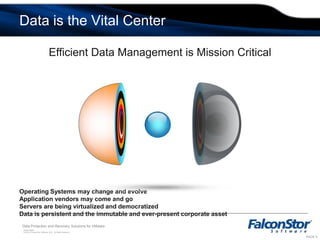
Efficient Data Management is Mission CriticalOperating Systems may change and evolveApplication vendors may come and goServers are being virtualized and democratizedData is persistent and the immutable and ever-present corporate assetData is the Vital Center
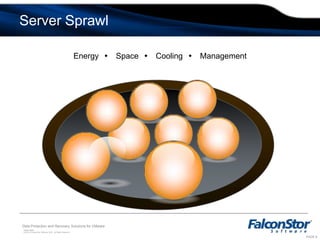
Energy Space Cooling ManagementServer Sprawl
Server Consolidation
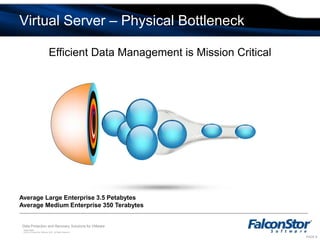
Efficient Data Management is Mission CriticalAverage Large Enterprise 3.5 PetabytesAverage Medium Enterprise 350 TerabytesVirtual Server – Physical Bottleneck
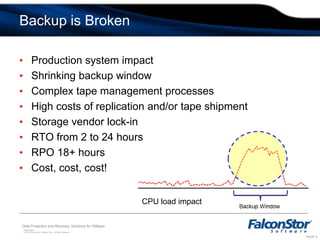
Backup is BrokenProduction system impactShrinking backup windowComplex tape management processesHigh costs of replication and/or tape shipmentStorage vendor lock-inRTO from 2 to 24 hoursRPO 18+ hoursCost, cost, cost!CPU load impact
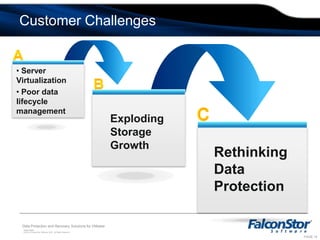
A Server Virtualization
 Poor data lifecycle managementB cExploding Storage GrowthRethinking Data ProtectionCustomer Challenges
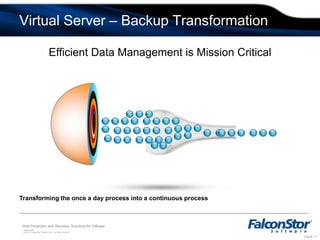
Efficient Data Management is Mission CriticalTransforming the once a day process into a continuous process Virtual Server – Backup Transformation
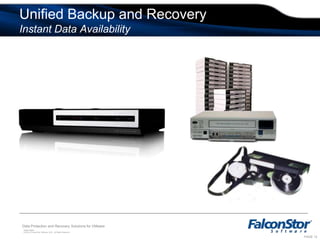
Unified Backup and RecoveryInstant Data Availability
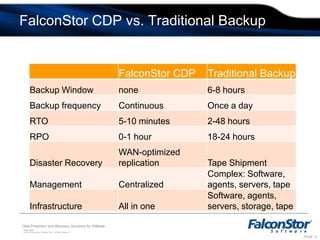
FalconStor CDP vs. Traditional Backup
Data Protection Demo
Service Enabling Demonstration
Data Integrity and System Recovery
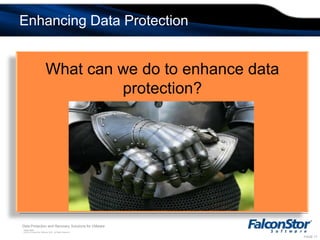
Enhancing Data ProtectionWhat can we do to enhance data protection?
VMware Recovery with FalconStor SoftwareFalconStor software provides a set of tools to enhance VMware data protection100% transactional integrity of data for fast restores WAN-optimized data replication to reduce bandwidth use by 90% or moreIntegration with VMware vCenter Site Recovery Manager Physical-to-virtual support with Site Recovery Manager
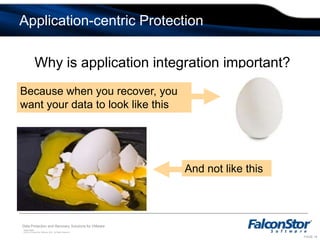
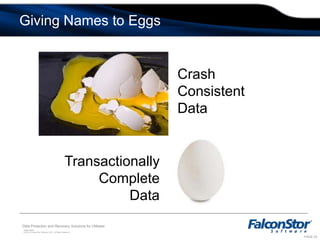
Application-centric ProtectionWhy is application integration important?Because when you recover, you want your data to look like thisAnd not like this
Giving Names to EggsCrashConsistentDataTransactionallyCompleteData
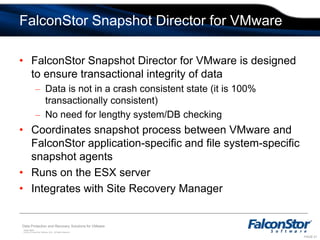
FalconStor Snapshot Director for VMwareFalconStor Snapshot Director for VMware is designed to ensure transactional integrity of dataData is not in a crash consistent state (it is 100% transactionally consistent)No need for lengthy system/DB checkingCoordinates snapshot process between VMware and FalconStor application-specific and file system-specific snapshot agents
Runs on the ESX server
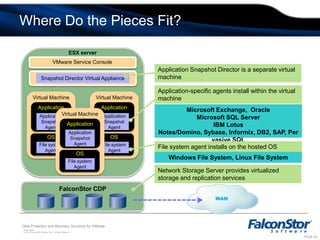
Integrates with Site Recovery Manager Where Do the Pieces Fit? ESX serverVMware Service ConsoleApplication Snapshot Director is a separate virtual machineSnapshot Director Virtual ApplianceApplication-specific agents install within the virtual machineVirtual MachineVirtual MachineVirtual MachineApplicationApplicationApplicationMicrosoft Exchange,  OracleMicrosoft SQL ServerIBM Lotus Notes/Domino, Sybase, Informix, DB2, SAP, Pervasive SQLApplication Snapshot AgentApplication Snapshot AgentApplication Snapshot AgentFile system AgentFile system AgentFile system AgentFile system agent installs on the hosted OSWindows File System, Linux File SystemNetwork Storage Server provides virtualized storage and replication servicesFalconStor CDPOSOSOS
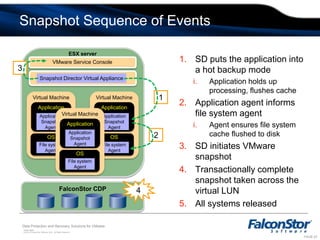
Snapshot Sequence of EventsESX serverSD puts the application into a hot backup modeApplication holds up processing, flushes cacheApplication agent informs file system agentAgent ensures file system cache flushed to diskSD initiates VMware snapshotTransactionally complete snapshot taken across the virtual LUNAll systems releasedVMware Service Console3Snapshot Director Virtual Appliance1Virtual MachineVirtual MachineVirtual MachineApplicationApplicationApplicationApplication Snapshot AgentApplication Snapshot AgentApplication Snapshot Agent2File system AgentFile system AgentFile system Agent4FalconStor CDPOSOSOS
Storage Virtualization and Site Recovery Manager
The Importance of Site Recovery ManagerVMware Site Recovery Manager is a critical disaster recovery tool
Provides automation of DR processes
Provides automation of DR testing
Provides reporting for proof of compliance Challenges for Site Recovery Manager ImplementationSite Recovery Manager does not move data by itself, it requires array-level data replication
Limited number of disk vendor certifications for Site Recovery Manager
Vendor Storage Replication Adapter (SRA) is platform specificNeed the same hardware on both primary and remote sitesLimited product certificationsNeed to change the underplaying infrastructure at the primary site, the secondary site, or both
Breaks the virtualization promise of platform independenceIntegration with Site Recovery Manager  FalconStor Storage Replication Adapter (SRA) integrates FalconStor replication with VMware vCenter Site Recovery Manager
FalconStor CDP provides replication engine
Virtual disk assignments are automatically coordinated with associated virtual machines with the help of FalconStor SRA
Disaster recovery scenarios can be tested at any timeA TimeView™ snapshot image is created and mounted to a virtual machine being testedThe virtual machine is startedRecovery is validated and the TimeView is image removed
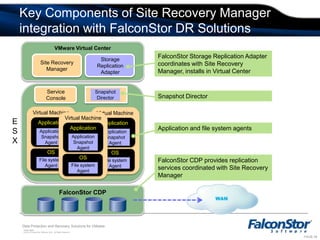
Key Components of Site Recovery Manager integration with FalconStor DR SolutionsVMware Virtual CenterFalconStor Storage Replication Adapter coordinates with Site Recovery Manager, installs in Virtual CenterService ConsoleSnapshot DirectorVirtual MachineVirtual MachineVirtual MachineApplicationApplicationApplicationSite Recovery Manager Storage Replication AdapterSnapshot DirectorApplication Snapshot AgentApplication Snapshot AgentApplication Snapshot AgentESXApplication and file system agentsFile system AgentFile system AgentFile system AgentFalconStor CDP provides replication services coordinated with Site Recovery ManagerFalconStor CDPOSOSOS
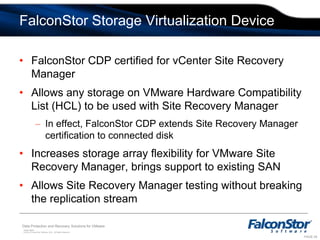
FalconStor Storage Virtualization DeviceFalconStor CDP certified for vCenter Site Recovery Manager
Allows any storage on VMware Hardware Compatibility List (HCL) to be used with Site Recovery ManagerIn effect, FalconStor CDP extends Site Recovery Manager certification to connected diskIncreases storage array flexibility for VMware Site Recovery Manager, brings support to existing SAN
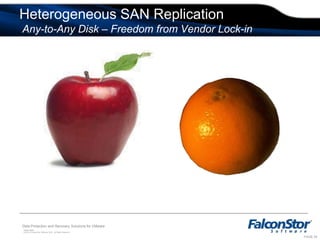
Allows Site Recovery Manager testing without breaking the replication streamHeterogeneous SAN Replication Any-to-Any Disk – Freedom from Vendor Lock-in
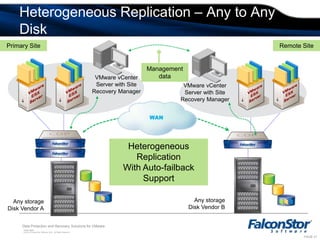
Heterogeneous Replication – Any to Any DiskPrimary SiteRemote SiteManagementdataVMware vCenter Server with Site Recovery ManagerVMware vCenter Server with Site Recovery ManagerVMwareESX ServerVMwareESX ServerVMwareESX ServerVMwareESX ServerHeterogeneous ReplicationWith Auto-failback SupportAny storageDisk Vendor BAny storageDisk Vendor A
Site Recovery ManagerDemonstration

VMUG - Falconstor Presentation

  • 1.
    Data Protection andRecovery Solutions for VMwareDavid ShyuSr. Enterprise Solution ArchitectFalconStor Softwaredavid.shyu@falconstor.com
  • 2.
    AgendaData Protection inVMware EnvironmentsData Protection demonstrationData integrity and system recovery
  • 3.
    Backup, Disaster Recovery,and Site Recovery ManagerSite Recovery Manager demonstrationPhysical to Virtual support with Site Recovery ManagerWAN optimizationData Protection for Virtual Environments
  • 4.
    The True ValueLiesin the Heart of the Enterprise
  • 5.
    Efficient Data Managementis Mission CriticalOperating Systems may change and evolveApplication vendors may come and goServers are being virtualized and democratizedData is persistent and the immutable and ever-present corporate assetData is the Vital Center
  • 6.
    Energy Space CoolingManagementServer Sprawl
  • 7.
  • 8.
    Efficient Data Managementis Mission CriticalAverage Large Enterprise 3.5 PetabytesAverage Medium Enterprise 350 TerabytesVirtual Server – Physical Bottleneck
  • 9.
    Backup is BrokenProductionsystem impactShrinking backup windowComplex tape management processesHigh costs of replication and/or tape shipmentStorage vendor lock-inRTO from 2 to 24 hoursRPO 18+ hoursCost, cost, cost!CPU load impact
  • 10.
  • 11.
    Poor datalifecycle managementB cExploding Storage GrowthRethinking Data ProtectionCustomer Challenges
  • 12.
    Efficient Data Managementis Mission CriticalTransforming the once a day process into a continuous process Virtual Server – Backup Transformation
  • 13.
    Unified Backup andRecoveryInstant Data Availability
  • 14.
    FalconStor CDP vs.Traditional Backup
  • 15.
  • 16.
  • 17.
    Data Integrity andSystem Recovery
  • 18.
    Enhancing Data ProtectionWhatcan we do to enhance data protection?
  • 19.
    VMware Recovery withFalconStor SoftwareFalconStor software provides a set of tools to enhance VMware data protection100% transactional integrity of data for fast restores WAN-optimized data replication to reduce bandwidth use by 90% or moreIntegration with VMware vCenter Site Recovery Manager Physical-to-virtual support with Site Recovery Manager
  • 20.
    Application-centric ProtectionWhy isapplication integration important?Because when you recover, you want your data to look like thisAnd not like this
  • 21.
    Giving Names toEggsCrashConsistentDataTransactionallyCompleteData
  • 22.
    FalconStor Snapshot Directorfor VMwareFalconStor Snapshot Director for VMware is designed to ensure transactional integrity of dataData is not in a crash consistent state (it is 100% transactionally consistent)No need for lengthy system/DB checkingCoordinates snapshot process between VMware and FalconStor application-specific and file system-specific snapshot agents
  • 23.
    Runs on theESX server
  • 24.
    Integrates with SiteRecovery Manager Where Do the Pieces Fit? ESX serverVMware Service ConsoleApplication Snapshot Director is a separate virtual machineSnapshot Director Virtual ApplianceApplication-specific agents install within the virtual machineVirtual MachineVirtual MachineVirtual MachineApplicationApplicationApplicationMicrosoft Exchange, OracleMicrosoft SQL ServerIBM Lotus Notes/Domino, Sybase, Informix, DB2, SAP, Pervasive SQLApplication Snapshot AgentApplication Snapshot AgentApplication Snapshot AgentFile system AgentFile system AgentFile system AgentFile system agent installs on the hosted OSWindows File System, Linux File SystemNetwork Storage Server provides virtualized storage and replication servicesFalconStor CDPOSOSOS
  • 25.
    Snapshot Sequence ofEventsESX serverSD puts the application into a hot backup modeApplication holds up processing, flushes cacheApplication agent informs file system agentAgent ensures file system cache flushed to diskSD initiates VMware snapshotTransactionally complete snapshot taken across the virtual LUNAll systems releasedVMware Service Console3Snapshot Director Virtual Appliance1Virtual MachineVirtual MachineVirtual MachineApplicationApplicationApplicationApplication Snapshot AgentApplication Snapshot AgentApplication Snapshot Agent2File system AgentFile system AgentFile system Agent4FalconStor CDPOSOSOS
  • 26.
    Storage Virtualization andSite Recovery Manager
  • 27.
    The Importance ofSite Recovery ManagerVMware Site Recovery Manager is a critical disaster recovery tool
  • 28.
  • 29.
  • 30.
    Provides reporting forproof of compliance Challenges for Site Recovery Manager ImplementationSite Recovery Manager does not move data by itself, it requires array-level data replication
  • 31.
    Limited number ofdisk vendor certifications for Site Recovery Manager
  • 32.
    Vendor Storage ReplicationAdapter (SRA) is platform specificNeed the same hardware on both primary and remote sitesLimited product certificationsNeed to change the underplaying infrastructure at the primary site, the secondary site, or both
  • 33.
    Breaks the virtualizationpromise of platform independenceIntegration with Site Recovery Manager FalconStor Storage Replication Adapter (SRA) integrates FalconStor replication with VMware vCenter Site Recovery Manager
  • 34.
    FalconStor CDP providesreplication engine
  • 35.
    Virtual disk assignmentsare automatically coordinated with associated virtual machines with the help of FalconStor SRA
  • 36.
    Disaster recovery scenarioscan be tested at any timeA TimeView™ snapshot image is created and mounted to a virtual machine being testedThe virtual machine is startedRecovery is validated and the TimeView is image removed
  • 37.
    Key Components ofSite Recovery Manager integration with FalconStor DR SolutionsVMware Virtual CenterFalconStor Storage Replication Adapter coordinates with Site Recovery Manager, installs in Virtual CenterService ConsoleSnapshot DirectorVirtual MachineVirtual MachineVirtual MachineApplicationApplicationApplicationSite Recovery Manager Storage Replication AdapterSnapshot DirectorApplication Snapshot AgentApplication Snapshot AgentApplication Snapshot AgentESXApplication and file system agentsFile system AgentFile system AgentFile system AgentFalconStor CDP provides replication services coordinated with Site Recovery ManagerFalconStor CDPOSOSOS
  • 38.
    FalconStor Storage VirtualizationDeviceFalconStor CDP certified for vCenter Site Recovery Manager
  • 39.
    Allows any storageon VMware Hardware Compatibility List (HCL) to be used with Site Recovery ManagerIn effect, FalconStor CDP extends Site Recovery Manager certification to connected diskIncreases storage array flexibility for VMware Site Recovery Manager, brings support to existing SAN
  • 40.
    Allows Site RecoveryManager testing without breaking the replication streamHeterogeneous SAN Replication Any-to-Any Disk – Freedom from Vendor Lock-in
  • 41.
    Heterogeneous Replication –Any to Any DiskPrimary SiteRemote SiteManagementdataVMware vCenter Server with Site Recovery ManagerVMware vCenter Server with Site Recovery ManagerVMwareESX ServerVMwareESX ServerVMwareESX ServerVMwareESX ServerHeterogeneous ReplicationWith Auto-failback SupportAny storageDisk Vendor BAny storageDisk Vendor A
  • 42.
  • 43.
    The FalconStor SiteRecovery Manager AdvantageProvide Heterogeneous Replication for VMware environments
  • 44.
    Full Automation offailover and failback operations with vCenter Site Recovery Manager
  • 45.
    Enables VMware DRdeployments on any HCL certified storage platforms
  • 46.
    Enable customers touse their current infrastructure to implement Site Recovery Manager and DR for VMware
  • 47.
    Provides cost effectiveDR strategy implementation
  • 48.
    Disaster Recovery solutionsthat protect infrastructure investment and provide flexibilityPhysical-to-Virtual Support with Site Recovery Manager
  • 49.
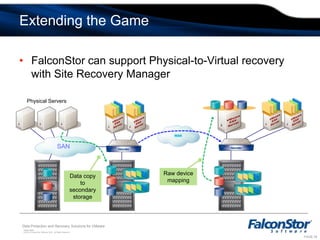
    Extending the GameFalconStorcan support Physical-to-Virtual recovery with Site Recovery Manager VMwareESX ServerVMwareESX ServerVMwareESX ServerVMwareESX ServerPhysical ServersVMwareESX ServerSANRaw device mappingData copy to secondary storage
  • 50.
  • 51.
    Achieving Efficient DataReplicationDeploy sub-block replication to move your data
  • 52.
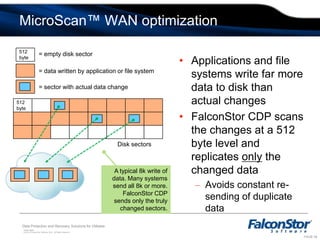
    MicroScan™ WAN optimization512byte= empty disk sectorApplications and file systems write far more data to disk than actual changes
  • 53.
    FalconStor CDP scansthe changes at a 512 byte level and replicates only the changed dataAvoids constant re-sending of duplicate data= data written by application or file system= sector with actual data change512 byteDisk sectorsA typical 8k write of data. Many systems send all 8k or more. FalconStor CDP sends only the truly changed sectors.
  • 54.
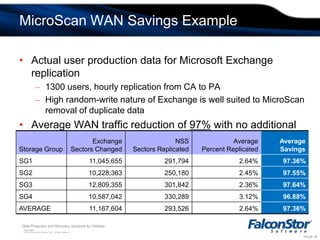
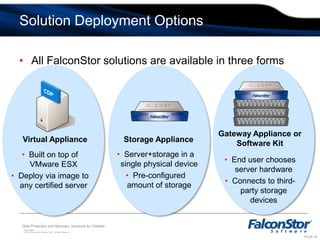
    MicroScan WAN SavingsExampleActual user production data for Microsoft Exchange replication1300 users, hourly replication from CA to PAHigh random-write nature of Exchange is well suited to MicroScan removal of duplicate dataAverage WAN traffic reduction of 97% with no additional network equipment neededSolution Deployment OptionsAll FalconStor solutions are available in three formsCDPGateway Appliance or Software KitVirtual ApplianceStorage ApplianceServer+storage in a single physical device
  • 55.
  • 56.
    Built on topofVMware ESX
  • 57.
    Deploy via imageto any certified server
  • 58.
    End user choosesserver hardware
  • 59.
    Connects to third-partystorage devicesSummaryFalconStor has the most complete set of VMware data protection products in the industry
  • 60.
    FalconStor CDP provideszero-impact VMware backup
  • 61.
    Data integrity agentsensure 100% data consistency
  • 62.
    Full integration withvCenter Site Recovery Manager
  • 63.
    Optimized WAN replicationThankYou! Any Questions?Data Protection and Recovery for VMwareFalconStor Confidential for Internal and Partner Use Only

Editor's Notes

  • #3 Agenda
  • #10 An important component of the backup process is the backup Agent that resides on the application host to send data over the LAN to the backup server. This method of data copy has multiple drawbacks, including performance impact on production systems and slow backup performance due to the bandwidth that we will be discussing later during this presentation.But mainly, the increasing amount of digital data and the global nature of our economies are exercising additional pressures on the ever shrinking backup window, which is the interval of time where the load on production servers is minimal and the backup process can take place without affecting production environments or ongoing business processes. This typically takes place after business hours.This daily tape backup process also creates a lot of complexity when it comes to managing multiple tapes and the retention schedules or the rotation of those tapes. This process is error prone and strains a lot of resources and time.Another challenge is the fact that it’s hard to verify the validity of the backup job unless you remount the tape to check the integrity of the data on it. The resource requirements for this verification mean that it tends to be performed only rarely.The last challenge is the recovery process and the extended time of the recovery itself, as well as the recovery point objective attached to tape backups or backups in general. It is very common to see recovery times extending beyond 24 hours and recovery points from at least the last day’s backup.
  • #18 What else can we do to protect data? There are a number of things we can do at the storage level to increase data protection.
  • #23 This diagram maps out the different components of the solution so far. Next we’ll look into specifics of how it works. At the top of the diagram, we see that ASD installs into the VMware Service Console on the ESX server. Under that we have individual virtual machines. Within those machines there are two agents. One, if needed, is the application-specific snapshot agent, for applications such as Exchange, SQL, Oracle, DB2, etc. This Agent makes sure the application is put into a backup mode and transactions are written to disk. Also in the VM is a file system agent, for Windows or Linux File system. This is needed to make sure the file system level is also in a backup mode and transactions are flushed out of cache. Everything needs to be stable on the disk before the snapshot is made. At the bottom is FalconStor CDP, which provides the online backup repository for ESX.
  • #24 This slide outlines the steps involved in the taking the snapshot. The snapshot request is initiated from CDP. This is normally a scheduled process, but it can be manually activated as well. The Application Snapshot Director receives the request and then informs the application snapshot agent running within the virtualized application to put the application into a backup mode. Once the application is in backup mode, the file system is notified in order to flush out any data that may still be in cache or in transit. When the VM is fully in backup mode, the next request goes to the ESX server which uses VMware snapshot technology to place the full ESX sever into a backup mode. At this point, the entire system is static, all transactions written to the backup disk The fourth step is to take the snapshot at the storage level. This entire process takes only a few seconds. It takes long to explain it than it does to happen.After the snapshot is done, all systems are released and go back to normal mode. A key benefit of this method is that the VMware snapshot is used only for a few seconds, rather than for the length of the backup process. Recall what we said earlier about the impact of VMware snapshots. The FalconStor method greatly reduces this impact.
  • #28 FalconStor provides a Storage Replication Adapter, which is an integration tool for integrating with VMware Site Recovery Manager. This is not the place for a full discussion of SRM, but we highly recommend taking a look at SRM as it is a very good tool for managing the replication process. SRM is a management tool. It does not move data. FalconStor CDP provides the actual data movement, coordinated with SRM. A very good feature of SRM is the ability to run disaster recovery scenarios. You can test your DR setup to make sure that applications will start as expected. All this is done without breaking the replication process.
  • #29 This diagram combines all the pieces we have seen. The top portion is the only new piece. Here we see how the FalconStor SRA installs along with SRM in the VMware Virtual Center (a separate system).
  • #39 FalconStor NSS uses patented MicroScan replication. This is the most efficient replication model on the market, because it is the most efficient possible form of replication. When applications or file systems write data, they often write far more data than actually changes. For example, a file system may write 8k of data at a minimum, no matter how much data actually changes. In other words, the same content is often re-written to the same storage sectors. Many replication tools will copy all the data that changes. In this illustration, the colored blocks show a typical 8k write by a file system. However, within that 8k of data, only a few sectors may actually change, as shown by the blue squares. NSS scans the disk at the 512 byte level to identify the sectors with NEW data and it copies ONLY those sectors over the network. This can dramatically reduce the amount of data being replicated.
  • #40 This slide show some real world data from an Exchange environment. It consists of 1300 Exchange users across four storage groups. The data is replicated hourly from California to Pennsylvania. Microscan is particularly effective with Exchange because of the random-write nature of Exchange data. If you look at the chart, in the second column we see the amount of data changes accumulated by Exchange, as measure at the application level. The next column shows those same sectors after being filtered by MicroScan. On average, Microscan replicated only between 2 and 3% of the total data change recorded, because that represented the actual NEW data. Overall, WAN traffic was reduced by 97%. Not all applications will have quite this level of WAN reduction. It does depend on the nature of the application and how it writes data. But typically, we see reductions on the order of 80-90% or more.