


Vagrant 101 Workshop
You will learn
(WIIFM)
● What environments are
● What Infrastructure as a Code
(IaaC) is
● How to use Vagrant to spin off
an environment
Requirements ● Basic knowledge of Linux
System
Requirements
● Latest version of Vagrant
installed
● Latest version of VirtualBox
installed
● Environment
● Vagrant introduction
● VirtualBox introduction
● Commands
● Workflow
Agenda
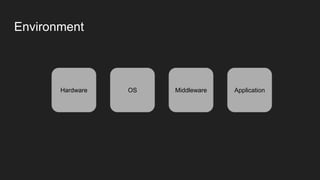
Environment
Hardware OS Middleware Application
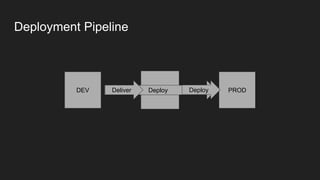
PRODDEV STAGEDeployDeliver Deploy
Deployment Pipeline
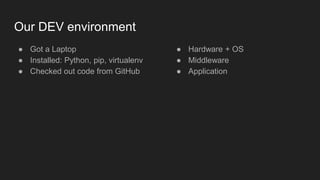
Our DEV environment
● Got a Laptop
● Installed: Python, pip, virtualenv
● Checked out code from GitHub
● Hardware + OS
● Middleware
● Application
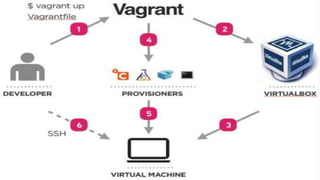
What Vagrant Is?
Building and Managing VM environments in a single,easy-to-
use workflow
https://www.vagrantup.com/
From Top
● Command line tool
● Providers: Virtualbox, VMWare, Hyper-V, AWS, GCP, Azure ….
● Provisioners: shell, Chef, Ansible, Puppet ….
● Runs on: Linux, Windows, MacOS
VirtualBox
● A general purpose full virtualizer for x86 hardware
● Free
● Open Source
● Available on every major platform
https://www.virtualbox.org
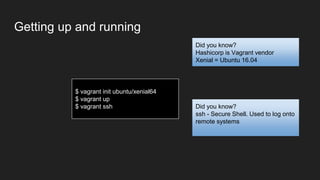
Getting up and running
$ vagrant init ubuntu/xenial64
$ vagrant up
$ vagrant ssh
Did you know?
Hashicorp is Vagrant vendor
Xenial = Ubuntu 16.04
Did you know?
ssh - Secure Shell. Used to log onto
remote systems
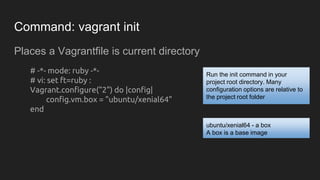
Command: vagrant init
Places a Vagrantfile is current directory
# -*- mode: ruby -*-
# vi: set ft=ruby :
Vagrant.configure("2") do |config|
config.vm.box = "ubuntu/xenial64"
end
Run the init command in your
project root directory. Many
configuration options are relative to
the project root folder
ubuntu/xenial64 - a box
A box is a base image
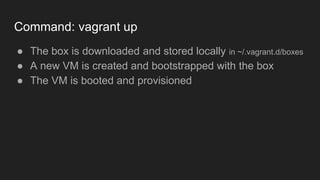
Command: vagrant up
● The box is downloaded and stored locally in ~/.vagrant.d/boxes
● A new VM is created and bootstrapped with the box
● The VM is booted and provisioned
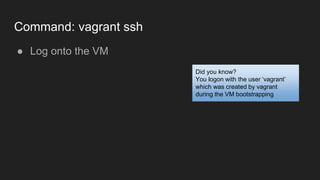
Command: vagrant ssh
● Log onto the VM
Did you know?
You logon with the user ‘vagrant’
which was created by vagrant
during the VM bootstrapping
Command: vagrant destroy
● Remove all traces of the guest machine from the host
machine
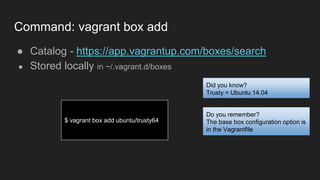
Command: vagrant box add
● Catalog - https://app.vagrantup.com/boxes/search
● Stored locally in ~/.vagrant.d/boxes
$ vagrant box add ubuntu/trusty64
Did you know?
Trusty = Ubuntu 14.04
Do you remember?
The base box configuration option is
in the Vagrantfile
Exercise
● Check which Ubuntu version is running - ‘lsb_release -a’
● Destroy the VM
● Spin up a new VM based on trusty64
● Check which Ubuntu version is running NOW
/vagrant - synced folder
● By default, the project root folder (host) is synced with the /vagrant folder
(guest)
● Two way sync
● It is not vagrant home directory
Provider - VirtualBox configuration
# -*- mode: ruby -*-
# vi: set ft=ruby :
Vagrant.configure("2") do |config|
config.vm.box = "ubuntu/xenial64"
config.vm.provider "virtualbox" do |v|
v.name = "my_vm"
v.memory = 2048
v.cpus = 4
end
end
Exercise
● Destroy current VM
● Spin up a new VM with different memory and cpu settings
● Check the new VM
● vagrant init user/box
● vagrant up
● vagrant destroy
● vagrant ssh
● vagrant box add user/box
Recap
shell provisioner
In the following Vagrant workshop

Vagrant 101 Workshop

  • 1.
  • 2.
    You will learn (WIIFM) ●What environments are ● What Infrastructure as a Code (IaaC) is ● How to use Vagrant to spin off an environment
  • 3.
    Requirements ● Basicknowledge of Linux
  • 4.
    System Requirements ● Latest versionof Vagrant installed ● Latest version of VirtualBox installed
  • 5.
    ● Environment ● Vagrantintroduction ● VirtualBox introduction ● Commands ● Workflow Agenda
  • 6.
  • 7.
  • 8.
    Our DEV environment ●Got a Laptop ● Installed: Python, pip, virtualenv ● Checked out code from GitHub ● Hardware + OS ● Middleware ● Application
  • 10.
    What Vagrant Is? Buildingand Managing VM environments in a single,easy-to- use workflow https://www.vagrantup.com/
  • 11.
    From Top ● Commandline tool ● Providers: Virtualbox, VMWare, Hyper-V, AWS, GCP, Azure …. ● Provisioners: shell, Chef, Ansible, Puppet …. ● Runs on: Linux, Windows, MacOS
  • 12.
    VirtualBox ● A generalpurpose full virtualizer for x86 hardware ● Free ● Open Source ● Available on every major platform https://www.virtualbox.org
  • 13.
    Getting up andrunning $ vagrant init ubuntu/xenial64 $ vagrant up $ vagrant ssh Did you know? Hashicorp is Vagrant vendor Xenial = Ubuntu 16.04 Did you know? ssh - Secure Shell. Used to log onto remote systems
  • 14.
    Command: vagrant init Placesa Vagrantfile is current directory # -*- mode: ruby -*- # vi: set ft=ruby : Vagrant.configure("2") do |config| config.vm.box = "ubuntu/xenial64" end Run the init command in your project root directory. Many configuration options are relative to the project root folder ubuntu/xenial64 - a box A box is a base image
  • 15.
    Command: vagrant up ●The box is downloaded and stored locally in ~/.vagrant.d/boxes ● A new VM is created and bootstrapped with the box ● The VM is booted and provisioned
  • 16.
    Command: vagrant ssh ●Log onto the VM Did you know? You logon with the user ‘vagrant’ which was created by vagrant during the VM bootstrapping
  • 17.
    Command: vagrant destroy ●Remove all traces of the guest machine from the host machine
  • 18.
    Command: vagrant boxadd ● Catalog - https://app.vagrantup.com/boxes/search ● Stored locally in ~/.vagrant.d/boxes $ vagrant box add ubuntu/trusty64 Did you know? Trusty = Ubuntu 14.04 Do you remember? The base box configuration option is in the Vagrantfile
  • 19.
    Exercise ● Check whichUbuntu version is running - ‘lsb_release -a’ ● Destroy the VM ● Spin up a new VM based on trusty64 ● Check which Ubuntu version is running NOW
  • 20.
    /vagrant - syncedfolder ● By default, the project root folder (host) is synced with the /vagrant folder (guest) ● Two way sync ● It is not vagrant home directory
  • 21.
    Provider - VirtualBoxconfiguration # -*- mode: ruby -*- # vi: set ft=ruby : Vagrant.configure("2") do |config| config.vm.box = "ubuntu/xenial64" config.vm.provider "virtualbox" do |v| v.name = "my_vm" v.memory = 2048 v.cpus = 4 end end
  • 22.
    Exercise ● Destroy currentVM ● Spin up a new VM with different memory and cpu settings ● Check the new VM
  • 23.
    ● vagrant inituser/box ● vagrant up ● vagrant destroy ● vagrant ssh ● vagrant box add user/box Recap
  • 25.
    shell provisioner In thefollowing Vagrant workshop