







Top 30 Scalability Mistakes John Coggeshall
Welcome! Who am I: John Coggeshall Team Lead for Pro Services, Zend Technologies Author PHP 5 Unleashed Zend Educational Advisory Board Speaker on PHP-related topics worldwide Geek
What is Scalability? Define: Scalability The ability and flexibility of an application to meet growth requirements of an organization More then making a site go fast(er) Scalability in human resources, for example The “fastest” approach isn’t always the most scalable OO is slower, but more scalable from a code maintenance and reuse standpoint Failure to consider future needs during architectural stages leading to failure of the application’s API to scale
The secret to scalability is the ability to design, code, and maintain your applications using the same process again and again regardless of size
Foundation “ Scalability marginally impacts procedure, procedure grossly impacts scalability” - Theo Schlossnagle
You have to plan Performance and resource scalability requires forethought and process Version Control Performance Goals Metric measuring Development Mailing Lists API documentation Awareness  is key Think about these problems and how you will solve them as your project gets off the ground
Development Infrastructure Every time a client has been in real trouble, they consistently fail to have a development infrastructure More then just CVS (although that’s a good start) Establishing a development release process early-on is critical to the overall stability of your apps Things will go wrong at 3am in production You need a process to release code to prevent the very-tempting cowboy-coding
Development Infrastructure Maintaining an existing code base is often the most costly endeavor of any application As an application grows, the complexity of it’s release process must scale Testing becomes more and more important Your release process must be able to scale with your application! Staging environments Coding Standards
Release Process The Cornerstone of a manageable application is a real release process Version Control Tagging of releases Atomic File Synchronization KISS: Rsync is your friend Find a Release Manager Only one entity should be able to put code in production The PHP Project has one release manager per version
Designing without Scalability If your application does not perform it will likely not succeed What does it mean to perform? 10 requests/sec? 100 requests/sec? 1000 requests/sec? If you don’t know what it will take to meet your performance requirements, you probably won’t meet them. “ If you're very lucky, performance problems can be fixed after the fact. But, as often as not, it will take a great deal of effort to get your code to where it needs to be for acceptable performance. This is a very bad trap to fall into. At its worst, you'll be faced with a memorable and sometimes job-ending quote: 'This will never work. You're going to have to start all over.'" Rico Mariani, Architect, Microsoft
Performance Metrics Response Time How long does it take for the server to respond to the request? Resource usage CPU, memory, disk I/O, Network I/O Throughput Requests / second Probably the most useful number to keep track of
Proactive vs. Reactive Common Scenario: Reactive Write your app Deploy it Watch it blow up Try to fix it If you’re lucky, you  might  succeed “enough” If you’re unlucky….. Correct Approach: Proactive Know your performance goals up front and make sure your application is living up to them as part of the development process
Everyone has a role in Performance Architects: Balance performance against other application needs Interoperability Security Maintainability Developers: You need to know how to measure and how to optimize to meet the goals Web-stress tools, profilers, etc. Testers: You must be able to validate the application will perform to specification
Designing with Scalability When designing your application, you should assume it needs to scale Quick and dirty prototypes often are exactly what gets to production It’s easy to make sure your applications have a decent chance of scaling MySQL: Design assuming someday you’ll need master/server replication, for example Don’t write an application you’ll need three years from now, write an application you need today Just think about what you might need in three years
System Scalability
Network file systems Problem: We have a server farm of 10 servers and we need to deploy our code base Very common problem Many people look to a technology like NFS Share one code base At least 90% of the time, this is a bad idea NFS/GFS is really slow NFS/GFS has tons of locking issues
Network file systems So how do we deploy our code base? You should always deploy your code base locally on the machine serving it Rsync is your friend What about run-time updates? Accepting File uploads Need to be available to all servers simultaneously Solutions vary depending on needs NFS may be an option for this small portion of the site Database is also an option
I/O Buffers I/O Buffers are there for a reason, to make things faster Sending 4098 bytes of data to the user when your system write blocks are 4096 bytes is stupid In PHP you can solve this using output buffering At the system level you can also boost up your TCP buffer size Almost always a good idea, most distributions are very conservative here Just be mindful of the amount of RAM you actually have
Ram Disks Ram Disks are a very nice way to improve performance of an application, as long as you have a lot of memory laying around Use Ramdisks to store any sort of data you wouldn’t care if you lost when the 16 year old trips over the power cable A reasonable alternative to shared memory
Bandwidth Optimization You can optimize bandwidth in a few ways Compression mod_deflate Zlib.output_compression=1 (PHP) Content Reduction via Tidy <?php $o = array(&quot;clean&quot; => true, &quot;drop-proprietary-attributes&quot; => true, &quot;drop-font-tags&quot; => true, &quot;drop-empty-paras&quot; => true, &quot;hide-comments&quot; => true, &quot;join-classes&quot; => true, &quot;join-styles&quot; => true ); $tidy = tidy_parse_file(&quot;php.html&quot;, $o);  tidy_clean_repair($tidy); echo $tidy; ?>  <?php ini_set(&quot;tidy.default_config&quot;, /path/to/compact_tidy.cfg&quot;); ini_set(&quot;tidy.clean_output&quot;, 1); ?>  clean=1 drop-proprietary-attributes=1 drop-font-tags=1 drop-empty-paras=1 hide-comments=1 join-classes=1 join-styles=1
PHP Scalability
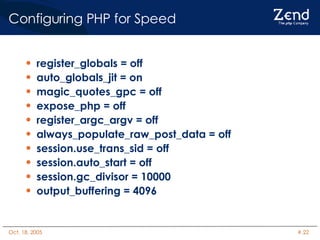
Configuring PHP for Speed register_globals = off auto_globals_jit = on magic_quotes_gpc = off expose_php = off register_argc_argv = off always_populate_raw_post_data = off session.use_trans_sid = off session.auto_start = off session.gc_divisor = 10000 output_buffering = 4096
Blocking calls Blocking I/O can always be a problem in an application I.e. attempting to open a remote URL from within your PHP scripts If the resource is locked / slow / unavailable your script hangs while we wait for a timeout Might as well try to scale an application that has a sleep(30) in it Very bad
Blocking calls Solutions Don’t use blocking calls in your application Don’t use blocking calls in the heavy-load aspects of your application Have out-of-process scripts responsible for pulling down data
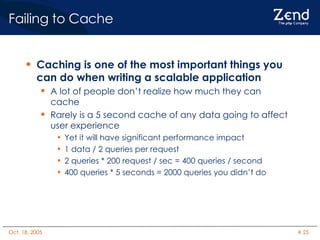
Failing to Cache Caching is one of the most important things you can do when writing a scalable application A lot of people don’t realize how much they can cache Rarely is a 5 second cache of any data going to affect user experience Yet it will have significant performance impact 1 data / 2 queries per request 2 queries * 200 request / sec = 400 queries / second 400 queries * 5 seconds = 2000 queries you didn’t do
Failing to Cache Improving the speed of PHP can be done very easily using an op-code cache PHP 6 will have this ability built-in to the engine
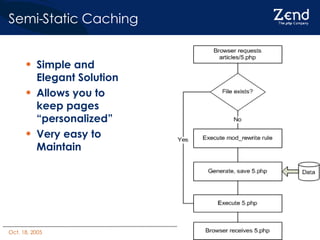
Semi-Static Caching If you're web application has a lot of semi-static content Content that  could change so it has to be stored in the DB, but almost never does .. And you're running on Apache This Design Pattern is killer!
Semi-Static Caching Most people in PHP would implement a page like this: http://www.example.com/show_article.php?id=5 This would be responsible for generating the semi-static page HTML for the browser
Semi-Static Caching Instead of generating the HTML for the browser, make this script generate another PHP script that contains mostly static content Keep things like personalization code, but make the actual article itself static in the file Write the file to disk in a public folder under document root
Semi-Static Caching If you put them in this directory http://www.example.com/articles/5.php You can create a mod_rewrite rule such that http://www.example.com/articles/5.php  maps to http://www.example.com/show_article.php?id=5 Since show_article.php writes articles to files, once it's been generated no more DB reads!
Semi-Static Caching Simple and Elegant Solution Allows you to keep pages “personalized” Very easy to Maintain
Database Scalability
Poor database design  Database design is almost always the most important thing in your application PHP can be used completely properly, but if you mess up the database you’re hosed anyway Take the time to really think about your design Read books on designing relational databases Understand how Indexes work, and use them
Poor database design  For example.. Using MySQL MyISAM tables all the time Use InnoDB instead if you can Use MyISAM tables only if you plan on doing fulltext searching Even then, they shouldn’t be primary tables
Improperly dealing with database connections Improperly using persistent database connections Know your database, MySQL has a relatively light handshake process compared to Oracle Using PHP to deal with database fail over It’s not PHP’s Job, don’t do it. Design your PHP applications to work with hostname aliases instead of real addresses i.e. mysql-r, mysql-w Have external processes responsible for switching the /etc/hosts file in the event something blows up
Let me say that again… I DON’T CARE WHAT IT SAYS IN SOME BOOK, DO NOT USE PHP TO DETERMINE WHICH DATABASE TO CONNECT TO
Database connections Bad: Code to determine if it is the dev environment or not and a different database is selected in each case Suicidal: Code to determine if the primary master in a MySQL database is down, and instead attempt to seamlessly roll-over to a hot swap MySQL slave you bless as master These don’t work These aren’t PHP’s Job what so ever These will someday land you on CNN for incompetence
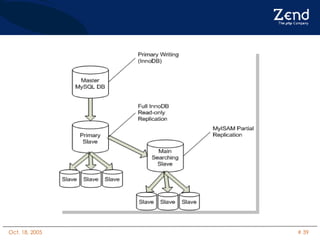
Having your Cake and Eating it too For those of us using MySQL, here’s a great replication trick from our friends at flickr InnoDB is under most circumstances considerably faster then MyISAM MyISAM is considerably better suited for full-text searches Trick: During a master/slave replication, the slave table type can change Set up a separate MyISAM fulltext search farm Connect to those servers when performing full-text searches
 
SQLite, Huh? SQLite is a great database package for PHP that can really speed certain things up Requires you understanding when and how to use it. SQLite is basically a flat-file embedded database Crazy-fast reads, horrible writes (full database locks) Answer: SQLite is a  *great*  lookup database
SQL Security Those who do not use Prepared statements should be flogged with a rubber hose They are  Faster Easier to maintain Considerably more secure ALL  database write operations should be done through prepared statements, Period.
Web Server Scalability
Know your Web Server When designing an application, it’s very important that you understand how PHP works in the bigger picture Know how PHP interacts and responds to your web server For instance – How’s PHP really work with Apache 1.3.x? 2.2.x?
Know your Web server Apache 1.3.x works on a pre-fork model One parent process spawns a whole lot of child processes Each process handles a single HTTP request at a time May handle a finite or infinite number of requests before being destroyed PHP exists in the context of an Apache Child process This means this like “persistent” resources are only persistent to the individual child process Database connections total = Process total
Hanging up Apache When scaling an application, requests per second is key You should have an idea how long a single request will take  You should know how many of those requests your server farm can handle at once without dying You should know you’re requests-per-second figures Too often, people let Apache handle things that it really shouldn’t I.e. Large file downloads, etc.
Dynamic vs Static serving When Apache is sending a 10 megabyte file, that means that one of your HTTP children is wasting it’s time shuffling data down the pipe This is definitely something that can be handled by something else A different HTTP server (tHttpd) Zend Download Server At any given point in time, you should try to design thing so that your primary server function (serving PHP scripts) is the only thing being done by Apache
Dynamic vs Static serving On the same note, you can use something like thttpd to serve all static content Set up a subdomain static.example.com Put all of your images, flash files, javascript libs, stylesheets, etc. on that server
Apache Configuration AllowOverride None FollowSymLinks No ExtendedStatus No Use IPs instead of Hostnames for allow,deny Disable HostnameLookups
Keepalive Requests Keepalive sounds great on paper It can actually totally hose you if you aren’t careful Use Keepalive if: You use the same server for static/dynamic content You intelligently know how to set the timeout No Keepalive request should last more then 10 seconds Configure your server appropriately If Apache is 100% Dynamic  TURN IT OFF
Optimizing Your Application The Art of making it faster without screwing it up
Knowing where to Not optimize Sooner or later, you will worry about scalability Hopefully, you didn’t start after your application started blowing up When trying to make scalability decisions knowledge is the most important thing you can have PHP has both closed source and open source profilers which do an excellent job of identifying the bottlenecks in your application Optimize where it counts
Instrumentation of your applications is key to determining what matters most when optimizing If you’re not logging, you’re shooting in the dark White-box monitoring of your applications via tools like Zend Platform are enormously helpful in understanding what is going on You can’t make good process (or business) decisions unless you understand how your web site is being used and by whom. Knowing where to Not optimize
Amdahl’s Law: Improving code execution time by 50% when the code executes only 2% of the time will result in a 1% overall improvement Improving code execution time by 10% when the code executes 80% of the time will result in a 8% overall improvement Knowing where to Not optimize
Use Profilers Profilers are  easy  to use Profilers draw pretty pictures Profilers are good, use profilers
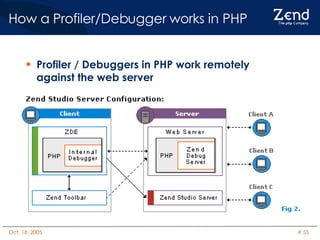
How a Profiler/Debugger works in PHP  Profiler / Debuggers in PHP work remotely against the web server
Tips on using a profiler When doing real performance analysis, here are a few tips to help you out: Copy the raw data (function execution times) into a spreadsheet and do analysis from there Most profilers provide at least two execution figures per function call The amount of time spent executing PHP code The amount of time PHP spent internally That means total = A + B  If you are spending a lot more time inside of PHP, you’ve got a blocking issue somewhere
Something More.. Do not mistake something more for something better Dev: “Hey, let’s build this great ORM that automatically generates it’s views like Ruby!” Manager: “Sounds great, go to it” <4 months pass> Dev: “Here’s my two weeks notice, I quit” Manager: “Okay John you write it” John: “Um, I have no idea what this guy did” <2 months pass to re-write the module in a way that we can maintain it>
Something More.. Don’t use a sledge hammer when a tack hammer will do Devs: Just because your boss doesn’t know the difference doesn’t make it a good idea It might seem like great job security to write code only you can maintain, but in reality all it will do is get you fired faster when they figure it out Managers: Know enough about the technologies to keep eager developers from leaving you holding the bag.
Binary Optimization If you can, building architecture-specific builds of all of your technology stack is a good idea Build Options: -O3 –march, -mcpu, -msse, -mmmx  – mfpmath=sse, -funroll-loops Stripping binaries using the ‘strip’ utility can also significantly reduce the memory footprint of the application Also, Most PHP extension aren’t used by PHP scripts Compile high-use ones statically into PHP and provide the rest as shared libs Only load the shared extensions when they are needed
Binary Optimization One drawback to Binary Optimization It’s optimized for that platform It’s significantly more annoying to try to manage different PHP versions all built on different hardware And then manage the underlying libraries which power PHP Don’t forget to optimize shared extensions too
Static compiling If running PHP in Apache you can increase the speed in some cases by 30% just by compiling PHP statically within Apache Of course, this increases the footprint of Apache, and each of it’s children (in prefork)
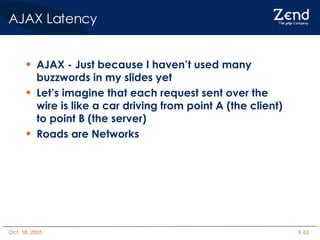
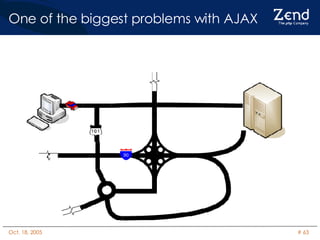
AJAX - Just because I haven’t used many buzzwords in my slides yet Let’s imagine that each request sent over the wire is like a car driving from point A (the client) to point B (the server) Roads are Networks AJAX Latency
One of the biggest problems with AJAX
One of the biggest problems with AJAX Simple requests seem to work just fine…
One of the biggest problems with AJAX
One of the biggest problems with AJAX The problem with AJAX has to do with  multiple   dependent  asynchronous requests  You can’t rely on any order of operations in classical AJAX models
One of the biggest problems with AJAX
Some requests  will  happen faster When working with AJAX, always know you cannot rely on one request finishing before the next is triggered Requests can take different lengths of time based on a huge array of factors Server load and Network load come to mind Can  really  mess up your application Bad news: None of the current AJAX toolkits account for this latency
Developing with Latency in mind A number of tools exist for developing AJAX applications with latency in mind AJAX Proxy is a good example http://ajaxblog.com/archives/2005/08/08/ajax-proxy-02 Allows you to simulate latency in your requests  You can use it in conjunction with “SwitchProxy” to point your browser at a different proxy server to use it http://www.roundtwo.com/product/switchproxy Not a true solution, but at least let’s you test for the problem.
Final Thoughts Final Thoughts Ultimately the secret of scalability is developing applications and procedures which scale both  UP   AND   DOWN You have to be able to afford to make the application to begin with You have to be able to afford to make the application ten times bigger then it is Without process, you will fail. REMEMBER:  In  ANY  application, there is only ever one bottleneck Questions?

Top 30 Scalability Mistakes

  • 1.
    Top 30 ScalabilityMistakes John Coggeshall
  • 2.
    Welcome! Who amI: John Coggeshall Team Lead for Pro Services, Zend Technologies Author PHP 5 Unleashed Zend Educational Advisory Board Speaker on PHP-related topics worldwide Geek
  • 3.
    What is Scalability?Define: Scalability The ability and flexibility of an application to meet growth requirements of an organization More then making a site go fast(er) Scalability in human resources, for example The “fastest” approach isn’t always the most scalable OO is slower, but more scalable from a code maintenance and reuse standpoint Failure to consider future needs during architectural stages leading to failure of the application’s API to scale
  • 4.
    The secret toscalability is the ability to design, code, and maintain your applications using the same process again and again regardless of size
  • 5.
    Foundation “ Scalabilitymarginally impacts procedure, procedure grossly impacts scalability” - Theo Schlossnagle
  • 6.
    You have toplan Performance and resource scalability requires forethought and process Version Control Performance Goals Metric measuring Development Mailing Lists API documentation Awareness is key Think about these problems and how you will solve them as your project gets off the ground
  • 7.
    Development Infrastructure Everytime a client has been in real trouble, they consistently fail to have a development infrastructure More then just CVS (although that’s a good start) Establishing a development release process early-on is critical to the overall stability of your apps Things will go wrong at 3am in production You need a process to release code to prevent the very-tempting cowboy-coding
  • 8.
    Development Infrastructure Maintainingan existing code base is often the most costly endeavor of any application As an application grows, the complexity of it’s release process must scale Testing becomes more and more important Your release process must be able to scale with your application! Staging environments Coding Standards
  • 9.
    Release Process TheCornerstone of a manageable application is a real release process Version Control Tagging of releases Atomic File Synchronization KISS: Rsync is your friend Find a Release Manager Only one entity should be able to put code in production The PHP Project has one release manager per version
  • 10.
    Designing without ScalabilityIf your application does not perform it will likely not succeed What does it mean to perform? 10 requests/sec? 100 requests/sec? 1000 requests/sec? If you don’t know what it will take to meet your performance requirements, you probably won’t meet them. “ If you're very lucky, performance problems can be fixed after the fact. But, as often as not, it will take a great deal of effort to get your code to where it needs to be for acceptable performance. This is a very bad trap to fall into. At its worst, you'll be faced with a memorable and sometimes job-ending quote: 'This will never work. You're going to have to start all over.'&quot; Rico Mariani, Architect, Microsoft
  • 11.
    Performance Metrics ResponseTime How long does it take for the server to respond to the request? Resource usage CPU, memory, disk I/O, Network I/O Throughput Requests / second Probably the most useful number to keep track of
  • 12.
    Proactive vs. ReactiveCommon Scenario: Reactive Write your app Deploy it Watch it blow up Try to fix it If you’re lucky, you might succeed “enough” If you’re unlucky….. Correct Approach: Proactive Know your performance goals up front and make sure your application is living up to them as part of the development process
  • 13.
    Everyone has arole in Performance Architects: Balance performance against other application needs Interoperability Security Maintainability Developers: You need to know how to measure and how to optimize to meet the goals Web-stress tools, profilers, etc. Testers: You must be able to validate the application will perform to specification
  • 14.
    Designing with ScalabilityWhen designing your application, you should assume it needs to scale Quick and dirty prototypes often are exactly what gets to production It’s easy to make sure your applications have a decent chance of scaling MySQL: Design assuming someday you’ll need master/server replication, for example Don’t write an application you’ll need three years from now, write an application you need today Just think about what you might need in three years
  • 15.
  • 16.
    Network file systemsProblem: We have a server farm of 10 servers and we need to deploy our code base Very common problem Many people look to a technology like NFS Share one code base At least 90% of the time, this is a bad idea NFS/GFS is really slow NFS/GFS has tons of locking issues
  • 17.
    Network file systemsSo how do we deploy our code base? You should always deploy your code base locally on the machine serving it Rsync is your friend What about run-time updates? Accepting File uploads Need to be available to all servers simultaneously Solutions vary depending on needs NFS may be an option for this small portion of the site Database is also an option
  • 18.
    I/O Buffers I/OBuffers are there for a reason, to make things faster Sending 4098 bytes of data to the user when your system write blocks are 4096 bytes is stupid In PHP you can solve this using output buffering At the system level you can also boost up your TCP buffer size Almost always a good idea, most distributions are very conservative here Just be mindful of the amount of RAM you actually have
  • 19.
    Ram Disks RamDisks are a very nice way to improve performance of an application, as long as you have a lot of memory laying around Use Ramdisks to store any sort of data you wouldn’t care if you lost when the 16 year old trips over the power cable A reasonable alternative to shared memory
  • 20.
    Bandwidth Optimization Youcan optimize bandwidth in a few ways Compression mod_deflate Zlib.output_compression=1 (PHP) Content Reduction via Tidy <?php $o = array(&quot;clean&quot; => true, &quot;drop-proprietary-attributes&quot; => true, &quot;drop-font-tags&quot; => true, &quot;drop-empty-paras&quot; => true, &quot;hide-comments&quot; => true, &quot;join-classes&quot; => true, &quot;join-styles&quot; => true ); $tidy = tidy_parse_file(&quot;php.html&quot;, $o); tidy_clean_repair($tidy); echo $tidy; ?> <?php ini_set(&quot;tidy.default_config&quot;, /path/to/compact_tidy.cfg&quot;); ini_set(&quot;tidy.clean_output&quot;, 1); ?> clean=1 drop-proprietary-attributes=1 drop-font-tags=1 drop-empty-paras=1 hide-comments=1 join-classes=1 join-styles=1
  • 21.
  • 22.
    Configuring PHP forSpeed register_globals = off auto_globals_jit = on magic_quotes_gpc = off expose_php = off register_argc_argv = off always_populate_raw_post_data = off session.use_trans_sid = off session.auto_start = off session.gc_divisor = 10000 output_buffering = 4096
  • 23.
    Blocking calls BlockingI/O can always be a problem in an application I.e. attempting to open a remote URL from within your PHP scripts If the resource is locked / slow / unavailable your script hangs while we wait for a timeout Might as well try to scale an application that has a sleep(30) in it Very bad
  • 24.
    Blocking calls SolutionsDon’t use blocking calls in your application Don’t use blocking calls in the heavy-load aspects of your application Have out-of-process scripts responsible for pulling down data
  • 25.
    Failing to CacheCaching is one of the most important things you can do when writing a scalable application A lot of people don’t realize how much they can cache Rarely is a 5 second cache of any data going to affect user experience Yet it will have significant performance impact 1 data / 2 queries per request 2 queries * 200 request / sec = 400 queries / second 400 queries * 5 seconds = 2000 queries you didn’t do
  • 26.
    Failing to CacheImproving the speed of PHP can be done very easily using an op-code cache PHP 6 will have this ability built-in to the engine
  • 27.
    Semi-Static Caching Ifyou're web application has a lot of semi-static content Content that could change so it has to be stored in the DB, but almost never does .. And you're running on Apache This Design Pattern is killer!
  • 28.
    Semi-Static Caching Mostpeople in PHP would implement a page like this: http://www.example.com/show_article.php?id=5 This would be responsible for generating the semi-static page HTML for the browser
  • 29.
    Semi-Static Caching Insteadof generating the HTML for the browser, make this script generate another PHP script that contains mostly static content Keep things like personalization code, but make the actual article itself static in the file Write the file to disk in a public folder under document root
  • 30.
    Semi-Static Caching Ifyou put them in this directory http://www.example.com/articles/5.php You can create a mod_rewrite rule such that http://www.example.com/articles/5.php maps to http://www.example.com/show_article.php?id=5 Since show_article.php writes articles to files, once it's been generated no more DB reads!
  • 31.
    Semi-Static Caching Simpleand Elegant Solution Allows you to keep pages “personalized” Very easy to Maintain
  • 32.
  • 33.
    Poor database design Database design is almost always the most important thing in your application PHP can be used completely properly, but if you mess up the database you’re hosed anyway Take the time to really think about your design Read books on designing relational databases Understand how Indexes work, and use them
  • 34.
    Poor database design For example.. Using MySQL MyISAM tables all the time Use InnoDB instead if you can Use MyISAM tables only if you plan on doing fulltext searching Even then, they shouldn’t be primary tables
  • 35.
    Improperly dealing withdatabase connections Improperly using persistent database connections Know your database, MySQL has a relatively light handshake process compared to Oracle Using PHP to deal with database fail over It’s not PHP’s Job, don’t do it. Design your PHP applications to work with hostname aliases instead of real addresses i.e. mysql-r, mysql-w Have external processes responsible for switching the /etc/hosts file in the event something blows up
  • 36.
    Let me saythat again… I DON’T CARE WHAT IT SAYS IN SOME BOOK, DO NOT USE PHP TO DETERMINE WHICH DATABASE TO CONNECT TO
  • 37.
    Database connections Bad:Code to determine if it is the dev environment or not and a different database is selected in each case Suicidal: Code to determine if the primary master in a MySQL database is down, and instead attempt to seamlessly roll-over to a hot swap MySQL slave you bless as master These don’t work These aren’t PHP’s Job what so ever These will someday land you on CNN for incompetence
  • 38.
    Having your Cakeand Eating it too For those of us using MySQL, here’s a great replication trick from our friends at flickr InnoDB is under most circumstances considerably faster then MyISAM MyISAM is considerably better suited for full-text searches Trick: During a master/slave replication, the slave table type can change Set up a separate MyISAM fulltext search farm Connect to those servers when performing full-text searches
  • 39.
  • 40.
    SQLite, Huh? SQLiteis a great database package for PHP that can really speed certain things up Requires you understanding when and how to use it. SQLite is basically a flat-file embedded database Crazy-fast reads, horrible writes (full database locks) Answer: SQLite is a *great* lookup database
  • 41.
    SQL Security Thosewho do not use Prepared statements should be flogged with a rubber hose They are Faster Easier to maintain Considerably more secure ALL database write operations should be done through prepared statements, Period.
  • 42.
  • 43.
    Know your WebServer When designing an application, it’s very important that you understand how PHP works in the bigger picture Know how PHP interacts and responds to your web server For instance – How’s PHP really work with Apache 1.3.x? 2.2.x?
  • 44.
    Know your Webserver Apache 1.3.x works on a pre-fork model One parent process spawns a whole lot of child processes Each process handles a single HTTP request at a time May handle a finite or infinite number of requests before being destroyed PHP exists in the context of an Apache Child process This means this like “persistent” resources are only persistent to the individual child process Database connections total = Process total
  • 45.
    Hanging up ApacheWhen scaling an application, requests per second is key You should have an idea how long a single request will take You should know how many of those requests your server farm can handle at once without dying You should know you’re requests-per-second figures Too often, people let Apache handle things that it really shouldn’t I.e. Large file downloads, etc.
  • 46.
    Dynamic vs Staticserving When Apache is sending a 10 megabyte file, that means that one of your HTTP children is wasting it’s time shuffling data down the pipe This is definitely something that can be handled by something else A different HTTP server (tHttpd) Zend Download Server At any given point in time, you should try to design thing so that your primary server function (serving PHP scripts) is the only thing being done by Apache
  • 47.
    Dynamic vs Staticserving On the same note, you can use something like thttpd to serve all static content Set up a subdomain static.example.com Put all of your images, flash files, javascript libs, stylesheets, etc. on that server
  • 48.
    Apache Configuration AllowOverrideNone FollowSymLinks No ExtendedStatus No Use IPs instead of Hostnames for allow,deny Disable HostnameLookups
  • 49.
    Keepalive Requests Keepalivesounds great on paper It can actually totally hose you if you aren’t careful Use Keepalive if: You use the same server for static/dynamic content You intelligently know how to set the timeout No Keepalive request should last more then 10 seconds Configure your server appropriately If Apache is 100% Dynamic TURN IT OFF
  • 50.
    Optimizing Your ApplicationThe Art of making it faster without screwing it up
  • 51.
    Knowing where toNot optimize Sooner or later, you will worry about scalability Hopefully, you didn’t start after your application started blowing up When trying to make scalability decisions knowledge is the most important thing you can have PHP has both closed source and open source profilers which do an excellent job of identifying the bottlenecks in your application Optimize where it counts
  • 52.
    Instrumentation of yourapplications is key to determining what matters most when optimizing If you’re not logging, you’re shooting in the dark White-box monitoring of your applications via tools like Zend Platform are enormously helpful in understanding what is going on You can’t make good process (or business) decisions unless you understand how your web site is being used and by whom. Knowing where to Not optimize
  • 53.
    Amdahl’s Law: Improvingcode execution time by 50% when the code executes only 2% of the time will result in a 1% overall improvement Improving code execution time by 10% when the code executes 80% of the time will result in a 8% overall improvement Knowing where to Not optimize
  • 54.
    Use Profilers Profilersare easy to use Profilers draw pretty pictures Profilers are good, use profilers
  • 55.
    How a Profiler/Debuggerworks in PHP Profiler / Debuggers in PHP work remotely against the web server
  • 56.
    Tips on usinga profiler When doing real performance analysis, here are a few tips to help you out: Copy the raw data (function execution times) into a spreadsheet and do analysis from there Most profilers provide at least two execution figures per function call The amount of time spent executing PHP code The amount of time PHP spent internally That means total = A + B If you are spending a lot more time inside of PHP, you’ve got a blocking issue somewhere
  • 57.
    Something More.. Donot mistake something more for something better Dev: “Hey, let’s build this great ORM that automatically generates it’s views like Ruby!” Manager: “Sounds great, go to it” <4 months pass> Dev: “Here’s my two weeks notice, I quit” Manager: “Okay John you write it” John: “Um, I have no idea what this guy did” <2 months pass to re-write the module in a way that we can maintain it>
  • 58.
    Something More.. Don’tuse a sledge hammer when a tack hammer will do Devs: Just because your boss doesn’t know the difference doesn’t make it a good idea It might seem like great job security to write code only you can maintain, but in reality all it will do is get you fired faster when they figure it out Managers: Know enough about the technologies to keep eager developers from leaving you holding the bag.
  • 59.
    Binary Optimization Ifyou can, building architecture-specific builds of all of your technology stack is a good idea Build Options: -O3 –march, -mcpu, -msse, -mmmx – mfpmath=sse, -funroll-loops Stripping binaries using the ‘strip’ utility can also significantly reduce the memory footprint of the application Also, Most PHP extension aren’t used by PHP scripts Compile high-use ones statically into PHP and provide the rest as shared libs Only load the shared extensions when they are needed
  • 60.
    Binary Optimization Onedrawback to Binary Optimization It’s optimized for that platform It’s significantly more annoying to try to manage different PHP versions all built on different hardware And then manage the underlying libraries which power PHP Don’t forget to optimize shared extensions too
  • 61.
    Static compiling Ifrunning PHP in Apache you can increase the speed in some cases by 30% just by compiling PHP statically within Apache Of course, this increases the footprint of Apache, and each of it’s children (in prefork)
  • 62.
    AJAX - Justbecause I haven’t used many buzzwords in my slides yet Let’s imagine that each request sent over the wire is like a car driving from point A (the client) to point B (the server) Roads are Networks AJAX Latency
  • 63.
    One of thebiggest problems with AJAX
  • 64.
    One of thebiggest problems with AJAX Simple requests seem to work just fine…
  • 65.
    One of thebiggest problems with AJAX
  • 66.
    One of thebiggest problems with AJAX
  • 67.
    One of thebiggest problems with AJAX
  • 68.
    One of thebiggest problems with AJAX The problem with AJAX has to do with multiple dependent asynchronous requests You can’t rely on any order of operations in classical AJAX models
  • 69.
    One of thebiggest problems with AJAX
  • 70.
    One of thebiggest problems with AJAX
  • 71.
    One of thebiggest problems with AJAX
  • 72.
    One of thebiggest problems with AJAX
  • 73.
    Some requests will happen faster When working with AJAX, always know you cannot rely on one request finishing before the next is triggered Requests can take different lengths of time based on a huge array of factors Server load and Network load come to mind Can really mess up your application Bad news: None of the current AJAX toolkits account for this latency
  • 74.
    Developing with Latencyin mind A number of tools exist for developing AJAX applications with latency in mind AJAX Proxy is a good example http://ajaxblog.com/archives/2005/08/08/ajax-proxy-02 Allows you to simulate latency in your requests You can use it in conjunction with “SwitchProxy” to point your browser at a different proxy server to use it http://www.roundtwo.com/product/switchproxy Not a true solution, but at least let’s you test for the problem.
  • 75.
    Final Thoughts FinalThoughts Ultimately the secret of scalability is developing applications and procedures which scale both UP AND DOWN You have to be able to afford to make the application to begin with You have to be able to afford to make the application ten times bigger then it is Without process, you will fail. REMEMBER: In ANY application, there is only ever one bottleneck Questions?