1
Virtualization and its Importance and Implementation Levels
Presented By: Muhammad Mubeen Yaseen
Reg no: 17-NTU-1228
Presented to: Dr.Abdul Quyyam
22
Contents:
Virtualization in Cloud Computing
Impotence of virtualization
What is the concept behind the Virtualization?
Types of Virtualization:
How does virtualization work in cloud computing?
Conclusion
33
Virtualization in Cloud Computing
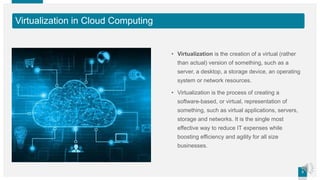
• Virtualization is the creation of a virtual (rather
than actual) version of something, such as a
server, a desktop, a storage device, an operating
system or network resources.
• Virtualization is the process of creating a
software-based, or virtual, representation of
something, such as virtual applications, servers,
storage and networks. It is the single most
effective way to reduce IT expenses while
boosting efficiency and agility for all size
businesses.
44
Impotence of virtualization
• Virtualization can increase IT agility, flexibility and scalability while creating
significant cost savings. Greater workload mobility, increased performance and
availability of resources, automated operations – they're all benefits
of virtualization that make IT simpler to manage and less costly to own and
operate
55
What is the concept behind the Virtualization?
• Creation of a virtual machine over existing operating system and hardware is
known as Hardware Virtualization. A Virtual machine provides an environment
that is logically separated from the underlying hardware.
• The machine on which the virtual machine is going to create is known as Host
Machine and that virtual machine is referred as a Guest Machine
66
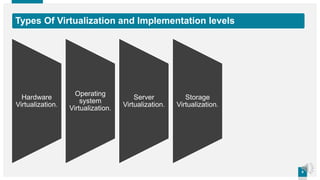
Types Of Virtualization and Implementation levels
Hardware
Virtualization.
Operating
system
Virtualization.
Server
Virtualization.
Storage
Virtualization.
77
Hardware Virtualization
• When the virtual machine software or virtual machine manager (VMM) is
directly installed on the hardware system is known as hardware virtualization.
• The main job of hypervisor is to control and monitoring the processor, memory
and other hardware resources.
• After virtualization of hardware system we can install different operating system
on it and run different applications on those OS.
• Usage: Hardware virtualization is mainly done for the server platforms,
because controlling virtual machines is much easier than controlling a physical
server.
88
Operating System Virtualization
• When the virtual machine software or virtual machine manager (VMM) is
installed on the Host operating system instead of directly on the hardware
system is known as operating system virtualization.
• Usage: Operating System Virtualization is mainly used for testing the
applications on different platforms of OS.
99
Server Virtualization
• When the virtual machine software or virtual machine manager (VMM) is
directly installed on the Server system is known as server virtualization.
• Usage: Server virtualization is done because a single physical server can be
divided into multiple servers on the demand basis and for balancing the load
1010
Storage Virtualization
• Storage virtualization is the process of grouping the physical storage from
multiple network storage devices so that it looks like a single storage device.
• Storage virtualization is also implemented by using software applications.
• Usage:
• Storage virtualization is mainly done for back-up and recovery purposes.
1111
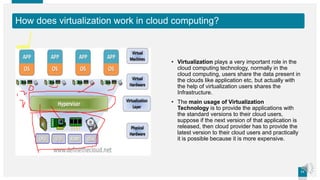
How does virtualization work in cloud computing?
• Virtualization plays a very important role in the
cloud computing technology, normally in the
cloud computing, users share the data present in
the clouds like application etc, but actually with
the help of virtualization users shares the
Infrastructure.
• The main usage of Virtualization
Technology is to provide the applications with
the standard versions to their cloud users,
suppose if the next version of that application is
released, then cloud provider has to provide the
latest version to their cloud users and practically
it is possible because it is more expensive.
1212
Conclusion:
• Mainly Virtualization means, running multiple operating systems on a single
machine but sharing all the hardware resources. And it helps us to provide the
pool of IT resources so that we can share these IT resources in order get
benefits in the business.
13

Virtualization and its importance and implementation levels

  • 1.
    1 Virtualization and itsImportance and Implementation Levels Presented By: Muhammad Mubeen Yaseen Reg no: 17-NTU-1228 Presented to: Dr.Abdul Quyyam
  • 2.
    22 Contents: Virtualization in CloudComputing Impotence of virtualization What is the concept behind the Virtualization? Types of Virtualization: How does virtualization work in cloud computing? Conclusion
  • 3.
    33 Virtualization in CloudComputing • Virtualization is the creation of a virtual (rather than actual) version of something, such as a server, a desktop, a storage device, an operating system or network resources. • Virtualization is the process of creating a software-based, or virtual, representation of something, such as virtual applications, servers, storage and networks. It is the single most effective way to reduce IT expenses while boosting efficiency and agility for all size businesses.
  • 4.
    44 Impotence of virtualization •Virtualization can increase IT agility, flexibility and scalability while creating significant cost savings. Greater workload mobility, increased performance and availability of resources, automated operations – they're all benefits of virtualization that make IT simpler to manage and less costly to own and operate
  • 5.
    55 What is theconcept behind the Virtualization? • Creation of a virtual machine over existing operating system and hardware is known as Hardware Virtualization. A Virtual machine provides an environment that is logically separated from the underlying hardware. • The machine on which the virtual machine is going to create is known as Host Machine and that virtual machine is referred as a Guest Machine
  • 6.
    66 Types Of Virtualizationand Implementation levels Hardware Virtualization. Operating system Virtualization. Server Virtualization. Storage Virtualization.
  • 7.
    77 Hardware Virtualization • Whenthe virtual machine software or virtual machine manager (VMM) is directly installed on the hardware system is known as hardware virtualization. • The main job of hypervisor is to control and monitoring the processor, memory and other hardware resources. • After virtualization of hardware system we can install different operating system on it and run different applications on those OS. • Usage: Hardware virtualization is mainly done for the server platforms, because controlling virtual machines is much easier than controlling a physical server.
  • 8.
    88 Operating System Virtualization •When the virtual machine software or virtual machine manager (VMM) is installed on the Host operating system instead of directly on the hardware system is known as operating system virtualization. • Usage: Operating System Virtualization is mainly used for testing the applications on different platforms of OS.
  • 9.
    99 Server Virtualization • Whenthe virtual machine software or virtual machine manager (VMM) is directly installed on the Server system is known as server virtualization. • Usage: Server virtualization is done because a single physical server can be divided into multiple servers on the demand basis and for balancing the load
  • 10.
    1010 Storage Virtualization • Storagevirtualization is the process of grouping the physical storage from multiple network storage devices so that it looks like a single storage device. • Storage virtualization is also implemented by using software applications. • Usage: • Storage virtualization is mainly done for back-up and recovery purposes.
  • 11.
    1111 How does virtualizationwork in cloud computing? • Virtualization plays a very important role in the cloud computing technology, normally in the cloud computing, users share the data present in the clouds like application etc, but actually with the help of virtualization users shares the Infrastructure. • The main usage of Virtualization Technology is to provide the applications with the standard versions to their cloud users, suppose if the next version of that application is released, then cloud provider has to provide the latest version to their cloud users and practically it is possible because it is more expensive.
  • 12.
    1212 Conclusion: • Mainly Virtualizationmeans, running multiple operating systems on a single machine but sharing all the hardware resources. And it helps us to provide the pool of IT resources so that we can share these IT resources in order get benefits in the business.
  • 13.