Susannah Monge Carla Obando Evelyn Gonzales Mar ía del Mar Bola ños Alejandro Gamboa
Package of tools that allows school level to College of Education learner to create an electronic portfolio. Learners can upload files, pictures, video, and links to other websites to customize it. The e-Portfolio can be shared with others which is the final assessment of learners in all College of Education program or institution.
Flexible and Easy-to-Use Calendar for Scheduling Activities Customizable Plan Templates Advanced Search Options Unlimited Attachments & Web Links Shared Library of Units and Lessons Feedback and Collaboration Tools Online Publishing  Comprehensive Standards Database Custom Folders for Organizing Plans Standards Gap & Frequency Reporting Archiving Print Formatting
User-friendly e-portfolio tools Share information  Submit documents, projects and other assignments Maintain portable samples  Look back on work you have done  High-impact online portfolios Create multiple, targeted showcases of your work Maintain your portable record  Expectations of your work  Organize work online  Request and receive feedback from others Share your portfolios in a variety of ways
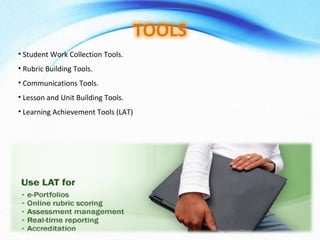
Student Work Collection Tools. Rubric Building Tools. Communications Tools. Lesson and Unit Building Tools. Learning Achievement Tools (LAT)
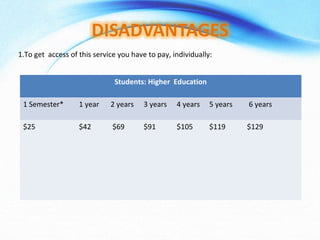
1.To get  access of this service you have to pay, individually: Students: Higher  Education 1 Semester* 1 year  2 years 3 years 4 years 5 years 6 years  $25    $42 $69  $91  $105  $119 $129
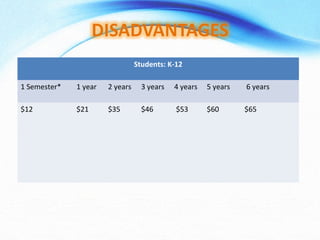
Students: K-12 1 Semester* 1 year  2 years 3 years 4 years 5 years 6 years  $12    $21 $35  $46 $53 $60  $65
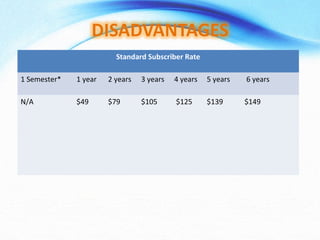
Standard Subscriber Rate 1 Semester* 1 year  2 years 3 years 4 years 5 years 6 years  N/A   $49  $79  $105  $125  $139  $149
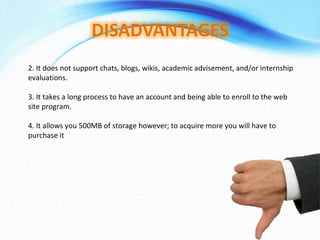
2. It does not support chats, blogs, wikis, academic advisement, and/or internship evaluations.  3. It takes a long process to have an account and being able to enroll to the web site program.  4. It allows you 500MB of storage however; to acquire more you will have to purchase it
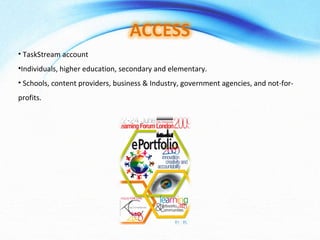
TaskStream account Individuals, higher education, secondary and elementary. Schools, content providers, business & Industry, government agencies, and not-for-profits.
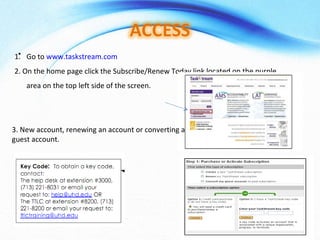
Go to  www.taskstream.com 2. On the home page click the Subscribe/Renew Today link located on the purple area on the top left side of the screen.  3. New account, renewing an account or converting a guest account.
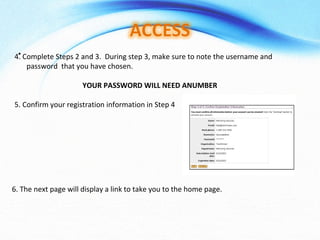
4. Complete Steps 2 and 3.  During step 3, make sure to note the username and password  that you have chosen.  YOUR PASSWORD WILL NEED ANUMBER 5. Confirm your registration information in Step 4  6. The next page will display a link to take you to the home page.
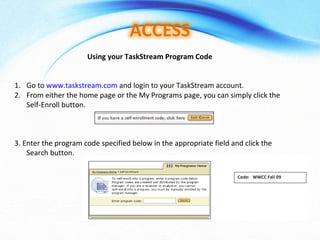
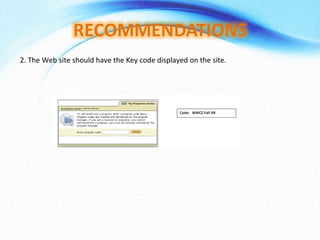
Using your TaskStream Program Code Go to  www.taskstream.com  and login to your TaskStream account. From either the home page or the My Programs page, you can simply click the Self-Enroll button.  3. Enter the program code specified below in the appropriate field and click the Search button.
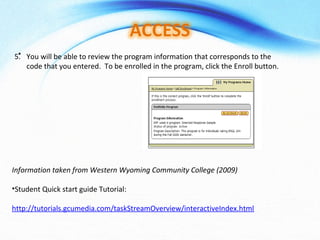
You will be able to review the program information that corresponds to the code that you entered.  To be enrolled in the program, click the Enroll button. Information taken from Western Wyoming Community College (2009) Student Quick start guide Tutorial: http://tutorials.gcumedia.com/taskStreamOverview/interactiveIndex.html
TaskStream account Program of Study, e-portafolio Individuals, higher education, secondary and elementary. Schools, content providers, business & Industry, government agencies, and not-for-profits.
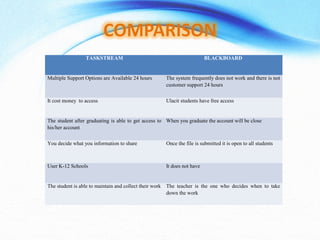
TASKSTREAM BLACKBOARD Multiple Support Options are Available 24 hours The system frequently does not work and there is not customer support 24 hours It cost money  to access  Ulacit students have free access The student after graduating is able to get access to his/her account When you graduate the account will be close You decide what you information to share Once the file is submitted it is open to all students User K-12 Schools It does not have  The student is able to maintain and collect their work The teacher is the one who decides when to take down the work
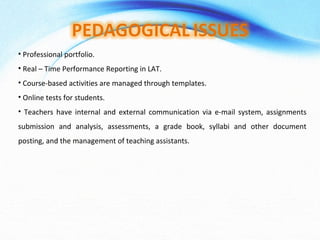
Professional portfolio. Real – Time Performance Reporting in LAT. Course-based activities are managed through templates. Online tests for students. Teachers have internal and external communication via e-mail system, assignments submission and analysis, assessments, a grade book, syllabi and other document posting, and the management of teaching assistants.
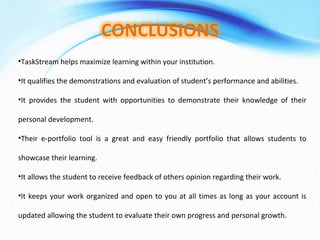
TaskStream helps maximize learning within your institution.  It qualifies the demonstrations and evaluation of student’s performance and abilities. It provides the student with opportunities to demonstrate their knowledge of their personal development.  Their e-portfolio tool is a great and easy friendly portfolio that allows students to showcase their learning.  It allows the student to receive feedback of others opinion regarding their work.  It keeps your work organized and open to you at all times as long as your account is updated allowing the student to evaluate their own progress and personal growth.
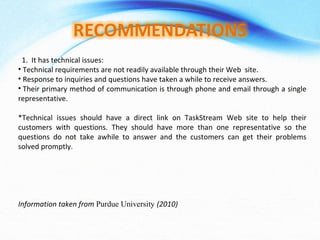
1.  It has technical issues:   Technical requirements are not readily available through their Web  site.   Response to inquiries and questions have taken a while to receive answers.   Their primary method of communication is through phone and email through a single representative.   *Technical issues should have a direct link on TaskStream Web site to help their customers with questions. They should have more than one representative so the questions do not take awhile to answer and the customers can get their problems solved promptly. Information taken from  Purdue University  (2010)    
2. The Web site should have the Key code displayed on the site.    
TaskStream (2002-2010).  Task Stream. Advancing Educational Excellence . Retrieved on November 09, 2010 from  http://www.taskstream.com/     Purdue University (2004).  TaskStream Information for Students.  Retrieved on November 09, 2010, from  http://www.education.purdue.edu/edit/taskstream/info_students.htm   Guy, R., Buzzeto, N (2006).  A Comparative Analysis of Common E-Portfolio Features and Available Platform.  Retrieved on November 09, 2010 from  http://proceedings.informingscience.org/InSITE2007/IISITv4p327-342Guy255.pdf   Grand Canyon University (2010).  Taskstream.  Retrieved on November 09, 2010 from  http://my.gcu.edu/Academics/Colleges/Education/Programs/Pages/TaskStream.aspx   Grand Canyon University (2010).  GCU Tutorials.  Retrieved on November 09, 2010 from  http://tutorials.gcumedia.com/taskStreamOverview/interactiveIndex.html Purdue University. (2010).  TaskStream AMS Review  (Preliminary Review). Retrieved on November 11, 2010 from  https://wiki.itap.purdue.edu/display/etech/TaskStream+AMS
Susannah Monge Carla Obando Evelyn Gonzales Mar ía del Mar Bola ños Alejandro Gamboa

Virtual classrooms research

  • 1.
    Susannah Monge CarlaObando Evelyn Gonzales Mar ía del Mar Bola ños Alejandro Gamboa
  • 2.
    Package of toolsthat allows school level to College of Education learner to create an electronic portfolio. Learners can upload files, pictures, video, and links to other websites to customize it. The e-Portfolio can be shared with others which is the final assessment of learners in all College of Education program or institution.
  • 3.
    Flexible and Easy-to-UseCalendar for Scheduling Activities Customizable Plan Templates Advanced Search Options Unlimited Attachments & Web Links Shared Library of Units and Lessons Feedback and Collaboration Tools Online Publishing Comprehensive Standards Database Custom Folders for Organizing Plans Standards Gap & Frequency Reporting Archiving Print Formatting
  • 4.
    User-friendly e-portfolio toolsShare information Submit documents, projects and other assignments Maintain portable samples Look back on work you have done High-impact online portfolios Create multiple, targeted showcases of your work Maintain your portable record Expectations of your work Organize work online Request and receive feedback from others Share your portfolios in a variety of ways
  • 5.
    Student Work CollectionTools. Rubric Building Tools. Communications Tools. Lesson and Unit Building Tools. Learning Achievement Tools (LAT)
  • 6.
    1.To get access of this service you have to pay, individually: Students: Higher Education 1 Semester* 1 year 2 years 3 years 4 years 5 years 6 years $25 $42 $69 $91 $105 $119 $129
  • 7.
    Students: K-12 1Semester* 1 year 2 years 3 years 4 years 5 years 6 years $12 $21 $35 $46 $53 $60 $65
  • 8.
    Standard Subscriber Rate1 Semester* 1 year 2 years 3 years 4 years 5 years 6 years N/A $49 $79 $105 $125 $139 $149
  • 9.
    2. It doesnot support chats, blogs, wikis, academic advisement, and/or internship evaluations. 3. It takes a long process to have an account and being able to enroll to the web site program. 4. It allows you 500MB of storage however; to acquire more you will have to purchase it
  • 10.
    TaskStream account Individuals,higher education, secondary and elementary. Schools, content providers, business & Industry, government agencies, and not-for-profits.
  • 11.
    Go to www.taskstream.com 2. On the home page click the Subscribe/Renew Today link located on the purple area on the top left side of the screen. 3. New account, renewing an account or converting a guest account.
  • 12.
    4. Complete Steps2 and 3. During step 3, make sure to note the username and password that you have chosen. YOUR PASSWORD WILL NEED ANUMBER 5. Confirm your registration information in Step 4 6. The next page will display a link to take you to the home page.
  • 13.
    Using your TaskStreamProgram Code Go to www.taskstream.com and login to your TaskStream account. From either the home page or the My Programs page, you can simply click the Self-Enroll button. 3. Enter the program code specified below in the appropriate field and click the Search button.
  • 14.
    You will beable to review the program information that corresponds to the code that you entered. To be enrolled in the program, click the Enroll button. Information taken from Western Wyoming Community College (2009) Student Quick start guide Tutorial: http://tutorials.gcumedia.com/taskStreamOverview/interactiveIndex.html
  • 15.
    TaskStream account Programof Study, e-portafolio Individuals, higher education, secondary and elementary. Schools, content providers, business & Industry, government agencies, and not-for-profits.
  • 16.
    TASKSTREAM BLACKBOARD MultipleSupport Options are Available 24 hours The system frequently does not work and there is not customer support 24 hours It cost money to access Ulacit students have free access The student after graduating is able to get access to his/her account When you graduate the account will be close You decide what you information to share Once the file is submitted it is open to all students User K-12 Schools It does not have The student is able to maintain and collect their work The teacher is the one who decides when to take down the work
  • 17.
    Professional portfolio. Real– Time Performance Reporting in LAT. Course-based activities are managed through templates. Online tests for students. Teachers have internal and external communication via e-mail system, assignments submission and analysis, assessments, a grade book, syllabi and other document posting, and the management of teaching assistants.
  • 18.
    TaskStream helps maximizelearning within your institution. It qualifies the demonstrations and evaluation of student’s performance and abilities. It provides the student with opportunities to demonstrate their knowledge of their personal development. Their e-portfolio tool is a great and easy friendly portfolio that allows students to showcase their learning. It allows the student to receive feedback of others opinion regarding their work. It keeps your work organized and open to you at all times as long as your account is updated allowing the student to evaluate their own progress and personal growth.
  • 19.
    1.  It hastechnical issues:   Technical requirements are not readily available through their Web site.   Response to inquiries and questions have taken a while to receive answers.   Their primary method of communication is through phone and email through a single representative.   *Technical issues should have a direct link on TaskStream Web site to help their customers with questions. They should have more than one representative so the questions do not take awhile to answer and the customers can get their problems solved promptly. Information taken from Purdue University (2010)    
  • 20.
    2. The Website should have the Key code displayed on the site.    
  • 21.
    TaskStream (2002-2010). Task Stream. Advancing Educational Excellence . Retrieved on November 09, 2010 from http://www.taskstream.com/   Purdue University (2004). TaskStream Information for Students. Retrieved on November 09, 2010, from http://www.education.purdue.edu/edit/taskstream/info_students.htm   Guy, R., Buzzeto, N (2006). A Comparative Analysis of Common E-Portfolio Features and Available Platform. Retrieved on November 09, 2010 from http://proceedings.informingscience.org/InSITE2007/IISITv4p327-342Guy255.pdf   Grand Canyon University (2010). Taskstream. Retrieved on November 09, 2010 from http://my.gcu.edu/Academics/Colleges/Education/Programs/Pages/TaskStream.aspx   Grand Canyon University (2010). GCU Tutorials. Retrieved on November 09, 2010 from http://tutorials.gcumedia.com/taskStreamOverview/interactiveIndex.html Purdue University. (2010). TaskStream AMS Review (Preliminary Review). Retrieved on November 11, 2010 from https://wiki.itap.purdue.edu/display/etech/TaskStream+AMS
  • 22.
    Susannah Monge CarlaObando Evelyn Gonzales Mar ía del Mar Bola ños Alejandro Gamboa