From the CIO’s Office
by Rusty Waterfield, CIO
Associate Vice President, University Services
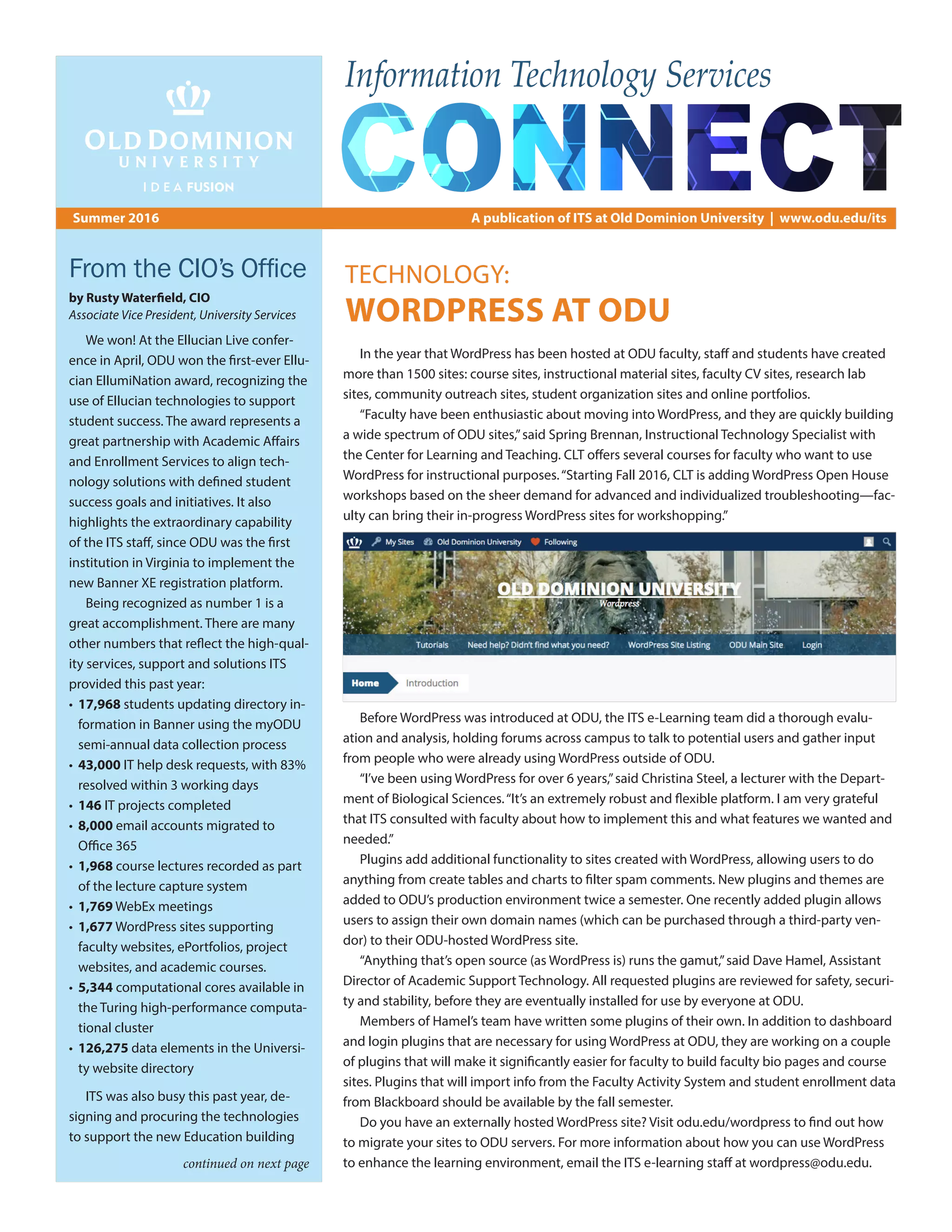
In the year that WordPress has been hosted at ODU faculty, staff and students have created
more than 1500 sites: course sites, instructional material sites, faculty CV sites, research lab
sites, community outreach sites, student organization sites and online portfolios.
“Faculty have been enthusiastic about moving into WordPress, and they are quickly building
a wide spectrum of ODU sites,”said Spring Brennan, Instructional Technology Specialist with
the Center for Learning and Teaching. CLT offers several courses for faculty who want to use
WordPress for instructional purposes.“Starting Fall 2016, CLT is adding WordPress Open House
workshops based on the sheer demand for advanced and individualized troubleshooting—fac-
ulty can bring their in-progress WordPress sites for workshopping.”
Before WordPress was introduced at ODU, the ITS e-Learning team did a thorough evalu-
ation and analysis, holding forums across campus to talk to potential users and gather input
from people who were already using WordPress outside of ODU.
“I’ve been using WordPress for over 6 years,”said Christina Steel, a lecturer with the Depart-
ment of Biological Sciences.“It’s an extremely robust and flexible platform. I am very grateful
that ITS consulted with faculty about how to implement this and what features we wanted and
needed.”
Plugins add additional functionality to sites created with WordPress, allowing users to do
anything from create tables and charts to filter spam comments. New plugins and themes are
added to ODU’s production environment twice a semester. One recently added plugin allows
users to assign their own domain names (which can be purchased through a third-party ven-
dor) to their ODU-hosted WordPress site.
“Anything that’s open source (as WordPress is) runs the gamut,”said Dave Hamel, Assistant
Director of Academic Support Technology. All requested plugins are reviewed for safety, securi-
ty and stability, before they are eventually installed for use by everyone at ODU.
Members of Hamel’s team have written some plugins of their own. In addition to dashboard
and login plugins that are necessary for using WordPress at ODU, they are working on a couple
of plugins that will make it significantly easier for faculty to build faculty bio pages and course
sites. Plugins that will import info from the Faculty Activity System and student enrollment data
from Blackboard should be available by the fall semester.
Do you have an externally hosted WordPress site? Visit odu.edu/wordpress to find out how
to migrate your sites to ODU servers. For more information about how you can use WordPress
to enhance the learning environment, email the ITS e-learning staff at wordpress@odu.edu.
We won! At the Ellucian Live confer-
ence in April, ODU won the first-ever Ellu-
cian EllumiNation award, recognizing the
use of Ellucian technologies to support
student success. The award represents a
great partnership with Academic Affairs
and Enrollment Services to align tech-
nology solutions with defined student
success goals and initiatives. It also
highlights the extraordinary capability
of the ITS staff, since ODU was the first
institution in Virginia to implement the
new Banner XE registration platform.
Being recognized as number 1 is a
great accomplishment. There are many
other numbers that reflect the high-qual-
ity services, support and solutions ITS
provided this past year:
•	17,968 students updating directory in-
formation in Banner using the myODU
semi-annual data collection process
•	43,000 IT help desk requests, with 83%
resolved within 3 working days
•	 146 IT projects completed
•	8,000 email accounts migrated to
Office 365
•	 1,968 course lectures recorded as part
of the lecture capture system
•	 1,769 WebEx meetings
•	1,677 WordPress sites supporting
faculty websites, ePortfolios, project
websites, and academic courses.
•	5,344 computational cores available in
the Turing high-performance computa-
tional cluster
•	126,275 data elements in the Universi-
ty website directory
ITS was also busy this past year, de-
signing and procuring the technologies
to support the new Education building
Summer 2016 A publication of ITS at Old Dominion University | www.odu.edu/its
Information Technology Services
continued on next page
TECHNOLOGY:
WORDPRESS AT ODU
The typical classroom on campus hosts
well over 500 classes in a 16-week semester.
The technology in these classrooms is used
several times a day by faculty in various and
innovative ways. The Classroom Central team
works hard to ensure that this technology is
operational and user-friendly.
“I would put our technology and support
against any other,”said Dwayne Smith, assistant
director of classroom and learning space tech-
nologies.“There is a large commitment to edu-
cational technology in the classroom at ODU.”
Classroom Central’s five classroom support
specialists conduct monthly quality control
checks in all 130 University classrooms, antici-
pating and solving technical problems before
they arise. And when instructors do have
issues, hotline phones in each room provide
immediate support.
Besides troubleshooting and supporting
existing technologies, classroom support
specialists constantly listen for feedback and
search for ways to improve the classroom
technology experience.
“In our daily interaction with faculty, we
see what works and what doesn’t,”said spe-
cialist Beth Bains.
“We try to do as much as we can in house
because we control the quality of the finished
product,”said Smith.“We’re successful be-
cause of the commitment and the ownership
we take in what we do around campus.”
Despite fast-changing technology and
constant upgrades, instructors will find similar
features and functions no matter which room
they are assigned.
“If you’ve ever taught in one of our class-
rooms and you walked into a new classroom, it
should feel familiar,”said specialist Geoff Farley.
Each room has a desktop computer, a pro-
jector, a document camera, lecture capture ca-
pability and a control unit. In newer rooms (and
as rooms are updated), classroom controls are
located on a separate desktop box that allows
instructors to project from their own laptops or
media units without ever having to touch the
classroom desktop. And going forward, each
new or updated room will be outfitted with
an adjustable desk and touchscreen monitors,
mounted on swiveling arms, allowing instruc-
tors to present while seated or standing, either
behind or in front of the desk.
The new desk was the product of several
discussions about capabilities and user expe-
rience, with input from a variety of people.
“From a design standpoint, we try to
understand what the user wants to do,”said
Smith,“and we try to build from a concept,
not a specific piece of of technology.”
Lecture capture, the ability to record class
sessions for later playback, is available in every
classroom and has been proven to increase
student performance. Smith and his team
studied the use of lecture capture in several
classes last year and found that students who
watch lecture videos through Blackboard tend
to perform better and have higher completion
rates than those who don’t watch the videos.
“We get to see the success that takes
place in the classroom as a direct result of
something we did,”said specialist Clay Fogler.
“That’s very rewarding.”
This fall, instructors who teach in large lec-
ture halls might want to request a Catchbox
– a foam-encased microphone that’s meant
to be tossed around the room. Sure, it’s fun,
but it also allows audience responses to be
heard in classroom recordings, enhancing the
lecture capture capabilities.
Other technology to watch for: the ability
to connect to projectors wirelessly so instruc-
tors can move freely around the classroom
while presenting and even encourage
students to present from their seats. The new
Education building will be the first to have
this technology standard in every classroom
“Our ultimate hope,”said Smith,“is that the
instructor doesn’t have to focus on technology;
the technology can focus on them.”
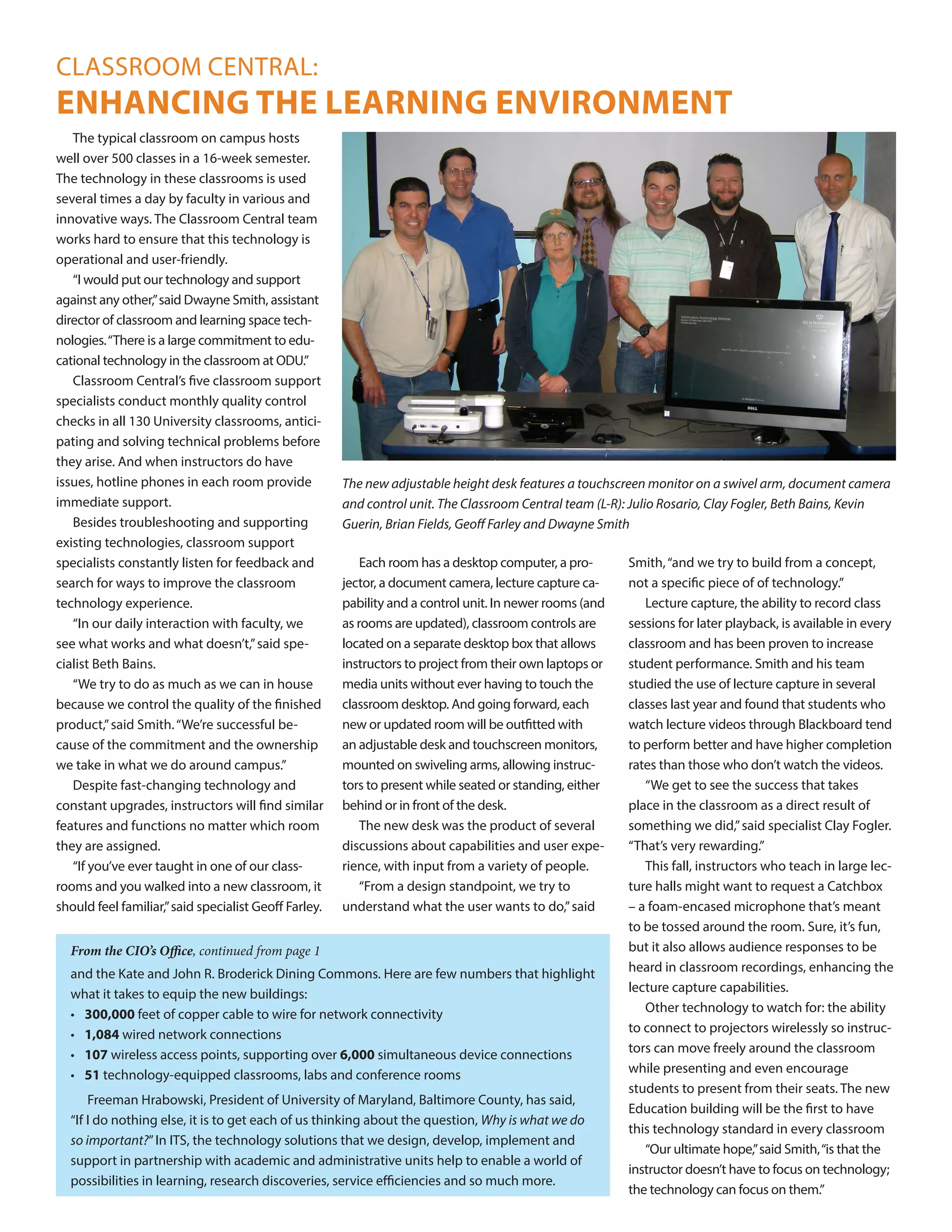
The new adjustable height desk features a touchscreen monitor on a swivel arm, document camera
and control unit. The Classroom Central team (L-R): Julio Rosario, Clay Fogler, Beth Bains, Kevin
Guerin, Brian Fields, Geoff Farley and Dwayne Smith
and the Kate and John R. Broderick Dining Commons. Here are few numbers that highlight
what it takes to equip the new buildings:
•	300,000 feet of copper cable to wire for network connectivity
•	 1,084 wired network connections
•	 107 wireless access points, supporting over 6,000 simultaneous device connections
•	 51 technology-equipped classrooms, labs and conference rooms
Freeman Hrabowski, President of University of Maryland, Baltimore County, has said,
“If I do nothing else, it is to get each of us thinking about the question, Why is what we do
so important?”In ITS, the technology solutions that we design, develop, implement and
support in partnership with academic and administrative units help to enable a world of
possibilities in learning, research discoveries, service efficiencies and so much more.
From the CIO’s Office, continued from page 1
CLASSROOM CENTRAL:
ENHANCING THE LEARNING ENVIRONMENT
Mark Walsh
Exemplary Service Award
Mark received the
2016 Exemplary Service
Award from the Tide-
water Chapter of ARMA
International, an asso-
ciation for records and
information management professionals.
ODU wins first Ellucian EllumiNation Award
ODU was recognized by Ellucian as the first Campus EllumiNation Award winner. This award
honors institutions who inspire their peers to push the boundaries of technology.
According to Ellucian,“ODU clearly stood out as a leading institution that is using technology
to enhance the student and campus experience, driving measurable growth in effectiveness.”
This award is the result of collaboration between Information Technology Services, Student
Engagement  Enrollment Services and Human Resources in rolling out Banner XE.
Great Computer Challenge
The Great Computer Challenge – a joint
project of WHRO, ODU and the Consortium
for Interactive Instruction – was recognized
with an award for Community Engagement
Based on a Local Project from the National
Educational Telecommunications Associa-
tion (NETA). The Great Computer Challenge,
now in its 30th year, is a competitive oppor-
tunity for students in kindergarten through
12th grade to demonstrate their knowledge
of various computer applications and pro-
gramming skills.
Shailaja Rao works with an NGO in India
called Rainbow of Humanity, a support group
for interfaith couples.
George McLeod trains the next generation of
students to solve problems using geospatial
technology.
Entrepreneurs at ODU
In support of ODU’s strategic goal to promote an entrepreneurial culture, the Entrepreneur-
ship program highlighted the work of ITS employees Shailaja Rao and George McLeod in brief
videos about their entrepreneurial work at ODU. Find these videos at odu.edu/e.
That’s the motto of the ITS project man-
agement office, who have been keeping ITS
projects on track and striving to improve the
way things are done since 2009.
“We are most successful when there’s a
method,”said Barrie Sutton, assistant director
of the ITS PMO.
To ensure the greatest chance of success,
each requested project is evaluated by a review
team to determine if it is compatible with
our current IT systems and if the appropriate
resources are available. Regular status meet-
ings and reports ensure that all stakeholders
know exactly where each project stands, and
help project managers determine whether
ITS should undertake any new projects at any
given time. And when a project is completed,
project managers perform a post-project review
to discuss lessons learned and gather valuable
feedback in order to continue improving.
The PMO works with departments across
campus, planning infrastructure for new
buildings and upgrading software.
“We do a lot of work with Student Engage-
ment and Enrollment Services,”said Sutton,
“helping them improve admission and gradu-
ation processes.”After helping SEES imple-
ment a product called Common Application,
freshman applications for fall 2016 increased
by 25 percent, according to Jane Dané, associ-
ate VP for enrollment management.
The PMO also works with the Information
Security group to determine if requested
software can operate within ODU’s existing
infrastructure.
Are you doing the right projects right? If
you would like someone from the ITS project
management office to talk to your depart-
ment or group about any aspect of project
management, contact pmo@odu.edu.
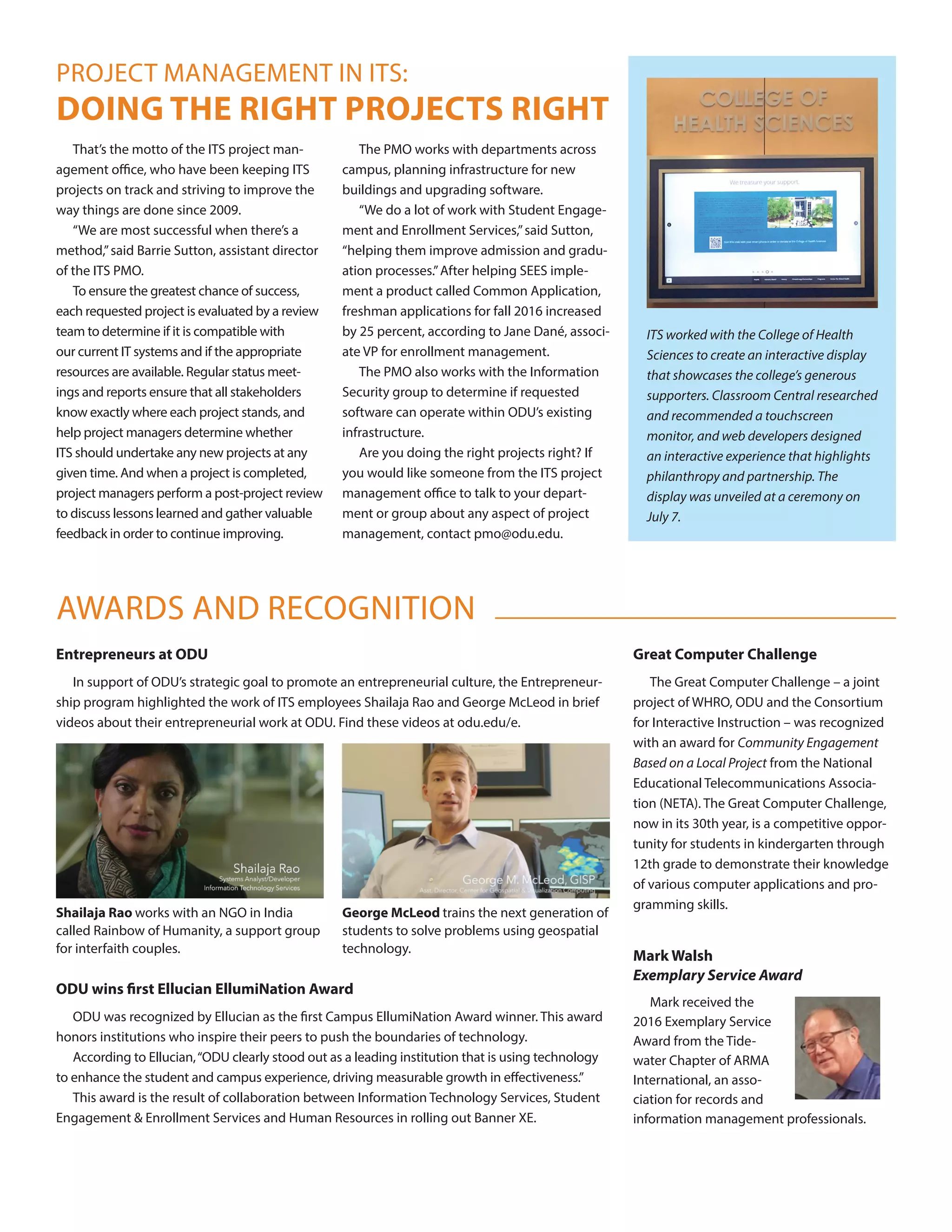
ITS worked with the College of Health
Sciences to create an interactive display
that showcases the college’s generous
supporters. Classroom Central researched
and recommended a touchscreen
monitor, and web developers designed
an interactive experience that highlights
philanthropy and partnership. The
display was unveiled at a ceremony on
July 7.
AWARDS AND RECOGNITION
PROJECT MANAGEMENT IN ITS:
DOING THE RIGHT PROJECTS RIGHT

its-connect-vol2

  • 1.
    From the CIO’sOffice by Rusty Waterfield, CIO Associate Vice President, University Services In the year that WordPress has been hosted at ODU faculty, staff and students have created more than 1500 sites: course sites, instructional material sites, faculty CV sites, research lab sites, community outreach sites, student organization sites and online portfolios. “Faculty have been enthusiastic about moving into WordPress, and they are quickly building a wide spectrum of ODU sites,”said Spring Brennan, Instructional Technology Specialist with the Center for Learning and Teaching. CLT offers several courses for faculty who want to use WordPress for instructional purposes.“Starting Fall 2016, CLT is adding WordPress Open House workshops based on the sheer demand for advanced and individualized troubleshooting—fac- ulty can bring their in-progress WordPress sites for workshopping.” Before WordPress was introduced at ODU, the ITS e-Learning team did a thorough evalu- ation and analysis, holding forums across campus to talk to potential users and gather input from people who were already using WordPress outside of ODU. “I’ve been using WordPress for over 6 years,”said Christina Steel, a lecturer with the Depart- ment of Biological Sciences.“It’s an extremely robust and flexible platform. I am very grateful that ITS consulted with faculty about how to implement this and what features we wanted and needed.” Plugins add additional functionality to sites created with WordPress, allowing users to do anything from create tables and charts to filter spam comments. New plugins and themes are added to ODU’s production environment twice a semester. One recently added plugin allows users to assign their own domain names (which can be purchased through a third-party ven- dor) to their ODU-hosted WordPress site. “Anything that’s open source (as WordPress is) runs the gamut,”said Dave Hamel, Assistant Director of Academic Support Technology. All requested plugins are reviewed for safety, securi- ty and stability, before they are eventually installed for use by everyone at ODU. Members of Hamel’s team have written some plugins of their own. In addition to dashboard and login plugins that are necessary for using WordPress at ODU, they are working on a couple of plugins that will make it significantly easier for faculty to build faculty bio pages and course sites. Plugins that will import info from the Faculty Activity System and student enrollment data from Blackboard should be available by the fall semester. Do you have an externally hosted WordPress site? Visit odu.edu/wordpress to find out how to migrate your sites to ODU servers. For more information about how you can use WordPress to enhance the learning environment, email the ITS e-learning staff at wordpress@odu.edu. We won! At the Ellucian Live confer- ence in April, ODU won the first-ever Ellu- cian EllumiNation award, recognizing the use of Ellucian technologies to support student success. The award represents a great partnership with Academic Affairs and Enrollment Services to align tech- nology solutions with defined student success goals and initiatives. It also highlights the extraordinary capability of the ITS staff, since ODU was the first institution in Virginia to implement the new Banner XE registration platform. Being recognized as number 1 is a great accomplishment. There are many other numbers that reflect the high-qual- ity services, support and solutions ITS provided this past year: • 17,968 students updating directory in- formation in Banner using the myODU semi-annual data collection process • 43,000 IT help desk requests, with 83% resolved within 3 working days • 146 IT projects completed • 8,000 email accounts migrated to Office 365 • 1,968 course lectures recorded as part of the lecture capture system • 1,769 WebEx meetings • 1,677 WordPress sites supporting faculty websites, ePortfolios, project websites, and academic courses. • 5,344 computational cores available in the Turing high-performance computa- tional cluster • 126,275 data elements in the Universi- ty website directory ITS was also busy this past year, de- signing and procuring the technologies to support the new Education building Summer 2016 A publication of ITS at Old Dominion University | www.odu.edu/its Information Technology Services continued on next page TECHNOLOGY: WORDPRESS AT ODU
  • 2.
    The typical classroomon campus hosts well over 500 classes in a 16-week semester. The technology in these classrooms is used several times a day by faculty in various and innovative ways. The Classroom Central team works hard to ensure that this technology is operational and user-friendly. “I would put our technology and support against any other,”said Dwayne Smith, assistant director of classroom and learning space tech- nologies.“There is a large commitment to edu- cational technology in the classroom at ODU.” Classroom Central’s five classroom support specialists conduct monthly quality control checks in all 130 University classrooms, antici- pating and solving technical problems before they arise. And when instructors do have issues, hotline phones in each room provide immediate support. Besides troubleshooting and supporting existing technologies, classroom support specialists constantly listen for feedback and search for ways to improve the classroom technology experience. “In our daily interaction with faculty, we see what works and what doesn’t,”said spe- cialist Beth Bains. “We try to do as much as we can in house because we control the quality of the finished product,”said Smith.“We’re successful be- cause of the commitment and the ownership we take in what we do around campus.” Despite fast-changing technology and constant upgrades, instructors will find similar features and functions no matter which room they are assigned. “If you’ve ever taught in one of our class- rooms and you walked into a new classroom, it should feel familiar,”said specialist Geoff Farley. Each room has a desktop computer, a pro- jector, a document camera, lecture capture ca- pability and a control unit. In newer rooms (and as rooms are updated), classroom controls are located on a separate desktop box that allows instructors to project from their own laptops or media units without ever having to touch the classroom desktop. And going forward, each new or updated room will be outfitted with an adjustable desk and touchscreen monitors, mounted on swiveling arms, allowing instruc- tors to present while seated or standing, either behind or in front of the desk. The new desk was the product of several discussions about capabilities and user expe- rience, with input from a variety of people. “From a design standpoint, we try to understand what the user wants to do,”said Smith,“and we try to build from a concept, not a specific piece of of technology.” Lecture capture, the ability to record class sessions for later playback, is available in every classroom and has been proven to increase student performance. Smith and his team studied the use of lecture capture in several classes last year and found that students who watch lecture videos through Blackboard tend to perform better and have higher completion rates than those who don’t watch the videos. “We get to see the success that takes place in the classroom as a direct result of something we did,”said specialist Clay Fogler. “That’s very rewarding.” This fall, instructors who teach in large lec- ture halls might want to request a Catchbox – a foam-encased microphone that’s meant to be tossed around the room. Sure, it’s fun, but it also allows audience responses to be heard in classroom recordings, enhancing the lecture capture capabilities. Other technology to watch for: the ability to connect to projectors wirelessly so instruc- tors can move freely around the classroom while presenting and even encourage students to present from their seats. The new Education building will be the first to have this technology standard in every classroom “Our ultimate hope,”said Smith,“is that the instructor doesn’t have to focus on technology; the technology can focus on them.” The new adjustable height desk features a touchscreen monitor on a swivel arm, document camera and control unit. The Classroom Central team (L-R): Julio Rosario, Clay Fogler, Beth Bains, Kevin Guerin, Brian Fields, Geoff Farley and Dwayne Smith and the Kate and John R. Broderick Dining Commons. Here are few numbers that highlight what it takes to equip the new buildings: • 300,000 feet of copper cable to wire for network connectivity • 1,084 wired network connections • 107 wireless access points, supporting over 6,000 simultaneous device connections • 51 technology-equipped classrooms, labs and conference rooms Freeman Hrabowski, President of University of Maryland, Baltimore County, has said, “If I do nothing else, it is to get each of us thinking about the question, Why is what we do so important?”In ITS, the technology solutions that we design, develop, implement and support in partnership with academic and administrative units help to enable a world of possibilities in learning, research discoveries, service efficiencies and so much more. From the CIO’s Office, continued from page 1 CLASSROOM CENTRAL: ENHANCING THE LEARNING ENVIRONMENT
  • 3.
    Mark Walsh Exemplary ServiceAward Mark received the 2016 Exemplary Service Award from the Tide- water Chapter of ARMA International, an asso- ciation for records and information management professionals. ODU wins first Ellucian EllumiNation Award ODU was recognized by Ellucian as the first Campus EllumiNation Award winner. This award honors institutions who inspire their peers to push the boundaries of technology. According to Ellucian,“ODU clearly stood out as a leading institution that is using technology to enhance the student and campus experience, driving measurable growth in effectiveness.” This award is the result of collaboration between Information Technology Services, Student Engagement Enrollment Services and Human Resources in rolling out Banner XE. Great Computer Challenge The Great Computer Challenge – a joint project of WHRO, ODU and the Consortium for Interactive Instruction – was recognized with an award for Community Engagement Based on a Local Project from the National Educational Telecommunications Associa- tion (NETA). The Great Computer Challenge, now in its 30th year, is a competitive oppor- tunity for students in kindergarten through 12th grade to demonstrate their knowledge of various computer applications and pro- gramming skills. Shailaja Rao works with an NGO in India called Rainbow of Humanity, a support group for interfaith couples. George McLeod trains the next generation of students to solve problems using geospatial technology. Entrepreneurs at ODU In support of ODU’s strategic goal to promote an entrepreneurial culture, the Entrepreneur- ship program highlighted the work of ITS employees Shailaja Rao and George McLeod in brief videos about their entrepreneurial work at ODU. Find these videos at odu.edu/e. That’s the motto of the ITS project man- agement office, who have been keeping ITS projects on track and striving to improve the way things are done since 2009. “We are most successful when there’s a method,”said Barrie Sutton, assistant director of the ITS PMO. To ensure the greatest chance of success, each requested project is evaluated by a review team to determine if it is compatible with our current IT systems and if the appropriate resources are available. Regular status meet- ings and reports ensure that all stakeholders know exactly where each project stands, and help project managers determine whether ITS should undertake any new projects at any given time. And when a project is completed, project managers perform a post-project review to discuss lessons learned and gather valuable feedback in order to continue improving. The PMO works with departments across campus, planning infrastructure for new buildings and upgrading software. “We do a lot of work with Student Engage- ment and Enrollment Services,”said Sutton, “helping them improve admission and gradu- ation processes.”After helping SEES imple- ment a product called Common Application, freshman applications for fall 2016 increased by 25 percent, according to Jane Dané, associ- ate VP for enrollment management. The PMO also works with the Information Security group to determine if requested software can operate within ODU’s existing infrastructure. Are you doing the right projects right? If you would like someone from the ITS project management office to talk to your depart- ment or group about any aspect of project management, contact pmo@odu.edu. ITS worked with the College of Health Sciences to create an interactive display that showcases the college’s generous supporters. Classroom Central researched and recommended a touchscreen monitor, and web developers designed an interactive experience that highlights philanthropy and partnership. The display was unveiled at a ceremony on July 7. AWARDS AND RECOGNITION PROJECT MANAGEMENT IN ITS: DOING THE RIGHT PROJECTS RIGHT