21st Century Portfolio Process
2011-2012 School Year
 All grades will create an electronic portfolio
  demonstrating 21st Century competencies

 Each year students will create a new portfolio

 Each year the portfolio will be compared to previous
  year to show improvement and growth along the 6
  competencies.

 Process facilitated by the advisor
Freshmen, Sophomore, Junior
Year

 Create electronic portfolio demonstrating 21st Century
 competencies.

 Include work and reflection piece.


 Presentation during SLC and Spring Showcase.
Senior year

 Create a portfolio that covers the best of the best for
    the entire 4 year period at MBA.
   Electronic portfolio demonstrating 21st Century
    competencies
   Include work and reflection.
   Presented to a panel (professional, parent, peer…)
   Expand the senior portfolio over the next 2 years to
    become a true capstone project
Advisor

 Guides students to understand competencies and the
  rubric
 Facilitates student collection of work
 Facilitates and teaches students to build an electronic
  portfolio each year
 Grades portfolio
Teacher


 Provides models of 21st century student work
 Provides 21st century learning opportunities in class
 Teaches students levels of competencies
 Uses the rubric in class as applicable(pieces at a time)
Student

 Learns to identify 21st century competencies
 Selects and collects best work
 Manages an online portfolio
 Reflects
 Presents
MBA Portfolio Progress


 MBA Planning Team preparing staff for 21st Century
  Portfolio process implementation September 2011.

 Established advisory groups


 2 All staff meetings


 Staff members working on 21st Century lesson plans
  and sharing sample student work
February 28
 21st Century Portfolio Planning Process Overview

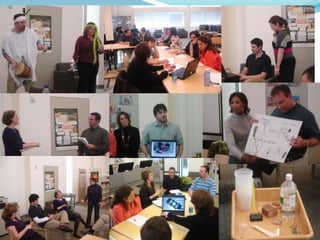
 Staff met in department groups to discuss and list ways
 that we currently provide opportunity for students to
 demonstrate 21st Century competencies
March 25
 Interdisciplinary teams identified ways to add to,
 expand or enhance the curriculum to provide greater
 opportunities for student to demonstrate 21st Century
 skills

 Staff share – focusing on creative and collaborative
In Progress and Next Steps

 Pilot electronic portfolio process using Google
 Docs with all senior students

 Planning team will practice scoring senior
 portfolios
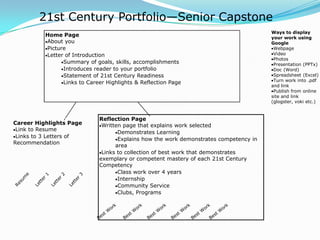
21st Century Portfolio—Senior Capstone
                                                                                       Ways to display
          Home Page                                                                    your work using
          About you                                                                    Google
          Picture                                                                       Webpage
          Letter of Introduction                                                        Video
                                                                                        Photos
                Summary of goals, skills, accomplishments                               Presentation (PPTx)
                Introduces reader to your portfolio                                     Doc (Word)
                Statement of 21st Century Readiness                                     Spreadsheet (Excel)
                                                                                        Turn work into .pdf
                Links to Career Highlights & Reflection Page
                                                                                       and link
                                                                                        Publish from online
                                                                                       site and link
                                                                                       (glogster, voki etc.)


                             Reflection Page
Career Highlights Page        Written page that explains work selected
 Link to Resume
                                    Demonstrates Learning
 Links to 3 Letters of
                                    Explains how the work demonstrates competency in
Recommendation
                                   area
                              Links to collection of best work that demonstrates
                             exemplary or competent mastery of each 21st Century
                             Competency
                                    Class work over 4 years
                                    Internship
                                    Community Service
                                    Clubs, Programs
Next Step
 Each member of the planning team is putting
  together an electronic portfolio using google sites
  & docs

 All staff will create an electronic portfolio

Mba 21st century plan

  • 1.
  • 2.
    2011-2012 School Year All grades will create an electronic portfolio demonstrating 21st Century competencies  Each year students will create a new portfolio  Each year the portfolio will be compared to previous year to show improvement and growth along the 6 competencies.  Process facilitated by the advisor
  • 3.
    Freshmen, Sophomore, Junior Year Create electronic portfolio demonstrating 21st Century competencies.  Include work and reflection piece.  Presentation during SLC and Spring Showcase.
  • 4.
    Senior year  Createa portfolio that covers the best of the best for the entire 4 year period at MBA.  Electronic portfolio demonstrating 21st Century competencies  Include work and reflection.  Presented to a panel (professional, parent, peer…)  Expand the senior portfolio over the next 2 years to become a true capstone project
  • 5.
    Advisor  Guides studentsto understand competencies and the rubric  Facilitates student collection of work  Facilitates and teaches students to build an electronic portfolio each year  Grades portfolio
  • 6.
    Teacher  Provides modelsof 21st century student work  Provides 21st century learning opportunities in class  Teaches students levels of competencies  Uses the rubric in class as applicable(pieces at a time)
  • 7.
    Student  Learns toidentify 21st century competencies  Selects and collects best work  Manages an online portfolio  Reflects  Presents
  • 8.
    MBA Portfolio Progress MBA Planning Team preparing staff for 21st Century Portfolio process implementation September 2011.  Established advisory groups  2 All staff meetings  Staff members working on 21st Century lesson plans and sharing sample student work
  • 9.
    February 28  21stCentury Portfolio Planning Process Overview  Staff met in department groups to discuss and list ways that we currently provide opportunity for students to demonstrate 21st Century competencies
  • 10.
    March 25  Interdisciplinaryteams identified ways to add to, expand or enhance the curriculum to provide greater opportunities for student to demonstrate 21st Century skills  Staff share – focusing on creative and collaborative
  • 12.
    In Progress andNext Steps  Pilot electronic portfolio process using Google Docs with all senior students  Planning team will practice scoring senior portfolios
  • 13.
    21st Century Portfolio—SeniorCapstone Ways to display Home Page your work using About you Google Picture Webpage Letter of Introduction Video Photos Summary of goals, skills, accomplishments Presentation (PPTx) Introduces reader to your portfolio Doc (Word) Statement of 21st Century Readiness Spreadsheet (Excel) Turn work into .pdf Links to Career Highlights & Reflection Page and link Publish from online site and link (glogster, voki etc.) Reflection Page Career Highlights Page Written page that explains work selected Link to Resume Demonstrates Learning Links to 3 Letters of Explains how the work demonstrates competency in Recommendation area Links to collection of best work that demonstrates exemplary or competent mastery of each 21st Century Competency Class work over 4 years Internship Community Service Clubs, Programs
  • 14.
    Next Step  Eachmember of the planning team is putting together an electronic portfolio using google sites & docs  All staff will create an electronic portfolio