CONTINUOUS DELIVERY
WITH VSTS + GIT FLOW +
OCTOPUS DEPLOY + ARM
FOR ENTERPRISE
SERGII KRYSHTOP
JUNE 18, 2016
SERGII KRYSHTOP
SOFTWARE ENGINEERING MANAGER @ EPAM
11+ YEARS IN IT / 5+ IN EPAM KHARKIV
MICROSOFT STACK / AZURE
DEVOPS & ENGINEERING PRACTICES
3CONFIDENTIAL
AGENDA
Definitions1
Processes2
Instruments3
Tips and Tricks / Lessons Learnt4
4CONFIDENTIAL
Continuous Delivery is a software development discipline
where you build software in such a way that the software
can be released to production at any time.
You achieve continuous delivery by continuously integrating
the software done by the development team, building
executables, and running automated tests on those
executables to detect problems. Furthermore you push the
executables into increasingly production-like environments
to ensure the software will work in production.
CONTINUOUS DELIVERY (CD)
Definition by Martin Fowler
5CONFIDENTIAL
RELEASE MANAGEMENT
Release management is the process of managing, planning,
scheduling and controlling a software build through
different stages and environments; including testing and
deploying software releases.
ITIL Release and Deployment Management aims to plan,
schedule and control the movement of releases to test and
live environments.
from wiki
6CONFIDENTIAL
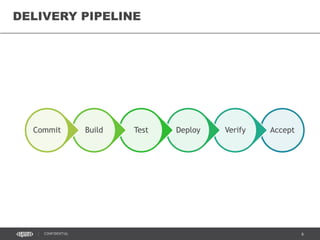
AcceptVerifyDeployTestBuildCommit
DELIVERY PIPELINE
7CONFIDENTIAL
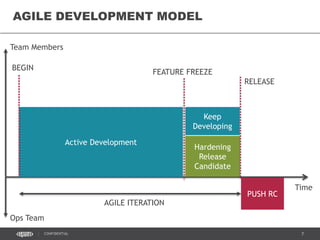
AGILE DEVELOPMENT MODEL
Time
Active Development
FEATURE FREEZE
Keep
Developing
Team Members
Hardening
Release
Candidate
BEGIN
Ops Team
PUSH RC
RELEASE
AGILE ITERATION
8CONFIDENTIAL
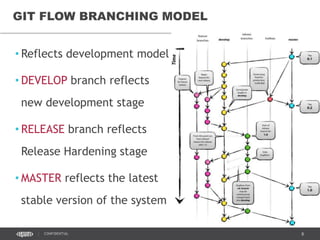
GIT FLOW BRANCHING MODEL
• Reflects development model
• DEVELOP branch reflects
new development stage
• RELEASE branch reflects
Release Hardening stage
• MASTER reflects the latest
stable version of the system
9CONFIDENTIAL
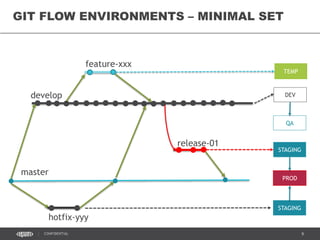
GIT FLOW ENVIRONMENTS – MINIMAL SET
DEV
QA
STAGING
TEMP
master
develop
release-01
feature-xxx
hotfix-yyy
STAGING
PROD
10CONFIDENTIAL
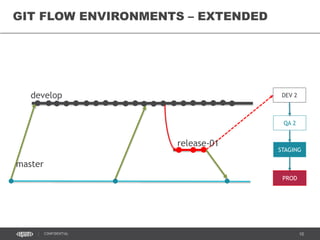
GIT FLOW ENVIRONMENTS – EXTENDED
DEV 2
QA 2
master
develop
release-01
STAGING
PROD
11CONFIDENTIAL
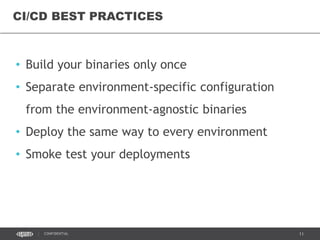
• Build your binaries only once
• Separate environment-specific configuration
from the environment-agnostic binaries
• Deploy the same way to every environment
• Smoke test your deployments
CI/CD BEST PRACTICES
12CONFIDENTIAL
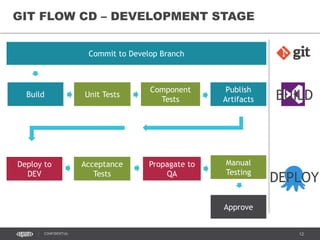
GIT FLOW CD – DEVELOPMENT STAGE
Commit to Develop Branch
Build Unit Tests
Component
Tests
Publish
Artifacts BUILD
DEPLOY
Deploy to
DEV
Acceptance
Tests
Propagate to
QA
Manual
Testing
Approve
13CONFIDENTIAL
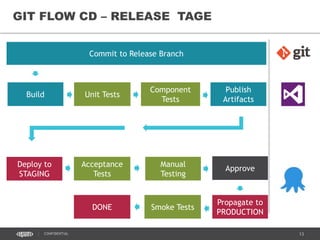
GIT FLOW CD – RELEASE TAGE
Commit to Release Branch
Build Unit Tests
Component
Tests
Publish
Artifacts
Deploy to
STAGING
Acceptance
Tests
Manual
Testing
Approve
Propagate to
PRODUCTION
Smoke TestsDONE
14CONFIDENTIAL
TOOLS
15CONFIDENTIAL
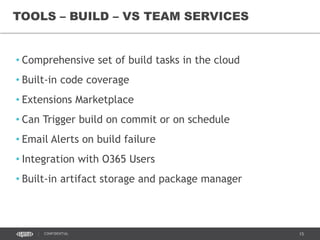
• Comprehensive set of build tasks in the cloud
• Built-in code coverage
• Extensions Marketplace
• Can Trigger build on commit or on schedule
• Email Alerts on build failure
• Integration with O365 Users
• Built-in artifact storage and package manager
TOOLS – BUILD – VS TEAM SERVICES
16CONFIDENTIAL
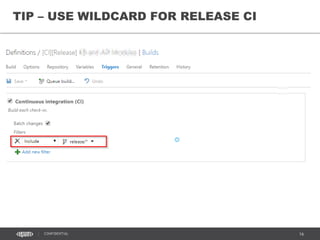
TIP – USE WILDCARD FOR RELEASE CI
18CONFIDENTIAL
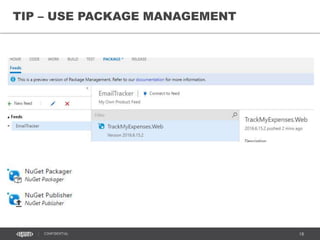
TIP – USE PACKAGE MANAGEMENT
19CONFIDENTIAL
TOOL
OCTOPUS DEPLOY
RELEASE MANAGEMENT
20CONFIDENTIAL
• Does one thing, does it well: Automated deployment for
.NET
• Build by .NET Developers for .NET Developers
• Comprehensive functionality and documentation
• Integration with all popular CI servers: Jenkins, TeamCity,
Visual Studio Team Services
• Installs in minutes
• Affordable prices, free for small systems
WHY OCTOPUS DEPLOY
21CONFIDENTIAL
• Environment management
• Life-cycle management
• Project deployment pipeline management
• Release Management
• Works with internal and external nugget package feed
• Approvals and manual intervention
• Integration with VSTS through Marketplace Build Tasks
OCTOPUS DEPLOY MAIN FEATURES
22CONFIDENTIAL
• Variable management
• Application settings value replacement
• Swapping connection strings
• Configuring IIS application pools and web sites
• Installing and updating Windows Services
• Supports deployment to Azure Cloud Services and App
Services
• Extendable with own PowerShell scripts and custom steps
DEPLOY - CONFIGURATION AND SCRIPTING
23CONFIDENTIAL
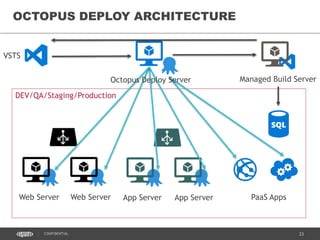
OCTOPUS DEPLOY ARCHITECTURE
DEV/QA/Staging/Production
Web Server Web Server App Server App Server
VSTS
Octopus Deploy Server
PaaS Apps
Managed Build Server
24CONFIDENTIAL
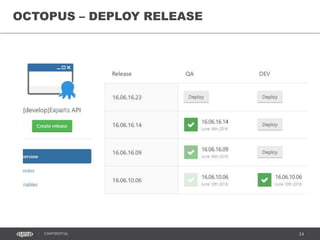
OCTOPUS – DEPLOY RELEASE
25CONFIDENTIAL
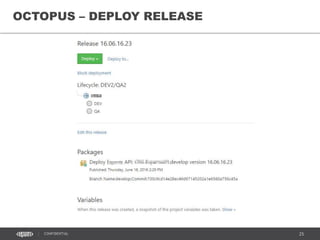
OCTOPUS – DEPLOY RELEASE
26CONFIDENTIAL
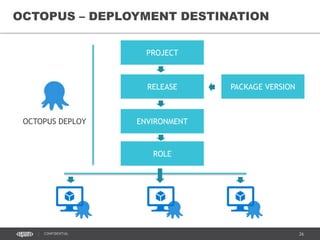
OCTOPUS – DEPLOYMENT DESTINATION
ENVIRONMENT
PROJECT
ROLE
RELEASE PACKAGE VERSION
OCTOPUS DEPLOY
27CONFIDENTIAL
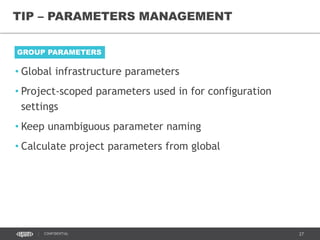
TIP – PARAMETERS MANAGEMENT
• Global infrastructure parameters
• Project-scoped parameters used in for configuration
settings
• Keep unambiguous parameter naming
• Calculate project parameters from global
GROUP PARAMETERS
28CONFIDENTIAL
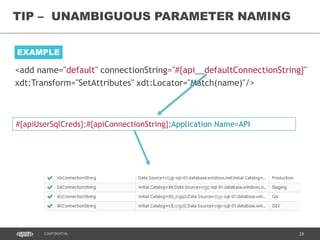
TIP – UNAMBIGUOUS PARAMETER NAMING
EXAMPLE
<add name="default" connectionString="#{api__defaultConnectionString}"
xdt:Transform="SetAttributes" xdt:Locator="Match(name)"/>
#{apiUserSqlCreds};#{apiConnectionString};Application Name=API
29CONFIDENTIAL
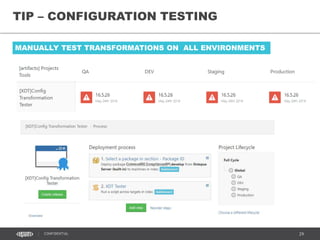
TIP – CONFIGURATION TESTING
MANUALLY TEST TRANSFORMATIONS ON ALL ENVIRONMENTS
30CONFIDENTIAL
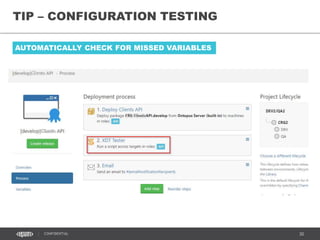
TIP – CONFIGURATION TESTING
AUTOMATICALLY CHECK FOR MISSED VARIABLES
31CONFIDENTIAL
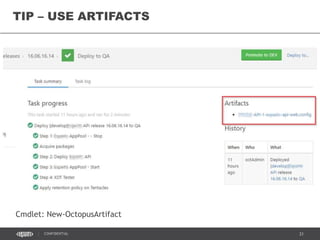
TIP – USE ARTIFACTS
Cmdlet: New-OctopusArtifact
32CONFIDENTIAL
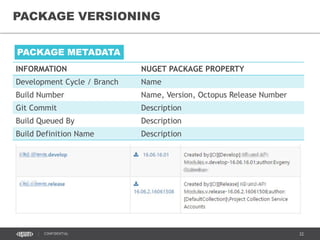
PACKAGE VERSIONING
INFORMATION NUGET PACKAGE PROPERTY
Development Cycle / Branch Name
Build Number Name, Version, Octopus Release Number
Git Commit Description
Build Queued By Description
Build Definition Name Description
PACKAGE METADATA
33CONFIDENTIAL
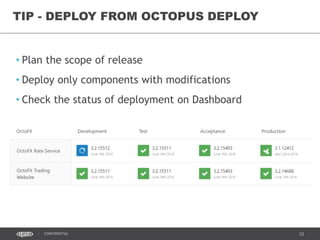
• Plan the scope of release
• Deploy only components with modifications
• Check the status of deployment on Dashboard
TIP - DEPLOY FROM OCTOPUS DEPLOY
34CONFIDENTIAL
MANAGER
ENVIRONMENT SETUP
AZURE RESOURCE
35CONFIDENTIAL
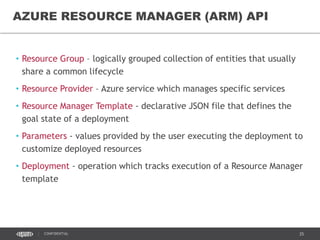
• Resource Group – logically grouped collection of entities that usually
share a common lifecycle
• Resource Provider – Azure service which manages specific services
• Resource Manager Template - declarative JSON file that defines the
goal state of a deployment
• Parameters - values provided by the user executing the deployment to
customize deployed resources
• Deployment - operation which tracks execution of a Resource Manager
template
AZURE RESOURCE MANAGER (ARM) API
38CONFIDENTIAL
[TOPIC]
xxxD
xxxOps
xxxQ xxxS xxxP
• Resource Group (RG) contains all resources which
belong to particular environment.
• RG name starts with common prefix and the letter,
which identifies the environment purpose: Dev, Qa,
Staging and Production
• RG name is included into the billing report and used to
track costs.
RESOURCE GROUPS AS CONTAINERS
39CONFIDENTIAL
network-01 (v2)
[TOPIC]
RESOURCE GROUP
front-subnet-01
back-subnet-01
Gateway Subnet
network-01 (Classic)
Gateway Subnet
Use Network Security Groups to limit
ports exposure on the subnet layer.
FE subnet network security Group:
Inbound Connections:
- Allow all HTTP and HTTPS from any
source
- Allow all from AD network address
space
- Allow/Block RDP connections from
EPAM and NYC offices
- Allow Octopus port from Virtual
Network
BE subnet network security Group:
Inbound Connections:
- Allow application ports from VNet
- Allow all from AD network address
space
- Allow/Block RDP connections from
EPAM and NYC offices
- Allow Octopus port from Virtual
Network
NETWORK SECURITY GROUPS
40CONFIDENTIAL
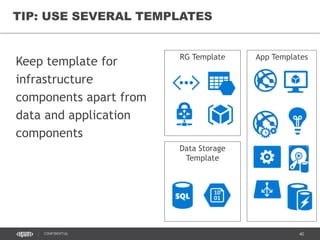
Keep template for
infrastructure
components apart from
data and application
components
TIP: USE SEVERAL TEMPLATES
RG Template
Data Storage
Template
App Templates
41CONFIDENTIAL
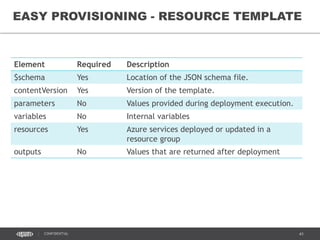
Element Required Description
$schema Yes Location of the JSON schema file.
contentVersion Yes Version of the template.
parameters No Values provided during deployment execution.
variables No Internal variables
resources Yes Azure services deployed or updated in a
resource group
outputs No Values that are returned after deployment
EASY PROVISIONING - RESOURCE TEMPLATE
44CONFIDENTIAL
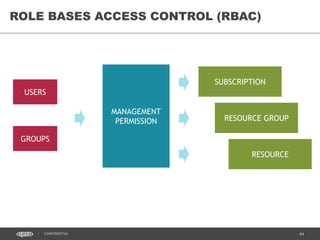
ROLE BASES ACCESS CONTROL (RBAC)
USERS
GROUPS
MANAGEMENT
PERMISSION
SUBSCRIPTION
RESOURCE GROUP
RESOURCE
45CONFIDENTIAL
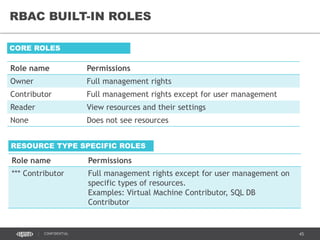
RBAC BUILT-IN ROLES
Role name Permissions
Owner Full management rights
Contributor Full management rights except for user management
Reader View resources and their settings
None Does not see resources
CORE ROLES
Role name Permissions
*** Contributor Full management rights except for user management on
specific types of resources.
Examples: Virtual Machine Contributor, SQL DB
Contributor
RESOURCE TYPE SPECIFIC ROLES
46CONFIDENTIAL
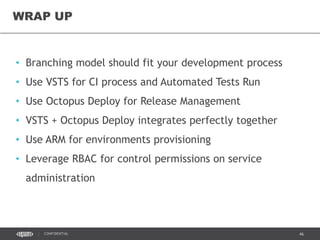
• Branching model should fit your development process
• Use VSTS for CI process and Automated Tests Run
• Use Octopus Deploy for Release Management
• VSTS + Octopus Deploy integrates perfectly together
• Use ARM for environments provisioning
• Leverage RBAC for control permissions on service
administration
WRAP UP
THANK
YOU
CONTACT ME
sergii.kryshtop@gmail.com
skryshtop

AzureDay Kyiv 2016 Release Management

  • 1.
    CONTINUOUS DELIVERY WITH VSTS+ GIT FLOW + OCTOPUS DEPLOY + ARM FOR ENTERPRISE SERGII KRYSHTOP JUNE 18, 2016
  • 2.
    SERGII KRYSHTOP SOFTWARE ENGINEERINGMANAGER @ EPAM 11+ YEARS IN IT / 5+ IN EPAM KHARKIV MICROSOFT STACK / AZURE DEVOPS & ENGINEERING PRACTICES
  • 3.
  • 4.
    4CONFIDENTIAL Continuous Delivery isa software development discipline where you build software in such a way that the software can be released to production at any time. You achieve continuous delivery by continuously integrating the software done by the development team, building executables, and running automated tests on those executables to detect problems. Furthermore you push the executables into increasingly production-like environments to ensure the software will work in production. CONTINUOUS DELIVERY (CD) Definition by Martin Fowler
  • 5.
    5CONFIDENTIAL RELEASE MANAGEMENT Release managementis the process of managing, planning, scheduling and controlling a software build through different stages and environments; including testing and deploying software releases. ITIL Release and Deployment Management aims to plan, schedule and control the movement of releases to test and live environments. from wiki
  • 6.
  • 7.
    7CONFIDENTIAL AGILE DEVELOPMENT MODEL Time ActiveDevelopment FEATURE FREEZE Keep Developing Team Members Hardening Release Candidate BEGIN Ops Team PUSH RC RELEASE AGILE ITERATION
  • 8.
    8CONFIDENTIAL GIT FLOW BRANCHINGMODEL • Reflects development model • DEVELOP branch reflects new development stage • RELEASE branch reflects Release Hardening stage • MASTER reflects the latest stable version of the system
  • 9.
    9CONFIDENTIAL GIT FLOW ENVIRONMENTS– MINIMAL SET DEV QA STAGING TEMP master develop release-01 feature-xxx hotfix-yyy STAGING PROD
  • 10.
    10CONFIDENTIAL GIT FLOW ENVIRONMENTS– EXTENDED DEV 2 QA 2 master develop release-01 STAGING PROD
  • 11.
    11CONFIDENTIAL • Build yourbinaries only once • Separate environment-specific configuration from the environment-agnostic binaries • Deploy the same way to every environment • Smoke test your deployments CI/CD BEST PRACTICES
  • 12.
    12CONFIDENTIAL GIT FLOW CD– DEVELOPMENT STAGE Commit to Develop Branch Build Unit Tests Component Tests Publish Artifacts BUILD DEPLOY Deploy to DEV Acceptance Tests Propagate to QA Manual Testing Approve
  • 13.
    13CONFIDENTIAL GIT FLOW CD– RELEASE TAGE Commit to Release Branch Build Unit Tests Component Tests Publish Artifacts Deploy to STAGING Acceptance Tests Manual Testing Approve Propagate to PRODUCTION Smoke TestsDONE
  • 14.
  • 15.
    15CONFIDENTIAL • Comprehensive setof build tasks in the cloud • Built-in code coverage • Extensions Marketplace • Can Trigger build on commit or on schedule • Email Alerts on build failure • Integration with O365 Users • Built-in artifact storage and package manager TOOLS – BUILD – VS TEAM SERVICES
  • 16.
    16CONFIDENTIAL TIP – USEWILDCARD FOR RELEASE CI
  • 17.
    18CONFIDENTIAL TIP – USEPACKAGE MANAGEMENT
  • 18.
  • 19.
    20CONFIDENTIAL • Does onething, does it well: Automated deployment for .NET • Build by .NET Developers for .NET Developers • Comprehensive functionality and documentation • Integration with all popular CI servers: Jenkins, TeamCity, Visual Studio Team Services • Installs in minutes • Affordable prices, free for small systems WHY OCTOPUS DEPLOY
  • 20.
    21CONFIDENTIAL • Environment management •Life-cycle management • Project deployment pipeline management • Release Management • Works with internal and external nugget package feed • Approvals and manual intervention • Integration with VSTS through Marketplace Build Tasks OCTOPUS DEPLOY MAIN FEATURES
  • 21.
    22CONFIDENTIAL • Variable management •Application settings value replacement • Swapping connection strings • Configuring IIS application pools and web sites • Installing and updating Windows Services • Supports deployment to Azure Cloud Services and App Services • Extendable with own PowerShell scripts and custom steps DEPLOY - CONFIGURATION AND SCRIPTING
  • 22.
    23CONFIDENTIAL OCTOPUS DEPLOY ARCHITECTURE DEV/QA/Staging/Production WebServer Web Server App Server App Server VSTS Octopus Deploy Server PaaS Apps Managed Build Server
  • 23.
  • 24.
  • 25.
    26CONFIDENTIAL OCTOPUS – DEPLOYMENTDESTINATION ENVIRONMENT PROJECT ROLE RELEASE PACKAGE VERSION OCTOPUS DEPLOY
  • 26.
    27CONFIDENTIAL TIP – PARAMETERSMANAGEMENT • Global infrastructure parameters • Project-scoped parameters used in for configuration settings • Keep unambiguous parameter naming • Calculate project parameters from global GROUP PARAMETERS
  • 27.
    28CONFIDENTIAL TIP – UNAMBIGUOUSPARAMETER NAMING EXAMPLE <add name="default" connectionString="#{api__defaultConnectionString}" xdt:Transform="SetAttributes" xdt:Locator="Match(name)"/> #{apiUserSqlCreds};#{apiConnectionString};Application Name=API
  • 28.
    29CONFIDENTIAL TIP – CONFIGURATIONTESTING MANUALLY TEST TRANSFORMATIONS ON ALL ENVIRONMENTS
  • 29.
    30CONFIDENTIAL TIP – CONFIGURATIONTESTING AUTOMATICALLY CHECK FOR MISSED VARIABLES
  • 30.
    31CONFIDENTIAL TIP – USEARTIFACTS Cmdlet: New-OctopusArtifact
  • 31.
    32CONFIDENTIAL PACKAGE VERSIONING INFORMATION NUGETPACKAGE PROPERTY Development Cycle / Branch Name Build Number Name, Version, Octopus Release Number Git Commit Description Build Queued By Description Build Definition Name Description PACKAGE METADATA
  • 32.
    33CONFIDENTIAL • Plan thescope of release • Deploy only components with modifications • Check the status of deployment on Dashboard TIP - DEPLOY FROM OCTOPUS DEPLOY
  • 33.
  • 34.
    35CONFIDENTIAL • Resource Group– logically grouped collection of entities that usually share a common lifecycle • Resource Provider – Azure service which manages specific services • Resource Manager Template - declarative JSON file that defines the goal state of a deployment • Parameters - values provided by the user executing the deployment to customize deployed resources • Deployment - operation which tracks execution of a Resource Manager template AZURE RESOURCE MANAGER (ARM) API
  • 35.
    38CONFIDENTIAL [TOPIC] xxxD xxxOps xxxQ xxxS xxxP •Resource Group (RG) contains all resources which belong to particular environment. • RG name starts with common prefix and the letter, which identifies the environment purpose: Dev, Qa, Staging and Production • RG name is included into the billing report and used to track costs. RESOURCE GROUPS AS CONTAINERS
  • 36.
    39CONFIDENTIAL network-01 (v2) [TOPIC] RESOURCE GROUP front-subnet-01 back-subnet-01 GatewaySubnet network-01 (Classic) Gateway Subnet Use Network Security Groups to limit ports exposure on the subnet layer. FE subnet network security Group: Inbound Connections: - Allow all HTTP and HTTPS from any source - Allow all from AD network address space - Allow/Block RDP connections from EPAM and NYC offices - Allow Octopus port from Virtual Network BE subnet network security Group: Inbound Connections: - Allow application ports from VNet - Allow all from AD network address space - Allow/Block RDP connections from EPAM and NYC offices - Allow Octopus port from Virtual Network NETWORK SECURITY GROUPS
  • 37.
    40CONFIDENTIAL Keep template for infrastructure componentsapart from data and application components TIP: USE SEVERAL TEMPLATES RG Template Data Storage Template App Templates
  • 38.
    41CONFIDENTIAL Element Required Description $schemaYes Location of the JSON schema file. contentVersion Yes Version of the template. parameters No Values provided during deployment execution. variables No Internal variables resources Yes Azure services deployed or updated in a resource group outputs No Values that are returned after deployment EASY PROVISIONING - RESOURCE TEMPLATE
  • 39.
    44CONFIDENTIAL ROLE BASES ACCESSCONTROL (RBAC) USERS GROUPS MANAGEMENT PERMISSION SUBSCRIPTION RESOURCE GROUP RESOURCE
  • 40.
    45CONFIDENTIAL RBAC BUILT-IN ROLES Rolename Permissions Owner Full management rights Contributor Full management rights except for user management Reader View resources and their settings None Does not see resources CORE ROLES Role name Permissions *** Contributor Full management rights except for user management on specific types of resources. Examples: Virtual Machine Contributor, SQL DB Contributor RESOURCE TYPE SPECIFIC ROLES
  • 41.
    46CONFIDENTIAL • Branching modelshould fit your development process • Use VSTS for CI process and Automated Tests Run • Use Octopus Deploy for Release Management • VSTS + Octopus Deploy integrates perfectly together • Use ARM for environments provisioning • Leverage RBAC for control permissions on service administration WRAP UP
  • 42.
  • 43.

Editor's Notes

  • #6 ITIL - IT Infrastructure Library
  • #8 During each iteration (sprint) development team works in two stages: 1. New feature development or bug fixing. All changes commits to the integration branch, which might be temporary unstable. 2. Preparing the release candidate and testing it, to produce the stable release code at the end of the iteration and initiate the push the new version to production environments At the beginning of each iteration all team works on new feature to produce the value. At the end of the sprint most of the team focused on the stabilizing and hardening the quality of iteration deliverables while some of the team members might keep working on the scope of the next iteration.
  • #11 In addition to minimal model the release stage includes own DEV and QA environments, called DEV2 and QA2 respectably DEV2 is used to test automated deployment scripts and to run automated acceptance tests. QA2 is used for exploratory testing and running manual regression tests over the Release Candidate. It’s good practice to have STAGE as a mirror of PROD. This allows to implement the Zero Downtime deployment strategies, like Canary Releases and Blue-Green Deployment. Hotfix is follows the release candidate flow.
  • #14 Release stage starts with creating release branch from the develop. The minimal pipeline includes only Staging and Production environments, where Staging is used for simulation of upgrading production version and also to run Automated and Manual Acceptance Tests. Staging can also be used as UAT environment for stakeholders. Release stage uses own CI builds which produces binaries. Binaries from Release CI build are propagated to the Production.
  • #16 VSTS provides comprehensive build tool with large number of tasks for all popular build tools and also can be extended from the VSTS Marketplace. Supports git capabilities to trigger build on changes in the
  • #23 No two environments are ever the same. Use variables to scope different settings to different environments. Built-in conventions mean that Octopus automatically takes care of:
  • #24 VSTS Task push application binaries as nugget package to the Octopus. It defines the name and the version of the package and also creates a new release for the project Octopus Deploy Server call Octopus Tentacles, agent application. installed on the VM. Tentacle receives the package and do the deployment and deploy-time config transformations. For PaaS services, like WebApps and Cloud Service Roles, all transformation is performed on the Octopus Server.
  • #30 Artefacts, get files after deployment
  • #32 Use
  • #36 https://azure.microsoft.com/en-gb/documentation/articles/role-based-access-control-configure/#known-issues-when-using-role-based-access-control Azure Resource Manager enables you to work with the resources in your application as a group. You can deploy, update or delete all of the resources for your application in a single, coordinated operation. You use a template for deployment and that template can work for different environments such as testing, staging and production. You can clarify billing for your organization by viewing the rolled-up costs for the entire group.
  • #37 https://azure.microsoft.com/en-gb/documentation/articles/role-based-access-control-configure/#known-issues-when-using-role-based-access-control Azure Resource Manager enables you to work with the resources in your application as a group. You can deploy, update or delete all of the resources for your application in a single, coordinated operation. You use a template for deployment and that template can work for different environments such as testing, staging and production. You can clarify billing for your organization by viewing the rolled-up costs for the entire group.
  • #38 https://azure.microsoft.com/en-gb/documentation/articles/role-based-access-control-configure/#known-issues-when-using-role-based-access-control Azure Resource Manager enables you to work with the resources in your application as a group. You can deploy, update or delete all of the resources for your application in a single, coordinated operation. You use a template for deployment and that template can work for different environments such as testing, staging and production. You can clarify billing for your organization by viewing the rolled-up costs for the entire group.
  • #40 Back-subnet-01 VNet subnet contains SOLR and other application services which are not exposed to the Internet. Front-subnet-01 VNet subnet contains web servers. Classic VNet is used only to host Cloud Service – Worker Role, which must be in VNet to access internal load balancer endpoint on SOLR instances. Access to another VNet with AD and domain servers is organized through the VNet-2-VNet gateway connection. Build and deploy servers can access to VMs through the VNet-2-VNet gateway connection. Network Security Group controls that Octopus Deploy port is accessed only from Azure VNet.
  • #41 Infrastructure, Data and Application resources has different lifecycle, so it’s better to script them separately. Manually Configured Resources: Classic VLAN to VLAN v2 Site-2-Site VPN Run Copy Database from Production to Staging
  • #43 https://azure.microsoft.com/en-us/documentation/articles/resource-group-template-functions/
  • #44 https://azure.microsoft.com/en-us/documentation/articles/resource-group-template-functions/
  • #46 http://blogs.msdn.com/b/cloud_solution_architect/archive/2015/03/17/rbac-and-the-azure-resource-manager.aspx