EMEA
#vBrownbag’s
VCAP5-CIA – Objectives 3.x
27/08/2013VCAP5-CIA Certification 1
Who am I
• My name is Andrew (Andrea in Italy) Mauro
• My blog: http://vinfrastructure.it/en/
• I’m a proud member of the Italian VMUG
o Aka the Italian vMaffia :-0
• My certs: vExpert 2000,2001,2012,2013 VCDX 3/4/5,
VCAP-DCA 4/5, VCAP-DCD 4/5, VCAP5-DTD,
VCAP5-CIA, VCAP5-CID, VCP 3/4/5, VCP-DT 4/5,
VCP5-Cloud…
…also some MCSA and MCSE and others…
• You can find me on twitter as: @Andrea_Mauro
• Currently I work for Assyrus Srl as an IT architect
11/06/2013VCAP5-CIA Certification 2
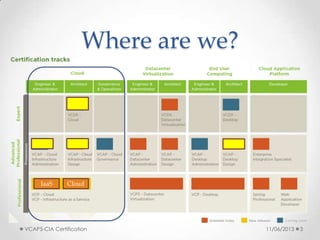
Where are we?
11/06/2013 3
CloudIaaS
VCAP5-CIA Certification
VCAP5-CIA
• VMware Certification page
o http://mylearn.vmware.com/mgrReg/plan.cfm?plan=3762
9&ui=www_cert
• Resources
o Exam Blueprint
o vCloud Director Instructional Videos
• http://vmwarelearning.com/vcloud/
o Lab sample!
o Links collection:
• http://vinfrastructure.it/en/2013/06/vcap5-cia-study-guides/
• http://thesaffageek.co.uk/vsphere-5-x-cloud-study-
resources/vcap5-cia-and-cid/
11/06/2013VCAP5-CIA Certification 4
VCAP5-CIA Exam
• Authorization
o Before you can schedule your VCAP-CIA exam, you must request authorization
• VUE code VCIA510
o Same price as other VCAP exams
o Same (limited!) testing centers
• 32 live labs in 210 minutes
o +30min in non native English countries
• Lab
o lab environment is based on VMware vCloud Suite 5.1 and vCenter
Chargeback Manager 2.5
• Exam experience
o http://vinfrastructure.it/en/2013/07/commenti-sullesame-vcap5-cia/
11/06/2013VCAP5-CIA Certification 6
VCAP5-CIA courses
• Nothing mandatory
• Nothing (officially) suggested
• Free Instructional Video
o vCloud Director Concepts and Architecture
• http://mylearn.vmware.com/mgrReg/plan.cfm?plan=36740&ui=www
_edu
• http://vmwarelearning.com/vcloud/
• http://vmwarelearning.com/vcloud_net_sec/
o Trainsignal free course
• http://www.trainsignal.com/Course/147/VMware-vCloud-Director-
Essentials
o Check also in the VMware Partner area
• + Blogs
11/06/2013VCAP5-CIA Certification 7
VCAP5-CIA Lab
• You need a lab or a good practical experience to
pass an admin role based exam!
• You need also good vSphere experience and
moderated Linux experience too!
• There is a VA for vCloud Director
o Some issue if you plan to use with Workstation
• http://vinfrastructure.it/en/2013/06/installing-vcloud-director-in-a-lab/
• For other material see also:
o http://vinfrastructure.it/en/2013/06/vcap5-cia-study-guides/
• Use also the Hands-on Lab
o http://hol.vmware.com
11/06/2013VCAP5-CIA Certification 8
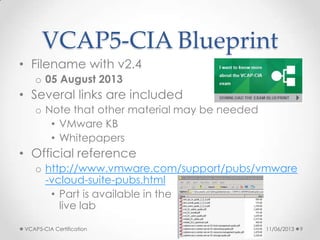
VCAP5-CIA Blueprint
• Filename with v2.4
o 05 August 2013
• Several links are included
o Note that other material may be needed
• VMware KB
• Whitepapers
• Official reference
o http://www.vmware.com/support/pubs/vmware
-vcloud-suite-pubs.html
• Part is available in the
live lab
11/06/2013VCAP5-CIA Certification 9
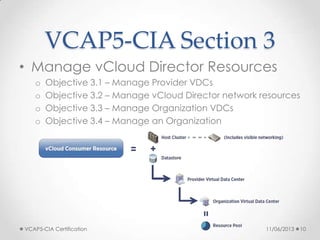
VCAP5-CIA Section 3
• Manage vCloud Director Resources
o Objective 3.1 – Manage Provider VDCs
o Objective 3.2 – Manage vCloud Director network resources
o Objective 3.3 – Manage Organization VDCs
o Objective 3.4 – Manage an Organization
11/06/2013VCAP5-CIA Certification 10
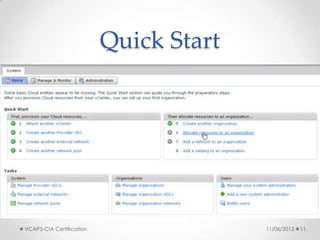
Quick Start
11/06/2013VCAP5-CIA Certification 11
VCAP5-CIA Objective 3.1
• Manage Provider VDCs
• Knowledge
o Identify Provider VDC options
• Skills and Abilities
o Create and Provider VDCs
o Merge or Expand Provider VDCs
o Manage Provider VDC options
• See also:
o http://fbuechsel.eu/2013/08/07/vcap-cia-objective-3-1-
manage-provider-vdcs/
o http://vmwarelearning.com/qiF/creating-provider-resources/
o http://www.petri.co.il/setting-up-vmware-vcloud-director-
essentials-part-2.htm
11/06/2013VCAP5-CIA Certification 12
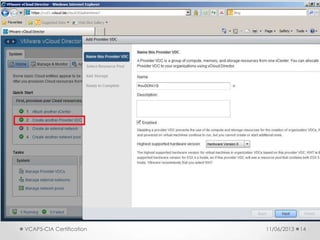
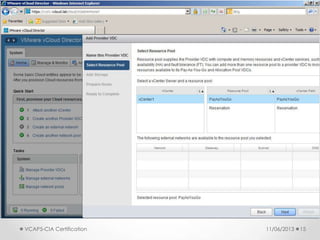
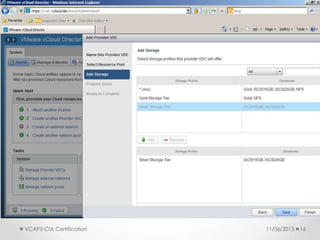
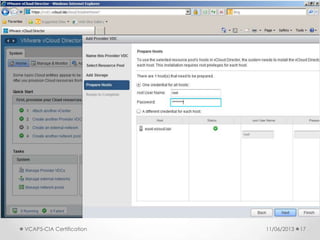
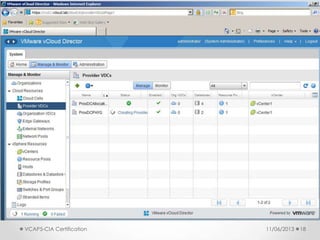
Create and Provider
VDCs
• vCloud Director Administrator’s Guide
o pages 21 and 22
• Creating a Provider Virtual Data Center in VMware
vCloud Director
o http://kb.vmware.com/kb/1026296
11/06/2013VCAP5-CIA Certification 13
11/06/2013VCAP5-CIA Certification 14
11/06/2013VCAP5-CIA Certification 15
11/06/2013VCAP5-CIA Certification 16
11/06/2013VCAP5-CIA Certification 17
11/06/2013VCAP5-CIA Certification 18
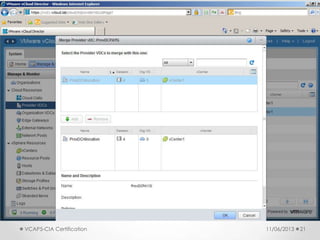
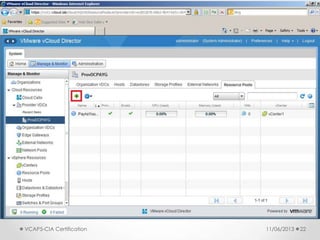
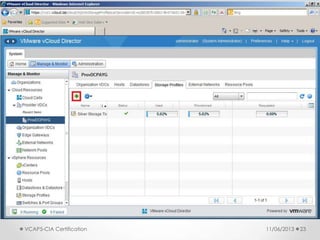
Merge or Expand
Provider VDCs
• vCloud Director Administrator’s Guide
o pages 45 – 51
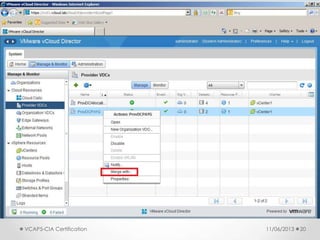
• Merging 2 Provider VDCs
o You can start by going to the Manage and Monitor tab, choosing the
Provider VDC option and right clicking the Provider VDC that should be
the merge destination
• Expand a Provider VDC
o Different cases
• Add compute resources which can be done by adding another
Resource Pool
• additional storage which can be done by adding Storage Profiles to
the Provider VDC
o For both options a wizard is going to pop up and guide you through
selecting the additional resources
11/06/2013VCAP5-CIA Certification 19
11/06/2013VCAP5-CIA Certification 20
11/06/2013VCAP5-CIA Certification 21
11/06/2013VCAP5-CIA Certification 22
11/06/2013VCAP5-CIA Certification 23
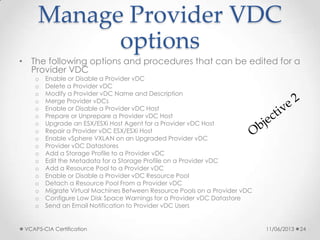
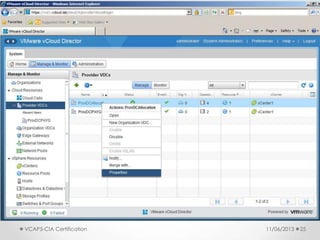
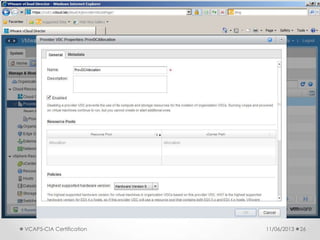
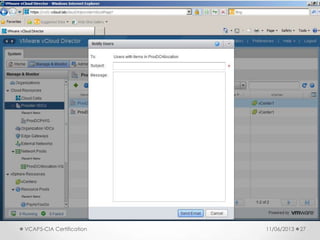
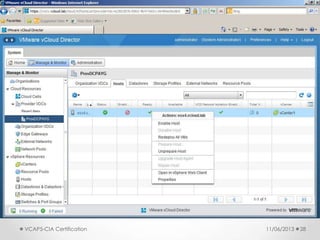
Manage Provider VDC
options
• The following options and procedures that can be edited for a
Provider VDC
o Enable or Disable a Provider vDC
o Delete a Provider vDC
o Modify a Provider vDC Name and Description
o Merge Provider vDCs
o Enable or Disable a Provider vDC Host
o Prepare or Unprepare a Provider vDC Host
o Upgrade an ESX/ESXi Host Agent for a Provider vDC Host
o Repair a Provider vDC ESX/ESXi Host
o Enable vSphere VXLAN on an Upgraded Provider vDC
o Provider vDC Datastores
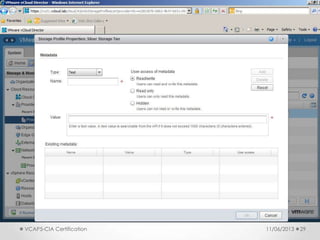
o Add a Storage Profile to a Provider vDC
o Edit the Metadata for a Storage Profile on a Provider vDC
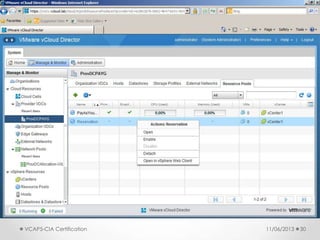
o Add a Resource Pool to a Provider vDC
o Enable or Disable a Provider vDC Resource Pool
o Detach a Resource Pool From a Provider vDC
o Migrate Virtual Machines Between Resource Pools on a Provider vDC
o Configure Low Disk Space Warnings for a Provider vDC Datastore
o Send an Email Notification to Provider vDC Users
11/06/2013VCAP5-CIA Certification 24
11/06/2013VCAP5-CIA Certification 25
11/06/2013VCAP5-CIA Certification 26
11/06/2013VCAP5-CIA Certification 27
11/06/2013VCAP5-CIA Certification 28
11/06/2013VCAP5-CIA Certification 29
11/06/2013VCAP5-CIA Certification 30
VCAP5-CIA Objective 3.2
• Manage vCloud Director network resources
• Knowledge
o Identify vCloud Director network pool types
• Skills and Abilities
o Create and manage network pools
o Create Provider external networks
o Manage and remove network resources
• See also:
o http://it20.info/2010/09/vcloud-director-networking-for-
dummies/
o http://www.gabesvirtualworld.com/vmware-vcloud-5-1-
networking-for-dummies/
o http://www.yellow-bricks.com/2010/09/09/vcd-networking-
part-2-network-pools/
11/06/2013VCAP5-CIA Certification 31
vCloud Networks
• Network Pools
o pools consumed by virtual datacenters to create vAPP networks
• Organization Networks
o assigned to an Organization VDC
• External Networks
o port group-backed networks (defined in vCenter) that provide ingress
and egress to the Cloud environment.
o They should be routable networks, either RFC-1918 for private, or Internet
routable for providers
• See also:
o http://philthevirtualizer.com/2012/05/07/vmware-vcloud-networking-
options/
11/06/2013VCAP5-CIA Certification 32
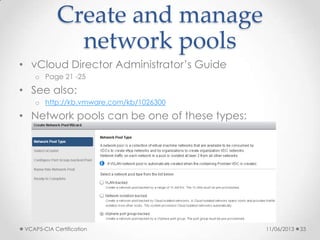
Create and manage
network pools
• vCloud Director Administrator’s Guide
o Page 21 -25
• See also:
o http://kb.vmware.com/kb/1026300
• Network pools can be one of these types:
o vSphere port groups
o VLAN
o vCloud Network isolation (VCNI)
o VXLAN
11/06/2013VCAP5-CIA Certification 33
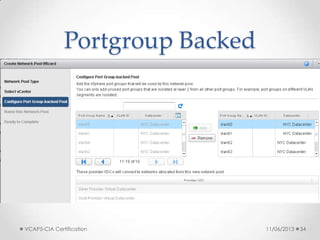
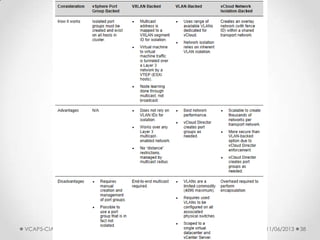
Portgroup Backed
• Portgroup-backed pools require pre-created
portgroups within the vSphere environment
o least flexible
o But do not require vDS and can be based on vSS, vDS or Cisco Nexus
1000v
• Requirements
o All portgroups need to be pre-created and available on all hosts of your
cluster
• Recommendations
o Use a scripted solution or host profiles to create the portgroups to ensure
consistency
• Constraints: n/a
11/06/2013VCAP5-CIA Certification 34
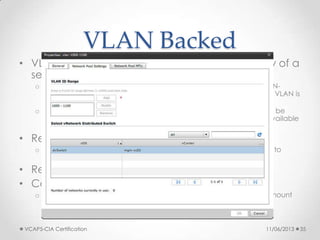
VLAN Backed
• VLAN-backed network pools require availability of a
set of unused VLANs
o When an Org or vApp network is created which is based on a VLAN-
backed network pool a portgroup is created on a dvSwitch and a VLAN is
assigned to this portgroup
o It should be noted that all VLANs specified for the pool will need to be
trunked to the host and that in most environment the amount of available
VLANs is limited
• Requirements
o Distributed vSwitch, pool of available VLANs, Physical uplinks need to
support VLAN Trunks
• Recommendations: n/a
• Constraints
o Nexus 1000v and regular vSwitches are not supported currently, amount
of available VLANs in most environments
11/06/2013VCAP5-CIA Certification 35
VCNI Backed
• vCloud Network Isolation-backed(VCNI) network pools
are flexible, easy to configure and do not require VLANs
o vCNI provides layer 2 isolation by utilizing a network overlay.
o This network overlay is provided by MAC in MAC encapsulation and requires a
vDS
o For each consumed network vCloud Director creates a portgroup and assigns
this portgroup a network ID number
o This network ID number is used for the encapsulation of the traffic
• Requirements
o Distributed vSwitch
• Constraints
o Nexus 1000v and regular vSwitches are not supported currently
• Recommendations
o minimum of 1 VLAN, MTU Increase (24Bytes, 1500 –> 1524)
o Admin guide suggest to set MTU to 1600
11/06/2013VCAP5-CIA Certification 36
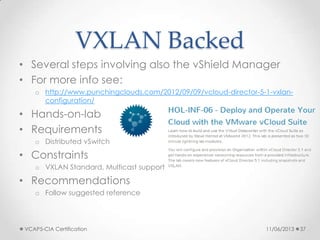
VXLAN Backed
• Several steps involving also the vShield Manager
• For more info see:
o http://www.punchingclouds.com/2012/09/09/vcloud-director-5-1-vxlan-
configuration/
• Hands-on-lab
• Requirements
o Distributed vSwitch
• Constraints
o VXLAN Standard, Multicast support
• Recommendations
o Follow suggested reference
11/06/2013VCAP5-CIA Certification 37
Comparison
11/06/2013VCAP5-CIA Certification 38
Create Provider external
networks
• vCloud Director Administrator’s Guide
o “Managing External Networks,” on page 22
• See also:
o http://kb.vmware.com/kb/1026299
o http://blogs.vmware.com/kb/2010/08/how-to-create-external-networks-
in-vmware-vcloud-director.html
11/06/2013VCAP5-CIA Certification 39
Manage and remove
network resources
• vCloud Director Administrator’s Guide
o “Managing External Networks,” on page 64
o “Managing Edge Gateways,” on page 65
o “Managing Organization vDC Networks,” on page 81
o “Managing Network Pools,” on page 94
11/06/2013VCAP5-CIA Certification 40
VCAP5-CIA Objective 3.3
• Manage Organization VDCs
• Knowledge
o Identify org VDC types
o Identify org VDC options
o Identify org VDC network options
• Skills and Abilities
o Configure storage tiers
o Create, manage and delete org VDCs
11/06/2013VCAP5-CIA Certification 41
Configure storage tiers
• Storage profiles (and datastore clusters) must be set
in the vSphere management part
o Storage Capability could be user defined or configured by VASA
• You can add storage resources to the Provider VDC
o be careful when choosing the * (Any) profile as this also includes the local
datastores of the hosts which can cause problems
• http://kb.vmware.com/kb/2045534
• See also:
o http://cormachogan.com/2012/10/17/vcloud-director-5-1-storage-
profiles/
o http://blogs.vmware.com/vcloud/2012/10/architecting-storage-offerings-
for-vcloud-director-5-1.html
o http://living-in-clouds.net/2012/09/27/vcloud-director-5-1-how-to-
configure-tiered-storage-on-netapp-part-1-vasa-provider/
11/06/2013VCAP5-CIA Certification 42
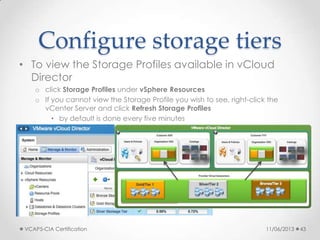
Configure storage tiers
• To view the Storage Profiles available in vCloud
Director
o click Storage Profiles under vSphere Resources
o If you cannot view the Storage Profile you wish to see, right-click the
vCenter Server and click Refresh Storage Profiles
• by default is done every five minutes
11/06/2013VCAP5-CIA Certification 43
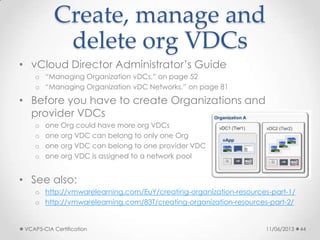
Create, manage and
delete org VDCs
• vCloud Director Administrator’s Guide
o “Managing Organization vDCs,” on page 52
o “Managing Organization vDC Networks,” on page 81
• Before you have to create Organizations and
provider VDCs
o one Org could have more org VDCs
o one org VDC can belong to only one Org
o one org VDC can belong to one provider VDC
o one org VDC is assigned to a network pool
• See also:
o http://vmwarelearning.com/EuY/creating-organization-resources-part-1/
o http://vmwarelearning.com/83T/creating-organization-resources-part-2/
11/06/2013VCAP5-CIA Certification 44
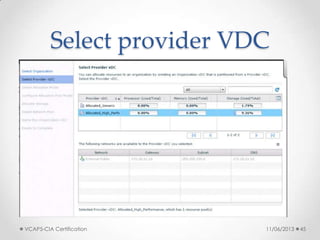
Select provider VDC
11/06/2013VCAP5-CIA Certification 45
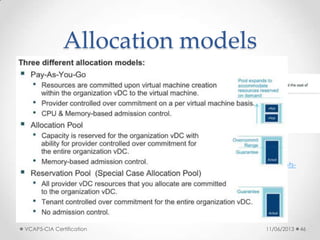
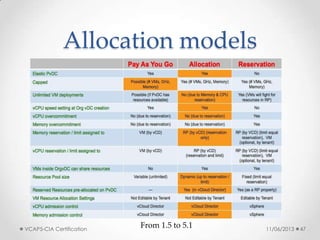
Allocation models
• Three different allocation models
o Allocation Pool
o Pay-As-You-Go
o Reservation Pool
• See also:
o http://kb.vmware.com/kb/1026290
o http://www.yellow-bricks.com/2010/09/22/vcd-allocation-models/
o http://stretch-cloud.info/category/vcloud-allocation-model/
o http://www.virtual-blog.com/2012/03/vmware-vcloud-director-101-concepts-
allocation-models-part-3/
o http://fojta.wordpress.com/2012/09/30/allocation-pool-organization-vdc-
changes-in-vcloud-director-5-1/
o http://it20.info/2012/10/vcloud-director-5-1-1-changes-in-resource-
entitlements/
11/06/2013VCAP5-CIA Certification 46
Allocation models
11/06/2013VCAP5-CIA Certification 47
From 1.5 to 5.1
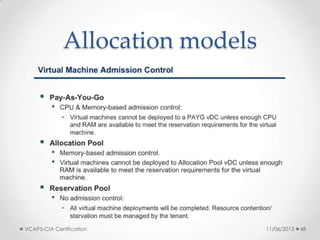
Allocation models
11/06/2013VCAP5-CIA Certification 48
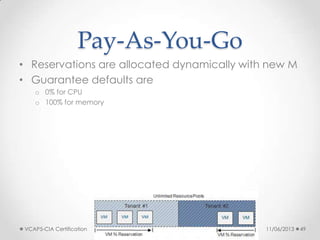
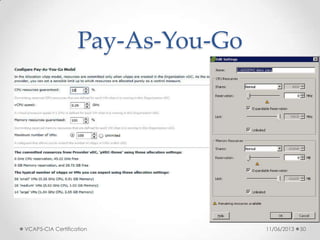
Pay-As-You-Go
• Reservations are allocated dynamically with new M
• Guarantee defaults are
o 0% for CPU
o 100% for memory
11/06/2013VCAP5-CIA Certification 49
Pay-As-You-Go
11/06/2013VCAP5-CIA Certification 50
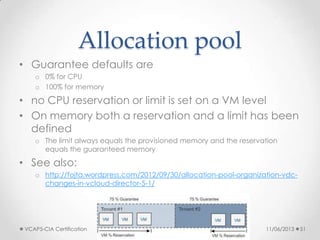
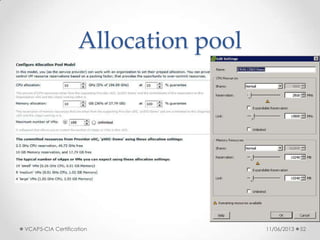
Allocation pool
• Guarantee defaults are
o 0% for CPU
o 100% for memory
• no CPU reservation or limit is set on a VM level
• On memory both a reservation and a limit has been
defined
o The limit always equals the provisioned memory and the reservation
equals the guaranteed memory
• See also:
o http://fojta.wordpress.com/2012/09/30/allocation-pool-organization-vdc-
changes-in-vcloud-director-5-1/
11/06/2013VCAP5-CIA Certification 51
Allocation pool
11/06/2013VCAP5-CIA Certification 52
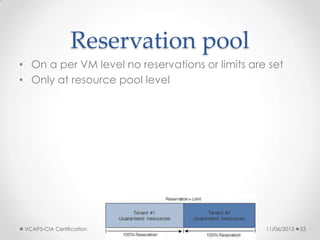
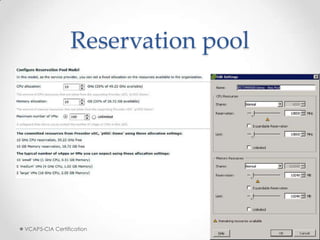
Reservation pool
• On a per VM level no reservations or limits are set
• Only at resource pool level
11/06/2013VCAP5-CIA Certification 53
Reservation pool
11/06/2013VCAP5-CIA Certification 54
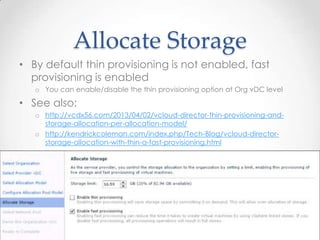
Allocate Storage
• By default thin provisioning is not enabled, fast
provisioning is enabled
o You can enable/disable the thin provisioning option at Org vDC level
• See also:
o http://vcdx56.com/2013/04/02/vcloud-director-thin-provisioning-and-
storage-allocation-per-allocation-model/
o http://kendrickcoleman.com/index.php/Tech-Blog/vcloud-director-
storage-allocation-with-thin-a-fast-provisioning.html
11/06/2013VCAP5-CIA Certification 55
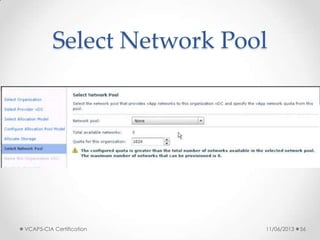
Select Network Pool
11/06/2013VCAP5-CIA Certification 56
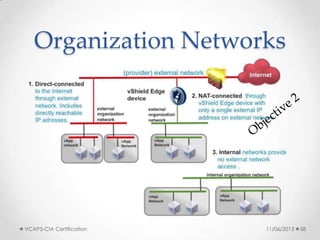
Organization Networks
• There are multiple ways to define an OrgNetwork:
o Direct connection
• This network is akin to a traditional port group-backed network in
vSphere. In short, it provides connectivity to LAN, WAN or Internet traffic. It
is tied to an External network and usually sits on internally routable RFC-
1918 address space (most likely for private cloud) or Internet-routable
address space for providers
o NAT-routed connection
• This connection allows for Network Address Translation (NAT) of External IP
space to internal private networks. The NAT-routed OrgNet is typically in
RFC-1918 address space, however there are other cases.
o Internal Organization network
• This is strictly an internal network for the vApps to communicate with each
other, but have no external network access
• See also:
o http://philthevirtualizer.com/2012/05/07/vmware-vcloud-networking-options/
o http://www.gabesvirtualworld.com/vmware-vcloud-5-1-networking-for-
dummies/
11/06/2013VCAP5-CIA Certification 57
Organization Networks
11/06/2013VCAP5-CIA Certification 58
VCAP5-CIA Objective 3.4
• Manage an Organization
• Knowledge
o Identify Organization options and their uses
• Skills and Abilities
o Create and manage Organizations
o Manage Organization policies and settings
11/06/2013VCAP5-CIA Certification 60
Create and manage
Organizations
• vCloud Director Administrator’s Guide
o “Create an Organization,” on page 28
o “Allocate Resources to an Organization,” on page 32
o “Enable or Disable an Organization,” on page 105
o “Delete an Organization,” on page 105
o “Add a Catalog to an Organization,” on page 106
o “Editing Organization Properties,” on page 106
o “Managing Organization Resources,” on page 110
o “Managing Organization Users and Groups,” on page 110
o “Managing Organization vApps and Virtual Machines,” on page 110
• See also
o http://vmwarelearning.com/ty7/creating-organizations/
11/06/2013VCAP5-CIA Certification 61
Manage Organization
policies and settings
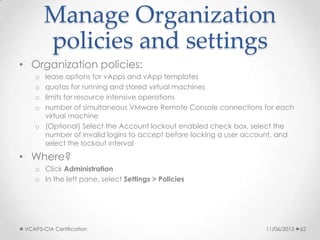
• Organization policies:
o lease options for vApps and vApp templates
o quotas for running and stored virtual machines
o limits for resource intensive operations
o number of simultaneous VMware Remote Console connections for each
virtual machine
o (Optional) Select the Account lockout enabled check box, select the
number of invalid logins to accept before locking a user account, and
select the lockout interval
• Where?
o Click Administration
o In the left pane, select Settings > Policies
11/06/2013VCAP5-CIA Certification 62
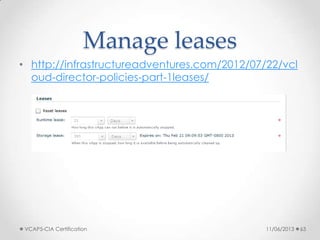
Manage leases
• http://infrastructureadventures.com/2012/07/22/vcl
oud-director-policies-part-1leases/
11/06/2013VCAP5-CIA Certification 63
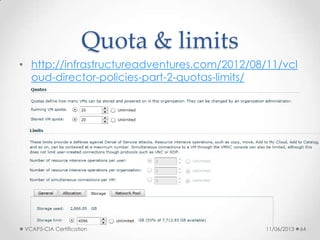
Quota & limits
• http://infrastructureadventures.com/2012/08/11/vcl
oud-director-policies-part-2-quotas-limits/
11/06/2013VCAP5-CIA Certification 64

#vBrownbag EMEA VCAP5-CIA Objectives 3

  • 1.
    EMEA #vBrownbag’s VCAP5-CIA – Objectives3.x 27/08/2013VCAP5-CIA Certification 1
  • 2.
    Who am I •My name is Andrew (Andrea in Italy) Mauro • My blog: http://vinfrastructure.it/en/ • I’m a proud member of the Italian VMUG o Aka the Italian vMaffia :-0 • My certs: vExpert 2000,2001,2012,2013 VCDX 3/4/5, VCAP-DCA 4/5, VCAP-DCD 4/5, VCAP5-DTD, VCAP5-CIA, VCAP5-CID, VCP 3/4/5, VCP-DT 4/5, VCP5-Cloud… …also some MCSA and MCSE and others… • You can find me on twitter as: @Andrea_Mauro • Currently I work for Assyrus Srl as an IT architect 11/06/2013VCAP5-CIA Certification 2
  • 3.
    Where are we? 11/06/20133 CloudIaaS VCAP5-CIA Certification
  • 4.
    VCAP5-CIA • VMware Certificationpage o http://mylearn.vmware.com/mgrReg/plan.cfm?plan=3762 9&ui=www_cert • Resources o Exam Blueprint o vCloud Director Instructional Videos • http://vmwarelearning.com/vcloud/ o Lab sample! o Links collection: • http://vinfrastructure.it/en/2013/06/vcap5-cia-study-guides/ • http://thesaffageek.co.uk/vsphere-5-x-cloud-study- resources/vcap5-cia-and-cid/ 11/06/2013VCAP5-CIA Certification 4
  • 5.
    VCAP5-CIA Exam • Authorization oBefore you can schedule your VCAP-CIA exam, you must request authorization • VUE code VCIA510 o Same price as other VCAP exams o Same (limited!) testing centers • 32 live labs in 210 minutes o +30min in non native English countries • Lab o lab environment is based on VMware vCloud Suite 5.1 and vCenter Chargeback Manager 2.5 • Exam experience o http://vinfrastructure.it/en/2013/07/commenti-sullesame-vcap5-cia/ 11/06/2013VCAP5-CIA Certification 6
  • 6.
    VCAP5-CIA courses • Nothingmandatory • Nothing (officially) suggested • Free Instructional Video o vCloud Director Concepts and Architecture • http://mylearn.vmware.com/mgrReg/plan.cfm?plan=36740&ui=www _edu • http://vmwarelearning.com/vcloud/ • http://vmwarelearning.com/vcloud_net_sec/ o Trainsignal free course • http://www.trainsignal.com/Course/147/VMware-vCloud-Director- Essentials o Check also in the VMware Partner area • + Blogs 11/06/2013VCAP5-CIA Certification 7
  • 7.
    VCAP5-CIA Lab • Youneed a lab or a good practical experience to pass an admin role based exam! • You need also good vSphere experience and moderated Linux experience too! • There is a VA for vCloud Director o Some issue if you plan to use with Workstation • http://vinfrastructure.it/en/2013/06/installing-vcloud-director-in-a-lab/ • For other material see also: o http://vinfrastructure.it/en/2013/06/vcap5-cia-study-guides/ • Use also the Hands-on Lab o http://hol.vmware.com 11/06/2013VCAP5-CIA Certification 8
  • 8.
    VCAP5-CIA Blueprint • Filenamewith v2.4 o 05 August 2013 • Several links are included o Note that other material may be needed • VMware KB • Whitepapers • Official reference o http://www.vmware.com/support/pubs/vmware -vcloud-suite-pubs.html • Part is available in the live lab 11/06/2013VCAP5-CIA Certification 9
  • 9.
    VCAP5-CIA Section 3 •Manage vCloud Director Resources o Objective 3.1 – Manage Provider VDCs o Objective 3.2 – Manage vCloud Director network resources o Objective 3.3 – Manage Organization VDCs o Objective 3.4 – Manage an Organization 11/06/2013VCAP5-CIA Certification 10
  • 10.
  • 11.
    VCAP5-CIA Objective 3.1 •Manage Provider VDCs • Knowledge o Identify Provider VDC options • Skills and Abilities o Create and Provider VDCs o Merge or Expand Provider VDCs o Manage Provider VDC options • See also: o http://fbuechsel.eu/2013/08/07/vcap-cia-objective-3-1- manage-provider-vdcs/ o http://vmwarelearning.com/qiF/creating-provider-resources/ o http://www.petri.co.il/setting-up-vmware-vcloud-director- essentials-part-2.htm 11/06/2013VCAP5-CIA Certification 12
  • 12.
    Create and Provider VDCs •vCloud Director Administrator’s Guide o pages 21 and 22 • Creating a Provider Virtual Data Center in VMware vCloud Director o http://kb.vmware.com/kb/1026296 11/06/2013VCAP5-CIA Certification 13
  • 13.
  • 14.
  • 15.
  • 16.
  • 17.
  • 18.
    Merge or Expand ProviderVDCs • vCloud Director Administrator’s Guide o pages 45 – 51 • Merging 2 Provider VDCs o You can start by going to the Manage and Monitor tab, choosing the Provider VDC option and right clicking the Provider VDC that should be the merge destination • Expand a Provider VDC o Different cases • Add compute resources which can be done by adding another Resource Pool • additional storage which can be done by adding Storage Profiles to the Provider VDC o For both options a wizard is going to pop up and guide you through selecting the additional resources 11/06/2013VCAP5-CIA Certification 19
  • 19.
  • 20.
  • 21.
  • 22.
  • 23.
    Manage Provider VDC options •The following options and procedures that can be edited for a Provider VDC o Enable or Disable a Provider vDC o Delete a Provider vDC o Modify a Provider vDC Name and Description o Merge Provider vDCs o Enable or Disable a Provider vDC Host o Prepare or Unprepare a Provider vDC Host o Upgrade an ESX/ESXi Host Agent for a Provider vDC Host o Repair a Provider vDC ESX/ESXi Host o Enable vSphere VXLAN on an Upgraded Provider vDC o Provider vDC Datastores o Add a Storage Profile to a Provider vDC o Edit the Metadata for a Storage Profile on a Provider vDC o Add a Resource Pool to a Provider vDC o Enable or Disable a Provider vDC Resource Pool o Detach a Resource Pool From a Provider vDC o Migrate Virtual Machines Between Resource Pools on a Provider vDC o Configure Low Disk Space Warnings for a Provider vDC Datastore o Send an Email Notification to Provider vDC Users 11/06/2013VCAP5-CIA Certification 24
  • 24.
  • 25.
  • 26.
  • 27.
  • 28.
  • 29.
  • 30.
    VCAP5-CIA Objective 3.2 •Manage vCloud Director network resources • Knowledge o Identify vCloud Director network pool types • Skills and Abilities o Create and manage network pools o Create Provider external networks o Manage and remove network resources • See also: o http://it20.info/2010/09/vcloud-director-networking-for- dummies/ o http://www.gabesvirtualworld.com/vmware-vcloud-5-1- networking-for-dummies/ o http://www.yellow-bricks.com/2010/09/09/vcd-networking- part-2-network-pools/ 11/06/2013VCAP5-CIA Certification 31
  • 31.
    vCloud Networks • NetworkPools o pools consumed by virtual datacenters to create vAPP networks • Organization Networks o assigned to an Organization VDC • External Networks o port group-backed networks (defined in vCenter) that provide ingress and egress to the Cloud environment. o They should be routable networks, either RFC-1918 for private, or Internet routable for providers • See also: o http://philthevirtualizer.com/2012/05/07/vmware-vcloud-networking- options/ 11/06/2013VCAP5-CIA Certification 32
  • 32.
    Create and manage networkpools • vCloud Director Administrator’s Guide o Page 21 -25 • See also: o http://kb.vmware.com/kb/1026300 • Network pools can be one of these types: o vSphere port groups o VLAN o vCloud Network isolation (VCNI) o VXLAN 11/06/2013VCAP5-CIA Certification 33
  • 33.
    Portgroup Backed • Portgroup-backedpools require pre-created portgroups within the vSphere environment o least flexible o But do not require vDS and can be based on vSS, vDS or Cisco Nexus 1000v • Requirements o All portgroups need to be pre-created and available on all hosts of your cluster • Recommendations o Use a scripted solution or host profiles to create the portgroups to ensure consistency • Constraints: n/a 11/06/2013VCAP5-CIA Certification 34
  • 34.
    VLAN Backed • VLAN-backednetwork pools require availability of a set of unused VLANs o When an Org or vApp network is created which is based on a VLAN- backed network pool a portgroup is created on a dvSwitch and a VLAN is assigned to this portgroup o It should be noted that all VLANs specified for the pool will need to be trunked to the host and that in most environment the amount of available VLANs is limited • Requirements o Distributed vSwitch, pool of available VLANs, Physical uplinks need to support VLAN Trunks • Recommendations: n/a • Constraints o Nexus 1000v and regular vSwitches are not supported currently, amount of available VLANs in most environments 11/06/2013VCAP5-CIA Certification 35
  • 35.
    VCNI Backed • vCloudNetwork Isolation-backed(VCNI) network pools are flexible, easy to configure and do not require VLANs o vCNI provides layer 2 isolation by utilizing a network overlay. o This network overlay is provided by MAC in MAC encapsulation and requires a vDS o For each consumed network vCloud Director creates a portgroup and assigns this portgroup a network ID number o This network ID number is used for the encapsulation of the traffic • Requirements o Distributed vSwitch • Constraints o Nexus 1000v and regular vSwitches are not supported currently • Recommendations o minimum of 1 VLAN, MTU Increase (24Bytes, 1500 –> 1524) o Admin guide suggest to set MTU to 1600 11/06/2013VCAP5-CIA Certification 36
  • 36.
    VXLAN Backed • Severalsteps involving also the vShield Manager • For more info see: o http://www.punchingclouds.com/2012/09/09/vcloud-director-5-1-vxlan- configuration/ • Hands-on-lab • Requirements o Distributed vSwitch • Constraints o VXLAN Standard, Multicast support • Recommendations o Follow suggested reference 11/06/2013VCAP5-CIA Certification 37
  • 37.
  • 38.
    Create Provider external networks •vCloud Director Administrator’s Guide o “Managing External Networks,” on page 22 • See also: o http://kb.vmware.com/kb/1026299 o http://blogs.vmware.com/kb/2010/08/how-to-create-external-networks- in-vmware-vcloud-director.html 11/06/2013VCAP5-CIA Certification 39
  • 39.
    Manage and remove networkresources • vCloud Director Administrator’s Guide o “Managing External Networks,” on page 64 o “Managing Edge Gateways,” on page 65 o “Managing Organization vDC Networks,” on page 81 o “Managing Network Pools,” on page 94 11/06/2013VCAP5-CIA Certification 40
  • 40.
    VCAP5-CIA Objective 3.3 •Manage Organization VDCs • Knowledge o Identify org VDC types o Identify org VDC options o Identify org VDC network options • Skills and Abilities o Configure storage tiers o Create, manage and delete org VDCs 11/06/2013VCAP5-CIA Certification 41
  • 41.
    Configure storage tiers •Storage profiles (and datastore clusters) must be set in the vSphere management part o Storage Capability could be user defined or configured by VASA • You can add storage resources to the Provider VDC o be careful when choosing the * (Any) profile as this also includes the local datastores of the hosts which can cause problems • http://kb.vmware.com/kb/2045534 • See also: o http://cormachogan.com/2012/10/17/vcloud-director-5-1-storage- profiles/ o http://blogs.vmware.com/vcloud/2012/10/architecting-storage-offerings- for-vcloud-director-5-1.html o http://living-in-clouds.net/2012/09/27/vcloud-director-5-1-how-to- configure-tiered-storage-on-netapp-part-1-vasa-provider/ 11/06/2013VCAP5-CIA Certification 42
  • 42.
    Configure storage tiers •To view the Storage Profiles available in vCloud Director o click Storage Profiles under vSphere Resources o If you cannot view the Storage Profile you wish to see, right-click the vCenter Server and click Refresh Storage Profiles • by default is done every five minutes 11/06/2013VCAP5-CIA Certification 43
  • 43.
    Create, manage and deleteorg VDCs • vCloud Director Administrator’s Guide o “Managing Organization vDCs,” on page 52 o “Managing Organization vDC Networks,” on page 81 • Before you have to create Organizations and provider VDCs o one Org could have more org VDCs o one org VDC can belong to only one Org o one org VDC can belong to one provider VDC o one org VDC is assigned to a network pool • See also: o http://vmwarelearning.com/EuY/creating-organization-resources-part-1/ o http://vmwarelearning.com/83T/creating-organization-resources-part-2/ 11/06/2013VCAP5-CIA Certification 44
  • 44.
  • 45.
    Allocation models • Threedifferent allocation models o Allocation Pool o Pay-As-You-Go o Reservation Pool • See also: o http://kb.vmware.com/kb/1026290 o http://www.yellow-bricks.com/2010/09/22/vcd-allocation-models/ o http://stretch-cloud.info/category/vcloud-allocation-model/ o http://www.virtual-blog.com/2012/03/vmware-vcloud-director-101-concepts- allocation-models-part-3/ o http://fojta.wordpress.com/2012/09/30/allocation-pool-organization-vdc- changes-in-vcloud-director-5-1/ o http://it20.info/2012/10/vcloud-director-5-1-1-changes-in-resource- entitlements/ 11/06/2013VCAP5-CIA Certification 46
  • 46.
  • 47.
  • 48.
    Pay-As-You-Go • Reservations areallocated dynamically with new M • Guarantee defaults are o 0% for CPU o 100% for memory 11/06/2013VCAP5-CIA Certification 49
  • 49.
  • 50.
    Allocation pool • Guaranteedefaults are o 0% for CPU o 100% for memory • no CPU reservation or limit is set on a VM level • On memory both a reservation and a limit has been defined o The limit always equals the provisioned memory and the reservation equals the guaranteed memory • See also: o http://fojta.wordpress.com/2012/09/30/allocation-pool-organization-vdc- changes-in-vcloud-director-5-1/ 11/06/2013VCAP5-CIA Certification 51
  • 51.
  • 52.
    Reservation pool • Ona per VM level no reservations or limits are set • Only at resource pool level 11/06/2013VCAP5-CIA Certification 53
  • 53.
  • 54.
    Allocate Storage • Bydefault thin provisioning is not enabled, fast provisioning is enabled o You can enable/disable the thin provisioning option at Org vDC level • See also: o http://vcdx56.com/2013/04/02/vcloud-director-thin-provisioning-and- storage-allocation-per-allocation-model/ o http://kendrickcoleman.com/index.php/Tech-Blog/vcloud-director- storage-allocation-with-thin-a-fast-provisioning.html 11/06/2013VCAP5-CIA Certification 55
  • 55.
  • 56.
    Organization Networks • Thereare multiple ways to define an OrgNetwork: o Direct connection • This network is akin to a traditional port group-backed network in vSphere. In short, it provides connectivity to LAN, WAN or Internet traffic. It is tied to an External network and usually sits on internally routable RFC- 1918 address space (most likely for private cloud) or Internet-routable address space for providers o NAT-routed connection • This connection allows for Network Address Translation (NAT) of External IP space to internal private networks. The NAT-routed OrgNet is typically in RFC-1918 address space, however there are other cases. o Internal Organization network • This is strictly an internal network for the vApps to communicate with each other, but have no external network access • See also: o http://philthevirtualizer.com/2012/05/07/vmware-vcloud-networking-options/ o http://www.gabesvirtualworld.com/vmware-vcloud-5-1-networking-for- dummies/ 11/06/2013VCAP5-CIA Certification 57
  • 57.
  • 58.
    VCAP5-CIA Objective 3.4 •Manage an Organization • Knowledge o Identify Organization options and their uses • Skills and Abilities o Create and manage Organizations o Manage Organization policies and settings 11/06/2013VCAP5-CIA Certification 60
  • 59.
    Create and manage Organizations •vCloud Director Administrator’s Guide o “Create an Organization,” on page 28 o “Allocate Resources to an Organization,” on page 32 o “Enable or Disable an Organization,” on page 105 o “Delete an Organization,” on page 105 o “Add a Catalog to an Organization,” on page 106 o “Editing Organization Properties,” on page 106 o “Managing Organization Resources,” on page 110 o “Managing Organization Users and Groups,” on page 110 o “Managing Organization vApps and Virtual Machines,” on page 110 • See also o http://vmwarelearning.com/ty7/creating-organizations/ 11/06/2013VCAP5-CIA Certification 61
  • 60.
    Manage Organization policies andsettings • Organization policies: o lease options for vApps and vApp templates o quotas for running and stored virtual machines o limits for resource intensive operations o number of simultaneous VMware Remote Console connections for each virtual machine o (Optional) Select the Account lockout enabled check box, select the number of invalid logins to accept before locking a user account, and select the lockout interval • Where? o Click Administration o In the left pane, select Settings > Policies 11/06/2013VCAP5-CIA Certification 62
  • 61.
  • 62.
    Quota & limits •http://infrastructureadventures.com/2012/08/11/vcl oud-director-policies-part-2-quotas-limits/ 11/06/2013VCAP5-CIA Certification 64

Editor's Notes

  • #37 http://www.yellow-bricks.com/2010/09/09/vcd-networking-part-2-network-pools/