VMWARE MIRAGE OVERVIEW
Andrew Mauro – VCDX & vExpert
http://vinfrastructure.it/en/
02/04/2015
1
VMware Mirage Overview
WHO AM I
 My name is Andrew (Andrea in Italy) Mauro
 My blog: http://vinfrastructure.it/en/
 I’m a proud member of the Italian VMUG
 vExpert 2010-2015, VCDX-DCV 3/4/5, VCAP-*,
VCIX-NV, VCP-*…
…also some MCSA and MCSE and others…
 You can find me on twitter as: @Andrea_Mauro
 Currently I work for Assyrus Srl as an IT architect
02/04/2015VMware Mirage Overview
2
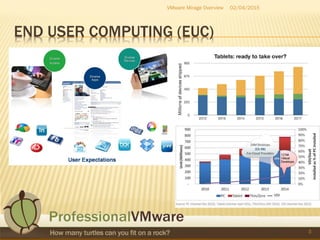
END USER COMPUTING (EUC)
02/04/2015VMware Mirage Overview
3
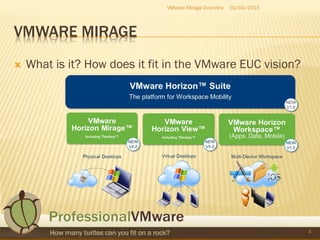
VMWARE MIRAGE
 What is it? How does it fit in the VMware EUC vision?
VMware Mirage Overview
4
02/04/2015
MIRAGE IN THE VCP6-DESKTOP CERTIFICATION
 Section 5 – Install, Configure, and Manage
VMware Mirage
 Objective 5.1
 Describe and Differentiate VMware Mirage Components
 Objective 5.2
 Manage Base and Application Layers
 Objective 5.3
 Configure and Manage Endpoints
02/04/2015VMware Mirage Overview
5
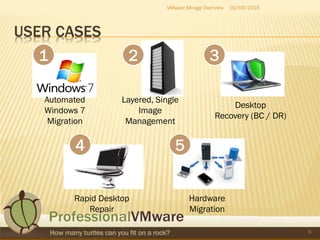
USER CASES
02/04/2015VMware Mirage Overview
6
Layered, Single
Image
Management
1 3
4 5
Automated
Windows 7
Migration
Desktop
Recovery (BC / DR)
Rapid Desktop
Repair
Hardware
Migration
2
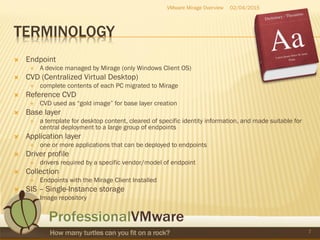
TERMINOLOGY
 Endpoint
 A device managed by Mirage (only Windows Client OS)
 CVD (Centralized Virtual Desktop)
 complete contents of each PC migrated to Mirage
 Reference CVD
 CVD used as “gold image” for base layer creation
 Base layer
 a template for desktop content, cleared of specific identity information, and made suitable for
central deployment to a large group of endpoints
 Application layer
 one or more applications that can be deployed to endpoints
 Driver profile
 drivers required by a specific vendor/model of endpoint
 Collection
 Endpoints with the Mirage Client Installed
 SIS – Single-Instance storage
 Image repository
02/04/2015VMware Mirage Overview
7
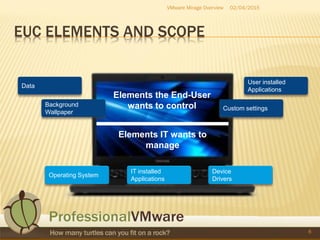
EUC ELEMENTS AND SCOPE
02/04/2015VMware Mirage Overview
8
Elements the End-User
wants to control
Elements IT wants to
manage
Operating System
IT installed
Applications
Device
Drivers
Data
Background
Wallpaper
User installed
Applications
Custom settings
LAYERS
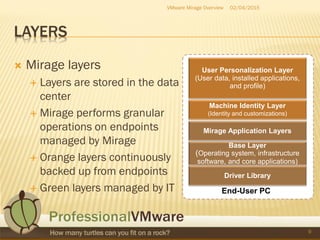
 Mirage layers
 Layers are stored in the data
center
 Mirage performs granular
operations on endpoints
managed by Mirage
 Orange layers continuously
backed up from endpoints
 Green layers managed by IT
02/04/2015VMware Mirage Overview
9
End-User PC
Machine Identity Layer
(Identity and customizations)
User Personalization Layer
(User data, installed applications,
and profile)
Base Layer
(Operating system, infrastructure
software, and core applications)
Driver Library
Mirage Application Layers
02/04/2015VMware Mirage Overview
10
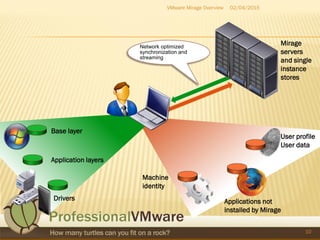
Applications not
installed by Mirage
User profile
User data
Machine
identity
Drivers
Base layer
Network optimized
synchronization and
streaming
Application layers
Mirage
servers
and single
instance
stores
DRIVER PROFILES
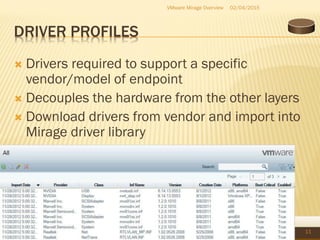
 Drivers required to support a specific
vendor/model of endpoint
 Decouples the hardware from the other layers
 Download drivers from vendor and import into
Mirage driver library
02/04/2015VMware Mirage Overview
11
BUILD A CVD FROM THE LAYERS
02/04/2015VMware Mirage Overview
12
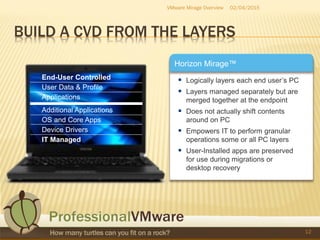
 Logically layers each end user’s PC
 Layers managed separately but are
merged together at the endpoint
 Does not actually shift contents
around on PC
 Empowers IT to perform granular
operations some or all PC layers
 User-Installed apps are preserved
for use during migrations or
desktop recovery
Horizon Mirage™
End-User Controlled
User Data & Profile
Applications
Additional Applications
OS and Core Apps
Device Drivers
IT Managed
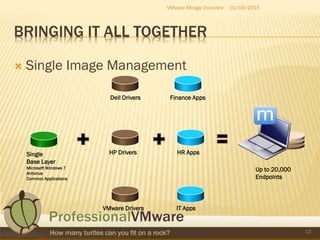
BRINGING IT ALL TOGETHER
 Single Image Management
02/04/2015VMware Mirage Overview
13
Single
Base Layer
Microsoft Windows 7
Antivirus
Common Applications
Dell Drivers
HP Drivers
VMware Drivers
Finance Apps
HR Apps
IT Apps
Up to 20,000
Endpoints
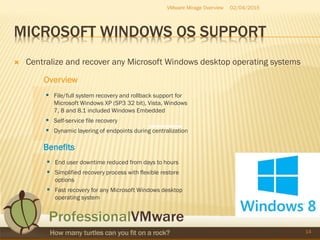
MICROSOFT WINDOWS OS SUPPORT
 Centralize and recover any Microsoft Windows desktop operating systems
02/04/2015VMware Mirage Overview
14
Overview
 File/full system recovery and rollback support for
Microsoft Windows XP (SP3 32 bit), Vista, Windows
7, 8 and 8.1 included Windows Embedded
 Self-service file recovery
 Dynamic layering of endpoints during centralization
Benefits
 End user downtime reduced from days to hours
 Simplified recovery process with flexible restore
options
 Fast recovery for any Microsoft Windows desktop
operating system
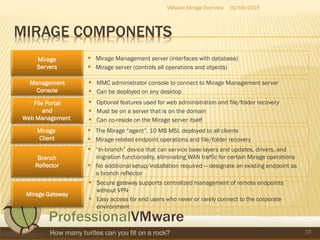
MIRAGE COMPONENTS
02/04/2015VMware Mirage Overview
15
Mirage
Client
 The Mirage “agent”, 10 MB MSI, deployed to all clients
 Mirage-related endpoint operations and file/folder recovery
Mirage
Servers
 Mirage Management server (interfaces with database)
 Mirage server (controls all operations and objects)
File Portal
and
Web Management
 Optional features used for web administration and file/folder recovery
 Must be on a server that is on the domain
 Can co-reside on the Mirage server itself
Management
Console
 MMC administrator console to connect to Mirage Management server
 Can be deployed on any desktop
Mirage Gateway
 Secure gateway supports centralized management of remote endpoints
without VPN
 Easy access for end users who never or rarely connect to the corporate
environment
Branch
Reflector
 “In-branch” device that can service base layers and updates, drivers, and
migration functionality, eliminating WAN traffic for certain Mirage operations
 No additional setup/installation required – designate an existing endpoint as
a branch reflector
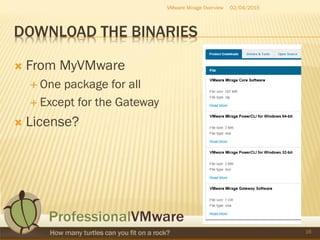
DOWNLOAD THE BINARIES
 From MyVMware
 One package for all
 Except for the Gateway
 License?
02/04/2015VMware Mirage Overview
16
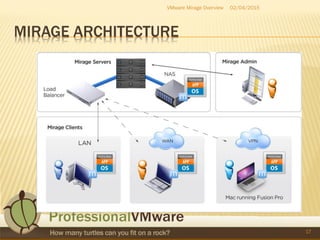
MIRAGE ARCHITECTURE
02/04/2015VMware Mirage Overview
17
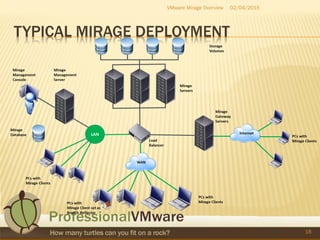
TYPICAL MIRAGE DEPLOYMENT
02/04/2015VMware Mirage Overview
18
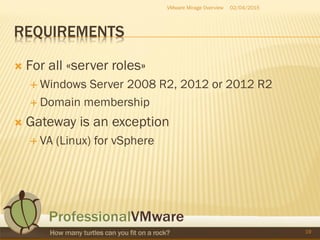
REQUIREMENTS
 For all «server roles»
 Windows Server 2008 R2, 2012 or 2012 R2
 Domain membership
 Gateway is an exception
 VA (Linux) for vSphere
02/04/2015VMware Mirage Overview
19
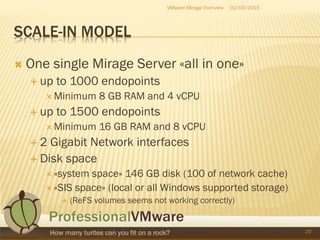
SCALE-IN MODEL
 One single Mirage Server «all in one»
 up to 1000 endopoints
 Minimum 8 GB RAM and 4 vCPU
 up to 1500 endopoints
 Minimum 16 GB RAM and 8 vCPU
 2 Gigabit Network interfaces
 Disk space
 «system space» 146 GB disk (100 of network cache)
 «SIS space» (local or all Windows supported storage)
 (ReFS volumes seems not working correctly)
02/04/2015VMware Mirage Overview
20
SCALE-OUT MODEL
 Separated roles
 More server nodes with an external
 load balancer (for endpoints connection)
 NAS (must be CIFS/SMB)
 DBMS (for the management server)
02/04/2015VMware Mirage Overview
21
POD MODEL?
 One or many Pod?
 Usually and recommended:
 Single cluster -> Single Management
 Bandwidth requirements and restriction to
define a multi Pod and multi-site architecture
02/04/2015VMware Mirage Overview
22
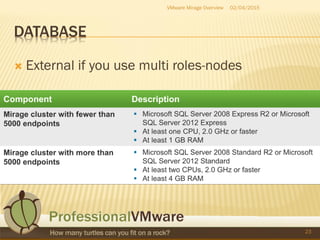
DATABASE
 External if you use multi roles-nodes
02/04/2015VMware Mirage Overview
23
MIRAGE STORAGE
 Single-Instance Storage (SIS)
 Where Mirage stores CVDs: 1000 per SIS
 Local storage or Microsoft Windows (CIFS) file share
 Mirage Servers are “stateless” if using share
 Multiple servers share SIS to form clusters
 File and binary (chunk) de-duplication, depending on file type
 Leverages Microsoft Windows file/folder security
 Must support Microsoft Windows Alternate Data Streams (ADS)
 Local Cache
 Caches endpoint synchronization
 One per Mirage server, 100 GB recommended (not shared)
 Reduces network and server utilization
 “Warm up” new Mirage servers by copying another’s cache
02/04/2015VMware Mirage Overview
24
MIRAGE NETWORKING
 Average of 15 Kbps per endpoint for steady-state
updates
 Other Mirage operations might demand additional
bandwidth
 Amount of unique versus de-duplicable content and
number of simultaneous centralizations impacts
bandwidth
 Bandwidth management integration
 Priority queuing, Class of Service (CoS), Quality of
Service (QoS) compatibility
 Leverage built-in Bandwidth Limiting Controls
02/04/2015VMware Mirage Overview
25
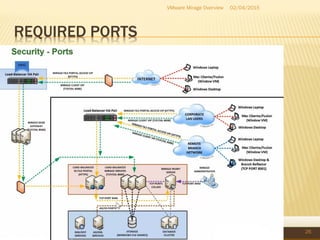
REQUIRED PORTS
02/04/2015VMware Mirage Overview
26
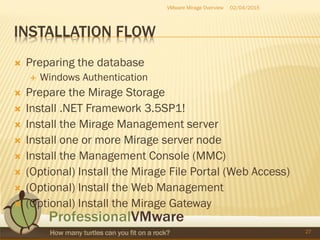
INSTALLATION FLOW
 Preparing the database
 Windows Authentication
 Prepare the Mirage Storage
 Install .NET Framework 3.5SP1!
 Install the Mirage Management server
 Install one or more Mirage server node
 Install the Management Console (MMC)
 (Optional) Install the Mirage File Portal (Web Access)
 (Optional) Install the Web Management
 (Optional) Install the Mirage Gateway
02/04/2015VMware Mirage Overview
27
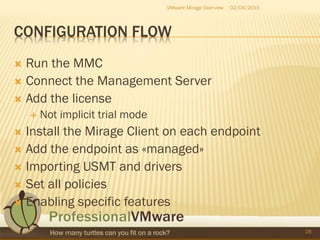
CONFIGURATION FLOW
 Run the MMC
 Connect the Management Server
 Add the license
 Not implicit trial mode
 Install the Mirage Client on each endpoint
 Add the endpoint as «managed»
 Importing USMT and drivers
 Set all policies
 Enabling specific features
02/04/2015VMware Mirage Overview
28
ENDPOINT MANAGEMENT
 New client are in pending status
 Can become managed
 Or reference
 Image composer
 Merge all layers
02/04/2015VMware Mirage Overview
29
BASE LAYER
 How many?
 Similar to the linked clone «parent» image
 But different techology
 Similar consideration about what put inside
 OS
 Application??
 Other?
 About 15% of disk space must be planned!
02/04/2015VMware Mirage Overview
30
APPLICATION MANAGEMENT
 Different solutions:
 Add in the base image
 Create one or more application layers
 Note that you cannot specify dependency across layers
 Use ThinApp
 Use Horizon Workspace
 Use other solutions
02/04/2015VMware Mirage Overview
31
SNAPSHOT MANAGEMENT
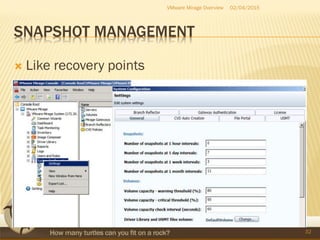
 Like recovery points
02/04/2015VMware Mirage Overview
32
DATA INTEGRITY AND SECURITY
 SSL-enabled communications (optional)
 NTFS permissions used to secure files, folders,
and shares
 MD5 checksum is used on all data files (backup
and restore) for data integrity
 Support for Microsoft Windows encrypting file
system and BitLocker
 Mirage SIS file system written in proprietary format
 Cannot execute or read files from Mirage SIS
02/04/2015VMware Mirage Overview
33
CVD POLICY FEATURES
02/04/2015VMware Mirage Overview
34
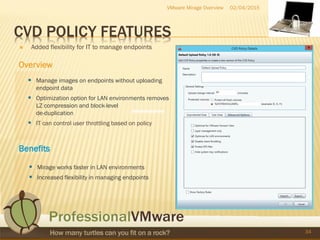
 Added flexibility for IT to manage endpoints
 Manage images on endpoints without uploading
endpoint data
 Optimization option for LAN environments removes
LZ compression and block-level
de-duplication
 IT can control user throttling based on policy
 Mirage works faster in LAN environments
 Increased flexibility in managing endpoints
Overview
Benefits
WEB CONSOLE AND FILE PORTAL
02/04/2015VMware Mirage Overview
35
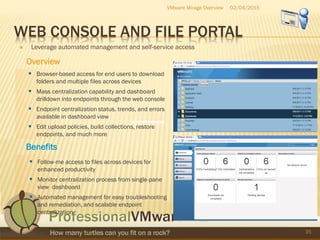
 Leverage automated management and self-service access
Overview
 Browser-based access for end users to download
folders and multiple files across devices
 Mass centralization capability and dashboard
drilldown into endpoints through the web console
 Endpoint centralization status, trends, and errors
available in dashboard view
 Edit upload policies, build collections, restore
endpoints, and much more
Benefits
 Follow-me access to files across devices for
enhanced productivity
 Monitor centralization process from single-pane
view dashboard
 Automated management for easy troubleshooting
and remediation, and scalable endpoint
centralization
BRANCH OFFICE
 Branch Reflector
 Reduces “downstream” WAN
network demands by caching frequently-accessed
content on designated endpoint
 Endpoints access data from branch reflector in local
office – not from Mirage server across WAN
 Can leverage any existing Mirage centralized endpoint
 Caches data used by base layers, base layer updates,
driver library, and operating system migrations
02/04/2015VMware Mirage Overview
36
MIRAGE GATEWAY
02/04/2015VMware Mirage Overview
37
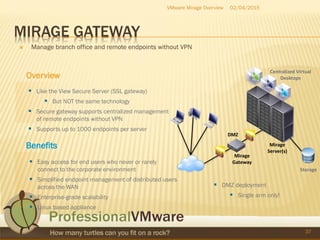
 Manage branch office and remote endpoints without VPN
Overview
 Like the View Secure Server (SSL gateway)
 But NOT the same technology
 Secure gateway supports centralized management
of remote endpoints without VPN
 Supports up to 1000 endpoints per server
Benefits
 Easy access for end users who never or rarely
connect to the corporate environment
 Simplified endpoint management of distributed users
across the WAN
 Enterprise-grade scalability
 Linux based appliance
DMZ
Mirage
Gateway
Centralized Virtual
Desktops
Storage
Mirage
Server(s)
 DMZ deployment
 Single arm only!
MIRAGE – BANDWIDTH LIMITING
02/04/2015VMware Mirage Overview
38
s
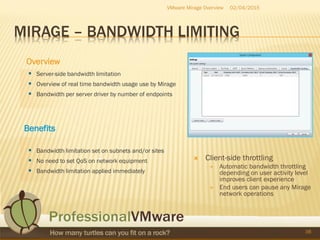
 Server-side bandwidth limitation
 Overview of real time bandwidth usage use by Mirage
 Bandwidth per server driver by number of endpoints
Benefits
 Bandwidth limitation set on subnets and/or sites
 No need to set QoS on network equipment
 Bandwidth limitation applied immediately
Overview
 Client-side throttling
 Automatic bandwidth throttling
depending on user activity level
improves client experience
 End users can pause any Mirage
network operations
FINAL RECAP
02/04/2015
39
VMware Mirage Overview
OBJECTIVE 5.1
 Describe and Differentiate VMware Mirage Components
 Identify firewall requirements for VMware Mirage
 Install VMware Mirage Management server and console
 Install VMware Mirage Web Manager
 Install VMware Mirage server
 Install VMware Mirage Gateway server
 Install and Configure File Portal
 Configure Branch Reflector
 Configure role-based delegations
 Configure driver library and profiles
 Configure SSL
 Configure the User State Migration Tool (USMT)
 Configure storage volumes
02/04/2015VMware Mirage Overview
40
OBJECTIVE 5.2
 Manage Base and Application Layers
 Capture and update the Base layer
 Capture and update the App layer
 Assign Base and App layers
02/04/2015VMware Mirage Overview
41
OBJECTIVE 5.3
 Configure and Manage Endpoints Manage
Base and Application Layers
 Create and manage Upload policies
 Restore snapshots
 Create, manage, and archive collections
 Install the Mirage Client
 Migrate and centralize endpoints
02/04/2015VMware Mirage Overview
42
MIRAGE LIMITS
 It isn’t a backup solution
 Only 30 recovery points
 It works ONLY if Windows works on the endpoint
 No support for vPro or OOB solutions
 Cannot change the disk layout of the endpoint
 No partitions management, no formatting, …
 Driver only in .inf format
 Not «binary» compatible with View or ThinApp
 Are different products… with some kind of integration
02/04/2015VMware Mirage Overview
43
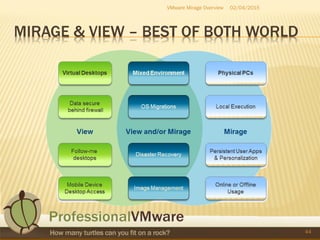
MIRAGE & VIEW – BEST OF BOTH WORLD
02/04/2015VMware Mirage Overview
44
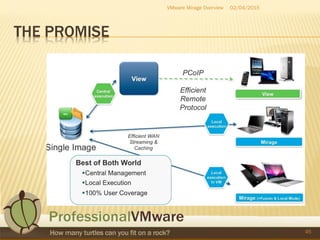
THE PROMISE
02/04/2015VMware Mirage Overview
45
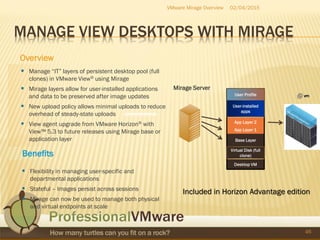
MANAGE VIEW DESKTOPS WITH MIRAGE
02/04/2015VMware Mirage Overview
46
 Manage “IT” layers of persistent desktop pool (full
clones) in VMware View® using Mirage
 Mirage layers allow for user-installed applications
and data to be preserved after image updates
 New upload policy allows minimal uploads to reduce
overhead of steady-state uploads
 View agent upgrade from VMware Horizon® with
View™ 5.3 to future releases using Mirage base or
application layer
 Flexibility in managing user-specific and
departmental applications
 Stateful – Images persist across sessions
 Mirage can now be used to manage both physical
and virtual endpoints at scale
Mirage Server
Base Layer
App Layer 1
App Layer 2
Desktop VM
Virtual Disk (full
clone)
User-installed
apps
User Profile
Overview
Benefits
Included in Horizon Advantage edition
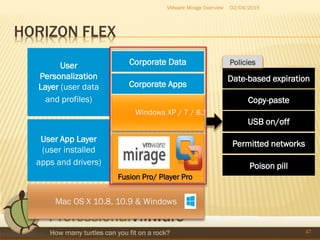
HORIZON FLEX
02/04/2015VMware Mirage Overview
47
Windows XP / 7 / 8.1
Fusion Pro/ Player Pro
Mac OS X 10.8, 10.9 & Windows
User App Layer
(user installed
apps and drivers)
Corporate Apps
User
Personalization
Layer (user data
and profiles)
Corporate Data
Date-based expiration
Copy-paste
USB on/off
Permitted networks
Poison pill
Policies
MORE INFORMATION
 This slide
 http://professionalvmware.com/
 http://vinfrastructure.it/en/
 VMware site
 http://www.vmware.com/it/products/horizon-mirage
 https://www.vmware.com/support/pubs/mirage_pubs.html
 HoL
 http://labs.hol.vmware.com/HOL/#lab/601
48
VMware Mirage Overview 02/04/2015
THANK YOU
02/04/2015
49
Andrew Mauro – VCDX & vExpert
http://vinfrastructure.it/en/
VMware Mirage Overview

APAC #vBrownbag – VMware Mirage overview

  • 1.
    VMWARE MIRAGE OVERVIEW AndrewMauro – VCDX & vExpert http://vinfrastructure.it/en/ 02/04/2015 1 VMware Mirage Overview
  • 2.
    WHO AM I My name is Andrew (Andrea in Italy) Mauro  My blog: http://vinfrastructure.it/en/  I’m a proud member of the Italian VMUG  vExpert 2010-2015, VCDX-DCV 3/4/5, VCAP-*, VCIX-NV, VCP-*… …also some MCSA and MCSE and others…  You can find me on twitter as: @Andrea_Mauro  Currently I work for Assyrus Srl as an IT architect 02/04/2015VMware Mirage Overview 2
  • 3.
    END USER COMPUTING(EUC) 02/04/2015VMware Mirage Overview 3
  • 4.
    VMWARE MIRAGE  Whatis it? How does it fit in the VMware EUC vision? VMware Mirage Overview 4 02/04/2015
  • 5.
    MIRAGE IN THEVCP6-DESKTOP CERTIFICATION  Section 5 – Install, Configure, and Manage VMware Mirage  Objective 5.1  Describe and Differentiate VMware Mirage Components  Objective 5.2  Manage Base and Application Layers  Objective 5.3  Configure and Manage Endpoints 02/04/2015VMware Mirage Overview 5
  • 6.
    USER CASES 02/04/2015VMware MirageOverview 6 Layered, Single Image Management 1 3 4 5 Automated Windows 7 Migration Desktop Recovery (BC / DR) Rapid Desktop Repair Hardware Migration 2
  • 7.
    TERMINOLOGY  Endpoint  Adevice managed by Mirage (only Windows Client OS)  CVD (Centralized Virtual Desktop)  complete contents of each PC migrated to Mirage  Reference CVD  CVD used as “gold image” for base layer creation  Base layer  a template for desktop content, cleared of specific identity information, and made suitable for central deployment to a large group of endpoints  Application layer  one or more applications that can be deployed to endpoints  Driver profile  drivers required by a specific vendor/model of endpoint  Collection  Endpoints with the Mirage Client Installed  SIS – Single-Instance storage  Image repository 02/04/2015VMware Mirage Overview 7
  • 8.
    EUC ELEMENTS ANDSCOPE 02/04/2015VMware Mirage Overview 8 Elements the End-User wants to control Elements IT wants to manage Operating System IT installed Applications Device Drivers Data Background Wallpaper User installed Applications Custom settings
  • 9.
    LAYERS  Mirage layers Layers are stored in the data center  Mirage performs granular operations on endpoints managed by Mirage  Orange layers continuously backed up from endpoints  Green layers managed by IT 02/04/2015VMware Mirage Overview 9 End-User PC Machine Identity Layer (Identity and customizations) User Personalization Layer (User data, installed applications, and profile) Base Layer (Operating system, infrastructure software, and core applications) Driver Library Mirage Application Layers
  • 10.
    02/04/2015VMware Mirage Overview 10 Applicationsnot installed by Mirage User profile User data Machine identity Drivers Base layer Network optimized synchronization and streaming Application layers Mirage servers and single instance stores
  • 11.
    DRIVER PROFILES  Driversrequired to support a specific vendor/model of endpoint  Decouples the hardware from the other layers  Download drivers from vendor and import into Mirage driver library 02/04/2015VMware Mirage Overview 11
  • 12.
    BUILD A CVDFROM THE LAYERS 02/04/2015VMware Mirage Overview 12  Logically layers each end user’s PC  Layers managed separately but are merged together at the endpoint  Does not actually shift contents around on PC  Empowers IT to perform granular operations some or all PC layers  User-Installed apps are preserved for use during migrations or desktop recovery Horizon Mirage™ End-User Controlled User Data & Profile Applications Additional Applications OS and Core Apps Device Drivers IT Managed
  • 13.
    BRINGING IT ALLTOGETHER  Single Image Management 02/04/2015VMware Mirage Overview 13 Single Base Layer Microsoft Windows 7 Antivirus Common Applications Dell Drivers HP Drivers VMware Drivers Finance Apps HR Apps IT Apps Up to 20,000 Endpoints
  • 14.
    MICROSOFT WINDOWS OSSUPPORT  Centralize and recover any Microsoft Windows desktop operating systems 02/04/2015VMware Mirage Overview 14 Overview  File/full system recovery and rollback support for Microsoft Windows XP (SP3 32 bit), Vista, Windows 7, 8 and 8.1 included Windows Embedded  Self-service file recovery  Dynamic layering of endpoints during centralization Benefits  End user downtime reduced from days to hours  Simplified recovery process with flexible restore options  Fast recovery for any Microsoft Windows desktop operating system
  • 15.
    MIRAGE COMPONENTS 02/04/2015VMware MirageOverview 15 Mirage Client  The Mirage “agent”, 10 MB MSI, deployed to all clients  Mirage-related endpoint operations and file/folder recovery Mirage Servers  Mirage Management server (interfaces with database)  Mirage server (controls all operations and objects) File Portal and Web Management  Optional features used for web administration and file/folder recovery  Must be on a server that is on the domain  Can co-reside on the Mirage server itself Management Console  MMC administrator console to connect to Mirage Management server  Can be deployed on any desktop Mirage Gateway  Secure gateway supports centralized management of remote endpoints without VPN  Easy access for end users who never or rarely connect to the corporate environment Branch Reflector  “In-branch” device that can service base layers and updates, drivers, and migration functionality, eliminating WAN traffic for certain Mirage operations  No additional setup/installation required – designate an existing endpoint as a branch reflector
  • 16.
    DOWNLOAD THE BINARIES From MyVMware  One package for all  Except for the Gateway  License? 02/04/2015VMware Mirage Overview 16
  • 17.
  • 18.
  • 19.
    REQUIREMENTS  For all«server roles»  Windows Server 2008 R2, 2012 or 2012 R2  Domain membership  Gateway is an exception  VA (Linux) for vSphere 02/04/2015VMware Mirage Overview 19
  • 20.
    SCALE-IN MODEL  Onesingle Mirage Server «all in one»  up to 1000 endopoints  Minimum 8 GB RAM and 4 vCPU  up to 1500 endopoints  Minimum 16 GB RAM and 8 vCPU  2 Gigabit Network interfaces  Disk space  «system space» 146 GB disk (100 of network cache)  «SIS space» (local or all Windows supported storage)  (ReFS volumes seems not working correctly) 02/04/2015VMware Mirage Overview 20
  • 21.
    SCALE-OUT MODEL  Separatedroles  More server nodes with an external  load balancer (for endpoints connection)  NAS (must be CIFS/SMB)  DBMS (for the management server) 02/04/2015VMware Mirage Overview 21
  • 22.
    POD MODEL?  Oneor many Pod?  Usually and recommended:  Single cluster -> Single Management  Bandwidth requirements and restriction to define a multi Pod and multi-site architecture 02/04/2015VMware Mirage Overview 22
  • 23.
    DATABASE  External ifyou use multi roles-nodes 02/04/2015VMware Mirage Overview 23
  • 24.
    MIRAGE STORAGE  Single-InstanceStorage (SIS)  Where Mirage stores CVDs: 1000 per SIS  Local storage or Microsoft Windows (CIFS) file share  Mirage Servers are “stateless” if using share  Multiple servers share SIS to form clusters  File and binary (chunk) de-duplication, depending on file type  Leverages Microsoft Windows file/folder security  Must support Microsoft Windows Alternate Data Streams (ADS)  Local Cache  Caches endpoint synchronization  One per Mirage server, 100 GB recommended (not shared)  Reduces network and server utilization  “Warm up” new Mirage servers by copying another’s cache 02/04/2015VMware Mirage Overview 24
  • 25.
    MIRAGE NETWORKING  Averageof 15 Kbps per endpoint for steady-state updates  Other Mirage operations might demand additional bandwidth  Amount of unique versus de-duplicable content and number of simultaneous centralizations impacts bandwidth  Bandwidth management integration  Priority queuing, Class of Service (CoS), Quality of Service (QoS) compatibility  Leverage built-in Bandwidth Limiting Controls 02/04/2015VMware Mirage Overview 25
  • 26.
  • 27.
    INSTALLATION FLOW  Preparingthe database  Windows Authentication  Prepare the Mirage Storage  Install .NET Framework 3.5SP1!  Install the Mirage Management server  Install one or more Mirage server node  Install the Management Console (MMC)  (Optional) Install the Mirage File Portal (Web Access)  (Optional) Install the Web Management  (Optional) Install the Mirage Gateway 02/04/2015VMware Mirage Overview 27
  • 28.
    CONFIGURATION FLOW  Runthe MMC  Connect the Management Server  Add the license  Not implicit trial mode  Install the Mirage Client on each endpoint  Add the endpoint as «managed»  Importing USMT and drivers  Set all policies  Enabling specific features 02/04/2015VMware Mirage Overview 28
  • 29.
    ENDPOINT MANAGEMENT  Newclient are in pending status  Can become managed  Or reference  Image composer  Merge all layers 02/04/2015VMware Mirage Overview 29
  • 30.
    BASE LAYER  Howmany?  Similar to the linked clone «parent» image  But different techology  Similar consideration about what put inside  OS  Application??  Other?  About 15% of disk space must be planned! 02/04/2015VMware Mirage Overview 30
  • 31.
    APPLICATION MANAGEMENT  Differentsolutions:  Add in the base image  Create one or more application layers  Note that you cannot specify dependency across layers  Use ThinApp  Use Horizon Workspace  Use other solutions 02/04/2015VMware Mirage Overview 31
  • 32.
    SNAPSHOT MANAGEMENT  Likerecovery points 02/04/2015VMware Mirage Overview 32
  • 33.
    DATA INTEGRITY ANDSECURITY  SSL-enabled communications (optional)  NTFS permissions used to secure files, folders, and shares  MD5 checksum is used on all data files (backup and restore) for data integrity  Support for Microsoft Windows encrypting file system and BitLocker  Mirage SIS file system written in proprietary format  Cannot execute or read files from Mirage SIS 02/04/2015VMware Mirage Overview 33
  • 34.
    CVD POLICY FEATURES 02/04/2015VMwareMirage Overview 34  Added flexibility for IT to manage endpoints  Manage images on endpoints without uploading endpoint data  Optimization option for LAN environments removes LZ compression and block-level de-duplication  IT can control user throttling based on policy  Mirage works faster in LAN environments  Increased flexibility in managing endpoints Overview Benefits
  • 35.
    WEB CONSOLE ANDFILE PORTAL 02/04/2015VMware Mirage Overview 35  Leverage automated management and self-service access Overview  Browser-based access for end users to download folders and multiple files across devices  Mass centralization capability and dashboard drilldown into endpoints through the web console  Endpoint centralization status, trends, and errors available in dashboard view  Edit upload policies, build collections, restore endpoints, and much more Benefits  Follow-me access to files across devices for enhanced productivity  Monitor centralization process from single-pane view dashboard  Automated management for easy troubleshooting and remediation, and scalable endpoint centralization
  • 36.
    BRANCH OFFICE  BranchReflector  Reduces “downstream” WAN network demands by caching frequently-accessed content on designated endpoint  Endpoints access data from branch reflector in local office – not from Mirage server across WAN  Can leverage any existing Mirage centralized endpoint  Caches data used by base layers, base layer updates, driver library, and operating system migrations 02/04/2015VMware Mirage Overview 36
  • 37.
    MIRAGE GATEWAY 02/04/2015VMware MirageOverview 37  Manage branch office and remote endpoints without VPN Overview  Like the View Secure Server (SSL gateway)  But NOT the same technology  Secure gateway supports centralized management of remote endpoints without VPN  Supports up to 1000 endpoints per server Benefits  Easy access for end users who never or rarely connect to the corporate environment  Simplified endpoint management of distributed users across the WAN  Enterprise-grade scalability  Linux based appliance DMZ Mirage Gateway Centralized Virtual Desktops Storage Mirage Server(s)  DMZ deployment  Single arm only!
  • 38.
    MIRAGE – BANDWIDTHLIMITING 02/04/2015VMware Mirage Overview 38 s  Server-side bandwidth limitation  Overview of real time bandwidth usage use by Mirage  Bandwidth per server driver by number of endpoints Benefits  Bandwidth limitation set on subnets and/or sites  No need to set QoS on network equipment  Bandwidth limitation applied immediately Overview  Client-side throttling  Automatic bandwidth throttling depending on user activity level improves client experience  End users can pause any Mirage network operations
  • 39.
  • 40.
    OBJECTIVE 5.1  Describeand Differentiate VMware Mirage Components  Identify firewall requirements for VMware Mirage  Install VMware Mirage Management server and console  Install VMware Mirage Web Manager  Install VMware Mirage server  Install VMware Mirage Gateway server  Install and Configure File Portal  Configure Branch Reflector  Configure role-based delegations  Configure driver library and profiles  Configure SSL  Configure the User State Migration Tool (USMT)  Configure storage volumes 02/04/2015VMware Mirage Overview 40
  • 41.
    OBJECTIVE 5.2  ManageBase and Application Layers  Capture and update the Base layer  Capture and update the App layer  Assign Base and App layers 02/04/2015VMware Mirage Overview 41
  • 42.
    OBJECTIVE 5.3  Configureand Manage Endpoints Manage Base and Application Layers  Create and manage Upload policies  Restore snapshots  Create, manage, and archive collections  Install the Mirage Client  Migrate and centralize endpoints 02/04/2015VMware Mirage Overview 42
  • 43.
    MIRAGE LIMITS  Itisn’t a backup solution  Only 30 recovery points  It works ONLY if Windows works on the endpoint  No support for vPro or OOB solutions  Cannot change the disk layout of the endpoint  No partitions management, no formatting, …  Driver only in .inf format  Not «binary» compatible with View or ThinApp  Are different products… with some kind of integration 02/04/2015VMware Mirage Overview 43
  • 44.
    MIRAGE & VIEW– BEST OF BOTH WORLD 02/04/2015VMware Mirage Overview 44
  • 45.
  • 46.
    MANAGE VIEW DESKTOPSWITH MIRAGE 02/04/2015VMware Mirage Overview 46  Manage “IT” layers of persistent desktop pool (full clones) in VMware View® using Mirage  Mirage layers allow for user-installed applications and data to be preserved after image updates  New upload policy allows minimal uploads to reduce overhead of steady-state uploads  View agent upgrade from VMware Horizon® with View™ 5.3 to future releases using Mirage base or application layer  Flexibility in managing user-specific and departmental applications  Stateful – Images persist across sessions  Mirage can now be used to manage both physical and virtual endpoints at scale Mirage Server Base Layer App Layer 1 App Layer 2 Desktop VM Virtual Disk (full clone) User-installed apps User Profile Overview Benefits Included in Horizon Advantage edition
  • 47.
    HORIZON FLEX 02/04/2015VMware MirageOverview 47 Windows XP / 7 / 8.1 Fusion Pro/ Player Pro Mac OS X 10.8, 10.9 & Windows User App Layer (user installed apps and drivers) Corporate Apps User Personalization Layer (user data and profiles) Corporate Data Date-based expiration Copy-paste USB on/off Permitted networks Poison pill Policies
  • 48.
    MORE INFORMATION  Thisslide  http://professionalvmware.com/  http://vinfrastructure.it/en/  VMware site  http://www.vmware.com/it/products/horizon-mirage  https://www.vmware.com/support/pubs/mirage_pubs.html  HoL  http://labs.hol.vmware.com/HOL/#lab/601 48 VMware Mirage Overview 02/04/2015
  • 49.
    THANK YOU 02/04/2015 49 Andrew Mauro– VCDX & vExpert http://vinfrastructure.it/en/ VMware Mirage Overview