1© Copyright 2010 EMC Corporation. All rights reserved.
VMware vCloud Director Technical Overview
Nathan Wheat, VMware Senior Systems Engineer
2© Copyright 2010 EMC Corporation. All rights reserved.
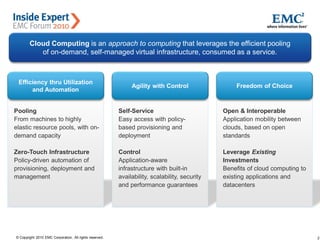
VMware Accelerating the Journey to CloudCloud Computing is an approach to computing that leverages the efficient pooling
of on-demand, self-managed virtual infrastructure, consumed as a service.
Pooling
From machines to highly
elastic resource pools, with on-
demand capacity
Zero-Touch Infrastructure
Policy-driven automation of
provisioning, deployment and
management
Self-Service
Easy access with policy-
based provisioning and
deployment
Control
Application-aware
infrastructure with built-in
availability, scalability, security
and performance guarantees
Open & Interoperable
Application mobility between
clouds, based on open
standards
Leverage Existing
Investments
Benefits of cloud computing to
existing applications and
datacenters
Efficiency thru Utilization
and Automation
Agility with Control Freedom of Choice
3© Copyright 2010 EMC Corporation. All rights reserved.
Agenda
 VMware Cloud Components and Licensing
 VMware Cloud Architecture
 Deploying a VMware Cloud
 Cloud use cases
4© Copyright 2010 EMC Corporation. All rights reserved.
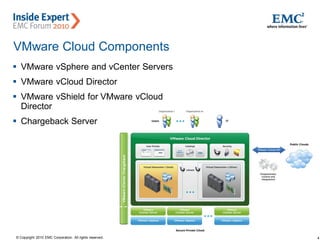
VMware Cloud Components
 VMware vSphere and vCenter Servers
 VMware vCloud Director
 VMware vShield for VMware vCloud
Director
 Chargeback Server
5© Copyright 2010 EMC Corporation. All rights reserved.
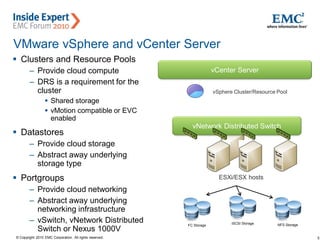
VMware vSphere and vCenter Server
 Clusters and Resource Pools
– Provide cloud compute
– DRS is a requirement for the
cluster
 Shared storage
 vMotion compatible or EVC
enabled
 Datastores
– Provide cloud storage
– Abstract away underlying
storage type
 Portgroups
– Provide cloud networking
– Abstract away underlying
networking infrastructure
– vSwitch, vNetwork Distributed
Switch or Nexus 1000V
FC Storage
vNetwork Distributed Switch
vSphere Cluster/Resource Pool
iSCSI Storage NFS Storage
vCenter Server
ESXi/ESX hosts
6© Copyright 2010 EMC Corporation. All rights reserved.
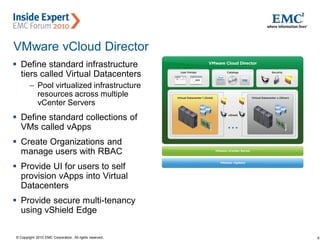
VMware vCloud Director
 Define standard infrastructure
tiers called Virtual Datacenters
– Pool virtualized infrastructure
resources across multiple
vCenter Servers
 Define standard collections of
VMs called vApps
 Create Organizations and
manage users with RBAC
 Provide UI for users to self
provision vApps into Virtual
Datacenters
 Provide secure multi-tenancy
using vShield Edge
7© Copyright 2010 EMC Corporation. All rights reserved.
VMware vShield for VMware vCloud Director
 VMware vShield Edge provides end point security
• Available for download with vSphere Enterprise and Enterprise Plus.
 One vShield Manager required per vCenter Server
• Provides network edge security
• Provides firewall, NAT, port forwarding, IP masquerading and DHCP functionality
(enforces multi-tenancy)
• Edge appliances deployed and managed by VMware vCloud Director on vSphere.
• Separate client not required.
• Does not require separate database
 Licensing
• Free but requires license key during configuration
• Upgradable to vShield Edge 1.0 (full version which includes site-to-site VPN and load
balancer)
8© Copyright 2010 EMC Corporation. All rights reserved.
Agenda
 VMware Cloud Components and Licensing
 VMware Cloud Architecture
 Deploying a VMware Cloud
 Cloud use cases
9© Copyright 2010 EMC Corporation. All rights reserved.
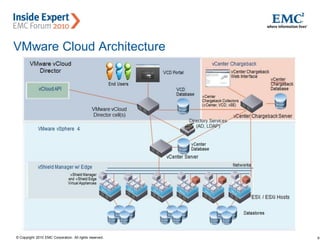
VMware Cloud Architecture
10© Copyright 2010 EMC Corporation. All rights reserved.
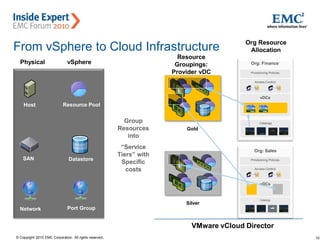
Gold” vDC
Physical
Group
Resources
into
“Service
Tiers” with
Specific
costs
Resource
Groupings:
Provider vDC
Org Resource
Allocation
Org: Finance
Access Control
vDCs
Catalogs
Provisioning Policies
Org: Sales
Access Control
vDCs
Catalogs
Provisioning Policies
Host
Network
SAN
vSphere
Resource Pool
Datastore
Port Group
VMware vCloud Director
Gold
Silver
From vSphere to Cloud Infrastructure
11© Copyright 2010 EMC Corporation. All rights reserved.
Agenda
 VMware Cloud Components and Licensing
 VMware Cloud Architecture
 Deploying a VMware Cloud
 Cloud use cases
12© Copyright 2010 EMC Corporation. All rights reserved.
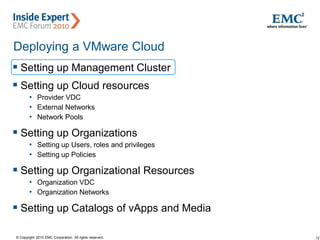
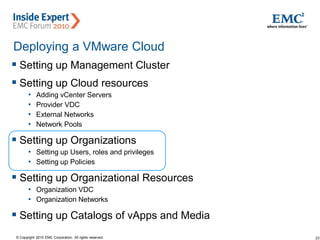
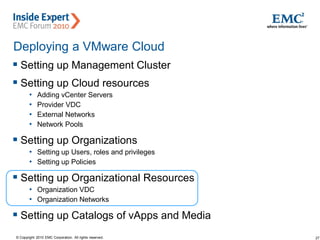
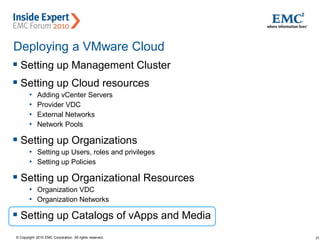
Deploying a VMware Cloud
 Setting up Management Cluster
 Setting up Cloud resources
• Provider VDC
• External Networks
• Network Pools
 Setting up Organizations
• Setting up Users, roles and privileges
• Setting up Policies
 Setting up Organizational Resources
• Organization VDC
• Organization Networks
 Setting up Catalogs of vApps and Media
13© Copyright 2010 EMC Corporation. All rights reserved.
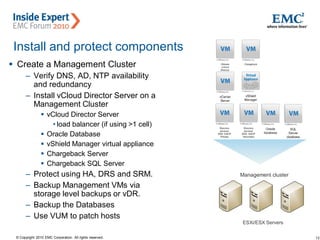
Install and protect components
 Create a Management Cluster
– Verify DNS, AD, NTP availability
and redundancy
– Install vCloud Director Server on a
Management Cluster
 vCloud Director Server
• load balancer (if using >1 cell)
 Oracle Database
 vShield Manager virtual appliance
 Chargeback Server
 Chargeback SQL Server
– Protect using HA, DRS and SRM.
– Backup Management VMs via
storage level backups or vDR.
– Backup the Databases
– Use VUM to patch hosts
Management cluster
ESXi/ESX Servers
14© Copyright 2010 EMC Corporation. All rights reserved.
Deploying a VMware Cloud
 Setting up Management Cluster
 Setting up Cloud resources
• vCenter Servers
• Provider VDC
• External Networks
• Network Pools
 Setting up Organizations
• Setting up Users, roles and privileges
• Setting up Policies
 Setting up Organizational Resources
• Organization VDC
• Organization Networks
 Setting up Catalogs of vApps and Media
15© Copyright 2010 EMC Corporation. All rights reserved.
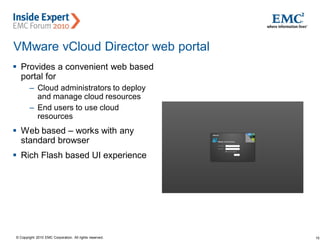
VMware vCloud Director web portal
 Provides a convenient web based
portal for
– Cloud administrators to deploy
and manage cloud resources
– End users to use cloud
resources
 Web based – works with any
standard browser
 Rich Flash based UI experience
16© Copyright 2010 EMC Corporation. All rights reserved.
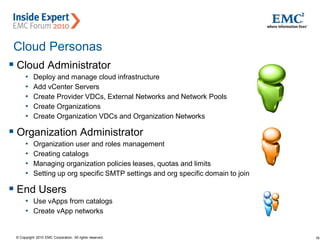
Cloud Personas
 Cloud Administrator
• Deploy and manage cloud infrastructure
• Add vCenter Servers
• Create Provider VDCs, External Networks and Network Pools
• Create Organizations
• Create Organization VDCs and Organization Networks
 Organization Administrator
• Organization user and roles management
• Creating catalogs
• Managing organization policies leases, quotas and limits
• Setting up org specific SMTP settings and org specific domain to join
 End Users
• Use vApps from catalogs
• Create vApp networks
17© Copyright 2010 EMC Corporation. All rights reserved.
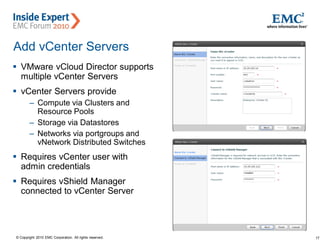
Add vCenter Servers
 VMware vCloud Director supports
multiple vCenter Servers
 vCenter Servers provide
– Compute via Clusters and
Resource Pools
– Storage via Datastores
– Networks via portgroups and
vNetwork Distributed Switches
 Requires vCenter user with
admin credentials
 Requires vShield Manager
connected to vCenter Server
18© Copyright 2010 EMC Corporation. All rights reserved.
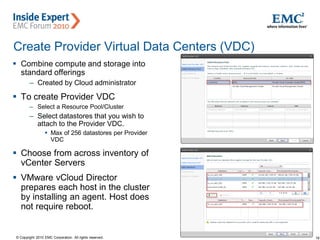
Create Provider Virtual Data Centers (VDC)
 Combine compute and storage into
standard offerings
– Created by Cloud administrator
 To create Provider VDC
– Select a Resource Pool/Cluster
– Select datastores that you wish to
attach to the Provider VDC.
 Max of 256 datastores per Provider
VDC
 Choose from across inventory of
vCenter Servers
 VMware vCloud Director
prepares each host in the cluster
by installing an agent. Host does
not require reboot.
19© Copyright 2010 EMC Corporation. All rights reserved.
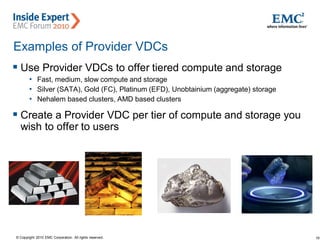
Examples of Provider VDCs
 Use Provider VDCs to offer tiered compute and storage
• Fast, medium, slow compute and storage
• Silver (SATA), Gold (FC), Platinum (EFD), Unobtainium (aggregate) storage
• Nehalem based clusters, AMD based clusters
 Create a Provider VDC per tier of compute and storage you
wish to offer to users
20© Copyright 2010 EMC Corporation. All rights reserved.
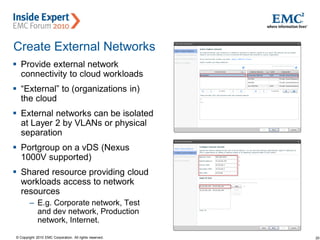
Create External Networks
 Provide external network
connectivity to cloud workloads
 “External” to (organizations in)
the cloud
 External networks can be isolated
at Layer 2 by VLANs or physical
separation
 Portgroup on a vDS (Nexus
1000V supported)
 Shared resource providing cloud
workloads access to network
resources
– E.g. Corporate network, Test
and dev network, Production
network, Internet.
21© Copyright 2010 EMC Corporation. All rights reserved.
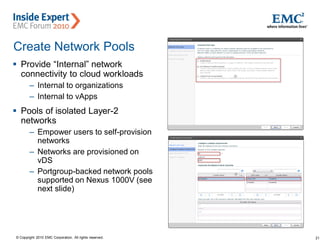
Create Network Pools
 Provide “Internal” network
connectivity to cloud workloads
– Internal to organizations
– Internal to vApps
 Pools of isolated Layer-2
networks
– Empower users to self-provision
networks
– Networks are provisioned on
vDS
– Portgroup-backed network pools
supported on Nexus 1000V (see
next slide)
22© Copyright 2010 EMC Corporation. All rights reserved.
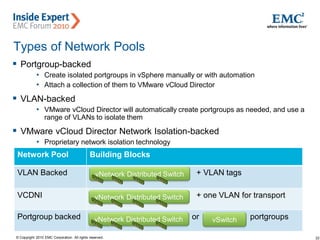
Types of Network Pools
 Portgroup-backed
• Create isolated portgroups in vSphere manually or with automation
• Attach a collection of them to VMware vCloud Director
 VLAN-backed
• VMware vCloud Director will automatically create portgroups as needed, and use a
range of VLANs to isolate them
 VMware vCloud Director Network Isolation-backed
• Proprietary network isolation technology
Network Pool Building Blocks
VLAN Backed + VLAN tags
VCDNI + one VLAN for transport
Portgroup backed or portgroupsvSwitchvNetwork Distributed Switch
vNetwork Distributed Switch
23© Copyright 2010 EMC Corporation. All rights reserved.
Deploying a VMware Cloud
 Setting up Management Cluster
 Setting up Cloud resources
• Adding vCenter Servers
• Provider VDC
• External Networks
• Network Pools
 Setting up Organizations
• Setting up Users, roles and privileges
• Setting up Policies
 Setting up Organizational Resources
• Organization VDC
• Organization Networks
 Setting up Catalogs of vApps and Media
24© Copyright 2010 EMC Corporation. All rights reserved.
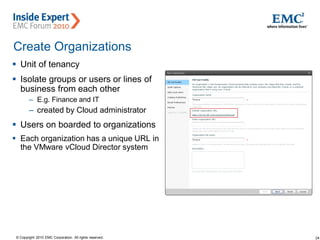
Create Organizations
 Unit of tenancy
 Isolate groups or users or lines of
business from each other
– E.g. Finance and IT
– created by Cloud administrator
 Users on boarded to organizations
 Each organization has a unique URL in
the VMware vCloud Director system
25© Copyright 2010 EMC Corporation. All rights reserved.
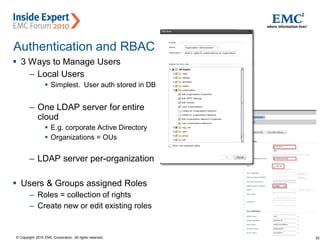
Authentication and RBAC
 3 Ways to Manage Users
– Local Users
 Simplest. User auth stored in DB
– One LDAP server for entire
cloud
 E.g. corporate Active Directory
 Organizations = OUs
– LDAP server per-organization
 Users & Groups assigned Roles
– Roles = collection of rights
– Create new or edit existing roles
26© Copyright 2010 EMC Corporation. All rights reserved.
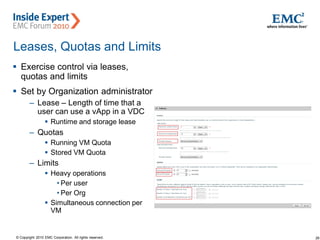
Leases, Quotas and Limits
 Exercise control via leases,
quotas and limits
 Set by Organization administrator
– Lease – Length of time that a
user can use a vApp in a VDC
 Runtime and storage lease
– Quotas
 Running VM Quota
 Stored VM Quota
– Limits
 Heavy operations
• Per user
• Per Org
 Simultaneous connection per
VM
27© Copyright 2010 EMC Corporation. All rights reserved.
Deploying a VMware Cloud
 Setting up Management Cluster
 Setting up Cloud resources
• Adding vCenter Servers
• Provider VDC
• External Networks
• Network Pools
 Setting up Organizations
• Setting up Users, roles and privileges
• Setting up Policies
 Setting up Organizational Resources
• Organization VDC
• Organization Networks
 Setting up Catalogs of vApps and Media
28© Copyright 2010 EMC Corporation. All rights reserved.
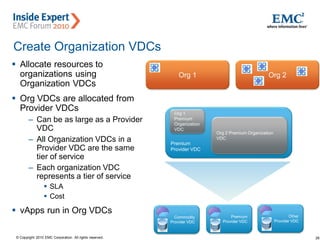
Create Organization VDCs
 Allocate resources to
organizations using
Organization VDCs
 Org VDCs are allocated from
Provider VDCs
– Can be as large as a Provider
VDC
– All Organization VDCs in a
Provider VDC are the same
tier of service
– Each organization VDC
represents a tier of service
 SLA
 Cost
 vApps run in Org VDCs
Premium
Provider VDC
Commodity
Provider VDC
Org 1
Premium
Organization
VDC
Org 2 Premium Organization
VDC
Org 1 Org 2
Premium
Provider VDC
Other
Provider VDC
29© Copyright 2010 EMC Corporation. All rights reserved.
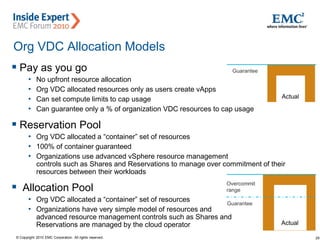
Org VDC Allocation Models
 Pay as you go
• No upfront resource allocation
• Org VDC allocated resources only as users create vApps
• Can set compute limits to cap usage
• Can guarantee only a % of organization VDC resources to cap usage
 Reservation Pool
• Org VDC allocated a “container” set of resources
• 100% of container guaranteed
• Organizations use advanced vSphere resource management
controls such as Shares and Reservations to manage over commitment of their
resources between their workloads
 Allocation Pool
• Org VDC allocated a “container” set of resources
• Organizations have very simple model of resources and
advanced resource management controls such as Shares and
Reservations are managed by the cloud operator Actual
Guarantee
Overcommit
range
Actual
Guarantee
30© Copyright 2010 EMC Corporation. All rights reserved.
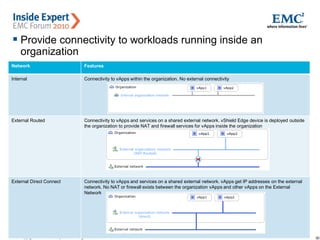
Create Organization Networks
 Provide connectivity to workloads running inside an
organization
Network Features
Internal Connectivity to vApps within the organization. No external connectivity
External Routed Connectivity to vApps and services on a shared external network. vShield Edge device is deployed outside
the organization to provide NAT and firewall services for vApps inside the organization
External Direct Connect Connectivity to vApps and services on a shared external network. vApps get IP addresses on the external
network. No NAT or firewall exists between the organization vApps and other vApps on the External
Network
31© Copyright 2010 EMC Corporation. All rights reserved.
Deploying a VMware Cloud
 Setting up Management Cluster
 Setting up Cloud resources
• Adding vCenter Servers
• Provider VDC
• External Networks
• Network Pools
 Setting up Organizations
• Setting up Users, roles and privileges
• Setting up Policies
 Setting up Organizational Resources
• Organization VDC
• Organization Networks
 Setting up Catalogs of vApps and Media
32© Copyright 2010 EMC Corporation. All rights reserved.
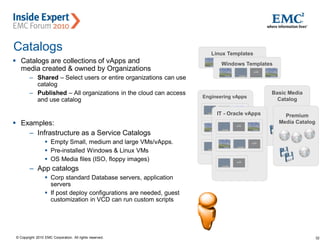
Catalogs
 Catalogs are collections of vApps and
media created & owned by Organizations
– Shared – Select users or entire organizations can use
catalog
– Published – All organizations in the cloud can access
and use catalog
 Examples:
– Infrastructure as a Service Catalogs
 Empty Small, medium and large VMs/vApps.
 Pre-installed Windows & Linux VMs
 OS Media files (ISO, floppy images)
– App catalogs
 Corp standard Database servers, application
servers
 If post deploy configurations are needed, guest
customization in VCD can run custom scripts
Linux Templates
Windows Templates
Engineering vApps
Basic Media
Catalog
IT - Oracle vApps Premium
Media Catalog
33© Copyright 2010 EMC Corporation. All rights reserved.
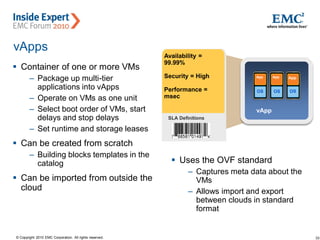
vApps
 Container of one or more VMs
– Package up multi-tier
applications into vApps
– Operate on VMs as one unit
– Select boot order of VMs, start
delays and stop delays
– Set runtime and storage leases
 Can be created from scratch
– Building blocks templates in the
catalog
 Can be imported from outside the
cloud
Availability =
99.99%
Security = High
Performance =
msec
SLA Definitions
vApp
App
OS
App
OS
App
OS
 Uses the OVF standard
– Captures meta data about the
VMs
– Allows import and export
between clouds in standard
format
34© Copyright 2010 EMC Corporation. All rights reserved.
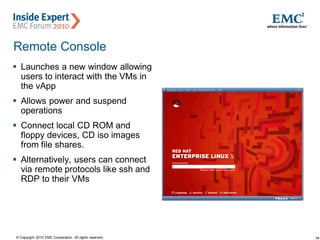
Remote Console
 Launches a new window allowing
users to interact with the VMs in
the vApp
 Allows power and suspend
operations
 Connect local CD ROM and
floppy devices, CD iso images
from file shares.
 Alternatively, users can connect
via remote protocols like ssh and
RDP to their VMs
35© Copyright 2010 EMC Corporation. All rights reserved.
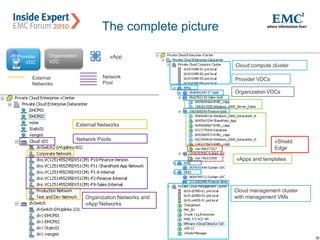
The complete picture
Provider
VDC
Organization
VDC
vApp
vCenter
Server 1
vCenter
Server 2
vCenter
Server n
VMware vCloud Director
Clusters,
datastores,
portgroups
Clusters,
datastores,
portgroups
Clusters,
datastores,
portgroups
Cloud compute cluster
Cloud management cluster
with management VMs
Provider VDCs
Organization VDCs
vApps and templates
vShield
Edge
Network
Pool
External
Networks
External Networks
Network Pools
Organization Networks and
vApp Networks
36© Copyright 2010 EMC Corporation. All rights reserved.
Agenda
 VMware Cloud Components and Licensing
 VMware Cloud Architecture
 Deploying a VMware Cloud
 Cloud use cases
37© Copyright 2010 EMC Corporation. All rights reserved.
Elastic and Seasonal Workloads
 Elastic workloads
• Scale up and down based on load easily by adding or removing
• ESXi/ESX Servers to Provider VDC
• Datastores to Provider VDCs
• vCenter Servers
• VMware vCloud Director cells
• E.g. Monte Carlo simulations
 Seasonal Workloads
• Avoid having to purchase and maintain capacity through out the year for workloads
that are seasonal
• E.g. Tax season workloads, end of quarter accounting workloads
• Scale up resources during the season and scale down resources in the off season.
38© Copyright 2010 EMC Corporation. All rights reserved.
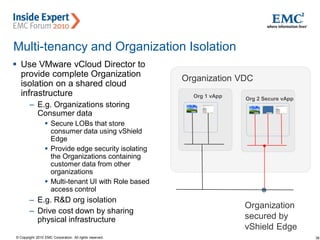
Multi-tenancy and Organization Isolation
 Use VMware vCloud Director to
provide complete Organization
isolation on a shared cloud
infrastructure
– E.g. Organizations storing
Consumer data
 Secure LOBs that store
consumer data using vShield
Edge
 Provide edge security isolating
the Organizations containing
customer data from other
organizations
 Multi-tenant UI with Role based
access control
– E.g. R&D org isolation
– Drive cost down by sharing
physical infrastructure
Org 2 Secure vApp
Org 1 vApp
Organization VDC
Organization
secured by
vShield Edge
39© Copyright 2010 EMC Corporation. All rights reserved.
Product/Solution Demo, Training and Support
 Demo use case
• Maintain a catalog of demos
• Systems Engineers can deploy demo vApps quickly with short deployment and
storage leases for demo purposes
 Training and remote education use cases
• Training administrator maintains course offerings in vApps
• Easily on-board students and associate roles and permissions
• Students can deploy course offerings into their cloud without IT intervention
 Customer support and troubleshooting use cases
• Quickly spin up vApps to test customer configurations with minimal IT intervention
• Each vApp has short deployment and storage lease to save on resources
• Fence vApps to deploy multiple copies of vApps on shared networks
40© Copyright 2010 EMC Corporation. All rights reserved.
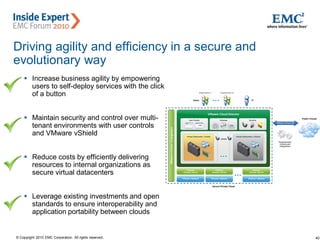
Driving agility and efficiency in a secure and
evolutionary way
 Increase business agility by empowering
users to self-deploy services with the click
of a button
 Maintain security and control over multi-
tenant environments with user controls
and VMware vShield
 Reduce costs by efficiently delivering
resources to internal organizations as
secure virtual datacenters
 Leverage existing investments and open
standards to ensure interoperability and
application portability between clouds
41© Copyright 2010 EMC Corporation. All rights reserved.
Call to Action
• Get educated and experienced!
– Download the software and 60-day evaluation licenses
– Follow the Evaluator’s Guides to learn about features
– Pursue training opportunities when available
• Encourage customers to be “cloud ready”
– VMware vCloud Director and the Private Cloud runs best on Enterprise Plus with
features such as the vDS, I/O Controls, DRS, and vShield
– Leverage customers’ excitement for the cloud as an opportunity to progress to
Enterprise Plus, push continued virtualisation of tier-1 applications, and promote
management products such as Capacity IQ.
• Start customers on “The Journey to the Cloud”
– Identify specific customers looking to develop virtualization maturity, vision and scale.
– Begin discussions around process and business operations to support IT-as-a-
Service models
42© Copyright 2010 EMC Corporation. All rights reserved.
Want more?
• Upcoming vmLIVE sessions
• Partner Central
• vmware.com
– vCloud Director - http://www.vmware.com/products/vcloud-director/
– vShield - http://www.vmware.com/products/vshield/
– vCenter - http://www.vmware.com/products/vcenter/
– 60-day evaluations - http://www.vmware.com/tryvmware.html
– Evaluator’s Guides
• vForum 2010
– Sydney, Australia – 26-27 October 2010
Presentation   v mware v-cloud director technical overview

Presentation v mware v-cloud director technical overview

  • 1.
    1© Copyright 2010EMC Corporation. All rights reserved. VMware vCloud Director Technical Overview Nathan Wheat, VMware Senior Systems Engineer
  • 2.
    2© Copyright 2010EMC Corporation. All rights reserved. VMware Accelerating the Journey to CloudCloud Computing is an approach to computing that leverages the efficient pooling of on-demand, self-managed virtual infrastructure, consumed as a service. Pooling From machines to highly elastic resource pools, with on- demand capacity Zero-Touch Infrastructure Policy-driven automation of provisioning, deployment and management Self-Service Easy access with policy- based provisioning and deployment Control Application-aware infrastructure with built-in availability, scalability, security and performance guarantees Open & Interoperable Application mobility between clouds, based on open standards Leverage Existing Investments Benefits of cloud computing to existing applications and datacenters Efficiency thru Utilization and Automation Agility with Control Freedom of Choice
  • 3.
    3© Copyright 2010EMC Corporation. All rights reserved. Agenda  VMware Cloud Components and Licensing  VMware Cloud Architecture  Deploying a VMware Cloud  Cloud use cases
  • 4.
    4© Copyright 2010EMC Corporation. All rights reserved. VMware Cloud Components  VMware vSphere and vCenter Servers  VMware vCloud Director  VMware vShield for VMware vCloud Director  Chargeback Server
  • 5.
    5© Copyright 2010EMC Corporation. All rights reserved. VMware vSphere and vCenter Server  Clusters and Resource Pools – Provide cloud compute – DRS is a requirement for the cluster  Shared storage  vMotion compatible or EVC enabled  Datastores – Provide cloud storage – Abstract away underlying storage type  Portgroups – Provide cloud networking – Abstract away underlying networking infrastructure – vSwitch, vNetwork Distributed Switch or Nexus 1000V FC Storage vNetwork Distributed Switch vSphere Cluster/Resource Pool iSCSI Storage NFS Storage vCenter Server ESXi/ESX hosts
  • 6.
    6© Copyright 2010EMC Corporation. All rights reserved. VMware vCloud Director  Define standard infrastructure tiers called Virtual Datacenters – Pool virtualized infrastructure resources across multiple vCenter Servers  Define standard collections of VMs called vApps  Create Organizations and manage users with RBAC  Provide UI for users to self provision vApps into Virtual Datacenters  Provide secure multi-tenancy using vShield Edge
  • 7.
    7© Copyright 2010EMC Corporation. All rights reserved. VMware vShield for VMware vCloud Director  VMware vShield Edge provides end point security • Available for download with vSphere Enterprise and Enterprise Plus.  One vShield Manager required per vCenter Server • Provides network edge security • Provides firewall, NAT, port forwarding, IP masquerading and DHCP functionality (enforces multi-tenancy) • Edge appliances deployed and managed by VMware vCloud Director on vSphere. • Separate client not required. • Does not require separate database  Licensing • Free but requires license key during configuration • Upgradable to vShield Edge 1.0 (full version which includes site-to-site VPN and load balancer)
  • 8.
    8© Copyright 2010EMC Corporation. All rights reserved. Agenda  VMware Cloud Components and Licensing  VMware Cloud Architecture  Deploying a VMware Cloud  Cloud use cases
  • 9.
    9© Copyright 2010EMC Corporation. All rights reserved. VMware Cloud Architecture
  • 10.
    10© Copyright 2010EMC Corporation. All rights reserved. Gold” vDC Physical Group Resources into “Service Tiers” with Specific costs Resource Groupings: Provider vDC Org Resource Allocation Org: Finance Access Control vDCs Catalogs Provisioning Policies Org: Sales Access Control vDCs Catalogs Provisioning Policies Host Network SAN vSphere Resource Pool Datastore Port Group VMware vCloud Director Gold Silver From vSphere to Cloud Infrastructure
  • 11.
    11© Copyright 2010EMC Corporation. All rights reserved. Agenda  VMware Cloud Components and Licensing  VMware Cloud Architecture  Deploying a VMware Cloud  Cloud use cases
  • 12.
    12© Copyright 2010EMC Corporation. All rights reserved. Deploying a VMware Cloud  Setting up Management Cluster  Setting up Cloud resources • Provider VDC • External Networks • Network Pools  Setting up Organizations • Setting up Users, roles and privileges • Setting up Policies  Setting up Organizational Resources • Organization VDC • Organization Networks  Setting up Catalogs of vApps and Media
  • 13.
    13© Copyright 2010EMC Corporation. All rights reserved. Install and protect components  Create a Management Cluster – Verify DNS, AD, NTP availability and redundancy – Install vCloud Director Server on a Management Cluster  vCloud Director Server • load balancer (if using >1 cell)  Oracle Database  vShield Manager virtual appliance  Chargeback Server  Chargeback SQL Server – Protect using HA, DRS and SRM. – Backup Management VMs via storage level backups or vDR. – Backup the Databases – Use VUM to patch hosts Management cluster ESXi/ESX Servers
  • 14.
    14© Copyright 2010EMC Corporation. All rights reserved. Deploying a VMware Cloud  Setting up Management Cluster  Setting up Cloud resources • vCenter Servers • Provider VDC • External Networks • Network Pools  Setting up Organizations • Setting up Users, roles and privileges • Setting up Policies  Setting up Organizational Resources • Organization VDC • Organization Networks  Setting up Catalogs of vApps and Media
  • 15.
    15© Copyright 2010EMC Corporation. All rights reserved. VMware vCloud Director web portal  Provides a convenient web based portal for – Cloud administrators to deploy and manage cloud resources – End users to use cloud resources  Web based – works with any standard browser  Rich Flash based UI experience
  • 16.
    16© Copyright 2010EMC Corporation. All rights reserved. Cloud Personas  Cloud Administrator • Deploy and manage cloud infrastructure • Add vCenter Servers • Create Provider VDCs, External Networks and Network Pools • Create Organizations • Create Organization VDCs and Organization Networks  Organization Administrator • Organization user and roles management • Creating catalogs • Managing organization policies leases, quotas and limits • Setting up org specific SMTP settings and org specific domain to join  End Users • Use vApps from catalogs • Create vApp networks
  • 17.
    17© Copyright 2010EMC Corporation. All rights reserved. Add vCenter Servers  VMware vCloud Director supports multiple vCenter Servers  vCenter Servers provide – Compute via Clusters and Resource Pools – Storage via Datastores – Networks via portgroups and vNetwork Distributed Switches  Requires vCenter user with admin credentials  Requires vShield Manager connected to vCenter Server
  • 18.
    18© Copyright 2010EMC Corporation. All rights reserved. Create Provider Virtual Data Centers (VDC)  Combine compute and storage into standard offerings – Created by Cloud administrator  To create Provider VDC – Select a Resource Pool/Cluster – Select datastores that you wish to attach to the Provider VDC.  Max of 256 datastores per Provider VDC  Choose from across inventory of vCenter Servers  VMware vCloud Director prepares each host in the cluster by installing an agent. Host does not require reboot.
  • 19.
    19© Copyright 2010EMC Corporation. All rights reserved. Examples of Provider VDCs  Use Provider VDCs to offer tiered compute and storage • Fast, medium, slow compute and storage • Silver (SATA), Gold (FC), Platinum (EFD), Unobtainium (aggregate) storage • Nehalem based clusters, AMD based clusters  Create a Provider VDC per tier of compute and storage you wish to offer to users
  • 20.
    20© Copyright 2010EMC Corporation. All rights reserved. Create External Networks  Provide external network connectivity to cloud workloads  “External” to (organizations in) the cloud  External networks can be isolated at Layer 2 by VLANs or physical separation  Portgroup on a vDS (Nexus 1000V supported)  Shared resource providing cloud workloads access to network resources – E.g. Corporate network, Test and dev network, Production network, Internet.
  • 21.
    21© Copyright 2010EMC Corporation. All rights reserved. Create Network Pools  Provide “Internal” network connectivity to cloud workloads – Internal to organizations – Internal to vApps  Pools of isolated Layer-2 networks – Empower users to self-provision networks – Networks are provisioned on vDS – Portgroup-backed network pools supported on Nexus 1000V (see next slide)
  • 22.
    22© Copyright 2010EMC Corporation. All rights reserved. Types of Network Pools  Portgroup-backed • Create isolated portgroups in vSphere manually or with automation • Attach a collection of them to VMware vCloud Director  VLAN-backed • VMware vCloud Director will automatically create portgroups as needed, and use a range of VLANs to isolate them  VMware vCloud Director Network Isolation-backed • Proprietary network isolation technology Network Pool Building Blocks VLAN Backed + VLAN tags VCDNI + one VLAN for transport Portgroup backed or portgroupsvSwitchvNetwork Distributed Switch vNetwork Distributed Switch vNetwork Distributed Switch
  • 23.
    23© Copyright 2010EMC Corporation. All rights reserved. Deploying a VMware Cloud  Setting up Management Cluster  Setting up Cloud resources • Adding vCenter Servers • Provider VDC • External Networks • Network Pools  Setting up Organizations • Setting up Users, roles and privileges • Setting up Policies  Setting up Organizational Resources • Organization VDC • Organization Networks  Setting up Catalogs of vApps and Media
  • 24.
    24© Copyright 2010EMC Corporation. All rights reserved. Create Organizations  Unit of tenancy  Isolate groups or users or lines of business from each other – E.g. Finance and IT – created by Cloud administrator  Users on boarded to organizations  Each organization has a unique URL in the VMware vCloud Director system
  • 25.
    25© Copyright 2010EMC Corporation. All rights reserved. Authentication and RBAC  3 Ways to Manage Users – Local Users  Simplest. User auth stored in DB – One LDAP server for entire cloud  E.g. corporate Active Directory  Organizations = OUs – LDAP server per-organization  Users & Groups assigned Roles – Roles = collection of rights – Create new or edit existing roles
  • 26.
    26© Copyright 2010EMC Corporation. All rights reserved. Leases, Quotas and Limits  Exercise control via leases, quotas and limits  Set by Organization administrator – Lease – Length of time that a user can use a vApp in a VDC  Runtime and storage lease – Quotas  Running VM Quota  Stored VM Quota – Limits  Heavy operations • Per user • Per Org  Simultaneous connection per VM
  • 27.
    27© Copyright 2010EMC Corporation. All rights reserved. Deploying a VMware Cloud  Setting up Management Cluster  Setting up Cloud resources • Adding vCenter Servers • Provider VDC • External Networks • Network Pools  Setting up Organizations • Setting up Users, roles and privileges • Setting up Policies  Setting up Organizational Resources • Organization VDC • Organization Networks  Setting up Catalogs of vApps and Media
  • 28.
    28© Copyright 2010EMC Corporation. All rights reserved. Create Organization VDCs  Allocate resources to organizations using Organization VDCs  Org VDCs are allocated from Provider VDCs – Can be as large as a Provider VDC – All Organization VDCs in a Provider VDC are the same tier of service – Each organization VDC represents a tier of service  SLA  Cost  vApps run in Org VDCs Premium Provider VDC Commodity Provider VDC Org 1 Premium Organization VDC Org 2 Premium Organization VDC Org 1 Org 2 Premium Provider VDC Other Provider VDC
  • 29.
    29© Copyright 2010EMC Corporation. All rights reserved. Org VDC Allocation Models  Pay as you go • No upfront resource allocation • Org VDC allocated resources only as users create vApps • Can set compute limits to cap usage • Can guarantee only a % of organization VDC resources to cap usage  Reservation Pool • Org VDC allocated a “container” set of resources • 100% of container guaranteed • Organizations use advanced vSphere resource management controls such as Shares and Reservations to manage over commitment of their resources between their workloads  Allocation Pool • Org VDC allocated a “container” set of resources • Organizations have very simple model of resources and advanced resource management controls such as Shares and Reservations are managed by the cloud operator Actual Guarantee Overcommit range Actual Guarantee
  • 30.
    30© Copyright 2010EMC Corporation. All rights reserved. Create Organization Networks  Provide connectivity to workloads running inside an organization Network Features Internal Connectivity to vApps within the organization. No external connectivity External Routed Connectivity to vApps and services on a shared external network. vShield Edge device is deployed outside the organization to provide NAT and firewall services for vApps inside the organization External Direct Connect Connectivity to vApps and services on a shared external network. vApps get IP addresses on the external network. No NAT or firewall exists between the organization vApps and other vApps on the External Network
  • 31.
    31© Copyright 2010EMC Corporation. All rights reserved. Deploying a VMware Cloud  Setting up Management Cluster  Setting up Cloud resources • Adding vCenter Servers • Provider VDC • External Networks • Network Pools  Setting up Organizations • Setting up Users, roles and privileges • Setting up Policies  Setting up Organizational Resources • Organization VDC • Organization Networks  Setting up Catalogs of vApps and Media
  • 32.
    32© Copyright 2010EMC Corporation. All rights reserved. Catalogs  Catalogs are collections of vApps and media created & owned by Organizations – Shared – Select users or entire organizations can use catalog – Published – All organizations in the cloud can access and use catalog  Examples: – Infrastructure as a Service Catalogs  Empty Small, medium and large VMs/vApps.  Pre-installed Windows & Linux VMs  OS Media files (ISO, floppy images) – App catalogs  Corp standard Database servers, application servers  If post deploy configurations are needed, guest customization in VCD can run custom scripts Linux Templates Windows Templates Engineering vApps Basic Media Catalog IT - Oracle vApps Premium Media Catalog
  • 33.
    33© Copyright 2010EMC Corporation. All rights reserved. vApps  Container of one or more VMs – Package up multi-tier applications into vApps – Operate on VMs as one unit – Select boot order of VMs, start delays and stop delays – Set runtime and storage leases  Can be created from scratch – Building blocks templates in the catalog  Can be imported from outside the cloud Availability = 99.99% Security = High Performance = msec SLA Definitions vApp App OS App OS App OS  Uses the OVF standard – Captures meta data about the VMs – Allows import and export between clouds in standard format
  • 34.
    34© Copyright 2010EMC Corporation. All rights reserved. Remote Console  Launches a new window allowing users to interact with the VMs in the vApp  Allows power and suspend operations  Connect local CD ROM and floppy devices, CD iso images from file shares.  Alternatively, users can connect via remote protocols like ssh and RDP to their VMs
  • 35.
    35© Copyright 2010EMC Corporation. All rights reserved. The complete picture Provider VDC Organization VDC vApp vCenter Server 1 vCenter Server 2 vCenter Server n VMware vCloud Director Clusters, datastores, portgroups Clusters, datastores, portgroups Clusters, datastores, portgroups Cloud compute cluster Cloud management cluster with management VMs Provider VDCs Organization VDCs vApps and templates vShield Edge Network Pool External Networks External Networks Network Pools Organization Networks and vApp Networks
  • 36.
    36© Copyright 2010EMC Corporation. All rights reserved. Agenda  VMware Cloud Components and Licensing  VMware Cloud Architecture  Deploying a VMware Cloud  Cloud use cases
  • 37.
    37© Copyright 2010EMC Corporation. All rights reserved. Elastic and Seasonal Workloads  Elastic workloads • Scale up and down based on load easily by adding or removing • ESXi/ESX Servers to Provider VDC • Datastores to Provider VDCs • vCenter Servers • VMware vCloud Director cells • E.g. Monte Carlo simulations  Seasonal Workloads • Avoid having to purchase and maintain capacity through out the year for workloads that are seasonal • E.g. Tax season workloads, end of quarter accounting workloads • Scale up resources during the season and scale down resources in the off season.
  • 38.
    38© Copyright 2010EMC Corporation. All rights reserved. Multi-tenancy and Organization Isolation  Use VMware vCloud Director to provide complete Organization isolation on a shared cloud infrastructure – E.g. Organizations storing Consumer data  Secure LOBs that store consumer data using vShield Edge  Provide edge security isolating the Organizations containing customer data from other organizations  Multi-tenant UI with Role based access control – E.g. R&D org isolation – Drive cost down by sharing physical infrastructure Org 2 Secure vApp Org 1 vApp Organization VDC Organization secured by vShield Edge
  • 39.
    39© Copyright 2010EMC Corporation. All rights reserved. Product/Solution Demo, Training and Support  Demo use case • Maintain a catalog of demos • Systems Engineers can deploy demo vApps quickly with short deployment and storage leases for demo purposes  Training and remote education use cases • Training administrator maintains course offerings in vApps • Easily on-board students and associate roles and permissions • Students can deploy course offerings into their cloud without IT intervention  Customer support and troubleshooting use cases • Quickly spin up vApps to test customer configurations with minimal IT intervention • Each vApp has short deployment and storage lease to save on resources • Fence vApps to deploy multiple copies of vApps on shared networks
  • 40.
    40© Copyright 2010EMC Corporation. All rights reserved. Driving agility and efficiency in a secure and evolutionary way  Increase business agility by empowering users to self-deploy services with the click of a button  Maintain security and control over multi- tenant environments with user controls and VMware vShield  Reduce costs by efficiently delivering resources to internal organizations as secure virtual datacenters  Leverage existing investments and open standards to ensure interoperability and application portability between clouds
  • 41.
    41© Copyright 2010EMC Corporation. All rights reserved. Call to Action • Get educated and experienced! – Download the software and 60-day evaluation licenses – Follow the Evaluator’s Guides to learn about features – Pursue training opportunities when available • Encourage customers to be “cloud ready” – VMware vCloud Director and the Private Cloud runs best on Enterprise Plus with features such as the vDS, I/O Controls, DRS, and vShield – Leverage customers’ excitement for the cloud as an opportunity to progress to Enterprise Plus, push continued virtualisation of tier-1 applications, and promote management products such as Capacity IQ. • Start customers on “The Journey to the Cloud” – Identify specific customers looking to develop virtualization maturity, vision and scale. – Begin discussions around process and business operations to support IT-as-a- Service models
  • 42.
    42© Copyright 2010EMC Corporation. All rights reserved. Want more? • Upcoming vmLIVE sessions • Partner Central • vmware.com – vCloud Director - http://www.vmware.com/products/vcloud-director/ – vShield - http://www.vmware.com/products/vshield/ – vCenter - http://www.vmware.com/products/vcenter/ – 60-day evaluations - http://www.vmware.com/tryvmware.html – Evaluator’s Guides • vForum 2010 – Sydney, Australia – 26-27 October 2010