UVM
Quick Reference Guide
Author: Ankit Sharma
M.Tech(IIT KANPUR)
Email id: Ankitglbitm@gmail.com
Table ofContents
1. UVM TB Architecture.................................................................................................................. 7
1.1 UVM TB Architecture.......................................................................................................... 7
2. UVM Factory................................................................................................................................. 8
2.1 Introduction........................................................................................................................... 8
2.1.1 Steps to Use Factory...................................................................................................... 8
2.2 Factory Registration .............................................................................................................8
2.2.1 `uvm_component_utils.................................................................................................. 8
2.2.2 `uvm_object_utils ..........................................................................................................8
2.2.3 `uvm_component_param_utils ....................................................................................9
2.2.4 `uvm_object_param_utils............................................................................................. 9
2.3 Constructor Definitions for UVM components and objects..............................................9
2.3.1 constructor of a component..........................................................................................9
2.3.2 constructor of an object..............................................................................................10 2.4
Factory Overriding .............................................................................................................10
2.4.1 set_type_override_by_type......................................................................................... 10
2.4.2 set_inst_override_by_type..........................................................................................10 2.5
Create Method..................................................................................................................... 11
3. Stimulus Modelling .....................................................................................................................11
3.1 Introduction - Stimulus ......................................................................................................11
3.1.1 Steps to define stimulus ..............................................................................................11
3.2 Field Registration Macros ..................................................................................................11
3.2.1 List of Field Registration Macros Available .............................................................11
3.2.2 Definition of a transaction class with Macros........................................................... 12
3.3 Methods of Transaction class............................................................................................. 12
3.3.1 copy & do_copy method .............................................................................................12
3.3.2 clone method................................................................................................................13
3.3.3 compare & do_compare method................................................................................13
3.3.4 print & do_print method............................................................................................13
2
4. UVM Phases ................................................................................................................................14
4.1 Introduction......................................................................................................................... 14
4.2 Pre run phases..................................................................................................................... 14
4.2.1 build_phase..................................................................................................................14
4.2.2 connect_phase.............................................................................................................. 14
4.2.3 end_of_elaboration_phase.......................................................................................... 14
4.2.4 start_of_simulation_phase.......................................................................................... 14
4.3 run_phase.............................................................................................................................15
4.4 Post Run Phases ..................................................................................................................15
4.4.1 extract_phase...............................................................................................................15
4.4.2 check_phase.................................................................................................................15
4.4.3 report_phase................................................................................................................ 15
4.4.4 final_phase ...................................................................................................................15
4.5 Objection Mechanism .........................................................................................................15
5. Reporting Mechanism.................................................................................................................16
5.1 Introduction......................................................................................................................... 16
5.2 UVM Reporting Macros.....................................................................................................16
5.3 Verbosity Settings ...............................................................................................................16
5.4 Command line options........................................................................................................17
5.4.1 +UVM_VERBOSITY .................................................................................................17
5.4.2 +UVM_REPORT_DISABLE_FILE_LINE.............................................................. 17
6. TLM – Transaction Level Modelling ........................................................................................18
6.1 Introduction......................................................................................................................... 18
6.2 Blocking Get Port................................................................................................................ 18
6.3 Blocking Put Port................................................................................................................ 19
6.4 Connecting TLM Ports....................................................................................................... 20
6.5 Analysis Ports ......................................................................................................................20
6.6 Analysis FIFO...................................................................................................................... 21
7. UVM Configuration....................................................................................................................22
7.1 Introduction......................................................................................................................... 22
7.2 Example ...............................................................................................................................22
7.2.1 Configuration Object..................................................................................................22
7.2.2 Setting Configuration Object.....................................................................................23
7.2.3 Getting Configuration Object ....................................................................................23
3
8. UVM Sequences ..........................................................................................................................23
8.1 Introduction......................................................................................................................... 23
8.1.1 Steps to Define Sequence............................................................................................ 23
8.2 Sequence Item flow from sequence to driver....................................................................24
8.3 Sample Sequence Definition...............................................................................................24
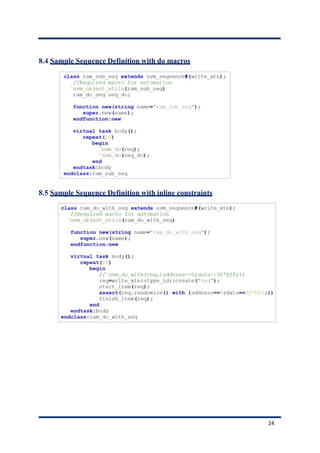
8.4 Sample Sequence Definition with do macros.................................................................... 25
8.5 Sample Sequence Definition with inline constraints ........................................................25
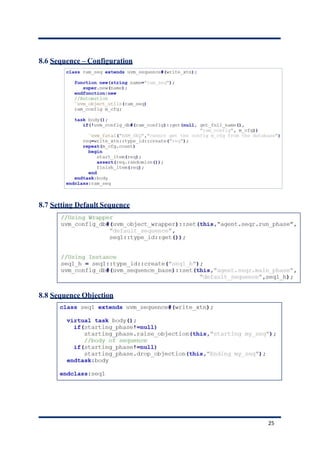
8.6 Sequence – Configuration ..................................................................................................26
8.7 Setting Default Sequence.................................................................................................... 26
8.8 Sequence Objection............................................................................................................. 26
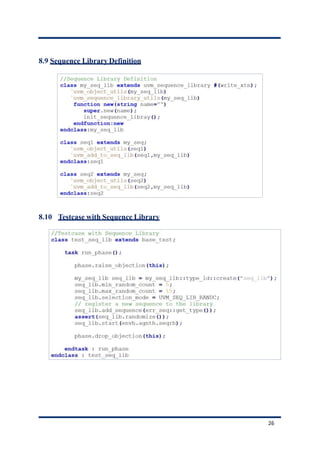
8.9 Sequence Library Definition.............................................................................................. 27
8.10 Testcase with Sequence Library ........................................................................................27
9. Virtual Sequences & Virtual Sequencers.................................................................................. 28
9.1 Introduction......................................................................................................................... 28
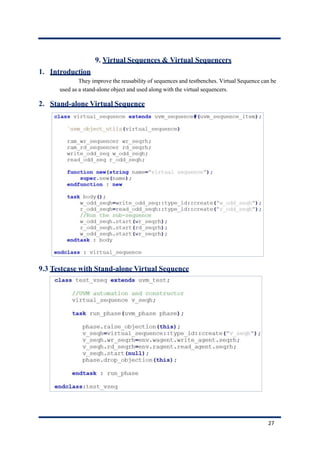
9.2 Stand-alone Virtual Sequence............................................................................................ 28
9.3 Testcase with Stand-alone Virtual Sequence ....................................................................28
9.4 Sample Virtual Sequencer.................................................................................................. 29
9.5 Base Virtual Sequence ........................................................................................................29
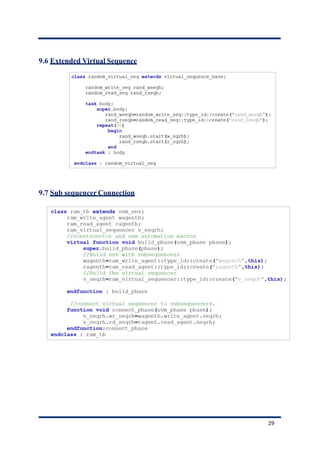
9.6 Extended Virtual Sequence................................................................................................30
9.7 Sub sequencer Connection .................................................................................................30
9.8 Testcase with Virtual Sequence .........................................................................................31
10. UVM Callbacks .......................................................................................................................32
10.1 Introduction......................................................................................................................... 32
10.2 Example of a transactor without callbacks.......................................................................32
10.2.1 Step 1: Definition of driver......................................................................................... 32
10.2.2 Step 2: Definition of test to run simulation............................................................... 32
10.2.3 Step 3: Expected Output.............................................................................................32
10.3 Example of a transactor with callbacks ............................................................................33
1. Step 1: Definition of driver callback class with empty callback methods.............. 33
2. Step 2: Definition of driver class with empty callback hooks .................................33
3.Step 3: Definition of extended driver callback class with callback methods ......... 34 10.3.4
Step 4: Linking Driver and Callback classes ............................................................ 34 10.3.5
Expected output...........................................................................................................34
4
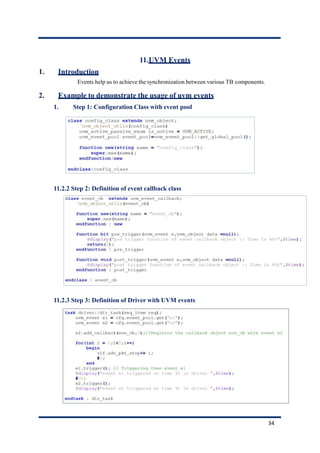
11. UVM Events ............................................................................................................................35
11.1 Introduction......................................................................................................................... 35
11.2 Example to demonstrate the usage of uvm events............................................................35
11.2.1 Step 1: Configuration Class with event pool............................................................. 35
11.2.2 Step 2: Definition of event callback class ..................................................................35
11.2.3 Step 3: Definition of Driver with UVM events .........................................................35
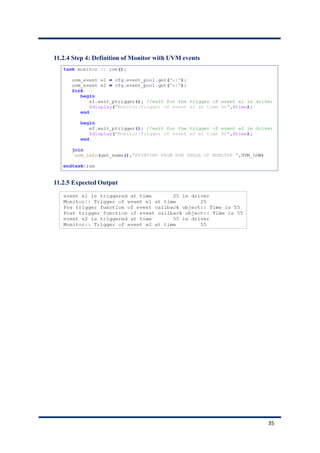
11.2.4 Step 4: Definition of Monitor with UVM events ......................................................36
11.2.5 Expected Output .........................................................................................................36
12.
12.1
12.2
12.3
12.4
12.5
12.6
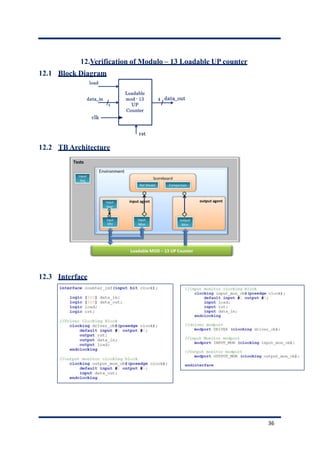
Verification of Modulo – 13 Loadable UP counter ..............................................................37
Block Diagram..................................................................................................................... 37
TB Architecture ..................................................................................................................37
Interface............................................................................................................................... 37
Transaction Class (Sequence Item) ...................................................................................38
Configuration Class ............................................................................................................38
Components in the input agent side ..................................................................................39
12.6.1 Input Driver................................................................................................................. 39
12.6.2 Input Sequencer ..........................................................................................................39
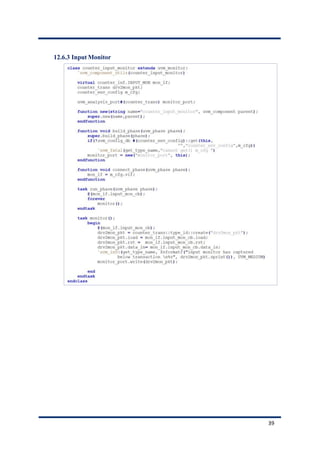
12.6.3 Input Monitor..............................................................................................................40
12.6.4 Input Agent..................................................................................................................41
12.7 Components in the output agent side ................................................................................42
12.7.1 Output Monitor........................................................................................................... 42
12.7.2 Output Agent............................................................................................................... 42
12.8 Scoreboard with Reference Model Logic..........................................................................43
12.9 Environment........................................................................................................................45
12.10 Sequence........................................................................................................................... 45
12.11 Base testcase ....................................................................................................................46
12.12 Derived testcase...............................................................................................................46
12.13 Package ............................................................................................................................47
12.14 Top Module......................................................................................................................47
5
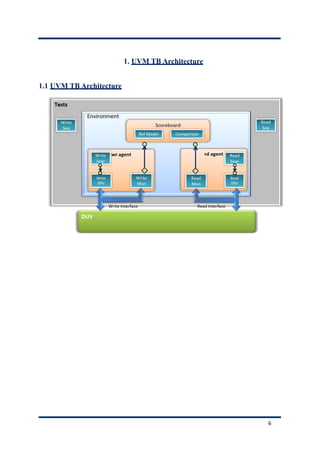
1. UVM TB Architecture
1.1 UVM TB Architecture
6
2. UVM Factory
1. Introduction
Factory is a class that manufactures (creates) UVM components and objects during
runtime and it has the ability to modify the types and number of objects that create the testbench
hierarchy.
1. Steps to Use Factory
✓ Register class types with the factory
✓ Override Components and Objects if needed
✓ Create components and objects using factory
2. Factory Registration
Every class (component or object) must be registered by using `uvm_component_utils or
`uvm_object_utils or `uvm_component_param_utils or `uvm_object_param_utils
macros.
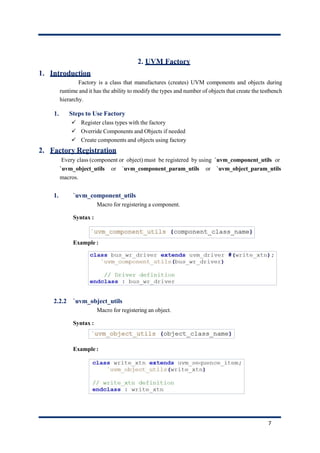
1. `uvm_component_utils
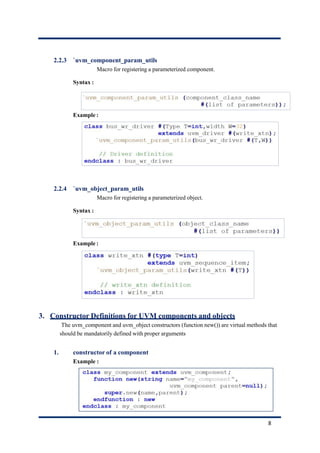
Macro for registering a component.
Syntax :
Example :
2.2.2 `uvm_object_utils
Macro for registering an object.
Syntax :
Example :
7
2.2.3 `uvm_component_param_utils
Macro for registering a parameterized component.
Syntax :
Example :
2.2.4 `uvm_object_param_utils
Macro for registering a parameterized object.
Syntax :
Example :
3. Constructor Definitions for UVM components and objects
The uvm_component and uvm_object constructors (function new()) are virtual methods that
should be mandatorily defined with proper arguments
1. constructor of a component
Example :
8
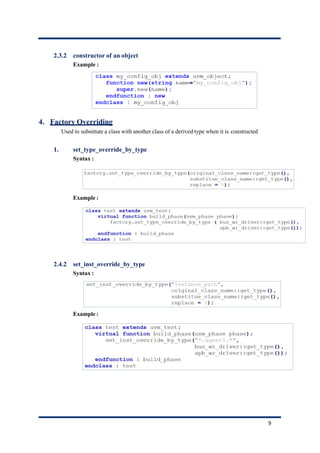
2.3.2 constructor of an object
Example :
4. Factory Overriding
Used to substitute a class with another class of a derived type when it is constructed
1. set_type_override_by_type
Syntax :
Example :
2.4.2 set_inst_override_by_type
Syntax :
Example :
9
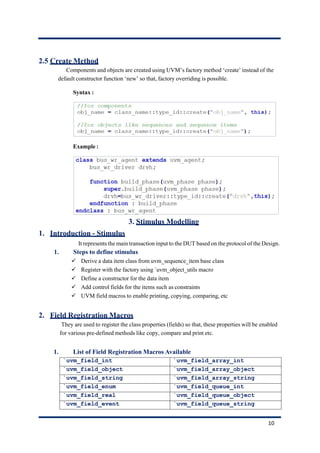
2.5 Create Method
Components and objects are created using UVM’s factory method ‘create’ instead of the
default constructor function ‘new’ so that, factory overriding is possible.
Syntax :
Example :
3. Stimulus Modelling
1. Introduction - Stimulus
It represents the main transaction input to the DUT based on the protocol of the Design.
1. Steps to define stimulus
✓ Derive a data item class from uvm_sequence_item base class
✓ Register with the factory using `uvm_object_utils macro
✓ Define a constructor for the data item
✓ Add control fields for the items such as constraints
✓ UVM field macros to enable printing, copying, comparing, etc
2. Field Registration Macros
They are used to register the class properties (fields) so that, these properties will be enabled
for various pre-defined methods like copy, compare and print etc.
1. List of Field Registration Macros Available
`uvm_field_int `uvm_field_array_int
`uvm_field_object `uvm_field_array_object
`uvm_field_string `uvm_field_array_string
`uvm_field_enum `uvm_field_queue_int
`uvm_field_real `uvm_field_queue_object
`uvm_field_event `uvm_field_queue_string
10
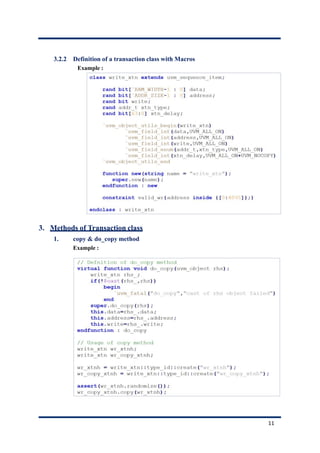
3.2.2 Definition of a transaction class with Macros
Example :
3. Methods of Transaction class
1. copy & do_copy method
Example :
11
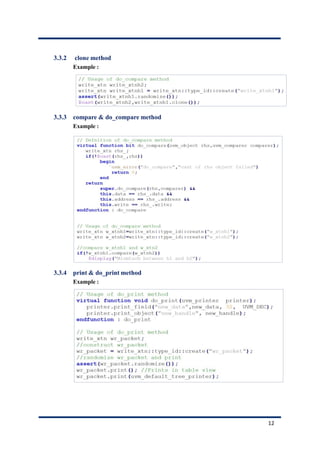
3.3.2 clone method
Example :
3.3.3 compare & do_compare method
Example :
3.3.4 print & do_print method
Example :
12
4. UVM Phases
1. Introduction
Phases help in synchronizing different events betweenMultiple Agents. The “run_test”
is the method to initiate execution of all the phases.
2. Pre run phases
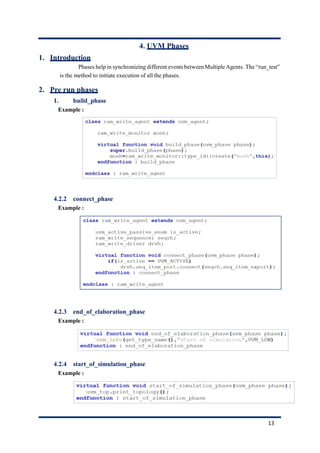
1. build_phase
Example :
4.2.2 connect_phase
Example :
4.2.3 end_of_elaboration_phase
Example :
4.2.4 start_of_simulation_phase
Example :
13
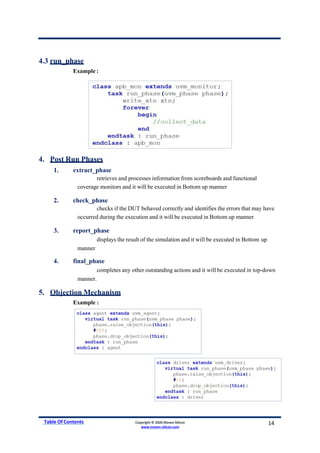
4.3 run_phase
Example :
4. Post Run Phases
1. extract_phase
retrieves and processes information from scoreboards and functional
coverage monitors and it will be executed in Bottom up manner
2. check_phase
checks if the DUT behaved correctly and identifies the errors that may have
occurred during the execution and it will be executed in Bottom up manner
3. report_phase
displays the result of the simulation and it will be executed in Bottom up
manner
4. final_phase
completes any other outstanding actions and it will be executed in top-down
manner.
5. Objection Mechanism
Example :
Table Of Contents Copyright © 2020 Maven Silicon
www.maven-silicon.com
14
5. Reporting Mechanism
1. Introduction
Helps in debugging an complex verification environment using different severities like
info, warning, error and fatal. Useful for displaying simulation results.
2. UVM Reporting Macros
Syntax:
Example :
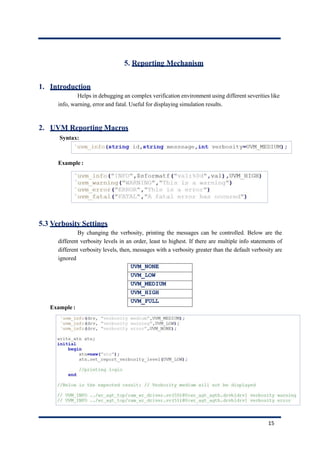
5.3 Verbosity Settings
By changing the verbosity, printing the messages can be controlled. Below are the
different verbosity levels in an order, least to highest. If there are multiple info statements of
different verbosity levels, then, messages with a verbosity greater than the default verbosity are
ignored
Example :
UVM_NONE
UVM_LOW
UVM_MEDIUM
UVM_HIGH
UVM_FULL
15
5.4 Command line options
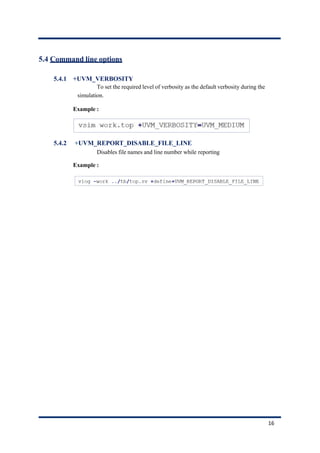
5.4.1 +UVM_VERBOSITY
To set the required level of verbosity as the default verbosity during the
simulation.
Example :
5.4.2 +UVM_REPORT_DISABLE_FILE_LINE
Disables file names and line number while reporting
Example :
16
6. TLM – Transaction Level Modelling
1. Introduction
TLM promotes reuse as they have same interface and supports interoperability for the
mixed-language verification environments. It also Maximizes reuse and minimizes the time and
effort.
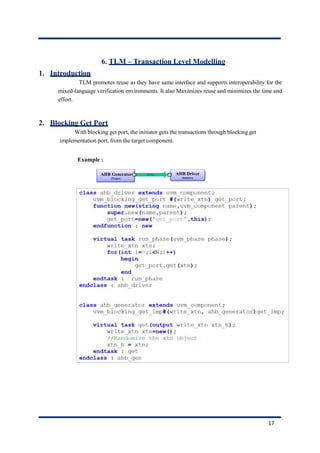
2. Blocking Get Port
With blocking get port, the initiator gets the transactions through blocking get
implementation port, from the target component.
Example :
17
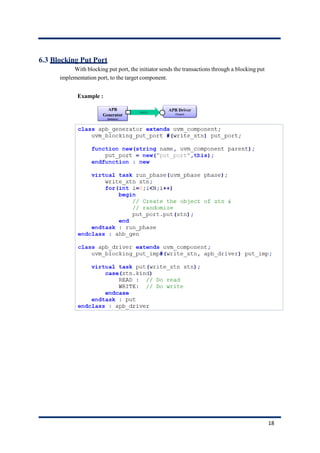
6.3 Blocking Put Port
With blocking put port, the initiator sends the transactions through a blocking put
implementation port, to the target component.
Example :
18
6.4 Connecting TLM Ports
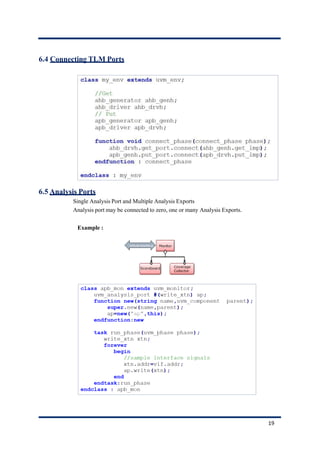
6.5 Analysis Ports
Single Analysis Port and Multiple Analysis Exports
Analysis port may be connected to zero, one or many Analysis Exports.
Example :
19
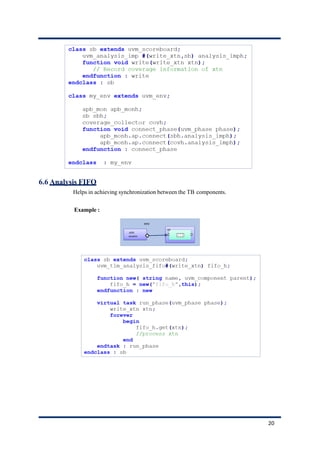
6.6 Analysis FIFO
Helps in achieving synchronization between the TB components.
Example :
20
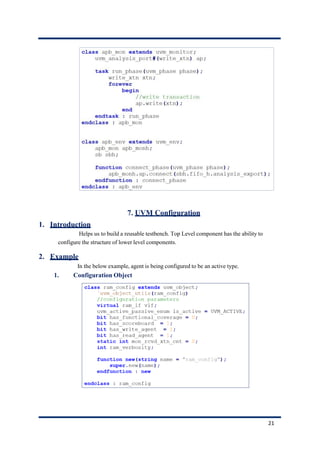
7. UVM Configuration
1. Introduction
Helps us to build a reusable testbench. Top Level component has the ability to
configure the structure of lower level components.
2. Example
In the below example, agent is being configured to be an active type.
1. Configuration Object
21
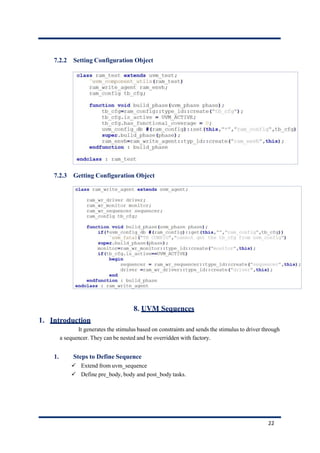
7.2.2 Setting Configuration Object
7.2.3 Getting Configuration Object
8. UVM Sequences
1. Introduction
It generates the stimulus based on constraints and sends the stimulus to driver through
a sequencer. They can be nested and be overridden with factory.
1. Steps to Define Sequence
✓ Extend from uvm_sequence
✓ Define pre_body, body and post_body tasks.
22
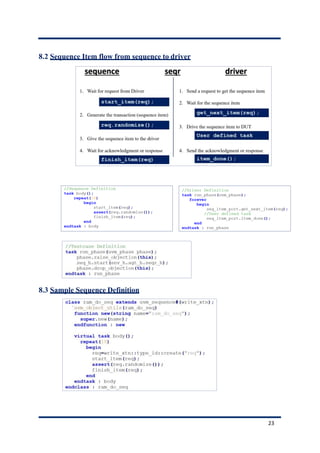
8.2 Sequence Item flow from sequence to driver
8.3 Sample Sequence Definition
23
8.4 Sample Sequence Definition with do macros
8.5 Sample Sequence Definition with inline constraints
24
8.6 Sequence – Configuration
8.7 Setting Default Sequence
8.8 Sequence Objection
25
8.9 Sequence Library Definition
8.10 Testcase with Sequence Library
26
9. Virtual Sequences & Virtual Sequencers
1. Introduction
They improve the reusability of sequences and testbenches. Virtual Sequence can be
used as a stand-alone object and used along with the virtual sequencers.
2. Stand-alone Virtual Sequence
9.3 Testcase with Stand-alone Virtual Sequence
27
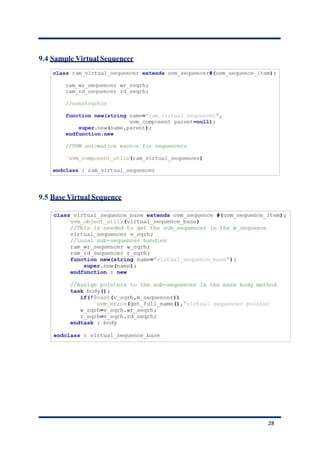
9.4 Sample Virtual Sequencer
9.5 Base Virtual Sequence
28
9.6 Extended Virtual Sequence
9.7 Sub sequencer Connection
29
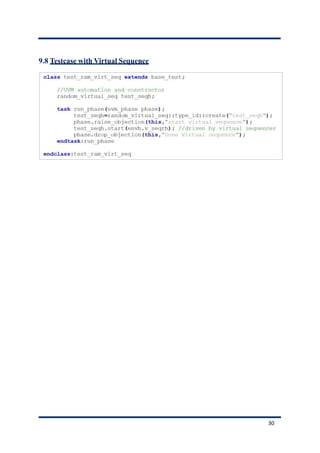
9.8 Testcase with Virtual Sequence
30
10.UVM Callbacks
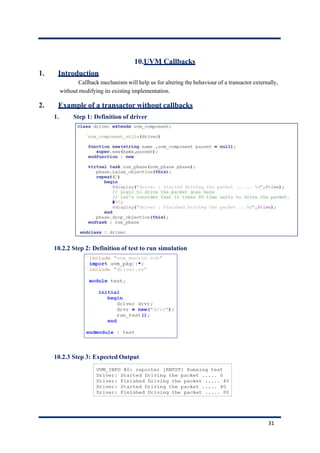
1. Introduction
Callback mechanism will help us for altering the behaviour of a transactor externally,
without modifying its existing implementation.
2. Example of a transactor without callbacks
1. Step 1: Definition of driver
10.2.2 Step 2: Definition of test to run simulation
10.2.3 Step 3: Expected Output
31
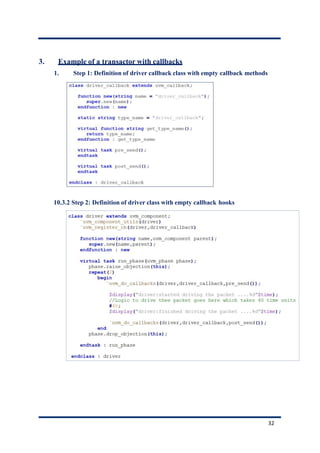
3. Example of a transactor with callbacks
1. Step 1: Definition of driver callback class with empty callback methods
10.3.2 Step 2: Definition of driver class with empty callback hooks
32
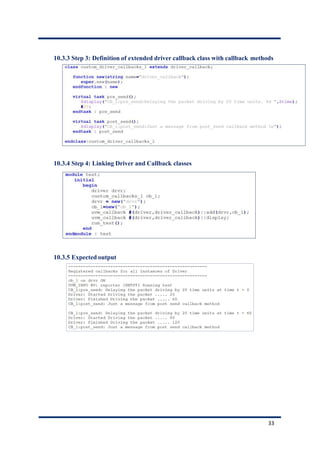
10.3.3 Step 3: Definition of extended driver callback class with callback methods
10.3.4 Step 4: Linking Driver and Callback classes
10.3.5 Expected output
33
11.UVM Events
1. Introduction
Events help us to achieve the synchronization between various TB components.
2. Example to demonstrate the usage of uvm events
1. Step 1: Configuration Class with event pool
11.2.2 Step 2: Definition of event callback class
11.2.3 Step 3: Definition of Driver with UVM events
34
11.2.4 Step 4: Definition of Monitor with UVM events
11.2.5 Expected Output
35
12.Verification of Modulo – 13 Loadable UP counter
12.1 Block Diagram
12.2 TB Architecture
12.3 Interface
36
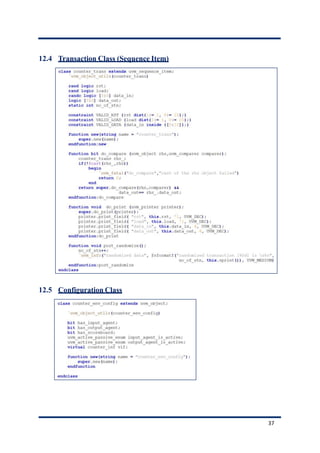
12.4 Transaction Class (Sequence Item)
12.5 Configuration Class
37
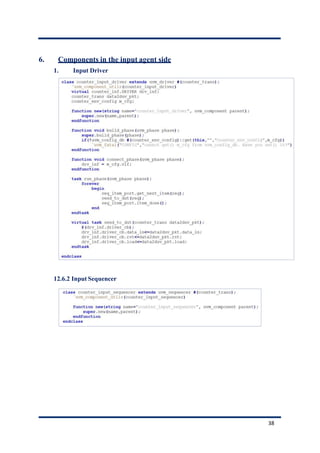
6. Components in the input agent side
1. Input Driver
12.6.2 Input Sequencer
38
12.6.3 Input Monitor
39
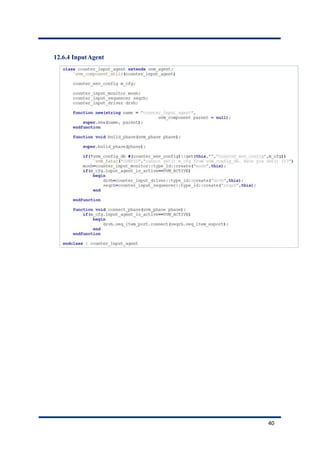
12.6.4 InputAgent
40
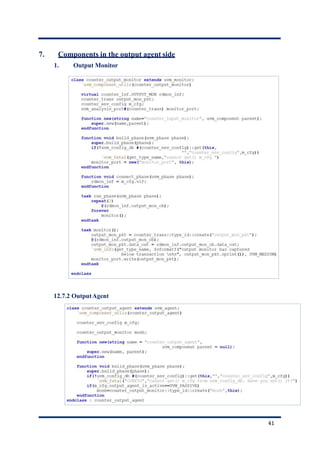
7. Components in the output agent side
1. Output Monitor
12.7.2 OutputAgent
41
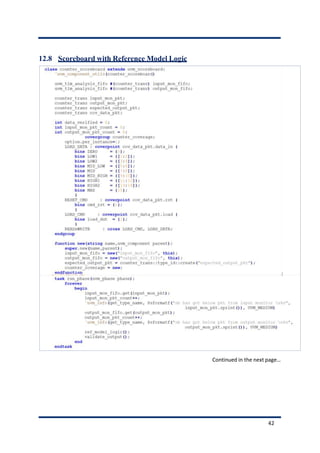
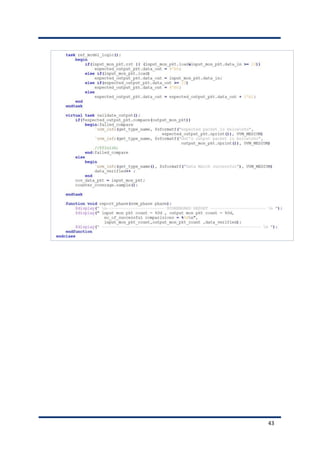
12.8 Scoreboard with Reference Model Logic
Continued in the next page…
42
43
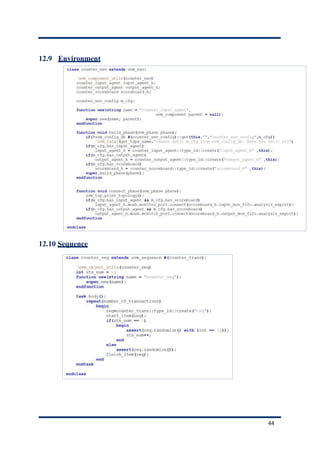
12.9 Environment
12.10 Sequence
44
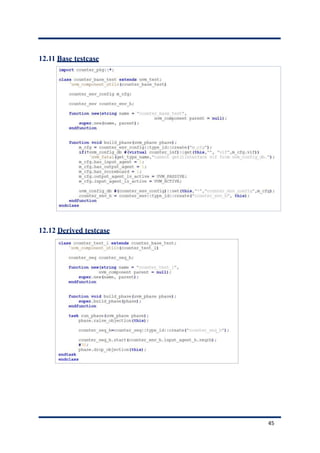
12.11 Base testcase
12.12 Derived testcase
45
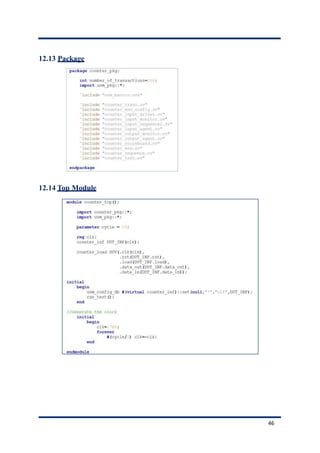
12.13 Package
12.14 Top Module
46

UVM REF GUIDE (1).pdf

  • 1.
    UVM Quick Reference Guide Author:Ankit Sharma M.Tech(IIT KANPUR) Email id: Ankitglbitm@gmail.com
  • 2.
    Table ofContents 1. UVMTB Architecture.................................................................................................................. 7 1.1 UVM TB Architecture.......................................................................................................... 7 2. UVM Factory................................................................................................................................. 8 2.1 Introduction........................................................................................................................... 8 2.1.1 Steps to Use Factory...................................................................................................... 8 2.2 Factory Registration .............................................................................................................8 2.2.1 `uvm_component_utils.................................................................................................. 8 2.2.2 `uvm_object_utils ..........................................................................................................8 2.2.3 `uvm_component_param_utils ....................................................................................9 2.2.4 `uvm_object_param_utils............................................................................................. 9 2.3 Constructor Definitions for UVM components and objects..............................................9 2.3.1 constructor of a component..........................................................................................9 2.3.2 constructor of an object..............................................................................................10 2.4 Factory Overriding .............................................................................................................10 2.4.1 set_type_override_by_type......................................................................................... 10 2.4.2 set_inst_override_by_type..........................................................................................10 2.5 Create Method..................................................................................................................... 11 3. Stimulus Modelling .....................................................................................................................11 3.1 Introduction - Stimulus ......................................................................................................11 3.1.1 Steps to define stimulus ..............................................................................................11 3.2 Field Registration Macros ..................................................................................................11 3.2.1 List of Field Registration Macros Available .............................................................11 3.2.2 Definition of a transaction class with Macros........................................................... 12 3.3 Methods of Transaction class............................................................................................. 12 3.3.1 copy & do_copy method .............................................................................................12 3.3.2 clone method................................................................................................................13 3.3.3 compare & do_compare method................................................................................13 3.3.4 print & do_print method............................................................................................13 2
  • 3.
    4. UVM Phases................................................................................................................................14 4.1 Introduction......................................................................................................................... 14 4.2 Pre run phases..................................................................................................................... 14 4.2.1 build_phase..................................................................................................................14 4.2.2 connect_phase.............................................................................................................. 14 4.2.3 end_of_elaboration_phase.......................................................................................... 14 4.2.4 start_of_simulation_phase.......................................................................................... 14 4.3 run_phase.............................................................................................................................15 4.4 Post Run Phases ..................................................................................................................15 4.4.1 extract_phase...............................................................................................................15 4.4.2 check_phase.................................................................................................................15 4.4.3 report_phase................................................................................................................ 15 4.4.4 final_phase ...................................................................................................................15 4.5 Objection Mechanism .........................................................................................................15 5. Reporting Mechanism.................................................................................................................16 5.1 Introduction......................................................................................................................... 16 5.2 UVM Reporting Macros.....................................................................................................16 5.3 Verbosity Settings ...............................................................................................................16 5.4 Command line options........................................................................................................17 5.4.1 +UVM_VERBOSITY .................................................................................................17 5.4.2 +UVM_REPORT_DISABLE_FILE_LINE.............................................................. 17 6. TLM – Transaction Level Modelling ........................................................................................18 6.1 Introduction......................................................................................................................... 18 6.2 Blocking Get Port................................................................................................................ 18 6.3 Blocking Put Port................................................................................................................ 19 6.4 Connecting TLM Ports....................................................................................................... 20 6.5 Analysis Ports ......................................................................................................................20 6.6 Analysis FIFO...................................................................................................................... 21 7. UVM Configuration....................................................................................................................22 7.1 Introduction......................................................................................................................... 22 7.2 Example ...............................................................................................................................22 7.2.1 Configuration Object..................................................................................................22 7.2.2 Setting Configuration Object.....................................................................................23 7.2.3 Getting Configuration Object ....................................................................................23 3
  • 4.
    8. UVM Sequences..........................................................................................................................23 8.1 Introduction......................................................................................................................... 23 8.1.1 Steps to Define Sequence............................................................................................ 23 8.2 Sequence Item flow from sequence to driver....................................................................24 8.3 Sample Sequence Definition...............................................................................................24 8.4 Sample Sequence Definition with do macros.................................................................... 25 8.5 Sample Sequence Definition with inline constraints ........................................................25 8.6 Sequence – Configuration ..................................................................................................26 8.7 Setting Default Sequence.................................................................................................... 26 8.8 Sequence Objection............................................................................................................. 26 8.9 Sequence Library Definition.............................................................................................. 27 8.10 Testcase with Sequence Library ........................................................................................27 9. Virtual Sequences & Virtual Sequencers.................................................................................. 28 9.1 Introduction......................................................................................................................... 28 9.2 Stand-alone Virtual Sequence............................................................................................ 28 9.3 Testcase with Stand-alone Virtual Sequence ....................................................................28 9.4 Sample Virtual Sequencer.................................................................................................. 29 9.5 Base Virtual Sequence ........................................................................................................29 9.6 Extended Virtual Sequence................................................................................................30 9.7 Sub sequencer Connection .................................................................................................30 9.8 Testcase with Virtual Sequence .........................................................................................31 10. UVM Callbacks .......................................................................................................................32 10.1 Introduction......................................................................................................................... 32 10.2 Example of a transactor without callbacks.......................................................................32 10.2.1 Step 1: Definition of driver......................................................................................... 32 10.2.2 Step 2: Definition of test to run simulation............................................................... 32 10.2.3 Step 3: Expected Output.............................................................................................32 10.3 Example of a transactor with callbacks ............................................................................33 1. Step 1: Definition of driver callback class with empty callback methods.............. 33 2. Step 2: Definition of driver class with empty callback hooks .................................33 3.Step 3: Definition of extended driver callback class with callback methods ......... 34 10.3.4 Step 4: Linking Driver and Callback classes ............................................................ 34 10.3.5 Expected output...........................................................................................................34 4
  • 5.
    11. UVM Events............................................................................................................................35 11.1 Introduction......................................................................................................................... 35 11.2 Example to demonstrate the usage of uvm events............................................................35 11.2.1 Step 1: Configuration Class with event pool............................................................. 35 11.2.2 Step 2: Definition of event callback class ..................................................................35 11.2.3 Step 3: Definition of Driver with UVM events .........................................................35 11.2.4 Step 4: Definition of Monitor with UVM events ......................................................36 11.2.5 Expected Output .........................................................................................................36 12. 12.1 12.2 12.3 12.4 12.5 12.6 Verification of Modulo – 13 Loadable UP counter ..............................................................37 Block Diagram..................................................................................................................... 37 TB Architecture ..................................................................................................................37 Interface............................................................................................................................... 37 Transaction Class (Sequence Item) ...................................................................................38 Configuration Class ............................................................................................................38 Components in the input agent side ..................................................................................39 12.6.1 Input Driver................................................................................................................. 39 12.6.2 Input Sequencer ..........................................................................................................39 12.6.3 Input Monitor..............................................................................................................40 12.6.4 Input Agent..................................................................................................................41 12.7 Components in the output agent side ................................................................................42 12.7.1 Output Monitor........................................................................................................... 42 12.7.2 Output Agent............................................................................................................... 42 12.8 Scoreboard with Reference Model Logic..........................................................................43 12.9 Environment........................................................................................................................45 12.10 Sequence........................................................................................................................... 45 12.11 Base testcase ....................................................................................................................46 12.12 Derived testcase...............................................................................................................46 12.13 Package ............................................................................................................................47 12.14 Top Module......................................................................................................................47 5
  • 6.
    1. UVM TBArchitecture 1.1 UVM TB Architecture 6
  • 7.
    2. UVM Factory 1.Introduction Factory is a class that manufactures (creates) UVM components and objects during runtime and it has the ability to modify the types and number of objects that create the testbench hierarchy. 1. Steps to Use Factory ✓ Register class types with the factory ✓ Override Components and Objects if needed ✓ Create components and objects using factory 2. Factory Registration Every class (component or object) must be registered by using `uvm_component_utils or `uvm_object_utils or `uvm_component_param_utils or `uvm_object_param_utils macros. 1. `uvm_component_utils Macro for registering a component. Syntax : Example : 2.2.2 `uvm_object_utils Macro for registering an object. Syntax : Example : 7
  • 8.
    2.2.3 `uvm_component_param_utils Macro forregistering a parameterized component. Syntax : Example : 2.2.4 `uvm_object_param_utils Macro for registering a parameterized object. Syntax : Example : 3. Constructor Definitions for UVM components and objects The uvm_component and uvm_object constructors (function new()) are virtual methods that should be mandatorily defined with proper arguments 1. constructor of a component Example : 8
  • 9.
    2.3.2 constructor ofan object Example : 4. Factory Overriding Used to substitute a class with another class of a derived type when it is constructed 1. set_type_override_by_type Syntax : Example : 2.4.2 set_inst_override_by_type Syntax : Example : 9
  • 10.
    2.5 Create Method Componentsand objects are created using UVM’s factory method ‘create’ instead of the default constructor function ‘new’ so that, factory overriding is possible. Syntax : Example : 3. Stimulus Modelling 1. Introduction - Stimulus It represents the main transaction input to the DUT based on the protocol of the Design. 1. Steps to define stimulus ✓ Derive a data item class from uvm_sequence_item base class ✓ Register with the factory using `uvm_object_utils macro ✓ Define a constructor for the data item ✓ Add control fields for the items such as constraints ✓ UVM field macros to enable printing, copying, comparing, etc 2. Field Registration Macros They are used to register the class properties (fields) so that, these properties will be enabled for various pre-defined methods like copy, compare and print etc. 1. List of Field Registration Macros Available `uvm_field_int `uvm_field_array_int `uvm_field_object `uvm_field_array_object `uvm_field_string `uvm_field_array_string `uvm_field_enum `uvm_field_queue_int `uvm_field_real `uvm_field_queue_object `uvm_field_event `uvm_field_queue_string 10
  • 11.
    3.2.2 Definition ofa transaction class with Macros Example : 3. Methods of Transaction class 1. copy & do_copy method Example : 11
  • 12.
    3.3.2 clone method Example: 3.3.3 compare & do_compare method Example : 3.3.4 print & do_print method Example : 12
  • 13.
    4. UVM Phases 1.Introduction Phases help in synchronizing different events betweenMultiple Agents. The “run_test” is the method to initiate execution of all the phases. 2. Pre run phases 1. build_phase Example : 4.2.2 connect_phase Example : 4.2.3 end_of_elaboration_phase Example : 4.2.4 start_of_simulation_phase Example : 13
  • 14.
    4.3 run_phase Example : 4.Post Run Phases 1. extract_phase retrieves and processes information from scoreboards and functional coverage monitors and it will be executed in Bottom up manner 2. check_phase checks if the DUT behaved correctly and identifies the errors that may have occurred during the execution and it will be executed in Bottom up manner 3. report_phase displays the result of the simulation and it will be executed in Bottom up manner 4. final_phase completes any other outstanding actions and it will be executed in top-down manner. 5. Objection Mechanism Example : Table Of Contents Copyright © 2020 Maven Silicon www.maven-silicon.com 14
  • 15.
    5. Reporting Mechanism 1.Introduction Helps in debugging an complex verification environment using different severities like info, warning, error and fatal. Useful for displaying simulation results. 2. UVM Reporting Macros Syntax: Example : 5.3 Verbosity Settings By changing the verbosity, printing the messages can be controlled. Below are the different verbosity levels in an order, least to highest. If there are multiple info statements of different verbosity levels, then, messages with a verbosity greater than the default verbosity are ignored Example : UVM_NONE UVM_LOW UVM_MEDIUM UVM_HIGH UVM_FULL 15
  • 16.
    5.4 Command lineoptions 5.4.1 +UVM_VERBOSITY To set the required level of verbosity as the default verbosity during the simulation. Example : 5.4.2 +UVM_REPORT_DISABLE_FILE_LINE Disables file names and line number while reporting Example : 16
  • 17.
    6. TLM –Transaction Level Modelling 1. Introduction TLM promotes reuse as they have same interface and supports interoperability for the mixed-language verification environments. It also Maximizes reuse and minimizes the time and effort. 2. Blocking Get Port With blocking get port, the initiator gets the transactions through blocking get implementation port, from the target component. Example : 17
  • 18.
    6.3 Blocking PutPort With blocking put port, the initiator sends the transactions through a blocking put implementation port, to the target component. Example : 18
  • 19.
    6.4 Connecting TLMPorts 6.5 Analysis Ports Single Analysis Port and Multiple Analysis Exports Analysis port may be connected to zero, one or many Analysis Exports. Example : 19
  • 20.
    6.6 Analysis FIFO Helpsin achieving synchronization between the TB components. Example : 20
  • 21.
    7. UVM Configuration 1.Introduction Helps us to build a reusable testbench. Top Level component has the ability to configure the structure of lower level components. 2. Example In the below example, agent is being configured to be an active type. 1. Configuration Object 21
  • 22.
    7.2.2 Setting ConfigurationObject 7.2.3 Getting Configuration Object 8. UVM Sequences 1. Introduction It generates the stimulus based on constraints and sends the stimulus to driver through a sequencer. They can be nested and be overridden with factory. 1. Steps to Define Sequence ✓ Extend from uvm_sequence ✓ Define pre_body, body and post_body tasks. 22
  • 23.
    8.2 Sequence Itemflow from sequence to driver 8.3 Sample Sequence Definition 23
  • 24.
    8.4 Sample SequenceDefinition with do macros 8.5 Sample Sequence Definition with inline constraints 24
  • 25.
    8.6 Sequence –Configuration 8.7 Setting Default Sequence 8.8 Sequence Objection 25
  • 26.
    8.9 Sequence LibraryDefinition 8.10 Testcase with Sequence Library 26
  • 27.
    9. Virtual Sequences& Virtual Sequencers 1. Introduction They improve the reusability of sequences and testbenches. Virtual Sequence can be used as a stand-alone object and used along with the virtual sequencers. 2. Stand-alone Virtual Sequence 9.3 Testcase with Stand-alone Virtual Sequence 27
  • 28.
    9.4 Sample VirtualSequencer 9.5 Base Virtual Sequence 28
  • 29.
    9.6 Extended VirtualSequence 9.7 Sub sequencer Connection 29
  • 30.
    9.8 Testcase withVirtual Sequence 30
  • 31.
    10.UVM Callbacks 1. Introduction Callbackmechanism will help us for altering the behaviour of a transactor externally, without modifying its existing implementation. 2. Example of a transactor without callbacks 1. Step 1: Definition of driver 10.2.2 Step 2: Definition of test to run simulation 10.2.3 Step 3: Expected Output 31
  • 32.
    3. Example ofa transactor with callbacks 1. Step 1: Definition of driver callback class with empty callback methods 10.3.2 Step 2: Definition of driver class with empty callback hooks 32
  • 33.
    10.3.3 Step 3:Definition of extended driver callback class with callback methods 10.3.4 Step 4: Linking Driver and Callback classes 10.3.5 Expected output 33
  • 34.
    11.UVM Events 1. Introduction Eventshelp us to achieve the synchronization between various TB components. 2. Example to demonstrate the usage of uvm events 1. Step 1: Configuration Class with event pool 11.2.2 Step 2: Definition of event callback class 11.2.3 Step 3: Definition of Driver with UVM events 34
  • 35.
    11.2.4 Step 4:Definition of Monitor with UVM events 11.2.5 Expected Output 35
  • 36.
    12.Verification of Modulo– 13 Loadable UP counter 12.1 Block Diagram 12.2 TB Architecture 12.3 Interface 36
  • 37.
    12.4 Transaction Class(Sequence Item) 12.5 Configuration Class 37
  • 38.
    6. Components inthe input agent side 1. Input Driver 12.6.2 Input Sequencer 38
  • 39.
  • 40.
  • 41.
    7. Components inthe output agent side 1. Output Monitor 12.7.2 OutputAgent 41
  • 42.
    12.8 Scoreboard withReference Model Logic Continued in the next page… 42
  • 43.
  • 44.
  • 45.
    12.11 Base testcase 12.12Derived testcase 45
  • 46.