Using Social Media In Your Job Search Paul DeBettignies, Managing Partner
Background and Experience Over a decade recruiting in IT Prominent blogger on Recruiting/HR, Career and Business topics Co-Founder and Coordinator of Minnesota Recruiters Contributor to RecruitingBlogs.com Creator of BeYourOwnHeadhunter.com
If you remember nothing else, remember these two things Doing a job search SUCKS Finding a job is a job
Who Are You? Marketing of you 10-second pitch or sound byte 30 second elevator pitch Business cards LinkedIn profile Email address, get a professional one
I love the GOPHERS!
Don’t [email_address] .com Do [email_address]
 
Where should I look? Big job boards Niche and local job boards Newspapers Trade, Professional, Association web sites Aggregators Social Networking Sites Your Network
Who is in my online network? Linkedin has 30M users Facebook has 150M users. Average age 25. Fastest growing demographic is 55+ Twitter (following & followers) Ning groups
LinkedIn 101 The fastest LinkedIn presentation you have ever seen
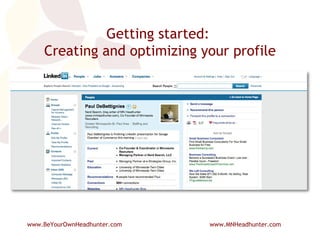
Getting started:  Creating and optimizing your profile
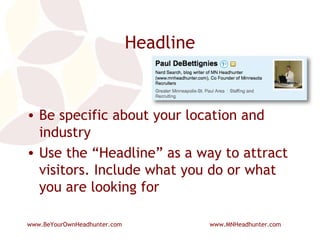
Headline Be specific about your location and industry Use the “Headline” as a way to attract visitors. Include what you do or what you are looking for
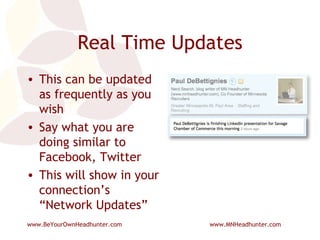
Real Time Updates This can be updated as frequently as you wish Say what you are doing similar to Facebook, Twitter This will show in your connection’s “Network Updates”
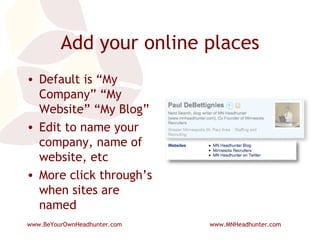
Add your online places Default is “My Company” “My Website” “My Blog” Edit to name your company, name of website, etc More click through’s when sites are named
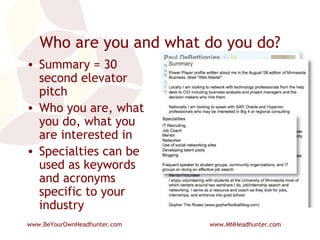
Who are you and what do you do? Summary = 30 second elevator pitch Who you are, what you do, what you are interested in Specialties can be used as keywords and acronyms specific to your industry
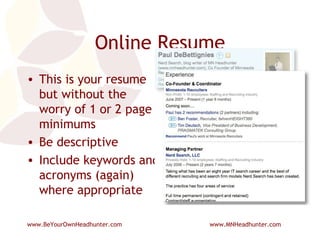
Online Resume This is your resume but without the worry of 1 or 2 page minimums Be descriptive Include keywords and acronyms (again) where appropriate
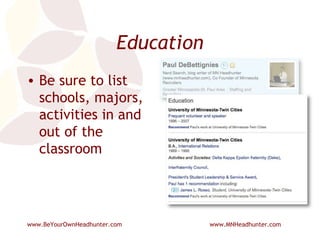
Education Be sure to list schools, majors, activities in and out of the classroom
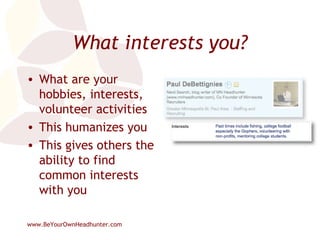
What interests you? What are your hobbies, interests, volunteer activities This humanizes you This gives others the ability to find common interests with you
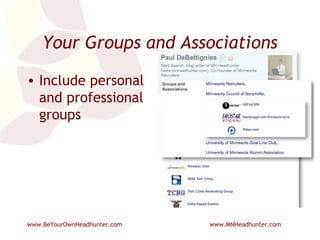
Your Groups and Associations Include personal and professional groups
Honors and Awards Include personal, professional, and volunteer nominations and awards
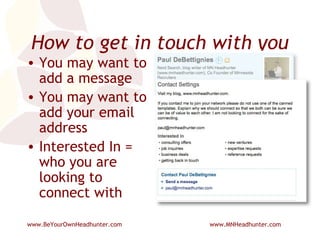
How to get in touch with you You may want to add a message You may want to add your email address Interested In = who you are looking to connect with
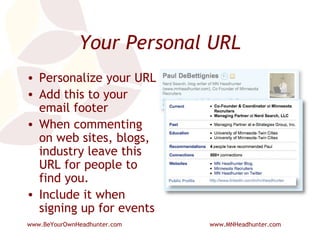
Your Personal URL Personalize your URL Add this to your email footer When commenting on web sites, blogs, industry leave this URL for people to find you. Include it when signing up for events
Use Google to search LinkedIn Your reach is only so big Google indexes most personal and company profiles Start with this search string in Google Site:LinkedIn.com (enter keywords) You will need to “play” with words, phrases, “”, like you would usually do on any Google search
LinkedIn Tips Create a specific email address for your LinkedIn account Archive unwanted or unknown connection requests 5 I Don’t Knows can get you in trouble with LinkedIn 3,000 Invitations allowed (can request for more) Personalize invitations or create your own templates. LinkedIn templates are boring. Write recommendations Participate in Questions & Answers
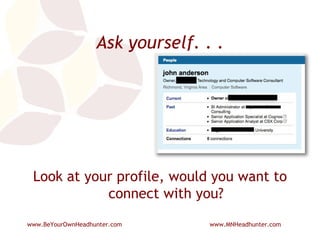
Ask yourself. . . Look at your profile, would you want to connect with you?
Social Network Sites Keep profile(s) updated Take advantage of “What are you doing” on Facebook and LinkedIn Be conscious of the line between professional and personal. Engage others in conversation
Using Twitter For Job Search Tweet that you are looking (DUH) Expand who you follow Use Twitter Search, Twitterholic, Twellow or a Google search to find users by title and/or company Twitter Search: enter keywords, acronyms Pull RSS feeds into your favorite reader TwitHire Complete profile with keywords and a link to something
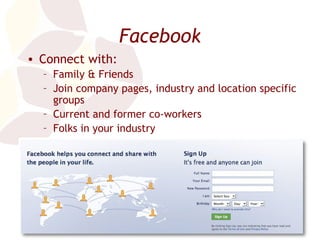
Facebook Connect with: Family & Friends Join company pages, industry and location specific groups Current and former co-workers Folks in your industry Acquaintances you want to keep in touch with
Whew, Victory. Now What? Send an email to those you have been in contact with Is your new company hiring other positions? Start looking for your next new job Keep track of and nurture your network
Mistakes With Social Media Using industry jargon and acronyms with those not in the industry Profiles that do not include keywords that allow others to find you Not linking or adding widgets to/from your other pages (LinkedIn, Facebook, Twitter) Failure to move from online relationships to in person Not introducing your friends and connections to each other
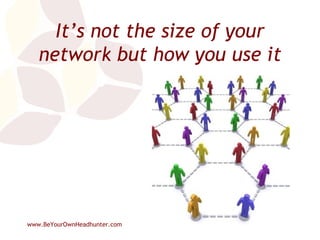
It’s not the size of your network but how you use it
Resources JibberJobber  – Career management tool Alltop  HR  and  Alltop  Careers  – Blog aggregator with lots of useful content Quintessential Careers  – Templates, advice, articles Job-Hunt.org  – Lots of local an national links Dan  Schawbel  – Personal branding guru Emurse  – Can host your resume here. Search engines love the site LinkUp  – Only jobs from corporate career pages Indeed Simply Hired Twin Cities Business magazine  – Lists of lists Social Media Headhunter   |  @smheadhunter
 
 
Thank You! Paul DeBettignies [email_address]

Using Social Media In Your Job Search

  • 1.
    Using Social MediaIn Your Job Search Paul DeBettignies, Managing Partner
  • 2.
    Background and ExperienceOver a decade recruiting in IT Prominent blogger on Recruiting/HR, Career and Business topics Co-Founder and Coordinator of Minnesota Recruiters Contributor to RecruitingBlogs.com Creator of BeYourOwnHeadhunter.com
  • 3.
    If you remembernothing else, remember these two things Doing a job search SUCKS Finding a job is a job
  • 4.
    Who Are You?Marketing of you 10-second pitch or sound byte 30 second elevator pitch Business cards LinkedIn profile Email address, get a professional one
  • 5.
    I love theGOPHERS!
  • 6.
    Don’t [email_address] .comDo [email_address]
  • 7.
  • 8.
    Where should Ilook? Big job boards Niche and local job boards Newspapers Trade, Professional, Association web sites Aggregators Social Networking Sites Your Network
  • 9.
    Who is inmy online network? Linkedin has 30M users Facebook has 150M users. Average age 25. Fastest growing demographic is 55+ Twitter (following & followers) Ning groups
  • 10.
    LinkedIn 101 Thefastest LinkedIn presentation you have ever seen
  • 11.
    Getting started: Creating and optimizing your profile
  • 12.
    Headline Be specificabout your location and industry Use the “Headline” as a way to attract visitors. Include what you do or what you are looking for
  • 13.
    Real Time UpdatesThis can be updated as frequently as you wish Say what you are doing similar to Facebook, Twitter This will show in your connection’s “Network Updates”
  • 14.
    Add your onlineplaces Default is “My Company” “My Website” “My Blog” Edit to name your company, name of website, etc More click through’s when sites are named
  • 15.
    Who are youand what do you do? Summary = 30 second elevator pitch Who you are, what you do, what you are interested in Specialties can be used as keywords and acronyms specific to your industry
  • 16.
    Online Resume Thisis your resume but without the worry of 1 or 2 page minimums Be descriptive Include keywords and acronyms (again) where appropriate
  • 17.
    Education Be sureto list schools, majors, activities in and out of the classroom
  • 18.
    What interests you?What are your hobbies, interests, volunteer activities This humanizes you This gives others the ability to find common interests with you
  • 19.
    Your Groups andAssociations Include personal and professional groups
  • 20.
    Honors and AwardsInclude personal, professional, and volunteer nominations and awards
  • 21.
    How to getin touch with you You may want to add a message You may want to add your email address Interested In = who you are looking to connect with
  • 22.
    Your Personal URLPersonalize your URL Add this to your email footer When commenting on web sites, blogs, industry leave this URL for people to find you. Include it when signing up for events
  • 23.
    Use Google tosearch LinkedIn Your reach is only so big Google indexes most personal and company profiles Start with this search string in Google Site:LinkedIn.com (enter keywords) You will need to “play” with words, phrases, “”, like you would usually do on any Google search
  • 24.
    LinkedIn Tips Createa specific email address for your LinkedIn account Archive unwanted or unknown connection requests 5 I Don’t Knows can get you in trouble with LinkedIn 3,000 Invitations allowed (can request for more) Personalize invitations or create your own templates. LinkedIn templates are boring. Write recommendations Participate in Questions & Answers
  • 25.
    Ask yourself. .. Look at your profile, would you want to connect with you?
  • 26.
    Social Network SitesKeep profile(s) updated Take advantage of “What are you doing” on Facebook and LinkedIn Be conscious of the line between professional and personal. Engage others in conversation
  • 27.
    Using Twitter ForJob Search Tweet that you are looking (DUH) Expand who you follow Use Twitter Search, Twitterholic, Twellow or a Google search to find users by title and/or company Twitter Search: enter keywords, acronyms Pull RSS feeds into your favorite reader TwitHire Complete profile with keywords and a link to something
  • 28.
    Facebook Connect with:Family & Friends Join company pages, industry and location specific groups Current and former co-workers Folks in your industry Acquaintances you want to keep in touch with
  • 29.
    Whew, Victory. NowWhat? Send an email to those you have been in contact with Is your new company hiring other positions? Start looking for your next new job Keep track of and nurture your network
  • 30.
    Mistakes With SocialMedia Using industry jargon and acronyms with those not in the industry Profiles that do not include keywords that allow others to find you Not linking or adding widgets to/from your other pages (LinkedIn, Facebook, Twitter) Failure to move from online relationships to in person Not introducing your friends and connections to each other
  • 31.
    It’s not thesize of your network but how you use it
  • 32.
    Resources JibberJobber – Career management tool Alltop HR and Alltop Careers – Blog aggregator with lots of useful content Quintessential Careers – Templates, advice, articles Job-Hunt.org – Lots of local an national links Dan Schawbel – Personal branding guru Emurse – Can host your resume here. Search engines love the site LinkUp – Only jobs from corporate career pages Indeed Simply Hired Twin Cities Business magazine – Lists of lists Social Media Headhunter | @smheadhunter
  • 33.
  • 34.
  • 35.
    Thank You! PaulDeBettignies [email_address]