
LinkedIn to a New Year Paul DeBettignies, Managing Partner
Background and Experience Over a decade recruiting in IT Prominent blogger on Recruiting/HR, Career and Business topics Co-Founder and Coordinator of Minnesota Recruiters Contributor to RecruitingBlogs.com Creator of BeYourOwnHeadhunter.com
Why LinkedIn Matters Provides an online presence Digital Rolodex Allows you to “see” your network Promote yourself and lets people  “get to know you” Local, regional, international reach
LinkedIn can be used to find: Business partners  Suppliers Service providers Subject matter experts Clients Employees Jobs Competitive intelligence Old friends and connect virtually with new ones Information on people you are meeting with
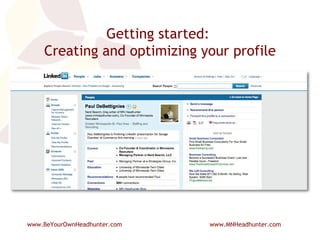
Getting started:  Creating and optimizing your profile
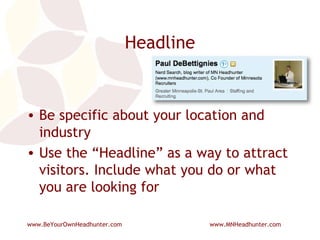
Headline Be specific about your location and industry Use the “Headline” as a way to attract visitors. Include what you do or what you are looking for
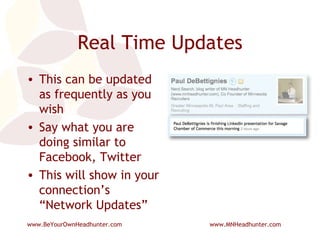
Real Time Updates This can be updated as frequently as you wish Say what you are doing similar to Facebook, Twitter This will show in your connection’s “Network Updates”
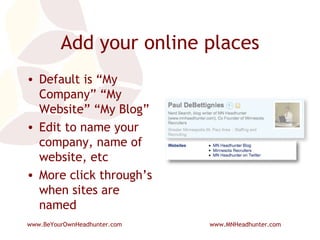
Add your online places Default is “My Company” “My Website” “My Blog” Edit to name your company, name of website, etc More click through’s when sites are named
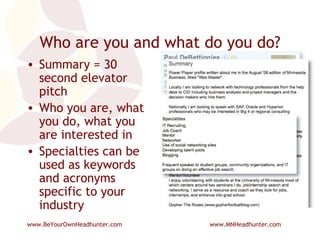
Who are you and what do you do? Summary = 30 second elevator pitch Who you are, what you do, what you are interested in Specialties can be used as keywords and acronyms specific to your industry
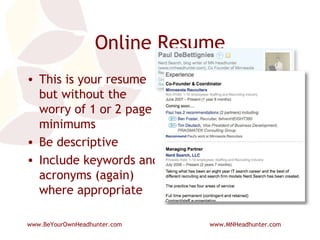
Online Resume This is your resume but without the worry of 1 or 2 page minimums Be descriptive Include keywords and acronyms (again) where appropriate
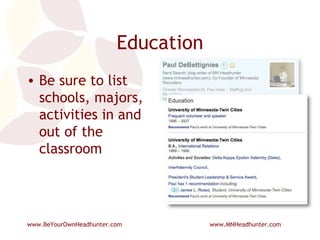
Education Be sure to list schools, majors, activities in and out of the classroom
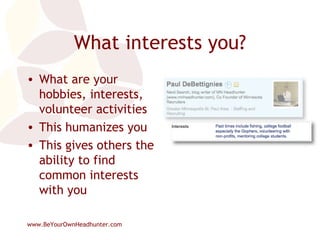
What interests you? What are your hobbies, interests, volunteer activities This humanizes you This gives others the ability to find common interests with you
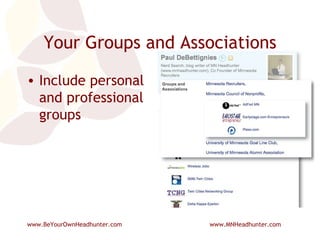
Your Groups and Associations Include personal and professional groups
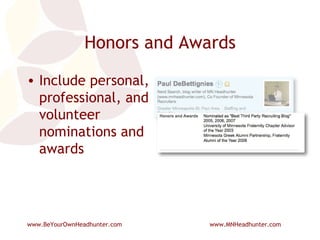
Honors and Awards Include personal, professional, and volunteer nominations and awards
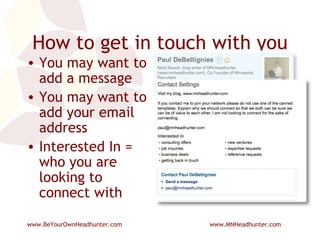
How to get in touch with you You may want to add a message You may want to add your email address Interested In = who you are looking to connect with
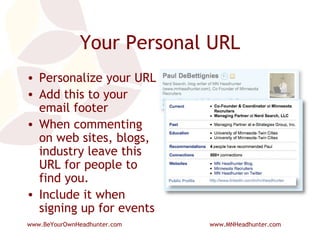
Your Personal URL Personalize your URL Add this to your email footer When commenting on web sites, blogs, industry leave this URL for people to find you. Include it when signing up for events
Groups You can belong to a maximum of 50 groups Local, regional, (inter)national Industry Special interest and causes College and school alumni Increases the size and scope of your network Create a group - Free
Super Connectors Those with 500+ connections Anyone with an email in their “Headline” is an open networker. They will accept all invitations. LIONS, TopLinkedIn.com, MyLinkNetwork Most Recruiters are open networkers This can be a quick way to grow your network. One caution: Many will include you in their newsletters or other infrequent email
Who are your connections Current and former colleagues, bosses, vendors Friends College/school connections Recruiters People in this room
How to connect, 3 options When reading a profile you can send a request to connect, email address maybe required. Click “Add Connections” Here you can add a small number of connections at a time. Here you can also upload your email address book
How to search for people Click “Advanced Search” Here you can search people a number of ways including keywords, company, location and industry
How to search companies Click “Companies” tab and then “Companies Search” Enter a company name Results will include statistics, related companies, job posted on LinkedIn and people in your network who work there
Use Google to search LinkedIn Your reach is only so big Google indexes most personal and company profiles Start with this search string in Google Site:LinkedIn.com (enter keywords) You will need to “play” with words, phrases, “”, like you would usually do on any Google search
LinkedIn Tips Create a specific email address for your LinkedIn account Archive unwanted or unknown connection requests 5 I Don’t Knows can get you in trouble with LinkedIn 3,000 Invitations allowed (can request for more) Personalize invitations or create your own templates. LinkedIn templates are boring. Write recommendations Participate in Questions & Answers
Look at your profile, would you want to connect with you?
Thank You! Paul DeBettignies [email_address]

LinkedIn to a New Year

  • 1.
    LinkedIn to aNew Year Paul DeBettignies, Managing Partner
  • 2.
    Background and ExperienceOver a decade recruiting in IT Prominent blogger on Recruiting/HR, Career and Business topics Co-Founder and Coordinator of Minnesota Recruiters Contributor to RecruitingBlogs.com Creator of BeYourOwnHeadhunter.com
  • 3.
    Why LinkedIn MattersProvides an online presence Digital Rolodex Allows you to “see” your network Promote yourself and lets people “get to know you” Local, regional, international reach
  • 4.
    LinkedIn can beused to find: Business partners Suppliers Service providers Subject matter experts Clients Employees Jobs Competitive intelligence Old friends and connect virtually with new ones Information on people you are meeting with
  • 5.
    Getting started: Creating and optimizing your profile
  • 6.
    Headline Be specificabout your location and industry Use the “Headline” as a way to attract visitors. Include what you do or what you are looking for
  • 7.
    Real Time UpdatesThis can be updated as frequently as you wish Say what you are doing similar to Facebook, Twitter This will show in your connection’s “Network Updates”
  • 8.
    Add your onlineplaces Default is “My Company” “My Website” “My Blog” Edit to name your company, name of website, etc More click through’s when sites are named
  • 9.
    Who are youand what do you do? Summary = 30 second elevator pitch Who you are, what you do, what you are interested in Specialties can be used as keywords and acronyms specific to your industry
  • 10.
    Online Resume Thisis your resume but without the worry of 1 or 2 page minimums Be descriptive Include keywords and acronyms (again) where appropriate
  • 11.
    Education Be sureto list schools, majors, activities in and out of the classroom
  • 12.
    What interests you?What are your hobbies, interests, volunteer activities This humanizes you This gives others the ability to find common interests with you
  • 13.
    Your Groups andAssociations Include personal and professional groups
  • 14.
    Honors and AwardsInclude personal, professional, and volunteer nominations and awards
  • 15.
    How to getin touch with you You may want to add a message You may want to add your email address Interested In = who you are looking to connect with
  • 16.
    Your Personal URLPersonalize your URL Add this to your email footer When commenting on web sites, blogs, industry leave this URL for people to find you. Include it when signing up for events
  • 17.
    Groups You canbelong to a maximum of 50 groups Local, regional, (inter)national Industry Special interest and causes College and school alumni Increases the size and scope of your network Create a group - Free
  • 18.
    Super Connectors Thosewith 500+ connections Anyone with an email in their “Headline” is an open networker. They will accept all invitations. LIONS, TopLinkedIn.com, MyLinkNetwork Most Recruiters are open networkers This can be a quick way to grow your network. One caution: Many will include you in their newsletters or other infrequent email
  • 19.
    Who are yourconnections Current and former colleagues, bosses, vendors Friends College/school connections Recruiters People in this room
  • 20.
    How to connect,3 options When reading a profile you can send a request to connect, email address maybe required. Click “Add Connections” Here you can add a small number of connections at a time. Here you can also upload your email address book
  • 21.
    How to searchfor people Click “Advanced Search” Here you can search people a number of ways including keywords, company, location and industry
  • 22.
    How to searchcompanies Click “Companies” tab and then “Companies Search” Enter a company name Results will include statistics, related companies, job posted on LinkedIn and people in your network who work there
  • 23.
    Use Google tosearch LinkedIn Your reach is only so big Google indexes most personal and company profiles Start with this search string in Google Site:LinkedIn.com (enter keywords) You will need to “play” with words, phrases, “”, like you would usually do on any Google search
  • 24.
    LinkedIn Tips Createa specific email address for your LinkedIn account Archive unwanted or unknown connection requests 5 I Don’t Knows can get you in trouble with LinkedIn 3,000 Invitations allowed (can request for more) Personalize invitations or create your own templates. LinkedIn templates are boring. Write recommendations Participate in Questions & Answers
  • 25.
    Look at yourprofile, would you want to connect with you?
  • 26.
    Thank You! PaulDeBettignies [email_address]