
4/13/2018 1
Sean Fleming, Sr. Solutions EngineerPresented by:
Today’s Presenters
Michael Macke| Net@Work
- Sage 300 Consultant
Sean Fleming | Net@Work
Senior Solutions Engineer
Webinar Details
• Presentation is roughly 30-60 minutes
• All phone lines are muted
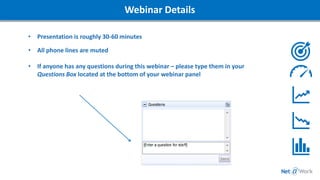
• If anyone has any questions during this webinar – please type them in your
Questions Box located at the bottom of your webinar panel
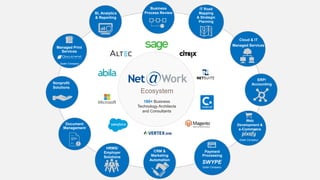
180+ Business
Technology Architects
and Consultants
IT Road
Mapping
& Strategic
Planning
Business
Process Review
Ecosystem
BI, Analytics
& Reporting
Cloud & IT
Managed Services
ERP/
Accounting
Web
Development &
e-Commerce
Sister Company
Payment
Processing
SWYPE
Sister Company
CRM &
Marketing
Automation
HRMS/
Employer
Solutions
Document
Management
Nonprofit
Solutions
Managed Print
Services
Sister Company
Goals of the Webinar Series
To Educate Sage 300 Users on the power
and basic capabilities of different BI Tools.
Provide a full range of Business
Intelligence Options to choose which is the
best solution for your needs.
Understand the benefits of transitioning
from FR to a more modern solution.
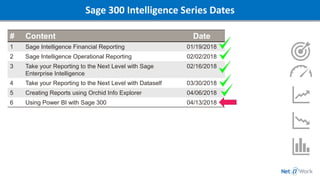
Sage 300 Intelligence Series Dates
# Content Date
1 Sage Intelligence Financial Reporting 01/19/2018
2 Sage Intelligence Operational Reporting 02/02/2018
3 Take your Reporting to the Next Level with Sage
Enterprise Intelligence
02/16/2018
4 Take your Reporting to the Next Level with Dataself 03/30/2018
5 Creating Reports using Orchid Info Explorer 04/06/2018
6 Using Power BI with Sage 300 04/13/2018
7
Webinar Poll
• Answer the Polling Question to the Right
SF
Today’s Topic
MS Power BI
• Why Power BI
• Power BI Basic Overview
• GL Reporting
• Visualizations
• Mobility
• Power BI with Office 365
SF
Lets Take a
Deeper Dive into
MS Power BI
Sage 300 Intelligence Series
4/13/2018 11
Thank You For Attending!
Kelly Hummel | Net@Work
Sage 300 Practice Director
(P) 800-719-3307
(E) khummel@netatwork.com
Connect with
800-719-3307
www.netatwork.com
netatwork.com/blog
Net@Work YouTube
Follow us on Twitter: @netatwork_corp
Follow Net@Work on LinkedIn
Follow Net@Work on Google+
Follow Net@Work on Facebook
Contact your Net@Work Account Manager for any questions or concerns.
Or you can reach out to us via the information below!
Sean Fleming | Net@Work
Sage 300 Solutions Engineer
(P) 800-719-3307
(E) sfleming@netatwork.com
Be Sure to Register for the
Next Webinar in the Series:
Sean Fleming
Email: sfleming@netatwork.com
Register: netatwork.com/events
Questions…
• Setup Series
• Intelligence Series
• Automation & Workflow Series
• Document Management Series
• Warehouse Management Series
• Net@Work’s Favorites Series

Using Power BI with Sage 300

  • 1.
    4/13/2018 1 Sean Fleming,Sr. Solutions EngineerPresented by:
  • 2.
    Today’s Presenters Michael Macke|Net@Work - Sage 300 Consultant Sean Fleming | Net@Work Senior Solutions Engineer
  • 3.
    Webinar Details • Presentationis roughly 30-60 minutes • All phone lines are muted • If anyone has any questions during this webinar – please type them in your Questions Box located at the bottom of your webinar panel
  • 4.
    180+ Business Technology Architects andConsultants IT Road Mapping & Strategic Planning Business Process Review Ecosystem BI, Analytics & Reporting Cloud & IT Managed Services ERP/ Accounting Web Development & e-Commerce Sister Company Payment Processing SWYPE Sister Company CRM & Marketing Automation HRMS/ Employer Solutions Document Management Nonprofit Solutions Managed Print Services Sister Company
  • 5.
    Goals of theWebinar Series To Educate Sage 300 Users on the power and basic capabilities of different BI Tools. Provide a full range of Business Intelligence Options to choose which is the best solution for your needs. Understand the benefits of transitioning from FR to a more modern solution.
  • 6.
    Sage 300 IntelligenceSeries Dates # Content Date 1 Sage Intelligence Financial Reporting 01/19/2018 2 Sage Intelligence Operational Reporting 02/02/2018 3 Take your Reporting to the Next Level with Sage Enterprise Intelligence 02/16/2018 4 Take your Reporting to the Next Level with Dataself 03/30/2018 5 Creating Reports using Orchid Info Explorer 04/06/2018 6 Using Power BI with Sage 300 04/13/2018
  • 7.
  • 8.
    Webinar Poll • Answerthe Polling Question to the Right SF
  • 9.
    Today’s Topic MS PowerBI • Why Power BI • Power BI Basic Overview • GL Reporting • Visualizations • Mobility • Power BI with Office 365 SF
  • 10.
    Lets Take a DeeperDive into MS Power BI Sage 300 Intelligence Series
  • 11.
    4/13/2018 11 Thank YouFor Attending! Kelly Hummel | Net@Work Sage 300 Practice Director (P) 800-719-3307 (E) khummel@netatwork.com Connect with 800-719-3307 www.netatwork.com netatwork.com/blog Net@Work YouTube Follow us on Twitter: @netatwork_corp Follow Net@Work on LinkedIn Follow Net@Work on Google+ Follow Net@Work on Facebook Contact your Net@Work Account Manager for any questions or concerns. Or you can reach out to us via the information below! Sean Fleming | Net@Work Sage 300 Solutions Engineer (P) 800-719-3307 (E) sfleming@netatwork.com
  • 12.
    Be Sure toRegister for the Next Webinar in the Series: Sean Fleming Email: sfleming@netatwork.com Register: netatwork.com/events Questions… • Setup Series • Intelligence Series • Automation & Workflow Series • Document Management Series • Warehouse Management Series • Net@Work’s Favorites Series