Creating digital stories Lena Arena DER Project Coordinator  Sydney Region [email_address]
The challenge… Wanting students to use digital imaging as a mode of communication and personal reflection
What is a digital story? Many definitions, but in general, combining the art of telling stories with any of a variety of available multimedia tools, including graphics, audio, video, animation, and Web publishing.  Revolve around a theme and often contain a particular viewpoint; stories are typically just a few minutes long.
Types of Digital Stories…1 Personal narratives: Memorial Stories – about a person’s memories Stories about events in our lives Stories about places in our lives  Stories about what we do
Types of Digital Stories…2 Examination of historical themes and events: Based on material students explore Facilitates research and organisational Skills
Types of Digital Stories…3 Stories that Inform or Instruct  Can be argued that all digital stories inform (or instruct) But the distinction is that digital stories can be created that deliver instructional content on many different topics, including: Mathematics, Science, Languages, Medicine, etc.
Elements of a personal narrative digital story Overall purpose of the story Narrator’s point of view Choice of content  Clarity of voice Pacing of the narrative  Meaningful soundtrack Quality of the images Economy of the story detail Good grammar and language usage
Sample digital stories Student Sample http://www.microsoft.com/australia/wvx/student_work_sample_digital_story.wvx   ACMI (Australian Centre for the Moving Image) http://www.acmi.net.au/video_kids.htm
Sample digital stories The Educational Uses of Digital Story Telling http://digitalstorytelling.coe.uh.edu
Why use digital stories?  An effective learning tool  for students Research Skills Writing Skills Listening Skills Speaking Skills  Organisational Skills Technology Skills Presentation Skills Interview Skills Interpersonal Skills
Why use digital stories? Stories created by teachers can serve: As a lesson hook As a way to integrate multimedia into the curriculum  As a way to make difficult content more understandable To facilitate classroom discussion
What do I need to create a digital story? Software: Photo Story (free with PCs) iMovie (free with Macs) Movie Maker (free with PCs) MemoriesOnTV Adobe Premiere Elements Animoto (web site) Hardware: Computer Microphone Headphones
Developing your Digital Story Pre-writing:  brainstorming, collecting images, researching, outlining, and storyboarding  Drafting:  creating a script and developing form  Revising:  modifying images and organisation  Editing:  timing, images, and narration  Publishing:  the final product
Evaluating digital stories Sample rubric
About Creative Commons "Creative Commons is a non-profit that offers an alternative to full copyright.“  creativecommons.org Attribution  means: You let others copy, distribute, display, and perform your copyrighted work - and derivative works based upon it - but only if they give you credit.  Noncommercial  means: You let others copy, distribute, display, and perform your work - and derivative works based upon it - but for noncommercial purposes only.
About Creative Commons…2 No Derivative Works  means: You let others copy, distribute, display, and perform only verbatim copies of your work, not derivative works based upon it.  Share Alike  means: You allow others to distribute derivative works only under a license identical to the license that governs your work.
Great websites Educational Uses of Digital Storytelling http://digitalstorytelling.coe.uh.edu/index.html DigiTales http://www.digitales.us/index.php   Teach Digital: Curriculum by Wes Fryer http://teachdigital.pbwiki.com/ds
Great Websites Flickr Storm http://www.zoo-m.com/flickr-storm/   FlickrCC http://flickrcc.bluemountains.net/   Free Play Music http://freeplaymusic.com/ Find Sounds http://www.findsounds.com/
Free Music Websites Incompetech Royalty Free Music http://incompetech.com/m/c/royalty-free/   Sounddogs Http://www.sounddogs.com/ Jamendo http://www.jamendo.com/en/   Partners in Rhyme http://www.partnersinrhyme.com/
Did you know? In 2007, the average Australian family household had: 3 mobile phones 3 TVs 2 computers 2 DVD players 2 portable MP3/MP4 players 1 VCR 2 games consoles (Source: ACMA study cited in Lee, M & Gaffney,M (eds.), Leading the Digital School. 2008)
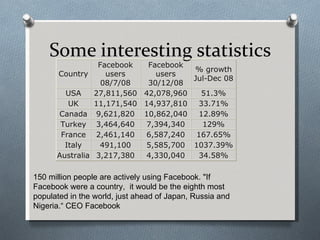
Some interesting statistics 150 million people are actively using Facebook. "If Facebook were a country,  it would be the eighth most populated in the world, just ahead of Japan, Russia and Nigeria.“ CEO Facebook
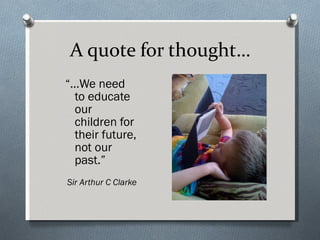
A quote for thought… “… We need to educate our children for their future, not our past.” Sir Arthur C Clarke

Using ict to create digital stories v2

  • 1.
    Creating digital storiesLena Arena DER Project Coordinator Sydney Region [email_address]
  • 2.
    The challenge… Wantingstudents to use digital imaging as a mode of communication and personal reflection
  • 3.
    What is adigital story? Many definitions, but in general, combining the art of telling stories with any of a variety of available multimedia tools, including graphics, audio, video, animation, and Web publishing. Revolve around a theme and often contain a particular viewpoint; stories are typically just a few minutes long.
  • 4.
    Types of DigitalStories…1 Personal narratives: Memorial Stories – about a person’s memories Stories about events in our lives Stories about places in our lives Stories about what we do
  • 5.
    Types of DigitalStories…2 Examination of historical themes and events: Based on material students explore Facilitates research and organisational Skills
  • 6.
    Types of DigitalStories…3 Stories that Inform or Instruct Can be argued that all digital stories inform (or instruct) But the distinction is that digital stories can be created that deliver instructional content on many different topics, including: Mathematics, Science, Languages, Medicine, etc.
  • 7.
    Elements of apersonal narrative digital story Overall purpose of the story Narrator’s point of view Choice of content Clarity of voice Pacing of the narrative Meaningful soundtrack Quality of the images Economy of the story detail Good grammar and language usage
  • 8.
    Sample digital storiesStudent Sample http://www.microsoft.com/australia/wvx/student_work_sample_digital_story.wvx ACMI (Australian Centre for the Moving Image) http://www.acmi.net.au/video_kids.htm
  • 9.
    Sample digital storiesThe Educational Uses of Digital Story Telling http://digitalstorytelling.coe.uh.edu
  • 10.
    Why use digitalstories? An effective learning tool for students Research Skills Writing Skills Listening Skills Speaking Skills Organisational Skills Technology Skills Presentation Skills Interview Skills Interpersonal Skills
  • 11.
    Why use digitalstories? Stories created by teachers can serve: As a lesson hook As a way to integrate multimedia into the curriculum As a way to make difficult content more understandable To facilitate classroom discussion
  • 12.
    What do Ineed to create a digital story? Software: Photo Story (free with PCs) iMovie (free with Macs) Movie Maker (free with PCs) MemoriesOnTV Adobe Premiere Elements Animoto (web site) Hardware: Computer Microphone Headphones
  • 13.
    Developing your DigitalStory Pre-writing: brainstorming, collecting images, researching, outlining, and storyboarding Drafting: creating a script and developing form Revising: modifying images and organisation Editing: timing, images, and narration Publishing: the final product
  • 14.
  • 15.
    About Creative Commons"Creative Commons is a non-profit that offers an alternative to full copyright.“ creativecommons.org Attribution means: You let others copy, distribute, display, and perform your copyrighted work - and derivative works based upon it - but only if they give you credit. Noncommercial means: You let others copy, distribute, display, and perform your work - and derivative works based upon it - but for noncommercial purposes only.
  • 16.
    About Creative Commons…2No Derivative Works means: You let others copy, distribute, display, and perform only verbatim copies of your work, not derivative works based upon it. Share Alike means: You allow others to distribute derivative works only under a license identical to the license that governs your work.
  • 17.
    Great websites EducationalUses of Digital Storytelling http://digitalstorytelling.coe.uh.edu/index.html DigiTales http://www.digitales.us/index.php Teach Digital: Curriculum by Wes Fryer http://teachdigital.pbwiki.com/ds
  • 18.
    Great Websites FlickrStorm http://www.zoo-m.com/flickr-storm/ FlickrCC http://flickrcc.bluemountains.net/ Free Play Music http://freeplaymusic.com/ Find Sounds http://www.findsounds.com/
  • 19.
    Free Music WebsitesIncompetech Royalty Free Music http://incompetech.com/m/c/royalty-free/ Sounddogs Http://www.sounddogs.com/ Jamendo http://www.jamendo.com/en/ Partners in Rhyme http://www.partnersinrhyme.com/
  • 20.
    Did you know?In 2007, the average Australian family household had: 3 mobile phones 3 TVs 2 computers 2 DVD players 2 portable MP3/MP4 players 1 VCR 2 games consoles (Source: ACMA study cited in Lee, M & Gaffney,M (eds.), Leading the Digital School. 2008)
  • 21.
    Some interesting statistics150 million people are actively using Facebook. "If Facebook were a country, it would be the eighth most populated in the world, just ahead of Japan, Russia and Nigeria.“ CEO Facebook
  • 22.
    A quote forthought… “… We need to educate our children for their future, not our past.” Sir Arthur C Clarke