Unit 1 : Introduction & Stages of
         multimedia projects
Agenda
 Introduction to multimedia
 Multimedia objects
 Uses of multimedia
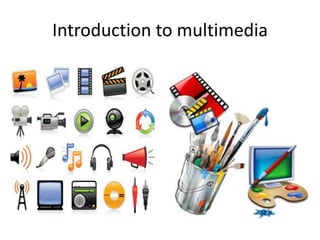
Introduction to multimedia
What is multimedia?
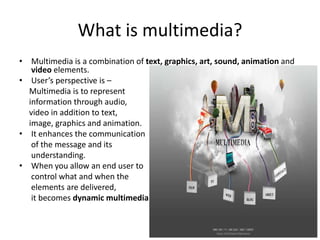
• Multimedia is a combination of text, graphics, art, sound, animation and
   video elements.
• User’s perspective is –
  Multimedia is to represent
  information through audio,
  video in addition to text,
  image, graphics and animation.
• It enhances the communication
   of the message and its
   understanding.
• When you allow an end user to
   control what and when the
   elements are delivered,
   it becomes dynamic multimedia
What others have to say about it
• Multimedia is a combination of time based media such as voice,
  animation and video and along with space based media such as
  text, graphics and images.
                                               - Mr. Christine Hughes
• Multimedia is commonly defined as the combination of text,
  graphics, audio, video and animation on the computer.
                                               -Mr. Fox
• The term multimedia describes a new application oriented
  technology that is based on the multi-sensory nature of humans
  and the evolving ability of computers to convey diverse types of
  information.
                                               Mr. Little
Multimedia Objects
Multimedia Objects
• Multimedia objects (OBJE) are files that
  contain images, scanned documents, audio
  recordings, video clips etc. that relate to some
  fact within our genealogical data.

• A multimedia object may be linked with
  several entities (person, family, source, …) and
  vice versa.
Where should we store multimedia
            objects?
• Multimedia files may be stored anywhere in
  the network. But it is recommended to keep
  them in a folder structure within the folder of
  the GEDCOM file. Thus only relative paths are
  kept, and a transfer of our genealogical data
  including pictures, document scans or audio
  files is much easier.
Uses of multimedia
Uses of multimedia
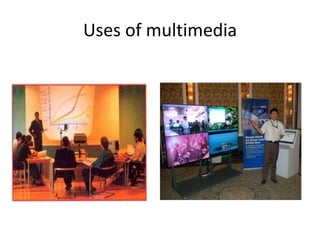
• These days many industries are rapidly adapting
  the uses of multimedia rich applications.
  Multimedia enhances the traditional methods of
  text based presentations.
• Following are some major areas of use of
  multimedia –
  –   Multimedia in Business
  –   Multimedia in Education
  –   Multimedia at home
  –   Multimedia in public places
Multimedia in Business
• This is the mainstream market for multimedia
• This includes –
  –   Marketing
  –   Advertising
  –   Product demos
  –   Other methods like presentation, network
      communication etc.
• For marketing, we need communication and it is
  done through person, print, video, voice mail and
  video conferencing
Multimedia in Business…
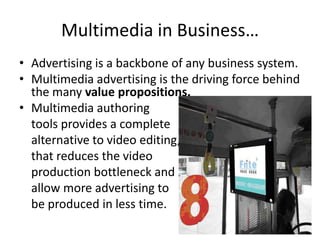
• Advertising is a backbone of any business system.
• Multimedia advertising is the driving force behind
  the many value propositions.
• Multimedia authoring
  tools provides a complete
  alternative to video editing,
  that reduces the video
  production bottleneck and
  allow more advertising to
  be produced in less time.
Multimedia in Business…
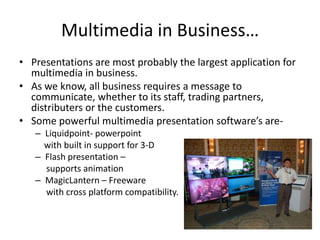
• Presentations are most probably the largest application for
  multimedia in business.
• As we know, all business requires a message to
  communicate, whether to its staff, trading partners,
  distributers or the customers.
• Some powerful multimedia presentation software’s are-
   – Liquidpoint- powerpoint
     with built in support for 3-D
   – Flash presentation –
     supports animation
   – MagicLantern – Freeware
     with cross platform compatibility.
Multimedia in education
• This is perhaps the most needy field for the multimedia.
• One of the challenges in teaching the engineering or any
  other discipline, is trying to meet the need of the variety of
  students (mainly in large classes)
• A survey of learning styles reveals that-
       Students are visual, yet lectures are primarily verbal.

• Because of these, when we come to consider the computer
  and learning, the debate focuses on the occasions when
  adding videos, sounds and other elements might be useful.
• Multimedia softwares favor visual learners, images, graphs,
  animations, movies etc.
Multimedia in education…
• Some softwares are-
  – EDUSMART – smart and interactive classroom
  – Chanakya ( Smart Learning based software for Std.1st
    to12th Marathi & English Medium ) As par
    Maharashtra State Board CBSE, ICSE Syllabus
  – SmartGuru ( Smart Analysis based software for 12th
    MHT-CET students to score more marks in exams )

• To know more
   about Edusmart, visit
   http://www.edusmart.co.in
Multimedia in education…
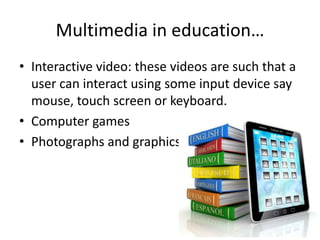
• Interactive video: these videos are such that a
  user can interact using some input device say
  mouse, touch screen or keyboard.
• Computer games
• Photographs and graphics
Multimedia in public place
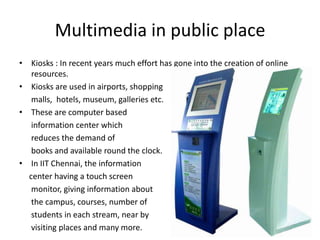
• Kiosks : In recent years much effort has gone into the creation of online
   resources.
• Kiosks are used in airports, shopping
   malls, hotels, museum, galleries etc.
• These are computer based
   information center which
   reduces the demand of
   books and available round the clock.
• In IIT Chennai, the information
  center having a touch screen
   monitor, giving information about
   the campus, courses, number of
   students in each stream, near by
   visiting places and many more.
Virtual Reality
• This is a new field of multimedia, where user can interact
  with a three-dimensional environment that sense the users
  position and attempt to place you inside a real experience.
• There are three-dimensional software designing tools
  which allow a developer to create the shapes, lightning and
  other effects of virtual environment.
• The idea behind the concept of virtual reality is to show the
  user a computer generated environment that adjust to you,
  to your movements.
• It involves a high end user interface that involves real time
  3D simulations and interactions through position and
  motion tracking.
Uses of virtual reality
•   Scientific simulators
•   Air traffic control system (ATC)
•   Games
•   Architectural planning
•   Business planning
•   Education and training
Tools of a VR system
•   Head-Mounted Display(HMD)
•   Binocular Omni-Orientation Monitor(BOOM)
•   Cave Automatic Virtual Environment(CAVE)
•   Input devices and other technologies
HMD
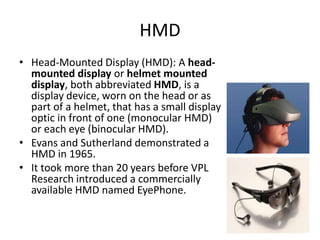
• Head-Mounted Display (HMD): A head-
  mounted display or helmet mounted
  display, both abbreviated HMD, is a
  display device, worn on the head or as
  part of a helmet, that has a small display
  optic in front of one (monocular HMD)
  or each eye (binocular HMD).
• Evans and Sutherland demonstrated a
  HMD in 1965.
• It took more than 20 years before VPL
  Research introduced a commercially
  available HMD named EyePhone.
HMD cont.
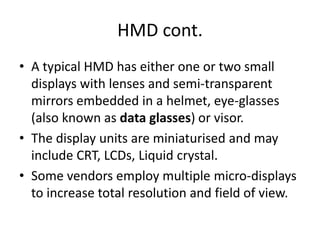
• A typical HMD has either one or two small
  displays with lenses and semi-transparent
  mirrors embedded in a helmet, eye-glasses
  (also known as data glasses) or visor.
• The display units are miniaturised and may
  include CRT, LCDs, Liquid crystal.
• Some vendors employ multiple micro-displays
  to increase total resolution and field of view.
Types of HMD
• HMDs differ in whether they can display just a
  computer generated image (CGI), show live images
  from the real world or a combination of both.
• Most HMDs display only a computer-generated image,
  sometimes referred to as a virtual image
• Some HMDs allow a CGI to be superimposed on a real-
  world view. This is sometimes referred to as
  augmented reality or mixed reality. Combining real-
  world view with CGI can be done by projecting the CGI
  through a partially reflective mirror and viewing the
  real world directly. This method is often called Optical
  See-Through.
BOOM
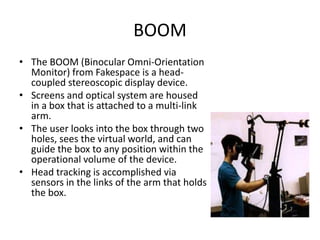
• The BOOM (Binocular Omni-Orientation
  Monitor) from Fakespace is a head-
  coupled stereoscopic display device.
• Screens and optical system are housed
  in a box that is attached to a multi-link
  arm.
• The user looks into the box through two
  holes, sees the virtual world, and can
  guide the box to any position within the
  operational volume of the device.
• Head tracking is accomplished via
  sensors in the links of the arm that holds
  the box.
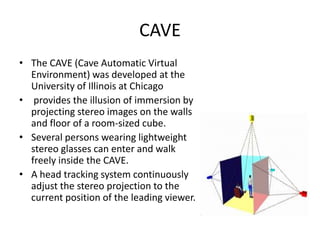
CAVE
• The CAVE (Cave Automatic Virtual
  Environment) was developed at the
  University of Illinois at Chicago
• provides the illusion of immersion by
  projecting stereo images on the walls
  and floor of a room-sized cube.
• Several persons wearing lightweight
  stereo glasses can enter and walk
  freely inside the CAVE.
• A head tracking system continuously
  adjust the stereo projection to the
  current position of the leading viewer.
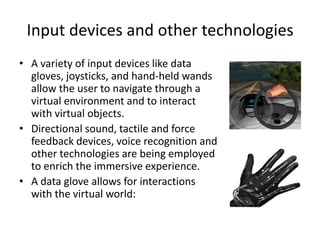
Input devices and other technologies
• A variety of input devices like data
  gloves, joysticks, and hand-held wands
  allow the user to navigate through a
  virtual environment and to interact
  with virtual objects.
• Directional sound, tactile and force
  feedback devices, voice recognition and
  other technologies are being employed
  to enrich the immersive experience.
• A data glove allows for interactions
  with the virtual world:

2.multimedia unit 1 introduction

  • 1.
    Unit 1 :Introduction & Stages of multimedia projects Agenda  Introduction to multimedia  Multimedia objects  Uses of multimedia
  • 2.
  • 3.
    What is multimedia? •Multimedia is a combination of text, graphics, art, sound, animation and video elements. • User’s perspective is – Multimedia is to represent information through audio, video in addition to text, image, graphics and animation. • It enhances the communication of the message and its understanding. • When you allow an end user to control what and when the elements are delivered, it becomes dynamic multimedia
  • 4.
    What others haveto say about it • Multimedia is a combination of time based media such as voice, animation and video and along with space based media such as text, graphics and images. - Mr. Christine Hughes • Multimedia is commonly defined as the combination of text, graphics, audio, video and animation on the computer. -Mr. Fox • The term multimedia describes a new application oriented technology that is based on the multi-sensory nature of humans and the evolving ability of computers to convey diverse types of information. Mr. Little
  • 5.
  • 6.
    Multimedia Objects • Multimediaobjects (OBJE) are files that contain images, scanned documents, audio recordings, video clips etc. that relate to some fact within our genealogical data. • A multimedia object may be linked with several entities (person, family, source, …) and vice versa.
  • 7.
    Where should westore multimedia objects? • Multimedia files may be stored anywhere in the network. But it is recommended to keep them in a folder structure within the folder of the GEDCOM file. Thus only relative paths are kept, and a transfer of our genealogical data including pictures, document scans or audio files is much easier.
  • 8.
  • 9.
    Uses of multimedia •These days many industries are rapidly adapting the uses of multimedia rich applications. Multimedia enhances the traditional methods of text based presentations. • Following are some major areas of use of multimedia – – Multimedia in Business – Multimedia in Education – Multimedia at home – Multimedia in public places
  • 10.
    Multimedia in Business •This is the mainstream market for multimedia • This includes – – Marketing – Advertising – Product demos – Other methods like presentation, network communication etc. • For marketing, we need communication and it is done through person, print, video, voice mail and video conferencing
  • 11.
    Multimedia in Business… •Advertising is a backbone of any business system. • Multimedia advertising is the driving force behind the many value propositions. • Multimedia authoring tools provides a complete alternative to video editing, that reduces the video production bottleneck and allow more advertising to be produced in less time.
  • 12.
    Multimedia in Business… •Presentations are most probably the largest application for multimedia in business. • As we know, all business requires a message to communicate, whether to its staff, trading partners, distributers or the customers. • Some powerful multimedia presentation software’s are- – Liquidpoint- powerpoint with built in support for 3-D – Flash presentation – supports animation – MagicLantern – Freeware with cross platform compatibility.
  • 13.
    Multimedia in education •This is perhaps the most needy field for the multimedia. • One of the challenges in teaching the engineering or any other discipline, is trying to meet the need of the variety of students (mainly in large classes) • A survey of learning styles reveals that- Students are visual, yet lectures are primarily verbal. • Because of these, when we come to consider the computer and learning, the debate focuses on the occasions when adding videos, sounds and other elements might be useful. • Multimedia softwares favor visual learners, images, graphs, animations, movies etc.
  • 14.
    Multimedia in education… •Some softwares are- – EDUSMART – smart and interactive classroom – Chanakya ( Smart Learning based software for Std.1st to12th Marathi & English Medium ) As par Maharashtra State Board CBSE, ICSE Syllabus – SmartGuru ( Smart Analysis based software for 12th MHT-CET students to score more marks in exams ) • To know more about Edusmart, visit http://www.edusmart.co.in
  • 15.
    Multimedia in education… •Interactive video: these videos are such that a user can interact using some input device say mouse, touch screen or keyboard. • Computer games • Photographs and graphics
  • 16.
    Multimedia in publicplace • Kiosks : In recent years much effort has gone into the creation of online resources. • Kiosks are used in airports, shopping malls, hotels, museum, galleries etc. • These are computer based information center which reduces the demand of books and available round the clock. • In IIT Chennai, the information center having a touch screen monitor, giving information about the campus, courses, number of students in each stream, near by visiting places and many more.
  • 17.
    Virtual Reality • Thisis a new field of multimedia, where user can interact with a three-dimensional environment that sense the users position and attempt to place you inside a real experience. • There are three-dimensional software designing tools which allow a developer to create the shapes, lightning and other effects of virtual environment. • The idea behind the concept of virtual reality is to show the user a computer generated environment that adjust to you, to your movements. • It involves a high end user interface that involves real time 3D simulations and interactions through position and motion tracking.
  • 18.
    Uses of virtualreality • Scientific simulators • Air traffic control system (ATC) • Games • Architectural planning • Business planning • Education and training
  • 19.
    Tools of aVR system • Head-Mounted Display(HMD) • Binocular Omni-Orientation Monitor(BOOM) • Cave Automatic Virtual Environment(CAVE) • Input devices and other technologies
  • 20.
    HMD • Head-Mounted Display(HMD): A head- mounted display or helmet mounted display, both abbreviated HMD, is a display device, worn on the head or as part of a helmet, that has a small display optic in front of one (monocular HMD) or each eye (binocular HMD). • Evans and Sutherland demonstrated a HMD in 1965. • It took more than 20 years before VPL Research introduced a commercially available HMD named EyePhone.
  • 21.
    HMD cont. • Atypical HMD has either one or two small displays with lenses and semi-transparent mirrors embedded in a helmet, eye-glasses (also known as data glasses) or visor. • The display units are miniaturised and may include CRT, LCDs, Liquid crystal. • Some vendors employ multiple micro-displays to increase total resolution and field of view.
  • 22.
    Types of HMD •HMDs differ in whether they can display just a computer generated image (CGI), show live images from the real world or a combination of both. • Most HMDs display only a computer-generated image, sometimes referred to as a virtual image • Some HMDs allow a CGI to be superimposed on a real- world view. This is sometimes referred to as augmented reality or mixed reality. Combining real- world view with CGI can be done by projecting the CGI through a partially reflective mirror and viewing the real world directly. This method is often called Optical See-Through.
  • 23.
    BOOM • The BOOM(Binocular Omni-Orientation Monitor) from Fakespace is a head- coupled stereoscopic display device. • Screens and optical system are housed in a box that is attached to a multi-link arm. • The user looks into the box through two holes, sees the virtual world, and can guide the box to any position within the operational volume of the device. • Head tracking is accomplished via sensors in the links of the arm that holds the box.
  • 24.
    CAVE • The CAVE(Cave Automatic Virtual Environment) was developed at the University of Illinois at Chicago • provides the illusion of immersion by projecting stereo images on the walls and floor of a room-sized cube. • Several persons wearing lightweight stereo glasses can enter and walk freely inside the CAVE. • A head tracking system continuously adjust the stereo projection to the current position of the leading viewer.
  • 25.
    Input devices andother technologies • A variety of input devices like data gloves, joysticks, and hand-held wands allow the user to navigate through a virtual environment and to interact with virtual objects. • Directional sound, tactile and force feedback devices, voice recognition and other technologies are being employed to enrich the immersive experience. • A data glove allows for interactions with the virtual world: