Establishing Your Own e-Business Website By: Niko Atmadja
Establishing Your Own e-Business Website On this topic you will learn about: The benefit of having your own e–business website How to check and register your domain name How to choose Web Hosting Provider How to choose and deploy open-source e-commerce software on your website
Establishing Your Own e-Business Website On this topic you will learn about: How to work with the graphics How to make use free video streaming provider such as YouTube to store your products video and display it on your website. Using Yahoo Messenger to provide support/help to your customer.
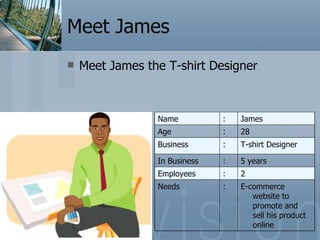
Meet James Meet James the T-shirt Designer E-commerce website to promote and sell his product online : Needs 2 : Employees 5 years : In Business T-shirt Designer : Business 28  : Age James  : Name
The benefit of having your own e–business website Take control of everything in your e-commerce system. Build your own brand name Customize to your needs
The Costs Setup cost Domain Name Web Hosting Provider Web Development / E-commerce shopping cart Maintenance cost Domain Name Web Hosting Provider
Register Domain Name Get Web Hosting Provider Install Shopping Cart App. Adding Product 1 2 3 4
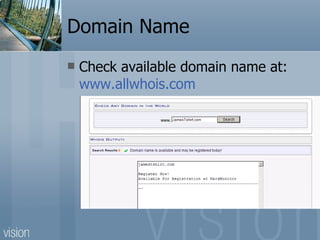
Domain Name Check available domain name at:  www.allwhois.com
Register your domain name
Domain Name 12 October 2007, WallStreet.com was sold for US$3million
Web Hosting Provider What you need to know about web hosting provider: Reliability Technical support Hosting Features Security Cost
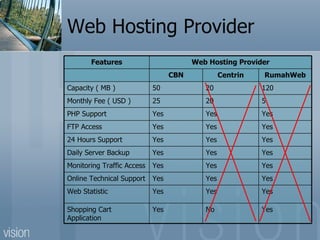
Web Hosting Provider Yes No Yes Shopping Cart Application Yes Yes Yes Web Statistic Yes Yes Yes Online Technical Support Yes Yes Yes Monitoring Traffic Access Yes Yes Yes Daily Server Backup  Yes Yes Yes 24 Hours Support  Yes Yes Yes FTP Access Yes Yes Yes PHP Support  5 20 25 Monthly Fee ( USD ) 120 20 50 Capacity ( MB ) RumahWeb Centrin CBN Web Hosting Provider Features
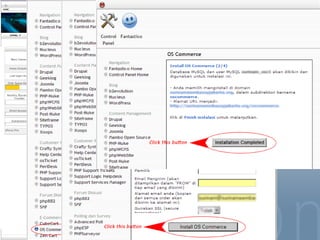
E-commerce Software (Open Source) osCommerce How to Install?
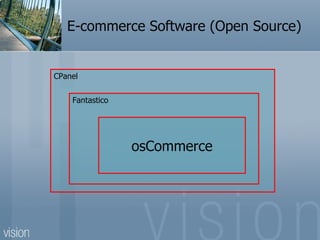
E-commerce Software (Open Source) CPanel Fantastico osCommerce
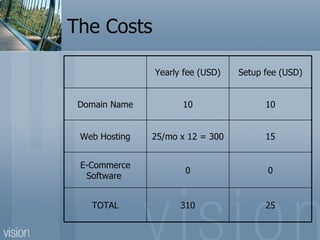
The Costs 25 310 TOTAL 0 0 E-Commerce Software  15 25/mo x 12 = 300 Web Hosting 10 10 Domain Name Setup fee (USD) Yearly fee (USD)
 
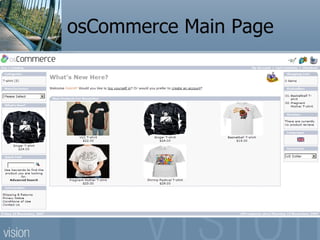
osCommerce Main Page
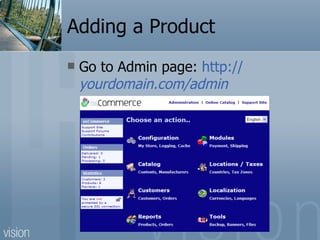
Adding a Product Go to Admin page:  http:// yourdomain .com /admin
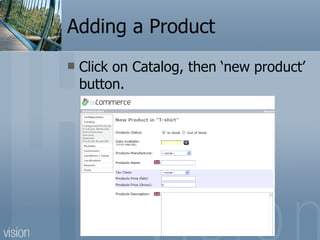
Adding a Product Click on Catalog, then ‘new product’ button.
Adding a Product Fill in all required fields and click Preview, then click Update to save your product.
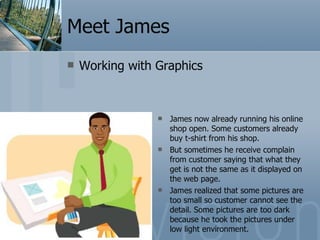
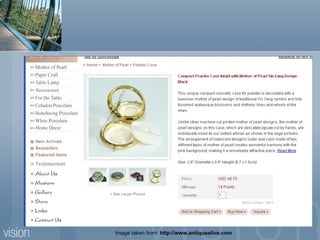
Meet James Working with Graphics James now already running his online shop open. Some customers already buy t-shirt from his shop. But sometimes he receive complain from customer saying that what they get is not the same as it displayed on the web page. James realized that some pictures are too small so customer cannot see the detail. Some pictures are too dark because he took the pictures under low light environment.
Why graphics important? You can see, but you cannot touch and feel. Consumer expectation of the purchased product.
Image taken from:  http://www.antiquealive.com
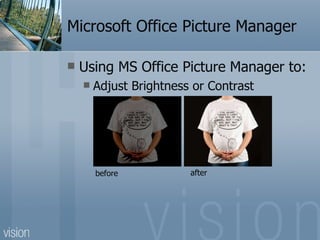
Microsoft Office Picture Manager Using MS Office Picture Manager to: Adjust Brightness or Contrast before after
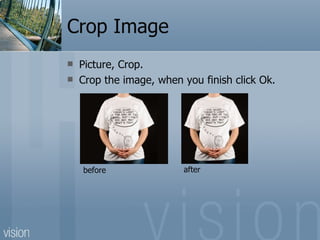
Crop Image Picture, Crop. Crop the image, when you finish click Ok. before after
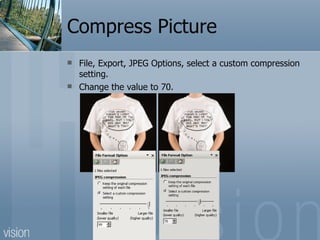
Compress Picture File, Export, JPEG Options, select a custom compression setting.  Change the value to 70.
Meet James Meet James the T-shirt Designer One day James browses the Internet to see other competitor’s website, he saw that other website display their products as videos.  James think if he can display his t-shirts using video, customer can see 360 degrees view of the product, he can also add voice to the video. It will make the product more alive.
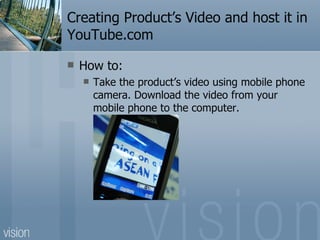
Creating Product’s Video and host it in YouTube.com How to: Take the product’s video using mobile phone camera. Download the video from your mobile phone to the computer.
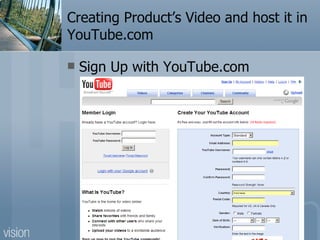
Creating Product’s Video and host it in YouTube.com Sign Up with YouTube.com
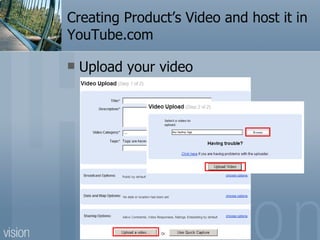
Creating Product’s Video and host it in YouTube.com Upload your video
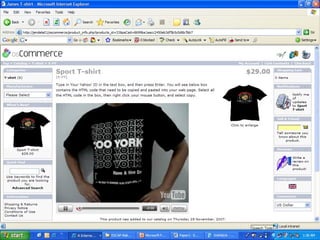
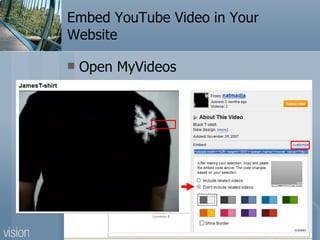
Embed YouTube Video in Your Website Open MyVideos
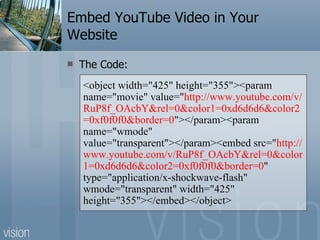
Embed YouTube Video in Your Website The Code: <object width=&quot;425&quot; height=&quot;355&quot;><param name=&quot;movie&quot; value=&quot; http://www.youtube.com/v/RuP8f_OAcbY&rel=0&color1=0xd6d6d6&color2=0xf0f0f0&border=0 &quot;></param><param name=&quot;wmode&quot; value=&quot;transparent&quot;></param><embed src=&quot; http://www.youtube.com/v/RuP8f_OAcbY&rel=0&color1=0xd6d6d6&color2=0xf0f0f0&border=0 &quot; type=&quot;application/x-shockwave-flash&quot; wmode=&quot;transparent&quot; width=&quot;425&quot; height=&quot;355&quot;></embed></object>
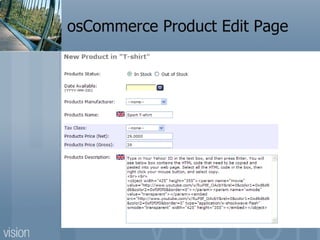
osCommerce Product Edit Page
 
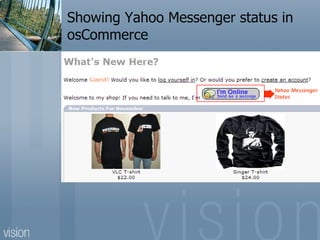
Meet James Support/Help Desk To serve his customer better, James using Instant Messaging software to chat with his customers. He uses Yahoo Messenger (YM). He put his ID on the website, so customer can chat with him via YM. If customer want to talk with him, the customer need to add James ID to his YM.  But sometimes, customers found difficulties in knowing whether James online or not. James needs to put his YM status on his online shop.
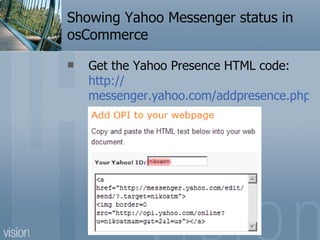
Showing Yahoo Messenger status in osCommerce Get the Yahoo Presence HTML code:  http:// messenger.yahoo.com/addpresence.php
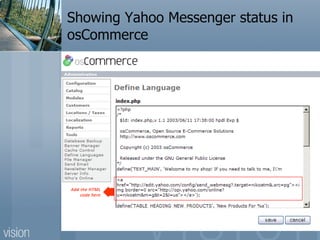
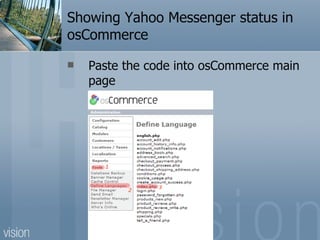
Showing Yahoo Messenger status in osCommerce Paste the code into osCommerce main page
Showing Yahoo Messenger status in osCommerce
Conclusion Establishing your own e-commerce website doesn’t need to be expensive. With US$25 for setup cost and US$310 for yearly cost, you can have your own e-commerce website. We also can use what are free from the Internet such as YouTube to display your product’s video, use Yahoo Messenger to give support/help desk to your customers online.
Thank You

Using Established e-Marketplace

  • 1.
    Establishing Your Owne-Business Website By: Niko Atmadja
  • 2.
    Establishing Your Owne-Business Website On this topic you will learn about: The benefit of having your own e–business website How to check and register your domain name How to choose Web Hosting Provider How to choose and deploy open-source e-commerce software on your website
  • 3.
    Establishing Your Owne-Business Website On this topic you will learn about: How to work with the graphics How to make use free video streaming provider such as YouTube to store your products video and display it on your website. Using Yahoo Messenger to provide support/help to your customer.
  • 4.
    Meet James MeetJames the T-shirt Designer E-commerce website to promote and sell his product online : Needs 2 : Employees 5 years : In Business T-shirt Designer : Business 28 : Age James : Name
  • 5.
    The benefit ofhaving your own e–business website Take control of everything in your e-commerce system. Build your own brand name Customize to your needs
  • 6.
    The Costs Setupcost Domain Name Web Hosting Provider Web Development / E-commerce shopping cart Maintenance cost Domain Name Web Hosting Provider
  • 7.
    Register Domain NameGet Web Hosting Provider Install Shopping Cart App. Adding Product 1 2 3 4
  • 8.
    Domain Name Checkavailable domain name at: www.allwhois.com
  • 9.
  • 10.
    Domain Name 12October 2007, WallStreet.com was sold for US$3million
  • 11.
    Web Hosting ProviderWhat you need to know about web hosting provider: Reliability Technical support Hosting Features Security Cost
  • 12.
    Web Hosting ProviderYes No Yes Shopping Cart Application Yes Yes Yes Web Statistic Yes Yes Yes Online Technical Support Yes Yes Yes Monitoring Traffic Access Yes Yes Yes Daily Server Backup Yes Yes Yes 24 Hours Support Yes Yes Yes FTP Access Yes Yes Yes PHP Support 5 20 25 Monthly Fee ( USD ) 120 20 50 Capacity ( MB ) RumahWeb Centrin CBN Web Hosting Provider Features
  • 13.
    E-commerce Software (OpenSource) osCommerce How to Install?
  • 14.
    E-commerce Software (OpenSource) CPanel Fantastico osCommerce
  • 15.
    The Costs 25310 TOTAL 0 0 E-Commerce Software 15 25/mo x 12 = 300 Web Hosting 10 10 Domain Name Setup fee (USD) Yearly fee (USD)
  • 16.
  • 17.
  • 18.
    Adding a ProductGo to Admin page: http:// yourdomain .com /admin
  • 19.
    Adding a ProductClick on Catalog, then ‘new product’ button.
  • 20.
    Adding a ProductFill in all required fields and click Preview, then click Update to save your product.
  • 21.
    Meet James Workingwith Graphics James now already running his online shop open. Some customers already buy t-shirt from his shop. But sometimes he receive complain from customer saying that what they get is not the same as it displayed on the web page. James realized that some pictures are too small so customer cannot see the detail. Some pictures are too dark because he took the pictures under low light environment.
  • 22.
    Why graphics important?You can see, but you cannot touch and feel. Consumer expectation of the purchased product.
  • 23.
    Image taken from: http://www.antiquealive.com
  • 24.
    Microsoft Office PictureManager Using MS Office Picture Manager to: Adjust Brightness or Contrast before after
  • 25.
    Crop Image Picture,Crop. Crop the image, when you finish click Ok. before after
  • 26.
    Compress Picture File,Export, JPEG Options, select a custom compression setting. Change the value to 70.
  • 27.
    Meet James MeetJames the T-shirt Designer One day James browses the Internet to see other competitor’s website, he saw that other website display their products as videos. James think if he can display his t-shirts using video, customer can see 360 degrees view of the product, he can also add voice to the video. It will make the product more alive.
  • 28.
    Creating Product’s Videoand host it in YouTube.com How to: Take the product’s video using mobile phone camera. Download the video from your mobile phone to the computer.
  • 29.
    Creating Product’s Videoand host it in YouTube.com Sign Up with YouTube.com
  • 30.
    Creating Product’s Videoand host it in YouTube.com Upload your video
  • 31.
    Embed YouTube Videoin Your Website Open MyVideos
  • 32.
    Embed YouTube Videoin Your Website The Code: <object width=&quot;425&quot; height=&quot;355&quot;><param name=&quot;movie&quot; value=&quot; http://www.youtube.com/v/RuP8f_OAcbY&rel=0&color1=0xd6d6d6&color2=0xf0f0f0&border=0 &quot;></param><param name=&quot;wmode&quot; value=&quot;transparent&quot;></param><embed src=&quot; http://www.youtube.com/v/RuP8f_OAcbY&rel=0&color1=0xd6d6d6&color2=0xf0f0f0&border=0 &quot; type=&quot;application/x-shockwave-flash&quot; wmode=&quot;transparent&quot; width=&quot;425&quot; height=&quot;355&quot;></embed></object>
  • 33.
  • 34.
  • 35.
    Meet James Support/HelpDesk To serve his customer better, James using Instant Messaging software to chat with his customers. He uses Yahoo Messenger (YM). He put his ID on the website, so customer can chat with him via YM. If customer want to talk with him, the customer need to add James ID to his YM. But sometimes, customers found difficulties in knowing whether James online or not. James needs to put his YM status on his online shop.
  • 36.
    Showing Yahoo Messengerstatus in osCommerce Get the Yahoo Presence HTML code: http:// messenger.yahoo.com/addpresence.php
  • 37.
    Showing Yahoo Messengerstatus in osCommerce Paste the code into osCommerce main page
  • 38.
    Showing Yahoo Messengerstatus in osCommerce
  • 39.
    Showing Yahoo Messengerstatus in osCommerce
  • 40.
    Conclusion Establishing yourown e-commerce website doesn’t need to be expensive. With US$25 for setup cost and US$310 for yearly cost, you can have your own e-commerce website. We also can use what are free from the Internet such as YouTube to display your product’s video, use Yahoo Messenger to give support/help desk to your customers online.
  • 41.