Using CI tools for
continuous delivery?
Can we use CI tools for Continuous Delivery?

www.vishalbiyani.com/cicontinuous-delivery

www.vishalbiyani.com
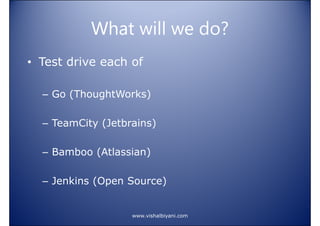
What will we do?
• Test drive each of
– Go (ThoughtWorks)
– TeamCity (Jetbrains)
– Bamboo (Atlassian)
– Jenkins (Open Source)

www.vishalbiyani.com
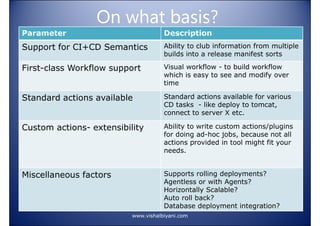
On what basis?
Parameter

Description

Support for CI+CD Semantics

Ability to club information from multiple
builds into a release manifest sorts

First-class Workflow support

Visual workflow - to build workflow
which is easy to see and modify over
time

Standard actions available

Standard actions available for various
CD tasks - like deploy to tomcat,
connect to server X etc.

Custom actions- extensibility

Ability to write custom actions/plugins
for doing ad-hoc jobs, because not all
actions provided in tool might fit your
needs.

Miscellaneous factors

Supports rolling deployments?
Agentless or with Agents?
Horizontally Scalable?
Auto roll back?
Database deployment integration?
www.vishalbiyani.com
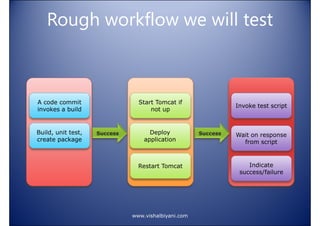
Rough workflow we will test

A code commit
invokes a build

Start Tomcat if
not up

Invoke test script

Build, unit test,
create package

Deploy
application

Wait on response
from script

Restart Tomcat

Indicate
success/failure

www.vishalbiyani.com
Go - ThoughtWorks
http://www.thoughtworks.co
m/products/go-continuousdelivery

www.vishalbiyani.com
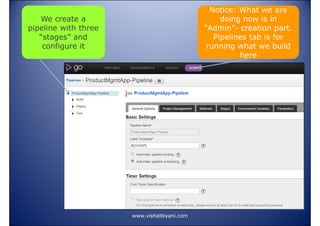
Notice: What we are
doing now is in
“Admin”- creation part.
Pipelines tab is for
running what we build
here

We create a
pipeline with three
“stages” and
configure it

www.vishalbiyani.com
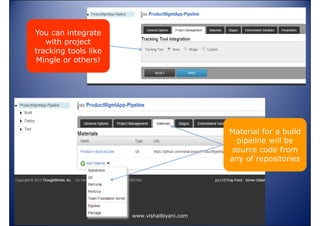
You can integrate
with project
tracking tools like
Mingle or others!

Material for a build
pipeline will be
source code from
any of repositories

www.vishalbiyani.com
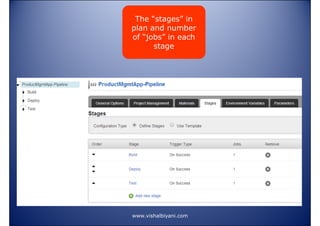
The “stages” in
plan and number
of “jobs” in each
stage

www.vishalbiyani.com
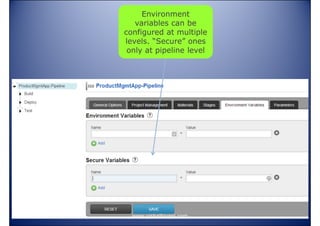
Environment
variables can be
configured at multiple
levels. “Secure” ones
only at pipeline level

www.vishalbiyani.com
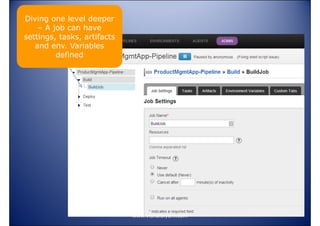
Diving one level deeper
– A job can have
settings, tasks, artifacts
and env. Variables
defined

www.vishalbiyani.com
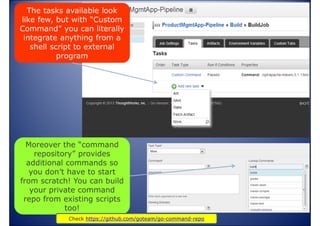
The tasks available look
like few, but with “Custom
Command” you can literally
integrate anything from a
shell script to external
program

Moreover the “command
repository” provides
additional commands so
you don’t have to start
from scratch! You can build
your private command
repo from existing scripts
too!
www.vishalbiyani.com
Check https://github.com/goteam/go-command-repo
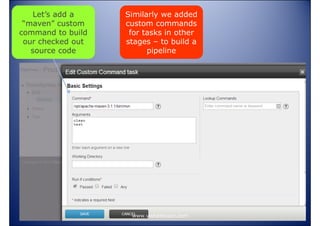
Let’s add a
“maven” custom
command to build
our checked out
source code

Similarly we added
custom commands
for tasks in other
stages – to build a
pipeline

www.vishalbiyani.com
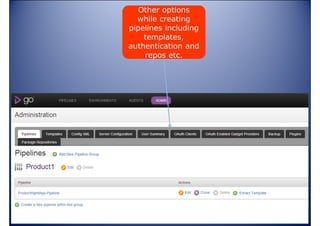
Other options
while creating
pipelines including
templates,
authentication and
repos etc.

www.vishalbiyani.com
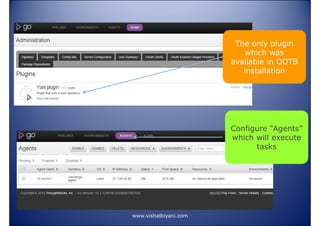
The only plugin
which was
available in OOTB
installation

Configure “Agents”
which will execute
tasks

www.vishalbiyani.com
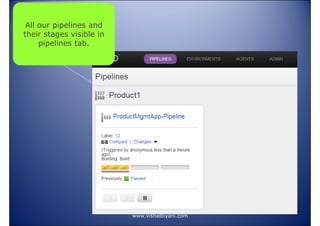
All our pipelines and
their stages visible in
pipelines tab.

www.vishalbiyani.com
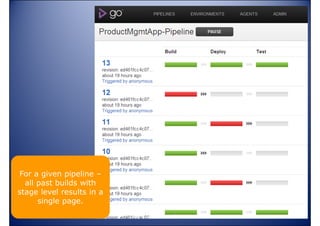
For a given pipeline –
all past builds with
stage level results in a
single page.
www.vishalbiyani.com
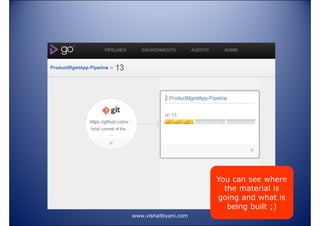
You can see where
the material is
going and what is
being built ;)
www.vishalbiyani.com
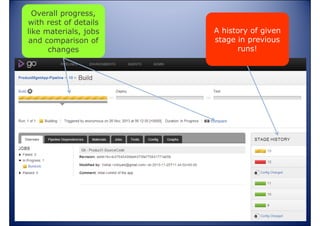
Overall progress,
with rest of details
like materials, jobs
and comparison of
changes

A history of given
stage in previous
runs!

www.vishalbiyani.com
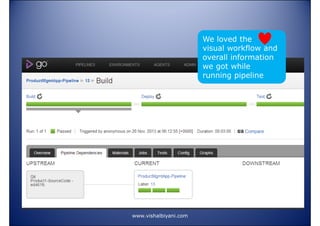
We loved the
visual workflow and
overall information
we got while
running pipeline

www.vishalbiyani.com
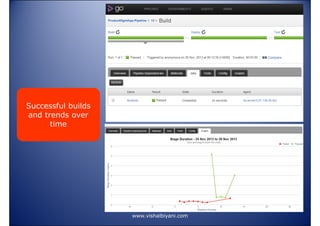
Successful builds
and trends over
time

www.vishalbiyani.com
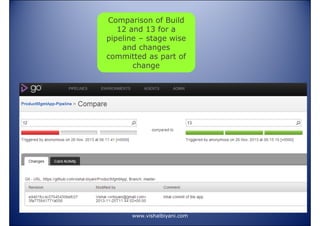
Comparison of Build
12 and 13 for a
pipeline – stage wise
and changes
committed as part of
change

www.vishalbiyani.com
Go - Concluding thoughts
• Clean, minimal interface
• Pretty good at both CI-CD Semantics
• Looks basic OOTB but Highly
extensible and can be customized to
needs with command repo (Kind of
actions etc.)
• Very well done visual workflows and
information required for deploys
www.vishalbiyani.com

Using CI for continuous delivery Part 1

  • 1.
    Using CI toolsfor continuous delivery? Can we use CI tools for Continuous Delivery? www.vishalbiyani.com/cicontinuous-delivery www.vishalbiyani.com
  • 2.
    What will wedo? • Test drive each of – Go (ThoughtWorks) – TeamCity (Jetbrains) – Bamboo (Atlassian) – Jenkins (Open Source) www.vishalbiyani.com
  • 3.
    On what basis? Parameter Description Supportfor CI+CD Semantics Ability to club information from multiple builds into a release manifest sorts First-class Workflow support Visual workflow - to build workflow which is easy to see and modify over time Standard actions available Standard actions available for various CD tasks - like deploy to tomcat, connect to server X etc. Custom actions- extensibility Ability to write custom actions/plugins for doing ad-hoc jobs, because not all actions provided in tool might fit your needs. Miscellaneous factors Supports rolling deployments? Agentless or with Agents? Horizontally Scalable? Auto roll back? Database deployment integration? www.vishalbiyani.com
  • 4.
    Rough workflow wewill test A code commit invokes a build Start Tomcat if not up Invoke test script Build, unit test, create package Deploy application Wait on response from script Restart Tomcat Indicate success/failure www.vishalbiyani.com
  • 5.
  • 6.
    Notice: What weare doing now is in “Admin”- creation part. Pipelines tab is for running what we build here We create a pipeline with three “stages” and configure it www.vishalbiyani.com
  • 7.
    You can integrate withproject tracking tools like Mingle or others! Material for a build pipeline will be source code from any of repositories www.vishalbiyani.com
  • 8.
    The “stages” in planand number of “jobs” in each stage www.vishalbiyani.com
  • 9.
    Environment variables can be configuredat multiple levels. “Secure” ones only at pipeline level www.vishalbiyani.com
  • 10.
    Diving one leveldeeper – A job can have settings, tasks, artifacts and env. Variables defined www.vishalbiyani.com
  • 11.
    The tasks availablelook like few, but with “Custom Command” you can literally integrate anything from a shell script to external program Moreover the “command repository” provides additional commands so you don’t have to start from scratch! You can build your private command repo from existing scripts too! www.vishalbiyani.com Check https://github.com/goteam/go-command-repo
  • 12.
    Let’s add a “maven”custom command to build our checked out source code Similarly we added custom commands for tasks in other stages – to build a pipeline www.vishalbiyani.com
  • 13.
    Other options while creating pipelinesincluding templates, authentication and repos etc. www.vishalbiyani.com
  • 14.
    The only plugin whichwas available in OOTB installation Configure “Agents” which will execute tasks www.vishalbiyani.com
  • 15.
    All our pipelinesand their stages visible in pipelines tab. www.vishalbiyani.com
  • 16.
    For a givenpipeline – all past builds with stage level results in a single page. www.vishalbiyani.com
  • 17.
    You can seewhere the material is going and what is being built ;) www.vishalbiyani.com
  • 18.
    Overall progress, with restof details like materials, jobs and comparison of changes A history of given stage in previous runs! www.vishalbiyani.com
  • 19.
    We loved the visualworkflow and overall information we got while running pipeline www.vishalbiyani.com
  • 20.
    Successful builds and trendsover time www.vishalbiyani.com
  • 21.
    Comparison of Build 12and 13 for a pipeline – stage wise and changes committed as part of change www.vishalbiyani.com
  • 22.
    Go - Concludingthoughts • Clean, minimal interface • Pretty good at both CI-CD Semantics • Looks basic OOTB but Highly extensible and can be customized to needs with command repo (Kind of actions etc.) • Very well done visual workflows and information required for deploys www.vishalbiyani.com