CI/CD Workflows and Best
Practices
with Jenkins
Kenichi Shibata
Why CI/CD
 It is important to have a stable code which runs all the time for deployment CI/CD is necessary
 If you want the code to be stable then you have to build it each time you push a new commit
 Building code takes time and adds overhead for the developers. Instead of running the builds
manually developers should focus on the code development.
 Jenkins is a good platform to build CI/CD
What is Jenkins?
 Jenkins helps to automate the non-human part of the whole software development process,
 Builds can be triggered by various means, for example by commit in a version control system, by
scheduling via a cron-like mechanism and by requesting a specific build URL. It can also be
triggered after the other builds in the queue have completed.
 Jenkins functionality can be extended with plugins.
 (from https://en.wikipedia.org/wiki/Jenkins_(software))
Good Continuous Integration
 Should be integrated with SCM such as Github/Bitbucket/Gitlab
 Should run all tests defined in the code
 Should send a feedback to the developers. Preferably a less disctracting means such as chat
system instead of emails. (e.g. slack, hipchat, hangouts)
Types of CI
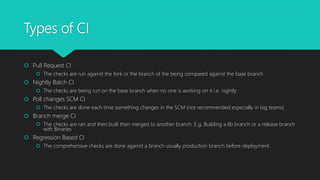
 Pull Request CI
 The checks are run against the fork or the branch of the being compared against the base branch
 Nightly Batch CI
 The checks are being run on the base branch when no one is working on it i.e. nightly
 Poll changes SCM CI
 The checks are done each time something changes in the SCM (not recommended especially in big teams)
 Branch merge CI
 The checks are ran and then built then merged to another branch. E.g. Building a lib branch or a release branch
with Binaries
 Regression Based CI
 The comprehensive checks are done against a branch usually production branch before deployment
CI (cont)
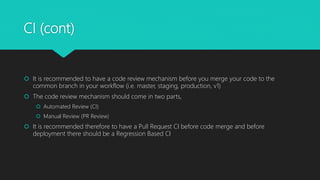
 It is recommended to have a code review mechanism before you merge your code to the
common branch in your workflow (i.e. master, staging, production, v1)
 The code review mechanism should come in two parts,
 Automated Review (CI)
 Manual Review (PR Review)
 It is recommended therefore to have a Pull Request CI before code merge and before
deployment there should be a Regression Based CI
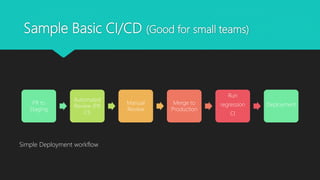
Sample Basic CI/CD (Good for small teams)
PR to
Staging
Automated
Review (PR
CI)
Manual
Review
Merge to
Production
Run
regression
CI
Deployment
Simple Deployment workflow
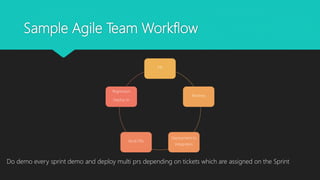
Sample Agile Team Workflow
PR
Reviews
Deployment to
Integration
Multi PRs
Regression
Deploy to
Do demo every sprint demo and deploy multi prs depending on tickets which are assigned on the Sprint
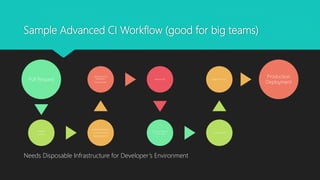
Sample Advanced CI Workflow (good for big teams)
Pull Request
Manual
Reviews
Automated Reviews
UI and Unit Tests
Nightly Batch CI
Deployment to
developer’s
Environment
Manual QA
QA Team Rejects
Or Accepts
QA Creates PR
Regression Test
Production
Deployment
Needs Disposable Infrastructure for Developer’s Environment
How to Configure Jenkins
 Best Practices
 There should be a jenkins which is designated for CI/CD use having a multipurpose jenkins is not
recommended and critical batch jobs should not use the same resources as CI/CD
 Use a separate user with its home directory jenkins is not a good user
 Use small master and use master-slaves setup with majority of the workload in the slaves
 Use Secure Authentication Tokens or better yet SSH Keys in configuring SCM access (need to deploy
public keys on github)
 Don’t use username:password
 Use LDAP authentication for more secure access
 Keep your jenkins inside vpn (this could cause issues if git SCM is trying to send webhooks)
 If you use above setup have a secure publicly accessible NGINX proxy server to pass the payload to your jenkins
inside VPN (small instance or reuse an instance will work)
Useful Plugins
 https://github.com/janinko/ghprb (pull request builder)
 https://wiki.jenkins-ci.org/display/JENKINS/Git+Plugin (git access)
 https://wiki.jenkins-ci.org/display/JENKINS/Simple+Theme+Plugin (readability)
 (use this one to make your jenkins logs more readable go to Manage-Jenkins -> configure system -> themes
 https://cdnjs.cloudflare.com/ajax/libs/doony/1.6/css/doony.min.css for css
 https://cdnjs.cloudflare.com/ajax/libs/doony/1.6/js/doony.min.js for JS
 https://wiki.jenkins-ci.org/display/JENKINS/Rebuild+Plugin (rebuilding)
 https://wiki.jenkins-ci.org/display/JENKINS/AnsiColor+Plugin (readability)
 https://wiki.jenkins-ci.org/display/JENKINS/LDAP+Plugin (LDAP security)
 https://wiki.jenkins-ci.org/display/JENKINS/Matrix+Authorization+Strategy+Plugin (security)
 https://wiki.jenkins-ci.org/display/JENKINS/Multijob+Plugin (upstreaming and downstreaming jobs)
 https://wiki.jenkins-ci.org/display/JENKINS/Slack+Plugin (slack notification)

Jenkins workflows and Best Practices

  • 1.
    CI/CD Workflows andBest Practices with Jenkins Kenichi Shibata
  • 2.
    Why CI/CD  Itis important to have a stable code which runs all the time for deployment CI/CD is necessary  If you want the code to be stable then you have to build it each time you push a new commit  Building code takes time and adds overhead for the developers. Instead of running the builds manually developers should focus on the code development.  Jenkins is a good platform to build CI/CD
  • 3.
    What is Jenkins? Jenkins helps to automate the non-human part of the whole software development process,  Builds can be triggered by various means, for example by commit in a version control system, by scheduling via a cron-like mechanism and by requesting a specific build URL. It can also be triggered after the other builds in the queue have completed.  Jenkins functionality can be extended with plugins.  (from https://en.wikipedia.org/wiki/Jenkins_(software))
  • 4.
    Good Continuous Integration Should be integrated with SCM such as Github/Bitbucket/Gitlab  Should run all tests defined in the code  Should send a feedback to the developers. Preferably a less disctracting means such as chat system instead of emails. (e.g. slack, hipchat, hangouts)
  • 5.
    Types of CI Pull Request CI  The checks are run against the fork or the branch of the being compared against the base branch  Nightly Batch CI  The checks are being run on the base branch when no one is working on it i.e. nightly  Poll changes SCM CI  The checks are done each time something changes in the SCM (not recommended especially in big teams)  Branch merge CI  The checks are ran and then built then merged to another branch. E.g. Building a lib branch or a release branch with Binaries  Regression Based CI  The comprehensive checks are done against a branch usually production branch before deployment
  • 6.
    CI (cont)  Itis recommended to have a code review mechanism before you merge your code to the common branch in your workflow (i.e. master, staging, production, v1)  The code review mechanism should come in two parts,  Automated Review (CI)  Manual Review (PR Review)  It is recommended therefore to have a Pull Request CI before code merge and before deployment there should be a Regression Based CI
  • 7.
    Sample Basic CI/CD(Good for small teams) PR to Staging Automated Review (PR CI) Manual Review Merge to Production Run regression CI Deployment Simple Deployment workflow
  • 8.
    Sample Agile TeamWorkflow PR Reviews Deployment to Integration Multi PRs Regression Deploy to Do demo every sprint demo and deploy multi prs depending on tickets which are assigned on the Sprint
  • 9.
    Sample Advanced CIWorkflow (good for big teams) Pull Request Manual Reviews Automated Reviews UI and Unit Tests Nightly Batch CI Deployment to developer’s Environment Manual QA QA Team Rejects Or Accepts QA Creates PR Regression Test Production Deployment Needs Disposable Infrastructure for Developer’s Environment
  • 10.
    How to ConfigureJenkins  Best Practices  There should be a jenkins which is designated for CI/CD use having a multipurpose jenkins is not recommended and critical batch jobs should not use the same resources as CI/CD  Use a separate user with its home directory jenkins is not a good user  Use small master and use master-slaves setup with majority of the workload in the slaves  Use Secure Authentication Tokens or better yet SSH Keys in configuring SCM access (need to deploy public keys on github)  Don’t use username:password  Use LDAP authentication for more secure access  Keep your jenkins inside vpn (this could cause issues if git SCM is trying to send webhooks)  If you use above setup have a secure publicly accessible NGINX proxy server to pass the payload to your jenkins inside VPN (small instance or reuse an instance will work)
  • 11.
    Useful Plugins  https://github.com/janinko/ghprb(pull request builder)  https://wiki.jenkins-ci.org/display/JENKINS/Git+Plugin (git access)  https://wiki.jenkins-ci.org/display/JENKINS/Simple+Theme+Plugin (readability)  (use this one to make your jenkins logs more readable go to Manage-Jenkins -> configure system -> themes  https://cdnjs.cloudflare.com/ajax/libs/doony/1.6/css/doony.min.css for css  https://cdnjs.cloudflare.com/ajax/libs/doony/1.6/js/doony.min.js for JS  https://wiki.jenkins-ci.org/display/JENKINS/Rebuild+Plugin (rebuilding)  https://wiki.jenkins-ci.org/display/JENKINS/AnsiColor+Plugin (readability)  https://wiki.jenkins-ci.org/display/JENKINS/LDAP+Plugin (LDAP security)  https://wiki.jenkins-ci.org/display/JENKINS/Matrix+Authorization+Strategy+Plugin (security)  https://wiki.jenkins-ci.org/display/JENKINS/Multijob+Plugin (upstreaming and downstreaming jobs)  https://wiki.jenkins-ci.org/display/JENKINS/Slack+Plugin (slack notification)