UI DESIGN
BY CALVIN DEUKE 2201200214
OVERVIEW
• Introduction
• Understanding User Interface Design
• Importance of UI Design in System Analysis
• Process of UI Design
• Interface design models
• Principles of Effective UI Design
• Tools and Technologies for UI Design
• Case Study: UI Design in Action
• Best Practices for UI Design
• Graphical User Interface
• Key points
INTRODUCTION
• User Interface(UI): is the point of interaction between users and
digital devices, systems, or applications.
• User interface (UI) design is the process designers use to build
interfaces in software or computerized devices, focusing on looks
or style.
• UI plays a crucial role in enhancing user experience, improving
system usability, and ultimately contributing to the success of
software projects.
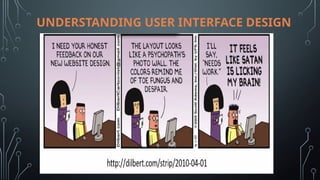
UNDERSTANDING USER INTERFACE DESIGN
• What is User Interface Design?: User Interface Design is the
process of creating interfaces for software applications or systems
that focus on usability, accessibility, and user satisfaction.
• Components of UI Design : UI design involves various elements
such as layout, navigation, visual design, interaction design, and
information architecture.
• User-Centered Design Principles: User-centered design
emphasizes designing products and systems that meet the needs,
preferences, and expectations of users.
UNDERSTANDING USER INTERFACE DESIGN
IMPORTANCE OF UI DESIGN IN SYSTEM ANALYSIS
• Enhancing User Experience: Well-designed UIs enhance user
satisfaction, engagement, and loyalty.
• Increasing Efficiency and Productivity: Intuitive UIs streamline
tasks and workflows, boosting efficiency and productivity.
• Reducing Errors and User Frustration: Clear and consistent UIs
minimize user errors and frustrations, leading to higher user
satisfaction and adoption rates.
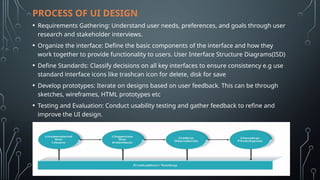
PROCESS OF UI DESIGN
• Requirements Gathering: Understand user needs, preferences, and goals through user
research and stakeholder interviews.
• Organize the interface: Define the basic components of the interface and how they
work together to provide functionality to users. User Interface Structure Diagrams(ISD)
• Define Standards: Classify decisions on all key interfaces to ensure consistency e.g use
standard interface icons like trashcan icon for delete, disk for save
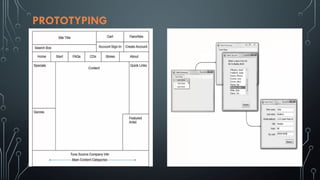
• Develop prototypes: Iterate on designs based on user feedback. This can be through
sketches, wireframes, HTML prototypes etc
• Testing and Evaluation: Conduct usability testing and gather feedback to refine and
improve the UI design.
REQUIREMENTS GATHERING
• Users will likely have different goals and intentions when using a system.
• Use personas to develop their various characteristics
INTERFACE STRUCTURE DIAGRAM(ISD)
PROTOTYPING
INTERFACE EVALUATION
• Heuristic evaluation: compare design to checklist
• Walkthrough evaluation: Team simulates movement through
components
• Interactive evaluation: Users try out the system
• Formal usability testing: detailed use of special lab testing and can
be expensive
EVALUATION TECHNIQUES
• Questionnaires for user feedback.
• Video recording of system use and subsequent tape evaluation.
• Instrumentation of code to collect information about facility use
and user errors.
• The provision of code in the software to collect on-line user
feedback
THE DESIGN PROCESS
INTERFACE DESIGN MODELS
There are mainly four models used in Human Computer Interaction(HCI) design;
• The design model: expresses the software design.
• The user model: describes the profile of the end users. (i.e., novices vs. experts,
cultural background, etc.)
• The user’s model: is the end users’ perception of the system
• The system image: is the external manifestation of the system (look and feel +
documentation etc.)
PRINCIPLES OF EFFECTIVE UI DESIGN
• Consistency: Maintain consistency in design elements, color,
terminology, and interactions throughout the UI.
• Clarity: Ensure that the UI elements are clear, understandable, and
easy to use.
• Simplicity: Simplify the UI design to reduce complexity and
cognitive load for users.
• Feedback: Provide immediate and informative feedback to users
for their actions.
• Flexibility: Design the UI to be adaptable to different user
preferences, devices, and contexts.
TOOLS AND TECHNOLOGIES FOR UI DESIGN
• Graphic Design Software (e.g., Adobe XD, Sketch): Create visual
designs and assets for UIs.
• Prototyping Tools (e.g., InVision, Figma): Build interactive
prototypes to demonstrate UI functionality and flow.
• Collaboration Platforms (e.g., Miro, Slack): Facilitate collaboration
and communication among UI designers, developers, and
stakeholders.
CASE STUDY: UI DESIGN IN ACTION
• Overview of a Real-World Project: Provide a brief overview of a
specific project where UI design played a significant role.
• Challenges Faced: Discuss challenges encountered during the UI
design process.
• Solutions Implemented: Describe the solutions and strategies
implemented to address these challenges.
• Results Achieved: Share the outcomes and impacts of the UI
design efforts on the project.
BEST PRACTICES FOR UI DESIGN
• Conduct User Research: Understand user needs, behaviors, and
preferences to inform UI design decisions.
• Design for Accessibility: Ensure that the UI is accessible to users with
disabilities by following accessibility guidelines and standards.
• Keep UI Elements Intuitive: Design UI elements and interactions that are
intuitive and easy to understand for users.
• Prioritize Content and Functionality: Focus on prioritizing content and
functionality to deliver a seamless user experience.
• Test and Iterate Continuously: Continuously test and iterate on UI
designs based on user feedback and testing results to improve usability
and effectiveness.
GRAPHICAL USER INTERFACE (GUI)
• A GUI design utilizes elements such as text, icons, menu and
images, as well as components, to allow a user to easily navigate
and interact with a system.
• It’s all about designing an engaging and intuitive visual interface
that allows users to interact with the system with ease.
• Without a good GUI design, using a digital product can be
confusing and frustrating.
GUI CONT…
Advantages
• Users feel in control and are less likely to be intimidated by the system
• User learning time is relatively short
• Users get immediate feedback on their actions
• mistakes can be quickly detected and corrected
Problems
• Finding the right user metaphor may be difficult
• It can be hard to navigate efficiently in a large information space.
• It can be complex to program and demanding to execute
DIRECT MANIPULATION
Advantages
• Users feel in control and are less likely to be intimidated by the system
• User learning time is relatively short
• Users get immediate feedback on their actions
• mistakes can be quickly detected and corrected
Demerits
• Finding the right user metaphor may be difficult
• It can be hard to navigate efficiently in a large information space.
• It can be complex to program and demanding to execute
COMMAND INTERFACE
This involves the user typing commands to give instructions to the
system.
• May be implemented using cheap terminals
• Easy to process using compiler techniques
• Commands of arbitrary complexity can be created by command
combination
• Concise interfaces requiring minimal typing can be created
COMMAND INTERFACE CONT…
Advantages
• Allow experienced users to interact quickly with the system
• Commands can be scripted
Demerits
• Users have to learn and remember a command language
• Not suitable for occasional or inexperienced users
• An error detection and recovery system is required
• Typing ability is required
ANALOGUE VS DIGITAL PRESENTATION
Digital presentation
• Compact i.e takes up little screen space
• Precise values can be communicated
Analogue presentation
• Easier to get an 'at a glance' impression of a value
• Possible to show relative values
• Easier to see exceptional data values
USER GUIDANCE
The user guidance system is integrated with the user interface to
help users when they need information about the system or
when they make some kind of error.
Includes
• System messages, including error messages
• Documentation provided for users
• On-line help
HELPSYSTEM
• Multiple entry points should be provided i.e the user should be able
to get help from different places
• The help system should indicate where the user is positioned
• Navigation and traversal facilities must be provided
ERROR MESSAGE GUIDELINES
• Speak the user’s language
• Give constructive advice for recovering from the error
• Indicate negative consequences of the error (e.g., possibly
corrupted files)
• Give an audible or visual cue
• Don’t make the user feel guilty
KEY POINTS
• User interface design principles should help guide the design of user
interfaces.
• Interaction styles include direct manipulation, menu systems form fill-in,
command languages and natural language.
• Graphical displays should be used to present trends and approximate values.
Digital displays when precision is required.
• Color should be used sparingly and consistent.
• The user interface design process involves user analysis, system prototyping
and prototype evaluation.
• The goals of UI evaluation are to obtain feedback on how to improve the
interface design and to assess if the interface meets its usability requirements
REFERENCES
• Interaction Design Foundation - IxDF. (2016, June 2). What is User Interface
(UI) Design?. Interaction Design Foundation - IxDF.
https://www.interaction-design.org/literature/topics/ui-design
• Norman, D. A. (2013). The Design of Everyday Things. Basic Books.
• Nielsen, J., & Loranger, H. (2006). Prioritizing Web Usability. New Riders.
• Garrett, J. J. (2010). The Elements of User Experience: User-Centered Design
for the Web and Beyond. New Riders.
• Shneiderman, B., & Plaisant, C. (2016). Designing the User Interface:
Strategies for Effective Human-Computer Interaction. Pearson.
• Sommerville, I. (2004). Software Engineering.
User Interface DESIGN - A brief summary.pptx

User Interface DESIGN - A brief summary.pptx

  • 1.
    UI DESIGN BY CALVINDEUKE 2201200214
  • 2.
    OVERVIEW • Introduction • UnderstandingUser Interface Design • Importance of UI Design in System Analysis • Process of UI Design • Interface design models • Principles of Effective UI Design • Tools and Technologies for UI Design • Case Study: UI Design in Action • Best Practices for UI Design • Graphical User Interface • Key points
  • 3.
    INTRODUCTION • User Interface(UI):is the point of interaction between users and digital devices, systems, or applications. • User interface (UI) design is the process designers use to build interfaces in software or computerized devices, focusing on looks or style. • UI plays a crucial role in enhancing user experience, improving system usability, and ultimately contributing to the success of software projects.
  • 4.
    UNDERSTANDING USER INTERFACEDESIGN • What is User Interface Design?: User Interface Design is the process of creating interfaces for software applications or systems that focus on usability, accessibility, and user satisfaction. • Components of UI Design : UI design involves various elements such as layout, navigation, visual design, interaction design, and information architecture. • User-Centered Design Principles: User-centered design emphasizes designing products and systems that meet the needs, preferences, and expectations of users.
  • 5.
  • 6.
    IMPORTANCE OF UIDESIGN IN SYSTEM ANALYSIS • Enhancing User Experience: Well-designed UIs enhance user satisfaction, engagement, and loyalty. • Increasing Efficiency and Productivity: Intuitive UIs streamline tasks and workflows, boosting efficiency and productivity. • Reducing Errors and User Frustration: Clear and consistent UIs minimize user errors and frustrations, leading to higher user satisfaction and adoption rates.
  • 7.
    PROCESS OF UIDESIGN • Requirements Gathering: Understand user needs, preferences, and goals through user research and stakeholder interviews. • Organize the interface: Define the basic components of the interface and how they work together to provide functionality to users. User Interface Structure Diagrams(ISD) • Define Standards: Classify decisions on all key interfaces to ensure consistency e.g use standard interface icons like trashcan icon for delete, disk for save • Develop prototypes: Iterate on designs based on user feedback. This can be through sketches, wireframes, HTML prototypes etc • Testing and Evaluation: Conduct usability testing and gather feedback to refine and improve the UI design.
  • 8.
    REQUIREMENTS GATHERING • Userswill likely have different goals and intentions when using a system. • Use personas to develop their various characteristics
  • 9.
  • 10.
  • 11.
    INTERFACE EVALUATION • Heuristicevaluation: compare design to checklist • Walkthrough evaluation: Team simulates movement through components • Interactive evaluation: Users try out the system • Formal usability testing: detailed use of special lab testing and can be expensive
  • 12.
    EVALUATION TECHNIQUES • Questionnairesfor user feedback. • Video recording of system use and subsequent tape evaluation. • Instrumentation of code to collect information about facility use and user errors. • The provision of code in the software to collect on-line user feedback
  • 13.
  • 14.
    INTERFACE DESIGN MODELS Thereare mainly four models used in Human Computer Interaction(HCI) design; • The design model: expresses the software design. • The user model: describes the profile of the end users. (i.e., novices vs. experts, cultural background, etc.) • The user’s model: is the end users’ perception of the system • The system image: is the external manifestation of the system (look and feel + documentation etc.)
  • 15.
    PRINCIPLES OF EFFECTIVEUI DESIGN • Consistency: Maintain consistency in design elements, color, terminology, and interactions throughout the UI. • Clarity: Ensure that the UI elements are clear, understandable, and easy to use. • Simplicity: Simplify the UI design to reduce complexity and cognitive load for users. • Feedback: Provide immediate and informative feedback to users for their actions. • Flexibility: Design the UI to be adaptable to different user preferences, devices, and contexts.
  • 16.
    TOOLS AND TECHNOLOGIESFOR UI DESIGN • Graphic Design Software (e.g., Adobe XD, Sketch): Create visual designs and assets for UIs. • Prototyping Tools (e.g., InVision, Figma): Build interactive prototypes to demonstrate UI functionality and flow. • Collaboration Platforms (e.g., Miro, Slack): Facilitate collaboration and communication among UI designers, developers, and stakeholders.
  • 17.
    CASE STUDY: UIDESIGN IN ACTION • Overview of a Real-World Project: Provide a brief overview of a specific project where UI design played a significant role. • Challenges Faced: Discuss challenges encountered during the UI design process. • Solutions Implemented: Describe the solutions and strategies implemented to address these challenges. • Results Achieved: Share the outcomes and impacts of the UI design efforts on the project.
  • 18.
    BEST PRACTICES FORUI DESIGN • Conduct User Research: Understand user needs, behaviors, and preferences to inform UI design decisions. • Design for Accessibility: Ensure that the UI is accessible to users with disabilities by following accessibility guidelines and standards. • Keep UI Elements Intuitive: Design UI elements and interactions that are intuitive and easy to understand for users. • Prioritize Content and Functionality: Focus on prioritizing content and functionality to deliver a seamless user experience. • Test and Iterate Continuously: Continuously test and iterate on UI designs based on user feedback and testing results to improve usability and effectiveness.
  • 19.
    GRAPHICAL USER INTERFACE(GUI) • A GUI design utilizes elements such as text, icons, menu and images, as well as components, to allow a user to easily navigate and interact with a system. • It’s all about designing an engaging and intuitive visual interface that allows users to interact with the system with ease. • Without a good GUI design, using a digital product can be confusing and frustrating.
  • 20.
    GUI CONT… Advantages • Usersfeel in control and are less likely to be intimidated by the system • User learning time is relatively short • Users get immediate feedback on their actions • mistakes can be quickly detected and corrected Problems • Finding the right user metaphor may be difficult • It can be hard to navigate efficiently in a large information space. • It can be complex to program and demanding to execute
  • 21.
    DIRECT MANIPULATION Advantages • Usersfeel in control and are less likely to be intimidated by the system • User learning time is relatively short • Users get immediate feedback on their actions • mistakes can be quickly detected and corrected Demerits • Finding the right user metaphor may be difficult • It can be hard to navigate efficiently in a large information space. • It can be complex to program and demanding to execute
  • 22.
    COMMAND INTERFACE This involvesthe user typing commands to give instructions to the system. • May be implemented using cheap terminals • Easy to process using compiler techniques • Commands of arbitrary complexity can be created by command combination • Concise interfaces requiring minimal typing can be created
  • 23.
    COMMAND INTERFACE CONT… Advantages •Allow experienced users to interact quickly with the system • Commands can be scripted Demerits • Users have to learn and remember a command language • Not suitable for occasional or inexperienced users • An error detection and recovery system is required • Typing ability is required
  • 24.
    ANALOGUE VS DIGITALPRESENTATION Digital presentation • Compact i.e takes up little screen space • Precise values can be communicated Analogue presentation • Easier to get an 'at a glance' impression of a value • Possible to show relative values • Easier to see exceptional data values
  • 25.
    USER GUIDANCE The userguidance system is integrated with the user interface to help users when they need information about the system or when they make some kind of error. Includes • System messages, including error messages • Documentation provided for users • On-line help
  • 26.
    HELPSYSTEM • Multiple entrypoints should be provided i.e the user should be able to get help from different places • The help system should indicate where the user is positioned • Navigation and traversal facilities must be provided
  • 27.
    ERROR MESSAGE GUIDELINES •Speak the user’s language • Give constructive advice for recovering from the error • Indicate negative consequences of the error (e.g., possibly corrupted files) • Give an audible or visual cue • Don’t make the user feel guilty
  • 28.
    KEY POINTS • Userinterface design principles should help guide the design of user interfaces. • Interaction styles include direct manipulation, menu systems form fill-in, command languages and natural language. • Graphical displays should be used to present trends and approximate values. Digital displays when precision is required. • Color should be used sparingly and consistent. • The user interface design process involves user analysis, system prototyping and prototype evaluation. • The goals of UI evaluation are to obtain feedback on how to improve the interface design and to assess if the interface meets its usability requirements
  • 29.
    REFERENCES • Interaction DesignFoundation - IxDF. (2016, June 2). What is User Interface (UI) Design?. Interaction Design Foundation - IxDF. https://www.interaction-design.org/literature/topics/ui-design • Norman, D. A. (2013). The Design of Everyday Things. Basic Books. • Nielsen, J., & Loranger, H. (2006). Prioritizing Web Usability. New Riders. • Garrett, J. J. (2010). The Elements of User Experience: User-Centered Design for the Web and Beyond. New Riders. • Shneiderman, B., & Plaisant, C. (2016). Designing the User Interface: Strategies for Effective Human-Computer Interaction. Pearson. • Sommerville, I. (2004). Software Engineering.

Editor's Notes

  • #3 In general, what you really, really need to learn first, because everything else comes with practice is grid typography, hierarchy, readability and some basic esthetics. But you don't really need to be an artist and design is definitely not art. It's not art because you have a very limited, you know, kind of scope of what you can do and you can't be too creative because that's going to make it unusable. So a lot of those Dribbble shots are basically artworks and they're just not able to become a real product because they are done in a way to just kind of have like a flashy visual. So we need to understand that. But what I think is the most important thing is the grid and the layout. I often tell the junior designers what I think the UI design really is, because this whole design thing is really, really like created to feel difficult to people. Like, you know, we have those super genius UX designers talking about lengthy processes and as a junior, we get discouraged. We get like, Oh, I'm not going to learn that ever because I'm not a super genius like they are. But in reality, a lot of the design is basically moving rectangles around. So you take a rectangle and based on some research and some knowledge, you move it to a different position, change the color, change the size, and that's it. And it's all rectangles, even if you're moving ovals because the bounding boxes are rectangular as well. So if you learn how and why and where to move those rectangles to, you're set to go. And after two years at university, I had a very hands on experience because I could actually walk to a desk and see what people struggled with. And these were the same problems over and over, mostly great problems, some color problems and typography problems. And do you think that this font is good and I'm going to break it to you know, it's not. So rule one off one because there is basically just one rule of good UI design. You don't want your brain to be working too much because our brains love order. They, they really, really hate chaos and they love order because it's easier for them to process. So if something is well-organized visually, it's just faster to process. So that brain is just working a little bit less. And if something is harder to process and it takes longer visually to process, then the brain is tired and it's kind of disliking the thing already.