User Guide:

MC Navigation Control
                      ®
Component for Flash
Developed by :
Enterprise System Solutions Pvt. Ltd. (ESSPL)
Infocity, Bhubaneswar, India – 751024
www.esspl.com

Component Author:
Samir K. Dash, Systems Consultant, ESSPL

Component Page URL : http://www.esspl.com/FlashComponents/mcnavhome.asp


© 2006
Support Information

For support information/ feedback mail to : ess@esspl.com

License Agreement for swfSequencer

swfSequencer is distributed by Enterprise System solutions Pvt. Ltd. (ESSPL) as is
without any warranties whatsoever. By using this Flash component you accept the fact that
ESSPL will not be liable for any damage it may cause.

This product is free to be used by anyone for noncommercial usage, without a written reference
provided by ESSPL (www.esspl.com).

Though no fee is charged for the commercial license of this product , the developer/ firm using
this product for any commercial use must get a written reference from ESSPL beforehand.

To get the commercial license , please send a mail to ess@esspl.com with the following details:

                                  Company Name: ____________________
                                  Company Address: __________________
                                  Period of Usage: ____________________


Disclaimer:

     ® Flash® is the registered trademark of Adobe Systems INC.

All content/ information presented here is the exclusive property of Enterprise system solutions Pvt. Ltd. (ESSPL). The
copyrights of trade marks/ logos of any other organizations/ companies/ vendors are under their respective copyright
holders and are in no way linked to ESSPL or any of its subsidiaries. The content/ information contained here is correct at
the time of its publishing. No material from here may be copied, modified, reproduced, republished, uploaded, transmitted,
posted or distributed in any form without prior written permission from ESSPL.


Introduction

                                                           ®
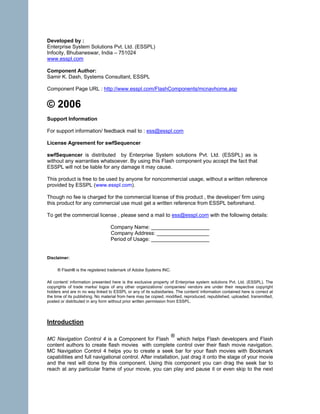
MC Navigation Control 4 is a Component for Flash              which helps Flash developers and Flash
content authors to create flash movies with complete control over their flash movie navigation.
MC Navigation Control 4 helps you to create a seek bar for your flash movies with Bookmark
capabilities and full navigational control. After installation, just drag it onto the stage of your movie
and the rest will done by this component. Using this component you can drag the seek bar to
reach at any particular frame of your movie, you can play and pause it or even skip to the next
labeled frame. Also you can control audio level of your movie. Using this component the user can
"Bookmark" any frame of the Flash movie at any particular time and can reach it at any point of
time, using "Save Bookmark" and "Go to Bookmark" buttons even when he/she re-launches the
flash movie.


Method of Installation

To install MC Navigation Control 4 you need to have Extension Manager .
                                    . Macromedia Extension manager is a free product and is
available with the installation of Flash. Alternatively you can download Extension Manager from
www.adobe.com

UI Access :

After installation, MC Navigation Control 4 is available in Components Panel of Flash IDE under
ESSPLComponents folder.


i) Descriptions of Parameters

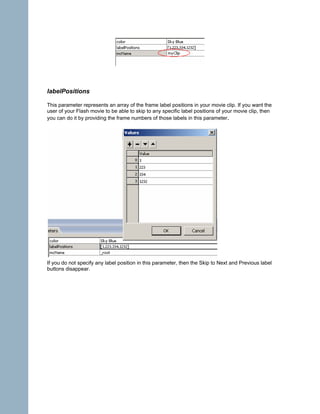
mcName

This parameter represents the movie clip of your Flash movie which should be controlled by MC
Navigation Control. The default value of this parameter is “_root”. If the default value is not altered,
then the MC Navigation Control controls the _root timeline of the flash movie.


If you have a movie clip which you want to be controlled by MC Navigation Control then you can
give its instance name in this parameter.
For example if you want to control a movie clip on stage with the instance name “myClip” then
you must set the value of “mcName” to “myClip”
labelPositions

This parameter represents an array of the frame label positions in your movie clip. If you want the
user of your Flash movie to be able to skip to any specific label positions of your movie clip, then
you can do it by providing the frame numbers of those labels in this parameter.


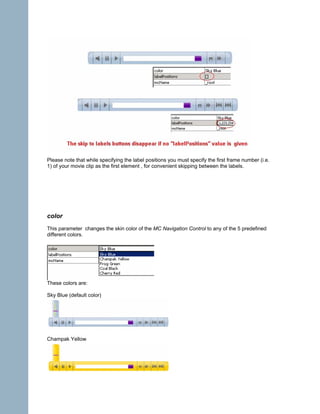
If you do not specify any label position in this parameter, then the Skip to Next and Previous label
buttons disappear.
Please note that while specifying the label positions you must specify the first frame number (i.e.
1) of your movie clip as the first element , for convenient skipping between the labels.


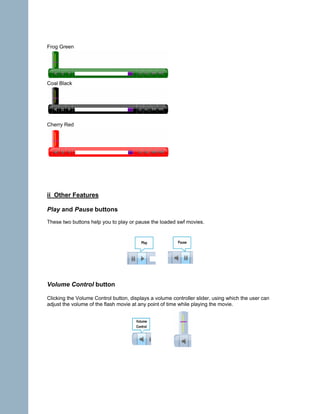
color
This parameter changes the skin color of the MC Navigation Control to any of the 5 predefined
different colors.


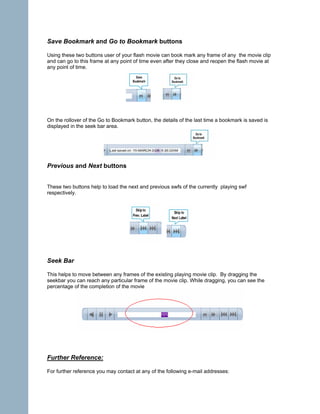
These colors are:

Sky Blue (default color)


Champak Yellow
Frog Green


Coal Black


Cherry Red


ii Other Features

Play and Pause buttons
These two buttons help you to play or pause the loaded swf movies.


Volume Control button

Clicking the Volume Control button, displays a volume controller slider, using which the user can
adjust the volume of the flash movie at any point of time while playing the movie.
Save Bookmark and Go to Bookmark buttons

Using these two buttons user of your flash movie can book mark any frame of any the movie clip
and can go to this frame at any point of time even after they close and reopen the flash movie at
any point of time.


On the rollover of the Go to Bookmark button, the details of the last time a bookmark is saved is
displayed in the seek bar area.


Previous and Next buttons


These two buttons help to load the next and previous swfs of the currently playing swf
respectively.


Seek Bar

This helps to move between any frames of the existing playing movie clip. By dragging the
seekbar you can reach any particular frame of the movie clip. While dragging, you can see the
percentage of the completion of the movie


Further Reference:

For further reference you may contact at any of the following e-mail addresses:
For support information / commercial usage license : ess@esspl.com
Feedback / suggestions for enhancements can also be mailed to: ess@esspl.com

Related links:

At Adobe’s Flash Exchange:
http://www.adobe.com/cfusion/exchange/index.cfm?view=sn111&extID=1031892#loc=en_us&view=sn1
11&extID=1031892&viewName=Flash%20Extension&avm=1


       About ESSPL

       ESSPL offers a wide range of e-learning, m-Learning and interactive solutions, from
       animation, interface design, multimedia assessment need analysis, customized
       courseware design, simulations, interactive kiosks, online design solutions, Flash based
       mobile content designing and development, to suit the wide range of client needs ranging
       from e-learning, m-learning to sales promotional campaign and presentation needs.

       For more details on ESSPL’s offerings in e-Learning and interactive design, refer to
       ESSPL website at www.esspl.com

User guide mcnavigationcontrol

  • 1.
    User Guide: MC NavigationControl ® Component for Flash
  • 2.
    Developed by : EnterpriseSystem Solutions Pvt. Ltd. (ESSPL) Infocity, Bhubaneswar, India – 751024 www.esspl.com Component Author: Samir K. Dash, Systems Consultant, ESSPL Component Page URL : http://www.esspl.com/FlashComponents/mcnavhome.asp © 2006 Support Information For support information/ feedback mail to : ess@esspl.com License Agreement for swfSequencer swfSequencer is distributed by Enterprise System solutions Pvt. Ltd. (ESSPL) as is without any warranties whatsoever. By using this Flash component you accept the fact that ESSPL will not be liable for any damage it may cause. This product is free to be used by anyone for noncommercial usage, without a written reference provided by ESSPL (www.esspl.com). Though no fee is charged for the commercial license of this product , the developer/ firm using this product for any commercial use must get a written reference from ESSPL beforehand. To get the commercial license , please send a mail to ess@esspl.com with the following details: Company Name: ____________________ Company Address: __________________ Period of Usage: ____________________ Disclaimer: ® Flash® is the registered trademark of Adobe Systems INC. All content/ information presented here is the exclusive property of Enterprise system solutions Pvt. Ltd. (ESSPL). The copyrights of trade marks/ logos of any other organizations/ companies/ vendors are under their respective copyright holders and are in no way linked to ESSPL or any of its subsidiaries. The content/ information contained here is correct at the time of its publishing. No material from here may be copied, modified, reproduced, republished, uploaded, transmitted, posted or distributed in any form without prior written permission from ESSPL. Introduction ® MC Navigation Control 4 is a Component for Flash which helps Flash developers and Flash content authors to create flash movies with complete control over their flash movie navigation. MC Navigation Control 4 helps you to create a seek bar for your flash movies with Bookmark capabilities and full navigational control. After installation, just drag it onto the stage of your movie and the rest will done by this component. Using this component you can drag the seek bar to reach at any particular frame of your movie, you can play and pause it or even skip to the next
  • 3.
    labeled frame. Alsoyou can control audio level of your movie. Using this component the user can "Bookmark" any frame of the Flash movie at any particular time and can reach it at any point of time, using "Save Bookmark" and "Go to Bookmark" buttons even when he/she re-launches the flash movie. Method of Installation To install MC Navigation Control 4 you need to have Extension Manager . . Macromedia Extension manager is a free product and is available with the installation of Flash. Alternatively you can download Extension Manager from www.adobe.com UI Access : After installation, MC Navigation Control 4 is available in Components Panel of Flash IDE under ESSPLComponents folder. i) Descriptions of Parameters mcName This parameter represents the movie clip of your Flash movie which should be controlled by MC Navigation Control. The default value of this parameter is “_root”. If the default value is not altered, then the MC Navigation Control controls the _root timeline of the flash movie. If you have a movie clip which you want to be controlled by MC Navigation Control then you can give its instance name in this parameter. For example if you want to control a movie clip on stage with the instance name “myClip” then you must set the value of “mcName” to “myClip”
  • 4.
    labelPositions This parameter representsan array of the frame label positions in your movie clip. If you want the user of your Flash movie to be able to skip to any specific label positions of your movie clip, then you can do it by providing the frame numbers of those labels in this parameter. If you do not specify any label position in this parameter, then the Skip to Next and Previous label buttons disappear.
  • 5.
    Please note thatwhile specifying the label positions you must specify the first frame number (i.e. 1) of your movie clip as the first element , for convenient skipping between the labels. color This parameter changes the skin color of the MC Navigation Control to any of the 5 predefined different colors. These colors are: Sky Blue (default color) Champak Yellow
  • 6.
    Frog Green Coal Black CherryRed ii Other Features Play and Pause buttons These two buttons help you to play or pause the loaded swf movies. Volume Control button Clicking the Volume Control button, displays a volume controller slider, using which the user can adjust the volume of the flash movie at any point of time while playing the movie.
  • 7.
    Save Bookmark andGo to Bookmark buttons Using these two buttons user of your flash movie can book mark any frame of any the movie clip and can go to this frame at any point of time even after they close and reopen the flash movie at any point of time. On the rollover of the Go to Bookmark button, the details of the last time a bookmark is saved is displayed in the seek bar area. Previous and Next buttons These two buttons help to load the next and previous swfs of the currently playing swf respectively. Seek Bar This helps to move between any frames of the existing playing movie clip. By dragging the seekbar you can reach any particular frame of the movie clip. While dragging, you can see the percentage of the completion of the movie Further Reference: For further reference you may contact at any of the following e-mail addresses:
  • 8.
    For support information/ commercial usage license : ess@esspl.com Feedback / suggestions for enhancements can also be mailed to: ess@esspl.com Related links: At Adobe’s Flash Exchange: http://www.adobe.com/cfusion/exchange/index.cfm?view=sn111&extID=1031892#loc=en_us&view=sn1 11&extID=1031892&viewName=Flash%20Extension&avm=1 About ESSPL ESSPL offers a wide range of e-learning, m-Learning and interactive solutions, from animation, interface design, multimedia assessment need analysis, customized courseware design, simulations, interactive kiosks, online design solutions, Flash based mobile content designing and development, to suit the wide range of client needs ranging from e-learning, m-learning to sales promotional campaign and presentation needs. For more details on ESSPL’s offerings in e-Learning and interactive design, refer to ESSPL website at www.esspl.com