User and Entity
Behaviour Analysis
Building an Effective Solution
Yolanta Beresna
Research Manager,
Threat Detection and Remediation,
Software Defined Cloud Group
10 November 2016
Outline
 Overview of UEBA space
 Key components of an Effective Solution
– Threat Use cases
– Data Sources
– Analytics
– Pluggable Analytics Modules
UEBA: Overview
User and Entity Behaviour Analytics
The Definition
User and entity behavior analytics is bringing profiling
and anomaly detection based on machine learning to
security, to detect malicious and abusive activity that
otherwise goes unnoticed.
 Profile and baseline the activity of users, peer groups and
other entities such as endpoints, applications and
networks.
 Form peer groups based upon common user activities,
using directory groupings and human resources
information only as a starting point.
 Correlate user and other entity activities and behaviors.
 Detect anomalies using statistical models, machine
learning and/or rules that compare activity to profiles.
4
Source: Gartner (September 2015)
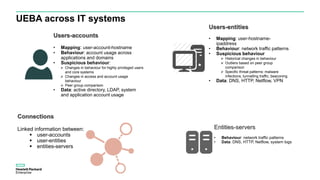
UEBA across IT systems
Users-accounts
• Mapping: user-account-hostname
• Behaviour: account usage across
applications and domains
• Suspicious behaviour:
 Changes in behaviour for highly privileged users
and core systems
 Changes in access and account usage
behaviour
 Peer group comparison
• Data: active directory, LDAP, system
and application account usage
Users-entities
• Mapping: user-hostname-
ipaddress
• Behaviour: network traffic patterns
• Suspicious behaviour
 Historical changes in behaviour
 Outliers based on peer group
comparison
 Specific threat patterns: malware
infections, tunnelling traffic, beaconing
• Data: DNS, HTTP, Netflow, VPN
Entities-servers
• Behaviour: network traffic patterns
• Data: DNS, HTTP, Netflow, system logs
Connections
Linked information between:
 user-accounts
 user-entities
 entities-servers
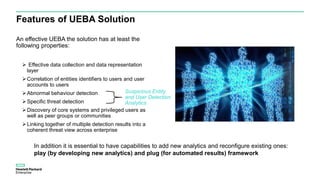
Features of UEBA Solution
An effective UEBA the solution has at least the
following properties:
 Effective data collection and data representation
layer
Correlation of entities identifiers to users and user
accounts to users
Abnormal behaviour detection
Specific threat detection
Discovery of core systems and privileged users as
well as peer groups or communities
Linking together of multiple detection results into a
coherent threat view across enterprise
Suspicious Entity
and User Detection
Analytics
In addition it is essential to have capabilities to add new analytics and reconfigure existing ones:
play (by developing new analytics) and plug (for automated results) framework
Creating an Effective Solution
7
Core Components
The effectiveness of an UEBA greatly depends on these core components:
1. Focused threat scenarios and use cases
2. Availability of relevant data sources and variables
3. Appropriate analytics algorithms
8
Anatomy of Attacks
9
Threat Use Cases
Threat Actor
External Internal
Goal
Theft
Attack Story 1: A hacker
organisation gains
access to the system
over the Internet and
steals user credentials
and business data.
Attack Story 2: An
employee uses their
access to the system to
steal business data.
Sabotage
Attack Story 3:
Ransomware attack:
Business data shared on
the internal network is
encrypted by
ransomware running on
a client machine.
Attack Story 4: An
employee reconfigures
the machines in the
network to render their
services unavailable to
legitimate users.
• Attack stories describe concrete attacks
• What is happening?
• In which order?
• When?
• Where?
• Goal/Actor Matrix to develop stories:
• Goal: What do the attackers want to achieve?
• Actor: Who are the attackers?
• Attack Story Steps:
1. Gain access
2. Get means to achieve goal
3. Reconnaissance and lateral movement
4. Achieve goal
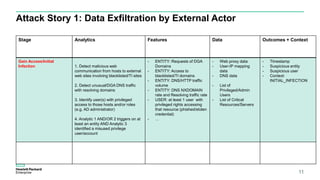
Attack Story 1: Data Exfiltration by External Actor
11
Stage Analytics Features Data Outcomes + Context
Gain Access/Initial
Infection 1. Detect malicious web
communication from hosts to external
web sites involving blacklisted/TI sites
2. Detect unusual/DGA DNS traffic
with resolving domains
3. Identify user(s) with privileged
access to those hosts and/or roles
(e.g. AD administrator)
4. Analytic 1 AND/OR 2 triggers on at
least an entity AND Analytic 3
identified a misused privilege
user/account
- ENTITY: Requests of DGA
Domains
- ENTITY: Access to
blacklisted/TI domains
- ENTITY: DNS/HTTP traffic
volume
- ENTITY: DNS NXDOMAIN
rate and Resolving traffic rate
- USER: at least 1 user with
privileged rights accessing
that resource (phished/stolen
credential)
- …
- Web proxy data
- User-IP mapping
data
- DNS data
- List of
Privileged/Admin
Users
- List of Critical
Resources/Servers
- Timestamp
- Suspicious entity
- Suspicious user
- Context:
INITIAL_INFECTION
Attack Story 4: Revenge by Disgruntled Employee
12
Stage Analytics Features Data Outcomes + Context
Reconnaissance and
lateral movements 1. Detect abnormal sequence of
privileged & system commands on a
system by local user/account (sudo,
system file changes, etc.)
2. Detect changes of cron tables
listing new, unrecognised programs.
Detect command to install these
programs.
3. Detect unusual traffic towards other
networked systems with unusual
success/failure rates
4. User belongs to a list of admin
users
4. Analytic 1,2,3,4 triggers on at least
a user and a device
- USER: use of privileged
command activities
- USER: installation of new
programs
- USER: modification of critical
system files, such as crons
- ENTITY: number of netflow
connections towards different
systems
- …
- User commands
- System commands
- Netflow data
- List of
Privileged/Admin
Users
- Timestamp
- Suspicious entity
- Suspicious user
- Context:
RECONNAISSANCE
LATERAL
MOVEMENTS
Data Sets
13
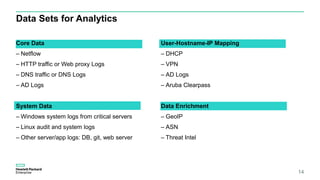
Data Sets for Analytics
Core Data
– Netflow
– HTTP traffic or Web proxy Logs
– DNS traffic or DNS Logs
– AD Logs
System Data
– Windows system logs from critical servers
– Linux audit and system logs
– Other server/app logs: DB, git, web server
14
User-Hostname-IP Mapping
– DHCP
– VPN
– AD Logs
– Aruba Clearpass
Data Enrichment
– GeoIP
– ASN
– Threat Intel
Scale of Core Data Sets
Volume and Size within HPE worldwide network
15
Data Type # Events/day
(after filtering)
TB/day Avg Event Size
Netflow 34 Billion
(3 collection points)
3.40 TB 100 B
DNS 150 Million
(4 collection points)
0.15 TB 1 KB
HTTP 65 Million
(central collection)
0.13 TB 2 KB
AD 153 Million
TOTAL ~ 35 Billion/day ~ 3.7 TB/day
Analytics
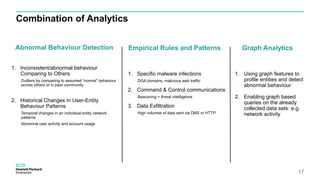
Combination of Analytics
Abnormal Behaviour Detection
1. Inconsistent/abnormal behaviour
Comparing to Others
Outliers by comparing to assumed “normal” behaviour
across others or in peer community
2. Historical Changes in User-Entity
Behaviour Patterns
Temporal changes in an individual entity network
patterns
Abnormal user activity and account usage
Empirical Rules and Patterns
1. Specific malware infections
DGA domains, malicious web traffic
2. Command & Control communications
Beaconing + threat intelligence
3. Data Exfiltration
High volumes of data sent via DNS or HTTP
17
Graph Analytics
1. Using graph features to
profile entities and detect
abnormal behaviour
2. Enabling graph based
queries on the already
collected data sets: e.g.
network activity
Anomaly Detection
Entity Profiling
Domain-name
Server (DNS)
Web-Proxy
Server (HTTP)
Internal Traffic
(Netflow)
Threat
Intelligence
Package
analysis
Anti-virus logs
…
Events
Sources
Users
Host machines
Domain Names
IP addresses
Port Numbers
Sites
…
Entities Profiles
𝑡0 𝑡1 𝑡2
𝑡0 𝑡1 𝑡2
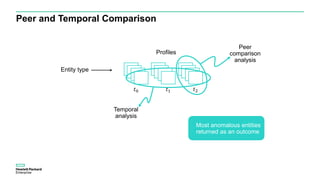
Peer and Temporal Comparison
Entity type
Profiles
𝑡0 𝑡1 𝑡2
Peer
comparison
analysis
Temporal
analysis
Most anomalous entities
returned as an outcome
Pattern-Based Analytics
Empirical Rules: Pattern-based Anomaly Detection
Initial Infection /
Gain Access
Command &
Control / Means to
Achieve Attack
Lateral
Movement
Exfiltration /
Damages
 Analytics based on deep knowledge of security attack patterns and infiltration processes
 Could be applied across all attack phases:
• Devices with DGA infections
• Abnormal device communications
to external sites
• Detection of privilege escalation
• Abnormal execution of
privileged/admin commands
• Abnormal creation/usage of
admin accounts or AD domains
at unusual times and locations
• Abnormal number and types of
accesses to a device from
remote locations
• Beaconing traffic to
suspicious external
sites
• New device communication
and traffic patterns
based on historical data
and threat intelligence
• Unusual number of failed
connections from a device
to external sites
• Port scanning detection
• Abnormal volume of traffic or
types of connections from a
device towards critical servers
(e.g. AD, …) or the way around
• Unusually large number of clients
• successfully connecting to other
clients
• Abnormal number of connection
failures from devices to network
services or specific service ports
(e.g. SSH)
• Abnormal volume of traffic from a
device towards unknown/suspicious
external sites
• Abnormal content in queries issued
to a set of unknown domains
• Abnormal external download of
content from organisation’s external
facing servers (e.g. web site)
• Abnormal activities/patterns on
specific servers (e.g. file encryption
on file servers)
• Abnormal traffic/uploading towards
an external web site/Dropbox/etc.
User Account
Compromise
• Abnormal Login
Failure/Success Rate
• Abnormal set of
privileged commands
• Abnormal command
sequences
• Creation of privileged
account coupled with
one or more above
anomalies
• Abnormal time of
logins and activities
Graph Analytics
23
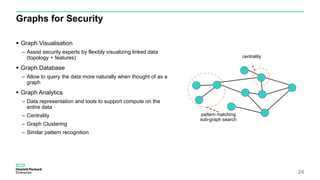
Graphs for Security
 Graph Visualisation
– Assist security experts by flexibly visualizing linked data
(topology + features)
 Graph Database
– Allow to query the data more naturally when thought of as a
graph
 Graph Analytics
– Data representation and tools to support compute on the
entire data
– Centrality
– Graph Clustering
– Similar pattern recognition
24
1
2
centrality
pattern matching
sub-graph search
Pluggable Analytics
25
Security Analytics Marketplace
Browse Analytics:
- Threat Scenario
- Use Case
- Attack Stage
- Analytics Type
End-User
Download
Analytics
Module(s)
Analytics
Module(s)
Analytics
Engine(s)
Analytics
Orchestration
Visualization
Configuration
Threat Findings
New Alert Types
Threat Links
Visual Widgets
Analytics
Results
New Link
Correlations
New
Widget
Analytics Store
Legal/Privacy
Audit
Software Deployment
Thank you
Yolanta Beresna
yolanta.beres@hpe.com
27

User and entity behavior analytics: building an effective solution

  • 1.
    User and Entity BehaviourAnalysis Building an Effective Solution Yolanta Beresna Research Manager, Threat Detection and Remediation, Software Defined Cloud Group 10 November 2016
  • 2.
    Outline  Overview ofUEBA space  Key components of an Effective Solution – Threat Use cases – Data Sources – Analytics – Pluggable Analytics Modules
  • 3.
  • 4.
    User and EntityBehaviour Analytics The Definition User and entity behavior analytics is bringing profiling and anomaly detection based on machine learning to security, to detect malicious and abusive activity that otherwise goes unnoticed.  Profile and baseline the activity of users, peer groups and other entities such as endpoints, applications and networks.  Form peer groups based upon common user activities, using directory groupings and human resources information only as a starting point.  Correlate user and other entity activities and behaviors.  Detect anomalies using statistical models, machine learning and/or rules that compare activity to profiles. 4 Source: Gartner (September 2015)
  • 5.
    UEBA across ITsystems Users-accounts • Mapping: user-account-hostname • Behaviour: account usage across applications and domains • Suspicious behaviour:  Changes in behaviour for highly privileged users and core systems  Changes in access and account usage behaviour  Peer group comparison • Data: active directory, LDAP, system and application account usage Users-entities • Mapping: user-hostname- ipaddress • Behaviour: network traffic patterns • Suspicious behaviour  Historical changes in behaviour  Outliers based on peer group comparison  Specific threat patterns: malware infections, tunnelling traffic, beaconing • Data: DNS, HTTP, Netflow, VPN Entities-servers • Behaviour: network traffic patterns • Data: DNS, HTTP, Netflow, system logs Connections Linked information between:  user-accounts  user-entities  entities-servers
  • 6.
    Features of UEBASolution An effective UEBA the solution has at least the following properties:  Effective data collection and data representation layer Correlation of entities identifiers to users and user accounts to users Abnormal behaviour detection Specific threat detection Discovery of core systems and privileged users as well as peer groups or communities Linking together of multiple detection results into a coherent threat view across enterprise Suspicious Entity and User Detection Analytics In addition it is essential to have capabilities to add new analytics and reconfigure existing ones: play (by developing new analytics) and plug (for automated results) framework
  • 7.
  • 8.
    Core Components The effectivenessof an UEBA greatly depends on these core components: 1. Focused threat scenarios and use cases 2. Availability of relevant data sources and variables 3. Appropriate analytics algorithms 8
  • 9.
  • 10.
    Threat Use Cases ThreatActor External Internal Goal Theft Attack Story 1: A hacker organisation gains access to the system over the Internet and steals user credentials and business data. Attack Story 2: An employee uses their access to the system to steal business data. Sabotage Attack Story 3: Ransomware attack: Business data shared on the internal network is encrypted by ransomware running on a client machine. Attack Story 4: An employee reconfigures the machines in the network to render their services unavailable to legitimate users. • Attack stories describe concrete attacks • What is happening? • In which order? • When? • Where? • Goal/Actor Matrix to develop stories: • Goal: What do the attackers want to achieve? • Actor: Who are the attackers? • Attack Story Steps: 1. Gain access 2. Get means to achieve goal 3. Reconnaissance and lateral movement 4. Achieve goal
  • 11.
    Attack Story 1:Data Exfiltration by External Actor 11 Stage Analytics Features Data Outcomes + Context Gain Access/Initial Infection 1. Detect malicious web communication from hosts to external web sites involving blacklisted/TI sites 2. Detect unusual/DGA DNS traffic with resolving domains 3. Identify user(s) with privileged access to those hosts and/or roles (e.g. AD administrator) 4. Analytic 1 AND/OR 2 triggers on at least an entity AND Analytic 3 identified a misused privilege user/account - ENTITY: Requests of DGA Domains - ENTITY: Access to blacklisted/TI domains - ENTITY: DNS/HTTP traffic volume - ENTITY: DNS NXDOMAIN rate and Resolving traffic rate - USER: at least 1 user with privileged rights accessing that resource (phished/stolen credential) - … - Web proxy data - User-IP mapping data - DNS data - List of Privileged/Admin Users - List of Critical Resources/Servers - Timestamp - Suspicious entity - Suspicious user - Context: INITIAL_INFECTION
  • 12.
    Attack Story 4:Revenge by Disgruntled Employee 12 Stage Analytics Features Data Outcomes + Context Reconnaissance and lateral movements 1. Detect abnormal sequence of privileged & system commands on a system by local user/account (sudo, system file changes, etc.) 2. Detect changes of cron tables listing new, unrecognised programs. Detect command to install these programs. 3. Detect unusual traffic towards other networked systems with unusual success/failure rates 4. User belongs to a list of admin users 4. Analytic 1,2,3,4 triggers on at least a user and a device - USER: use of privileged command activities - USER: installation of new programs - USER: modification of critical system files, such as crons - ENTITY: number of netflow connections towards different systems - … - User commands - System commands - Netflow data - List of Privileged/Admin Users - Timestamp - Suspicious entity - Suspicious user - Context: RECONNAISSANCE LATERAL MOVEMENTS
  • 13.
  • 14.
    Data Sets forAnalytics Core Data – Netflow – HTTP traffic or Web proxy Logs – DNS traffic or DNS Logs – AD Logs System Data – Windows system logs from critical servers – Linux audit and system logs – Other server/app logs: DB, git, web server 14 User-Hostname-IP Mapping – DHCP – VPN – AD Logs – Aruba Clearpass Data Enrichment – GeoIP – ASN – Threat Intel
  • 15.
    Scale of CoreData Sets Volume and Size within HPE worldwide network 15 Data Type # Events/day (after filtering) TB/day Avg Event Size Netflow 34 Billion (3 collection points) 3.40 TB 100 B DNS 150 Million (4 collection points) 0.15 TB 1 KB HTTP 65 Million (central collection) 0.13 TB 2 KB AD 153 Million TOTAL ~ 35 Billion/day ~ 3.7 TB/day
  • 16.
  • 17.
    Combination of Analytics AbnormalBehaviour Detection 1. Inconsistent/abnormal behaviour Comparing to Others Outliers by comparing to assumed “normal” behaviour across others or in peer community 2. Historical Changes in User-Entity Behaviour Patterns Temporal changes in an individual entity network patterns Abnormal user activity and account usage Empirical Rules and Patterns 1. Specific malware infections DGA domains, malicious web traffic 2. Command & Control communications Beaconing + threat intelligence 3. Data Exfiltration High volumes of data sent via DNS or HTTP 17 Graph Analytics 1. Using graph features to profile entities and detect abnormal behaviour 2. Enabling graph based queries on the already collected data sets: e.g. network activity
  • 18.
  • 19.
    Entity Profiling Domain-name Server (DNS) Web-Proxy Server(HTTP) Internal Traffic (Netflow) Threat Intelligence Package analysis Anti-virus logs … Events Sources Users Host machines Domain Names IP addresses Port Numbers Sites … Entities Profiles 𝑡0 𝑡1 𝑡2 𝑡0 𝑡1 𝑡2
  • 20.
    Peer and TemporalComparison Entity type Profiles 𝑡0 𝑡1 𝑡2 Peer comparison analysis Temporal analysis Most anomalous entities returned as an outcome
  • 21.
  • 22.
    Empirical Rules: Pattern-basedAnomaly Detection Initial Infection / Gain Access Command & Control / Means to Achieve Attack Lateral Movement Exfiltration / Damages  Analytics based on deep knowledge of security attack patterns and infiltration processes  Could be applied across all attack phases: • Devices with DGA infections • Abnormal device communications to external sites • Detection of privilege escalation • Abnormal execution of privileged/admin commands • Abnormal creation/usage of admin accounts or AD domains at unusual times and locations • Abnormal number and types of accesses to a device from remote locations • Beaconing traffic to suspicious external sites • New device communication and traffic patterns based on historical data and threat intelligence • Unusual number of failed connections from a device to external sites • Port scanning detection • Abnormal volume of traffic or types of connections from a device towards critical servers (e.g. AD, …) or the way around • Unusually large number of clients • successfully connecting to other clients • Abnormal number of connection failures from devices to network services or specific service ports (e.g. SSH) • Abnormal volume of traffic from a device towards unknown/suspicious external sites • Abnormal content in queries issued to a set of unknown domains • Abnormal external download of content from organisation’s external facing servers (e.g. web site) • Abnormal activities/patterns on specific servers (e.g. file encryption on file servers) • Abnormal traffic/uploading towards an external web site/Dropbox/etc. User Account Compromise • Abnormal Login Failure/Success Rate • Abnormal set of privileged commands • Abnormal command sequences • Creation of privileged account coupled with one or more above anomalies • Abnormal time of logins and activities
  • 23.
  • 24.
    Graphs for Security Graph Visualisation – Assist security experts by flexibly visualizing linked data (topology + features)  Graph Database – Allow to query the data more naturally when thought of as a graph  Graph Analytics – Data representation and tools to support compute on the entire data – Centrality – Graph Clustering – Similar pattern recognition 24 1 2 centrality pattern matching sub-graph search
  • 25.
  • 26.
    Security Analytics Marketplace BrowseAnalytics: - Threat Scenario - Use Case - Attack Stage - Analytics Type End-User Download Analytics Module(s) Analytics Module(s) Analytics Engine(s) Analytics Orchestration Visualization Configuration Threat Findings New Alert Types Threat Links Visual Widgets Analytics Results New Link Correlations New Widget Analytics Store Legal/Privacy Audit Software Deployment
  • 27.

Editor's Notes

  • #9 The effectiveness of an UEBA greatly depends on: Focusing on specific set of uses cases and threat scenarios to be detected Knowing which data and variables need to be analyzed related to these threats Making sure the "right" data sources are being collected that will give it the full picture Selecting the appropriate analytics algorithms and approaches across the range of use cases