Use of E-Resources for Higher
Education
By
Pruthvi P Badiger
Junior Library Assistant
IIT Dharwad
Content
• Introduction
• Types of E-Resources
• E-Resources strengths
• E-Resources advantages
Introduction
• E-Resource it means electronic resource.
• Any source of information available in
electronic format or accessible in electronic
format is called E-Resource.
• It may be in the form of PDF, image, video
etc…
• Electronic resources are regarded as the
mines of information that are preserved
through modern ICT devices.
• The phrase “electronic resources”, has
broadly been defined as information
accessed by a computer.
Types of E-Resources
• Electronic Journals
• Online Databases
• Scholarly Databases
• Information Gateways
• Digital Collections (Images, Audio, Video)
• CD-ROM Databases
Continued..
• Virtual Libraries
• E-Books
• E-Thesis
• E-Newspaper
• File Transfer Protocol (FTP)
• PDAs and Pocket PCs
• Meta Resources
Electronic Journals
• Electronic journals or “e-journals” are used
for those journals and newsletters that are
prepared and distributed electronically.
• Full-text - whole journal available
• Partial full-text - selected articles only
• Table of contents or abstracts only
DOAJ
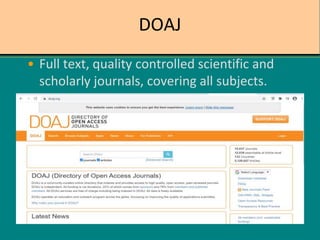
• Full text, quality controlled scientific and
scholarly journals, covering all subjects.
DOAB
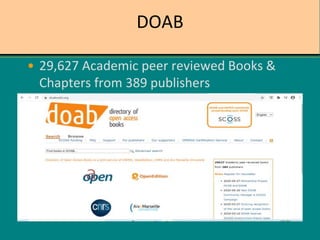
• 29,627 Academic peer reviewed Books &
Chapters from 389 publishers
Online Databases
• This is the most effective way to provide
access to electronic books/journals.
• Online databases are a collection of
electronic information sources (e-
journals/e-books) by publishers from
various fields and disciplines
• Students can utilize the growing range of
electronic resources
e-ShodhSindhu
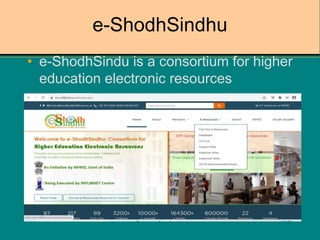
• e-ShodhSindu is a consortium for higher
education electronic resources
N-LIST
• An initiative of MHRD under NME-ICT now
funded by UGC, as component under
UGCINFONET Digital Library Consortium
have access for the e-resources (6000+ e-
journals and 31,35,000+ e-books).
e-PG Pathshala
• e-PG Pathshala is an initiative of the MHRD
under its National Mission on Education
through ICT (NME-ICT) being executed by
the UGC. The content and its quality being
the key component of education.
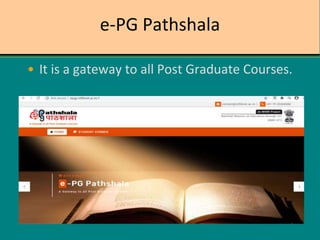
e-PG Pathshala
• It is a gateway to all Post Graduate Courses.
NDLI
• National Digital Library of India – Ministry
of Human Resource Development under its
National Mission on Education through ICT
has initiated the NDL pilot project to
develop a framework of virtual repository
of learning resources with single window
search facility. It is being developed by IIT
Kharagpur.
NDLI
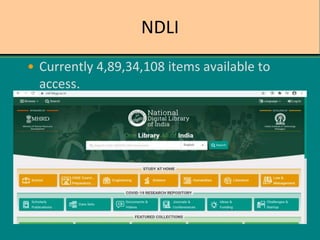
• Currently 4,89,34,108 items available to
access.
Swayam
• SWAYAM is a programme initiated by
Government of India and designed to
achieve the three cardinal principles of
Education Policy viz., access, equity and
quality.
Swayam
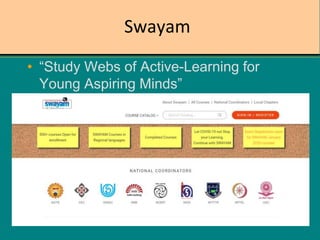
• “Study Webs of Active-Learning for
Young Aspiring Minds”
Project Gutenberg
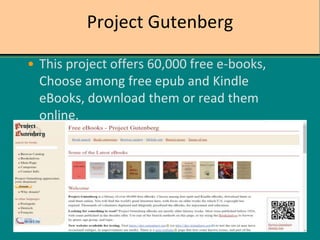
• This project offers 60,000 free e-books,
Choose among free epub and Kindle
eBooks, download them or read them
online.
Electronic Resources: strengths
• Huge range of information available
– >8 billion web pages
– >20,000 journals
• Timely, up-to-date information sources
• ‘Value added’ functionality (e.g. searching)
• Additional skills development – ICT skills
• Large volume of quality, free information
How can we access resources?
• Most academic e-resources are fee-based
– often very high costs (although variable)
– subscriptions to
individual/group/organisation/ nation/region
– pay-per-view models
• Growing movement of “open access”
• Authentication via username/password or
IP address
E-resources Advantages
 Available 7 x 24
 Remote access
 Desktop delivery of information
 Articles available upon publication
 Hypertext link to related resources
 Space saving
 Cost saving
 No handling of print
 No binding of journals
Less storage space required
 User satisfaction
 Seamless, one-stop access
 Individualised for the student
 Flexible for the teacher
 Universally accessible
 Easy to use
 Accessing information through electronic
Libraries
 Helpful in conducting research
 Data/ File storage through Cloud
Computing
 Lack of reliability and quality of information
 Quality control issues with online
information
 Search / browse functions
Use of E-Resources for Higher Education

Use of E-Resources for Higher Education

  • 1.
    Use of E-Resourcesfor Higher Education By Pruthvi P Badiger Junior Library Assistant IIT Dharwad
  • 2.
    Content • Introduction • Typesof E-Resources • E-Resources strengths • E-Resources advantages
  • 3.
    Introduction • E-Resource itmeans electronic resource. • Any source of information available in electronic format or accessible in electronic format is called E-Resource. • It may be in the form of PDF, image, video etc…
  • 4.
    • Electronic resourcesare regarded as the mines of information that are preserved through modern ICT devices. • The phrase “electronic resources”, has broadly been defined as information accessed by a computer.
  • 5.
    Types of E-Resources •Electronic Journals • Online Databases • Scholarly Databases • Information Gateways • Digital Collections (Images, Audio, Video) • CD-ROM Databases
  • 6.
    Continued.. • Virtual Libraries •E-Books • E-Thesis • E-Newspaper • File Transfer Protocol (FTP) • PDAs and Pocket PCs • Meta Resources
  • 7.
    Electronic Journals • Electronicjournals or “e-journals” are used for those journals and newsletters that are prepared and distributed electronically. • Full-text - whole journal available • Partial full-text - selected articles only • Table of contents or abstracts only
  • 8.
    DOAJ • Full text,quality controlled scientific and scholarly journals, covering all subjects.
  • 9.
    DOAB • 29,627 Academicpeer reviewed Books & Chapters from 389 publishers
  • 10.
    Online Databases • Thisis the most effective way to provide access to electronic books/journals. • Online databases are a collection of electronic information sources (e- journals/e-books) by publishers from various fields and disciplines • Students can utilize the growing range of electronic resources
  • 11.
    e-ShodhSindhu • e-ShodhSindu isa consortium for higher education electronic resources
  • 12.
    N-LIST • An initiativeof MHRD under NME-ICT now funded by UGC, as component under UGCINFONET Digital Library Consortium have access for the e-resources (6000+ e- journals and 31,35,000+ e-books).
  • 13.
    e-PG Pathshala • e-PGPathshala is an initiative of the MHRD under its National Mission on Education through ICT (NME-ICT) being executed by the UGC. The content and its quality being the key component of education.
  • 14.
    e-PG Pathshala • Itis a gateway to all Post Graduate Courses.
  • 15.
    NDLI • National DigitalLibrary of India – Ministry of Human Resource Development under its National Mission on Education through ICT has initiated the NDL pilot project to develop a framework of virtual repository of learning resources with single window search facility. It is being developed by IIT Kharagpur.
  • 16.
    NDLI • Currently 4,89,34,108items available to access.
  • 17.
    Swayam • SWAYAM isa programme initiated by Government of India and designed to achieve the three cardinal principles of Education Policy viz., access, equity and quality.
  • 18.
    Swayam • “Study Websof Active-Learning for Young Aspiring Minds”
  • 19.
    Project Gutenberg • Thisproject offers 60,000 free e-books, Choose among free epub and Kindle eBooks, download them or read them online.
  • 20.
    Electronic Resources: strengths •Huge range of information available – >8 billion web pages – >20,000 journals • Timely, up-to-date information sources • ‘Value added’ functionality (e.g. searching) • Additional skills development – ICT skills • Large volume of quality, free information
  • 21.
    How can weaccess resources? • Most academic e-resources are fee-based – often very high costs (although variable) – subscriptions to individual/group/organisation/ nation/region – pay-per-view models • Growing movement of “open access” • Authentication via username/password or IP address
  • 22.
    E-resources Advantages  Available7 x 24  Remote access  Desktop delivery of information  Articles available upon publication  Hypertext link to related resources  Space saving  Cost saving
  • 23.
     No handlingof print  No binding of journals Less storage space required  User satisfaction  Seamless, one-stop access  Individualised for the student  Flexible for the teacher  Universally accessible  Easy to use
  • 24.
     Accessing informationthrough electronic Libraries  Helpful in conducting research  Data/ File storage through Cloud Computing  Lack of reliability and quality of information  Quality control issues with online information  Search / browse functions